规则引擎包含场景联动和规则脚本,由场景表/脚本表/场景脚本表和场景设备表组成。场景表存储场景基本信息和规则链,脚本表存储脚本信息和脚本数据,场景脚本记录触发器和执行动作和脚本表对应,场景设备表记录场景关联的所有设备和产品。
```mermaid
%%{init: {"flowchart": {"htmlLabels": false}}}%%
flowchart LR
Device["设备"] --> Upload["上报数据"]
Upload --> Trigger["触发器
产品 / 设备 / 定时"]
Trigger --> RuleChain["场景联动
规则链"]
Upload --> DataFlow["数据流脚本"]
RuleChain --> Action["执行动作
下发 / 通知 / HTTP / MQTT / 告警"]
Action --> Device
Action --> User["用户"]
DataFlow --> Event["脚本事件
上报 / 下发 / 上下线 / 订阅"]
classDef source fill:#eef4ff,stroke:#536dfe,color:#1f2937;
classDef rule fill:#f4efff,stroke:#7c3aed,color:#1f2937;
classDef action fill:#ecfeff,stroke:#0891b2,color:#1f2937;
classDef event fill:#f8fafc,stroke:#94a3b8,color:#1f2937;
class Device,Upload,User source;
class Trigger,RuleChain rule;
class Action action;
class DataFlow,Event event;
```
## 场景联动
### 1. 场景规则链:
```js
规则数据示例:
IF(AND(T1,T2,T3),THEN(A1,A2,A3))
IF(OR(T1,T2,T3),WHEN(A1,A2,A3))
说明:
AND OR 中必须包含两个以上组件
NOT 只能包含一个触发器
THEN 串行,顺序执行
WHEN 并行,同时执行
```
### 2. 场景脚本格式:
```js
String json ={
"cond": 3,
"delay": 3,
"deviceNums": "D1ELV3A5TOJS",
"id": "temperature",
"operator": "between",
"productId": 41,
"purpose": 2,
"sceneId": 63,
"scriptId": "T1754931118680969216",
"silent": 1,
"source": 1,
"type": 1,
"value": "10-50"
};
sceneContext.process(json);
```
**关键字段说明:**
1. source: 1=设备触发 3=产品触发 4=告警
2. type: 1=属性, 2=功能,3=事件,4=设备升级,5=设备上线,6=设备下线
3. delay: 延时,例如等于1表示延时1秒执行,不存储的定时任务
4. silent: 静默时间,例如等于1表示静默一分钟,设备一分钟内只会上报第一次的执行动作(包含告警),使用redis存储。
5. purpose:脚本用途,1=数据流(上报/下发),2=触发器,3=执行动作
6. cond:触发条件,1=任意条件,2=所有条件,3=不满足
7. operator:操作符,大于/等于/小于/包含/不包含/在...之间等
8. scriptId:脚本ID,系统生成D开头为数据流,T开头为触发器,A开头为执行动作
### 3. 场景脚本对象
分为触发器对象和执行动作对象,执行动作必填字段少于触发器。执行动作中的物模型不包含只读和监测数据。
```js
触发器所需字段:
productId: 0,
productName: '',
deviceCount: 0,
deviceNums: [],
source: 1, // 触发源,1=设备,2=定时,3=产品
type: 1, // 类型,1=属性, 2=功能,3=事件,4=设备升级,5=设备上线,6=设备下线
parentId: '', // 物模父级id
parentName: '',
parentModel: null, // 父级物模型,除对象类型和对象数组类型外的普通类型,父级物模型与物模型相同
model: null, // 物模型
operator: '=',
id: '',
name: '',
value: '', // between操作符时,值=值A-值B
valueA: '',
valueB: '',
arrayIndex: '', // 索引,数组才有
arrayIndexName: '',
isAdvance: 0, // 自定义CRON
cronExpression: '', // cron表达式
timerTimeValue: '', // 时间
timerWeekValue: [1, 2, 3, 4, 5, 6, 7], // 星期
执行动作所需字段:
productId: 0,
productName: '',
deviceCount: 0,
deviceNums: [],
source: 4, // 1=设备,3=产品,4=告警
type: 2, // 类型
parentId: '', // 物模父级id
parentName: '',
parentModel: null, // 父级物模型,除对象类型和对象数组类型外的普通类型,父级物模型与物模型相同
model: null, // 物模型
id: '',
name: '',
value: '',
arrayIndex: '', // 索引,数组才有
arrayIndexName: '',
```
```mermaid
%%{init: {"flowchart": {"htmlLabels": false}}}%%
flowchart TB
Start["场景触发"] --> Match["匹配范围
设备 / 产品 / 定时 / 上下线"]
Match --> Condition{"条件满足?"}
Condition -->|否| Stop["静默结束"]
Condition -->|是| Record["记录触发物模型集合"]
Record --> ActionType["执行动作
设备 / 产品 / 告警"]
ActionType --> Delay["按延迟策略执行"]
Delay --> Result["下发指令或消息通知"]
classDef start fill:#eef4ff,stroke:#536dfe,color:#1f2937;
classDef rule fill:#f4efff,stroke:#7c3aed,color:#1f2937;
classDef action fill:#ecfeff,stroke:#0891b2,color:#1f2937;
class Start,Match start;
class Condition,Record rule;
class ActionType,Delay,Result,Stop action;
```
## 规则脚本
### 1. 脚本语言
平台脚本语言目前使用Groovy,语法跟Java类似,差异如下:
| Groovy | Java |
|:------------------|:----------------|
|编译为JVM字节码,兼容Java平台 |在JDK上开发并在JVM上运行|
|用作编程和脚本语言 |用作编程和面向对象的语言 |
|默认访问修饰符 public |默认访问修饰符包|
|为类成员自动生成 getter 和 setter |需要为字段提供 getter 和 setter 方法,特别是如果遵循 Java Beans命名约定|
|分号是可选的 |分号是强制性的|
|默认导入常用包 |默认只导入`Java.lang.* `包|
|一切都是对象并且仅使用对象,因此没有自动装箱或拆箱的概念 |具有原始数据类型和包装类来隐式或显式执行装箱和拆箱|
|不需要任何 main 方法或方法的入口点来运行类或任何程序 |需要类内部的 main 方法来运行程序|
### 2. 消息转发
文档将从下述步骤简单介绍消息转发过程:
1. 消息转发上下文执行方法:脚本执行后端代码定义的方法类
2. 执行规则引擎方法类: 调用脚本执行类
3. 前端展示配置,脚本定义
4. 平台使用脚本的示例,用法
#### 1. 消息转发上下文执行方法(可选)
**@ScriptBean("msgContextService")** 定义该类可以在上下文使用,使用方法是 `msgContextService.porcess()`
```java
/*
* 规则引擎上下文执行方法
* @author gsb
*/
@Component
@Slf4j
@ScriptBean("msgContextService")
public class MsgContextService {
private final RedisCache redisCache;
public MsgContextService(RedisCache redisCache){
this.redisCache = redisCache;
}
private void process(String serialNumber){
//执行的业务逻辑
}
}
```
#### 2. 执行规则引擎方法类
先根据设备编号获取到 `产品ID、协议编`号等信息,并缓存到redis,然后根据产品ID,等信息查询 iot\_scripe表中是否存在要执行的脚本,如果有,则执行脚本。类定义如下:
```java
/**
* 执行规则引擎
* @author gsb
*/
@Component
@Slf4j
public class RuleProcess {
@Resource
private FlowExecutor flowExecutor;
@Resource
private IScriptService scriptService;
@Resource
private RedisCache redisCache;
@Resource
private IProductService productService;
}
```
执行引擎脚本方法:
```java
/**
* 规则引擎脚本处理
* @param topic
* @param payload
* @param event 1=设备上报 2=平台下发 3=设备上线 4=设备下线 (其他可以增加设备完成主题订阅之类)
* @return
*/
public MsgContext processRuleScript(String serialNumber, int event, String topic, String payload) {
ProductCode productCode = getDeviceDetail(serialNumber);
if (Objects.isNull(productCode)){
return null;
}
// 查询数据流脚本组件
ScriptCondition scriptCondition = new ScriptCondition();
scriptCondition.setProductId(productCode.getProductId());
scriptCondition.setScriptEvent(event); // 事件 1=设备上报 2=平台下发 3=设备上线 4=设备下线
scriptCondition.setScriptPurpose(1); // 脚本用途:数据流=1
String[] scriptIds = scriptService.selectRuleScriptIdArray(scriptCondition);
MsgContext context = new MsgContext(topic, payload, serialNumber, productCode.getProductId(), productCode.getProtocolCode());
//如果查询不到脚本,则认为是不用处理
if (Objects.isNull(scriptIds) || scriptIds.length == 0) {
return null;
}
// 动态构造Chain和EL表达式
String el = String.join(",", scriptIds); // THEN(a,b,c,d)
LiteFlowChainELBuilder.createChain().setChainName("dataChain").setEL("THEN(" + el + ")").build();
// 执行规则脚本
LiteflowResponse response = flowExecutor.execute2Resp("dataChain", null, context);
if (!response.isSuccess()) {
log.error("规则脚本执行发生错误:" + response.getMessage());
}
return context;
}
```
获取产品ID,协议编号等信息方法
```java
/**
* 查询产品id,协议编号,缓存到redis,后续查询协议的地方替换数据库查询
*
* @param serialNumber
*/
public ProductCode getDeviceDetail(String serialNumber) {
ProductCode productCode;
String cacheKey = RedisKeyBuilder.buildDeviceMsgCacheKey(serialNumber);
if (redisCache.containsKey(cacheKey)) {
Object cacheObject = redisCache.getCacheObject(cacheKey);
return JSON.parseObject(cacheObject.toString(), ProductCode.class);
}
productCode = productService.getProtocolBySerialNumber(serialNumber);
String jsonString = JSON.toJSONString(productCode);
redisCache.setCacheObject(cacheKey, jsonString);
return productCode;
}
```
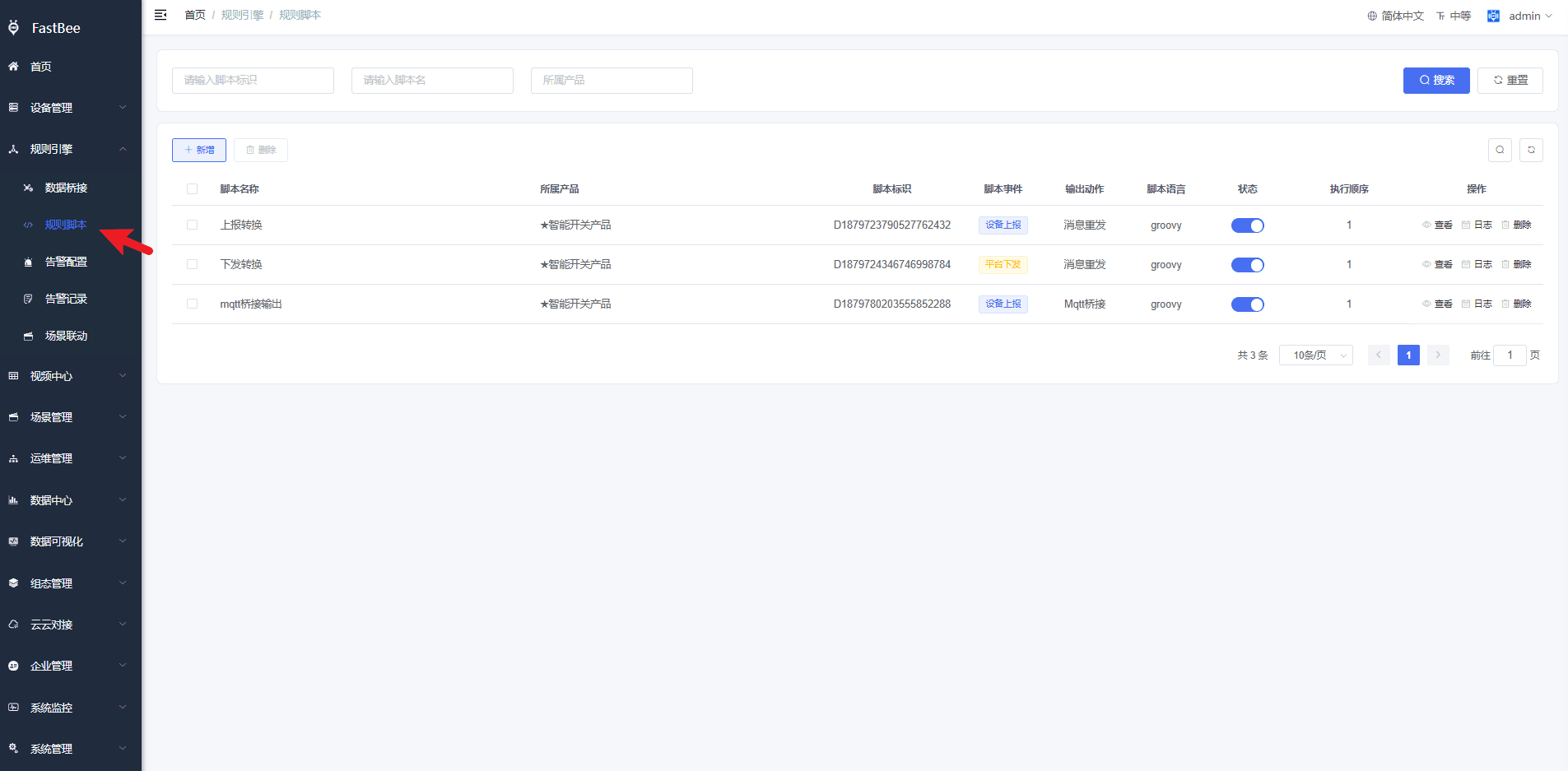
#### **3. 前端配置页面如下**:
 #### 5. 平台使用脚本的示例,用法
**设备上报**:设备上报是指设备端上报数据到云端,设备端定义的数据或者topic都可能跟系统有差别,通过消息转发可以调整主题名称和消息内容,适配到设备的主题和内容。我们看看当前平台调用设备上报执行脚本的地方:
* 使用emqx作为MQTT服务器时, 在MQTT客户端桥接消息的回调方法类(MqttService)中调用
```java
/**
* 消息回调方法
* @param topic 主题
* @param mqttMessage 消息体
*/
public void subscribeCallback(String topic, MqttMessage mqttMessage) {
String message = new String(mqttMessage.getPayload());
//..此处省略代码../
//这里默认设备编号长度超过9位
String[] split = topic.split("/");
String clientId = Arrays.stream(split).filter(imei -> imei.length() > 9).findFirst().get();
// 规则引擎脚本处理,完成后返回结果
MsgContext context = ruleProcess.processRuleScript(clientId,1, topic, message);
if (!Objects.isNull(context)){
topic = context.getTopic();
message = context.getPayload();
}
```
* 使用netty-MQTT作为MQTT服务器时,在类MqttPublish中sendToMQ调用
```java
/**
* 消息推送
* @param message 推送消息
*/
@SneakyThrows
public void sendToMQ(MqttPublishMessage message,String clientId) {
/*获取topic*/
String topicName = message.variableHeader().topicName();
byte[] source = ByteBufUtil.getBytes(message.content());
//..此处省略代码../
// 规则引擎脚本处理,完成后返回结果
MsgContext context = ruleProcess.processRuleScript(clientId,1, topicName, new String(source));
if (!Objects.isNull(context)){
reportBo.setTopicName(context.getTopic());
reportBo.setData(context.getPayload().getBytes(StandardCharsets.UTF_8));
}
//..此处省略代码../
}
```