## What is a product?
FastBee provides a progressive device access model. If you only need simple device data reporting and message delivery, a device can work without a full product definition.
When you want to build an IoT product or solution and use the advanced platform capabilities, create a product first. A product defines the common model and access rules for a group of devices.
A product can:
* Define the device capabilities.
* Validate whether messages are legal.
* Attach enhanced capabilities to all devices under the product.
Common product configuration includes:
* Product category
* Device type
* Communication protocol
* Transport protocol
* Network access mode
* MQTT authentication method
* Product thing model
* Modbus configuration
* Firmware management
## Create a product
When creating a product, pay attention to the options below.
### Product category
A product category is the business category of a product. For example, "smart switch" is a category, and a specific vendor model of smart switch is a product.
### Device type
The device type describes how a device connects to the cloud platform.
| Type | Description |
| --- | --- |
| Direct device | The device has a network module, such as Wi-Fi or 4G, and connects directly to the platform through the Internet. |
| Gateway sub-device | The device cannot directly connect to the platform and must access it through a gateway. |
| Gateway | An independent gateway device that bridges sub-devices and the cloud platform, parses protocols, and forwards messages. |
| Monitoring device | A video monitoring device, such as Hikvision cameras, EZVIZ devices, or devices using GB/T 28181. |
### Communication protocol
The communication protocol refers to the message protocol used between hardware and the platform. The platform focuses on the protocol that actually interacts with the cloud.
Examples:
* A 4G module, Wi-Fi module, or DTU connects sub-devices through RS485.
* If the DTU converts Modbus to JSON, the platform-facing protocol is the JSON protocol defined by the DTU.
* If the DTU or module is in transparent transmission mode, the platform-facing protocol is Modbus.
Common protocol types:
1. General protocol
2. Private protocol
3. DTU-converted JSON protocol
### Transport protocol
The transport protocol is the network protocol used for communication. FastBee currently supports:
* MQTT
* TCP
* CoAP
* GB/T 28181
* HTTP
## Device communication mode
The device communication mode usually refers to the physical access mode, such as Wi-Fi, 2G/3G/4G/5G, BLE, Zigbee, LoRa, RS485, or Ethernet.
In some scenarios, this option does not affect basic operation. For devices that require provisioning or a specific gateway, choose the correct communication mode so the platform can apply the proper access process.
## MQTT authentication method
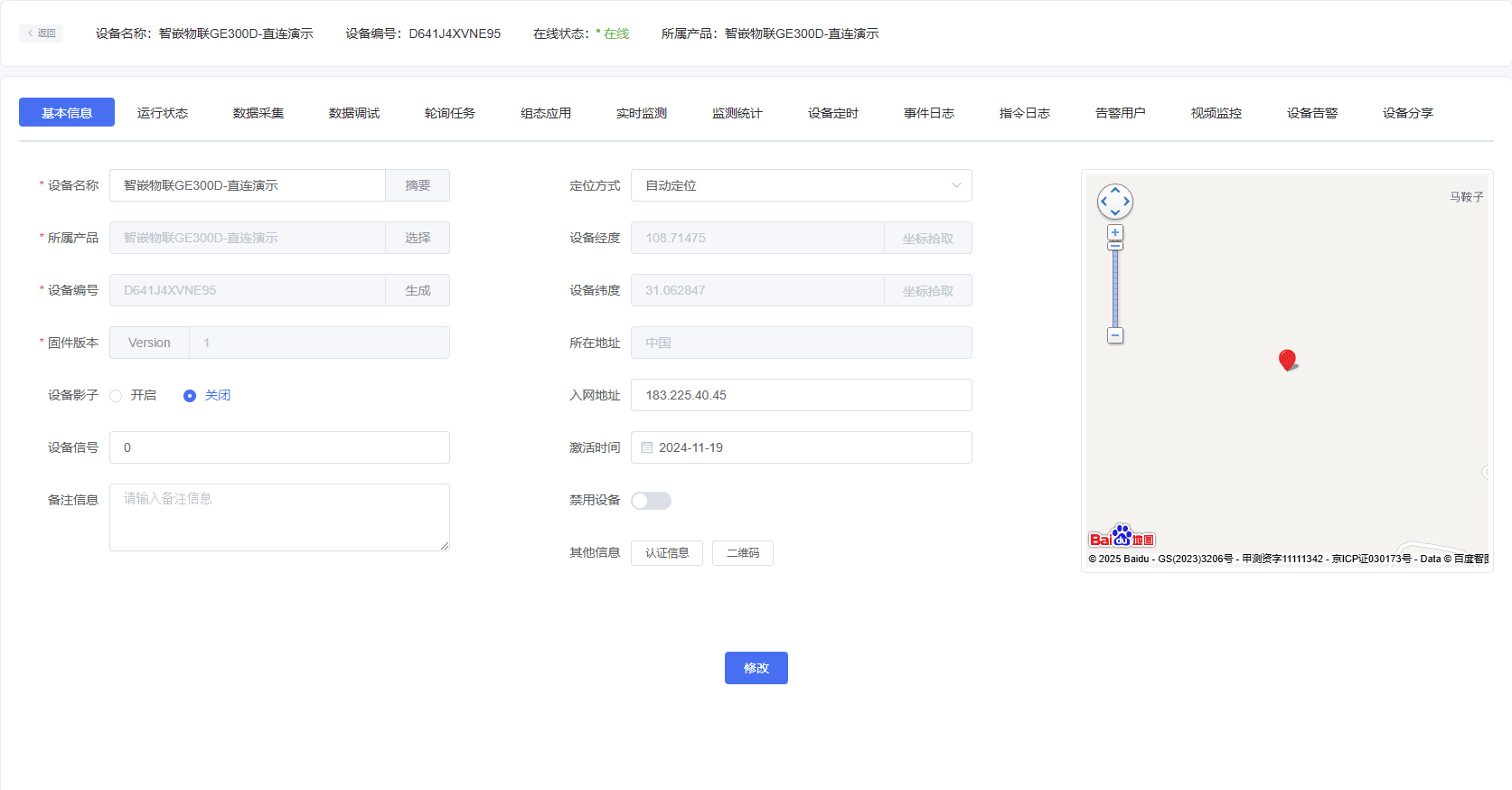
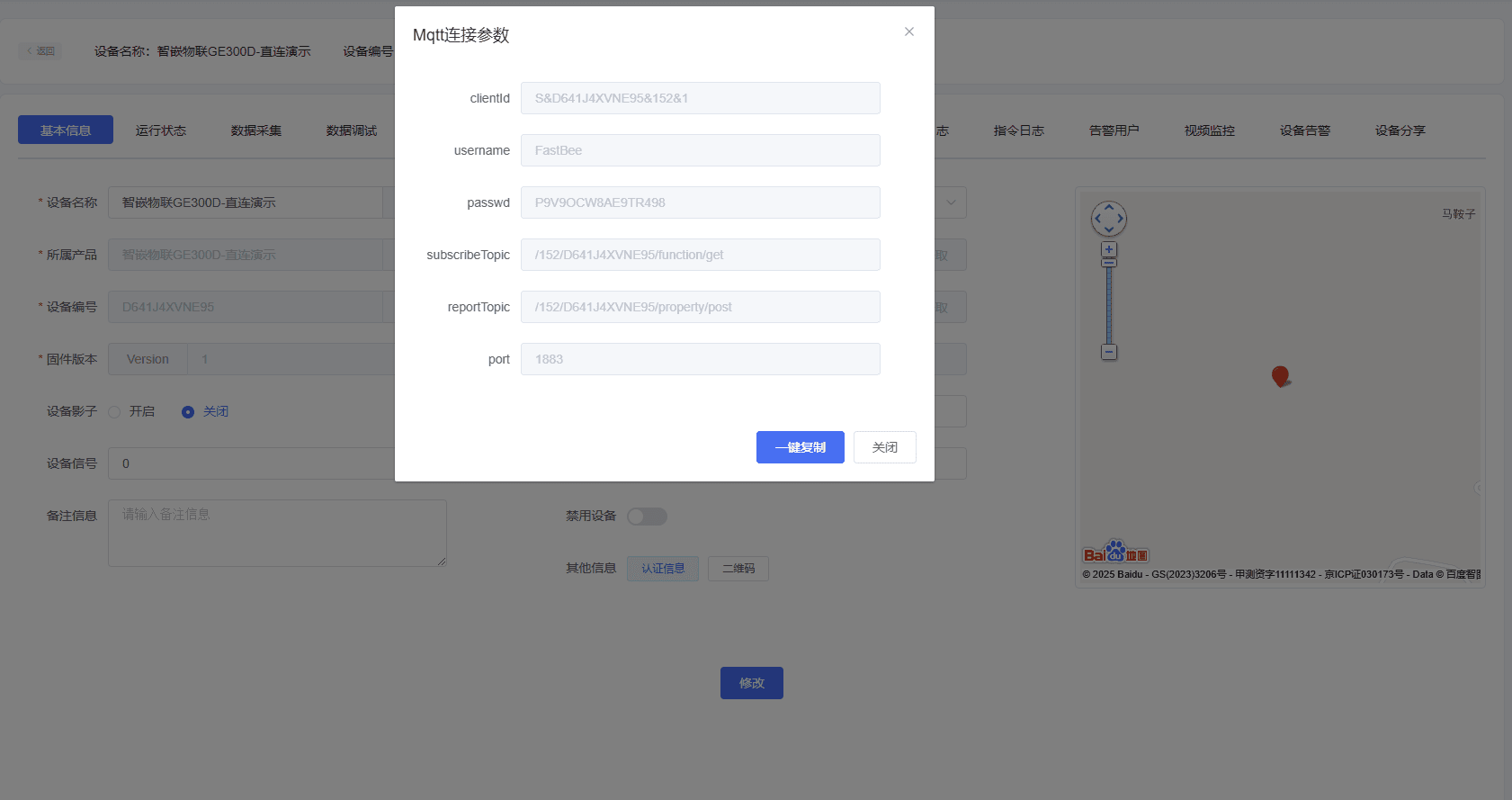
FastBee supports MQTT-based client authentication. In most cases, use **simple authentication**.
You can view the client authentication information in the lower-right area of the device details page.
 ## Product thing model
### Definition
A thing model is the data model that the IoT platform defines for a product. It describes the product capabilities in a structured way.
### Capabilities
A thing model is the digital representation of a physical entity in the cloud, such as a sensor, gateway, building, or factory. It defines the product from three dimensions:
* **Properties**: what the entity is and what state it has.
* **Services**: what the entity can do.
* **Events**: what information the entity can report.
After properties, services, and events are defined, the product capability definition is complete.
### Properties
Properties describe runtime information and status, such as current temperature, smart-light switch status, or fan speed level.
Property access types:
* **Read/write**: the platform can read and set the property value.
* **Read-only**: the platform can only read the property value.
### Services
Services are commands or methods that external systems can call. A service can contain input and output parameters:
* Input parameters are the parameters used when the service is executed.
* Output parameters are the result returned after execution.
Compared with properties, services can express more complex business actions, such as executing a specific task. Services can be called asynchronously or synchronously.
### Events
Events are actively reported by the device during runtime. They usually contain information that needs to be perceived or handled by the platform, such as alarms, faults, or task completion messages.
An event can contain multiple output parameters and can be subscribed to or pushed to downstream systems.
## Modbus configuration
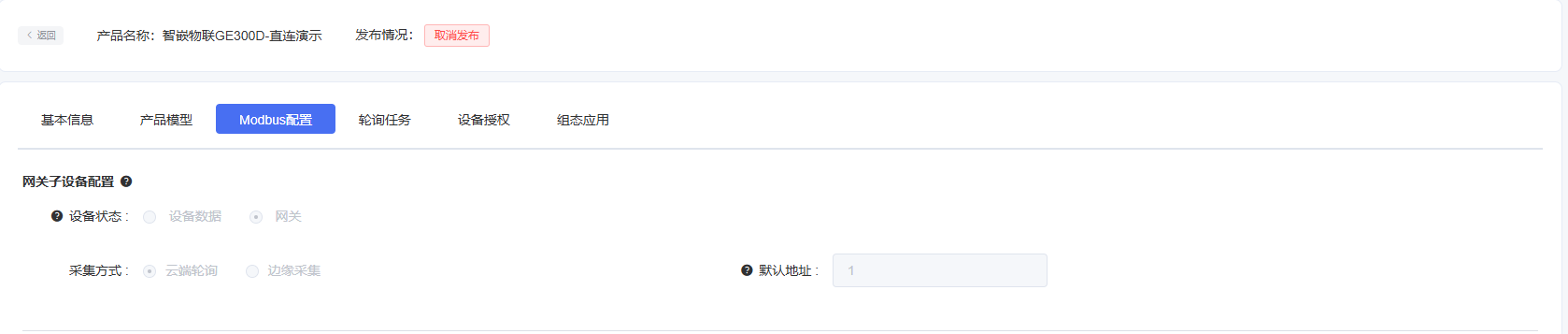
When the product access protocol is **Modbus RTU transparent transmission**, the product detail page displays **Modbus configuration**. This configuration binds device properties to Modbus registers so the platform can automatically convert between property values and Modbus messages.
Examples:
* When the platform sends a read/write DI/DO property command, and that property is bound to a device IO register, the actual message sent to the device is a Modbus register write message.
* When the platform sends a Modbus query through a task, the device returns a Modbus response. The platform parses the response based on the configured Modbus registers and generates the corresponding property value.
### 1. Default property configuration
Default configuration includes:
1. Device status source: device data or gateway.
2. Collection mode: cloud polling or edge collection.
3. Default sub-device address.
 ### 2. IO registers
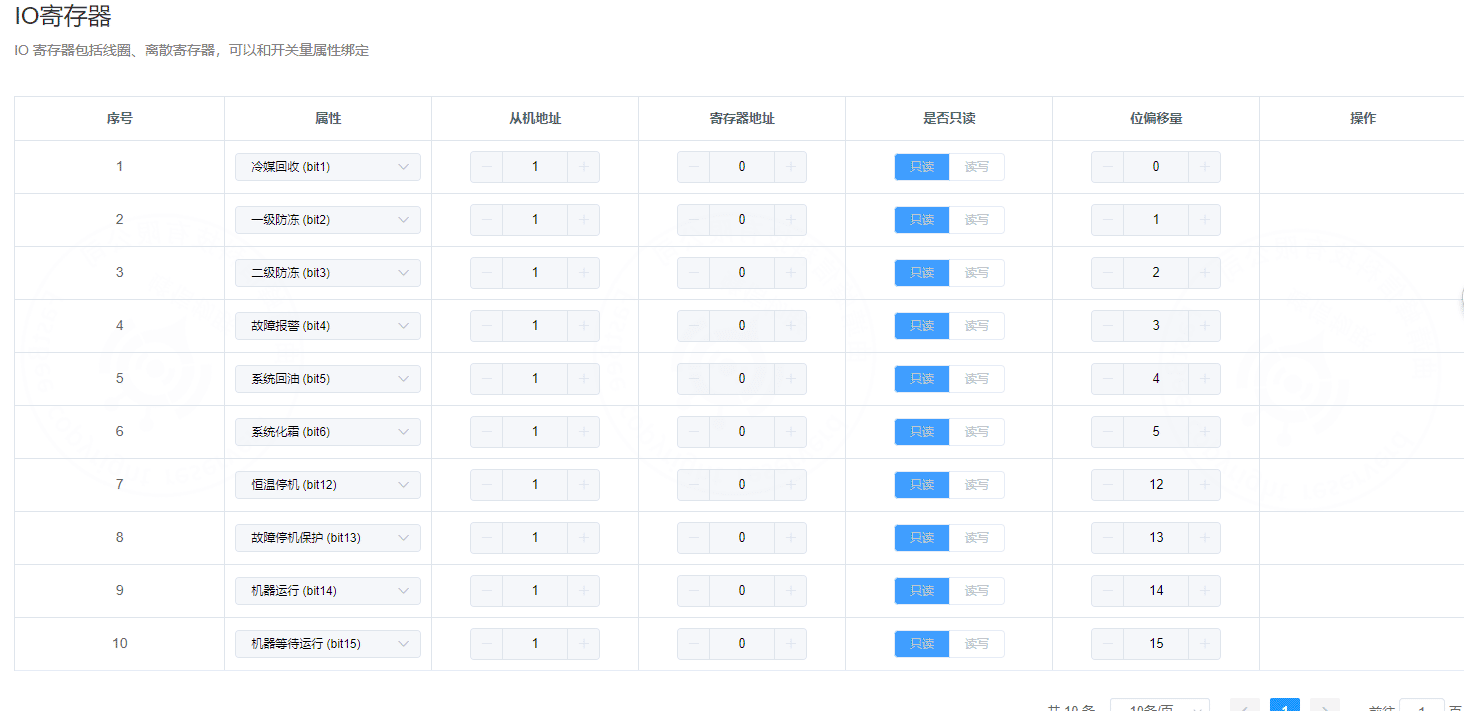
IO registers include coils and discrete input registers. They can be bound to switch-type properties.
| Field | Description |
| --- | --- |
| Property | The product thing model property. |
| Slave address | The Modbus slave address of the sub-device. |
| Register address | The Modbus register address. |
| Read-only | Read-only corresponds to function code `02`; read/write corresponds to function code `01`. |
| Bit offset | Used when one data register stores 16 bits and must be parsed into 16 IO values. For example, register `01` can map to 16 IO points. |
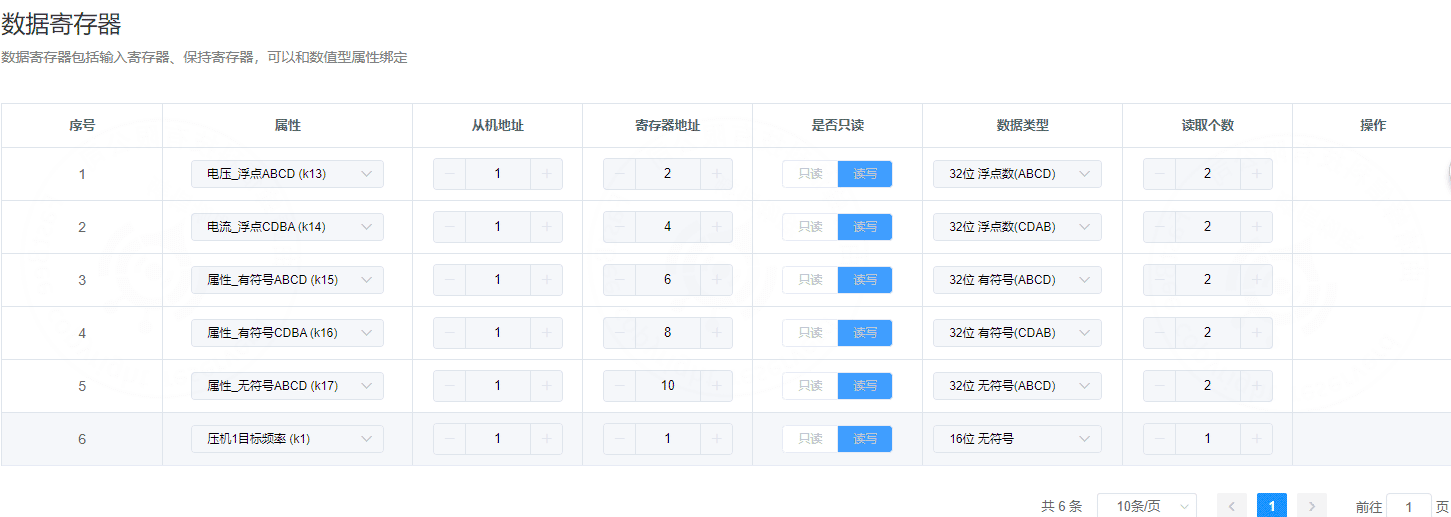
 ### 3. Data registers
Data registers include input registers and holding registers. They can be bound to numeric properties.
| Field | Description |
| --- | --- |
| Property | The product thing model property. |
| Slave address | The Modbus slave address of the sub-device. |
| Register address | The Modbus register address. |
| Read-only | Read-only corresponds to function code `04`; read/write corresponds to function code `03`. |
| Data type | Select according to the relationship between register count, byte count, and byte order. |
| Read count | The number of registers to read for the model value. For example, a 32-bit floating-point value requires two registers. |
 ### Numeric register data types
FastBee supports the following data types when generating and parsing Modbus numeric register messages:
| Data type | Register count | Bytes | Bits | Supported byte order |
| --- | ---: | ---: | ---: | --- |
| 16-bit integer | 1 | 2 | 16 | AB / BA |
| 16-bit unsigned integer | 1 | 2 | 16 | AB / BA |
| 32-bit integer | 2 | 4 | 32 | ABCD / CDAB |
| 32-bit unsigned integer | 2 | 4 | 32 | ABCD / CDAB |
| 32-bit float | 2 | 4 | 32 | ABCD / CDAB |
### Register read/write types
Choose the correct read/write type according to the register category.
For **IO registers**:
| Read/write type | Register type | Read function code | Write function code | Usage |
| --- | --- | --- | --- | --- |
| Read-only | Discrete input register | 02 | Not supported | Read switch input status, such as travel switches and buttons. |
| Read/write | Coil status register | 01 | 05 | Read relay status and control relay on/off state. |
For **data registers**:
| Read/write type | Register type | Read function code | Write function code | Usage |
| --- | --- | --- | --- | --- |
| Read-only | Input register | 04 | Not supported | Read sensor values, such as temperature, humidity, air pressure, and light intensity. |
| Read/write | Holding register | 03 | 06 | Write or read configuration values, such as temperature setpoint and local alarm threshold. |
## Firmware management
Firmware management is used for OTA upgrade packages. More detailed instructions will be added in a later version.