## FMQ Service Deployment
### Copy Deployment Files
Copy the `fmq` folder to `/opt`, then grant execution permission:
```sh
chmod u+x permission.sh
./permission.sh
```
### Update Spring Boot Configuration
Edit `opt/fmq/application.yml`. Use internal IP addresses for the local node and cluster node list:
```yaml
localAddress: 1x.x.x.x
static-ip-addresses: 1x.x.x.x, 1x.x.x.xx
```
Update the Kafka `bootstrap-servers` setting and enable the message bridge when Kafka forwarding is required:
```yml
kafka:
broker-enabled: true
bootstrap-servers: 127.0.0.1:9092
producer:
acks: -1
retries: 3
batch-size: 16384
buffer-memory: 33554432
key-serializer: org.apache.kafka.common.serialization.StringSerializer
value-serializer: org.apache.kafka.common.serialization.StringSerializer
partitioner:
class: cn.fastbee.iot.store.kafaka.MqttPartitioner
message-bridge:
bridge-topics:
- "property_post"
enable: true
```
Update the WebHook authentication URL:
```yaml
webhook-url: http://127.0.0.1:18083/webhook
```
### Package The Project
In the `fmq-application` `pom` file, keep resource exclusions for runtime configuration:
```xml
src/main/resources
application.yml
application-dev.yml
```
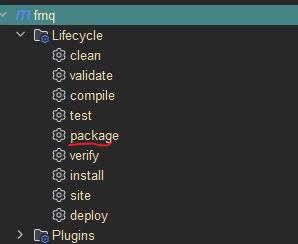
Run `package` in IDEA, then copy `fmq-application.jar` to `/opt/fmq`.
 ### Create A Systemd Service
Register the service:
```sh
./fmq-system-register.sh
```
Start, check, and stop the service:
```sh
systemctl start fmq
systemctl status fmq
systemctl stop fmq
```
### Direct Run Mode
```sh
./fmq-start.sh start
./fmq-start.sh stop
```
### Deploy Other Nodes
Before deploying each additional node, update its local IP and the cluster IP list in `application.yml`:
```yaml
localAddress: 1x.x.x.x
static-ip-addresses: 1x.x.x.x, 1x.x.x.xx
```
## Cluster Verification
After deployment, open `http://ip:18083`, log in to the FMQ visual console, and check **Home -> Nodes**.
 If multiple nodes are displayed, the cluster discovery configuration is effective.
## FAQ
### A node starts but other nodes are not visible in the console?
Check that `localAddress` in each node's `application.yml` is the node's own internal IP, that `static-ip-addresses` lists all cluster node IPs, and that internal ports between nodes are reachable without firewall blocking.
### The startup script reports permission errors?
Run `chmod u+x permission.sh` and `./permission.sh` in the `fmq` directory first, then start with `fmq-start.sh` or the systemd service.
### Messages are not forwarded after enabling the Kafka bridge?
Confirm the `bootstrap-servers` address is reachable, `message-bridge.enable` is `true`, and the topics in `bridge-topics` match the actual reporting topics (such as `property_post`).