


How to Implement Smart Building Device Monitoring: From Protocol Access to a Closed Alert Loop
Industry Case · Smart Building · Device Operations | FastBee Tech Team | Originally published: October 22, 2026 | Content reviewed: October 30, 2026
Smart building device monitoring brings devices from different vendors and different protocols into one operations workflow, models device identity and operating data, and then completes abnormal alerts, human handling, remote control, and result tracking. To judge whether a project is usable, you cannot look only at whether the devices are online; you also have to verify whether the data is correct, whether alerts can be delivered, whether devices execute commands, and whether they can recover after a failure.
This article uses the pump room, common-area environment, and power distribution monitoring of an office building as reference scenarios to explain how to plan a device monitoring PoC (proof of concept). The scenarios and illustrations are used to explain the method; they do not represent a FastBee customer project or field measurement results.
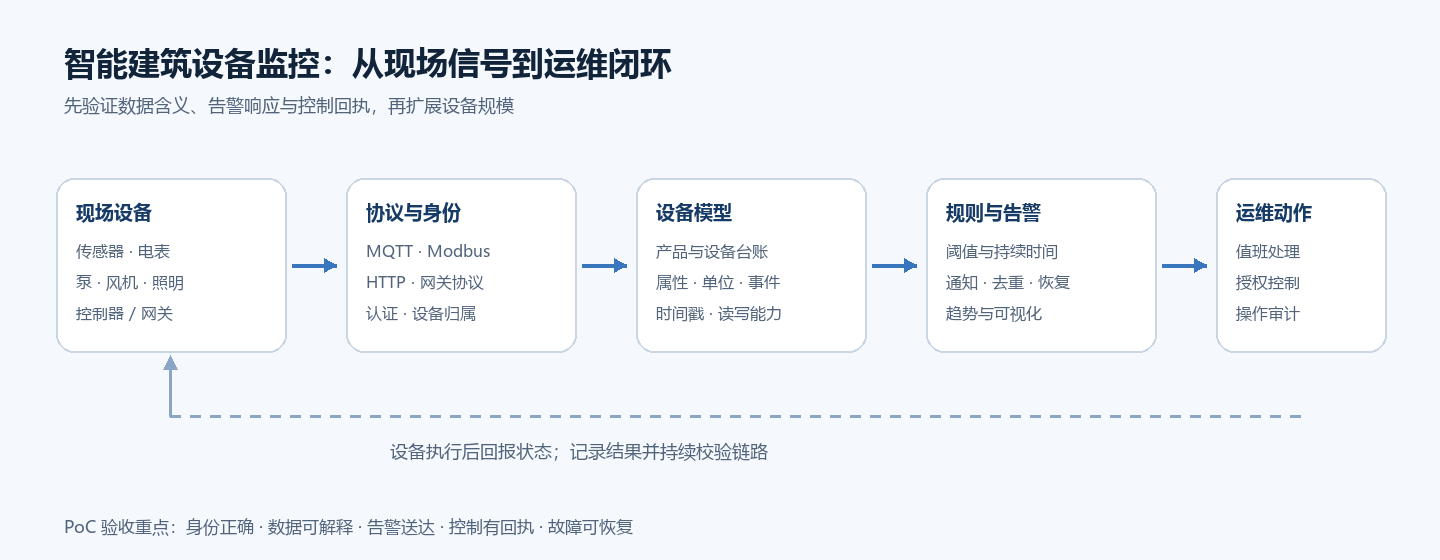
Figure: from field signals to operations handling, and then back into a closed loop through device receipts. This diagram is a process illustration, not a customer site deployment diagram.
First, Separate "Device Online" from "Project Usable"
A device showing as online usually only proves that the connection or heartbeat link is working. A usable device monitoring project also needs to verify device identity, data semantics, alert notifications, control execution, and failure recovery.
- Can device identity be mapped to the correct product, building, and location?
- Do reported values land in the correct properties, and are the units and timestamps trustworthy?
- After a limit is exceeded, can a rule match, generate an alert, and notify the responsible person?
- Does remote operation go through permission checks, and does the device execute it and report its actual state?
- After a network outage or service restart, can connections, data, and operations records recover as expected?
So a PoC should not take "the console opens" as its ending condition; it should complete one full pass through reporting, exception handling, control confirmation, and recovery.
A Reference Architecture for Building Monitoring
Taking an office building pilot as an example, you can start with three scenarios: the pump room, power, and the common-area environment:
| Device/Signal | Platform Model | Operations Action to Verify |
|---|---|---|
| Pump room water level, pump running state | Water level property, running state, fault event | Generate an alert and notify the person on duty after the water level exceeds limits; record the state after recovery. |
| Common-area temperature and humidity | Temperature, humidity, sampling time | View trends by floor; trigger a reminder when limits are exceeded continuously. |
| Electricity meter or distribution collector | Properties such as voltage, current, and power | View changes by area and provide data for energy analysis. |
| Controllable fan or lighting circuit | Writable property or device function | Authorized staff issue control; the device reports its actual state after execution. |
The logical chain can first be abstracted as:
Sensor / controller
      ↓ MQTT, Modbus, HTTP, or gateway protocol
Access service and device identity authentication
      ↓
Product / device / thing model
      ↓
Rules, alerts, notifications, visualization
      ↓
On-duty staff handle it, or the platform issues control
      ↓
Device executes and returns the resultProtocol adaptation determines whether data can be ingested, the thing model determines whether the data has a stable meaning, and permissions and the alert workflow determine whether the data can become traceable operations actions. The FastBee commercial edition's official device access catalog lists access documentation for MQTT, Modbus RTU/TCP, HTTP, TCP, CoAP, JT808, video, and gateway sub-devices. The catalog shows that the official documentation provides the corresponding access paths; it does not mean that any device model, firmware, or payload has been verified compatible—specific combinations need joint debugging on the target version.
Start with One Device Type for End-to-End Validation
Do not start by connecting an entire building. Pick one representative device type first and validate it in this order:
- Create the product and the thing model, and define property identifiers, units, read/write capability, and alert thresholds.
- Connect it with a real device or gateway, and check device identity, protocol authentication, and data ownership.
- Compare the raw payload against the platform property values to verify parsing, unit conversion, timestamps, and duplicate message handling.
- Simulate one threshold violation, and check whether the rule triggers, whether an alert is generated, and whether the notification is delivered.
- If the device supports control, use a low-risk device to verify command delivery, physical execution, state reporting, and the operations log.
- Disconnect the device from the network and then restore it, and check reconnection, data recovery, and offline alert behavior.
Alerts Must Be Accepted Against the Workflow
An alert is not just a threshold. The threshold condition, duration, responsible person, notification channel, silence or deduplication policy, recovery condition, and operation records all need to be accepted together. Taking a high water level in a pump room as an example, you can test:
- Report a water level value above the threshold.
- Confirm that the rule is bound to the correct device and property.
- Check whether an alert record is generated.
- Verify that the expected person on duty receives the notification.
- Report the recovery value, and check the recovery state and record.
- Send the abnormal message repeatedly, and observe whether duplicate notifications are produced.
The FastBee commercial edition's alert configuration documentation can serve as an entry point for configuration and acceptance; the workflows and notification channels actually available should be verified against the target version, license, and deployment configuration.
Remote Control Must Verify the Device Receipt
That the platform button has been clicked or the message has been delivered does not prove that the field device has acted. A complete control test must at least confirm: the user has operation permission, the platform sends to the correct device, the firmware receives and parses the command, the physical output changes, the device reports its actual state, and the operation can be traced in the log. Start with low-risk devices; for systems that involve life safety or are governed by building control regulations, follow the site's existing safety and authorization procedures.
Why Do Hardware Vendors Also Build Their Own Platforms?
When sensor, controller, or gateway vendors build their own platforms, it is usually to extend hardware delivery into device lifecycle management, such as device inventory, parameter configuration, firmware updates, customer organizations, alerts, and after-sales workflows. This does not mean that all infrastructure must be developed from scratch.
Vendors can keep their own device protocols and customer applications while evaluating whether a general IoT platform can take over the product model, device management, permissions, rules, or visualization. Before integrating, clarify the following responsibility boundaries:
- Who authenticates device identity, and how are credentials issued and rotated?
- Between the vendor cloud and the private platform, which is the master data source for device state?
- How are command timeouts, failures, retries, and execution receipts handled?
- How is multi-customer data isolated, and who maintains the logs and permissions?
- How do the existing app and after-sales systems work with the new platform?
FastBee's system architecture documentation can help you understand the relationships between its modules. The documented architecture and protocol list are a starting point for evaluation; compatibility still has to be verified through joint debugging with the vendor's firmware, gateway, and actual payloads, and cannot be concluded from protocol names alone.
Private Deployment: Acceptance Is Not Just Containers Starting
Private deployment means placing the platform on infrastructure that the organization manages or has entrusted someone to manage, with data, access permissions, and operations responsibilities clearly defined. It does not automatically mean fully offline or free of external dependencies. The project team needs to inventory the network boundary, third-party services, certificates, image sources, data persistence, and recovery responsibilities.
- What dependencies exist among the application, database, cache, message service, time-series storage, and video components?
- Which ports need to be opened, and who maintains the TLS certificates and administrator permissions?
- Are the database, uploaded files, configuration, and certificates persisted?
- Can backups be restored, and is there a rollback plan if an upgrade fails?
- After a service restart, do device connections, alerts, and control workflows recover?
- Can logs, metrics, and notifications help locate device offline or data anomalies?
The FastBee commercial edition's deployment and operations architecture documentation introduces common components and directions for go-live checks. Not every project needs every component; the deployment checklist should be trimmed according to protocol, video, time-series data, and high-availability requirements. The documentation describing something does not mean that the target project has completed validation.
How to Read Public Case Studies
FastBee has officially published a smart agriculture system page, which shows modules such as the workbench, the big screen, the mobile app, and farm management. That page can help you understand how features combine into an industry application, but it cannot be used to infer smart building customer deployments, customer scale, runtime duration, or performance data.
The smart building content in this article is likewise a reference architecture, not a customer case or a field test. To assess whether it fits a project, record the device models, protocols, message frequency, alert and control results, deployment topology, resource usage, and failure recovery process in the target environment.
A One-Page Checklist Before Evaluation
- Devices: Are the representative hardware, protocols, payloads, and firmware versions clear?
- Model: Are the properties, units, read/write capability, and device ownership clear?
- Operations: Do alert triggering, notification, recovery, and operation auditing work end to end?
- Deployment: Are the network, security, persistence, backup recovery, and upgrade responsibilities clear?
- Capacity: Have the device count, reporting frequency, property count, and query scenarios been tested in the target environment?
- License: Do the commercial license, secondary development, delivery, and support scopes match?
Design a Reproducible PoC
- Choose one real device, one representative protocol, and one critical alert workflow.
- Verify identity authentication, data mapping, history queries, threshold rules, notifications, command delivery, and operation records.
- Install it in the target private environment, and check network disconnection, restart, backup recovery, and the upgrade path.
- Record the load, latency, failures, and manual operations steps, and decide whether to scale or stop according to criteria agreed in advance.
For example, when validating warehouse temperature monitoring, you can use one sensor or a payload simulator to check "report temperature → history query → over-limit notification → issue control → device returns the result." This is a proposed test scenario, not a FastBee customer case. Capacity can first be estimated with a formula: average reporting rate = number of online devices × reports per device per second. Assuming 1,000 devices report once every 10 seconds, the average is 100 messages/second; this is an arithmetic estimate, not a measurement, and not a FastBee performance metric. Actual load testing also needs to cover burst reconnections, message size, rule processing, storage writes, and failure recovery.
Each test round should record the platform version, topology, hardware resources, the device or simulator version, connection count, payload size, test duration, latency, failure/duplicate counts, and the recovery process. Acceptance thresholds should be agreed by the project owner before testing; do not treat vendor numbers without stated conditions as a project capacity guarantee.
FAQ
The device shows as online—does that mean the smart building monitoring project is usable?
No. Online usually reflects only the connection or heartbeat status. You also need to verify data mapping, units and timestamps, alert notifications, control execution and receipts, and recovery after a network outage or service restart.
Can the FastBee device access catalog prove that my device is compatible?
Not from the catalog alone. The catalog shows that official documentation exists for the corresponding protocol access; the specific device also depends on the model, firmware, gateway, authentication method, and payload format, so a PoC should be completed on the target version with a real device or payload.
Does private deployment mean fully offline?
Not necessarily. You should inventory the external services, images, notification channels, certificates, and network access that the platform needs to run, and then verify them item by item against the project's data boundary requirements.
How do I confirm that remote control really executed?
Besides confirming that the platform sent the command, you also need to check that the device received and parsed it, that the physical output changed, that the device reported its actual state, and the operation log. A delivered message does not mean a successful device action.
Conclusion: The key to smart building device monitoring is turning device data into a reliable, executable, traceable operations workflow. First close the loop with one representative device scenario, and then expand gradually based on PoC evidence from the target environment.
Official Resources
- FastBee official website
- FastBee official documentation center
- Commercial edition device access catalog
- Commercial edition alert configuration
- Commercial edition system architecture
- Commercial edition deployment and operations architecture
- Smart agriculture system public page
The smart building and warehouse temperature scenarios in this article are methodological examples, not measured customer projects. Conclusions about device compatibility, alert notifications, capacity, deployment, and licensing should be based on the official documentation for the target version, actual PoC records, and written agreements.