

FMQ Link Monitoring Details
Read runtime snapshots item by item from the top-level context through the six link segments to determine whether the system is currently stable and where to start troubleshooting an anomaly.
How to Read
First confirm the entry point, permissions, and target objects, then complete the operations in numbered order. Each step includes the expected result; detailed fields and options are collected in the expandable reference tables.
Screenshot Notice
The screenshots come from the original operations manual. The public edition hides real node addresses, connection addresses, and credentials; the statuses, times, and data in the examples do not represent the current production environment.
Before You Start
| Item | Description |
|---|---|
| What you can do | Read the overall status, access, event processing, rule downstream, resource, and scheduling metrics from top to bottom on the page, and quickly locate the layer where a link anomaly occurs. |
| Where to enter | After logging in to the FMQ console, go to Monitoring → Link Monitoring Details. |
| Required permission | FMQ console runtime monitoring view permission. |
| Estimated time | 6 minutes |
Procedure
1. Confirm the Overall Health Status
Location: Monitoring → Link Monitoring Details → Overall Health Status
Enter Link Monitoring Details and first check the Overall Health Status at the top of the page.

Figure: The Overall Health Status area fully displays the overall health status; the number in the figure locates this area, and field meanings, normality criteria, and first checkpoints for anomalies are described below.
Field Descriptions
| Field / Control | Description |
|---|---|
| Overall health status | The page's overall health judgment for the current link snapshot. |
2. Confirm the Monitoring Scope
Location: Link Monitoring Details → Monitoring Scope
Confirm that the Monitoring Scope matches the goal of this inspection; switch the scope when you need to locate a node.

Figure: The Monitoring Scope area fully displays the monitoring scope; the number in the figure locates this area, and field meanings, normality criteria, and first checkpoints for anomalies are described below.
Field Descriptions
| Field / Control | Description |
|---|---|
| Monitoring scope | Indicates whether the current statistics come from cluster aggregation or a specified node. |
3. Confirm the Sampling Time
Location: Link Monitoring Details → Sampling Time
Record the Sampling Time; refresh the page when necessary and confirm that the time updates.

Figure: The Sampling Time area fully displays the sampling time; the number in the figure locates this area, and field meanings, normality criteria, and first checkpoints for anomalies are described below.
Field Descriptions
| Field / Control | Description |
|---|---|
| Sampling time | Marks the point in time when the current page data was last refreshed or sampled. |
4. Read the Access and Connection Fields
Location: Link Monitoring Details → Access and Connections
At position ④ in the figure, read Online Devices, MQTT Count, TCP Count, UDP Count, MODBUS Count, and Abnormal Devices.
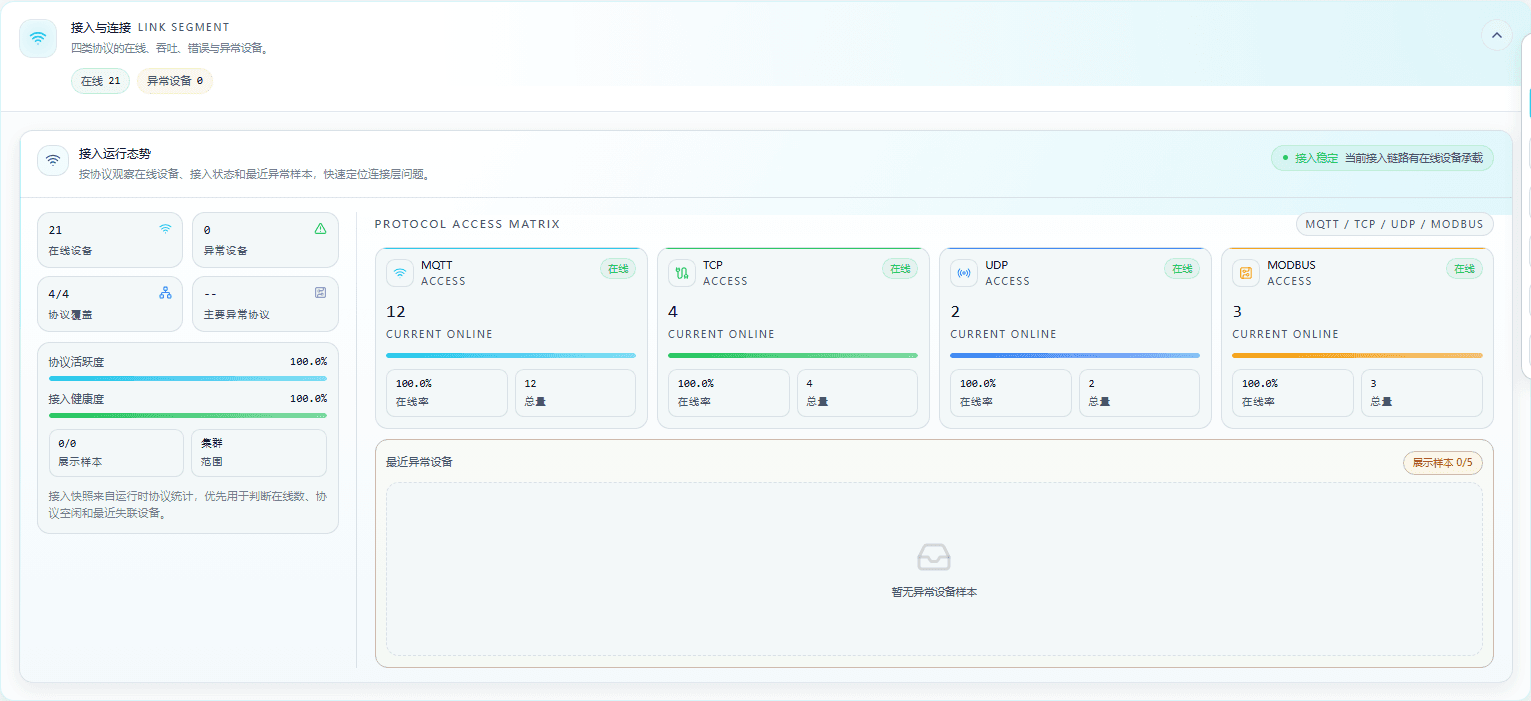
Figure: The Access and Connections area fully displays Online Devices, MQTT Count, TCP Count, UDP Count, MODBUS Count, and Abnormal Devices; the number in the figure locates this area, and field meanings, normality criteria, and first checkpoints for anomalies are described below.
Field Descriptions
| Field / Control | Description |
|---|---|
| Online devices | The number of devices within the current monitoring scope that have established protocol sessions and are recognized by the access layer. |
| MQTT count | The number of online devices connected via MQTT within the current scope. |
| TCP count | The number of online devices connected via TCP within the current scope. |
| UDP count | The number of devices connected via UDP and recognized within the current scope. |
| MODBUS count | The number of online devices connected via MODBUS within the current scope. |
| Abnormal devices | Lists device samples with access anomalies, session anomalies, or protocol recognition anomalies. |
5. Read the Event Bus Fields
Location: Link Monitoring Details → Event Bus
At position ⑤ in the figure, read all statistical fields of the event bus area item by item.
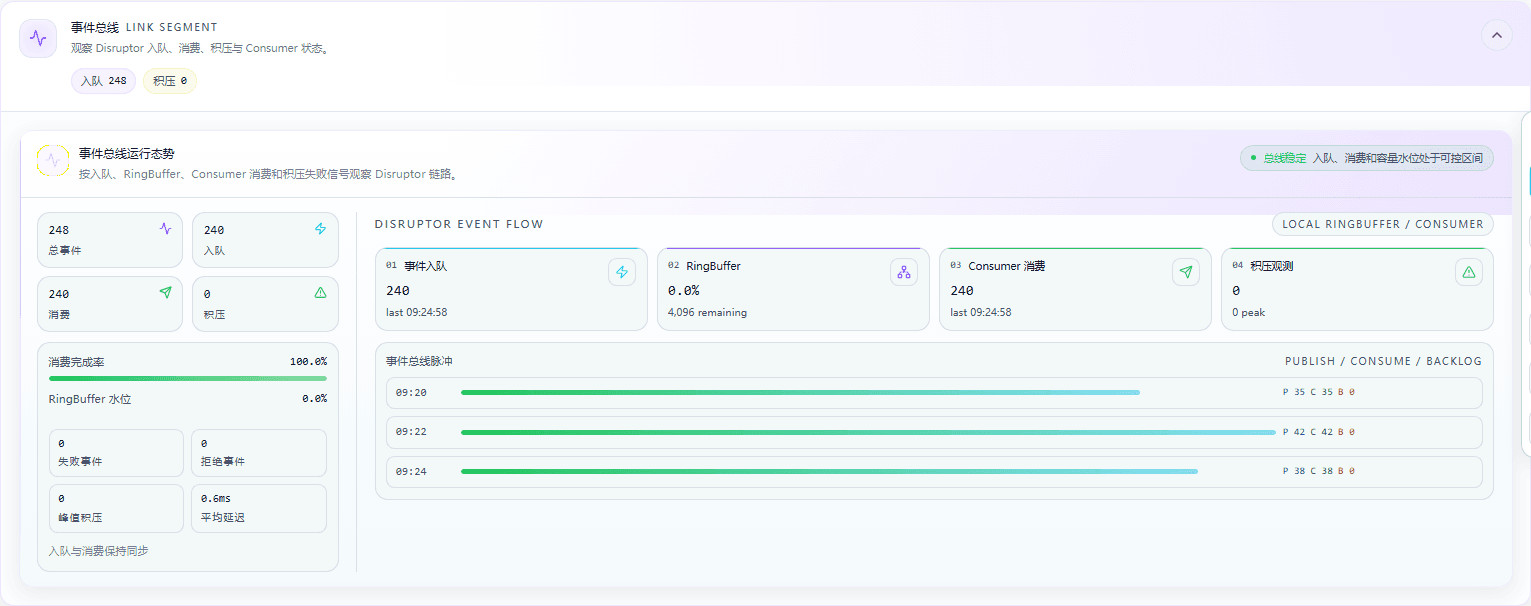
Figure: The Event Bus area fully displays Total Events, Enqueued, Consumed, Backlog, Consumption Completion Rate, RingBuffer Watermark, Failed Events, Rejected Events, Peak Backlog, Average Latency, and the four trend cards; the number in the figure locates this area, and the plain-language meaning of each field is described below.
Field Descriptions
| Field / Control | Description |
|---|---|
| Total events | The total number of events received and processed by the event bus within the current statistics window. |
| Enqueued | The number or cumulative amount of events that entered the event bus and are waiting to be processed. |
| Consumed | The number of events that event consumers have taken out and finished processing. |
| Backlog | The number of events not yet processed by event consumers. |
| Consumption completion rate | The proportion of consumed events among the events that entered the event bus. |
| RingBuffer watermark | The currently used capacity proportion of the event bus ring buffer. |
| Failed events | The number of events that failed to execute after entering the processing link. |
| Rejected events | The number of events that were not accepted because capacity, state, or processing conditions were not met. |
| Peak backlog | The maximum event backlog observed within the current statistics window. |
| Average latency | The time difference between an event entering the bus and being processed or completed. |
| Event enqueue | The number of events entering the bus and the time of the most recent enqueue. |
| RingBuffer | Shows the capacity or current usage watermark of the event bus ring buffer. |
| Consumer consumption | Shows the number of events processed by event consumers, their status, or the latest processing time. |
| Backlog observation | Observes event backlog changes and peaks as a time series. |
6. Read the Rule and Downstream Fields
Location: Link Monitoring Details → Rules and Downstream
At position ⑥ in the figure, read Enabled Rules, Rule Hits, Execution Success, Execution Failure, Connector Delivery, and Downstream Backlog.
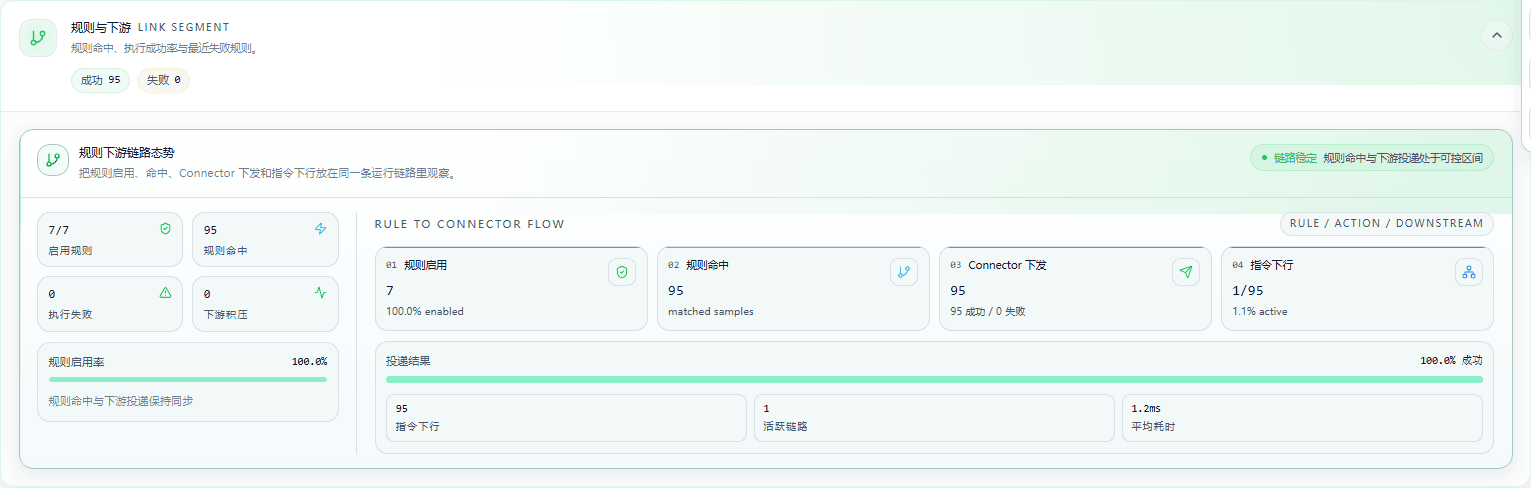
Figure: The Rules and Downstream area fully displays Enabled Rules, Rule Hits, Execution Success, Execution Failure, Connector Delivery, and Downstream Backlog; the number in the figure locates this area, and field meanings, normality criteria, and first checkpoints for anomalies are described below.
Field Descriptions
| Field / Control | Description |
|---|---|
| Enabled rules | The number of enabled rules currently participating in event matching and execution. |
| Rule hits | The number of times events satisfied rule conditions and entered execution. |
| Execution success | The number of rule actions that completed without reporting execution errors. |
| Execution failure | The number of rule actions whose execution did not complete or returned an error. |
| Connector delivery | The delivery result of sending rule results to downstream connectors. |
| Downstream backlog | The number of results waiting to be processed by downstream connectors or target systems. |
7. Read the Cluster Resource Fields
Location: Link Monitoring Details → Cluster Resources
At position ⑦ in the figure, read Node Count, Node Status, CPU, Memory, Task Distribution, and Device Distribution.
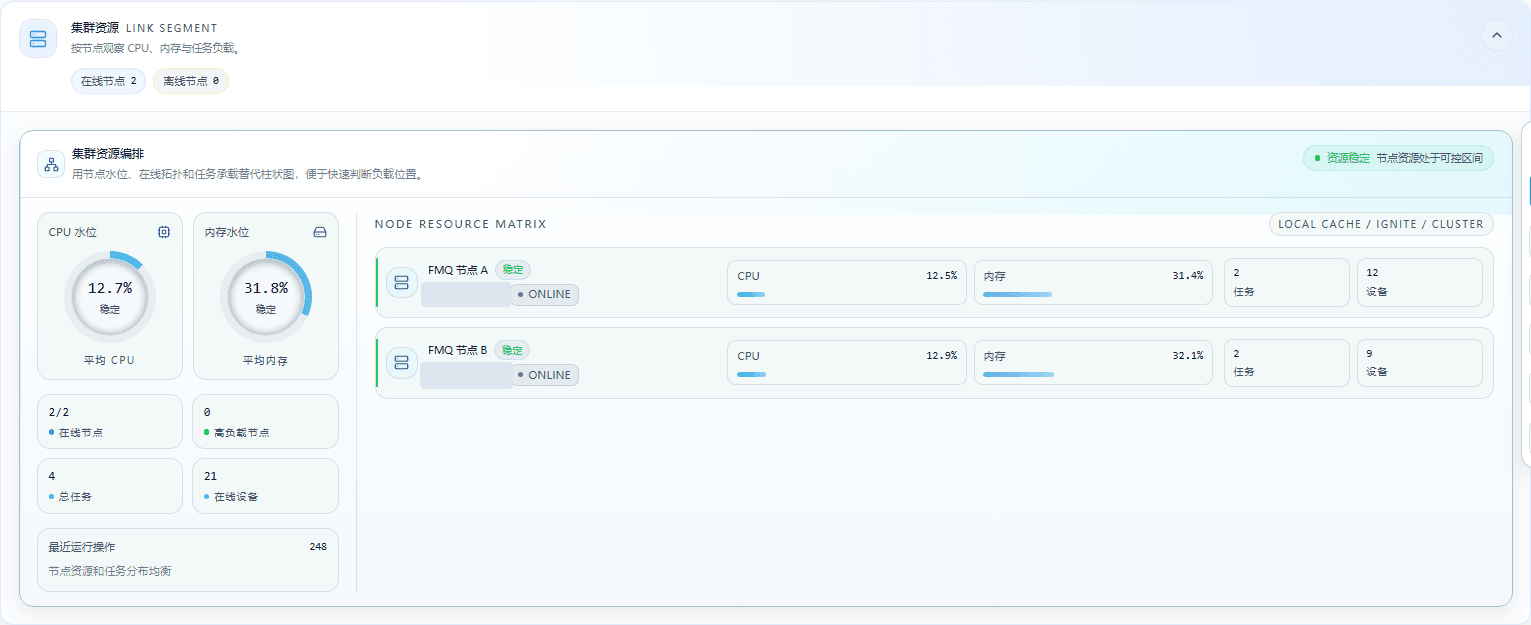
Figure: The Cluster Resources area fully displays Node Count, Node Status, CPU, Memory, Task Distribution, and Device Distribution; the number in the figure locates this area, and field meanings, normality criteria, and first checkpoints for anomalies are described below.
Field Descriptions
| Field / Control | Description |
|---|---|
| Node count | The number of cluster nodes participating in operation within the current monitoring scope. |
| Node status | Shows whether each node is online and able to undertake runtime tasks. |
| CPU | The node's current CPU usage ratio, used to judge compute resource pressure. |
| Memory | The node's current memory usage ratio, used to judge memory pressure. |
| Task distribution | Compares how running tasks are distributed across nodes. |
| Device distribution | Compares how online devices are distributed across nodes. |
8. Read the Thread Pool Resource Fields
Location: Link Monitoring Details → Thread Pool Resources
At position ⑧ in the figure, read Thread Pool Count, Active Threads, Queue Watermark, High-Risk Pools, and Cumulative Rejections.
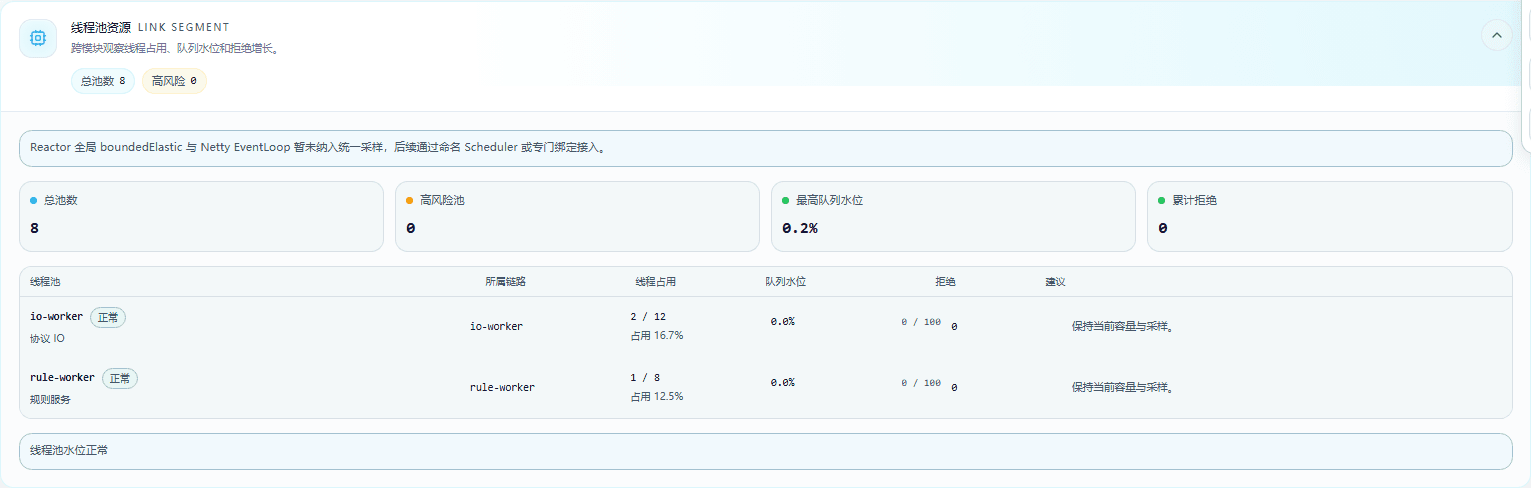
Figure: The Thread Pool Resources area fully displays Thread Pool Count, Active Threads, Queue Watermark, High-Risk Pools, and Cumulative Rejections; the number in the figure locates this area, and field meanings, normality criteria, and first checkpoints for anomalies are described below.
Field Descriptions
| Field / Control | Description |
|---|---|
| Thread pool count | The number of thread pools registered and monitored on the current runtime plane. |
| Active threads | The number of threads currently executing tasks in a thread pool, or the usage ratio. |
| Queue watermark | The number of tasks waiting for thread pool processing, or the relative capacity. |
| High-risk pools | The number and names of thread pools that have reached the high watermark, full-load, or rejection risk threshold. |
| Cumulative rejections | The cumulative number of tasks rejected by thread pools. |
9. Read the Scheduling Tasks and Draw a Conclusion
Location: Link Monitoring Details → Scheduling Tasks
At position ⑨ in the figure, read all statistical fields of the scheduling tasks area item by item.
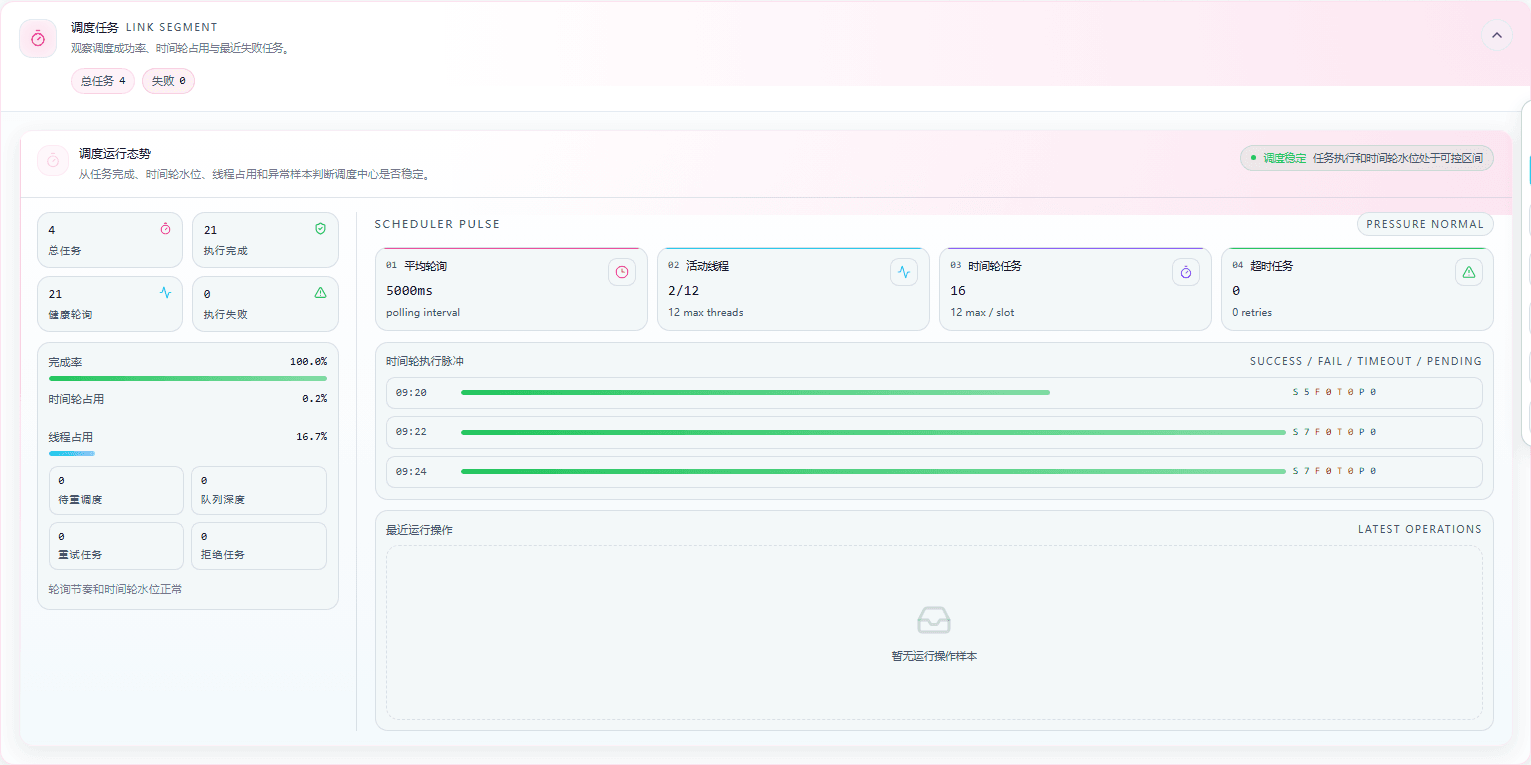
Figure: The Scheduling Tasks area fully displays Total Tasks, Execution Completions, Health Polls, Execution Failures, Completion Rate, Time Wheel Occupancy, Thread Occupancy, Pending Scheduling, Queue Depth, Retry Tasks, Rejected Tasks, Average Poll, Active Threads, Time Wheel Tasks, and Timeout Tasks; the number in the figure locates this area, and the plain-language meaning of each field is described below.
Field Descriptions
| Field / Control | Description |
|---|---|
| Total tasks | The total number of tasks included in scheduling within the current scheduling statistics window. |
| Execution completions | The number of polling or scheduled tasks completed as planned. |
| Completion rate | The proportion of completed scheduled tasks among planned tasks. |
| Health polls | The number of polling tasks completed normally as planned without triggering anomalies. |
| Execution failures | The number of scheduled tasks that returned failure during execution. |
| Time wheel occupancy | The capacity proportion of the time wheel currently occupied by scheduled tasks. |
| Thread occupancy | The proportion or number of execution threads currently occupied by scheduled tasks. |
| Active threads | The number of active threads currently executing scheduled tasks and the available slots. |
| Average poll | The average trigger interval of the scheduling center's recent periodic polling tasks. |
| Pending scheduling | The number of tasks generated but not yet assigned to execution threads. |
| Queue depth | The number of tasks waiting to be picked up by scheduling threads. |
| Retry tasks | The number of tasks requeued for execution due to failure or timeout. |
| Rejected tasks | The number of tasks that did not enter execution because resource or scheduling conditions were not met. |
| Time wheel tasks | The state of time wheel resources carrying delays, timeouts, and next scheduling times. |
| Timeout tasks | The number or elapsed time of scheduled tasks that exceeded their execution time limit without completing. |
Page Field Reference
Complete Reference
| Field / Unit | Plain Meaning | Data Direction / Source | Normality Criterion | Anomaly Signal and First Checkpoint |
|---|---|---|---|---|
| Overall Health Status | ||||
| Overall health status | The page's overall health judgment for the current link snapshot. | Runtime snapshot → Monitoring page | The status is stable or healthy, with no persistent anomaly contradicting the segments below. | Shows abnormal, degraded, or alerting, or the overall status clearly disagrees with key segments. First checkpoint: record the status and sampling time first, then locate by the corresponding segment below. |
| Monitoring Scope | ||||
| Monitoring scope cluster / node | Indicates whether the current statistics come from cluster aggregation or a specified node. | Query condition → Runtime snapshot | The scope matches the goal of this inspection, and the conventions stay unchanged when comparing data before and after. | A single node was selected by mistake, or the scope changed after refresh, causing online counts and resource counts to differ from expectations. First checkpoint: switch back to the scope consistent with the inspection goal, then re-read all segments. |
| Sampling Time | ||||
| Sampling time | Marks the point in time when the current page data was last refreshed or sampled. | Runtime snapshot → Monitoring page | The time is close to the current inspection moment, and the time conventions of all areas agree after refresh. | The time stays unchanged for a long time, is clearly stale, or different areas show inconsistent sampling conventions. First checkpoint: refresh the page and confirm the time updates, then judge whether the metrics are still abnormal. |
| Access and Connections | ||||
| Online devices | The number of devices within the current monitoring scope that have established protocol sessions and are recognized by the access layer. | Devices → FMQ access layer | Roughly consistent with the actual access scale, and changes as devices go online or offline. | Devices are confirmed connected but the count stays low, or fluctuates abnormally within a short time. First checkpoint: verify the scope, protocol listener status, and client sessions first. |
| MQTT count | The number of online devices connected via MQTT within the current scope. | MQTT devices → FMQ | Consistent with the actual MQTT device scale; changes can be explained by connections or disconnections. | MQTT clients are connected but the count does not grow, or the count suddenly drops to zero. First checkpoint: check the MQTT listen port, client connections, and authentication results first. |
| TCP count | The number of online devices connected via TCP within the current scope. | TCP devices → FMQ | Consistent with the actual TCP connection count; connection changes have clear device-side causes. | TCP connections exist but the statistics do not change, or the online count stays below the device-side connection count. First checkpoint: check the TCP listener, ports, and session lifecycle first. |
| UDP count | The number of devices connected via UDP and recognized within the current scope. | UDP devices → FMQ | Matches the recent scale of UDP message sources; may stay unchanged during short periods without messages. | Devices keep sending messages but the count does not update, or the number of source devices decreases abnormally. First checkpoint: check the UDP listen address, port, and protocol recognition results first. |
| MODBUS count | The number of online devices connected via MODBUS within the current scope. | MODBUS devices → FMQ | Consistent with the MODBUS device connection or polling scale. | Polling tasks exist but the online count does not grow, or device status flaps frequently. First checkpoint: check MODBUS connection status, polling schedules, and device responses first. |
| Abnormal devices / entries | Lists device samples with access anomalies, session anomalies, or protocol recognition anomalies. | Access anomalies → Monitoring page | Empty, or every anomaly has an explainable device-side cause. | Abnormal samples keep increasing, or the same device repeatedly shows access anomalies. First checkpoint: open the abnormal device details and verify the device protocol and recent sessions first. |
| Event Bus | ||||
| Total events | The total number of events received and processed by the event bus within the current statistics window. | Protocol access → Event bus | The total matches the current device message scale and changes with business input. | The total stays unchanged for a long time, suddenly drops to zero, or clearly disagrees with enqueue and consumption counts. First checkpoint: verify the sampling time first, then compare changes in total events, enqueue, and consumption. |
| Enqueued | The number or cumulative amount of events that entered the event bus and are waiting to be processed. | Protocol access → Event bus | Grows with device messages, roughly in sync with consumption over short periods. | Enqueue keeps growing while consumption does not follow, or growth stops suddenly. First checkpoint: compare the difference between enqueue and Consumer consumption first. |
| Consumed | The number of events that event consumers have taken out and finished processing. | Event bus → Consumer | Consumption grows with enqueue, roughly in sync over short periods. | There is enqueue but consumption stays unchanged for a long time, or consumption clearly lags behind enqueue. First checkpoint: compare the difference between consumption and enqueue, then check the Consumer status. |
| Backlog | The number of events not yet processed by event consumers. | Event bus → Pending queue | Stays low and falls back as traffic subsides. | Backlog keeps rising or does not return to zero for a long time. First checkpoint: look at the difference between enqueue and consumption, then check consumers and queue capacity. |
| Consumption completion rate % | The proportion of consumed events among the events that entered the event bus. | Enqueue → Consumption completion | The completion rate is close to 100% and consistent with backlog and latency trends. | The completion rate keeps declining, or is inconsistent with consumption and backlog changes. First checkpoint: compare enqueue, consumption, and backlog, then check consumer processing capacity. |
| RingBuffer watermark % | The currently used capacity proportion of the event bus ring buffer. | Event bus buffer → Consumer | The watermark stays low and can absorb burst traffic. | The watermark stays close to the capacity limit, or rises together with rejections and backlog. First checkpoint: check Consumer processing speed and event bus capacity first. |
| Failed events | The number of events that failed to execute after entering the processing link. | Consumer → Event processing result | Zero, or every failure has a known cause. | Failures keep growing or appear in sync with enqueue growth. First checkpoint: review failure reasons, then verify rule execution and downstream status. |
| Rejected events | The number of events that were not accepted because capacity, state, or processing conditions were not met. | Event bus → Rejection count | Zero, or has a clear transient-overload explanation. | The rejection count keeps increasing, meaning input is not entering the normal processing link. First checkpoint: verify the RingBuffer watermark and event bus capacity first. |
| Peak backlog | The maximum event backlog observed within the current statistics window. | Event bus → Peak statistics | The peak stays within capacity and business-acceptable range, and falls back after peaks. | The peak keeps rising, or is clearly higher than the current backlog and processing capacity. First checkpoint: check when the peak occurred, then verify Consumer and thread pool load. |
| Average latency ms | The time difference between an event entering the bus and being processed or completed. | Enqueue → Consumption completion | Stable under the current business load, with no continuous upward trend. | Latency keeps rising or grows together with backlog. First checkpoint: check consumer processing time and the load of the hosting node. |
| Event enqueue / time | The number of events entering the bus and the time of the most recent enqueue. | Protocol access → Event bus | The enqueue card keeps showing data, and the timestamp updates with the latest event. | The card shows no updates for a long time, or the enqueue count disagrees with the statistics on the left. First checkpoint: verify the sampling time and enqueue trend, then check access-layer input. |
| RingBuffer capacity / watermark | Shows the capacity or current usage watermark of the event bus ring buffer. | Event bus buffer → Consumers | The watermark stays low, with enough room to absorb burst traffic. | The watermark stays close to the capacity limit, or events cannot be enqueued. First checkpoint: check Consumer processing speed and node resources first. |
| Consumer consumption / status | Shows the number of events processed by event consumers, their status, or the latest processing time. | Event bus → Consumer | Consumers keep running, and throughput changes with enqueue. | Consumers stall, throughput is zero, or clearly lags behind enqueue. First checkpoint: check consumer status and the hosting node's thread pools. |
| Backlog observation / trend | Observes event backlog changes and peaks as a time series. | Event bus → Backlog trend | The backlog trend stays low and falls back after peaks. | The backlog trend rises continuously or does not fall back for a long time. First checkpoint: compare enqueue and consumption trends, then check the event processing link. |
| Rules and Downstream | ||||
| Enabled rules | The number of enabled rules currently participating in event matching and execution. | Rule configuration → Rule engine | Consistent with the current business configuration; the enabled count is stable. | Expected rules are not enabled, or the enabled count clearly disagrees with the configuration. First checkpoint: verify rule status and the current product or device scope first. |
| Rule hits | The number of times events satisfied rule conditions and entered execution. | Event bus → Rule matching | Grows with business when there is matching input. | Input is confirmed but hits stay at zero for a long time, or hits suddenly stop. First checkpoint: verify rule conditions, enablement status, and input fields first. |
| Execution success | The number of rule actions that completed without reporting execution errors. | Rule engine → Action result | Grows with hits; the success rate stays within the business-acceptable range. | Hits grow but successes do not, or the success rate drops significantly. First checkpoint: review failure reasons and the state of action targets first. |
| Execution failure | The number of rule actions whose execution did not complete or returned an error. | Rule engine → Execution failure | Zero, or every failure has an explainable cause. | Failures keep increasing, or concentrate on the same rule. First checkpoint: open the rule execution details and verify action parameters and dependent services first. |
| Connector delivery success / failure | The delivery result of sending rule results to downstream connectors. | Rule engine → Downstream connectors | Successful deliveries grow with business; failures are zero or have a clear dependency fault. | Rule executions succeed but connector delivery fails or stalls. First checkpoint: check connector runtime status, target addresses, and delivery retries first. |
| Downstream backlog | The number of results waiting to be processed by downstream connectors or target systems. | Connectors → Downstream targets | Stays low and falls back after business peaks. | Backlog keeps increasing or appears together with delivery failures. First checkpoint: check target system availability and connector queue watermarks first. |
| Cluster Resources | ||||
| Node count | The number of cluster nodes participating in operation within the current monitoring scope. | FMQ cluster → Monitoring page | Consistent with the number of actually deployed nodes. | Node count decreases or is inconsistent with the deployment topology. First checkpoint: review node details and node heartbeat status first. |
| Node status online / offline | Shows whether each node is online and able to undertake runtime tasks. | Node heartbeats → Monitoring page | All nodes are online; status changes have deployment or maintenance causes. | Nodes appear offline, unreachable, or flapping between online and offline. First checkpoint: confirm the node process, heartbeat, and cluster membership first. |
| CPU % | The node's current CPU usage ratio, used to judge compute resource pressure. | Node runtime resources → Monitoring page | Stable under the current load, not persistently approaching the limit. | Persistently high, or a single node significantly higher than the others. First checkpoint: locate the high-load node, then verify its tasks and thread pools. |
| Memory % | The node's current memory usage ratio, used to judge memory pressure. | Node runtime resources → Monitoring page | Usage is stable, with no obvious skew between nodes. | Persistently high, rising fast, or a single node significantly higher. First checkpoint: check that node's thread pools, caches, and long-lived sessions first. |
| Task distribution tasks / node | Compares how running tasks are distributed across nodes. | Scheduled tasks → Cluster nodes | Task distribution matches node capacity, with no long-term single-node concentration. | Large numbers of tasks concentrate on a single node, or inter-node differences keep widening. First checkpoint: verify node ownership, scheduling status, and hot tasks first. |
| Device distribution devices / node | Compares how online devices are distributed across nodes. | Device sessions → Cluster nodes | Device distribution is roughly balanced; node changes can be explained by connection migration. | Devices concentrate on a single node or show obvious skew. First checkpoint: verify node status, session ownership, and access load first. |
| Thread Pool Resources | ||||
| Thread pool count | The number of thread pools registered and monitored on the current runtime plane. | Runtime thread pools → Monitoring page | Matches enabled modules and deployment configuration. | The thread pool count decreases abnormally, or unexpected new thread pools appear. First checkpoint: verify module enablement status and thread pool registration first. |
| Active threads threads / % | The number of threads currently executing tasks in a thread pool, or the usage ratio. | Runtime thread pools → Task execution | Active threads change with load and do not persistently approach the pool limit. | Long-term full load, active threads not decreasing, or occurring together with task backlog. First checkpoint: review the corresponding pool's task types and queue watermark first. |
| Queue watermark / % | The number of tasks waiting for thread pool processing, or the relative capacity. | Task submission → Thread pool queue | The watermark is low and falls back with load. | The watermark keeps rising or approaches the capacity limit. First checkpoint: confirm active threads and task processing time, then check the submission sources. |
| High-risk pools / names | The number and names of thread pools that have reached the high watermark, full-load, or rejection risk threshold. | Thread pool metrics → Risk judgment | Zero, or recovers quickly after a short peak. | High-risk pools persist, consistent with queue or rejection growth. First checkpoint: open the thread pool details and confirm the specific module and queue first. |
| Cumulative rejections | The cumulative number of tasks rejected by thread pools. | Thread pools → Rejection count | Zero, or has a clear transient-overload explanation. | Cumulative rejections keep increasing, meaning tasks are not entering the execution queue. First checkpoint: record the names of the growing thread pools, then check queue capacity and submission rate. |
| Scheduling Tasks | ||||
| Total tasks | The total number of tasks included in scheduling within the current scheduling statistics window. | Scheduling configuration → Scheduled tasks | The total matches the scale of currently enabled polling and business tasks. | The total changes suddenly, or clearly disagrees with the number of enabled tasks. First checkpoint: verify task configuration and the current monitoring scope, then compare execution statistics. |
| Execution completions | The number of polling or scheduled tasks completed as planned. | Scheduled tasks → Completion result | Grows steadily with health polls and business tasks. | There are pending tasks but the completion count stays unchanged for a long time. First checkpoint: compare completions with pending scheduling, then review failures and timeouts. |
| Health polls | The number of polling tasks completed normally as planned without triggering anomalies. | Scheduled tasks → Health result | Health polls grow steadily with task periods. | Health polls do not grow for a long time, or clearly disagree with execution completions. First checkpoint: compare health polls with execution completions, then review failures and timeouts. |
| Execution failures | The number of scheduled tasks that returned failure during execution. | Scheduled tasks → Failure result | Zero, or every failure has an explainable cause. | Failures keep increasing or concentrate on the same task type. First checkpoint: review the causes of failed tasks and the status of associated devices first. |
| Completion rate % | The proportion of completed scheduled tasks among planned tasks. | Scheduled tasks → Completion statistics | The completion rate is close to expectations and consistent with failure, timeout, and pending-scheduling trends. | The completion rate declines, or disagrees with execution completions and pending counts. First checkpoint: check failures, timeouts, and pending scheduling, then verify task periods. |
| Time wheel occupancy % | The capacity proportion of the time wheel currently occupied by scheduled tasks. | Scheduling plan → Time wheel resources | Occupancy stays low; tasks enter and leave the time wheel as planned. | Occupancy keeps rising or approaches the capacity limit. First checkpoint: review pending scheduling and timeouts, then check time wheel capacity. |
| Thread occupancy threads / slots | The proportion or number of execution threads currently occupied by scheduled tasks. | Scheduled tasks → Execution threads | Thread usage matches the task volume and is not persistently at full load. | Threads at full load for a long time, zero available slots, or occurring together with task backlog. First checkpoint: check the scheduling thread pool's active count and queue watermark first. |
| Pending scheduling | The number of tasks generated but not yet assigned to execution threads. | Scheduled tasks → Waiting queue | Stays low and can be drained within a polling period. | Pending scheduling keeps growing or does not decrease for a long time. First checkpoint: check task threads, queue watermarks, and recent failures first. |
| Queue depth | The number of tasks waiting to be picked up by scheduling threads. | Scheduled tasks → Execution queue | The queue stays low, and tasks can be picked up within a polling period. | Queue depth keeps increasing or rises together with thread occupancy. First checkpoint: check thread occupancy and pending scheduling, then review task failures and retries. |
| Retry tasks | The number of tasks requeued for execution due to failure or timeout. | Failure / Timeout → Retry queue | Zero, or falls back after a short anomaly. | Retries keep increasing and cause pending-scheduling backlog. First checkpoint: locate the original failure cause, then confirm the retry limit and interval. |
| Rejected tasks | The number of tasks that did not enter execution because resource or scheduling conditions were not met. | Scheduled tasks → Rejection count | Zero, or appears only during transient overload and falls back. | Rejected tasks keep increasing, meaning tasks cannot enter the normal execution link. First checkpoint: check thread pool queues, time wheel occupancy, and task submission rate first. |
| Active threads threads / slots | The number of active threads currently executing scheduled tasks and the available slots. | Scheduled tasks → Active threads | Active threads change with task volume, without long-term full load. | Active threads persistently at full load, zero available slots, or accompanied by queue backlog. First checkpoint: verify thread occupancy and queue depth, then check thread pool resources. |
| Average poll ms | The average trigger interval of the scheduling center's recent periodic polling tasks. | Scheduling configuration → Polling tasks | Consistent with the current business configuration; tasks fire on their periods. | The interval becomes abnormally large or small, or disagrees with actual task trigger times. First checkpoint: verify polling configuration and the recent task timeline first. |
| Time wheel tasks slots / watermark | The state of time wheel resources carrying delays, timeouts, and next scheduling times. | Scheduling plan → Time wheel | Resource watermark is stable; tasks enter and leave the time wheel as planned. | Slots or watermark stay near the limit, or task times drift. First checkpoint: check time wheel occupancy, then verify scheduling threads and task backlog. |
| Timeout tasks / ms | The number or elapsed time of scheduled tasks that exceeded their execution time limit without completing. | Scheduled tasks → Timeout result | Zero, or only occasional, explainable slow tasks. | Timeouts keep increasing, or occur together with thread pool backlog and unresponsive devices. First checkpoint: verify task durations, device responses, and execution threads first. |
Production Operation Notice
The screenshots and examples illustrate operation locations and judgment methods; they do not represent the current production state. When publishing, starting/stopping, rebinding, retrying, or deleting is involved, first confirm the target environment, the scope of impact, and the recovery plan, and have authorized personnel perform the operation.
FastBee · FMQ Operations Manual