

FAQ and common issues
提示
If you run into a problem that is not covered here, please submit an Issue in the FastBee repository.
Backend startup
1. Database table not found
FastBee requires MySQL 5.7 or later. MySQL 5.7 is recommended for the open-source deployment.
On Linux, make sure the database uses case-insensitive table names. Add the following setting to /etc/my.cnf, then restart MySQL:
lower_case_table_names=12. Java package or class not found
The backend project uses JDK 1.8. If a higher JDK is installed and causes dependency or runtime issues, switch the project to JDK 1.8 or install the missing dependency explicitly.
3. Redis or EMQX related runtime errors
FastBee depends on Redis and EMQX. Check the following items first:
- Redis connection address, port, and password are correct.
- EMQX HTTP authentication URL is configured correctly.
- EMQX Webhook URL is configured correctly.
- The backend EMQX connection address points to the active MQTT service.
Frontend build and deployment
4. npm ERR! code ERESOLVE
NPM 7 and later enforce stricter peer dependency checks. Install dependencies with one of the following commands:
npm i --legacy-peer-deps
npx -p npm@6 npm i --legacy-peer-depsYou can also switch to NPM 6.x for this project.
5. syscall mkdir error during npm install
Delete the .npmrc file under the current Windows user directory, for example:
C:\Users\{account}\.npmrcThen run the installation command again.
6. Entrypoint size limit warning during frontend packaging
This Vue CLI warning means the combined asset size of one or more entry points exceeds the recommended limit. If the current bundle size is expected, configure vue.config.js directly:
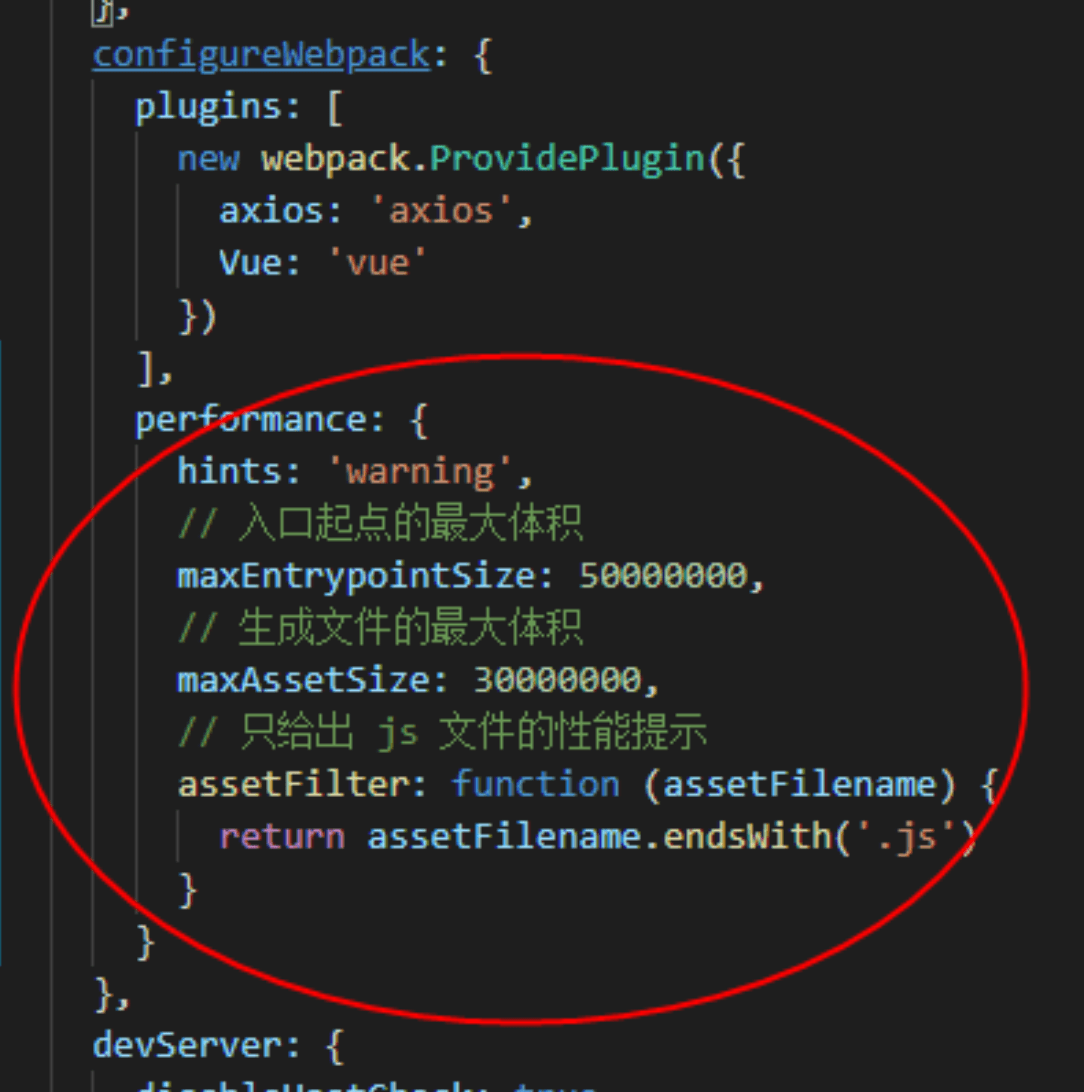
7. Cannot find module '@/views/XXX' after deployment
If the project works locally but fails after production deployment, modify src/store/modules/permission.js.
// Before
export const loadView = (view) => {
  if (process.env.NODE_ENV === 'development') {
    return (resolve) => require([`@/views/${view}`], resolve);
  } else {
    return () => import(`@/views/${view}`);
  }
};

// After
export const loadView = (view) => {
  return (resolve) => require([`@/views/${view}`], resolve);
};Device data and status
8. Real-time monitoring data is received but not shown on the device overview
Real-time monitoring data is designed for live viewing and is not stored in the database by default. Historical values on the device overview or running-status page will not change unless the device reports the same value as a property.
To persist the data, use one of these approaches:
- Let the device periodically report the value as a property.
- Configure scheduled property reporting in the system.
9. Add the fixed large-screen menu
When switching from the open-source version to the commercial version, reinstall frontend dependencies:
npm installThen add the large-screen menu from System Management -> Menu Management -> Add.
Parent menu: Main category
Menu type: Directory
Menu icon: monitor-a
Menu name: Large-screen display
External link: Yes
Sort order: 5
Route address: https://iot.fastbee.cn/bigScreen
Display status: Show
Menu status: NormalReplace https://iot.fastbee.cn with your own server address.
10. Device activation and device status
提示
For the device authentication and device information publishing process, see MQTT device access.
A device can be in one of the following states:
Inactive Online Offline DisabledDevice status can be changed in three ways:
- The device passes authentication, and the status changes to online.
- The device publishes device information with
statusfixed to3, which means online. - The device is powered off or disconnected, and the status changes to offline after the keep-alive timeout.
// Publish device information after power-on or after receiving the query command.
// rssi: signal strength. Excellent [-55, 0], good [-70, -55],
//       normal [-85, -70], poor [-100, -85].
// status: fixed to 3, meaning online.
// firmwareVersion: firmware version.
// userId: optional. For Wi-Fi devices, upload the user ID during provisioning.
// longitude / latitude: optional, required when device positioning is used.
// summary: optional JSON object for custom device configuration summary.
{
  "rssi": -43,
  "firmwareVersion": 1.2,
  "status": 3,
  "userId": "1",
  "longitude": 0,
  "latitude": 0,
  "summary": {}
}重要
The offline detection time is about 1.5 times the device keep-alive value.
- If the device
keep-aliveis10s, the offline time is about10 x 1.5 = 15s. - The device keep-alive value should be lower than the system keep-alive value. The default system value is
70s, so device keep-alive should normally be no more than60s.
11. Device provisioning and QR-code binding
提示
There are two common cases. If the device does not exist in the system, provisioning or scanning creates a new device under the user account. If the device already exists, provisioning or scanning binds the existing device to the user account.
Device provisioning
Provisioning writes Wi-Fi information to the device and creates the device under the user account. H5, WeChat Mini Program, Android, and iOS support single-device provisioning. Multi-device provisioning is currently supported by the WeChat Mini Program.
During single-device provisioning, the user manually switches the phone Wi-Fi to the device hotspot, then completes the provisioning flow.
QR-code binding
Each device has a QR code. You can view it in the device detail summary. The QR-code content uses the following JSON format:
// type is fixed to 1, meaning QR-code device binding.
// type, deviceNumber, and productId are required. productName is optional.
{
  "type": 1,
  "deviceNumber": "D888666",
  "productId": 5,
  "productName": "Smart plug"
}Accounts and tenant model
12. Multi-tenant account types
FastBee includes five account types by default. Account capabilities are controlled by roles. A newly registered account is a regular user, and an administrator can assign another role when needed.
| Account type | Description |
|---|---|
| Super administrator | The admin account. There is only one super administrator, and it can manage all system data. |
| Administrator | Can manage system data. Detailed permissions are configurable. |
| Guest | Used for demo projects. Compared with an administrator, it has no data deletion permission and fewer feature permissions. |
| Tenant | Can view system product categories and common thing models, and manage its own products, categories, thing models, firmware, device groups, scene automation, and product devices. |
| User | Can manage owned groups, devices, scene automation, and devices shared by other users. |
13. Default system accounts
# Users added from the backend use 123456 as the default password.

Administrator    admin       admin123
Guest            fastbee     123456
Tenant T1        fastbee-t1  123456
User U1 fastbee-u1 12345614. Druid monitoring account
# File:
# fastbee\springboot\fastbee-admin\src\main\resources\application-druid.yml

statViewServlet:
  enabled: true
  # Leave allow empty to permit all addresses.
  allow:
  url-pattern: /druid/*
  login-username: fastbee
login-password: fastbeeDeployment and configuration
15. Recommended server configuration
For a typical deployment, use at least:
- 4 CPU cores
- 8 GB memory
- 100 GB disk
This specification is commonly available from major cloud providers.
16. Key terms
Thing model
A thing model is the data model of a product or device. It contains properties, services, and events. Properties describe state, configuration, and telemetry data, such as temperature and humidity. Telemetry is read-only, while configuration and state can be readable and writable.
Device shadow
The device shadow caches properties and services. When a device is offline, a command can be stored first. After the device comes online, the system sends the cached property or service command to the device.
Scene automation
Scene automation is visual programming for automation logic. For example, when a door lock is opened at night, the system can turn on the TV, water dispenser, and air conditioner automatically.
17. Maven compiler plugin configuration
<!-- File:
fastbee\springboot\pom.xml

Configure bootclasspath. Use ";" on Windows and ":" on Linux.
-->
<plugins>
  <plugin>
    <groupId>org.apache.maven.plugins</groupId>
    <artifactId>maven-compiler-plugin</artifactId>
    <version>3.1</version>
    <configuration>
      <source>${java.version}</source>
      <target>${java.version}</target>
      <encoding>${project.build.sourceEncoding}</encoding>
      <compilerArguments>
        <bootclasspath>${java.home}/lib/rt.jar;${java.home}/lib/jce.jar</bootclasspath>
      </compilerArguments>
    </configuration>
  </plugin>
</plugins>18. Log file path
<!-- File:
fastbee\springboot\fastbee-admin\src\main\resources\logback.xml
-->

<!-- Log storage path -->
<property name="log.path" value="/logs" />

<!-- Log output format -->
<property name="log.pattern" value="%d{HH:mm:ss.SSS} [%thread] %-5level %logger{20} - [%method,%line] - %msg%n" />19. Upload path
# File:
# fastbee\springboot\fastbee-admin\src\main\resources\application.yml
#
# The file path should end with uploadPath.
# Windows example: D:/uploadPath
# Linux example: /var/data/java/uploadPath

profile: /uploadPathMessaging
20. No data in real-time monitoring
Real-time monitoring messages are exchanged directly between the user client and the device. They are not persisted by default.
The usual process is:
- The user client sends a real-time monitoring request, including the number of reads and the interval.
- The device subscribes to the request topic.
- The device publishes monitoring data according to the requested count and interval.
- The user client subscribes to the monitoring data and displays it in real time.
21. MQTT client authentication
The server, web client, mobile client, and device are all MQTT clients, and each needs credentials to connect to EMQX.
FastBee uses the EMQX HTTP authentication plugin. The beginning of clientId identifies the source:
- Server clients start with
server-. - Web clients start with
web-. - Mobile clients start with
phone-. - Device clients start with
SorE, depending on the encryption method.
Authentication rules:
- The server uses the MQTT username and password configured in the backend.
- Web and mobile clients use token authentication.
- Devices use the MQTT username, password, secret key, and encryption method configured in the product.
22. EMQX Webhook for online and offline status
Devices may frequently go online and offline because of hardware or network conditions. If a user sends a command while a device is offline, the device cannot receive it immediately. When shadow mode is enabled, the command is stored in Redis and delivered after the device comes online.
FastBee uses EMQX as the message broker. Device online and offline events are detected through EMQX Webhook. When EMQX detects a status change, it calls:
http://localhost:8080/iot/tool/mqtt/webhookv5The backend then updates the device status. If the device uses shadow mode, pending offline operations are delivered after the device comes online.
23. Shadow mode and online mode
| Mode | Behavior |
|---|---|
| Online mode | The user client publishes property and service messages. The device subscribes and responds. The device then publishes property and service messages, and the server stores them. |
| Shadow mode | The user client publishes property and service messages. The backend subscribes and stores them. After the device comes online, the backend publishes changed properties and services to the device, and the device responds. |