

FMQ Runtime Configuration Center
Fully explains the Runtime Configuration Center page, its 28 fields, save methods, effective scopes, rebinding risks, read-only boundaries, cache refresh, and audit checks.
How to Read
Confirm the entry point, permissions, and target object first, then complete the operations in numbered order. Each step includes the expected result; detailed fields and options are collected in expandable reference tables.
About the Screenshots
The screenshots come from the original operations manual. The public version hides real node addresses, connection addresses, and credentials; the statuses, times, and data in the examples do not represent the current production environment.
Before You Begin
| Item | Description |
|---|---|
| What you can do | Understand the 8 modules and 28 fields first, then distinguish plain saves, save-on-toggle switches, listener rebinding, and read-only startup items by how they take effect. |
| Where to enter | Device -> Runtime Configuration Center |
| Required permissions | Logged in to the FMQ console; write operations must be performed by authorized personnel during a maintenance window. |
| Estimated time | 18 minutes |
Operation Steps
1. Page Scope and Configuration Statistics
Location: Device -> Runtime Configuration Center
Enter the Runtime Configuration Center, read the current node, cache time, and the 5 statistics cards first, then review the module groups.
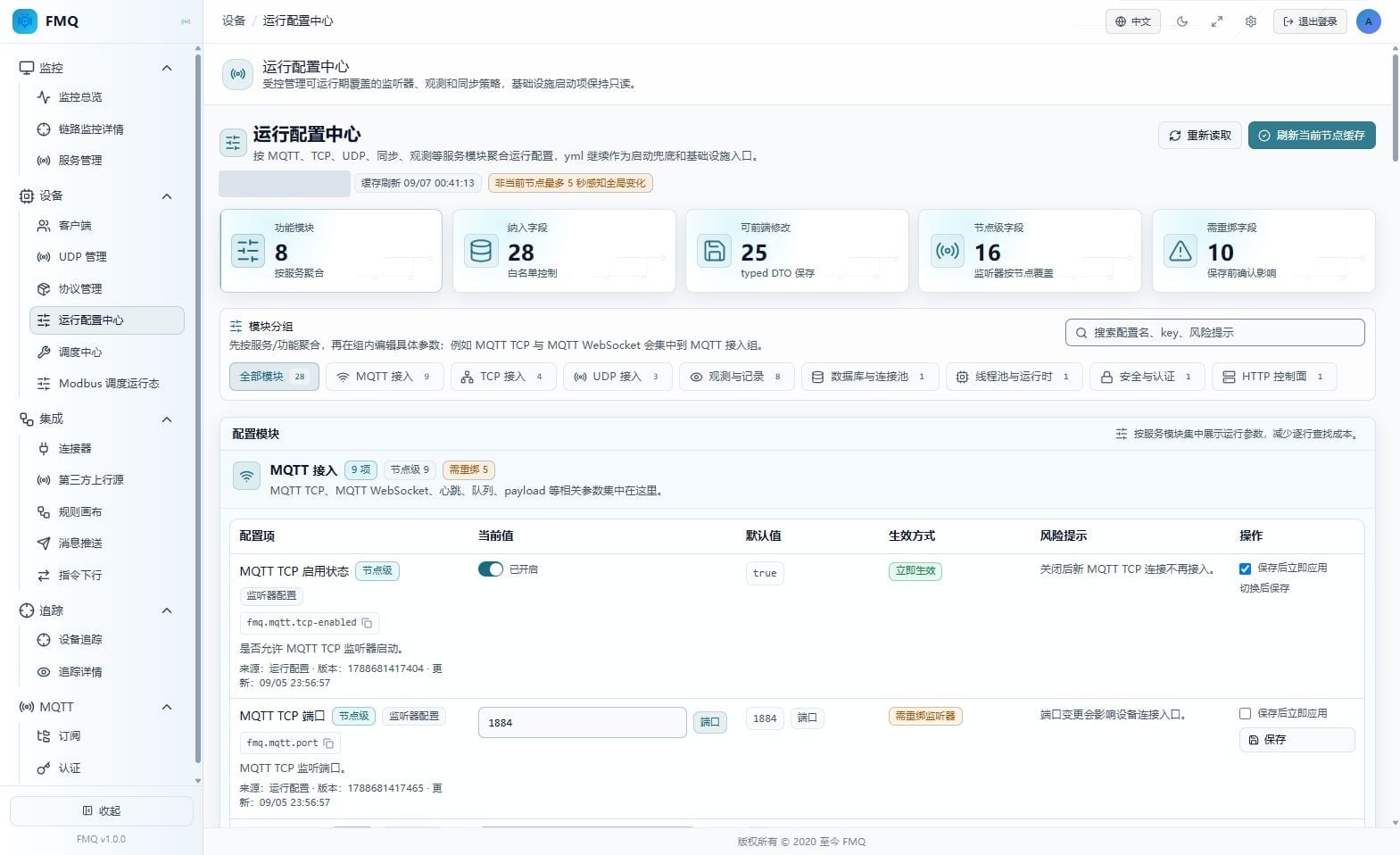
Figure: The first screen of the real page; first confirm the current node, cache time, and configuration statistics.
Field Descriptions
| Field / Control | Description |
|---|---|
| Current node | Indicates which FMQ node's node-level configuration this page is reading. |
| Overall health status (not provided on this page) | The Runtime Configuration Center only displays configurations and values; it does not compute the overall health of listeners or business links. |
| Cache refresh time | Shows the time after the page last read the configuration. |
| Other node awareness delay | Notes that global configuration is perceived by other nodes through periodic refresh after at most about 5 seconds. |
| Functional modules | The number of modules aggregated by service on the current page. |
| Included fields | The total number of fields from the runtime configuration whitelist displayed on the page. |
| Frontend-editable | The number of fields allowed to be submitted in the Runtime Configuration Center. |
| Node-level fields | The number of listener fields that apply only to the specified FMQ node. |
| Fields requiring rebind | The number of fields that require an immediate rebind or wait for the listener's next restart after a change. |
2. MQTT TCP Basic Configuration
Location: Device -> Runtime Configuration Center
Select the corresponding module and read the current values, defaults, effective methods, and risk notices of MQTT TCP Basic Configuration; this round does not edit or save.
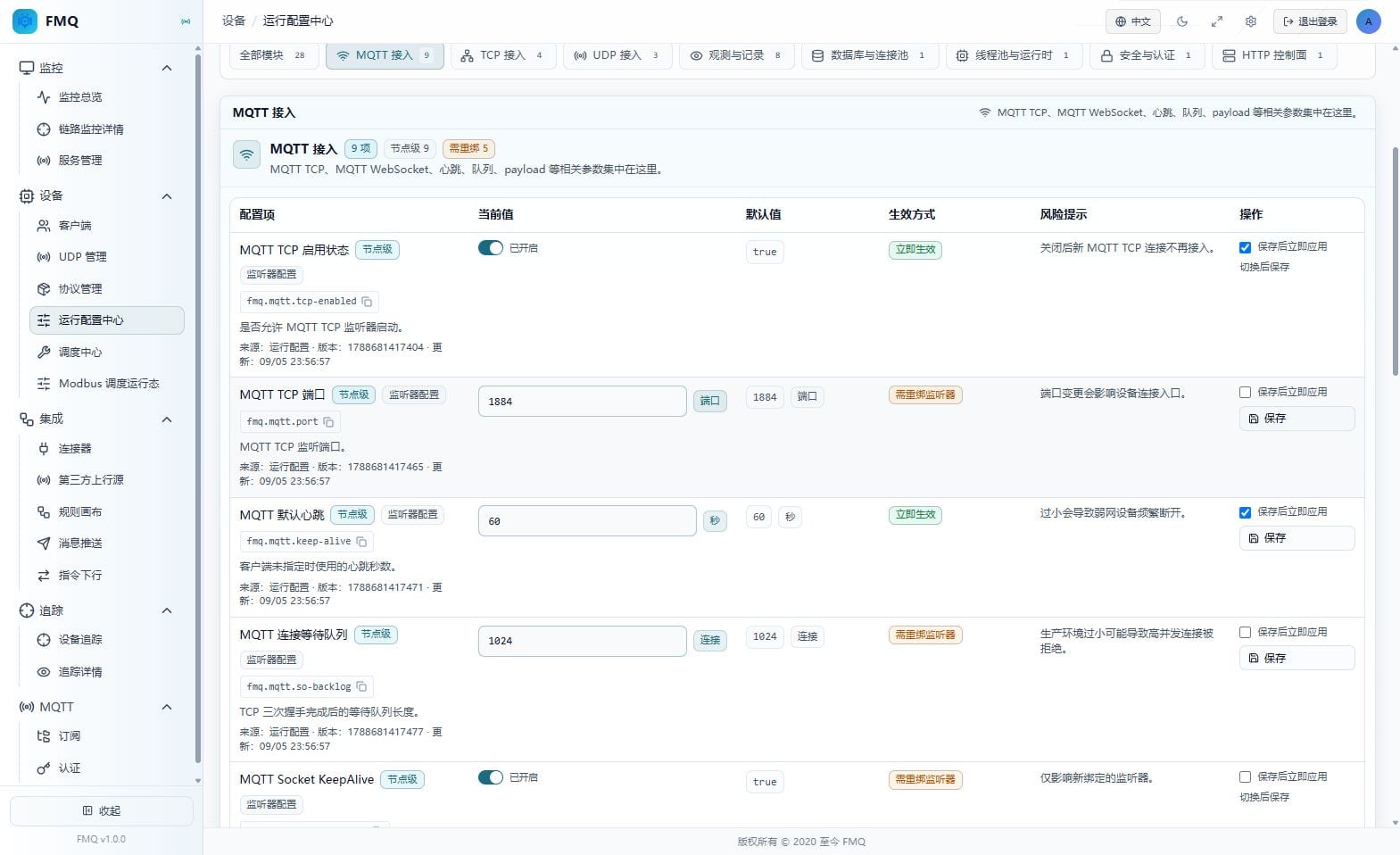
Figure: MQTT TCP Basic Configuration in the real Runtime Configuration Center; the fields of this section are explained item by item below the figure.
Field Descriptions
| Field / Control | Description |
|---|---|
| MQTT TCP enabled status | Determines whether the MQTT TCP listener is allowed to start; toggling saves directly. The current page value is "true", the default is "true", and the effective method is "effective immediately". |
| MQTT TCP port | The external listening port of MQTT TCP; the device connection address must match it. The current page value is "1884", the default is "1884", and the effective method is "requires listener rebind". |
| MQTT default heartbeat | The default keepalive time used when the client does not declare a heartbeat. The current page value is "60", the default is "60", and the effective method is "effective immediately". |
| MQTT connection backlog | The length of the connection queue waiting for application acceptance after the TCP handshake completes. The current page value is "1024", the default is "1024", and the effective method is "requires listener rebind". |
| MQTT Socket KeepAlive | Enables operating-system TCP keepalive; affects only listeners after rebinding. The current page value is "true", the default is "true", and the effective method is "requires listener rebind". |
3. MQTT Payload and WebSocket Configuration
Location: Device -> Runtime Configuration Center
Select the corresponding module and read the current values, defaults, effective methods, and risk notices of MQTT Payload and WebSocket Configuration; this round does not edit or save.
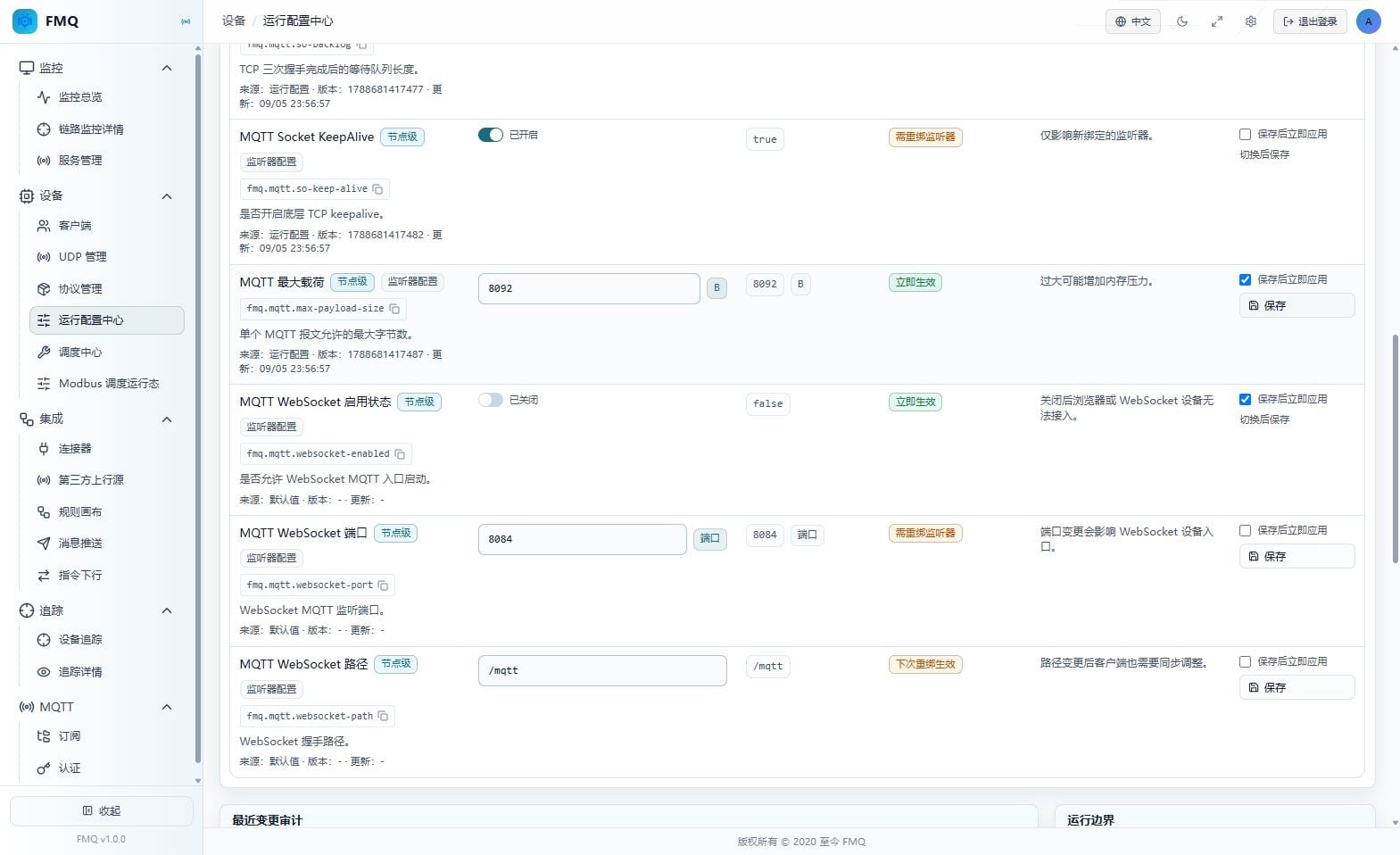
Figure: MQTT Payload and WebSocket Configuration in the real Runtime Configuration Center; the fields of this section are explained item by item below the figure.
Field Descriptions
| Field / Control | Description |
|---|---|
| MQTT maximum payload | Limits the maximum number of bytes allowed in a single MQTT packet. The current page value is "8092", the default is "8092", and the effective method is "effective immediately". |
| MQTT WebSocket enabled status | Determines whether browser or WebSocket MQTT clients can connect. The current page value is "false", the default is "false", and the effective method is "effective immediately". |
| MQTT WebSocket port | The listening port used for the WebSocket MQTT handshake. The current page value is "8084", the default is "8084", and the effective method is "requires listener rebind". |
| MQTT WebSocket path | The WebSocket handshake path; the backend automatically prepends the leading slash. The current page value is "/mqtt", the default is "/mqtt", and the effective method is "takes effect on next rebind". |
4. TCP Access Configuration
Location: Device -> Runtime Configuration Center
Select the corresponding module and read the current values, defaults, effective methods, and risk notices of TCP Access Configuration; this round does not edit or save.
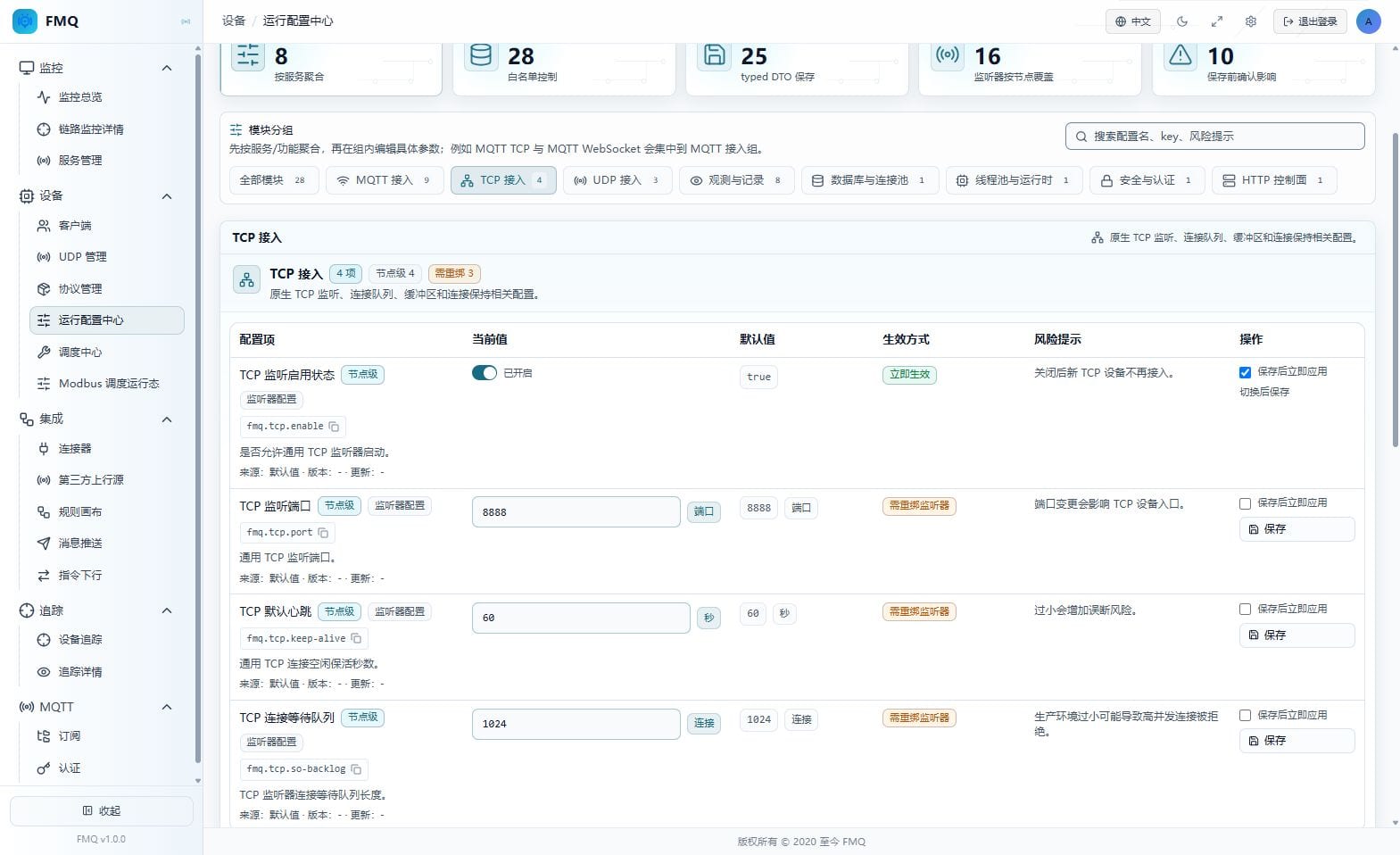
Figure: TCP Access Configuration in the real Runtime Configuration Center; the fields of this section are explained item by item below the figure.
Field Descriptions
| Field / Control | Description |
|---|---|
| TCP listener enabled status | Determines whether the general TCP listener is allowed to start; toggling saves directly. The current page value is "true", the default is "true", and the effective method is "effective immediately". |
| TCP listener port | The listening port for general TCP device connections. The current page value is "8888", the default is "8888", and the effective method is "requires listener rebind". |
| TCP default heartbeat | The idle keepalive time for general TCP connections. The current page value is "60", the default is "60", and the effective method is "requires listener rebind". |
| TCP connection backlog | The length of the connection queue the TCP listener waits for the application to accept. The current page value is "1024", the default is "1024", and the effective method is "requires listener rebind". |
5. UDP Access Configuration
Location: Device -> Runtime Configuration Center
Select the corresponding module and read the current values, defaults, effective methods, and risk notices of UDP Access Configuration; this round does not edit or save.
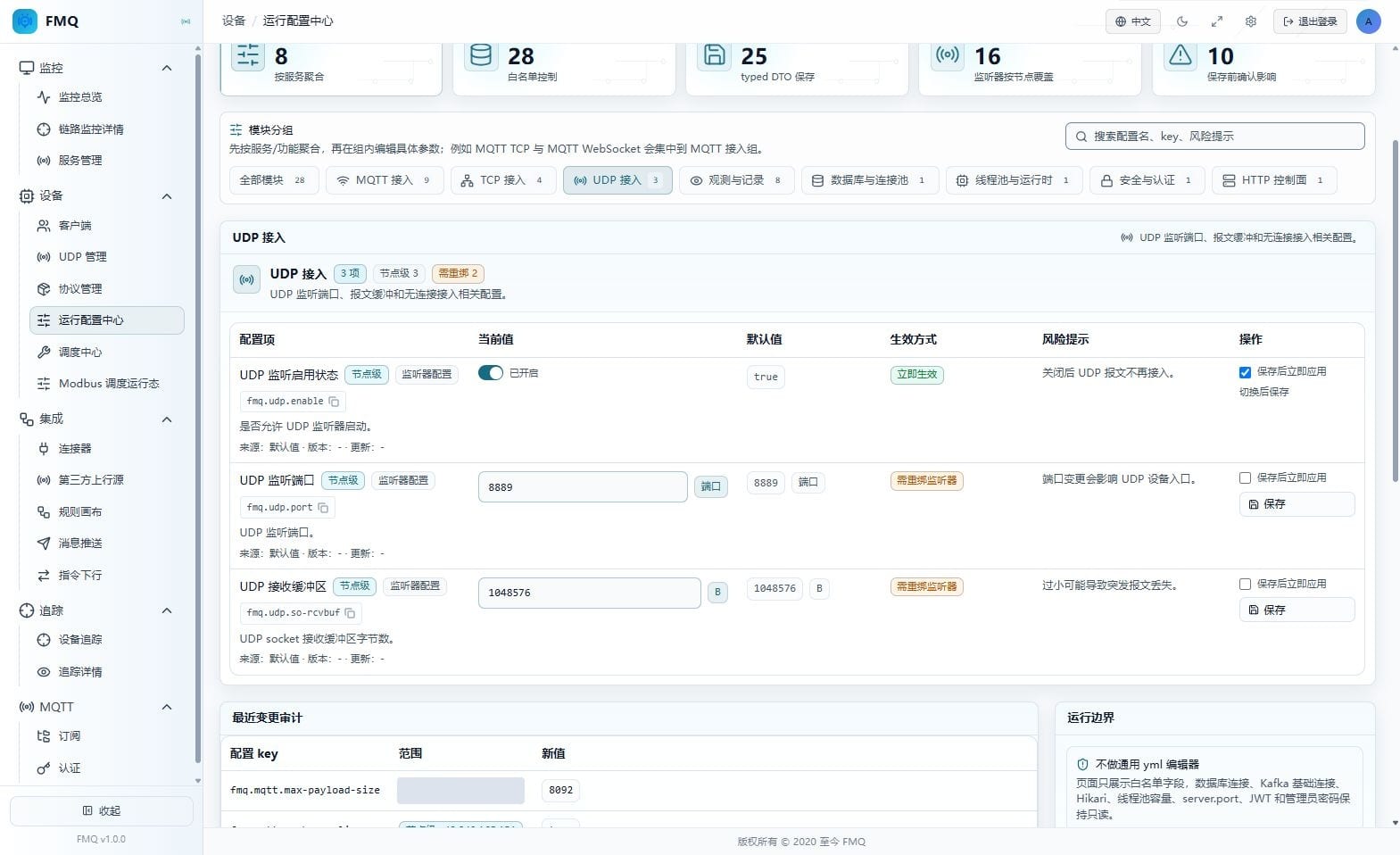
Figure: UDP Access Configuration in the real Runtime Configuration Center; the fields of this section are explained item by item below the figure.
Field Descriptions
| Field / Control | Description |
|---|---|
| UDP listener enabled status | Determines whether the UDP listener is allowed to receive datagrams; toggling saves directly. The current page value is "true", the default is "true", and the effective method is "effective immediately". |
| UDP listener port | The target port to which UDP devices send datagrams. The current page value is "8889", the default is "8889", and the effective method is "requires listener rebind". |
| UDP receive buffer | The receive buffer size of the operating-system UDP socket. The current page value is "1048576", the default is "1048576", and the effective method is "requires listener rebind". |
6. Observation Default Policy
Location: Device -> Runtime Configuration Center
Select the corresponding module and read the current values, defaults, effective methods, and risk notices of Observation Default Policy; this round does not edit or save.
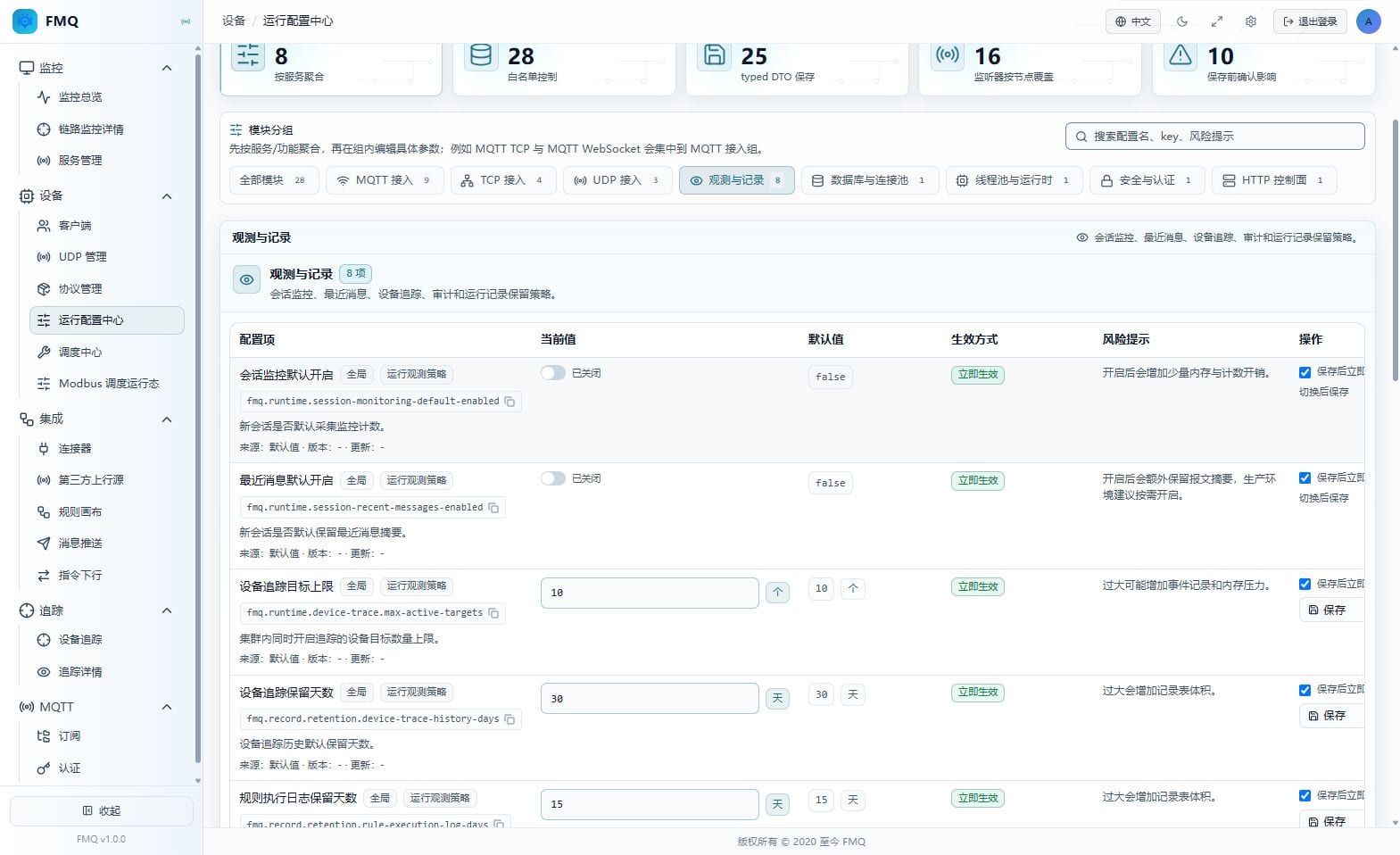
Figure: Observation Default Policy in the real Runtime Configuration Center; the fields of this section are explained item by item below the figure.
Field Descriptions
| Field / Control | Description |
|---|---|
| Session monitoring enabled by default | Determines whether new sessions collect send/receive and activity counters by default. The current page value is "false", the default is "false", and the effective method is "effective immediately". |
| Recent messages enabled by default | Determines whether new sessions retain recent packet summaries by default. The current page value is "false", the default is "false", and the effective method is "effective immediately". |
| Device trace target limit | Limits the number of devices traced simultaneously within the cluster. The current page value is "10", the default is "10", and the effective method is "effective immediately". |
| Device trace retention days | The default retention period of device trace history. The current page value is "30", the default is "30", and the effective method is "effective immediately". |
7. Record Retention and Cleanup Policy
Location: Device -> Runtime Configuration Center
Select the corresponding module and read the current values, defaults, effective methods, and risk notices of Record Retention and Cleanup Policy; this round does not edit or save.
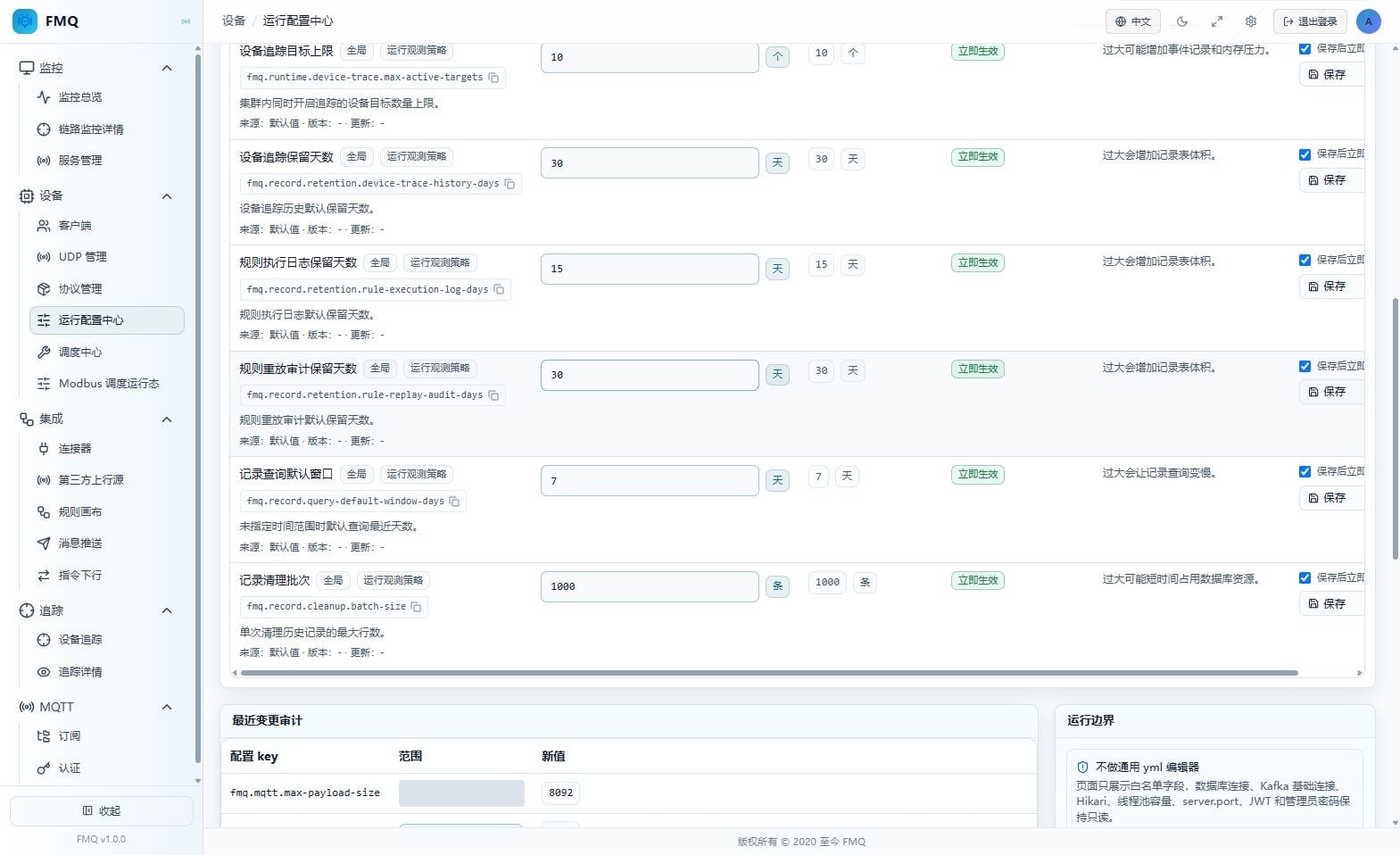
Figure: Record Retention and Cleanup Policy in the real Runtime Configuration Center; the fields of this section are explained item by item below the figure.
Field Descriptions
| Field / Control | Description |
|---|---|
| Rule execution log retention days | The default retention period of rule execution logs. The current page value is "15", the default is "15", and the effective method is "effective immediately". |
| Rule replay audit retention days | The default retention period of rule replay audits. The current page value is "30", the default is "30", and the effective method is "effective immediately". |
| Record query default window | The number of recent days read by default when a query does not specify a time range. The current page value is "7", the default is "7", and the effective method is "effective immediately". |
| Record cleanup batch | The maximum number of rows cleaned up per history record cleanup run. The current page value is "1000", the default is "1000", and the effective method is "effective immediately". |
8. Database Connection Startup Items
Location: Device -> Runtime Configuration Center
Select the corresponding module and read the current values, defaults, effective methods, and risk notices of Database Connection Startup Items; this round does not edit or save.
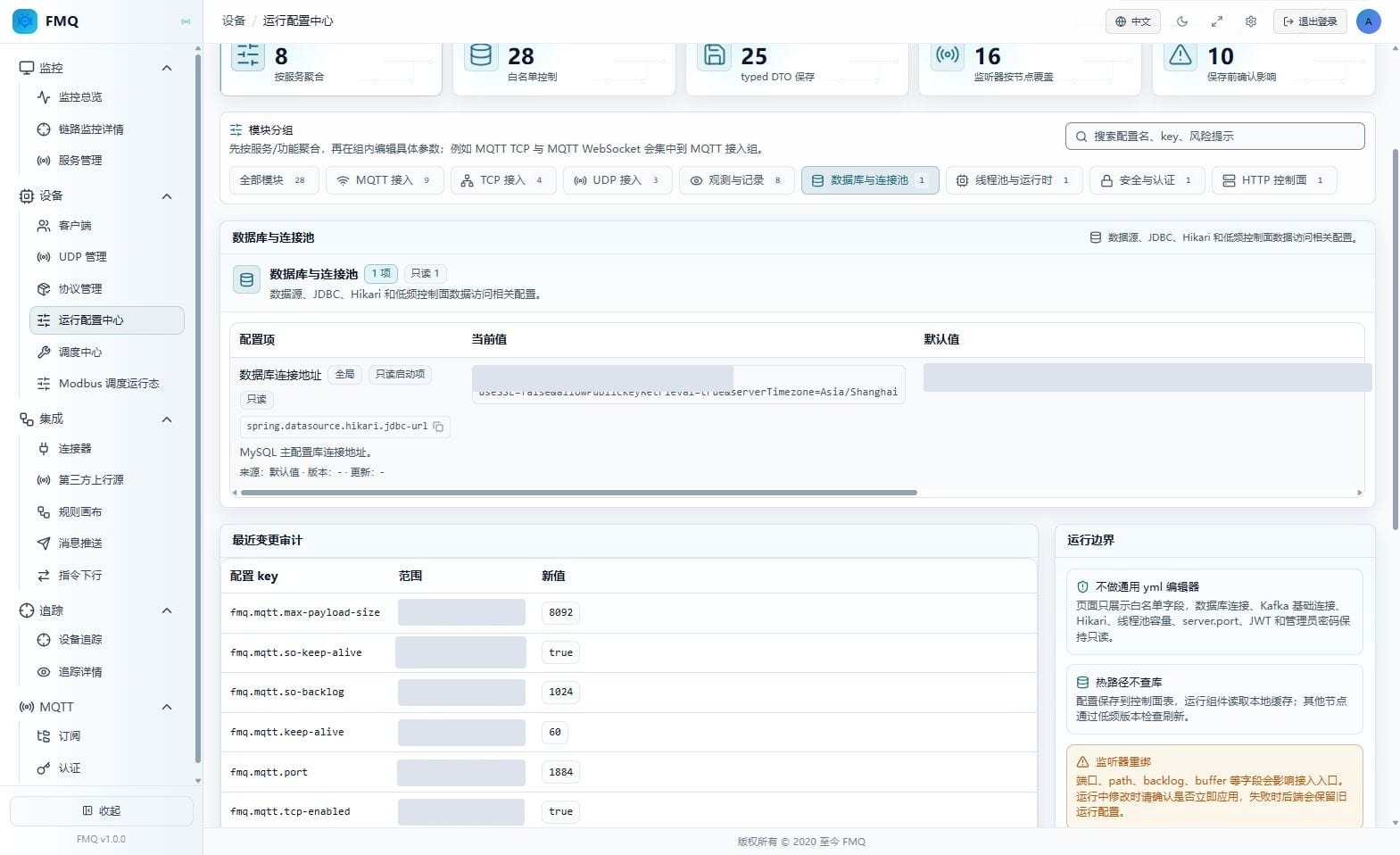
Figure: Database Connection Startup Items in the real Runtime Configuration Center; the fields of this section are explained item by item below the figure.
Field Descriptions
| Field / Control | Description |
|---|---|
| Database connection address | The connection address of the MySQL main configuration database; displayed on this page only and cannot be modified at runtime. The current page value is "current JDBC address", the default is "current JDBC address", and the effective method is "application restart". |
9. Event Bus Startup Items
Location: Device -> Runtime Configuration Center
Select the corresponding module and read the current values, defaults, effective methods, and risk notices of Event Bus Startup Items; this round does not edit or save.
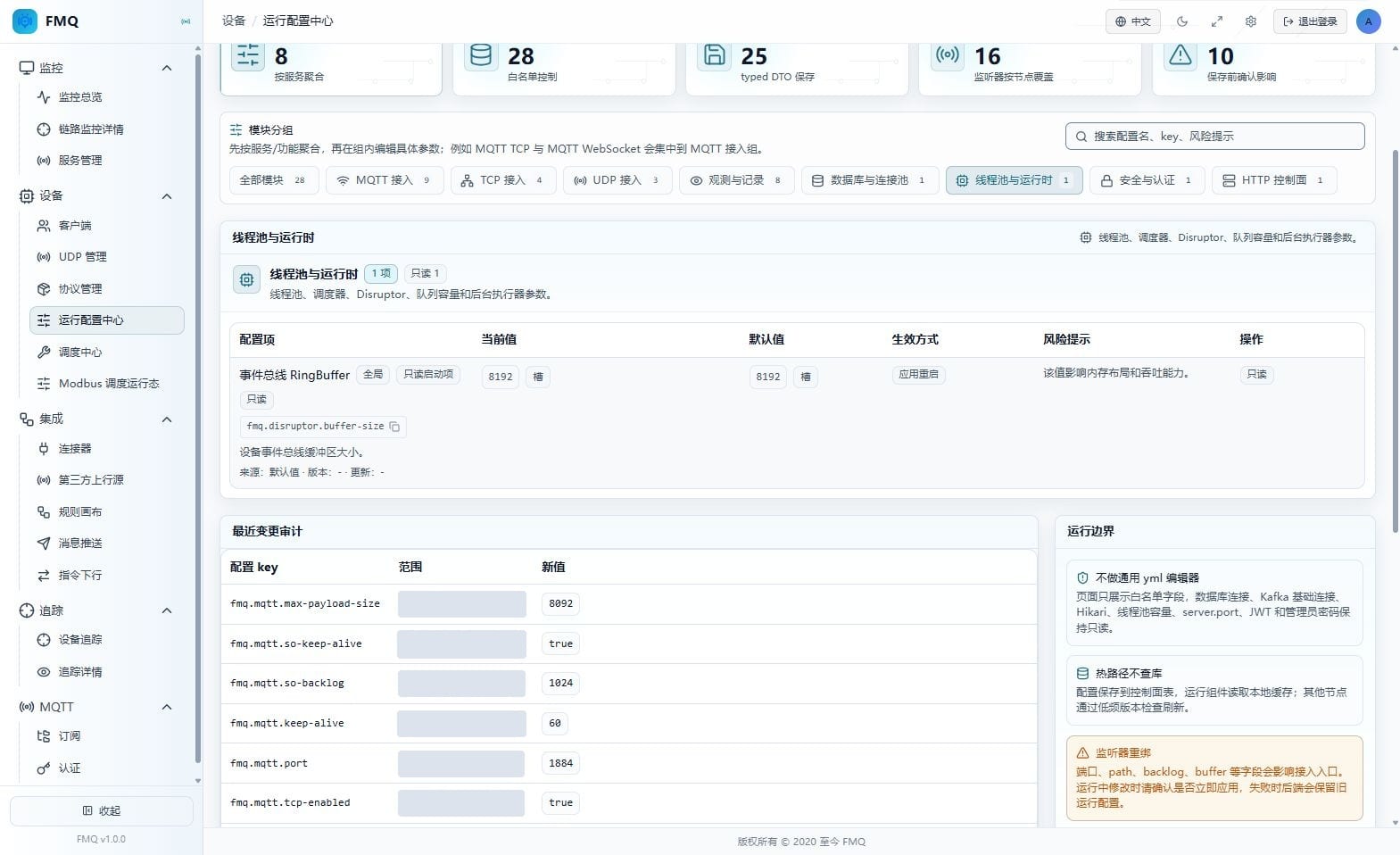
Figure: Event Bus Startup Items in the real Runtime Configuration Center; the fields of this section are explained item by item below the figure.
Field Descriptions
| Field / Control | Description |
|---|---|
| Event bus RingBuffer | The ring buffer capacity of the device event bus; it can only be adjusted on the deployment side. The current page value is "8192", the default is "8192", and the effective method is "application restart". |
10. FastBee WEB Address
Location: Device -> Runtime Configuration Center
Select the corresponding module and read the current values, defaults, effective methods, and risk notices of FastBee WEB Address; this round does not edit or save.
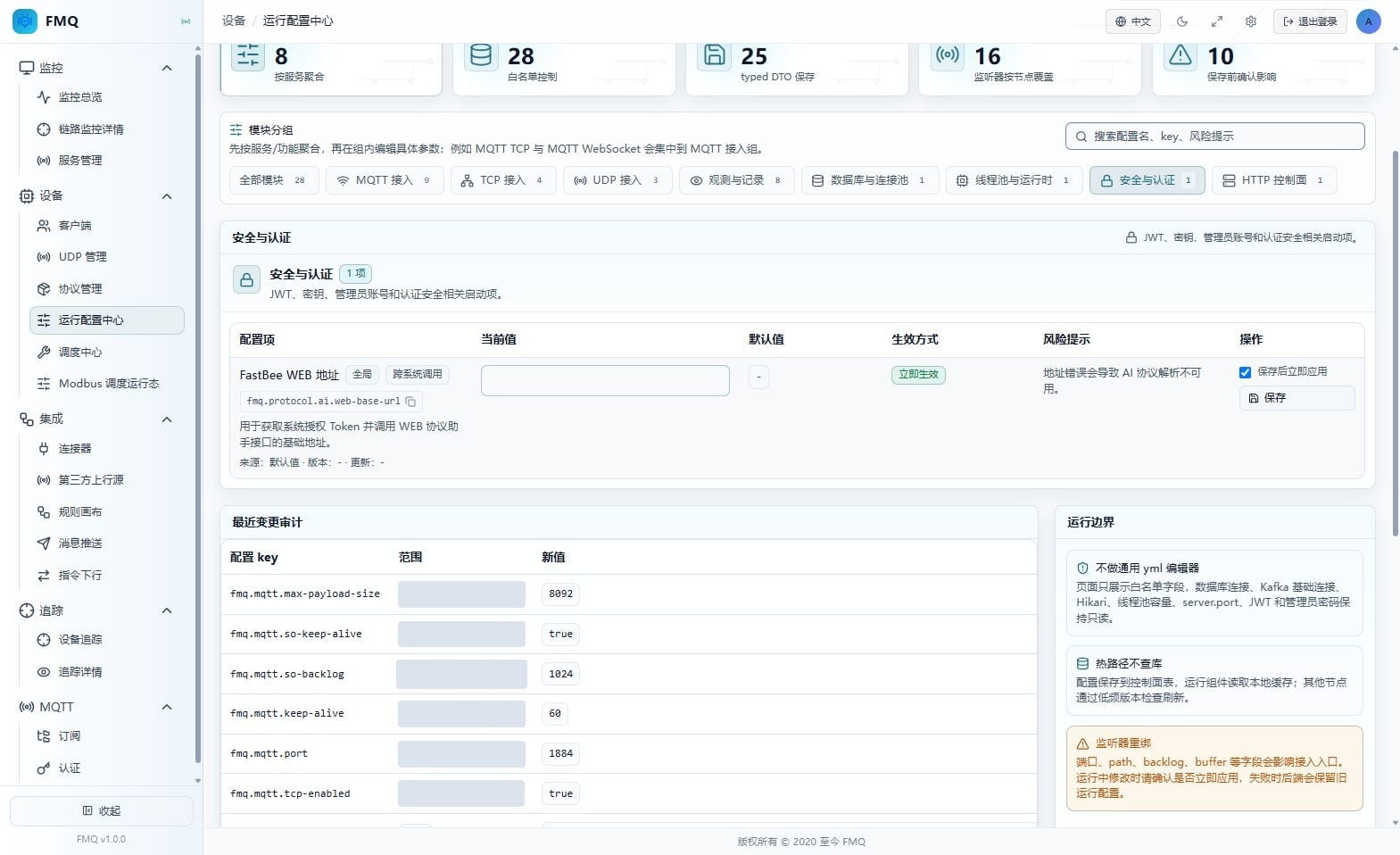
Figure: FastBee WEB Address in the real Runtime Configuration Center; the fields of this section are explained item by item below the figure.
Field Descriptions
| Field / Control | Description |
|---|---|
| FastBee WEB address | The base address FMQ uses to call the FastBee WEB protocol assistant API; the Token is not filled in on this page. The current page value is "empty", the default is "empty", and the effective method is "effective immediately". |
11. HTTP Control Plane Startup Items
Location: Device -> Runtime Configuration Center
Select the corresponding module and read the current values, defaults, effective methods, and risk notices of HTTP Control Plane Startup Items; this round does not edit or save.
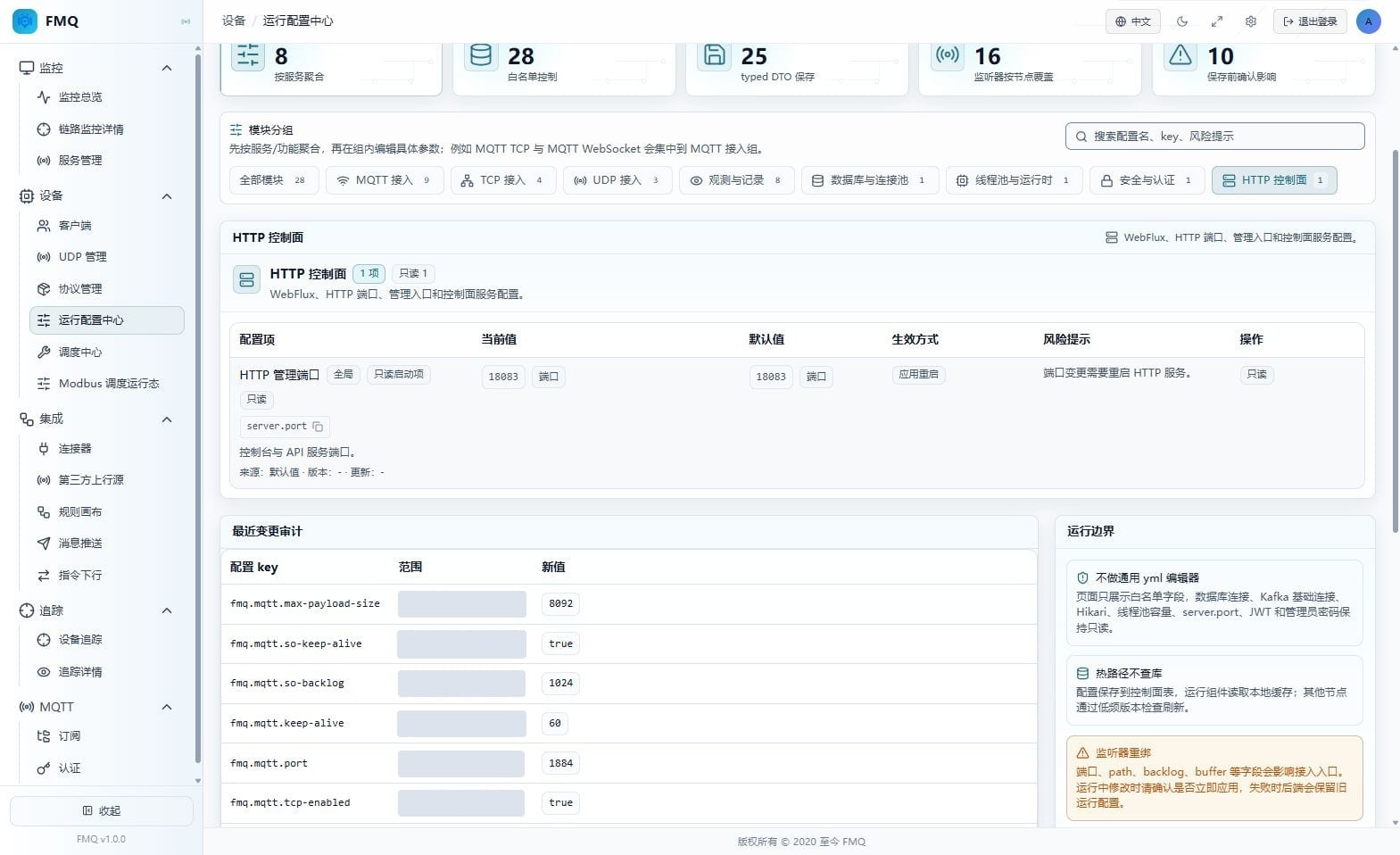
Figure: HTTP Control Plane Startup Items in the real Runtime Configuration Center; the fields of this section are explained item by item below the figure.
Field Descriptions
| Field / Control | Description |
|---|---|
| HTTP management port | The HTTP port used by the console and API service; read-only display. The current page value is "18083", the default is "18083", and the effective method is "application restart". |
12. Recent Changes and Runtime Boundaries
Location: Device -> Runtime Configuration Center -> bottom of the page
Scroll to Recent Change Audit, read the configuration key, scope, new value, operator, result, and time, then review the runtime boundaries on the right.
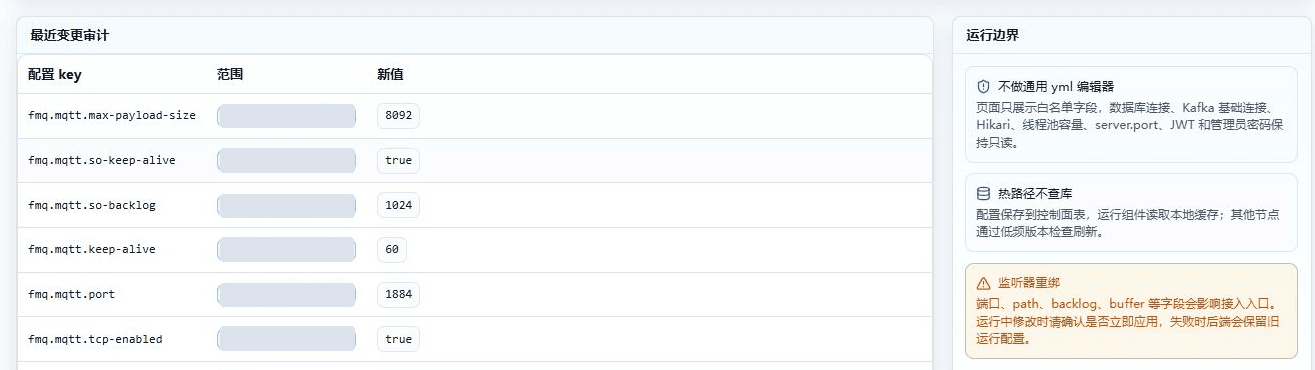
Figure: Recent MQTT configuration changes and runtime boundaries cropped from the real page; long-topology request identifiers are not included.
Field Descriptions
| Field / Control | Description |
|---|---|
| Configuration key | Identifies the specific runtime configuration item that changed. |
| Scope | Shows whether the change is global or for a specified node. |
| New value | Records the new configuration value after saving. |
| Operator | Records the source of this change or the operating account. |
| Result | Shows whether this change succeeded. |
| Time | Records when the change occurred. |
| Not a general-purpose yml editor | Infrastructure fields such as database, thread pool, and HTTP port are read-only. |
| Hot path does not query the database | Runtime components prefer reading the local cache; other nodes perceive global changes periodically. |
| Listener rebinding | Fields such as port, path, backlog, and buffer may affect device entries. |
13. Locate Fields by Module and Keyword
Location: Device -> Runtime Configuration Center
Select a Module Group first, then enter a keyword in Search Configuration Name, Key, Risk Notice; clearing the search restores all fields of the module.
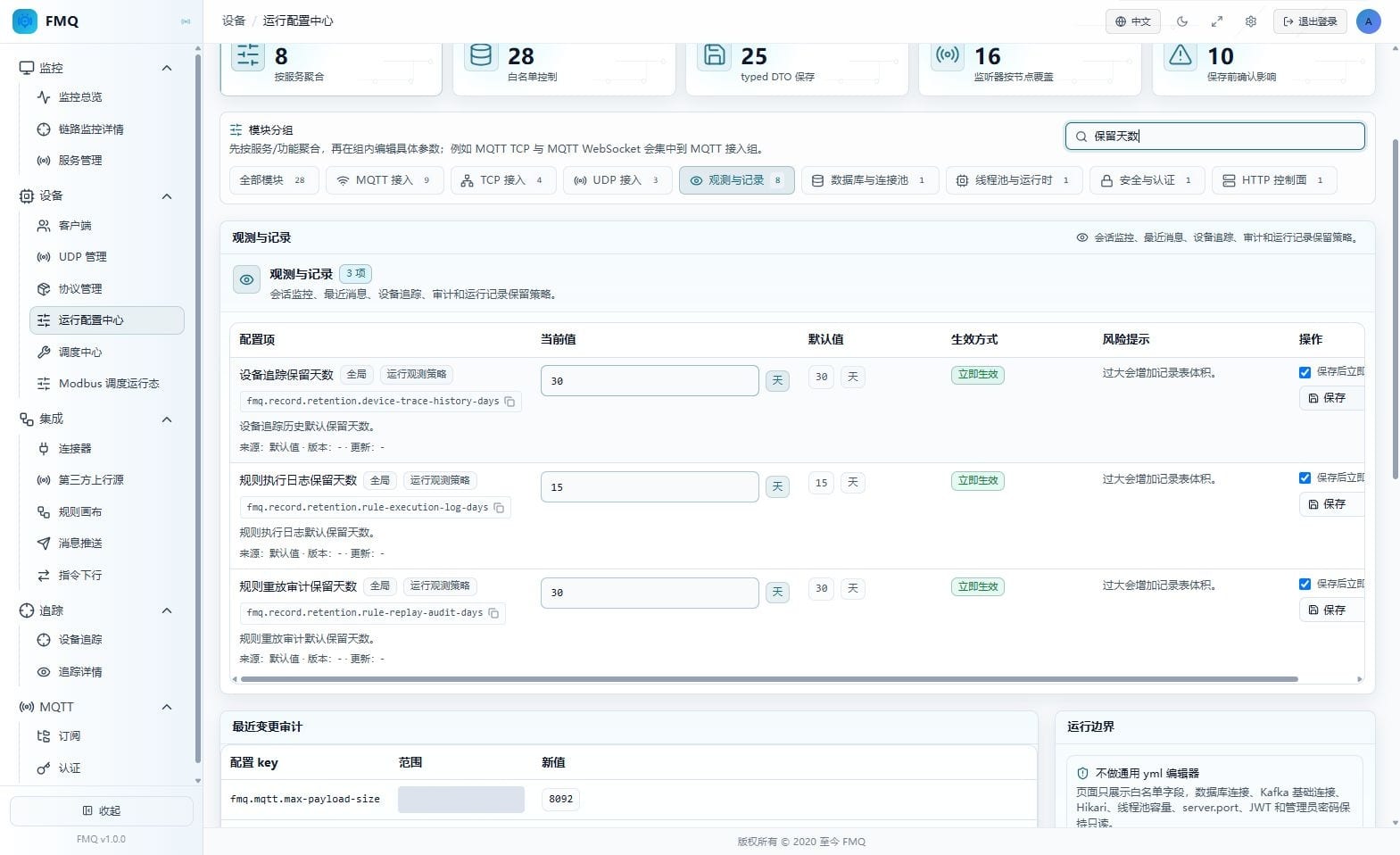
Figure: The operation entry on the real page; this step only describes the operation method and expected result, and no write operation was performed.
Field Descriptions
| Field / Control | Description |
|---|---|
| Search configuration name, key, risk notice | Narrows the field range by Chinese name, original key, effective method, or risk notice.; Narrows the field range by Chinese name, original key, effective method, or risk notice. Optional · Recommended: keep the current value; verify the impact scope before changing · Example: use the on-site planned value |
| Device trace retention days | The default retention period of device trace history.; Global; effective immediately Required · Recommended: keep the current value 30 for now; adjust after assessing on-site capacity · Example: 30 |
| Rule execution log retention days | The default retention period of rule execution logs.; Global; effective immediately Required · Recommended: keep the current value 15 for now; adjust after assessing on-site capacity · Example: 15 |
| Rule replay audit retention days | The default retention period of rule replay audits.; Global; effective immediately Required · Recommended: keep the current value 30 for now; adjust after assessing on-site capacity · Example: 30 |
Operation Boundary
Expected result (not executed): Expected: the page keeps only the fields that match both the current module and the keyword; filtering does not save configuration. Risks and recovery: when the result is empty, clear the keyword first, then check whether the wrong module was selected.
14. Understand That Toggling a Switch Saves Immediately
Location: Device -> Runtime Configuration Center
Confirm the target scope and current connections before toggling Session Monitoring Enabled by Default or Recent Messages Enabled by Default; a switch change invokes saving immediately, and no separate save button appears.
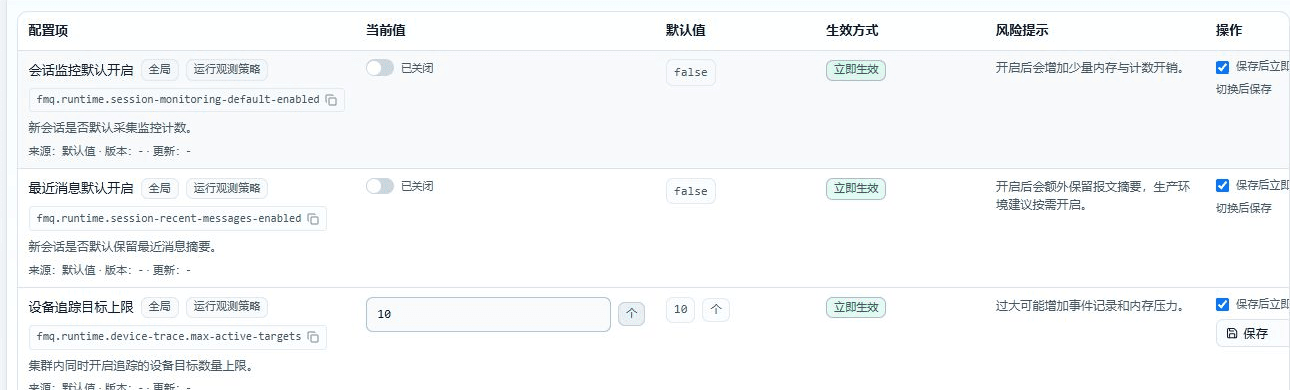
Figure: The operation entry on the real page; this step only describes the operation method and expected result, and no write operation was performed.
Field Descriptions
| Field / Control | Description |
|---|---|
| Session monitoring enabled by default | Determines whether new sessions collect send/receive and activity counters by default.; Global; effective immediately Required · Recommended: keep the current value false for now; adjust after assessing on-site capacity · Example: false |
| Recent messages enabled by default | Determines whether new sessions retain recent packet summaries by default.; Global; effective immediately Required · Recommended: keep the current value false for now; adjust after assessing on-site capacity · Example: false |
| Apply immediately after save | Determines whether listener-related changes are rebound immediately; checked by default for ordinary effective-immediately fields.; Determines whether listener-related changes are rebound immediately; checked by default for ordinary effective-immediately fields. Optional · Recommended: keep the current value; verify the impact scope before changing · Example: use the on-site planned value |
Operation Boundary
Expected result (not executed): Expected (not executed): the page reports a successful save and re-reads the current value; only the policy of new sessions that read the configuration after the save is affected. Risks and recovery: if a switch is toggled by mistake, switch it back to the original value immediately and confirm the two records in Recent Change Audit.
15. Distinguish MQTT Immediate Effect from Rebinding
Location: Device -> Runtime Configuration Center
Review the Effective Method row by row: the enabled status and default heartbeat can take effect immediately, while the port and backlog require confirming whether Apply Immediately After Save is checked.
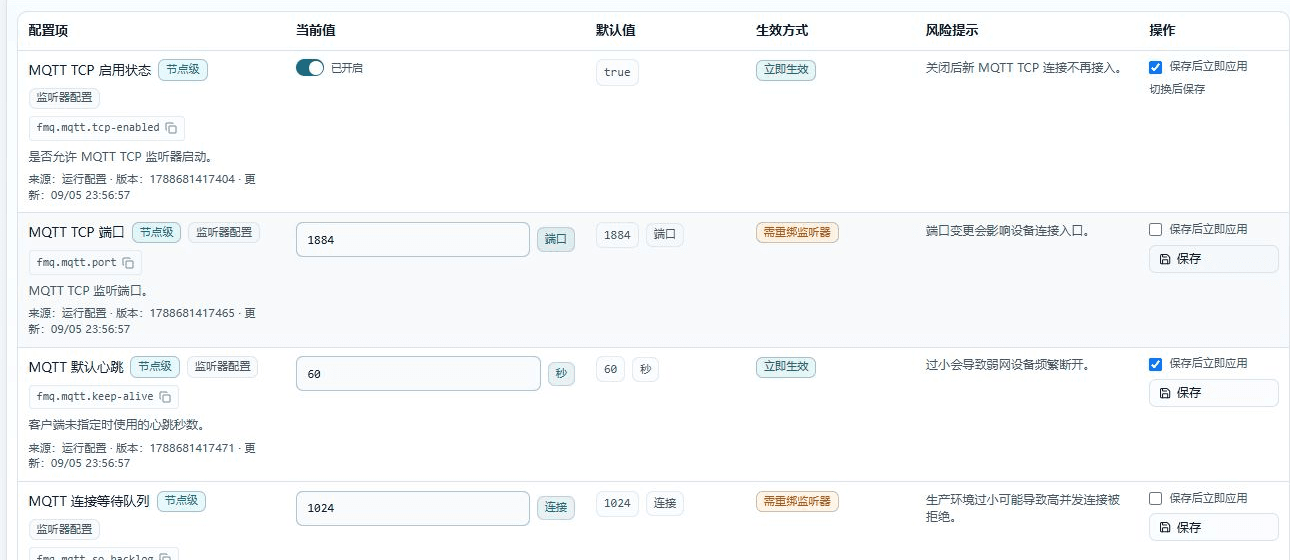
Figure: The operation entry on the real page; this step only describes the operation method and expected result, and no write operation was performed.
Field Descriptions
| Field / Control | Description |
|---|---|
| MQTT TCP enabled status | Determines whether the MQTT TCP listener is allowed to start; toggling saves directly.; Current node; effective immediately Required · Recommended: keep the current value true for now; adjust after assessing on-site capacity · Example: true |
| MQTT TCP port | The external listening port of MQTT TCP; the device connection address must match it.; Current node; requires listener rebind Required · Recommended: keep the current value 1884 for now; adjust after assessing on-site capacity · Example: 1884 |
| MQTT default heartbeat | The default keepalive time used when the client does not declare a heartbeat.; Current node; effective immediately Required · Recommended: keep the current value 60 for now; adjust after assessing on-site capacity · Example: 60 |
| MQTT connection backlog | The length of the connection queue waiting for application acceptance after the TCP handshake completes.; Current node; requires listener rebind Required · Recommended: keep the current value 1024 for now; adjust after assessing on-site capacity · Example: 1024 |
| Apply immediately after save | Determines whether listener-related changes are rebound immediately; checked by default for ordinary effective-immediately fields.; Determines whether listener-related changes are rebound immediately; checked by default for ordinary effective-immediately fields. Optional · Recommended: keep the current value; verify the impact scope before changing · Example: use the on-site planned value |
Operation Boundary
Expected result (not executed): Expected (not executed): after saving, effective-immediately fields update the runtime configuration; rebind fields are rebound immediately or wait for the next listener restart depending on the checkbox. Risks and recovery: cancel the save when the maintenance window cannot be confirmed; do not apply the same judgment to all MQTT fields.
16. Configure the MQTT Port, Queue, and Socket Keepalive
Location: Device -> Runtime Configuration Center
Record the old values before modifying the MQTT TCP Port, Connection Backlog, or Socket KeepAlive; check Apply Immediately After Save only when an immediate rebind is needed.
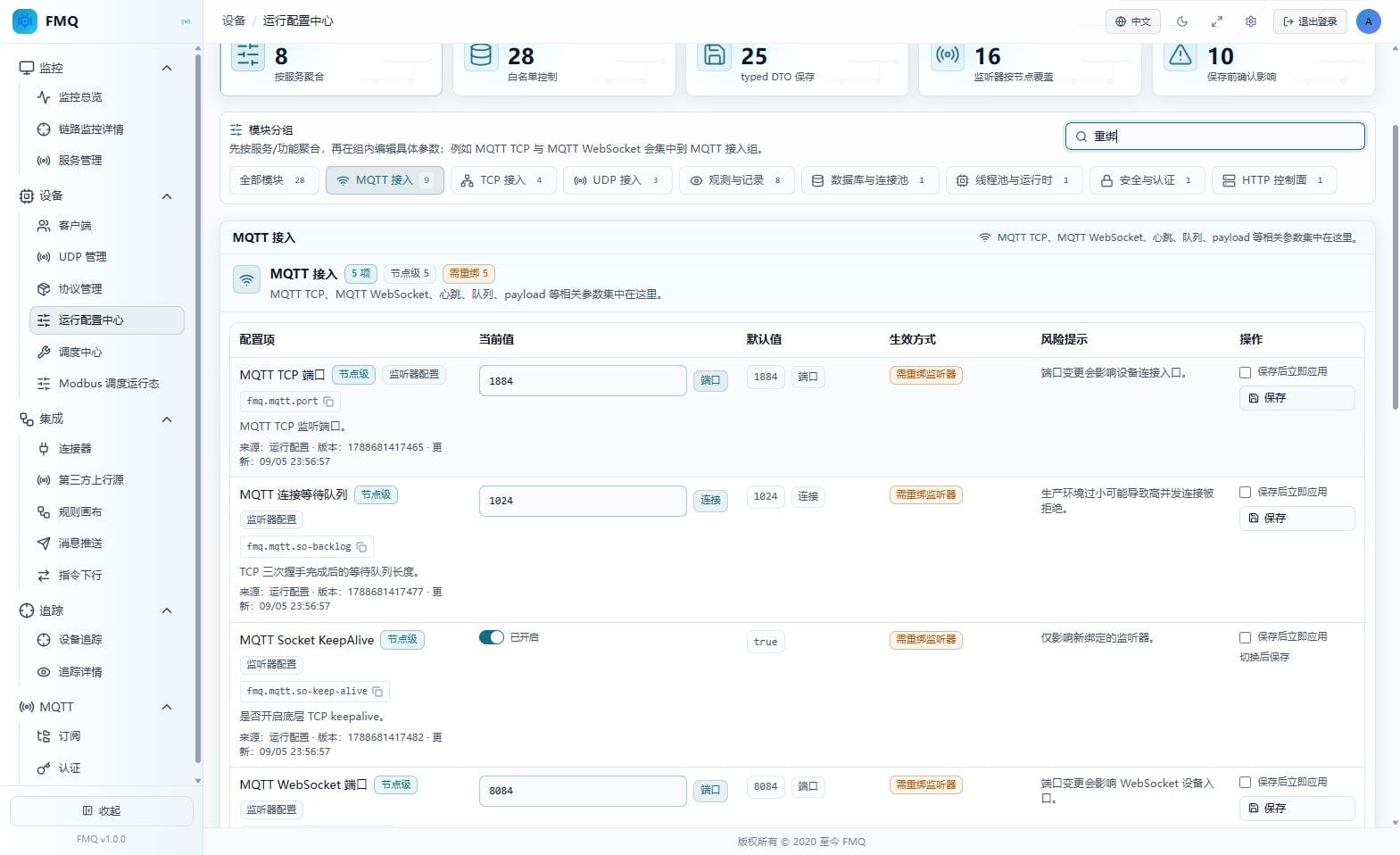
Figure: The operation entry on the real page; this step only describes the operation method and expected result, and no write operation was performed.
Field Descriptions
| Field / Control | Description |
|---|---|
| MQTT TCP port | The external listening port of MQTT TCP; the device connection address must match it.; Current node; requires listener rebind Required · Recommended: keep the current value 1884 for now; adjust after assessing on-site capacity · Example: 1884 |
| MQTT connection backlog | The length of the connection queue waiting for application acceptance after the TCP handshake completes.; Current node; requires listener rebind Required · Recommended: keep the current value 1024 for now; adjust after assessing on-site capacity · Example: 1024 |
| MQTT Socket KeepAlive | Enables operating-system TCP keepalive; affects only listeners after rebinding.; Current node; requires listener rebind Required · Recommended: keep the current value true for now; adjust after assessing on-site capacity · Example: true |
| MQTT WebSocket port | The listening port used for the WebSocket MQTT handshake.; Current node; requires listener rebind Required · Recommended: keep the current value 8084 for now; adjust after assessing on-site capacity · Example: 8084 |
| Apply immediately after save | Determines whether listener-related changes are rebound immediately; checked by default for ordinary effective-immediately fields.; Determines whether listener-related changes are rebound immediately; checked by default for ordinary effective-immediately fields. Optional · Recommended: keep the current value; verify the impact scope before changing · Example: use the on-site planned value |
Operation Boundary
Expected result (not executed): Expected (not executed): after a successful immediate rebind, Service Management shows the new listener parameters; when not applied immediately, the configuration is saved and the current listener keeps using the old binding until restart. Risks and recovery: stop making further changes when a rebind fails; the backend does not persist the new value after a runtime update failure, so confirm first that the old listener is still usable.
17. Synchronize the WebSocket Port and Path
Location: Device -> Runtime Configuration Center
When modifying the MQTT WebSocket Port or path, adjust the client/reverse proxy in sync; the backend automatically prepends the leading slash when the path does not start with one.
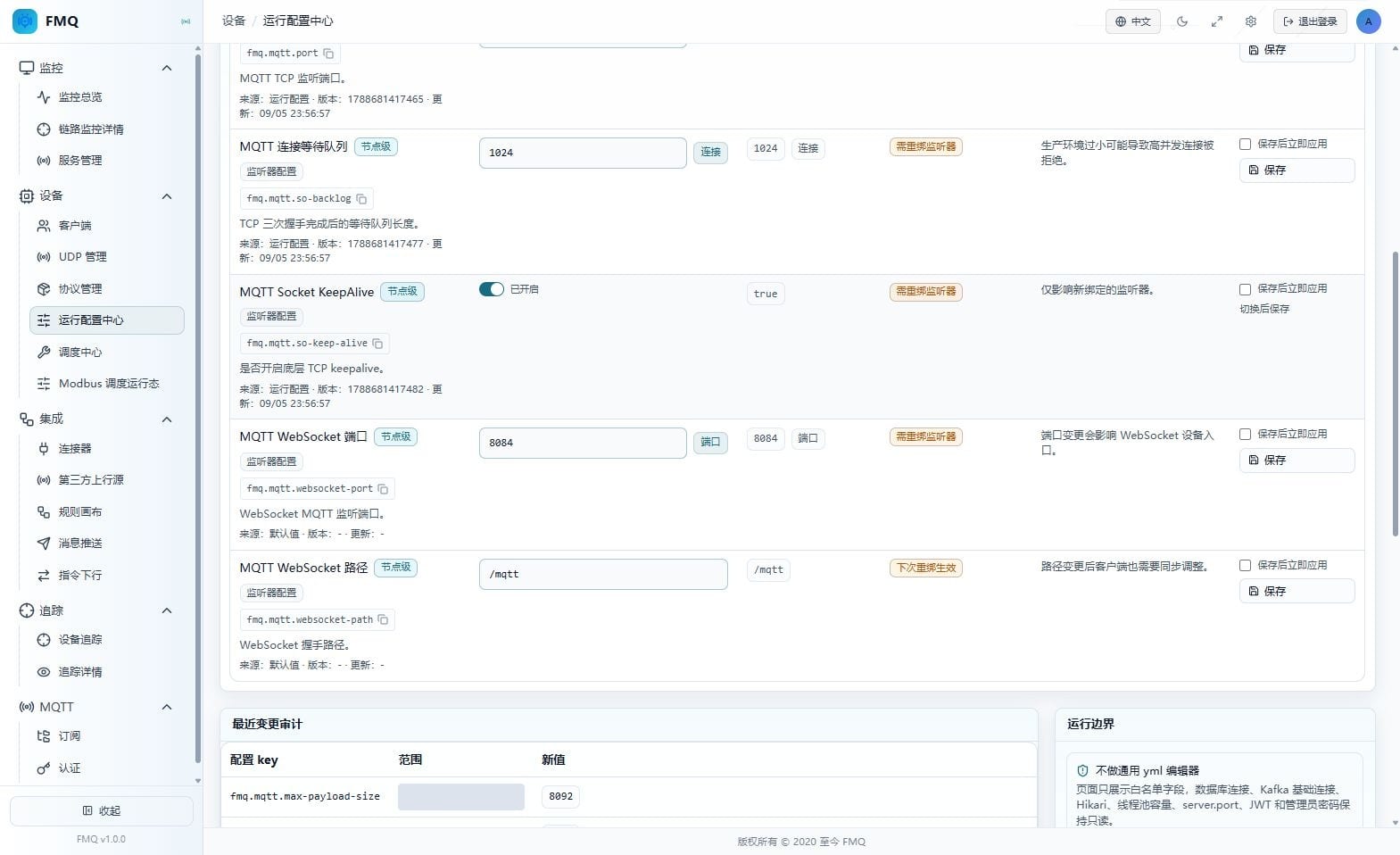
Figure: The operation entry on the real page; this step only describes the operation method and expected result, and no write operation was performed.
Field Descriptions
| Field / Control | Description |
|---|---|
| MQTT WebSocket port | The listening port used for the WebSocket MQTT handshake.; Current node; requires listener rebind Required · Recommended: keep the current value 8084 for now; adjust after assessing on-site capacity · Example: 8084 |
| MQTT WebSocket path | The WebSocket handshake path; the backend automatically prepends the leading slash.; Current node; takes effect on next rebind Required · Recommended: keep the current value /mqtt for now; adjust after assessing on-site capacity · Example: /mqtt |
| Apply immediately after save | Determines whether listener-related changes are rebound immediately; checked by default for ordinary effective-immediately fields.; Determines whether listener-related changes are rebound immediately; checked by default for ordinary effective-immediately fields. Optional · Recommended: keep the current value; verify the impact scope before changing · Example: use the on-site planned value |
Operation Boundary
Expected result (not executed): Expected (not executed): the port takes effect according to the rebind choice; the path takes effect at the latest after the next listener rebind, and clients must use the same path to complete the handshake. Risks and recovery: when the handshake fails, restore the old port and path, and check proxy forwarding and the listener status in Service Management.
18. Maintain TCP Listener Parameters
Location: Device -> Runtime Configuration Center
In the TCP module, verify the Listener Enabled Status, Port, Heartbeat, and Backlog separately; the port, heartbeat, and backlog are all handled as rebind fields.
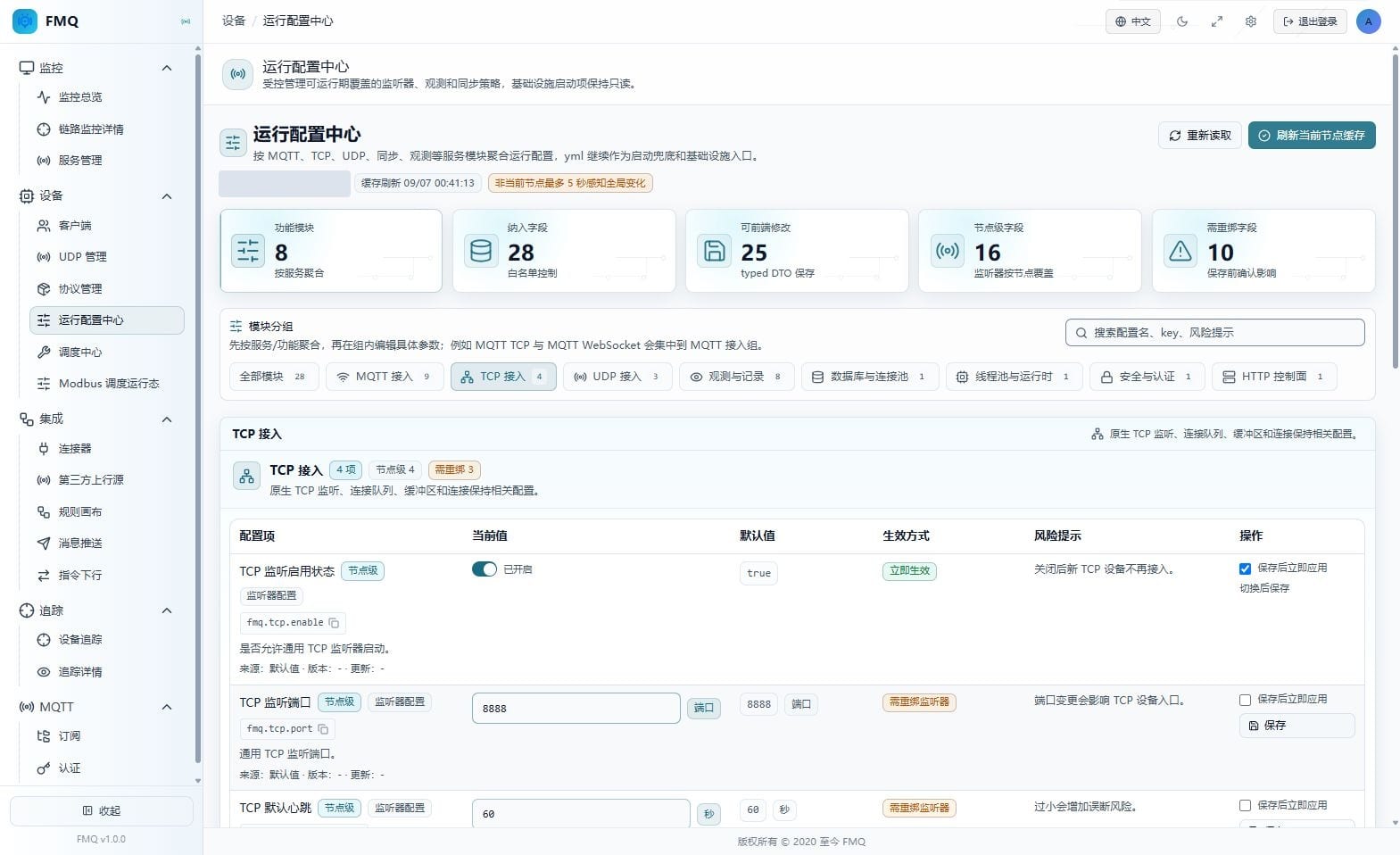
Figure: The operation entry on the real page; this step only describes the operation method and expected result, and no write operation was performed.
Field Descriptions
| Field / Control | Description |
|---|---|
| TCP listener enabled status | Determines whether the general TCP listener is allowed to start; toggling saves directly.; Current node; effective immediately Required · Recommended: keep the current value true for now; adjust after assessing on-site capacity · Example: true |
| TCP listener port | The listening port for general TCP device connections.; Current node; requires listener rebind Required · Recommended: keep the current value 8888 for now; adjust after assessing on-site capacity · Example: 8888 |
| TCP default heartbeat | The idle keepalive time for general TCP connections.; Current node; requires listener rebind Required · Recommended: keep the current value 60 for now; adjust after assessing on-site capacity · Example: 60 |
| TCP connection backlog | The length of the connection queue the TCP listener waits for the application to accept.; Current node; requires listener rebind Required · Recommended: keep the current value 1024 for now; adjust after assessing on-site capacity · Example: 1024 |
| Apply immediately after save | Determines whether listener-related changes are rebound immediately; checked by default for ordinary effective-immediately fields.; Determines whether listener-related changes are rebound immediately; checked by default for ordinary effective-immediately fields. Optional · Recommended: keep the current value; verify the impact scope before changing · Example: use the on-site planned value |
Operation Boundary
Expected result (not executed): Expected (not executed): after saving, the current node uses the new configuration; choosing immediate apply rebinds the TCP listener and may affect connections. Risks and recovery: review TCP sessions before maintenance; on abnormality, restore the old values and restart or rebind the TCP listener.
19. Maintain the UDP Port and Receive Buffer
Location: Device -> Runtime Configuration Center
In the UDP module, confirm that the UDP Listener Port matches the device target, then evaluate the receive buffer against burst traffic; choose rebind only when immediate effect is needed.
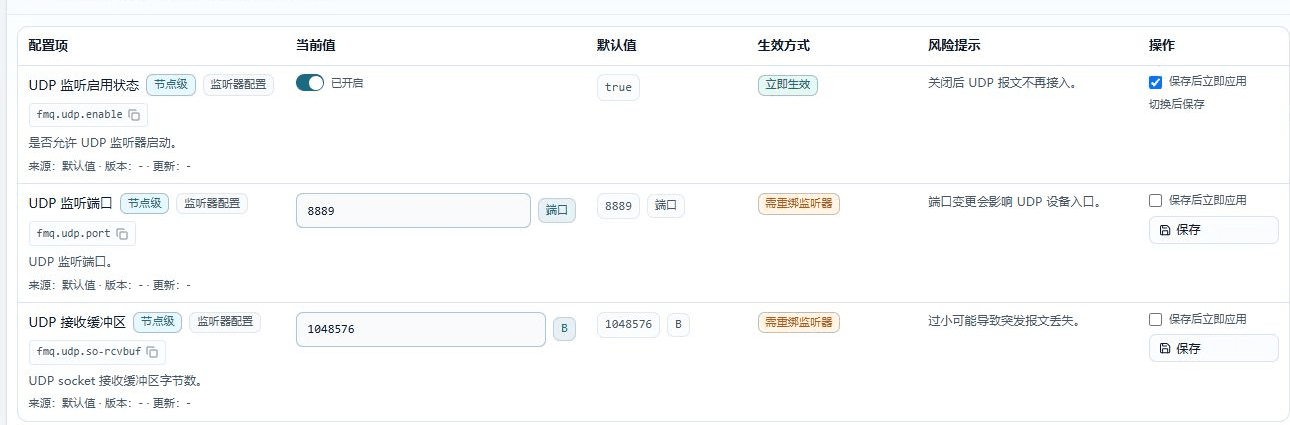
Figure: The operation entry on the real page; this step only describes the operation method and expected result, and no write operation was performed.
Field Descriptions
| Field / Control | Description |
|---|---|
| UDP listener enabled status | Determines whether the UDP listener is allowed to receive datagrams; toggling saves directly.; Current node; effective immediately Required · Recommended: keep the current value true for now; adjust after assessing on-site capacity · Example: true |
| UDP listener port | The target port to which UDP devices send datagrams.; Current node; requires listener rebind Required · Recommended: keep the current value 8889 for now; adjust after assessing on-site capacity · Example: 8889 |
| UDP receive buffer | The receive buffer size of the operating-system UDP socket.; Current node; requires listener rebind Required · Recommended: keep the current value 1048576 for now; adjust after assessing on-site capacity · Example: 1048576 |
| Apply immediately after save | Determines whether listener-related changes are rebound immediately; checked by default for ordinary effective-immediately fields.; Determines whether listener-related changes are rebound immediately; checked by default for ordinary effective-immediately fields. Optional · Recommended: keep the current value; verify the impact scope before changing · Example: use the on-site planned value |
Operation Boundary
Expected result (not executed): Expected (not executed): after rebinding, UDP devices send to the new port; the new buffer value is used for the rebound socket. Risks and recovery: when no datagrams are received, restore the old port and check the device target, firewall, and Service Management status.
20. Adjust Record Retention Periods
Location: Device -> Runtime Configuration Center
Fill in the retention days for device trace, rule execution logs, and rule replay audits according to audit and capacity requirements, confirm the unit, and click Save; these fields are global in scope.
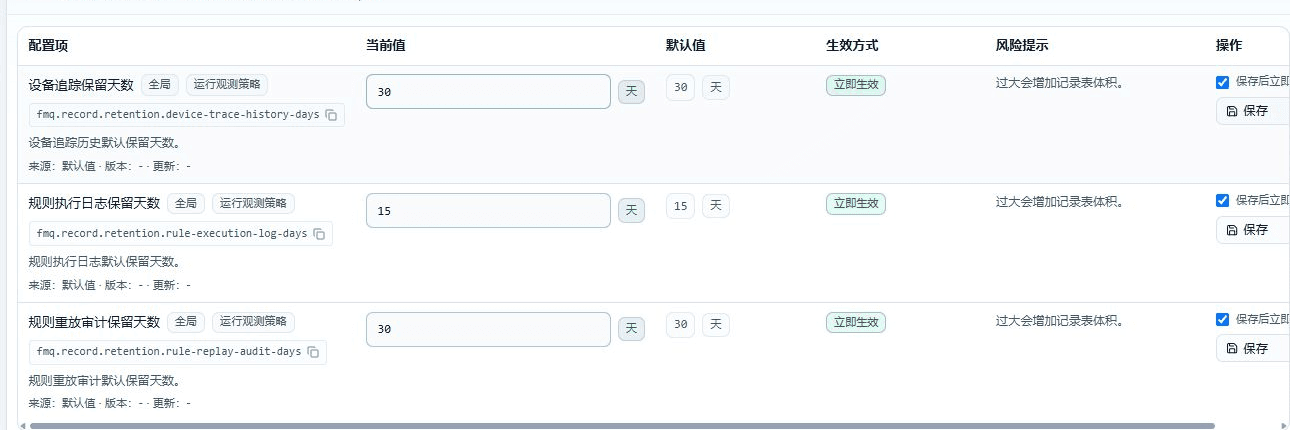
Figure: The operation entry on the real page; this step only describes the operation method and expected result, and no write operation was performed.
Field Descriptions
| Field / Control | Description |
|---|---|
| Device trace retention days | The default retention period of device trace history.; Global; effective immediately Required · Recommended: keep the current value 30 for now; adjust after assessing on-site capacity · Example: 30 |
| Rule execution log retention days | The default retention period of rule execution logs.; Global; effective immediately Required · Recommended: keep the current value 15 for now; adjust after assessing on-site capacity · Example: 15 |
| Rule replay audit retention days | The default retention period of rule replay audits.; Global; effective immediately Required · Recommended: keep the current value 30 for now; adjust after assessing on-site capacity · Example: 30 |
| Apply immediately after save | Determines whether listener-related changes are rebound immediately; checked by default for ordinary effective-immediately fields.; Determines whether listener-related changes are rebound immediately; checked by default for ordinary effective-immediately fields. Optional · Recommended: keep the current value; verify the impact scope before changing · Example: use the on-site planned value |
Operation Boundary
Expected result (not executed): Expected (not executed): after saving, the local cache reads the new retention periods immediately, and other nodes perceive them through periodic refresh after at most about 5 seconds. Risks and recovery: when record tables grow abnormally, restore the old values, then check the cleanup tasks and storage capacity.
21. Adjust the Query Window and Cleanup Batch
Location: Device -> Runtime Configuration Center
Assess the data volume of the record tables first, then modify the Record Query Default Window and Record Cleanup Batch; an oversized query window slows queries, and an oversized cleanup batch may occupy the database for a short time.
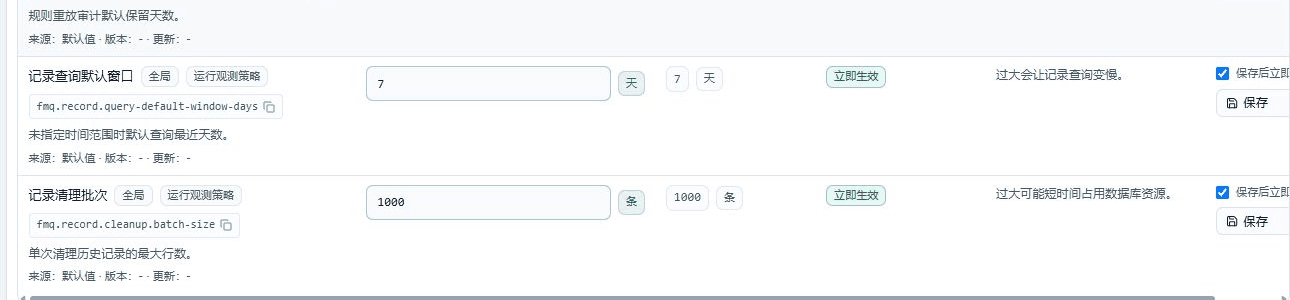
Figure: The operation entry on the real page; this step only describes the operation method and expected result, and no write operation was performed.
Field Descriptions
| Field / Control | Description |
|---|---|
| Record query default window | The number of recent days read by default when a query does not specify a time range.; Global; effective immediately Required · Recommended: keep the current value 7 for now; adjust after assessing on-site capacity · Example: 7 |
| Record cleanup batch | The maximum number of rows cleaned up per history record cleanup run.; Global; effective immediately Required · Recommended: keep the current value 1000 for now; adjust after assessing on-site capacity · Example: 1000 |
| Apply immediately after save | Determines whether listener-related changes are rebound immediately; checked by default for ordinary effective-immediately fields.; Determines whether listener-related changes are rebound immediately; checked by default for ordinary effective-immediately fields. Optional · Recommended: keep the current value; verify the impact scope before changing · Example: use the on-site planned value |
Operation Boundary
Expected result (not executed): Expected (not executed): after saving, new queries use the new default window, and cleanup tasks run with the new batch size. Risks and recovery: when queries slow down or cleanup occupies the database, restore the old values and check query duration, lock waits, and the connection pool.
22. Configure the FastBee WEB Address
Location: Device -> Runtime Configuration Center
Fill in a reachable FastBee WEB Address and click Save; only the base address is maintained here, and no Token is filled in or displayed.
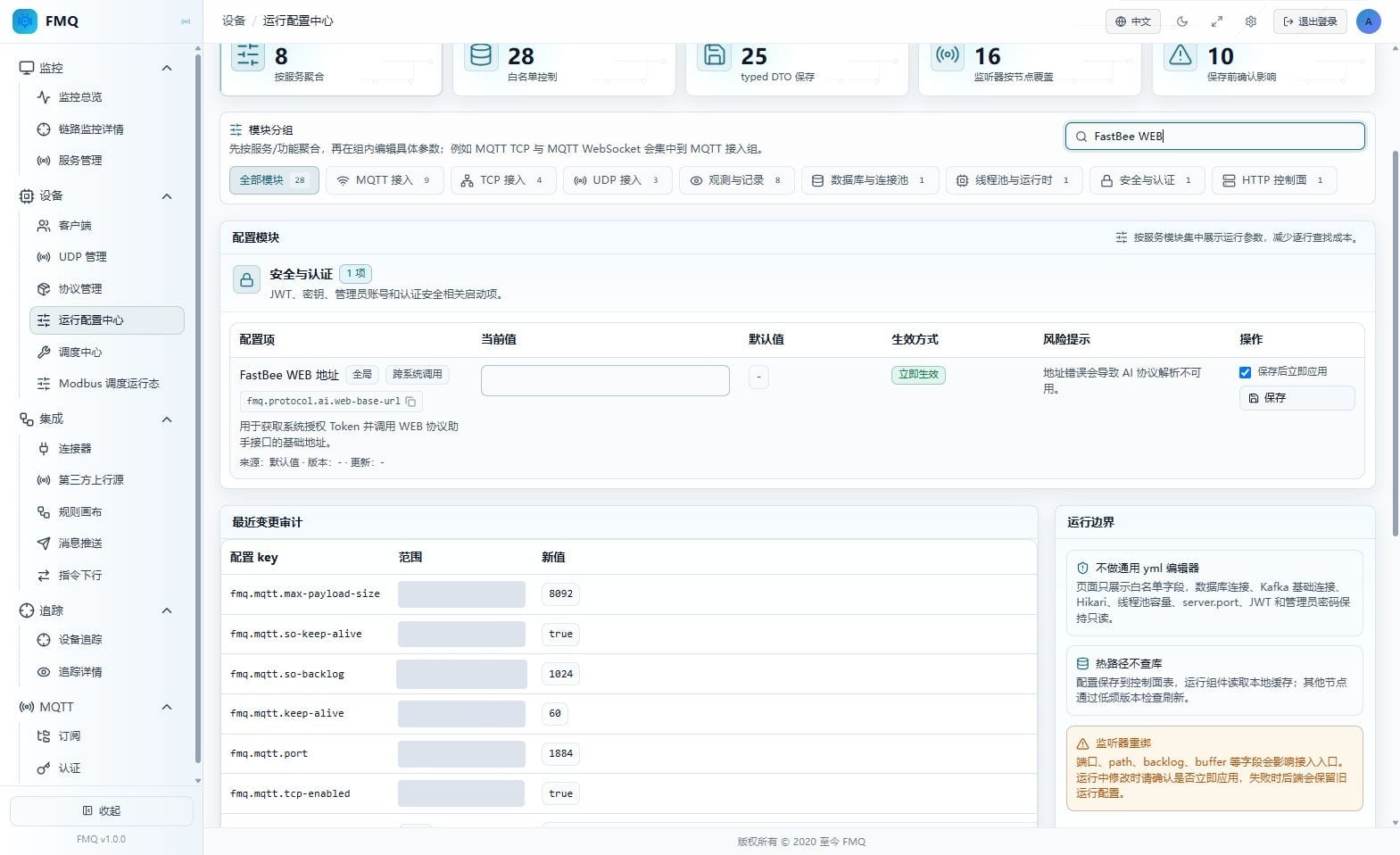
Figure: The operation entry on the real page; this step only describes the operation method and expected result, and no write operation was performed.
Field Descriptions
| Field / Control | Description |
|---|---|
| FastBee WEB address | The base address FMQ uses to call the FastBee WEB protocol assistant API; the Token is not filled in on this page.; Global; effective immediately Required · Recommended: keep the current value empty for now; adjust after assessing on-site capacity · Example: empty |
| Apply immediately after save | Determines whether listener-related changes are rebound immediately; checked by default for ordinary effective-immediately fields.; Determines whether listener-related changes are rebound immediately; checked by default for ordinary effective-immediately fields. Optional · Recommended: keep the current value; verify the impact scope before changing · Example: use the on-site planned value |
Operation Boundary
Expected result (not executed): Expected (not executed): the address enters the runtime configuration cache immediately after saving; whether authorization works still needs a separate connection test in Protocol Management. Risks and recovery: when the address is wrong, restore the old value or clear it, and check the WEB root address, network, and the WEB-side Token.
23. Identify the Database and Event Bus Read-Only Items
Location: Device -> Runtime Configuration Center
The Database Connection Address and RingBuffer are for verification only; the page has no input box or save button, and they must be maintained by the deployment side in yml, environment variables, or the deployment platform.
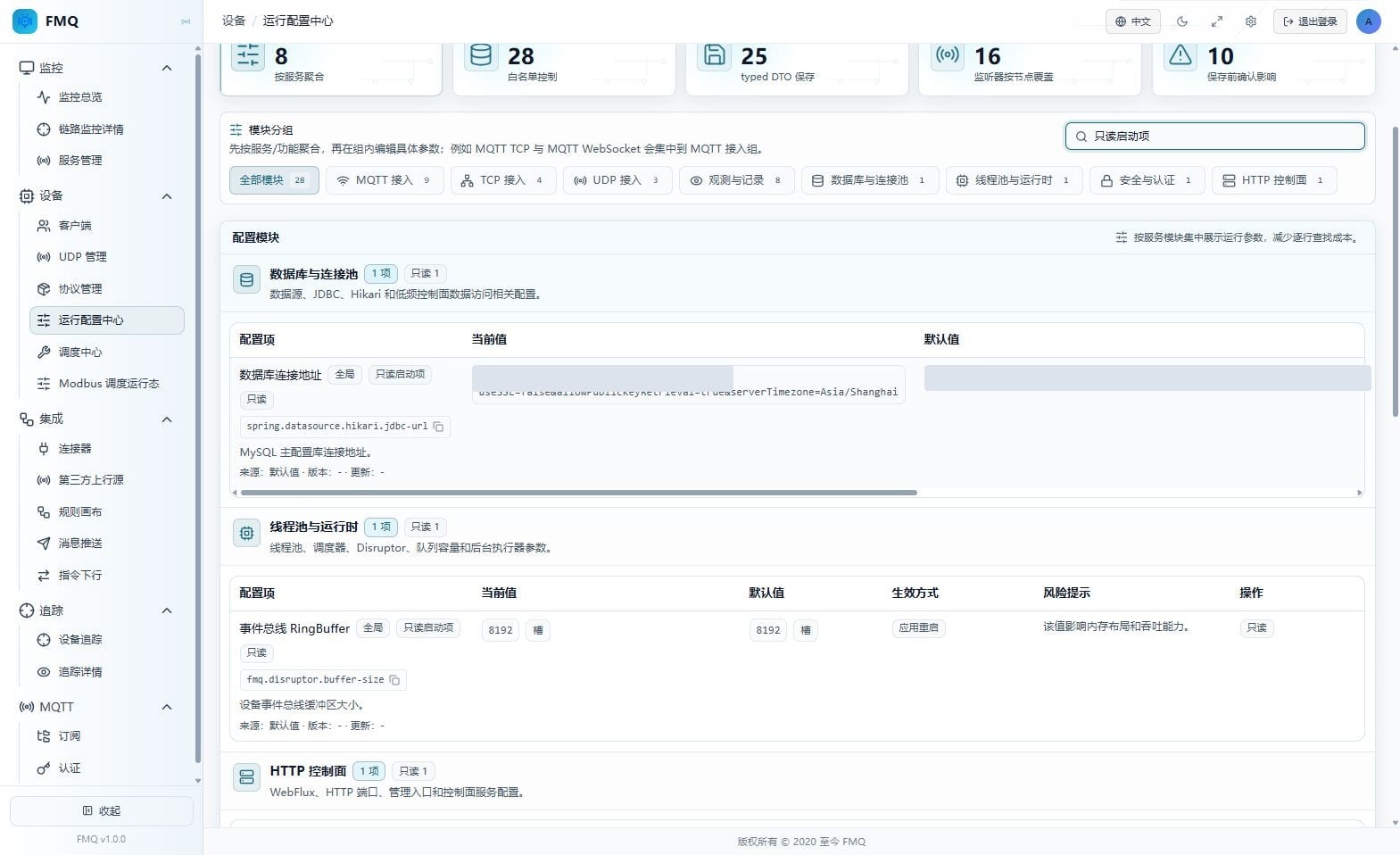
Figure: The operation entry on the real page; this step only describes the operation method and expected result, and no write operation was performed.
Operation Boundary
Expected result (not executed): Expected: the page stays read-only; actual modification must be done in the deployment configuration followed by an application restart. Risks and recovery: do not try to bypass the page and write the runtime configuration table directly; when the configuration is wrong, the deployment side restores the original values.
24. Identify the HTTP Management Port Read-Only Item
Location: Device -> Runtime Configuration Center
Verify that the HTTP Management Port matches the access entry; it cannot be modified on this page, and after a deployment-side change the reverse proxy, health probes, and firewall must be synchronized.
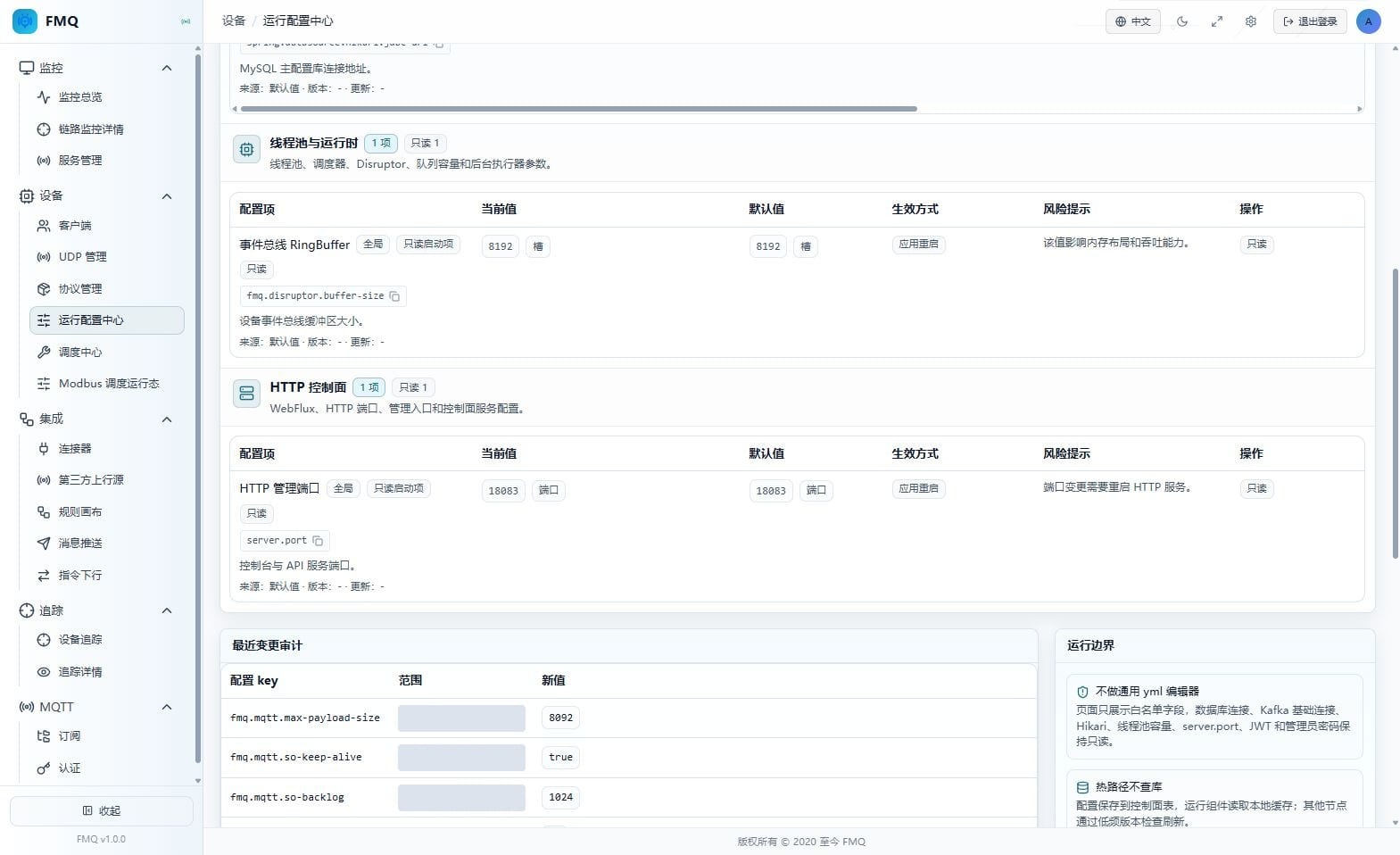
Figure: The operation entry on the real page; this step only describes the operation method and expected result, and no write operation was performed.
Operation Boundary
Expected result (not executed): Expected: the HTTP port displays as read-only with application restart; no save button appears. Risks and recovery: when the port becomes inaccessible after a change, restore the original port and check the proxy, probes, and firewall.
25. Distinguish Re-read from Cache Refresh
Location: Device -> Runtime Configuration Center
Re-read only re-requests the page data; Refresh Current Node Cache makes the backend reload the configuration table on the current node, and should be used only when a cache refresh is explicitly needed.
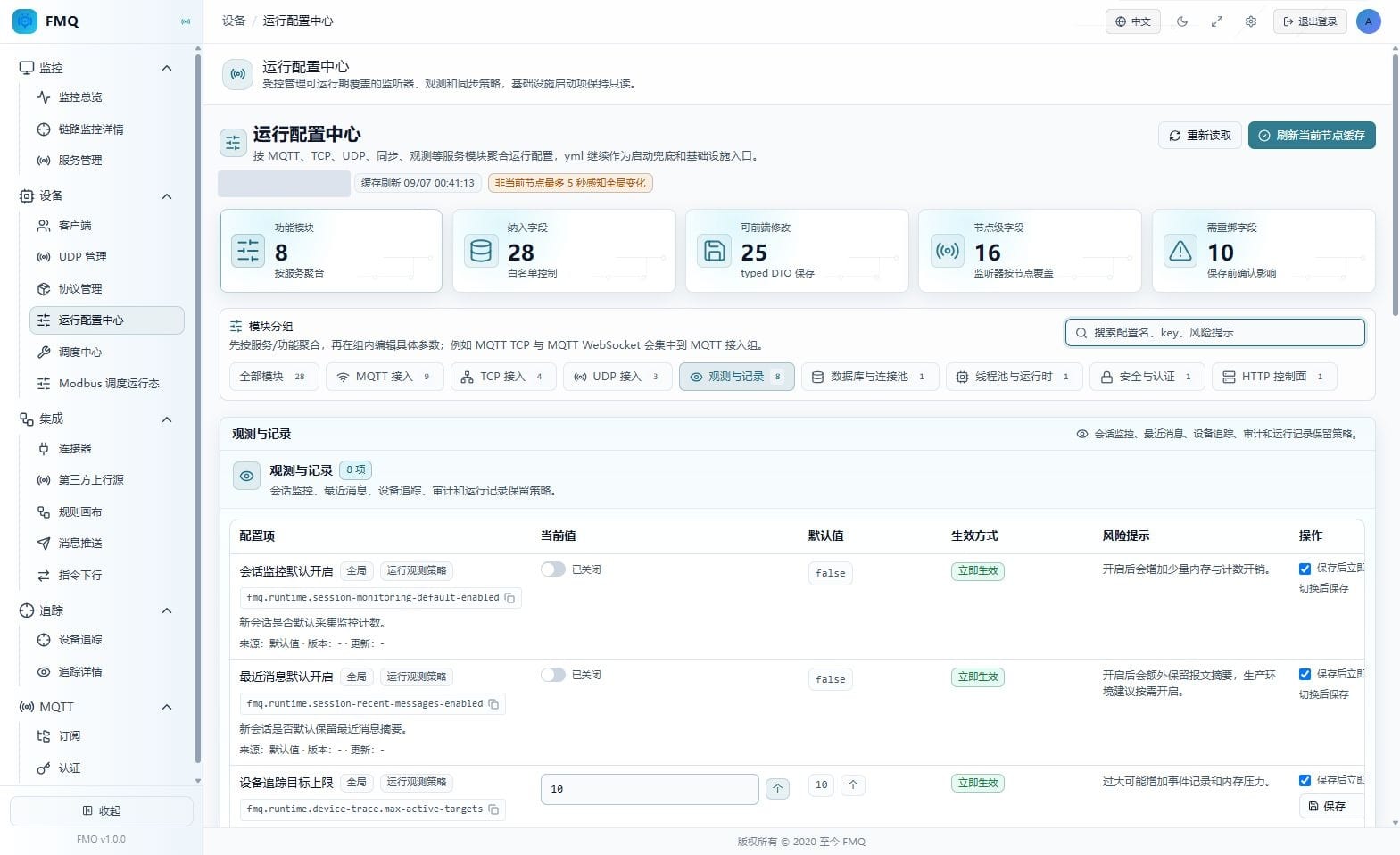
Figure: The operation entry on the real page; this step only describes the operation method and expected result, and no write operation was performed.
Operation Boundary
Expected result (not executed): Expected (not executed): re-reading updates the page and audit; after a successful cache refresh, a new cache time is shown and the page is read again. Risks and recovery: when the refresh fails, do not click repeatedly — check the database connection and API errors first; other nodes still refresh on their periodic schedule.
Page Field Reference
Full Reference
| Field / Unit | Plain Meaning | Data Direction / Source | Normal Criteria | Abnormal Signals and First Checkpoint |
|---|---|---|---|---|
| Page Scope and Configuration Statistics | ||||
| Current Node (node) | Indicates which FMQ node's node-level configuration this page is reading. | Runtime configuration grouping API -> current page overview | Shows a clear node address. | The node is empty or inconsistent with the target environment. First checkpoint: confirm the login environment and node routing first. |
| Overall Health Status (not provided on this page) (boundary) | The Runtime Configuration Center only displays configurations and values; it does not compute the overall health of listeners or business links. | Runtime configuration grouping API -> current page overview | The page configuration loads normally; health conclusions are judged separately in Monitoring Overview or Service Management. | Treating field counts, default values, or audit success directly as system health. First checkpoint: go to Monitoring Overview and Service Management to verify the real-time running status. |
| Cache Refresh Time (time) | Shows the time after the page last read the configuration. | Runtime configuration grouping API -> current page overview | The time is close to when the page was opened. | The time does not update for a long time or reading reports an error. First checkpoint: use Re-read first; if it is still abnormal, check the API. |
| Other Node Awareness Delay (seconds) | Notes that global configuration is perceived by other nodes through periodic refresh after at most about 5 seconds. | Runtime configuration grouping API -> current page overview | All nodes gradually read the same global version within a short time. | Still persistently inconsistent beyond the period. First checkpoint: check cache refresh and configuration version node by node. |
| Functional Modules (count) | The number of modules aggregated by service on the current page. | Runtime configuration grouping API -> current page overview | The page shows 8 this time. | The module count does not match the whitelist or deployment expectation. First checkpoint: clear the filters and verify the field whitelist. |
| Included Fields (items) | The total number of fields from the runtime configuration whitelist displayed on the page. | Runtime configuration grouping API -> current page overview | The page shows 28 this time. | Fields missing or duplicated. First checkpoint: verify the grouping API and the field registry. |
| Frontend-Editable (items) | The number of fields allowed to be submitted in the Runtime Configuration Center. | Runtime configuration grouping API -> current page overview | The page shows 25 this time. | Read-only items are editable or editable items are locked. First checkpoint: verify the field readOnly metadata. |
| Node-Level Fields (items) | The number of listener fields that apply only to the specified FMQ node. | Runtime configuration grouping API -> current page overview | The page shows 16 this time. | Node-level fields are mistaken for global configuration. First checkpoint: look at the field scope label and the current node first. |
| Fields Requiring Rebind (items) | The number of fields that require an immediate rebind or wait for the listener's next restart after a change. | Runtime configuration grouping API -> current page overview | The page shows 10 this time. | Preparing to save without evaluating the rebinding impact. First checkpoint: go to Service Management to confirm connections and the maintenance window. |
| MQTT TCP Basic Configuration | ||||
| MQTT TCP Enabled Status (switch) | Determines whether the MQTT TCP listener is allowed to start; toggling saves directly. The current page value is "true", the default is "true", and the effective method is "effective immediately". | Current node runtime configuration -> listener or new connections | Keep it on when MQTT TCP device access is needed. | After it is turned off, new MQTT TCP connections cannot get in. First checkpoint: go to Service Management first to confirm the listener status and existing connections. |
| MQTT TCP Port (port) | The external listening port of MQTT TCP; the device connection address must match it. The current page value is "1884", the default is "1884", and the effective method is "requires listener rebind". | Current node runtime configuration -> listener or new connections | The port is not in conflict and matches the client configuration. | The port is occupied or clients still connect to the old port. First checkpoint: check port occupancy, Service Management status, and client addresses. |
| MQTT Default Heartbeat (seconds) | The default keepalive time used when the client does not declare a heartbeat. The current page value is "60", the default is "60", and the effective method is "effective immediately". | Current node runtime configuration -> listener or new connections | Set according to network quality and terminal reporting cycle; currently 60 seconds. | Too small causes frequent disconnections of weak-network devices; too large delays the detection of lost contact. First checkpoint: verify the client Keep Alive, network quality, and disconnection times. |
| MQTT Connection Backlog (connections) | The length of the connection queue waiting for application acceptance after the TCP handshake completes. The current page value is "1024", the default is "1024", and the effective method is "requires listener rebind". | Current node runtime configuration -> listener or new connections | No persistent connection refusals under high-concurrency peaks. | A queue that is too small causes connection peaks to be rejected. First checkpoint: check connection peaks, listener rejection counts, and system resources. |
| MQTT Socket KeepAlive (switch) | Enables operating-system TCP keepalive; affects only listeners after rebinding. The current page value is "true", the default is "true", and the effective method is "requires listener rebind". | Current node runtime configuration -> listener or new connections | Keep it on when network devices may clean up idle connections. | After it is turned off, long-idle connections rely more on application-layer heartbeats. First checkpoint: verify the network idle timeout and MQTT heartbeat strategy first. |
| MQTT Payload and WebSocket Configuration | ||||
| MQTT Maximum Payload (B) | Limits the maximum number of bytes allowed in a single MQTT packet. The current page value is "8092", the default is "8092", and the effective method is "effective immediately". | Current node runtime configuration -> listener or new connections | Covers real packets without excessively amplifying memory usage. | Too small rejects legitimate packets; too large increases memory pressure. First checkpoint: compare against real packet sizes and concurrent connection volume. |
| MQTT WebSocket Enabled Status (switch) | Determines whether browser or WebSocket MQTT clients can connect. The current page value is "false", the default is "false", and the effective method is "effective immediately". | Current node runtime configuration -> listener or new connections | Enable only when WebSocket clients genuinely exist. | When off, WebSocket clients cannot connect. First checkpoint: confirm the client transport; do not mix it up with plain MQTT TCP. |
| MQTT WebSocket Port (port) | The listening port used for the WebSocket MQTT handshake. The current page value is "8084", the default is "8084", and the effective method is "requires listener rebind". | Current node runtime configuration -> listener or new connections | The port is not in conflict and matches the reverse proxy and clients. | Port conflict or the proxy still forwards to the old port. First checkpoint: check port occupancy, proxy forwarding, and Service Management status. |
| MQTT WebSocket Path (path) | The WebSocket handshake path; the backend automatically prepends the leading slash. The current page value is "/mqtt", the default is "/mqtt", and the effective method is "takes effect on next rebind". | Current node runtime configuration -> listener or new connections | The path matches the client and reverse proxy configuration. | Clients still using the old path cause handshake failures. First checkpoint: modify the client or proxy path in sync, then check the handshake response. |
| TCP Access Configuration | ||||
| TCP Listener Enabled Status (switch) | Determines whether the general TCP listener is allowed to start; toggling saves directly. The current page value is "true", the default is "true", and the effective method is "effective immediately". | Current node runtime configuration -> listener or new connections | Keep it on when TCP device access exists. | After it is turned off, new TCP devices cannot get in. First checkpoint: confirm the current sessions and maintenance window first. |
| TCP Listener Port (port) | The listening port for general TCP device connections. The current page value is "8888", the default is "8888", and the effective method is "requires listener rebind". | Current node runtime configuration -> listener or new connections | The port matches the device configuration and is not occupied. | Port conflict or devices still connect to the old port. First checkpoint: check port occupancy, client addresses, and listener status. |
| TCP Default Heartbeat (seconds) | The idle keepalive time for general TCP connections. The current page value is "60", the default is "60", and the effective method is "requires listener rebind". | Current node runtime configuration -> listener or new connections | Matches the device send cycle and network stability. | Too small may wrongly disconnect slow or weak-network devices. First checkpoint: verify device heartbeats, idle times, and disconnection causes. |
| TCP Connection Backlog (connections) | The length of the connection queue the TCP listener waits for the application to accept. The current page value is "1024", the default is "1024", and the effective method is "requires listener rebind". | Current node runtime configuration -> listener or new connections | No persistent refusals at connection peaks. | Too small causes concurrent connections to be rejected. First checkpoint: check connection peaks, system resources, and rejection counts. |
| UDP Access Configuration | ||||
| UDP Listener Enabled Status (switch) | Determines whether the UDP listener is allowed to receive datagrams; toggling saves directly. The current page value is "true", the default is "true", and the effective method is "effective immediately". | Current node runtime configuration -> listener or new connections | Keep it on when UDP device reporting exists. | After it is turned off, UDP datagrams no longer enter the platform. First checkpoint: confirm first whether the business still has UDP devices. |
| UDP Listener Port (port) | The target port to which UDP devices send datagrams. The current page value is "8889", the default is "8889", and the effective method is "requires listener rebind". | Current node runtime configuration -> listener or new connections | The port matches the device target and is not occupied. | A wrong port causes datagrams to be completely unreceived. First checkpoint: check the device target address, firewall, and Service Management status. |
| UDP Receive Buffer (B) | The receive buffer size of the operating-system UDP socket. The current page value is "1048576", the default is "1048576", and the effective method is "requires listener rebind". | Current node runtime configuration -> listener or new connections | Covers short burst traffic with controlled memory usage. | Too small may drop packets during bursts. First checkpoint: compare against packet peaks, packet-loss metrics, and system memory. |
| Observation Default Policy | ||||
| Session Monitoring Enabled by Default (switch) | Determines whether new sessions collect send/receive and activity counters by default. The current page value is "false", the default is "false", and the effective method is "effective immediately". | Global runtime configuration -> runtime policy or control plane | Enable in production as troubleshooting requires; avoid purposeless full observation. | Full enablement adds a small amount of memory and counting overhead. First checkpoint: determine the session scope to be observed first. |
| Recent Messages Enabled by Default (switch) | Determines whether new sessions retain recent packet summaries by default. The current page value is "false", the default is "false", and the effective method is "effective immediately". | Global runtime configuration -> runtime policy or control plane | Enable on demand only when quick troubleshooting is needed. | Full enablement adds summary retention overhead. First checkpoint: confirm the troubleshooting target and data sensitivity. |
| Device Trace Target Limit (count) | Limits the number of devices traced simultaneously within the cluster. The current page value is "10", the default is "10", and the effective method is "effective immediately". | Global runtime configuration -> runtime policy or control plane | The limit covers daily troubleshooting targets without growing unbounded. | Too large increases event records and memory pressure. First checkpoint: clean up trace targets that are no longer needed first. |
| Device Trace Retention Days (days) | The default retention period of device trace history. The current page value is "30", the default is "30", and the effective method is "effective immediately". | Global runtime configuration -> runtime policy or control plane | Meets audit needs with controlled record table growth. | Too large increases the record table size. First checkpoint: check table growth, query frequency, and cleanup tasks. |
| Record Retention and Cleanup Policy | ||||
| Rule Execution Log Retention Days (days) | The default retention period of rule execution logs. The current page value is "15", the default is "15", and the effective method is "effective immediately". | Global runtime configuration -> runtime policy or control plane | Covers the daily troubleshooting cycle with controlled table size. | Too large makes the record table grow continuously. First checkpoint: check cleanup results and the query window. |
| Rule Replay Audit Retention Days (days) | The default retention period of rule replay audits. The current page value is "30", the default is "30", and the effective method is "effective immediately". | Global runtime configuration -> runtime policy or control plane | Meets audit requirements with controlled storage. | Too short lacks audit coverage; too long increases table size. First checkpoint: adjust together with the audit cycle and table growth. |
| Record Query Default Window (days) | The number of recent days read by default when a query does not specify a time range. The current page value is "7", the default is "7", and the effective method is "effective immediately". | Global runtime configuration -> runtime policy or control plane | Common queries return quickly; currently 7 days. | An oversized window slows list queries. First checkpoint: narrow the time range first and check indexes and data volume. |
| Record Cleanup Batch (rows) | The maximum number of rows cleaned up per history record cleanup run. The current page value is "1000", the default is "1000", and the effective method is "effective immediately". | Global runtime configuration -> runtime policy or control plane | Cleanup progresses continuously without occupying the database for long. | Too large may produce database resource peaks. First checkpoint: check cleanup duration, lock waits, and the connection pool. |
| Database Connection Startup Items | ||||
| Database Connection Address (address) | The connection address of the MySQL main configuration database; displayed on this page only and cannot be modified at runtime. The current page value is "current JDBC address", the default is "current JDBC address", and the effective method is "application restart". | Global runtime configuration -> runtime policy or control plane | Maintained by the deployment side, and the current service starts normally. | A wrong address makes the configuration database unusable. First checkpoint: verify the JDBC address, network, and credentials in the deployment configuration; do not modify on this page. |
| Event Bus Startup Items | ||||
| Event Bus RingBuffer (slots) | The ring buffer capacity of the device event bus; it can only be adjusted on the deployment side. The current page value is "8192", the default is "8192", and the effective method is "application restart". | Global runtime configuration -> runtime policy or control plane | The capacity covers throughput peaks with stable memory. | Too small may cause backlog; too large amplifies memory usage. First checkpoint: evaluate against peak throughput, backlog, and heap memory, then restart. |
| FastBee WEB Address | ||||
| FastBee WEB Address (address) | The base address FMQ uses to call the FastBee WEB protocol assistant API; the Token is not filled in on this page. The current page value is "empty", the default is "empty", and the effective method is "effective immediately". | Global runtime configuration -> runtime policy or control plane | Configure a reachable WEB root address, then verify authorization separately. | Empty or a wrong address makes AI protocol parsing unavailable. First checkpoint: verify the WEB root address, network, and WEB-side Token configuration. |
| HTTP Control Plane Startup Items | ||||
| HTTP Management Port (port) | The HTTP port used by the console and API service; read-only display. The current page value is "18083", the default is "18083", and the effective method is "application restart". | Global runtime configuration -> runtime policy or control plane | The port matches the deployment entry, reverse proxy, and firewall. | Port conflict or the entry still points to the old port. First checkpoint: modify in the deployment configuration and restart, then check the proxy and health probes. |
| Recent Changes and Runtime Boundaries | ||||
| Configuration Key (identifier) | Identifies the specific runtime configuration item that changed. | Configuration changes and runtime boundaries -> current page | Consistent with the fields just maintained. | An unexpected key appears in the audit. First checkpoint: stop further operations and verify the operator and time. |
| Scope (scope) | Shows whether the change is global or for a specified node. | Configuration changes and runtime boundaries -> current page | The scope matches the field metadata. | A node-level change is written as global or the node does not match. First checkpoint: verify the current node and the request nodeId. |
| New Value (value) | Records the new configuration value after saving. | Configuration changes and runtime boundaries -> current page | Consistent with the intended filled-in value. | The value after normalization does not match expectations. First checkpoint: re-read the field and compare with the old value. |
| Operator (account) | Records the source of this change or the operating account. | Configuration changes and runtime boundaries -> current page | The source is identifiable. | An unknown operator appears. First checkpoint: check account usage and the audit context. |
| Result (status) | Shows whether this change succeeded. | Configuration changes and runtime boundaries -> current page | Succeeded, or failed with a clear reason. | Failed, or no corresponding record for a long time. First checkpoint: check the API message, Service Management status, and backend audit. |
| Time (time) | Records when the change occurred. | Configuration changes and runtime boundaries -> current page | Consistent with the maintenance window. | The time does not match or the audit does not update for a long time. First checkpoint: confirm the system time and re-read the audit. |
| Not a General-Purpose yml Editor (boundary) | Infrastructure fields such as database, thread pool, and HTTP port are read-only. | Configuration changes and runtime boundaries -> current page | Read-only items have no save button. | A read-only item can be submitted directly. First checkpoint: stop the operation and return to the deployment configuration. |
| Hot Path Does Not Query the Database (boundary) | Runtime components prefer reading the local cache; other nodes perceive global changes periodically. | Configuration changes and runtime boundaries -> current page | Configuration versions sync within the expected period. | Node versions are inconsistent for a long time. First checkpoint: check node cache refresh and database connections. |
| Listener Rebinding (boundary) | Fields such as port, path, backlog, and buffer may affect device entries. | Configuration changes and runtime boundaries -> current page | The maintenance window and rollback were confirmed before the change. | Rebinding immediately without evaluating connections. First checkpoint: cancel the save and go to Service Management to check connections first. |
Runtime Configuration Center
Full Reference
| Field/Control | Purpose and Original Key | Default/Recommended/Example | Options | Effect and Impact | Effective Conditions |
|---|---|---|---|---|---|
| Search Configuration Name, Key, Risk Notice (field) | Narrows the field range by Chinese name, original key, effective method, or risk notice. runtime-search | Default: as shown on the current page Recommended: keep the current value; verify the impact scope before changing Example: use the on-site planned value | Not applicable | Narrows the field range by Chinese name, original key, effective method, or risk notice. | Scope: subject to the node-level or global scope shown by the field Publish: not required · Restart: not required · Reconnect: not required |
| Module Group (tab) | Switches among All Modules, MQTT, TCP, UDP, Observation, Database, Thread Pool, Security and Authentication, and HTTP Control Plane. module-filter | Default: as shown on the current page Recommended: keep the current value; verify the impact scope before changing Example: use the on-site planned value | Not applicable | Switches among All Modules, MQTT, TCP, UDP, Observation, Database, Thread Pool, Security and Authentication, and HTTP Control Plane. | Scope: subject to the node-level or global scope shown by the field Publish: not required · Restart: not required · Reconnect: not required |
| Re-read (button) | Re-requests the configuration groups and recent audits without actively refreshing the backend local cache. reread | Default: as shown on the current page Recommended: keep the current value; verify the impact scope before changing Example: use the on-site planned value | Not applicable | Re-requests the configuration groups and recent audits without actively refreshing the backend local cache. | Scope: subject to the node-level or global scope shown by the field Publish: not required · Restart: not required · Reconnect: not required |
| Refresh Current Node Cache (button) | Triggers the current node to reload the runtime configuration cache from the configuration table. refresh-cache | Default: as shown on the current page Recommended: keep the current value; verify the impact scope before changing Example: use the on-site planned value | Not applicable | Triggers the current node to reload the runtime configuration cache from the configuration table. | Scope: only the current node refreshes immediately; other nodes still perceive global configuration periodically Publish: not required · Restart: not required · Reconnect: not required |
| Save (button) | Saves the current field; numeric and text fields require an explicit click, while switches save immediately after being toggled. save-item | Default: as shown on the current page Recommended: keep the current value; verify the impact scope before changing Example: use the on-site planned value | Not applicable | Saves the current field; numeric and text fields require an explicit click, while switches save immediately after being toggled. | Scope: subject to the node-level or global scope shown by the field Publish: not required · Restart: not required · Reconnect: not required |
| Apply Immediately After Save (checkbox) | Determines whether listener-related changes are rebound immediately; checked by default for ordinary effective-immediately fields. apply-now | Default: as shown on the current page Recommended: keep the current value; verify the impact scope before changing Example: use the on-site planned value | Not applicable | Determines whether listener-related changes are rebound immediately; checked by default for ordinary effective-immediately fields. | Scope: subject to the node-level or global scope shown by the field Publish: not required · Restart: not required · Reconnect: required |
| Recent Change Audit (display) | Shows the configuration key, scope, new value, operator, result, and time. audit-table | Default: as shown on the current page Recommended: keep the current value; verify the impact scope before changing Example: use the on-site planned value | Not applicable | Shows the configuration key, scope, new value, operator, result, and time. | Scope: subject to the node-level or global scope shown by the field Publish: not required · Restart: not required · Reconnect: not required |
| Required MQTT TCP Enabled Status (switch) | Determines whether the MQTT TCP listener is allowed to start; toggling saves directly. fmq.mqtt.tcp-enabled | Default: true Recommended: keep the current value true for now; adjust after assessing on-site capacity Example: true | On (true): allows the corresponding capability to run as configured.; affects new connections, new sessions, or the corresponding runtime policy. Off (false): stops enabling the corresponding capability by default.; may block new connections, stop default collection, or reduce runtime overhead. | Current node; effective immediately | Scope: current node Publish: not required · Restart: not required · Reconnect: not required |
| Required MQTT TCP Port (field) | The external listening port of MQTT TCP; the device connection address must match it. fmq.mqtt.port | Default: 1884 Recommended: keep the current value 1884 for now; adjust after assessing on-site capacity Example: 1884 | Not applicable | Current node; requires listener rebind | Scope: current node Publish: not required · Restart: not required · Reconnect: required |
| Required MQTT Default Heartbeat (field) | The default keepalive time used when the client does not declare a heartbeat. fmq.mqtt.keep-alive | Default: 60 Recommended: keep the current value 60 for now; adjust after assessing on-site capacity Example: 60 | Not applicable | Current node; effective immediately | Scope: current node Publish: not required · Restart: not required · Reconnect: not required |
| Required MQTT Connection Backlog (field) | The length of the connection queue waiting for application acceptance after the TCP handshake completes. fmq.mqtt.so-backlog | Default: 1024 Recommended: keep the current value 1024 for now; adjust after assessing on-site capacity Example: 1024 | Not applicable | Current node; requires listener rebind | Scope: current node Publish: not required · Restart: not required · Reconnect: required |
| Required MQTT Socket KeepAlive (switch) | Enables operating-system TCP keepalive; affects only listeners after rebinding. fmq.mqtt.so-keep-alive | Default: true Recommended: keep the current value true for now; adjust after assessing on-site capacity Example: true | On (true): allows the corresponding capability to run as configured.; affects new connections, new sessions, or the corresponding runtime policy. Off (false): stops enabling the corresponding capability by default.; may block new connections, stop default collection, or reduce runtime overhead. | Current node; requires listener rebind | Scope: current node Publish: not required · Restart: not required · Reconnect: required |
| Required MQTT Maximum Payload (field) | Limits the maximum number of bytes allowed in a single MQTT packet. fmq.mqtt.max-payload-size | Default: 8092 Recommended: keep the current value 8092 for now; adjust after assessing on-site capacity Example: 8092 | Not applicable | Current node; effective immediately | Scope: current node Publish: not required · Restart: not required · Reconnect: not required |
| Required MQTT WebSocket Enabled Status (switch) | Determines whether browser or WebSocket MQTT clients can connect. fmq.mqtt.websocket-enabled | Default: false Recommended: keep the current value false for now; adjust after assessing on-site capacity Example: false | On (true): allows the corresponding capability to run as configured.; affects new connections, new sessions, or the corresponding runtime policy. Off (false): stops enabling the corresponding capability by default.; may block new connections, stop default collection, or reduce runtime overhead. | Current node; effective immediately | Scope: current node Publish: not required · Restart: not required · Reconnect: not required |
| Required MQTT WebSocket Port (field) | The listening port used for the WebSocket MQTT handshake. fmq.mqtt.websocket-port | Default: 8084 Recommended: keep the current value 8084 for now; adjust after assessing on-site capacity Example: 8084 | Not applicable | Current node; requires listener rebind | Scope: current node Publish: not required · Restart: not required · Reconnect: required |
| Required MQTT WebSocket Path (field) | The WebSocket handshake path; the backend automatically prepends the leading slash. fmq.mqtt.websocket-path | Default: /mqtt Recommended: keep the current value /mqtt for now; adjust after assessing on-site capacity Example: /mqtt | Not applicable | Current node; takes effect on next rebind | Scope: current node Publish: not required · Restart: not required · Reconnect: required |
| Required TCP Listener Enabled Status (switch) | Determines whether the general TCP listener is allowed to start; toggling saves directly. fmq.tcp.enable | Default: true Recommended: keep the current value true for now; adjust after assessing on-site capacity Example: true | On (true): allows the corresponding capability to run as configured.; affects new connections, new sessions, or the corresponding runtime policy. Off (false): stops enabling the corresponding capability by default.; may block new connections, stop default collection, or reduce runtime overhead. | Current node; effective immediately | Scope: current node Publish: not required · Restart: not required · Reconnect: not required |
| Required TCP Listener Port (field) | The listening port for general TCP device connections. fmq.tcp.port | Default: 8888 Recommended: keep the current value 8888 for now; adjust after assessing on-site capacity Example: 8888 | Not applicable | Current node; requires listener rebind | Scope: current node Publish: not required · Restart: not required · Reconnect: required |
| Required TCP Default Heartbeat (field) | The idle keepalive time for general TCP connections. fmq.tcp.keep-alive | Default: 60 Recommended: keep the current value 60 for now; adjust after assessing on-site capacity Example: 60 | Not applicable | Current node; requires listener rebind | Scope: current node Publish: not required · Restart: not required · Reconnect: required |
| Required TCP Connection Backlog (field) | The length of the connection queue the TCP listener waits for the application to accept. fmq.tcp.so-backlog | Default: 1024 Recommended: keep the current value 1024 for now; adjust after assessing on-site capacity Example: 1024 | Not applicable | Current node; requires listener rebind | Scope: current node Publish: not required · Restart: not required · Reconnect: required |
| Required UDP Listener Enabled Status (switch) | Determines whether the UDP listener is allowed to receive datagrams; toggling saves directly. fmq.udp.enable | Default: true Recommended: keep the current value true for now; adjust after assessing on-site capacity Example: true | On (true): allows the corresponding capability to run as configured.; affects new connections, new sessions, or the corresponding runtime policy. Off (false): stops enabling the corresponding capability by default.; may block new connections, stop default collection, or reduce runtime overhead. | Current node; effective immediately | Scope: current node Publish: not required · Restart: not required · Reconnect: not required |
| Required UDP Listener Port (field) | The target port to which UDP devices send datagrams. fmq.udp.port | Default: 8889 Recommended: keep the current value 8889 for now; adjust after assessing on-site capacity Example: 8889 | Not applicable | Current node; requires listener rebind | Scope: current node Publish: not required · Restart: not required · Reconnect: required |
| Required UDP Receive Buffer (field) | The receive buffer size of the operating-system UDP socket. fmq.udp.so-rcvbuf | Default: 1048576 Recommended: keep the current value 1048576 for now; adjust after assessing on-site capacity Example: 1048576 | Not applicable | Current node; requires listener rebind | Scope: current node Publish: not required · Restart: not required · Reconnect: required |
| Required Session Monitoring Enabled by Default (switch) | Determines whether new sessions collect send/receive and activity counters by default. fmq.runtime.session-monitoring-default-enabled | Default: false Recommended: keep the current value false for now; adjust after assessing on-site capacity Example: false | On (true): allows the corresponding capability to run as configured.; affects new connections, new sessions, or the corresponding runtime policy. Off (false): stops enabling the corresponding capability by default.; may block new connections, stop default collection, or reduce runtime overhead. | Global; effective immediately | Scope: global Publish: not required · Restart: not required · Reconnect: not required |
| Required Recent Messages Enabled by Default (switch) | Determines whether new sessions retain recent packet summaries by default. fmq.runtime.session-recent-messages-enabled | Default: false Recommended: keep the current value false for now; adjust after assessing on-site capacity Example: false | On (true): allows the corresponding capability to run as configured.; affects new connections, new sessions, or the corresponding runtime policy. Off (false): stops enabling the corresponding capability by default.; may block new connections, stop default collection, or reduce runtime overhead. | Global; effective immediately | Scope: global Publish: not required · Restart: not required · Reconnect: not required |
| Required Device Trace Target Limit (field) | Limits the number of devices traced simultaneously within the cluster. fmq.runtime.device-trace.max-active-targets | Default: 10 Recommended: keep the current value 10 for now; adjust after assessing on-site capacity Example: 10 | Not applicable | Global; effective immediately | Scope: global Publish: not required · Restart: not required · Reconnect: not required |
| Required Device Trace Retention Days (field) | The default retention period of device trace history. fmq.record.retention.device-trace-history-days | Default: 30 Recommended: keep the current value 30 for now; adjust after assessing on-site capacity Example: 30 | Not applicable | Global; effective immediately | Scope: global Publish: not required · Restart: not required · Reconnect: not required |
| Required Rule Execution Log Retention Days (field) | The default retention period of rule execution logs. fmq.record.retention.rule-execution-log-days | Default: 15 Recommended: keep the current value 15 for now; adjust after assessing on-site capacity Example: 15 | Not applicable | Global; effective immediately | Scope: global Publish: not required · Restart: not required · Reconnect: not required |
| Required Rule Replay Audit Retention Days (field) | The default retention period of rule replay audits. fmq.record.retention.rule-replay-audit-days | Default: 30 Recommended: keep the current value 30 for now; adjust after assessing on-site capacity Example: 30 | Not applicable | Global; effective immediately | Scope: global Publish: not required · Restart: not required · Reconnect: not required |
| Required Record Query Default Window (field) | The number of recent days read by default when a query does not specify a time range. fmq.record.query-default-window-days | Default: 7 Recommended: keep the current value 7 for now; adjust after assessing on-site capacity Example: 7 | Not applicable | Global; effective immediately | Scope: global Publish: not required · Restart: not required · Reconnect: not required |
| Required Record Cleanup Batch (field) | The maximum number of rows cleaned up per history record cleanup run. fmq.record.cleanup.batch-size | Default: 1000 Recommended: keep the current value 1000 for now; adjust after assessing on-site capacity Example: 1000 | Not applicable | Global; effective immediately | Scope: global Publish: not required · Restart: not required · Reconnect: not required |
| Required FastBee WEB Address (field) | The base address FMQ uses to call the FastBee WEB protocol assistant API; the Token is not filled in on this page. fmq.protocol.ai.web-base-url | Default: empty Recommended: keep the current value empty for now; adjust after assessing on-site capacity Example: empty | Not applicable | Global; effective immediately | Scope: global Publish: not required · Restart: not required · Reconnect: not required |
Full Reference 2
| Field/Control | Purpose and Original Key | Default/Recommended/Example | Options | Effect and Impact | Effective Conditions |
|---|---|---|---|---|---|
| Required Database Connection Address (display) | The connection address of the MySQL main configuration database; displayed on this page only and cannot be modified at runtime. spring.datasource.hikari.jdbc-url | Default: current JDBC address Recommended: maintained uniformly by the deployment side according to capacity and environment Example: current JDBC address | Not applicable | Global; application restart | Scope: global Publish: not required · Restart: required · Reconnect: not required |
| Required Event Bus RingBuffer (display) | The ring buffer capacity of the device event bus; it can only be adjusted on the deployment side. fmq.disruptor.buffer-size | Default: 8192 Recommended: maintained uniformly by the deployment side according to capacity and environment Example: 8192 | Not applicable | Global; application restart | Scope: global Publish: not required · Restart: required · Reconnect: not required |
| Required HTTP Management Port (display) | The HTTP port used by the console and API service; read-only display. server.port | Default: 18083 Recommended: maintained uniformly by the deployment side according to capacity and environment Example: 18083 | Not applicable | Global; application restart | Scope: global Publish: not required · Restart: required · Reconnect: not required |
Production Operation Notice
The screenshots and examples illustrate operation locations and judgment methods; they do not represent the current production status. When publishing, starting/stopping, rebinding, retrying, or deleting is involved, confirm the target environment, impact scope, and recovery plan first, and have authorized personnel perform the operation.
FastBee · FMQ Operations Manual