

FMQ Service Management
Read inspection displays by page area; look up operation instructions by target node and protocol. All write operations describe only the steps and expected results; none were executed in this round.
How to Read
Confirm the entry point, permissions, and target object first, then complete the operations in numbered order. Each step includes the expected result; detailed fields and options are collected in expandable reference tables.
About the Screenshots
The screenshots come from the original operations manual. The public version hides real node addresses, connection addresses, and credentials; the statuses, times, and data in the examples do not represent the current production environment.
Before You Begin
| Item | Description |
|---|---|
| What you can do | Understand the status, fields, and operation boundaries of each listener entry by node, and look up the configuration, start/stop, restart, and rebind instructions. |
| Where to enter | Monitoring -> Service Management |
| Required permissions | Existing access to the FMQ console; actual runtime changes must be performed by authorized operations personnel during a maintenance window. |
| Estimated time | 15 minutes |
Operation Steps
1. Confirm the Management Scope and Refresh Entry
Location: Monitoring -> Service Management
Enter Service Management from the Monitoring menu, read the page scope notice first, then locate Refresh.

Figure: First confirm that the page operates only on the target node, and locate the refresh entry.
Field Descriptions
| Field / Control | Description |
|---|---|
| Monitoring scope | The page displays runtime snapshots scoped to the currently selected node; the node overview is used to switch targets and does not mean all nodes are operated in sync. |
| Sampling time | Judge the freshness of the data on this page by the sync time on the node card and the latest snapshot time. |
| Overall health status | Judge overall health by combining online nodes, offline nodes, and the number of failed listeners; do not treat a single "online" label as proof that everything is normal. |
| Runtime only | Indicates that the current entry operates on the services currently running on the node. |
| Does not write back to deployment config | The page states that it does not modify deployment files; this is not the same as not writing to the runtime configuration center. |
| Does not auto-sync other nodes | Page operations must not be treated as simultaneous changes on all nodes. |
2. Read the Node and Selected-Node Summaries
Location: Monitoring -> Service Management
Review the summary cards and distinguish the cluster node count from the statistics scope of Selected Node Sessions and Selected Node Listeners.

Figure: Distinguish cluster-wide node statistics from the statistics of the currently selected node.
Field Descriptions
| Field / Control | Description |
|---|---|
| Total nodes | The number of nodes visible in the current snapshot. |
| Online nodes | The number of nodes not marked offline or disconnected in the page statistics; this does not equal fully healthy. |
| Offline | The number of nodes marked offline or disconnected. |
| Selected node sessions | The number of sessions aggregated for the currently selected node, not the cluster-wide total. |
| Selected node listeners | The number of listener entries returned by the selected node. |
| Running | The number of listeners in Running status on the selected node. |
| Failed | The number of listeners in Failed status on the selected node. |
3. Confirm Node Identity and Snapshot Freshness
Location: Monitoring -> Service Management
In the Cluster Node Overview, verify the node name, address, status, and times before selecting the target node.

Figure: Verify node identity, online status, sessions, and sync time.
Field Descriptions
| Field / Control | Description |
|---|---|
| Node name | The node identity used to select the operation target. |
| Current node / remote node | The current node is the node this console corresponds to; the other nodes are remote. |
| Node address | The network address that distinguishes the deployed nodes. |
| Node status | The page distinguishes online, offline, abnormal, or warning. |
| Listeners | The number of listener entries returned by this node. |
| Sessions | The session aggregate of this node. |
| Sync time | The most recent sync time of the node snapshot, not the last device report time. |
| Latest snapshot time | The time marker of this page snapshot. |
4. Confirm the Current Listener Workspace
Location: Monitoring -> Service Management
After selecting a node, verify that the Listener Workspace title matches the selected node before reviewing the protocol entries below.

Figure: The workspace title determines which node all listener cards below belong to.
Field Descriptions
| Field / Control | Description |
|---|---|
| Workspace node name | All listener cards below belong to the node shown in the title. |
| Current node / remote node | Reminds you which node subsequent operations belong to. |
| Runtime only | This controls the node's runtime entries, not a batch global switch. |
5. Read the MQTT TCP Listener Status
Location: Monitoring -> Service Management
Under External Access, find MQTT TCP and review its status, endpoint, sessions, and times in order; do not click the start/stop buttons.
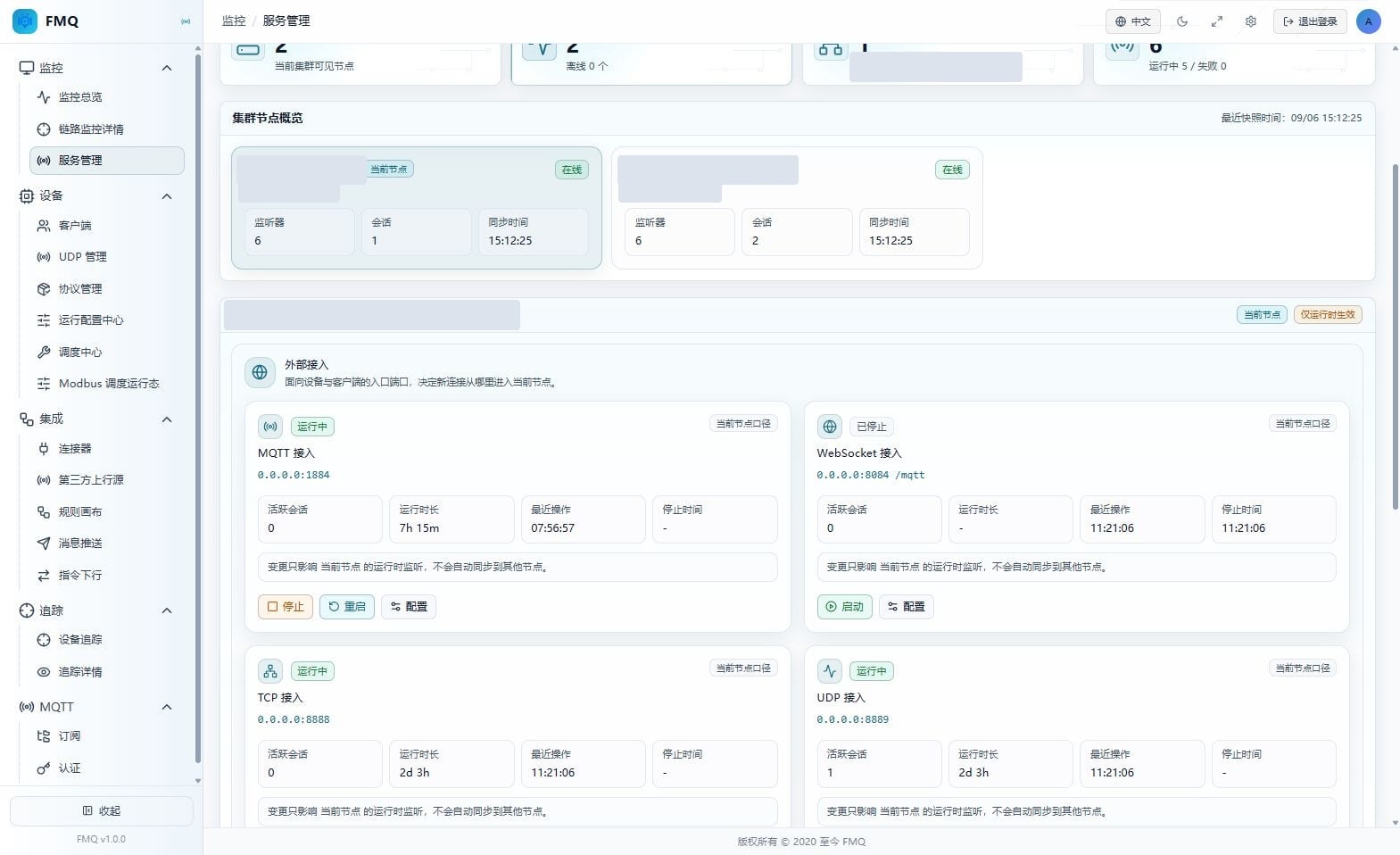
Figure: Verify the MQTT TCP listener endpoint, running status, session count, and times.
Field Descriptions
| Field / Control | Description |
|---|---|
| MQTT access | MQTT TCP: the page purpose grouping of MQTT TCP. |
| Running status | MQTT TCP: distinguishes Running, Starting, Stopping, Stopped, Failed, and Unknown. |
| Listener endpoint | MQTT TCP: shows the address and port the service is bound to; 0.0.0.0 means bound to all interfaces, not the target address a device should fill in. |
| Current node scope | MQTT TCP: the card values are not a cluster-wide total. |
| Active sessions | MQTT TCP: the number of active sessions belonging to the MQTT TCP entry. |
| Uptime | MQTT TCP: the continuous running time since the listener was last started; a dash is shown when stopped. |
| Last operation | MQTT TCP: the time of the most recent listener lifecycle operation, not the device message time. |
| Stop time | MQTT TCP: the most recent stop time; a dash is shown when there is no such record. |
6. Read the MQTT WebSocket Listener Status
Location: Monitoring -> Service Management
Under External Access, find MQTT WebSocket and review its status, endpoint, sessions, and times in order; do not click the start/stop buttons.
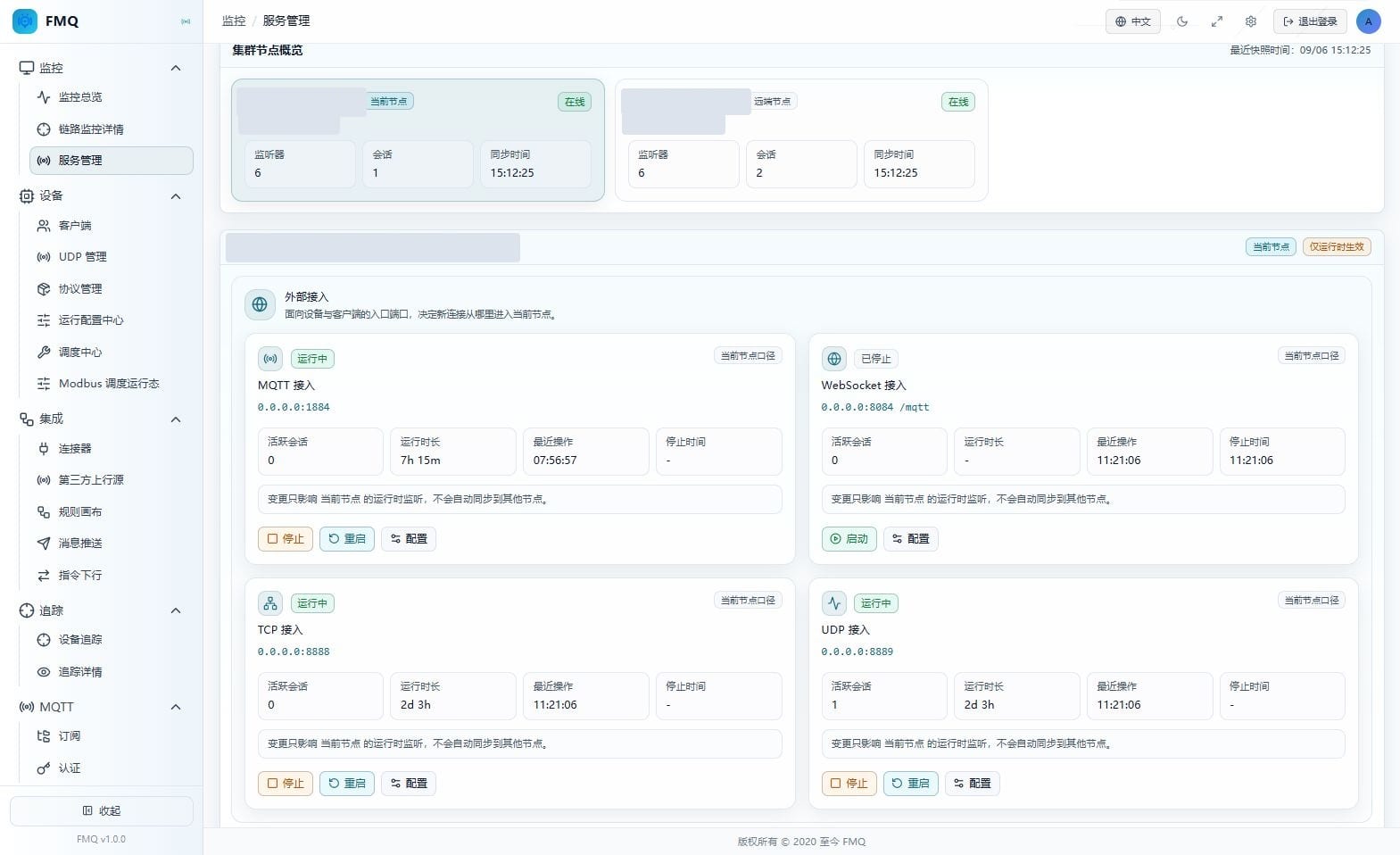
Figure: The WebSocket endpoint also includes a path, and it may be in the Stopped state.
Field Descriptions
| Field / Control | Description |
|---|---|
| WebSocket access | MQTT WebSocket: the page purpose grouping of MQTT WebSocket. |
| Running status | MQTT WebSocket: distinguishes Running, Starting, Stopping, Stopped, Failed, and Unknown. |
| Listener endpoint | MQTT WebSocket: composed of the listen address, port, and WebSocket path. |
| Current node scope | MQTT WebSocket: the card values are not a cluster-wide total. |
| Active sessions | MQTT WebSocket: the number of active sessions belonging to the MQTT WebSocket entry. |
| Uptime | MQTT WebSocket: the continuous running time since the listener was last started; a dash is shown when stopped. |
| Last operation | MQTT WebSocket: the time of the most recent listener lifecycle operation, not the device message time. |
| Stop time | MQTT WebSocket: the most recent stop time; a dash is shown when there is no such record. |
7. Read the TCP Listener Status
Location: Monitoring -> Service Management
Under External Access, find TCP and review its status, endpoint, sessions, and times in order; do not click the start/stop buttons.
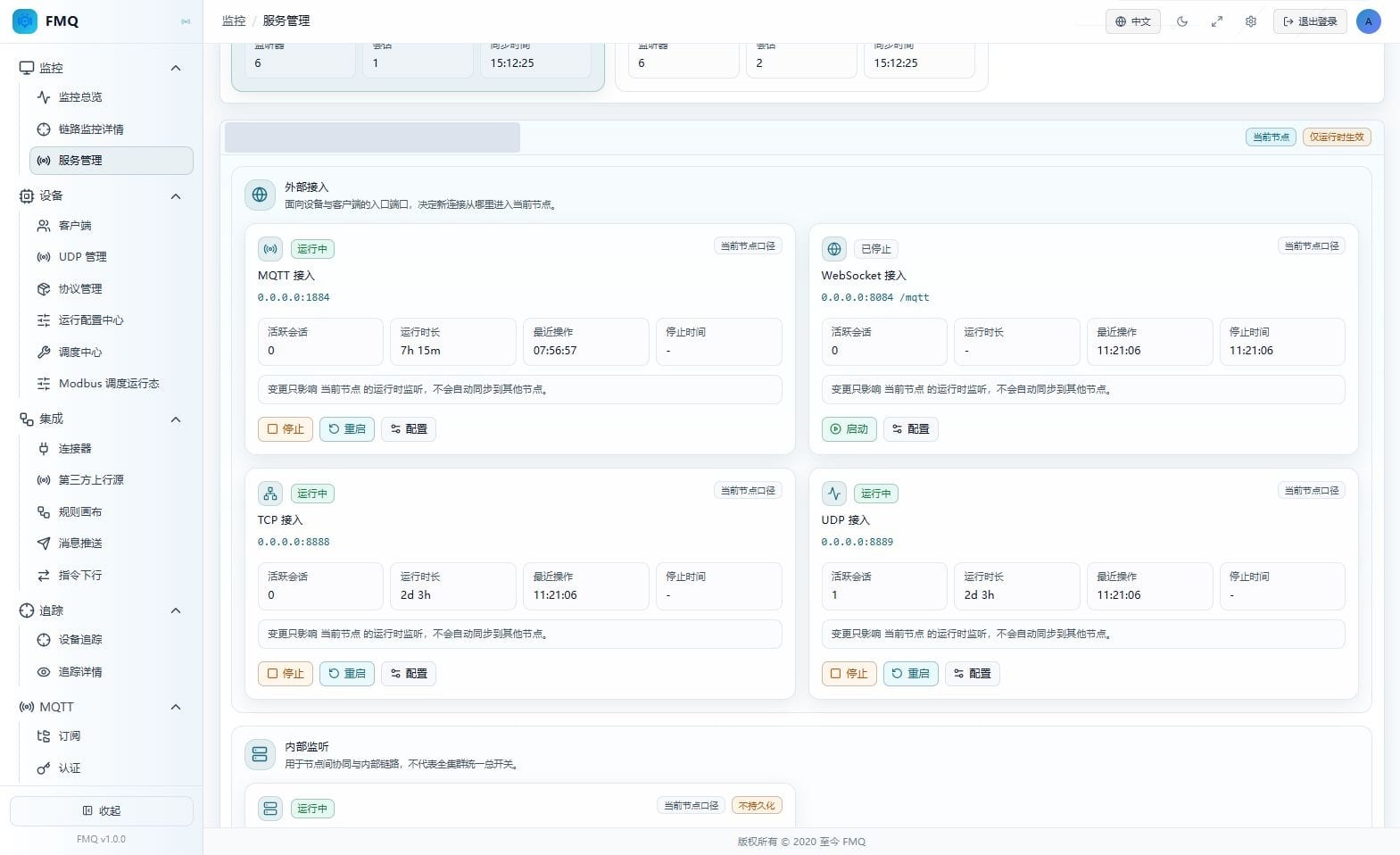
Figure: Verify the TCP endpoint, running status, session count, and times.
Field Descriptions
| Field / Control | Description |
|---|---|
| TCP access | TCP: the page purpose grouping of TCP. |
| Running status | TCP: distinguishes Running, Starting, Stopping, Stopped, Failed, and Unknown. |
| Listener endpoint | TCP: shows the address and port the service is bound to; 0.0.0.0 means bound to all interfaces, not the target address a device should fill in. |
| Current node scope | TCP: the card values are not a cluster-wide total. |
| Active sessions | TCP: the number of active sessions belonging to the TCP entry. |
| Uptime | TCP: the continuous running time since the listener was last started; a dash is shown when stopped. |
| Last operation | TCP: the time of the most recent listener lifecycle operation, not the device message time. |
| Stop time | TCP: the most recent stop time; a dash is shown when there is no such record. |
8. Read the UDP Listener Status
Location: Monitoring -> Service Management
Under External Access, find UDP and review its status, endpoint, sessions, and times in order; do not click the start/stop buttons.
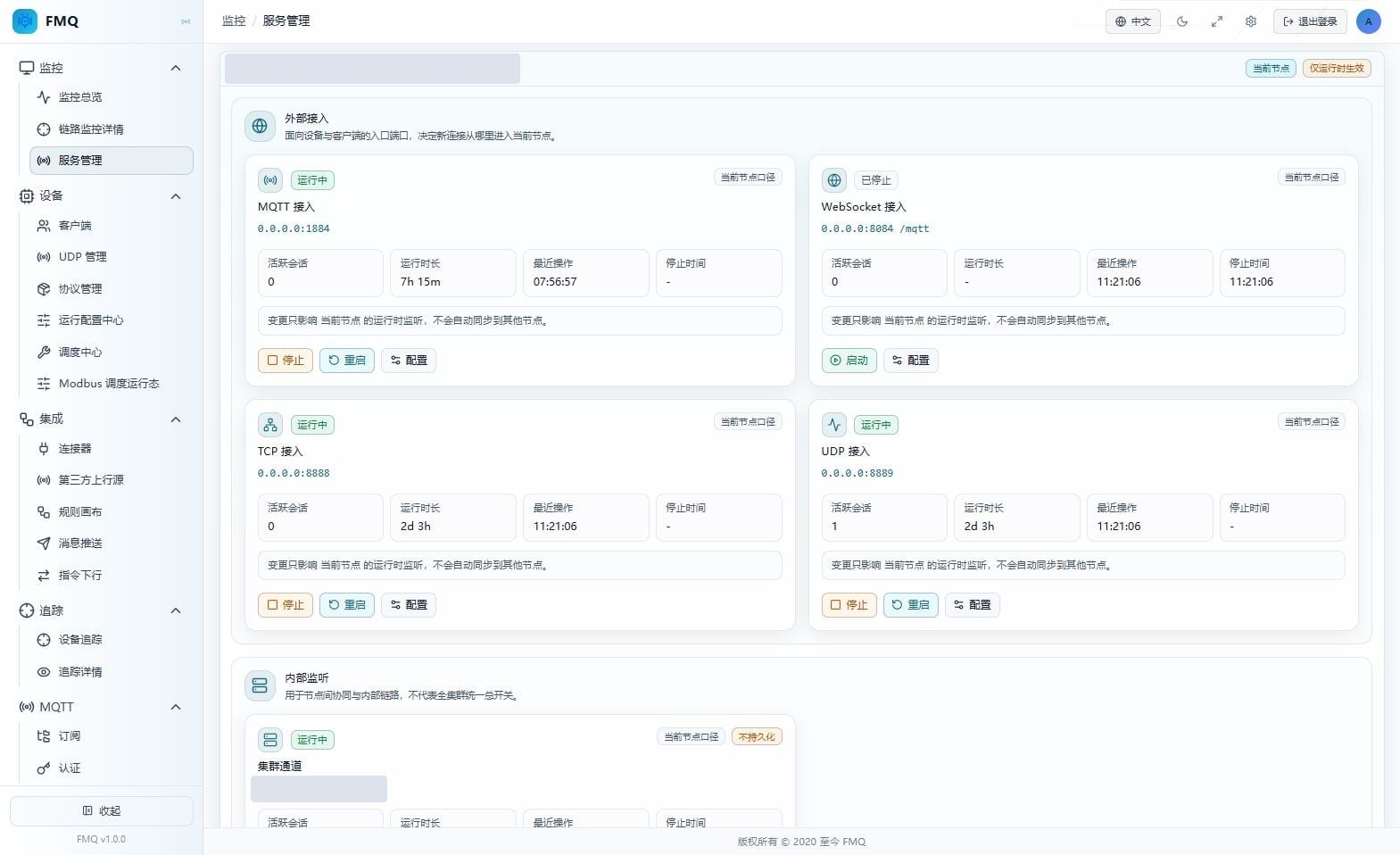
Figure: Verify the UDP endpoint, logical session count, and running status.
Field Descriptions
| Field / Control | Description |
|---|---|
| UDP access | UDP: the page purpose grouping of UDP. |
| Running status | UDP: distinguishes Running, Starting, Stopping, Stopped, Failed, and Unknown. |
| Listener endpoint | UDP: shows the address and port the service is bound to; 0.0.0.0 means bound to all interfaces, not the target address a device should fill in. |
| Current node scope | UDP: the card values are not a cluster-wide total. |
| Active sessions | UDP: the number of UDP logical sessions; this does not mean TCP-style connections have been established. |
| Uptime | UDP: the continuous running time since the listener was last started; a dash is shown when stopped. |
| Last operation | UDP: the time of the most recent listener lifecycle operation, not the device message time. |
| Stop time | UDP: the most recent stop time; a dash is shown when there is no such record. |
9. Read the Cluster TCP Listener Status
Location: Monitoring -> Service Management
Under Internal Listeners, find Cluster TCP and review its status, endpoint, sessions, and times in order; do not click the start/stop buttons.
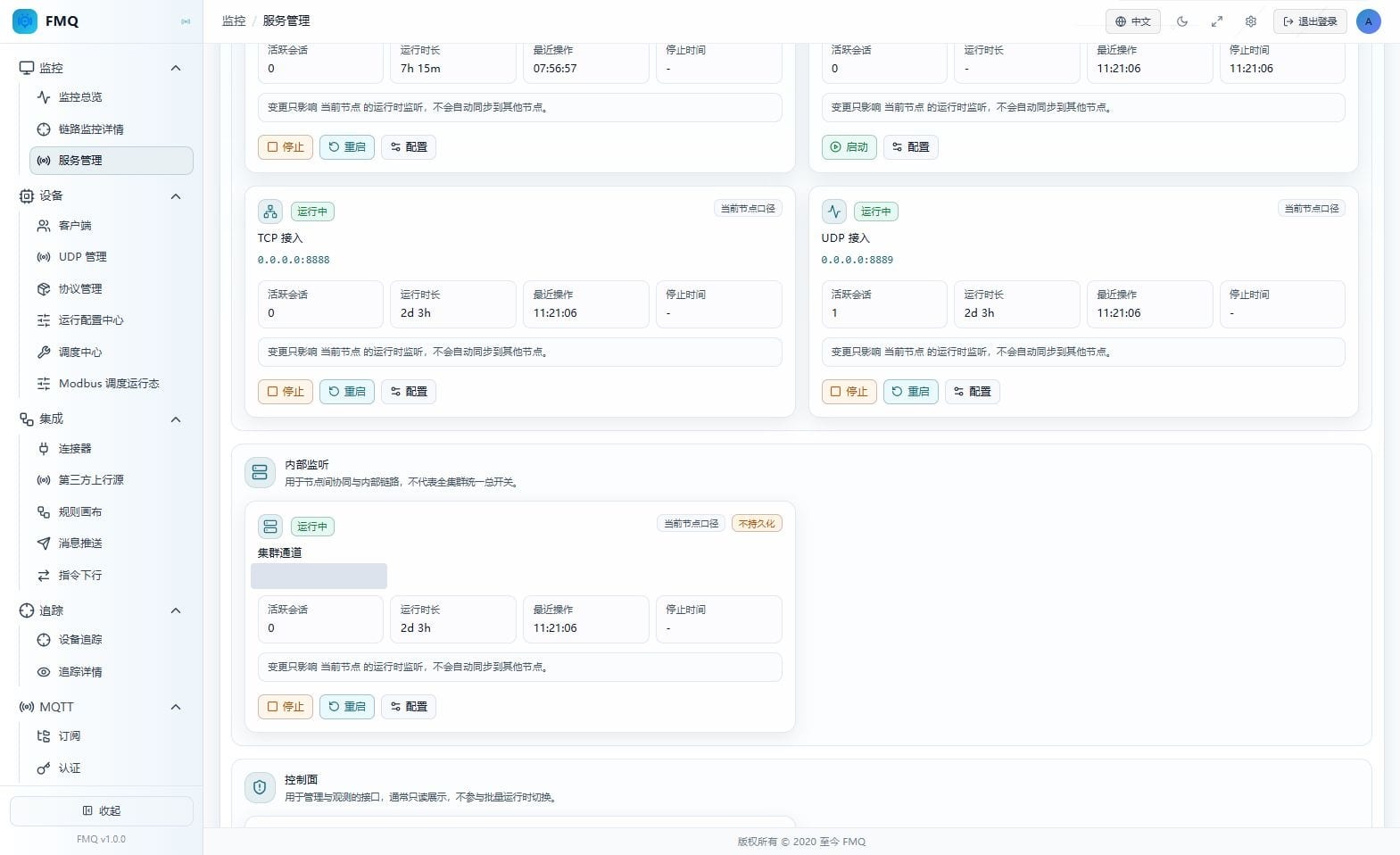
Figure: The cluster channel is an internal link and is marked as not persisted.
Field Descriptions
| Field / Control | Description |
|---|---|
| Cluster channel | Cluster TCP: the page purpose grouping of Cluster TCP. |
| Running status | Cluster TCP: distinguishes Running, Starting, Stopping, Stopped, Failed, and Unknown. |
| Listener endpoint | Cluster TCP: shows the address and port the service is bound to; 0.0.0.0 means bound to all interfaces, not the target address a device should fill in. |
| Current node scope | Cluster TCP: the card values are not a cluster-wide total. |
| Active sessions | Cluster TCP: the session count returned by the cluster channel card; it cannot replace a cluster health assessment. |
| Uptime | Cluster TCP: the continuous running time since the listener was last started; a dash is shown when stopped. |
| Last operation | Cluster TCP: the time of the most recent listener lifecycle operation, not the device message time. |
| Stop time | Cluster TCP: the most recent stop time; a dash is shown when there is no such record. |
| Not persisted | Cluster TCP: the configuration persistence limitation explicitly marked on the cluster channel card. |
10. Read the HTTP Control Plane Read-Only Status
Location: Monitoring -> Service Management
Under Control Plane, find HTTP Control Plane and review its status, endpoint, sessions, and times in order; do not click the start/stop buttons.
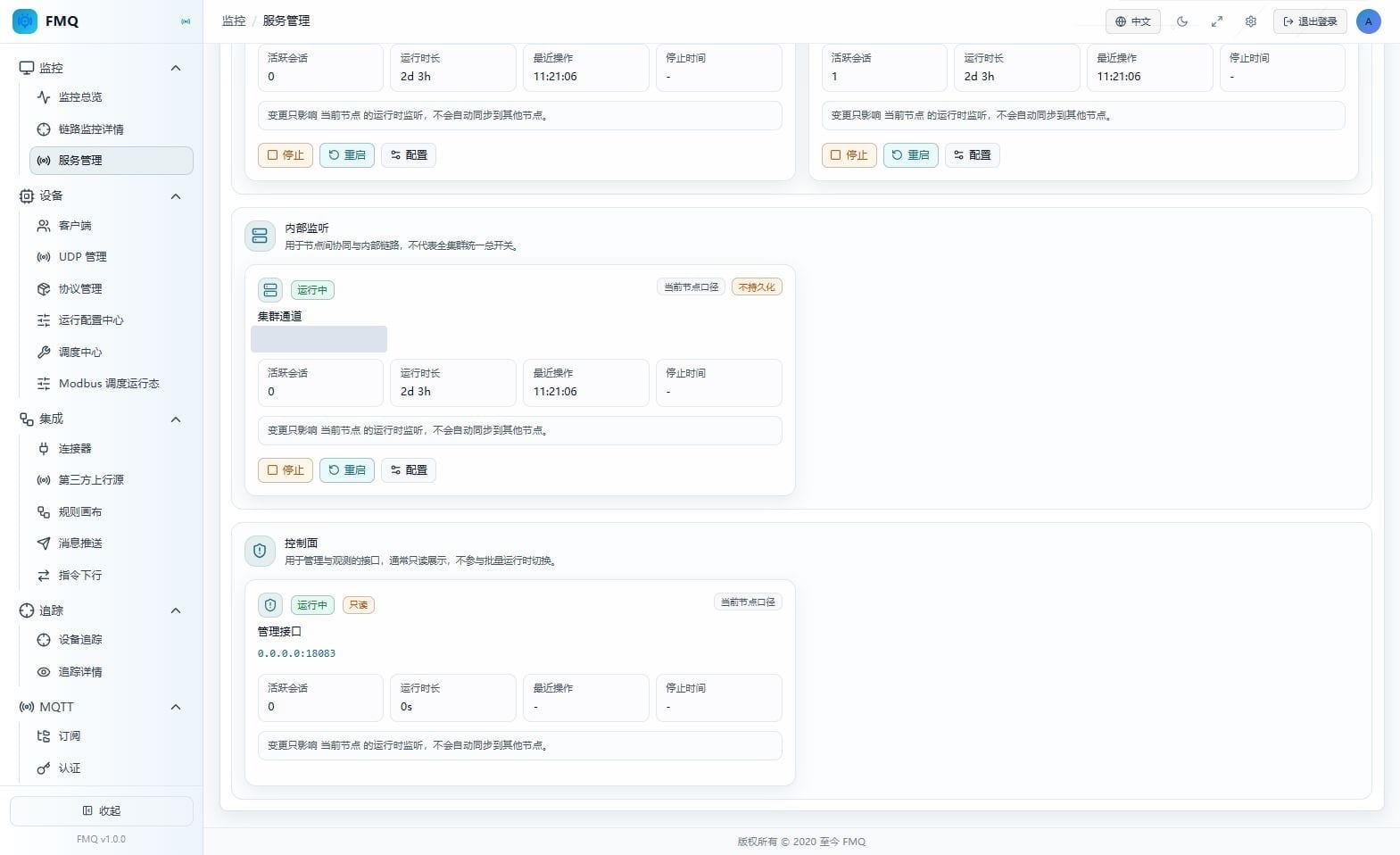
Figure: The HTTP control plane is a read-only display and provides no start/stop or configuration buttons.
Field Descriptions
| Field / Control | Description |
|---|---|
| Management interface | HTTP Control Plane: the page purpose grouping of HTTP Control Plane. |
| Running status | HTTP Control Plane: distinguishes Running, Starting, Stopping, Stopped, Failed, and Unknown. |
| Listener endpoint | HTTP Control Plane: shows the address and port the service is bound to; 0.0.0.0 means bound to all interfaces, not the target address a device should fill in. |
| Current node scope | HTTP Control Plane: the card values are not a cluster-wide total. |
| Active sessions | HTTP Control Plane: the management interface should not be interpreted as a device connection count; 0 does not mean the console is unavailable. |
| Uptime | HTTP Control Plane: the current source code always returns 0, so it cannot be used to judge that HTTP has just restarted. |
| Last operation | HTTP Control Plane: the time of the most recent listener lifecycle operation, not the device message time. |
| Stop time | HTTP Control Plane: the most recent stop time; a dash is shown when there is no such record. |
| Read-only | HTTP Control Plane: this page provides no start/stop or configuration for the HTTP control plane. |
11. Select the Correct Operation Node
Location: Monitoring -> Service Management
Click the Node Card first, then verify the workspace node name and address. Do not treat the current page as a unified switch for all nodes.
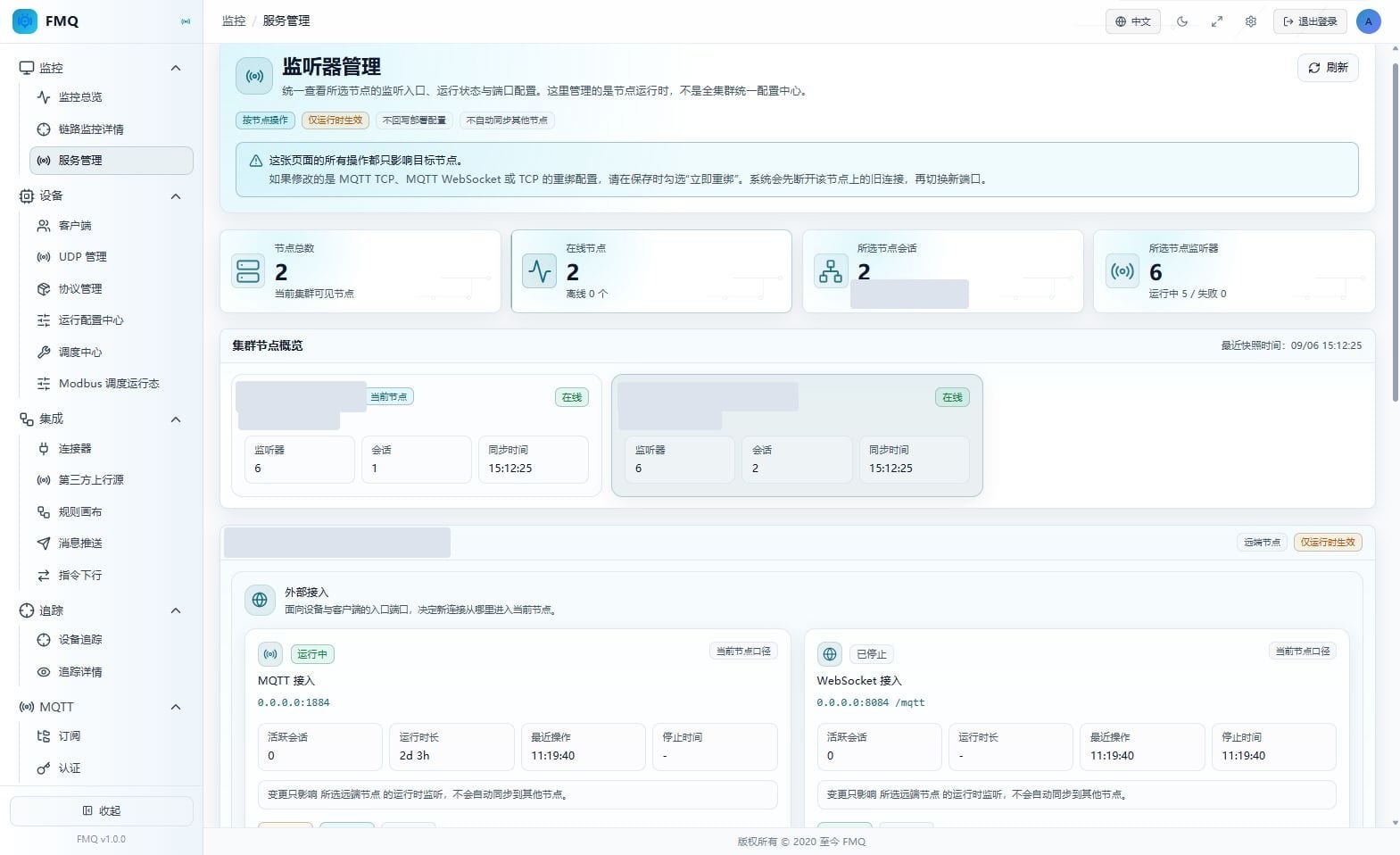
Figure: The node card determines the operation target of the listener workspace below; once selected, the summary and workspace switch in sync.
12. Review the MQTT TCP Configuration and Protocol Differences
Location: Monitoring -> Service Management
On the MQTT TCP card, click Configure and understand the fields according to the table below. This round is view-only: no modification, no save; click Cancel after reviewing.
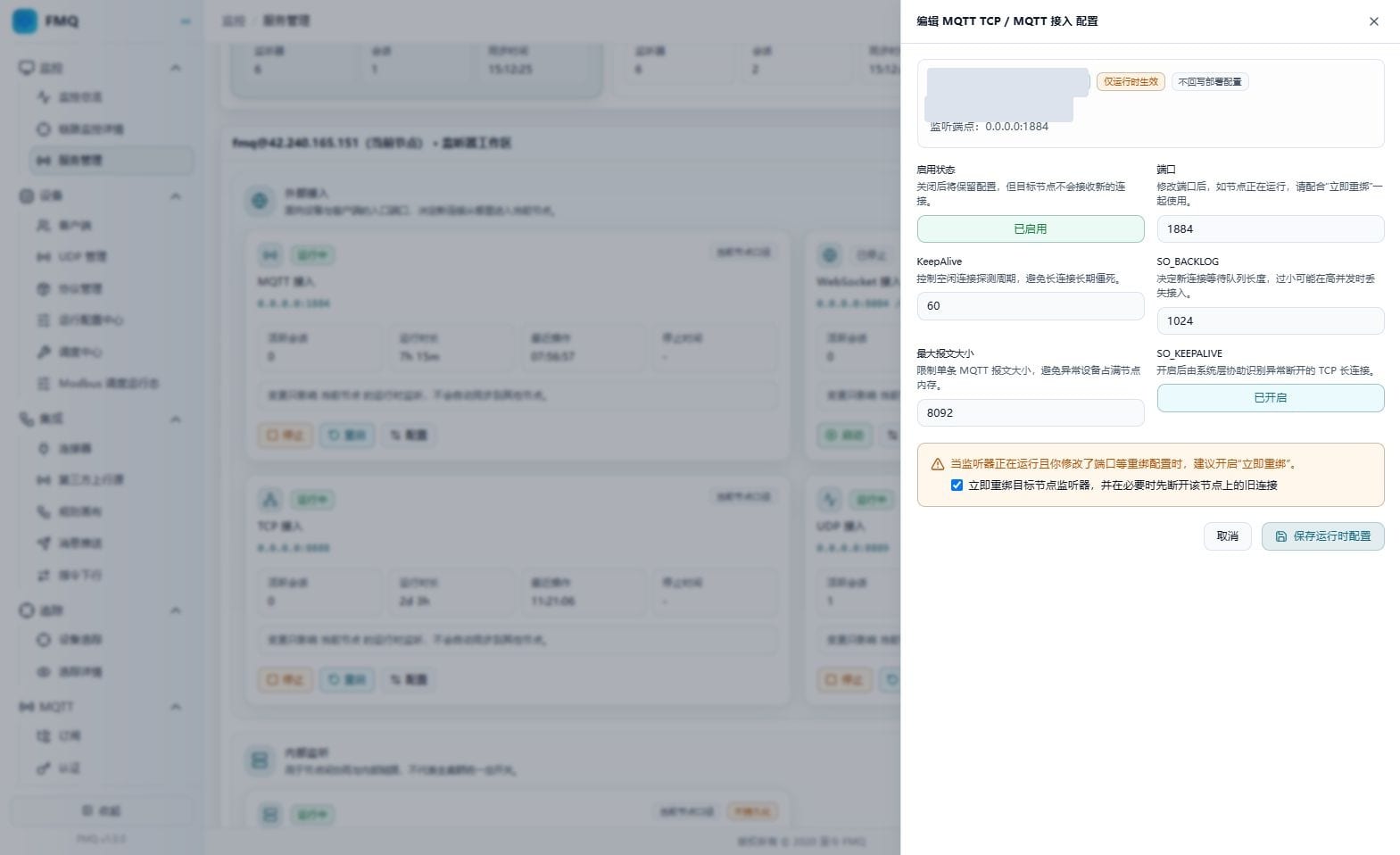
Figure: This round only reviews the fields and current values; no modification, no save.
Field Descriptions
| Field / Control | Description |
|---|---|
| Enabled status | Enables or disables this listener entry; after it is disabled the configuration is retained but new connections are no longer accepted.; Enables or disables this listener entry; after it is disabled the configuration is retained but new connections are no longer accepted. Required · Recommended: keep the verified deployment value · Example: use the on-site value |
| Port | Listener entry port, range 1-65535; use a port that does not conflict with the deployment plan.; Listener entry port, range 1-65535; use a port that does not conflict with the deployment plan. Required · Recommended: keep the verified deployment value · Example: use the on-site value |
| KeepAlive | The MQTT KeepAlive configuration readable and writable on the page. In the current source code, the actual connection idle timeout is 1.5 times the client CONNECT heartbeat value, so there is no guarantee that modifying this field changes the device heartbeat.; The MQTT KeepAlive configuration readable and writable on the page. In the current source code, the actual connection idle timeout is 1.5 times the client CONNECT heartbeat value, so there is no guarantee that modifying this field changes the device heartbeat. Required · Recommended: keep the verified deployment value · Example: use the on-site value |
| SO_BACKLOG | The capacity of the queue waiting for connection establishment to complete, range 1-65535; it is not an upper limit on online devices.; The capacity of the queue waiting for connection establishment to complete, range 1-65535; it is not an upper limit on online devices. Required · Recommended: keep the verified deployment value · Example: use the on-site value |
| Maximum packet size | The single-packet size allowed by MQTT decoding, in bytes; page range 1024-67108864 (64 MiB).; The single-packet size allowed by MQTT decoding, in bytes; page range 1024-67108864 (64 MiB). Required · Recommended: keep the verified deployment value · Example: use the on-site value |
| SO_KEEPALIVE | Whether to enable operating-system TCP keepalive; it is not equivalent to the MQTT PING heartbeat interval.; Whether to enable operating-system TCP keepalive; it is not equivalent to the MQTT PING heartbeat interval. Required · Recommended: keep the verified deployment value · Example: use the on-site value |
| Rebind immediately | Releases and rebinds the entry when saving; MQTT TCP, WebSocket, and TCP may disconnect the node's old connections first when necessary.; Releases and rebinds the entry when saving; MQTT TCP, WebSocket, and TCP may disconnect the node's old connections first when necessary. Optional · Recommended: decide by impact assessment within a maintenance window; do not toggle for experimentation · Example: use the on-site value |
13. Review the MQTT WebSocket Configuration and Protocol Differences
Location: Monitoring -> Service Management
On the MQTT WebSocket card, click Configure and understand the fields according to the table below. This round is view-only: no modification, no save; click Cancel after reviewing.
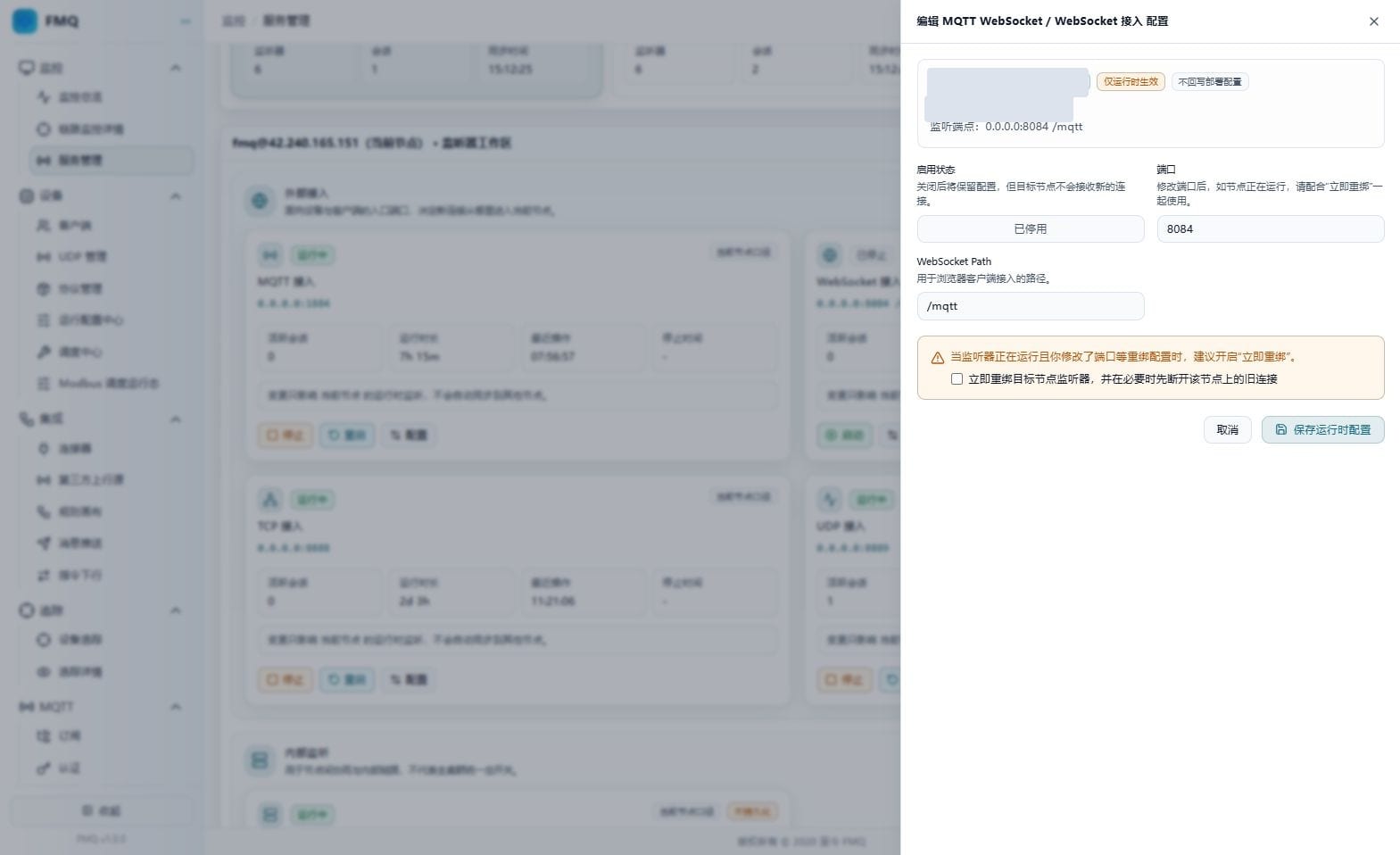
Figure: The WebSocket configuration includes the port and Path; nothing was saved this round.
Field Descriptions
| Field / Control | Description |
|---|---|
| Enabled status | Enables or disables this listener entry; after it is disabled the configuration is retained but new connections are no longer accepted.; Enables or disables this listener entry; after it is disabled the configuration is retained but new connections are no longer accepted. Required · Recommended: keep the verified deployment value · Example: use the on-site value |
| Port | Listener entry port, range 1-65535; use a port that does not conflict with the deployment plan.; Listener entry port, range 1-65535; use a port that does not conflict with the deployment plan. Required · Recommended: keep the verified deployment value · Example: use the on-site value |
| WebSocket Path | The access path for browser MQTT clients; it cannot be empty, and the page prepends a / when it does not start with one.; The access path for browser MQTT clients; it cannot be empty, and the page prepends a / when it does not start with one. Required · Recommended: match the client exactly, for example /mqtt · Example: use the on-site value |
| Rebind immediately | Releases and rebinds the entry when saving; MQTT TCP, WebSocket, and TCP may disconnect the node's old connections first when necessary.; Releases and rebinds the entry when saving; MQTT TCP, WebSocket, and TCP may disconnect the node's old connections first when necessary. Optional · Recommended: decide by impact assessment within a maintenance window; do not toggle for experimentation · Example: use the on-site value |
14. Review the TCP Configuration and Protocol Differences
Location: Monitoring -> Service Management
On the TCP card, click Configure and understand the fields according to the table below. This round is view-only: no modification, no save; click Cancel after reviewing.
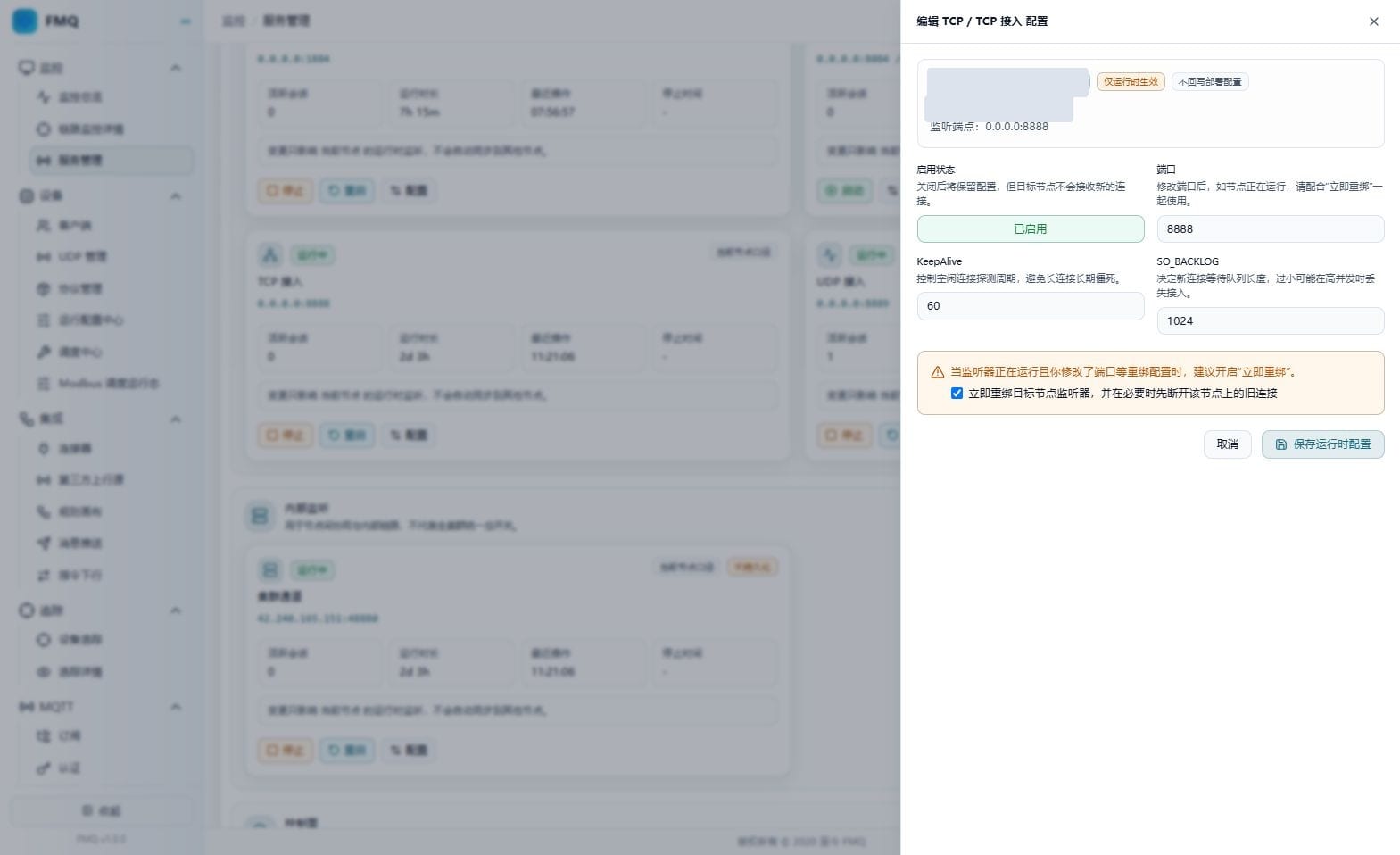
Figure: The TCP configuration includes the port, KeepAlive, and SO_BACKLOG; nothing was saved this round.
Field Descriptions
| Field / Control | Description |
|---|---|
| Enabled status | Enables or disables this listener entry; after it is disabled the configuration is retained but new connections are no longer accepted.; Enables or disables this listener entry; after it is disabled the configuration is retained but new connections are no longer accepted. Required · Recommended: keep the verified deployment value · Example: use the on-site value |
| Port | Listener entry port, range 1-65535; use a port that does not conflict with the deployment plan.; Listener entry port, range 1-65535; use a port that does not conflict with the deployment plan. Required · Recommended: keep the verified deployment value · Example: use the on-site value |
| KeepAlive | The idle detection interval for a TCP connection with continuous no reads or writes, in seconds; page range 1-86400. It does not automatically send heartbeat packets at that interval.; The idle detection interval for a TCP connection with continuous no reads or writes, in seconds; page range 1-86400. It does not automatically send heartbeat packets at that interval. Required · Recommended: keep the verified deployment value · Example: use the on-site value |
| SO_BACKLOG | The capacity of the queue waiting for connection establishment to complete, range 1-65535; it is not an upper limit on online devices.; The capacity of the queue waiting for connection establishment to complete, range 1-65535; it is not an upper limit on online devices. Required · Recommended: keep the verified deployment value · Example: use the on-site value |
| Rebind immediately | Releases and rebinds the entry when saving; MQTT TCP, WebSocket, and TCP may disconnect the node's old connections first when necessary.; Releases and rebinds the entry when saving; MQTT TCP, WebSocket, and TCP may disconnect the node's old connections first when necessary. Optional · Recommended: decide by impact assessment within a maintenance window; do not toggle for experimentation · Example: use the on-site value |
15. Review the UDP Configuration and Protocol Differences
Location: Monitoring -> Service Management
On the UDP card, click Configure and understand the fields according to the table below. This round is view-only: no modification, no save; click Cancel after reviewing.
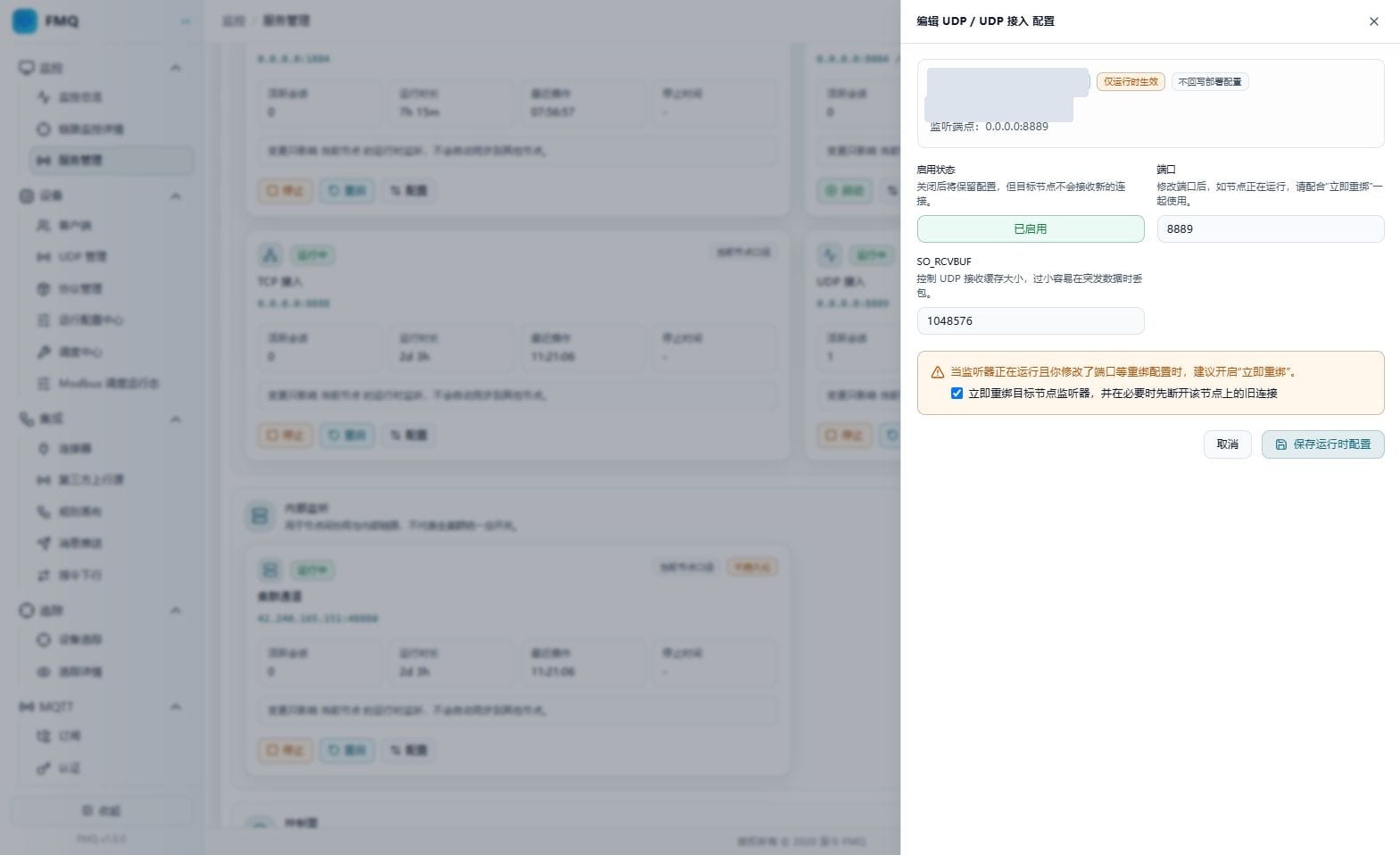
Figure: The UDP configuration uses SO_RCVBUF and does not apply TCP's KeepAlive or SO_BACKLOG.
Field Descriptions
| Field / Control | Description |
|---|---|
| Enabled status | Enables or disables this listener entry; after it is disabled the configuration is retained but new connections are no longer accepted.; Enables or disables this listener entry; after it is disabled the configuration is retained but new connections are no longer accepted. Required · Recommended: keep the verified deployment value · Example: use the on-site value |
| Port | Listener entry port, range 1-65535; use a port that does not conflict with the deployment plan.; Listener entry port, range 1-65535; use a port that does not conflict with the deployment plan. Required · Recommended: keep the verified deployment value · Example: use the on-site value |
| SO_RCVBUF | The UDP receive buffer size, in bytes; page range 1024-134217728 (128 MiB); the actual allocation is limited by the system.; The UDP receive buffer size, in bytes; page range 1024-134217728 (128 MiB); the actual allocation is limited by the system. Required · Recommended: keep the verified deployment value · Example: use the on-site value |
| Rebind immediately | Releases and rebinds the entry when saving; MQTT TCP, WebSocket, and TCP may disconnect the node's old connections first when necessary.; Releases and rebinds the entry when saving; MQTT TCP, WebSocket, and TCP may disconnect the node's old connections first when necessary. Optional · Recommended: decide by impact assessment within a maintenance window; do not toggle for experimentation · Example: use the on-site value |
16. Review the Cluster TCP Configuration and Protocol Differences
Location: Monitoring -> Service Management
On the Cluster TCP card, click Configure and understand the fields according to the table below. This round is view-only: no modification, no save; click Cancel after reviewing.
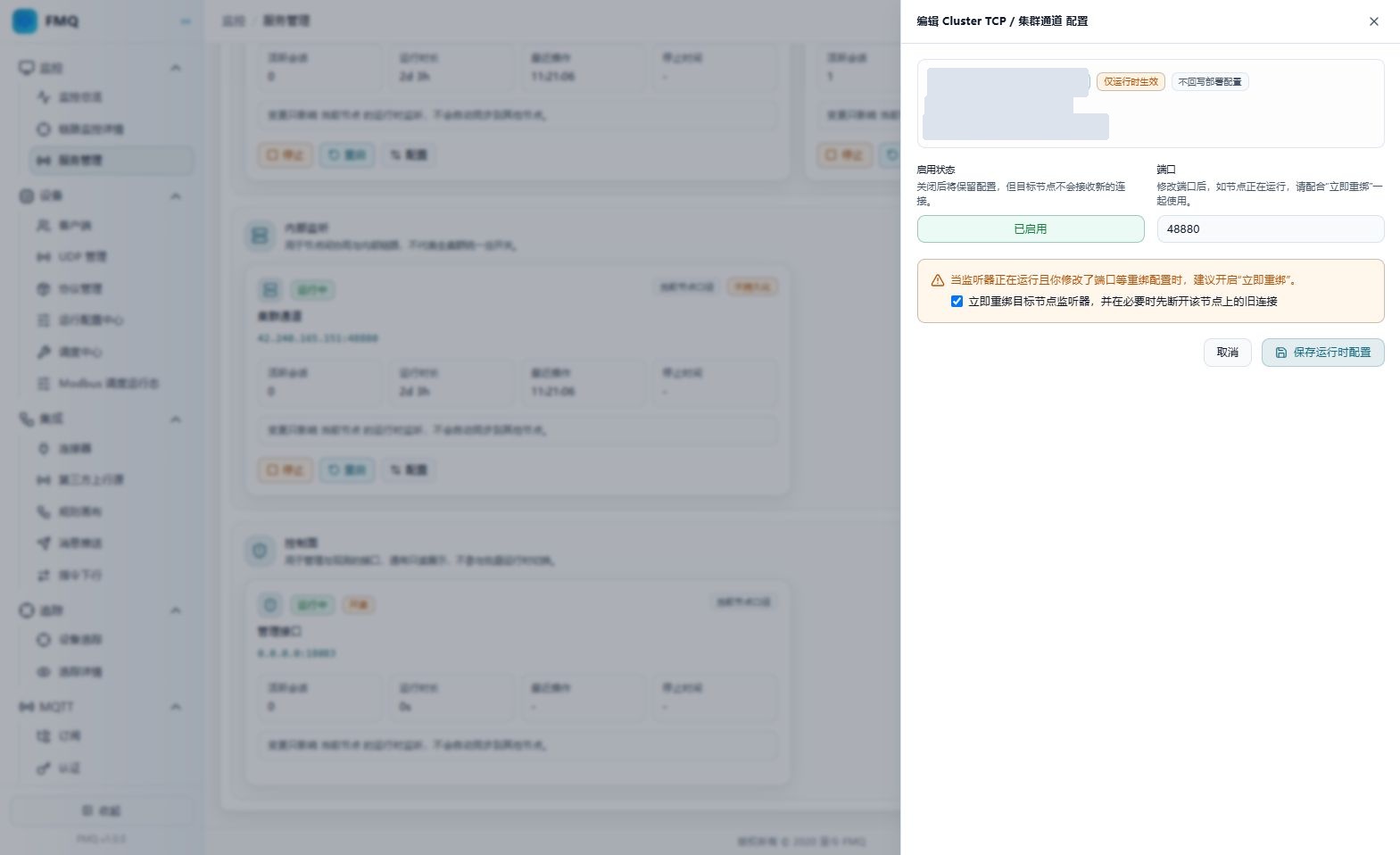
Figure: Cluster TCP only modifies the runtime port on the current node; when the port changes, rebinding immediately disconnects the old connections before switching.
Field Descriptions
| Field / Control | Description |
|---|---|
| Enabled status | Enables or disables this listener entry; after it is disabled the configuration is retained but new connections are no longer accepted.; Enables or disables this listener entry; after it is disabled the configuration is retained but new connections are no longer accepted. Required · Recommended: keep the verified deployment value · Example: use the on-site value |
| Port | Listener entry port, range 1-65535; use a port that does not conflict with the deployment plan.; Listener entry port, range 1-65535; use a port that does not conflict with the deployment plan. Required · Recommended: keep the verified deployment value · Example: use the on-site value |
| Rebind immediately | Releases and rebinds the entry when saving; MQTT TCP, WebSocket, and TCP may disconnect the node's old connections first when necessary.; Releases and rebinds the entry when saving; MQTT TCP, WebSocket, and TCP may disconnect the node's old connections first when necessary. Optional · Recommended: decide by impact assessment within a maintenance window; do not toggle for experimentation · Example: use the on-site value |
17. Understand the Boundaries of Saving, Rebinding, and Taking Effect
Location: Monitoring -> Service Management
During actual maintenance, confirm the node and fields first, then evaluate Rebind Immediately, and only then click Save Runtime Configuration. This round only shows the pre-save panel; Save was not clicked.
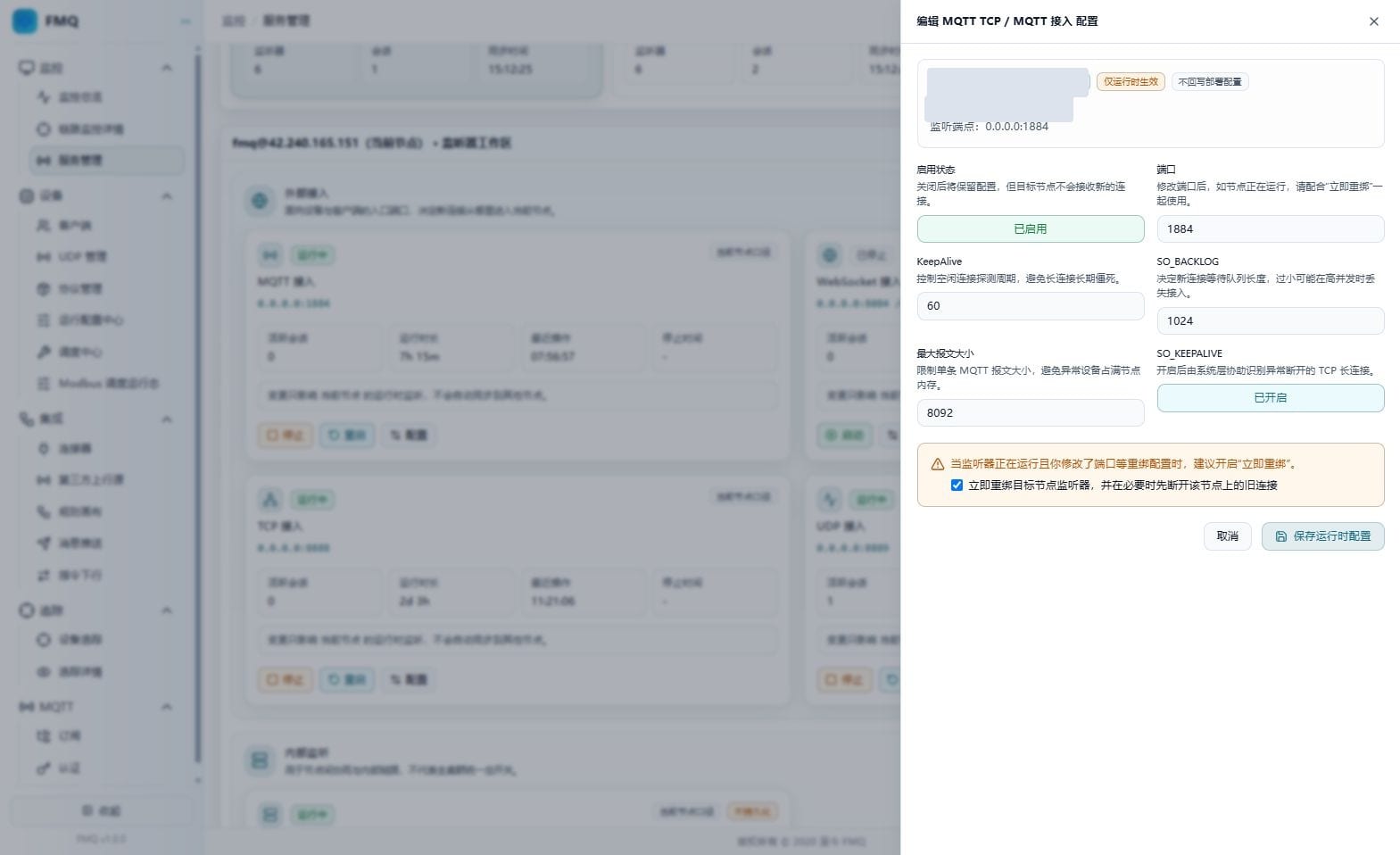
Figure: Before saving, verify the rebinding risk and target node; Save Runtime Configuration was not clicked this round.
Field Descriptions
| Field / Control | Description |
|---|---|
| Rebind immediately | Releases and rebinds the entry when saving; MQTT TCP, WebSocket, and TCP may disconnect the node's old connections first when necessary.; Releases and rebinds the entry when saving; MQTT TCP, WebSocket, and TCP may disconnect the node's old connections first when necessary. Optional · Recommended: decide by impact assessment within a maintenance window; do not toggle for experimentation · Example: use the on-site value |
Operation Boundary
Expected result (not executed): Expected: after validation passes, the target node is asked to apply the configuration and returns feedback; you should also refresh and verify the endpoint and status. A save request may start an entry that is stopped but enabled. Risks and recovery: a running form submits rebinding fields such as the port; the current source code may require rebinding immediately even when the value has not changed. Do not trial-save just to see the feedback. On failure, read the error first, then have operations verify the port, node, and original configuration.
18. Understand the Start Confirmation
Location: Monitoring -> Service Management
On an applicable listener card, click Start and verify the node, endpoint, and impact scope in the confirmation box. This round clicks Cancel, not "Confirm Start".
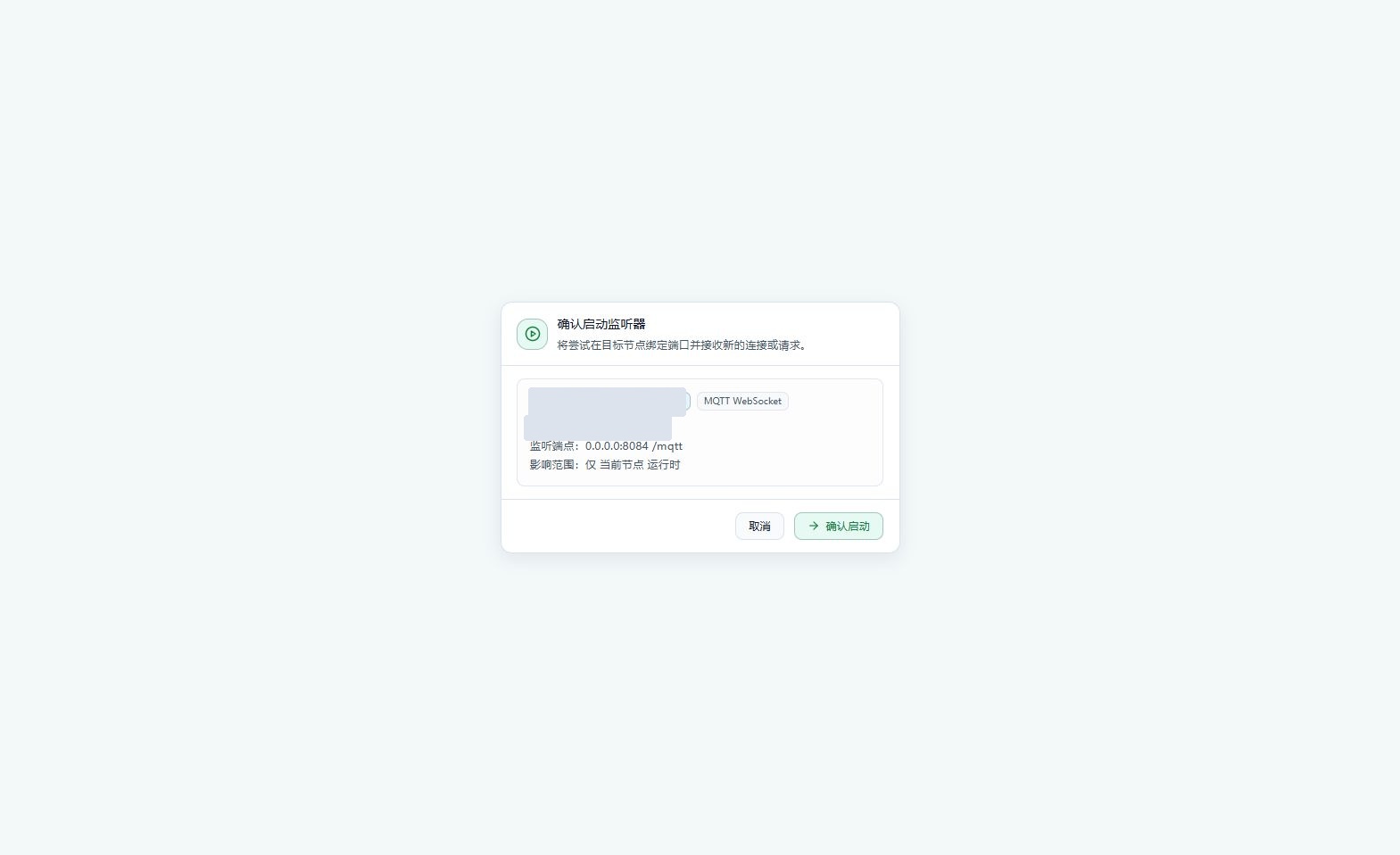
Figure: The confirmation box lists the target node, listener endpoint, and impact scope again; this round was view-and-cancel only, and the listener was not started.
Operation Boundary
Expected result (not executed): Expected: the target listener binds the entry and should show Running after refresh; this does not mean existing devices have connected. Risks and recovery: a disabled entry, port conflict, or offline node may cause failure; read the feedback first and do not confirm repeatedly.
19. Understand the Stop Confirmation
Location: Monitoring -> Service Management
On an applicable listener card, click Stop and verify the node, endpoint, and impact scope in the confirmation box. This round clicks Cancel, not "Confirm Stop".
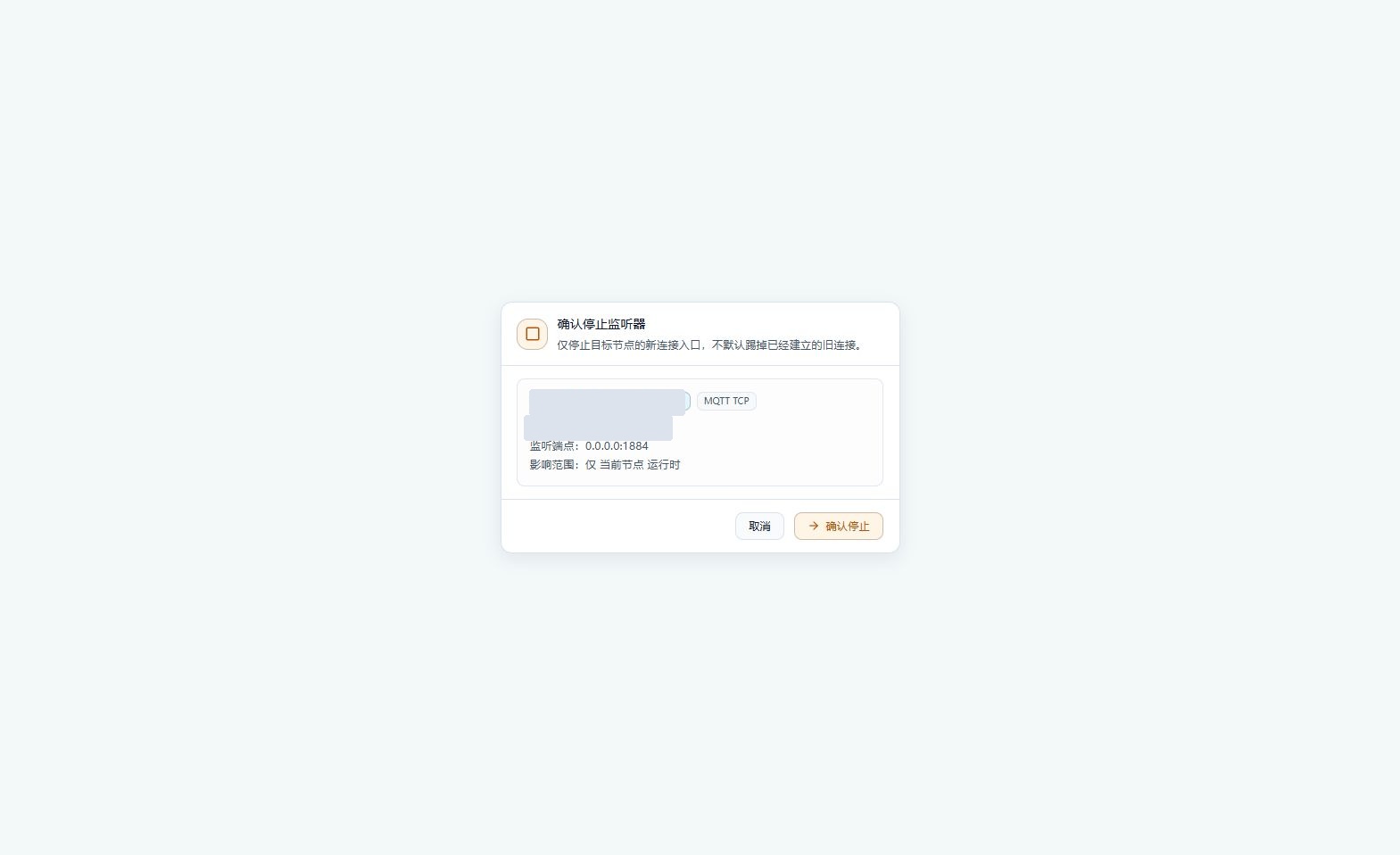
Figure: Stopping only closes the new-connection entry on the current node and does not kick established connections by default; this round was view-and-cancel only, and the listener was not stopped.
Operation Boundary
Expected result (not executed): Expected: the target entry stops accepting new connections; established MQTT/TCP connections are not actively disconnected by default, while UDP datagram reception is affected. Risks and recovery: stopping a non-target entry affects business; before recovery, verify the node and port, then start it according to the maintenance procedure.
20. Understand the Restart Confirmation
Location: Monitoring -> Service Management
On an applicable listener card, click Restart and verify the node, endpoint, and impact scope in the confirmation box. This round clicks Cancel, not "Confirm Restart".
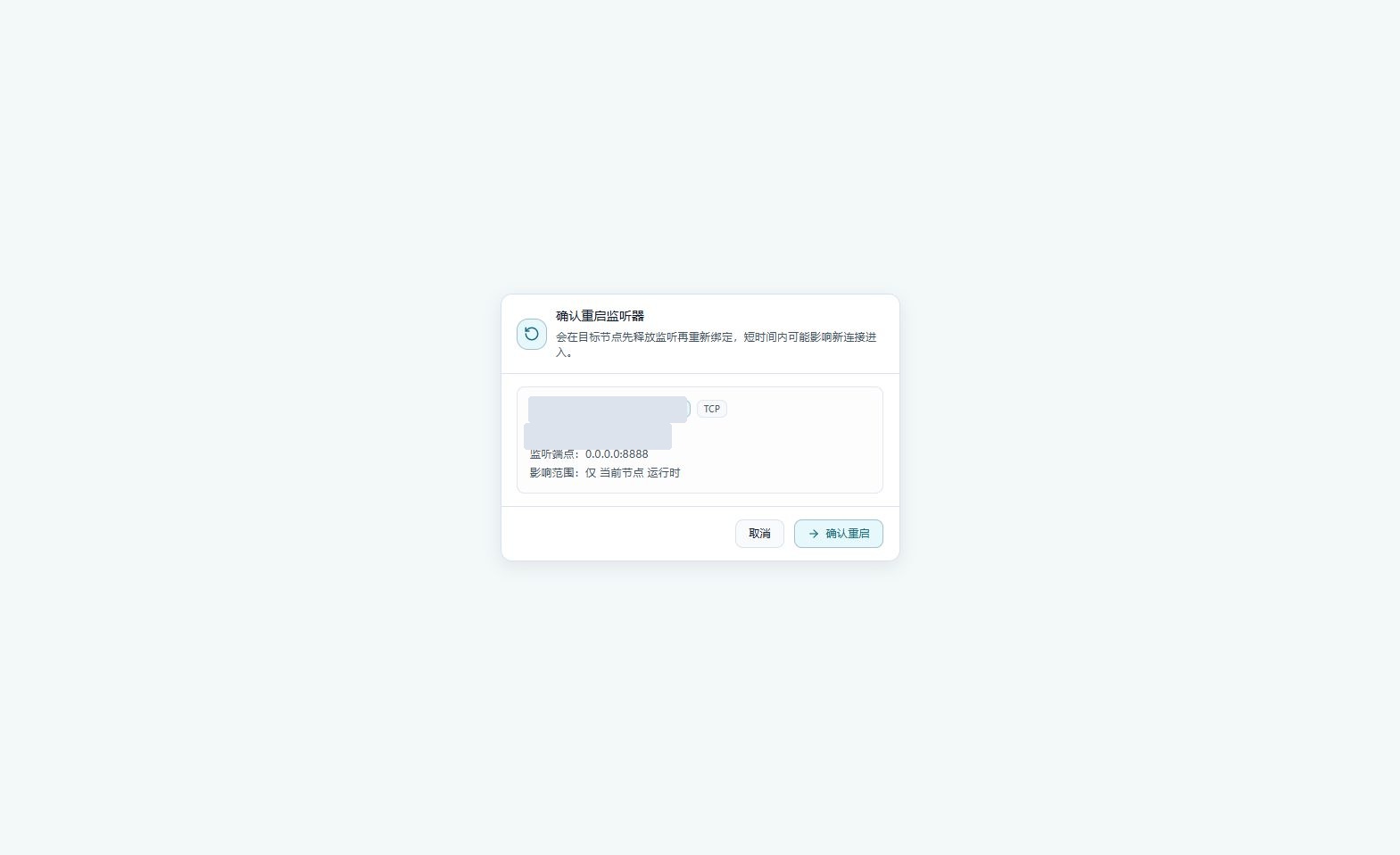
Figure: Restarting releases the listener on the current node and then rebinds it, briefly affecting new connections; this round was view-and-cancel only, and the listener was not restarted.
Operation Boundary
Expected result (not executed): Expected: the target entry is released first and then rebound, during which new connections or datagrams may not get in; refresh and verify after completion. Risks and recovery: restart is not a lossless operation; on failure, check the port, service logs, and original configuration — do not judge completion by the button click alone.
21. How to Check and Recover After Operations
Location: Monitoring -> Service Management
After an actual change, click Refresh and check the node, endpoint, listener status, and times; then verify device access as business requires. This round was read-only review and is not proof of a successful change.
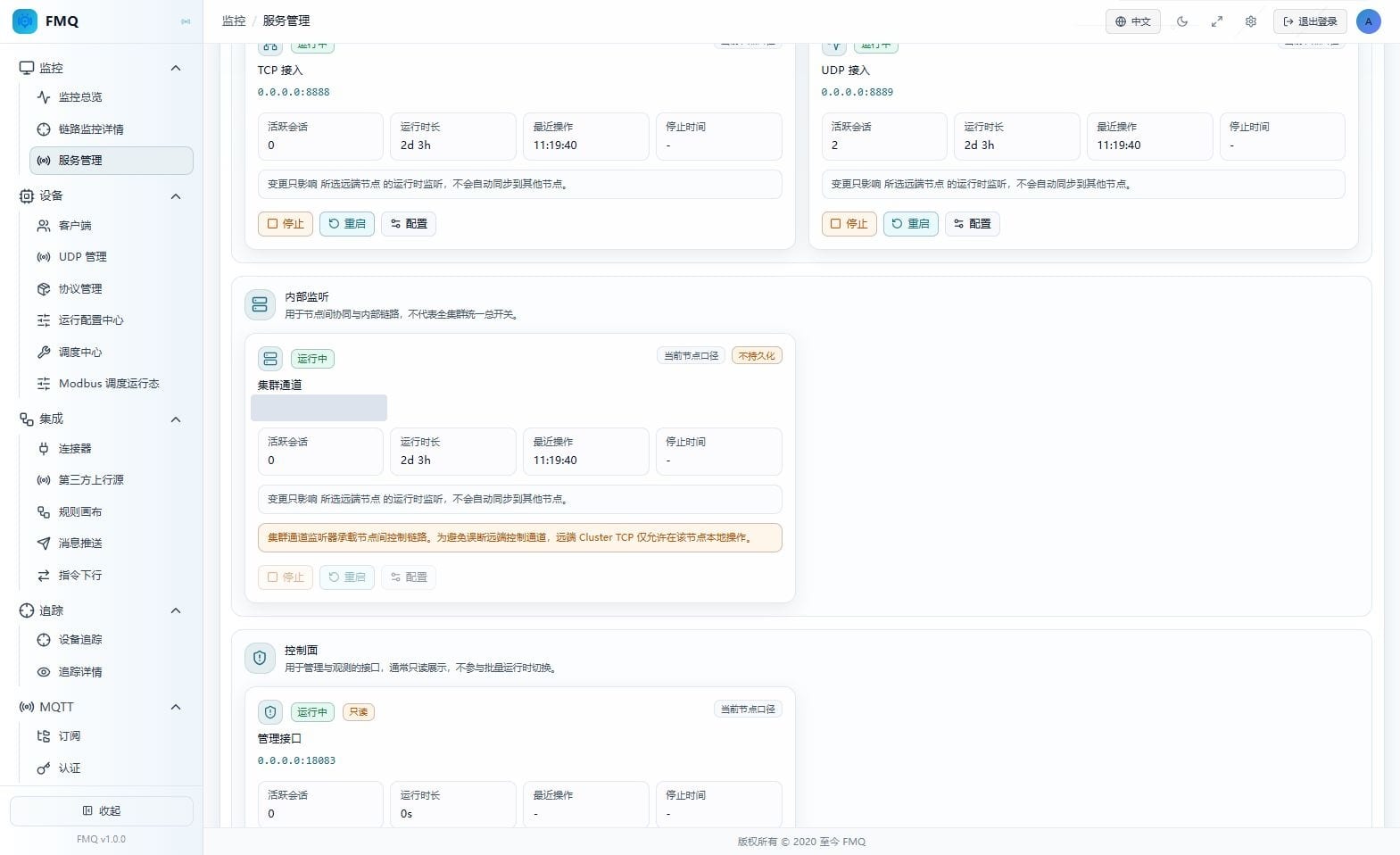
Figure: You can view listener status on a remote node, but Stop, Restart, and Configure for Cluster TCP are disabled; log in to the target node locally for maintenance.
Operation Boundary
Expected result (not executed): Expected: the snapshot should reflect the real status of the target node. Running only proves the listener entry status; it does not prove that device, uplink, or downlink business is working end to end. Risks and recovery: when a node is offline, only old snapshots are visible — restore communication first; for port conflicts, check the occupancy first; remote cluster channels are maintained back on the local node; the HTTP control plane goes through the deployment process. The current source code supports partial runtime configuration persistence and does not guarantee that old values are restored after a restart.
Page Field Reference
Full Reference
| Field / Unit | Plain Meaning | Data Direction / Source | Normal Criteria | Abnormal Signals and First Checkpoint |
|---|---|---|---|---|
| Confirm the Management Scope and Refresh Entry | ||||
| Monitoring Scope (scope) | The page displays runtime snapshots scoped to the currently selected node; the node overview is used to switch targets and does not mean all nodes are operated in sync. | Target node runtime snapshot -> current page | The selected node matches the workspace title. | Selecting the wrong node makes another node's status look like the local status. First checkpoint: verify the node name, address, and workspace title first. |
| Sampling Time (time) | Judge the freshness of the data on this page by the sync time on the node card and the latest snapshot time. | Target node runtime snapshot -> current page | The time updates reasonably after refresh. | The time stays unchanged for a long time or is clearly earlier than the current inspection. First checkpoint: check node sync, API response, and the server time zone. |
| Overall Health Status (status) | Judge overall health by combining online nodes, offline nodes, and the number of failed listeners; do not treat a single "online" label as proof that everything is normal. | Target node runtime snapshot -> current page | The required nodes are online and failed listeners are 0. | Nodes offline, listeners failed, or status inconsistent with business needs. First checkpoint: locate the abnormal node first, then check the latest error on the corresponding listener card. |
| Runtime Only (boundary) | Indicates that the current entry operates on the services currently running on the node. | Target node runtime snapshot -> current page | Maintenance actions target only the selected entry. | Treating this entry as a platform-wide configuration center misjudges the impact. First checkpoint: verify the target node first. |
| Does Not Write Back to Deployment Config (boundary) | The page states that it does not modify deployment files; this is not the same as not writing to the runtime configuration center. | Target node runtime snapshot -> current page | Deployment files and runtime configuration records are maintained separately. | You cannot assert from this that settings are necessarily lost after a restart. First checkpoint: verify the runtime configuration center and version of the current deployment. |
| Does Not Auto-Sync Other Nodes (boundary) | Page operations must not be treated as simultaneous changes on all nodes. | Target node runtime snapshot -> current page | Each node is verified through its own entry. | Changing only one node while expecting a global change. First checkpoint: confirm the endpoint and status node by node. |
| Read the Node and Selected-Node Summaries | ||||
| Total Nodes (count) | The number of nodes visible in the current snapshot. | Target node runtime snapshot -> current page | Consistent with the expected deployment topology. | Fewer than expected may mean a node has not joined or the snapshot is incomplete. First checkpoint: check the node list. |
| Online Nodes (count) | The number of nodes not marked offline or disconnected in the page statistics; this does not equal fully healthy. | Target node runtime snapshot -> current page | Judge together with the node card warnings. | The online count is normal but there may still be abnormal or warning nodes. First checkpoint: check each node's status label. |
| Offline (count) | The number of nodes marked offline or disconnected. | Target node runtime snapshot -> current page | Should normally be 0 when there is no planned offline. | A business node is offline unplanned. First checkpoint: confirm host and cluster communication. |
| Selected Node Sessions (count) | The number of sessions aggregated for the currently selected node, not the cluster-wide total. | Target node runtime snapshot -> current page | Varies with the node's actual business. | Persistently inconsistent with expected device activity. First checkpoint: verify the selected node and the clients page. |
| Selected Node Listeners (count) | The number of listener entries returned by the selected node. | Target node runtime snapshot -> current page | Corresponds to the service types enabled on that node. | A certain type of entry is missing. First checkpoint: verify the node deployment against the returned snapshot. |
| Running (count) | The number of listeners in Running status on the selected node. | Target node runtime snapshot -> current page | Only the entries the business needs are required to run. | A required entry is stopped or missing. First checkpoint: locate the corresponding listener card. |
| Failed (count) | The number of listeners in Failed status on the selected node. | Target node runtime snapshot -> current page | Normally 0 during a routine inspection. | A failed entry appears. First checkpoint: read the card's latest error, then check port occupancy. |
| Confirm Node Identity and Snapshot Freshness | ||||
| Node Name (identifier) | The node identity used to select the operation target. | Target node runtime snapshot -> current page | Matches the maintenance target. | The name or address does not match. First checkpoint: stop further changes and reselect. |
| Current Node / Remote Node (type) | The current node is the node this console corresponds to; the other nodes are remote. | Target node runtime snapshot -> current page | The operation entry matches the target. | A remote cluster channel being inoperable is not a button fault. First checkpoint: switch to that node's local console. |
| Node Address (address) | The network address that distinguishes the deployed nodes. | Target node runtime snapshot -> current page | Consistent with the deployment records. | The address does not match expectations. First checkpoint: verify the node ownership. |
| Node Status (status) | The page distinguishes online, offline, abnormal, or warning. | Target node runtime snapshot -> current page | Online with no abnormal information. | When offline, only the most recently synced snapshot can be viewed. First checkpoint: restore node communication before operating. |
| Listeners (count) | The number of listener entries returned by this node. | Target node runtime snapshot -> current page | Matches the node's deployment. | Differences between nodes cannot be explained. First checkpoint: verify the protocols enabled on the node. |
| Sessions (count) | The session aggregate of this node. | Target node runtime snapshot -> current page | Consistent with the node's business activity. | Business is active but the count is persistently inconsistent. First checkpoint: open the node's clients view. |
| Sync Time (time) | The most recent sync time of the node snapshot, not the last device report time. | Target node runtime snapshot -> current page | Updates with refresh and sync. | Stuck at an old time for a long period. First checkpoint: check node sync and time zone. |
| Latest Snapshot Time (time) | The time marker of this page snapshot. | Target node runtime snapshot -> current page | Returns a reasonable time after clicking refresh. | The time stays unchanged for a long time after refresh. First checkpoint: check the query, node sync, and server time. |
| Confirm the Current Listener Workspace | ||||
| Workspace Node Name (identifier) | All listener cards below belong to the node shown in the title. | Target node runtime snapshot -> current page | Matches the node card just selected. | The title still shows another node. First checkpoint: reselect and wait for the snapshot to load. |
| Current Node / Remote Node (scope) | Reminds you which node subsequent operations belong to. | Target node runtime snapshot -> current page | Maintain according to the target node. | Mistaking remote status for local status. First checkpoint: look at the title and address first. |
| Runtime Only (boundary) | This controls the node's runtime entries, not a batch global switch. | Target node runtime snapshot -> current page | Only the entries that need maintenance are handled. | Preparing to start/stop without confirming the impact scope. First checkpoint: read the corresponding operation section first. |
| Read the MQTT TCP Listener Status | ||||
| MQTT Access (purpose) | MQTT TCP: the page purpose grouping of MQTT TCP. | Target node runtime snapshot -> current page | MQTT TCP: consistent with the actual device or client access protocol. | MQTT TCP: the purpose does not match the business being troubleshooted. First checkpoint: MQTT TCP: switch to the corresponding protocol entry for inspection. |
| Running Status (status) | MQTT TCP: distinguishes Running, Starting, Stopping, Stopped, Failed, and Unknown. | Target node runtime snapshot -> current page | MQTT TCP: only required services need to run; disabled non-business entries may be Stopped. | MQTT TCP: a required entry fails or stays in a transitional state for a long time. First checkpoint: MQTT TCP: read the latest error after refresh and confirm the port and node status. |
| Listener Endpoint (address:port) | MQTT TCP: shows the address and port the service is bound to; 0.0.0.0 means bound to all interfaces, not the target address a device should fill in. | Target node runtime snapshot -> current page | MQTT TCP: corresponds to the deployment and client configuration. | MQTT TCP: the device fills in 0.0.0.0 or uses a wrong port. First checkpoint: MQTT TCP: use an actually reachable node address and the correct port. |
| Current Node Scope (scope) | MQTT TCP: the card values are not a cluster-wide total. | Target node runtime snapshot -> current page | MQTT TCP: used only for judgments about this node. | MQTT TCP: directly compared against the cluster-wide device total. First checkpoint: MQTT TCP: unify the node scope before comparing. |
| Active Sessions (count) | MQTT TCP: the number of active sessions belonging to the MQTT TCP entry. | Target node runtime snapshot -> current page | MQTT TCP: judge together with the entry's actual business; 0 can be normal when idle or deviceless. | MQTT TCP: there is a clear access expectation but the count does not match. First checkpoint: MQTT TCP: verify the node scope, client online status, and access address. |
| Uptime (duration) | MQTT TCP: the continuous running time since the listener was last started; a dash is shown when stopped. | Target node runtime snapshot -> current page | MQTT TCP: increases over time while running. | MQTT TCP: the uptime abnormally resets to zero or changes repeatedly. First checkpoint: MQTT TCP: confirm the cause by combining the last operation and service logs. |
| Last Operation (time) | MQTT TCP: the time of the most recent listener lifecycle operation, not the device message time. | Target node runtime snapshot -> current page | MQTT TCP: consistent with known maintenance records. | MQTT TCP: unexplained recent changes appear. First checkpoint: MQTT TCP: verify against the operations change records. |
| Stop Time (time) | MQTT TCP: the most recent stop time; a dash is shown when there is no such record. | Target node runtime snapshot -> current page | MQTT TCP: corresponds to the running status and maintenance records. | MQTT TCP: the relationship between running status and time is abnormal. First checkpoint: MQTT TCP: refresh the snapshot and check the logs. |
| Read the MQTT WebSocket Listener Status | ||||
| WebSocket Access (purpose) | MQTT WebSocket: the page purpose grouping of MQTT WebSocket. | Target node runtime snapshot -> current page | MQTT WebSocket: consistent with the actual device or client access protocol. | MQTT WebSocket: the purpose does not match the business being troubleshooted. First checkpoint: MQTT WebSocket: switch to the corresponding protocol entry for inspection. |
| Running Status (status) | MQTT WebSocket: distinguishes Running, Starting, Stopping, Stopped, Failed, and Unknown. | Target node runtime snapshot -> current page | MQTT WebSocket: only required services need to run; disabled non-business entries may be Stopped. | MQTT WebSocket: a required entry fails or stays in a transitional state for a long time. First checkpoint: MQTT WebSocket: read the latest error after refresh and confirm the port and node status. |
| Listener Endpoint (address:port) | MQTT WebSocket: composed of the listen address, port, and WebSocket path. | Target node runtime snapshot -> current page | MQTT WebSocket: corresponds to the deployment and client configuration. | MQTT WebSocket: the device fills in 0.0.0.0 or uses a wrong port. First checkpoint: MQTT WebSocket: use an actually reachable node address and the correct port. |
| Current Node Scope (scope) | MQTT WebSocket: the card values are not a cluster-wide total. | Target node runtime snapshot -> current page | MQTT WebSocket: used only for judgments about this node. | MQTT WebSocket: directly compared against the cluster-wide device total. First checkpoint: MQTT WebSocket: unify the node scope before comparing. |
| Active Sessions (count) | MQTT WebSocket: the number of active sessions belonging to the MQTT WebSocket entry. | Target node runtime snapshot -> current page | MQTT WebSocket: judge together with the entry's actual business; 0 can be normal when idle or deviceless. | MQTT WebSocket: there is a clear access expectation but the count does not match. First checkpoint: MQTT WebSocket: verify the node scope, client online status, and access address. |
| Uptime (duration) | MQTT WebSocket: the continuous running time since the listener was last started; a dash is shown when stopped. | Target node runtime snapshot -> current page | MQTT WebSocket: increases over time while running. | MQTT WebSocket: the uptime abnormally resets to zero or changes repeatedly. First checkpoint: MQTT WebSocket: confirm the cause by combining the last operation and service logs. |
| Last Operation (time) | MQTT WebSocket: the time of the most recent listener lifecycle operation, not the device message time. | Target node runtime snapshot -> current page | MQTT WebSocket: consistent with known maintenance records. | MQTT WebSocket: unexplained recent changes appear. First checkpoint: MQTT WebSocket: verify against the operations change records. |
| Stop Time (time) | MQTT WebSocket: the most recent stop time; a dash is shown when there is no such record. | Target node runtime snapshot -> current page | MQTT WebSocket: corresponds to the running status and maintenance records. | MQTT WebSocket: the relationship between running status and time is abnormal. First checkpoint: MQTT WebSocket: refresh the snapshot and check the logs. |
| Read the TCP Listener Status | ||||
| TCP Access (purpose) | TCP: the page purpose grouping of TCP. | Target node runtime snapshot -> current page | TCP: consistent with the actual device or client access protocol. | TCP: the purpose does not match the business being troubleshooted. First checkpoint: TCP: switch to the corresponding protocol entry for inspection. |
| Running Status (status) | TCP: distinguishes Running, Starting, Stopping, Stopped, Failed, and Unknown. | Target node runtime snapshot -> current page | TCP: only required services need to run; disabled non-business entries may be Stopped. | TCP: a required entry fails or stays in a transitional state for a long time. First checkpoint: TCP: read the latest error after refresh and confirm the port and node status. |
| Listener Endpoint (address:port) | TCP: shows the address and port the service is bound to; 0.0.0.0 means bound to all interfaces, not the target address a device should fill in. | Target node runtime snapshot -> current page | TCP: corresponds to the deployment and client configuration. | TCP: the device fills in 0.0.0.0 or uses a wrong port. First checkpoint: TCP: use an actually reachable node address and the correct port. |
| Current Node Scope (scope) | TCP: the card values are not a cluster-wide total. | Target node runtime snapshot -> current page | TCP: used only for judgments about this node. | TCP: directly compared against the cluster-wide device total. First checkpoint: TCP: unify the node scope before comparing. |
| Active Sessions (count) | TCP: the number of active sessions belonging to the TCP entry. | Target node runtime snapshot -> current page | TCP: judge together with the entry's actual business; 0 can be normal when idle or deviceless. | TCP: there is a clear access expectation but the count does not match. First checkpoint: TCP: verify the node scope, client online status, and access address. |
| Uptime (duration) | TCP: the continuous running time since the listener was last started; a dash is shown when stopped. | Target node runtime snapshot -> current page | TCP: increases over time while running. | TCP: the uptime abnormally resets to zero or changes repeatedly. First checkpoint: TCP: confirm the cause by combining the last operation and service logs. |
| Last Operation (time) | TCP: the time of the most recent listener lifecycle operation, not the device message time. | Target node runtime snapshot -> current page | TCP: consistent with known maintenance records. | TCP: unexplained recent changes appear. First checkpoint: TCP: verify against the operations change records. |
| Stop Time (time) | TCP: the most recent stop time; a dash is shown when there is no such record. | Target node runtime snapshot -> current page | TCP: corresponds to the running status and maintenance records. | TCP: the relationship between running status and time is abnormal. First checkpoint: TCP: refresh the snapshot and check the logs. |
| Read the UDP Listener Status | ||||
| UDP Access (purpose) | UDP: the page purpose grouping of UDP. | Target node runtime snapshot -> current page | UDP: consistent with the actual device or client access protocol. | UDP: the purpose does not match the business being troubleshooted. First checkpoint: UDP: switch to the corresponding protocol entry for inspection. |
| Running Status (status) | UDP: distinguishes Running, Starting, Stopping, Stopped, Failed, and Unknown. | Target node runtime snapshot -> current page | UDP: only required services need to run; disabled non-business entries may be Stopped. | UDP: a required entry fails or stays in a transitional state for a long time. First checkpoint: UDP: read the latest error after refresh and confirm the port and node status. |
| Listener Endpoint (address:port) | UDP: shows the address and port the service is bound to; 0.0.0.0 means bound to all interfaces, not the target address a device should fill in. | Target node runtime snapshot -> current page | UDP: corresponds to the deployment and client configuration. | UDP: the device fills in 0.0.0.0 or uses a wrong port. First checkpoint: UDP: use an actually reachable node address and the correct port. |
| Current Node Scope (scope) | UDP: the card values are not a cluster-wide total. | Target node runtime snapshot -> current page | UDP: used only for judgments about this node. | UDP: directly compared against the cluster-wide device total. First checkpoint: UDP: unify the node scope before comparing. |
| Active Sessions (count) | UDP: the number of UDP logical sessions; this does not mean TCP-style connections have been established. | Target node runtime snapshot -> current page | UDP: judge together with the entry's actual business; 0 can be normal when idle or deviceless. | UDP: there is a clear access expectation but the count does not match. First checkpoint: UDP: verify the node scope, client online status, and access address. |
| Uptime (duration) | UDP: the continuous running time since the listener was last started; a dash is shown when stopped. | Target node runtime snapshot -> current page | UDP: increases over time while running. | UDP: the uptime abnormally resets to zero or changes repeatedly. First checkpoint: UDP: confirm the cause by combining the last operation and service logs. |
| Last Operation (time) | UDP: the time of the most recent listener lifecycle operation, not the device message time. | Target node runtime snapshot -> current page | UDP: consistent with known maintenance records. | UDP: unexplained recent changes appear. First checkpoint: UDP: verify against the operations change records. |
| Stop Time (time) | UDP: the most recent stop time; a dash is shown when there is no such record. | Target node runtime snapshot -> current page | UDP: corresponds to the running status and maintenance records. | UDP: the relationship between running status and time is abnormal. First checkpoint: UDP: refresh the snapshot and check the logs. |
| Read the Cluster TCP Listener Status | ||||
| Cluster Channel (purpose) | Cluster TCP: the page purpose grouping of Cluster TCP. | Target node runtime snapshot -> current page | Cluster TCP: used for inter-node coordination, not a device business entry. | Cluster TCP: the purpose does not match the business being troubleshooted. First checkpoint: Cluster TCP: switch to the corresponding protocol entry for inspection. |
| Running Status (status) | Cluster TCP: distinguishes Running, Starting, Stopping, Stopped, Failed, and Unknown. | Target node runtime snapshot -> current page | Cluster TCP: only required services need to run; disabled non-business entries may be Stopped. | Cluster TCP: a required entry fails or stays in a transitional state for a long time. First checkpoint: Cluster TCP: read the latest error after refresh and confirm the port and node status. |
| Listener Endpoint (address:port) | Cluster TCP: shows the address and port the service is bound to; 0.0.0.0 means bound to all interfaces, not the target address a device should fill in. | Target node runtime snapshot -> current page | Cluster TCP: corresponds to the deployment and client configuration. | Cluster TCP: the device fills in 0.0.0.0 or uses a wrong port. First checkpoint: Cluster TCP: use an actually reachable node address and the correct port. |
| Current Node Scope (scope) | Cluster TCP: the card values are not a cluster-wide total. | Target node runtime snapshot -> current page | Cluster TCP: used only for judgments about this node. | Cluster TCP: directly compared against the cluster-wide device total. First checkpoint: Cluster TCP: unify the node scope before comparing. |
| Active Sessions (count) | Cluster TCP: the session count returned by the cluster channel card; it cannot replace a cluster health assessment. | Target node runtime snapshot -> current page | Cluster TCP: judge together with the entry's actual business; 0 can be normal when idle or deviceless. | Cluster TCP: there is a clear access expectation but the count does not match. First checkpoint: Cluster TCP: verify the node scope, client online status, and access address. |
| Uptime (duration) | Cluster TCP: the continuous running time since the listener was last started; a dash is shown when stopped. | Target node runtime snapshot -> current page | Cluster TCP: increases over time while running. | Cluster TCP: the uptime abnormally resets to zero or changes repeatedly. First checkpoint: Cluster TCP: confirm the cause by combining the last operation and service logs. |
| Last Operation (time) | Cluster TCP: the time of the most recent listener lifecycle operation, not the device message time. | Target node runtime snapshot -> current page | Cluster TCP: consistent with known maintenance records. | Cluster TCP: unexplained recent changes appear. First checkpoint: Cluster TCP: verify against the operations change records. |
| Stop Time (time) | Cluster TCP: the most recent stop time; a dash is shown when there is no such record. | Target node runtime snapshot -> current page | Cluster TCP: corresponds to the running status and maintenance records. | Cluster TCP: the relationship between running status and time is abnormal. First checkpoint: Cluster TCP: refresh the snapshot and check the logs. |
| Not Persisted (boundary) | Cluster TCP: the configuration persistence limitation explicitly marked on the cluster channel card. | Target node runtime snapshot -> current page | Cluster TCP: settings that must be kept long term are maintained by the deployment. | Cluster TCP: expecting changes made only on this page to persist across restarts. First checkpoint: Cluster TCP: have operations verify the deployment configuration. |
| Read the HTTP Control Plane Read-Only Status | ||||
| Management Interface (purpose) | HTTP Control Plane: the page purpose grouping of HTTP Control Plane. | Target node runtime snapshot -> current page | HTTP Control Plane: used for console management and observation. | HTTP Control Plane: the purpose does not match the business being troubleshooted. First checkpoint: HTTP Control Plane: switch to the corresponding protocol entry for inspection. |
| Running Status (status) | HTTP Control Plane: distinguishes Running, Starting, Stopping, Stopped, Failed, and Unknown. | Target node runtime snapshot -> current page | HTTP Control Plane: only required services need to run; disabled non-business entries may be Stopped. | HTTP Control Plane: a required entry fails or stays in a transitional state for a long time. First checkpoint: HTTP Control Plane: read the latest error after refresh and confirm the port and node status. |
| Listener Endpoint (address:port) | HTTP Control Plane: shows the address and port the service is bound to; 0.0.0.0 means bound to all interfaces, not the target address a device should fill in. | Target node runtime snapshot -> current page | HTTP Control Plane: corresponds to the deployment and client configuration. | HTTP Control Plane: the device fills in 0.0.0.0 or uses a wrong port. First checkpoint: HTTP Control Plane: use an actually reachable node address and the correct port. |
| Current Node Scope (scope) | HTTP Control Plane: the card values are not a cluster-wide total. | Target node runtime snapshot -> current page | HTTP Control Plane: used only for judgments about this node. | HTTP Control Plane: directly compared against the cluster-wide device total. First checkpoint: HTTP Control Plane: unify the node scope before comparing. |
| Active Sessions (count) | HTTP Control Plane: the management interface should not be interpreted as a device connection count; 0 does not mean the console is unavailable. | Target node runtime snapshot -> current page | HTTP Control Plane: judge together with the entry's actual business; 0 can be normal when idle or deviceless. | HTTP Control Plane: there is a clear access expectation but the count does not match. First checkpoint: HTTP Control Plane: verify console reachability and node health. |
| Uptime (duration) | HTTP Control Plane: the current source code always returns 0, so it cannot be used to judge that HTTP has just restarted. | Target node runtime snapshot -> current page | HTTP Control Plane: used only as a page display value, not for restart judgments. | HTTP Control Plane: the uptime abnormally resets to zero or changes repeatedly. First checkpoint: HTTP Control Plane: confirm the cause by combining the last operation and service logs. |
| Last Operation (time) | HTTP Control Plane: the time of the most recent listener lifecycle operation, not the device message time. | Target node runtime snapshot -> current page | HTTP Control Plane: consistent with known maintenance records. | HTTP Control Plane: unexplained recent changes appear. First checkpoint: HTTP Control Plane: verify against the operations change records. |
| Stop Time (time) | HTTP Control Plane: the most recent stop time; a dash is shown when there is no such record. | Target node runtime snapshot -> current page | HTTP Control Plane: corresponds to the running status and maintenance records. | HTTP Control Plane: the relationship between running status and time is abnormal. First checkpoint: HTTP Control Plane: refresh the snapshot and check the logs. |
| Read-Only (permission) | HTTP Control Plane: this page provides no start/stop or configuration for the HTTP control plane. | Target node runtime snapshot -> current page | HTTP Control Plane: having no operation buttons is a design limitation. | HTTP Control Plane: treating the absence of buttons as a service fault. First checkpoint: HTTP Control Plane: when a change is needed, go through the deployment maintenance process. |
Service Management and Configuration Panel
Full Reference
| Field/Control | Purpose | Default/Recommended/Example | Options | Effect and Impact | Effective Conditions |
|---|---|---|---|---|---|
| Service Management | Enters the listener page from the Monitoring menu. | Default: as shown on the current panel Recommended: keep the verified deployment value Example: use the on-site value | Not applicable | Enters the listener page from the Monitoring menu. | Scope: selected node; deployment-file and runtime-configuration-center persistence are evaluated separately Publish: not required · Restart: not required · Reconnect: not required |
| Refresh | Re-requests the node and listener snapshots without modifying configuration. | Default: as shown on the current panel Recommended: keep the verified deployment value Example: use the on-site value | Not applicable | Re-requests the node and listener snapshots without modifying configuration. | Scope: selected node; deployment-file and runtime-configuration-center persistence are evaluated separately Publish: not required · Restart: not required · Reconnect: not required |
| Node Card | Switches the target node of the workspace below; it is not a cluster-wide master switch. | Default: as shown on the current panel Recommended: keep the verified deployment value Example: use the on-site value | Not applicable | Switches the target node of the workspace below; it is not a cluster-wide master switch. | Scope: selected node; deployment-file and runtime-configuration-center persistence are evaluated separately Publish: not required · Restart: not required · Reconnect: not required |
| Cancel / Close | Exits the configuration panel or confirmation box without submitting the current form. | Default: as shown on the current panel Recommended: keep the verified deployment value Example: use the on-site value | Not applicable | Exits the configuration panel or confirmation box without submitting the current form. | Scope: selected node; deployment-file and runtime-configuration-center persistence are evaluated separately Publish: not required · Restart: not required · Reconnect: not required |
| Configure | Opens the runtime configuration panel of the corresponding listener; opening it does not save anything by itself. | Default: as shown on the current panel Recommended: keep the verified deployment value Example: use the on-site value | Not applicable | Opens the runtime configuration panel of the corresponding listener; opening it does not save anything by itself. | Scope: selected node; deployment-file and runtime-configuration-center persistence are evaluated separately Publish: not required · Restart: not required · Reconnect: not required |
| Save Runtime Configuration | Validates the form and then submits the target node configuration; it may trigger a rebind or start, so saving must not be treated as an impact-free action. | Default: as shown on the current panel Recommended: keep the verified deployment value Example: use the on-site value | Not applicable | Validates the form and then submits the target node configuration; it may trigger a rebind or start, so saving must not be treated as an impact-free action. | Scope: selected node; deployment-file and runtime-configuration-center persistence are evaluated separately Publish: not required · Restart: not required · Reconnect: required |
| Start / Confirm Start | The Start button opens a confirmation box first; only Confirm Start attempts to bind the port and accept connections or datagrams. | Default: as shown on the current panel Recommended: keep the verified deployment value Example: use the on-site value | Not applicable | The Start button opens a confirmation box first; only Confirm Start attempts to bind the port and accept connections or datagrams. | Scope: selected node; deployment-file and runtime-configuration-center persistence are evaluated separately Publish: not required · Restart: not required · Reconnect: not required |
| Stop / Confirm Stop | The Stop button opens a confirmation box first; after confirmation the entry is released, and not disconnecting old TCP connections by default must not be read as no impact for all protocols. | Default: as shown on the current panel Recommended: keep the verified deployment value Example: use the on-site value | Not applicable | The Stop button opens a confirmation box first; after confirmation the entry is released, and not disconnecting old TCP connections by default must not be read as no impact for all protocols. | Scope: selected node; deployment-file and runtime-configuration-center persistence are evaluated separately Publish: not required · Restart: not required · Reconnect: not required |
| Restart / Confirm Restart | After confirmation, the listener is stopped first and then started, during which new connections or UDP datagrams may not get in. | Default: as shown on the current panel Recommended: keep the verified deployment value Example: use the on-site value | Not applicable | After confirmation, the listener is stopped first and then started, during which new connections or UDP datagrams may not get in. | Scope: selected node; deployment-file and runtime-configuration-center persistence are evaluated separately Publish: not required · Restart: not required · Reconnect: required |
| Required Enabled Status | Enables or disables this listener entry; after it is disabled the configuration is retained but new connections are no longer accepted. | Default: as shown on the current panel Recommended: keep the verified deployment value Example: use the on-site value | Enabled: Enabled; Enabled Disabled: Disabled; Disabled | Enables or disables this listener entry; after it is disabled the configuration is retained but new connections are no longer accepted. | Scope: selected node; deployment-file and runtime-configuration-center persistence are evaluated separately Publish: not required · Restart: not required · Reconnect: not required |
| Required Port | Listener entry port, range 1-65535; use a port that does not conflict with the deployment plan. | Default: as shown on the current panel Recommended: keep the verified deployment value Example: use the on-site value | Not applicable | Listener entry port, range 1-65535; use a port that does not conflict with the deployment plan. | Scope: selected node; deployment-file and runtime-configuration-center persistence are evaluated separately Publish: not required · Restart: not required · Reconnect: not required |
| Required KeepAlive | The MQTT KeepAlive configuration readable and writable on the page. In the current source code, the actual connection idle timeout is 1.5 times the client CONNECT heartbeat value, so there is no guarantee that modifying this field changes the device heartbeat. | Default: as shown on the current panel Recommended: keep the verified deployment value Example: use the on-site value | Not applicable | The MQTT KeepAlive configuration readable and writable on the page. In the current source code, the actual connection idle timeout is 1.5 times the client CONNECT heartbeat value, so there is no guarantee that modifying this field changes the device heartbeat. | Scope: selected node; deployment-file and runtime-configuration-center persistence are evaluated separately Publish: not required · Restart: not required · Reconnect: not required |
| Required SO_BACKLOG | The capacity of the queue waiting for connection establishment to complete, range 1-65535; it is not an upper limit on online devices. | Default: as shown on the current panel Recommended: keep the verified deployment value Example: use the on-site value | Not applicable | The capacity of the queue waiting for connection establishment to complete, range 1-65535; it is not an upper limit on online devices. | Scope: selected node; deployment-file and runtime-configuration-center persistence are evaluated separately Publish: not required · Restart: not required · Reconnect: not required |
| Required Maximum Packet Size | The single-packet size allowed by MQTT decoding, in bytes; page range 1024-67108864 (64 MiB). | Default: as shown on the current panel Recommended: keep the verified deployment value Example: use the on-site value | Not applicable | The single-packet size allowed by MQTT decoding, in bytes; page range 1024-67108864 (64 MiB). | Scope: selected node; deployment-file and runtime-configuration-center persistence are evaluated separately Publish: not required · Restart: not required · Reconnect: not required |
| Required SO_KEEPALIVE | Whether to enable operating-system TCP keepalive; it is not equivalent to the MQTT PING heartbeat interval. | Default: as shown on the current panel Recommended: keep the verified deployment value Example: use the on-site value | On: On; On Off: Off; Off | Whether to enable operating-system TCP keepalive; it is not equivalent to the MQTT PING heartbeat interval. | Scope: selected node; deployment-file and runtime-configuration-center persistence are evaluated separately Publish: not required · Restart: not required · Reconnect: not required |
| Rebind Immediately | Releases and rebinds the entry when saving; MQTT TCP, WebSocket, and TCP may disconnect the node's old connections first when necessary. | Default: current source code: checked by default when running, unchecked by default when stopped Recommended: decide by impact assessment within a maintenance window; do not toggle for experimentation Example: use the on-site value | Checked: Checked; Checked Unchecked: Unchecked; Unchecked | Releases and rebinds the entry when saving; MQTT TCP, WebSocket, and TCP may disconnect the node's old connections first when necessary. | Scope: selected node; deployment-file and runtime-configuration-center persistence are evaluated separately Publish: not required · Restart: not required · Reconnect: required |
| Required Enabled Status | Enables or disables this listener entry; after it is disabled the configuration is retained but new connections are no longer accepted. | Default: as shown on the current panel Recommended: keep the verified deployment value Example: use the on-site value | Enabled: Enabled; Enabled Disabled: Disabled; Disabled | Enables or disables this listener entry; after it is disabled the configuration is retained but new connections are no longer accepted. | Scope: selected node; deployment-file and runtime-configuration-center persistence are evaluated separately Publish: not required · Restart: not required · Reconnect: not required |
| Required Port | Listener entry port, range 1-65535; use a port that does not conflict with the deployment plan. | Default: as shown on the current panel Recommended: keep the verified deployment value Example: use the on-site value | Not applicable | Listener entry port, range 1-65535; use a port that does not conflict with the deployment plan. | Scope: selected node; deployment-file and runtime-configuration-center persistence are evaluated separately Publish: not required · Restart: not required · Reconnect: not required |
| Required WebSocket Path | The access path for browser MQTT clients; it cannot be empty, and the page prepends a / when it does not start with one. | Default: as shown on the current panel Recommended: match the client exactly, for example /mqtt Example: use the on-site value | Not applicable | The access path for browser MQTT clients; it cannot be empty, and the page prepends a / when it does not start with one. | Scope: selected node; deployment-file and runtime-configuration-center persistence are evaluated separately Publish: not required · Restart: not required · Reconnect: not required |
| Rebind Immediately | Releases and rebinds the entry when saving; MQTT TCP, WebSocket, and TCP may disconnect the node's old connections first when necessary. | Default: current source code: checked by default when running, unchecked by default when stopped Recommended: decide by impact assessment within a maintenance window; do not toggle for experimentation Example: use the on-site value | Checked: Checked; Checked Unchecked: Unchecked; Unchecked | Releases and rebinds the entry when saving; MQTT TCP, WebSocket, and TCP may disconnect the node's old connections first when necessary. | Scope: selected node; deployment-file and runtime-configuration-center persistence are evaluated separately Publish: not required · Restart: not required · Reconnect: required |
| Required Enabled Status | Enables or disables this listener entry; after it is disabled the configuration is retained but new connections are no longer accepted. | Default: as shown on the current panel Recommended: keep the verified deployment value Example: use the on-site value | Enabled: Enabled; Enabled Disabled: Disabled; Disabled | Enables or disables this listener entry; after it is disabled the configuration is retained but new connections are no longer accepted. | Scope: selected node; deployment-file and runtime-configuration-center persistence are evaluated separately Publish: not required · Restart: not required · Reconnect: not required |
| Required Port | Listener entry port, range 1-65535; use a port that does not conflict with the deployment plan. | Default: as shown on the current panel Recommended: keep the verified deployment value Example: use the on-site value | Not applicable | Listener entry port, range 1-65535; use a port that does not conflict with the deployment plan. | Scope: selected node; deployment-file and runtime-configuration-center persistence are evaluated separately Publish: not required · Restart: not required · Reconnect: not required |
| Required KeepAlive | The idle detection interval for a TCP connection with continuous no reads or writes, in seconds; page range 1-86400. It does not automatically send heartbeat packets at that interval. | Default: as shown on the current panel Recommended: keep the verified deployment value Example: use the on-site value | Not applicable | The idle detection interval for a TCP connection with continuous no reads or writes, in seconds; page range 1-86400. It does not automatically send heartbeat packets at that interval. | Scope: selected node; deployment-file and runtime-configuration-center persistence are evaluated separately Publish: not required · Restart: not required · Reconnect: not required |
| Required SO_BACKLOG | The capacity of the queue waiting for connection establishment to complete, range 1-65535; it is not an upper limit on online devices. | Default: as shown on the current panel Recommended: keep the verified deployment value Example: use the on-site value | Not applicable | The capacity of the queue waiting for connection establishment to complete, range 1-65535; it is not an upper limit on online devices. | Scope: selected node; deployment-file and runtime-configuration-center persistence are evaluated separately Publish: not required · Restart: not required · Reconnect: not required |
| Rebind Immediately | Releases and rebinds the entry when saving; MQTT TCP, WebSocket, and TCP may disconnect the node's old connections first when necessary. | Default: current source code: checked by default when running, unchecked by default when stopped Recommended: decide by impact assessment within a maintenance window; do not toggle for experimentation Example: use the on-site value | Checked: Checked; Checked Unchecked: Unchecked; Unchecked | Releases and rebinds the entry when saving; MQTT TCP, WebSocket, and TCP may disconnect the node's old connections first when necessary. | Scope: selected node; deployment-file and runtime-configuration-center persistence are evaluated separately Publish: not required · Restart: not required · Reconnect: required |
| Required Enabled Status | Enables or disables this listener entry; after it is disabled the configuration is retained but new connections are no longer accepted. | Default: as shown on the current panel Recommended: keep the verified deployment value Example: use the on-site value | Enabled: Enabled; Enabled Disabled: Disabled; Disabled | Enables or disables this listener entry; after it is disabled the configuration is retained but new connections are no longer accepted. | Scope: selected node; deployment-file and runtime-configuration-center persistence are evaluated separately Publish: not required · Restart: not required · Reconnect: not required |
| Required Port | Listener entry port, range 1-65535; use a port that does not conflict with the deployment plan. | Default: as shown on the current panel Recommended: keep the verified deployment value Example: use the on-site value | Not applicable | Listener entry port, range 1-65535; use a port that does not conflict with the deployment plan. | Scope: selected node; deployment-file and runtime-configuration-center persistence are evaluated separately Publish: not required · Restart: not required · Reconnect: not required |
| Required SO_RCVBUF | The UDP receive buffer size, in bytes; page range 1024-134217728 (128 MiB); the actual allocation is limited by the system. | Default: as shown on the current panel Recommended: keep the verified deployment value Example: use the on-site value | Not applicable | The UDP receive buffer size, in bytes; page range 1024-134217728 (128 MiB); the actual allocation is limited by the system. | Scope: selected node; deployment-file and runtime-configuration-center persistence are evaluated separately Publish: not required · Restart: not required · Reconnect: not required |
| Rebind Immediately | Releases and rebinds the entry when saving; MQTT TCP, WebSocket, and TCP may disconnect the node's old connections first when necessary. | Default: current source code: checked by default when running, unchecked by default when stopped Recommended: decide by impact assessment within a maintenance window; do not toggle for experimentation Example: use the on-site value | Checked: Checked; Checked Unchecked: Unchecked; Unchecked | Releases and rebinds the entry when saving; MQTT TCP, WebSocket, and TCP may disconnect the node's old connections first when necessary. | Scope: selected node; deployment-file and runtime-configuration-center persistence are evaluated separately Publish: not required · Restart: not required · Reconnect: required |
| Required Enabled Status | Enables or disables this listener entry; after it is disabled the configuration is retained but new connections are no longer accepted. | Default: as shown on the current panel Recommended: keep the verified deployment value Example: use the on-site value | Enabled: Enabled; Enabled Disabled: Disabled; Disabled | Enables or disables this listener entry; after it is disabled the configuration is retained but new connections are no longer accepted. | Scope: selected node; deployment-file and runtime-configuration-center persistence are evaluated separately Publish: not required · Restart: not required · Reconnect: not required |
| Required Port | Listener entry port, range 1-65535; use a port that does not conflict with the deployment plan. | Default: as shown on the current panel Recommended: keep the verified deployment value Example: use the on-site value | Not applicable | Listener entry port, range 1-65535; use a port that does not conflict with the deployment plan. | Scope: selected node; deployment-file and runtime-configuration-center persistence are evaluated separately Publish: not required · Restart: not required · Reconnect: not required |
| Rebind Immediately | Releases and rebinds the entry when saving; MQTT TCP, WebSocket, and TCP may disconnect the node's old connections first when necessary. | Default: current source code: checked by default when running, unchecked by default when stopped Recommended: decide by impact assessment within a maintenance window; do not toggle for experimentation Example: use the on-site value | Checked: Checked; Checked Unchecked: Unchecked; Unchecked | Releases and rebinds the entry when saving; MQTT TCP, WebSocket, and TCP may disconnect the node's old connections first when necessary. | Scope: selected node; deployment-file and runtime-configuration-center persistence are evaluated separately Publish: not required · Restart: not required · Reconnect: required |
Production Operation Notice
The screenshots and examples illustrate operation locations and judgment methods; they do not represent the current production status. When publishing, starting/stopping, rebinding, retrying, or deleting is involved, confirm the target environment, impact scope, and recovery plan first, and have authorized personnel perform the operation.
FastBee · FMQ Operations Manual