

MQTT Device Tracking
Complete connection, uplink, tracking reading, subscribed receipt, disconnection, and recovery with a real MQTT client. The FMQX used in this page is a FastBee self-developed client tool, different from the third-party MQTTX.
Page Guide
How to Read
Confirm the entry point, permissions, and target object first, then complete the operations in numbered order. Each step includes the expected result; detailed fields and options are collected in expandable reference tables.
About the Screenshots
The screenshots come from the original operation manual. The public version hides real node addresses, connection addresses, and credentials; the statuses, times, and data in the examples do not represent the current production environment.
Before You Start
| Item | Description |
|---|---|
| What you can do | Complete connection, uplink, tracking reading, subscribed receipt, disconnection, and recovery with a real MQTT client. |
| Entry point | Tracking → Device Tracking |
| Required permissions | Device Tracking view and corresponding runtime operation permissions |
| Estimated time | 15 minutes |
Procedure
1. Establish the Device Connection in FMQX
Location: FMQX → Connection Session
Confirm the device session name, protocol, endpoint, and connection status.

Figure: the MQTT session is connected, with the device-side identity and send/receive statistics visible.
2. Make the Device Generate Real Data
Location: FMQX → Publish Message
Send identifiable data continuously to this property-report Topic.
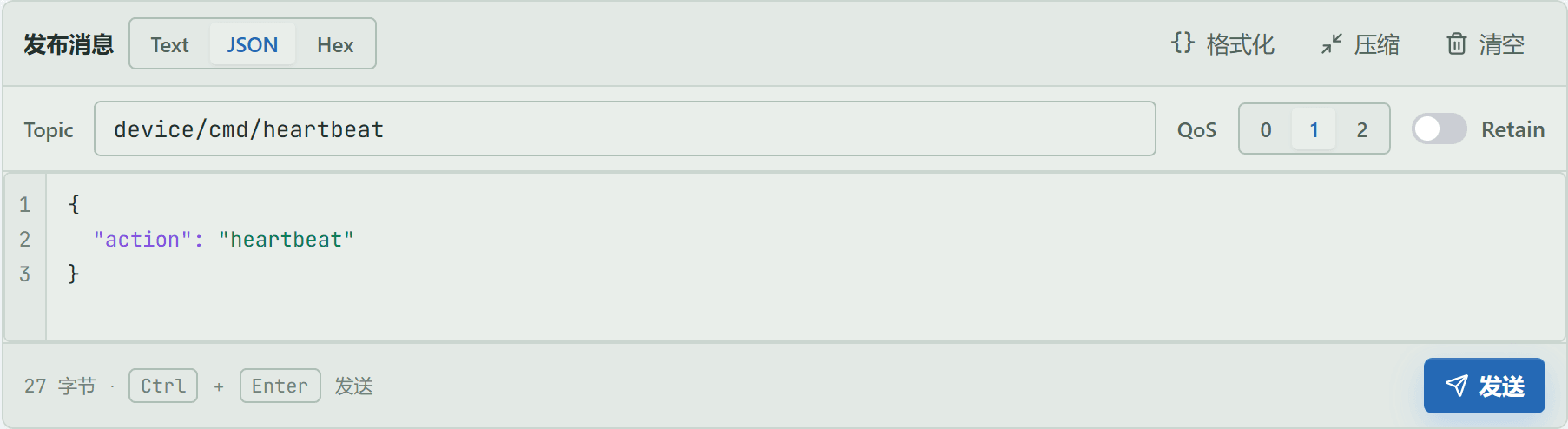
Figure: the FMQX MQTT operation area retains this real uplink data and the send entry.
3. Locate the Object on the Workbench
Location: Tracking → Device Tracking
Enter the device identifier and use Open Tracked Object.

Figure: enter a client ID, device number, or tracking key, then open the same tracked object.
Field Descriptions
| Field / Control | Description |
|---|---|
| Identifier Input | You can enter a client ID, IP, device number, deviceKey, sessionId, or a full tracking key. |
| Open Tracked Object | Parses the input and opens the same object; not used to create a device profile. |
4. Read the Object Status and Entry Actions
Location: Tracking → Device Tracking → Tracked Object List
Only review the status, protocol, and risk conclusion of the current protocol object, then enter the details.

Figure: the current MQTT object card centrally shows tracking status, protocol, and risk conclusion, and provides delete and view details.
Field Descriptions
| Field / Control | Description |
|---|---|
| Tracking Status | Distinguishes Not Started, Tracking, and Ended; new evidence is collected only while tracking is active. |
| Protocol | Indicates which communication method the current object is parsed and displayed by. |
| Risk Conclusion | The troubleshooting priority given by the platform based on current evidence; not equivalent to the final fault cause. |
| Tracking Key | The unique runtime identifier of the current tracked object, used to avoid cross-wiring objects with the same name. |
5. Understand the Full Tracking Details Page First
Location: Tracking → Device Tracking → Tracking Details
First confirm the positional relationship of the top tools, object summary, left timeline, and the three detail tabs on the right from the whole page.
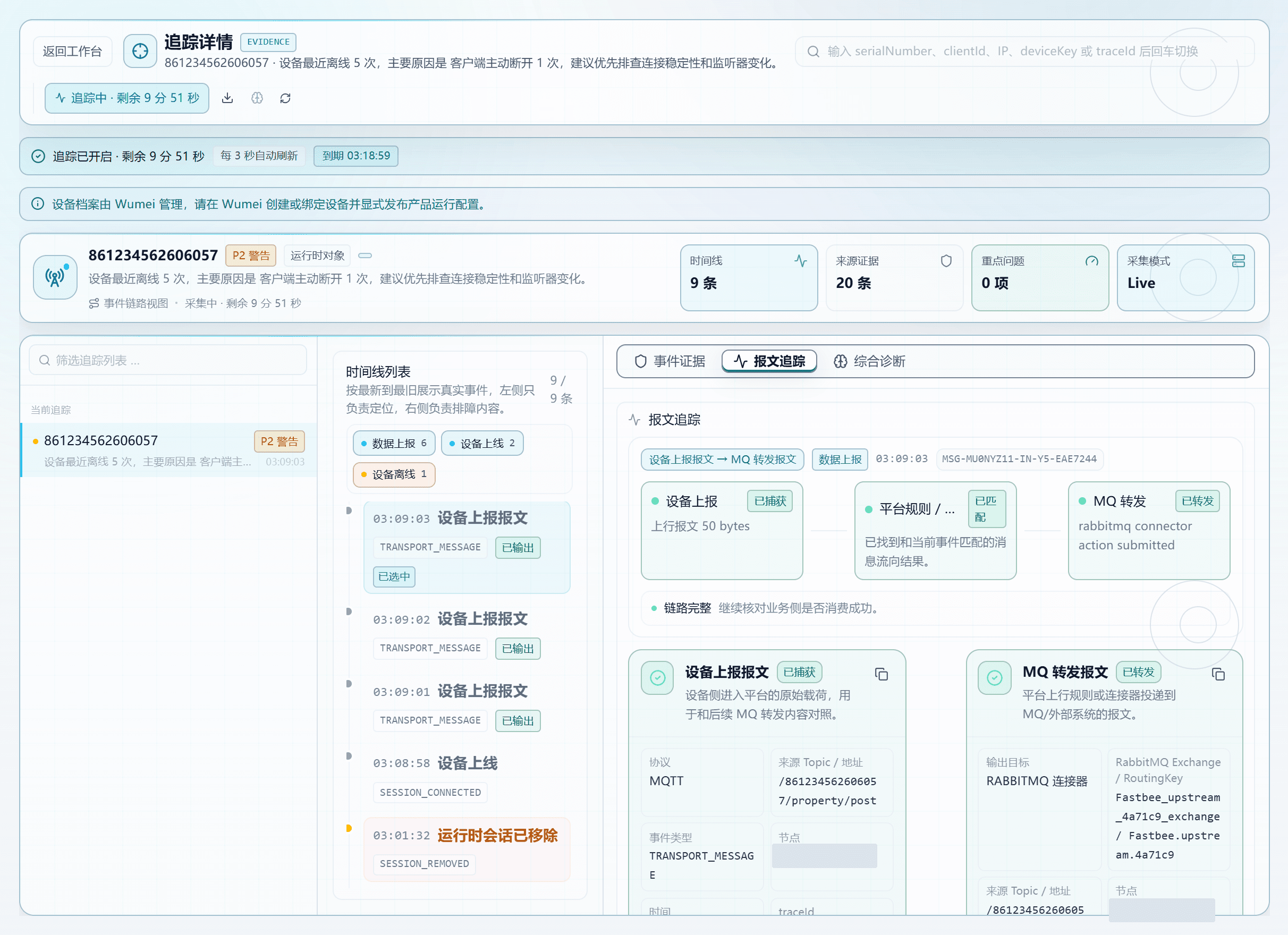
Figure: Tracking Details consists of the top tools, object summary, left timeline, and right analysis area; select an event first, then switch evidence tabs.
6. Master the Details Top Toolbar
Location: Tracking Details → Top Toolbar
Confirm back, the tracking switch, download, refresh, search, and the reserved entry.

Figure: the top toolbar is used to go back, toggle tracking, download evidence, refresh, and search other objects; AI Deep Tracking is currently a reserved entry.
Field Descriptions
| Field / Control | Description |
|---|---|
| Back to Workbench | Returns to the object list without stopping tracking. |
| Enable/Disable Tracking | Starts ten minutes of real-time collection, or stops collecting new events. |
| Download Evidence | Downloads the current object's evidence text, suitable for handover troubleshooting. |
| Refresh | Reads the latest status immediately; the page also auto-refreshes every three seconds. |
| AI Deep Tracking | Currently only a reserved entry; do not treat it as a completed diagnosis. |
| Global Search | Switches to another tracked object without returning to the workbench. |
7. Read the Object Status Summary
Location: Tracking Details → Object Summary
Verify identity, online status, remaining time, evidence count, and key issues.

Figure: confirm the object identity, tracking remaining time, timeline count, source evidence, and key issues first, then continue to individual events.
Field Descriptions
| Field / Control | Description |
|---|---|
| Object Identity | Distinguishes registered devices from runtime-discovered objects; an unconfirmed identity does not mean communication failed. |
| Running Status | Indicates whether the object is currently online or collecting; judge it separately from individual message results. |
| Remaining Time | How long remains before this real-time tracking session ends automatically. |
| Timeline Count | The number of readable events aggregated for the current object. |
| Source Evidence | Indicates which runtime source this conclusion is based on. |
| Key Issues | The number of abnormal or identity issues that should be reviewed first. |
| Collection Mode | Live means collecting; Standby means read-only access to existing evidence. |
8. Select an Event from the Timeline
Location: Tracking Details → Timeline List
Filter by stage and select this real communication event.
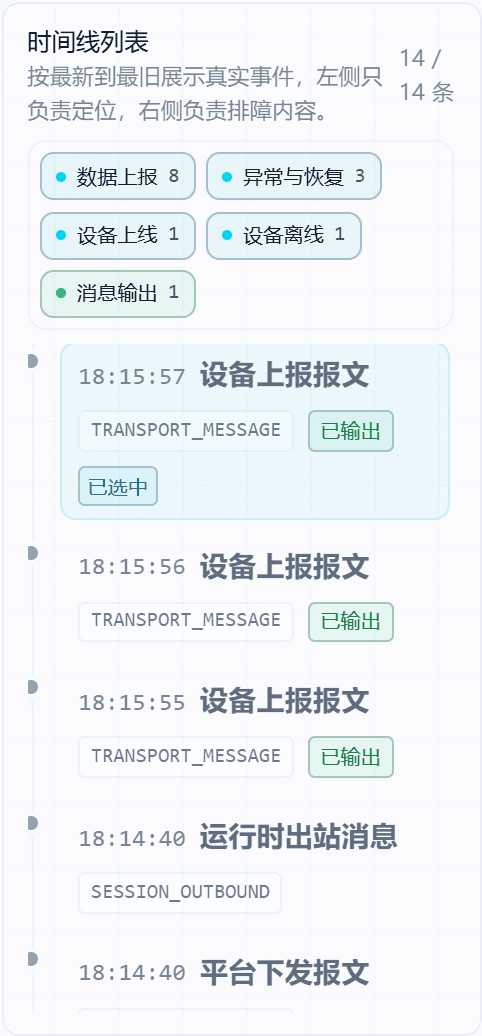
Figure: the timeline shows connect, uplink, downlink, offline, and recovery in order of occurrence; the left side selects events, and the right side shows evidence.
Field Descriptions
| Field / Control | Description |
|---|---|
| Occurrence Time | The time the event entered the tracking timeline, used to align with FMQX device time. |
| Stage | Indicates whether the event is in the connect, report, parse, output, or recovery stage. |
| Event Type | The stable type of the runtime raw event, used for precise location. |
| Flow Status | Indicates whether downstream links have captured, are waiting for, or lack evidence. |
| Stage Filter | Only changes the current list scope; does not delete evidence. |
9. View Event Source Evidence
Location: Tracking Details → Event Evidence
Confirm the event source, time, protocol context, and associated evidence.
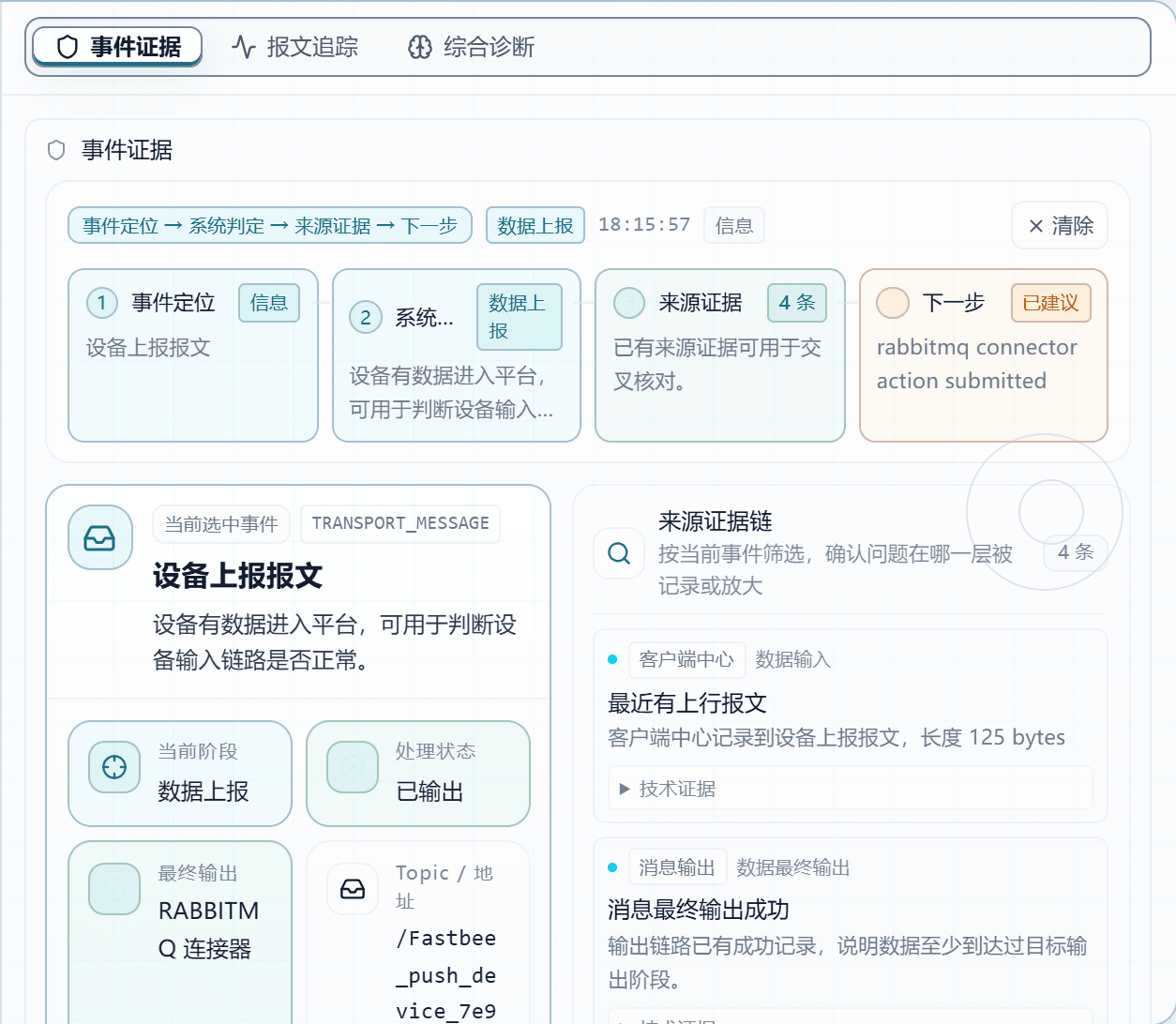
Figure: Event Evidence answers when this record occurred, where it came from, which stage it belongs to, and what context the platform holds.
Field Descriptions
| Field / Control | Description |
|---|---|
| Source Evidence | Indicates which runtime source this conclusion is based on. |
| Protocol Context | MQTT uses Topic and QoS; this example subscribes to the function downlink Topic, and the device side completes a send/receive self-check. |
| Source Time | The time the evidence was generated, used to verify it belongs to this operation. |
| View All Source Evidence | Expands all sources of the current object without changing the runtime state. |
10. Read the Full Message and Flow
Location: Tracking Details → Message Tracing
From top to bottom, verify the link conclusion, the device-side Topic and raw message, the MQ forwarded message, the forwarding process, and the technical fields.
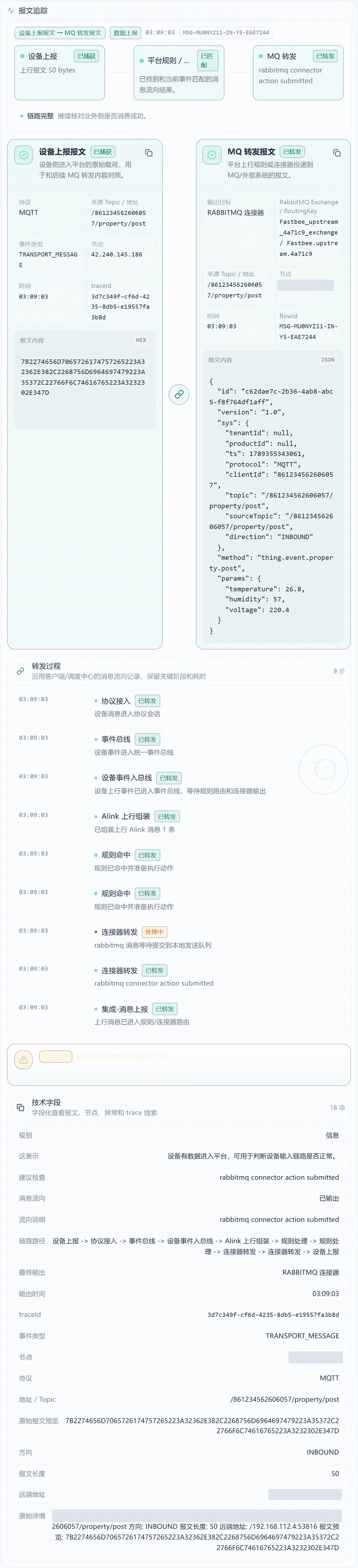
Figure: full message tracing starts from the link conclusion, then shows the device raw message, MQ forwarded message, forwarding process, and technical fields in order.
Field Descriptions
| Field / Control | Description |
|---|---|
| Link Type | Indicates whether the current comparison is between device reporting and MQ forwarding, or a device command or Modbus poll. |
| Event Time | The time the currently selected event occurred; should be close to the device-side send or reply time. |
| Device Report Status | Captured means the platform retained the raw message entering FMQ from the device; a non-report event does not mean communication failed. |
| Platform Rule or Connector Status | Indicates whether the current event found matching uplink rules and connector flow evidence. |
| MQ Forwarding Status | Forwarded means the connector has submitted; when waiting or not captured, continue checking rules and connectors. |
| Link Conclusion | A complete link only proves tracking has seen the device message and forwarding evidence; whether the business system consumed it must be confirmed separately. |
| Device Protocol | The protocol on the device report card; should match the current tracked object. |
| Source Topic or Address | MQTT shows the Topic, TCP shows the remote address, and Modbus TCP shows the polling endpoint or response clue. |
| Device Event Type | The raw event type recorded by the platform, used to distinguish connect, report, parse, and reply. |
| Running Node | The FMQ node that processed this message, used to troubleshoot cluster node differences. |
| traceId | The correlation identifier of the device-side event, used to cross-check with logs, rules, or downstream records. |
| Device Raw Message | The raw Payload or hexadecimal frame retained when the device entered FMQ; the basis for judging what the device actually sent. |
| Output Target | Indicates which connector or external target this uplink message is about to be delivered to. |
| Delivery Address | Shows the Topic, Exchange/RoutingKey, or other actual delivery address, used to verify the target selection. |
| flowId | The correlation identifier of one platform forwarding process, used to string processing stages into the same link. |
| MQ Forwarded Message | The message body handed to the connector after rule processing; can be compared with the device raw message for field changes. |
| Forwarding Process and Duration | When expanded, shows rule matching, action submission, and connector execution times by stage; on failure, find the first abnormal stage first. |
| Technical Fields | When expanded, lists message, node, exception, and correlation identifiers for implementation and R&D to locate further. |
11. Understand Comprehensive Diagnosis and Protocol Actions
Location: Tracking Details → Comprehensive Diagnosis
Read the conclusion, causes, and suggested actions; only execute buttons supported by the current protocol and session.
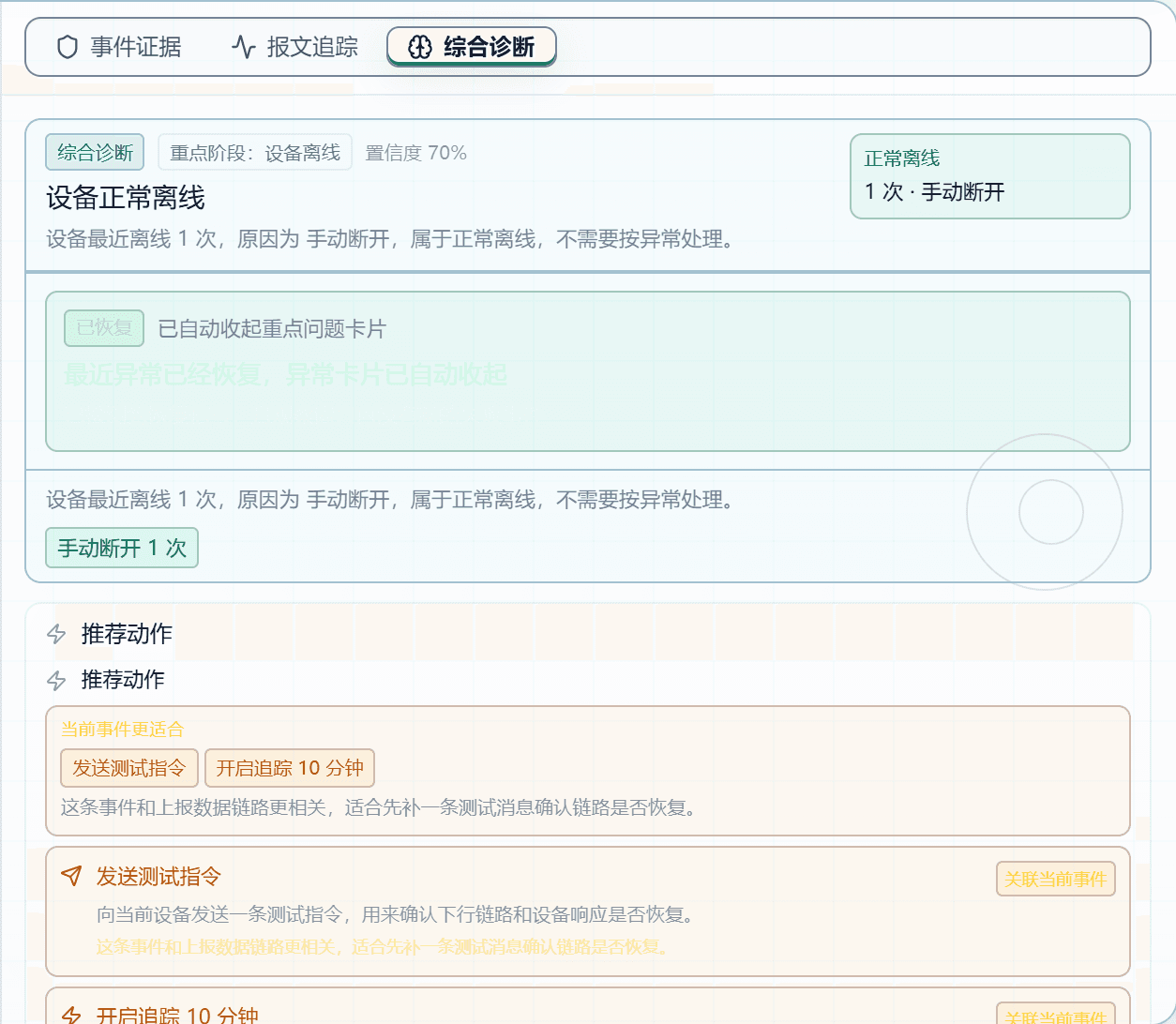
Figure: Comprehensive Diagnosis gives the current conclusion, possible causes, and suggested actions; whether an action appears depends on the protocol, session, and selected event.
Field Descriptions
| Field / Control | Description |
|---|---|
| Diagnosis Conclusion | A plain-language conclusion about the currently selected event. |
| Possible Causes | Troubleshooting directions listed by the platform from existing evidence; does not mean the root cause is confirmed. |
| Suggested Actions | The next step matching the current event, protocol, and session context. |
| Action Conditions | Send Test Command, Retry Last Delivery, and Disconnect Session only take effect on the currently online MQTT session; after disconnection the device must reconnect itself. |
12. Verify the Action with Device-Side Counters
Location: FMQX → Session Summary
Compare the uplink/downlink counters and connection generation to confirm this round of actions produced new device communication.

Figure: the FMQX MQTT session can still send and receive after recovery; the downlink counter is used to verify whether the platform test command reached the device side.
13. Confirm Real Receipt on the Device Side
Location: FMQX → Real-time Messages
Verify the subscribed Topic's TX, RX, QoS, and Payload.
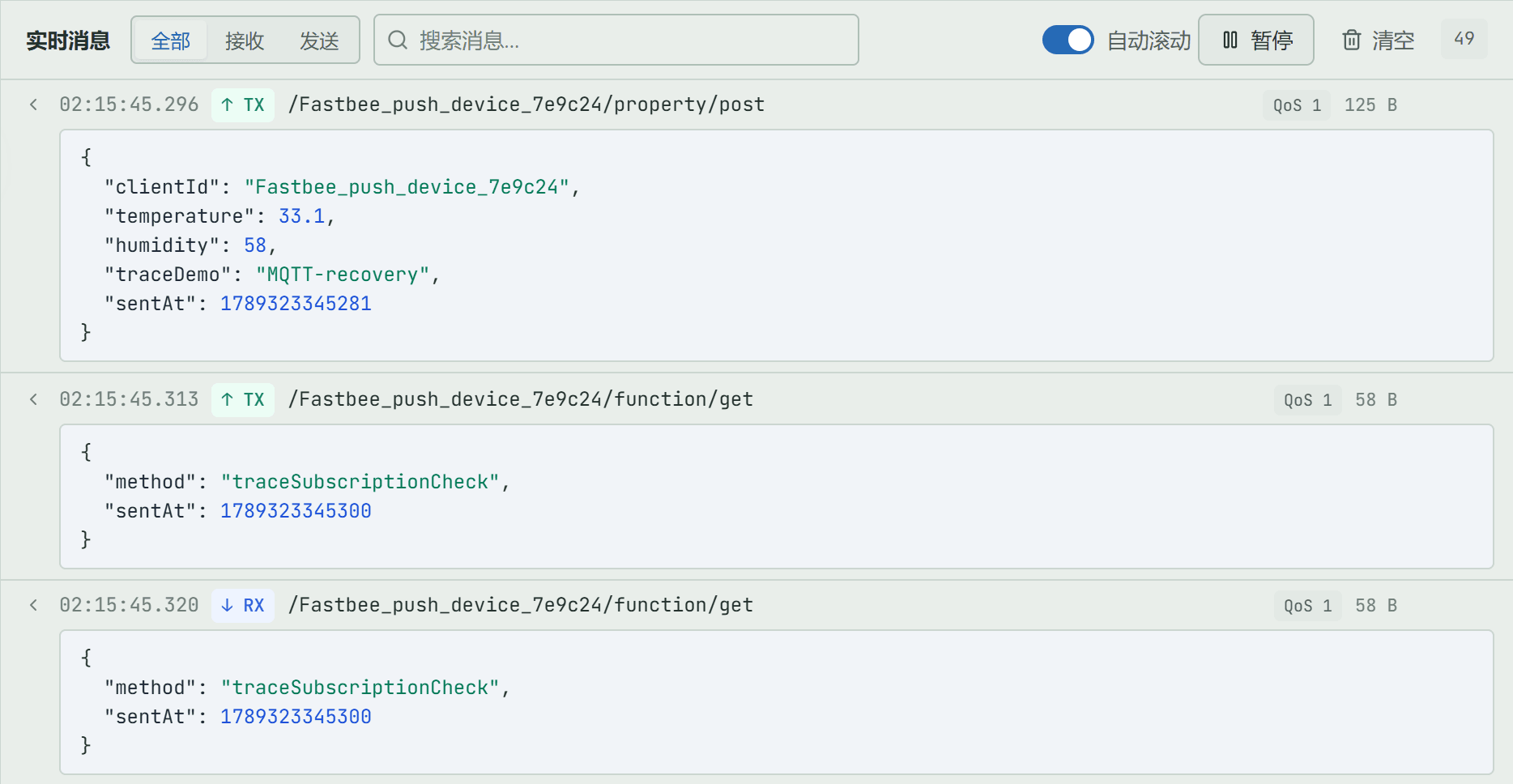
Figure: the device side shows the real Topic, QoS, direction, and message body; this is a subscription-link self-check and cannot be passed off as the platform tracking button having completed the delivery.
14. Align Disconnection, Abnormality, and Recovery
Location: Tracking Details → Timeline List
Review disconnection or timeout records, then locate the new events after recovery.
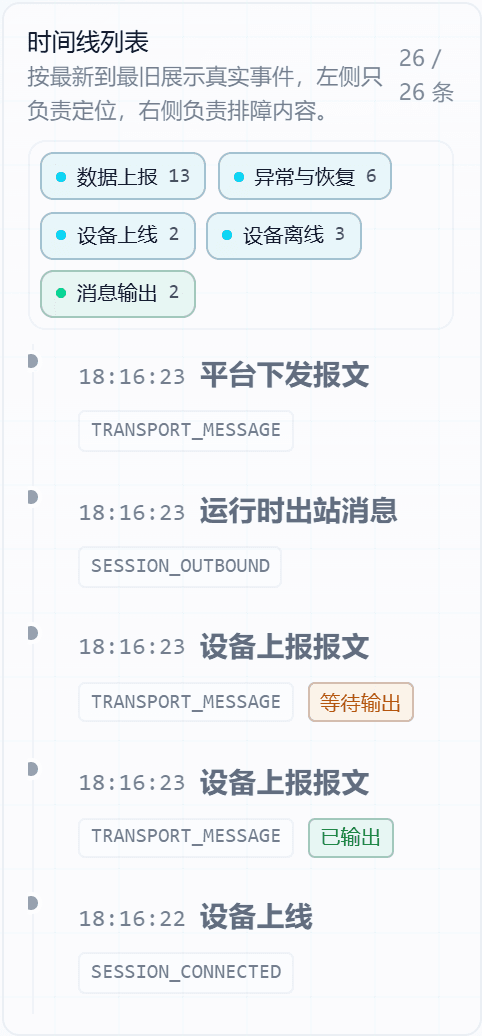
Figure: disconnection and reconnection are on the same tracking timeline; recovery must be based on new uplink or downlink evidence after reconnection.
Field Descriptions
| Field / Control | Description |
|---|---|
| Abnormality Time | The time the fault or disconnection was recorded. |
| Abnormality Stage | Indicates whether the failure occurred in connect, send, waiting for reply, parse, or output. |
| Abnormality Cause | The observable error or offline cause this time. |
| New Events After Recovery | After FMQX actively disconnects and reconnects, it reports again, and a new TRANSPORT_MESSAGE appears in the timeline. |
15. Complete the Recovery Judgment
Location: Tracking Details → Comprehensive Diagnosis
Confirm together the device-side real receipt, the new events after recovery, and the current diagnosis.
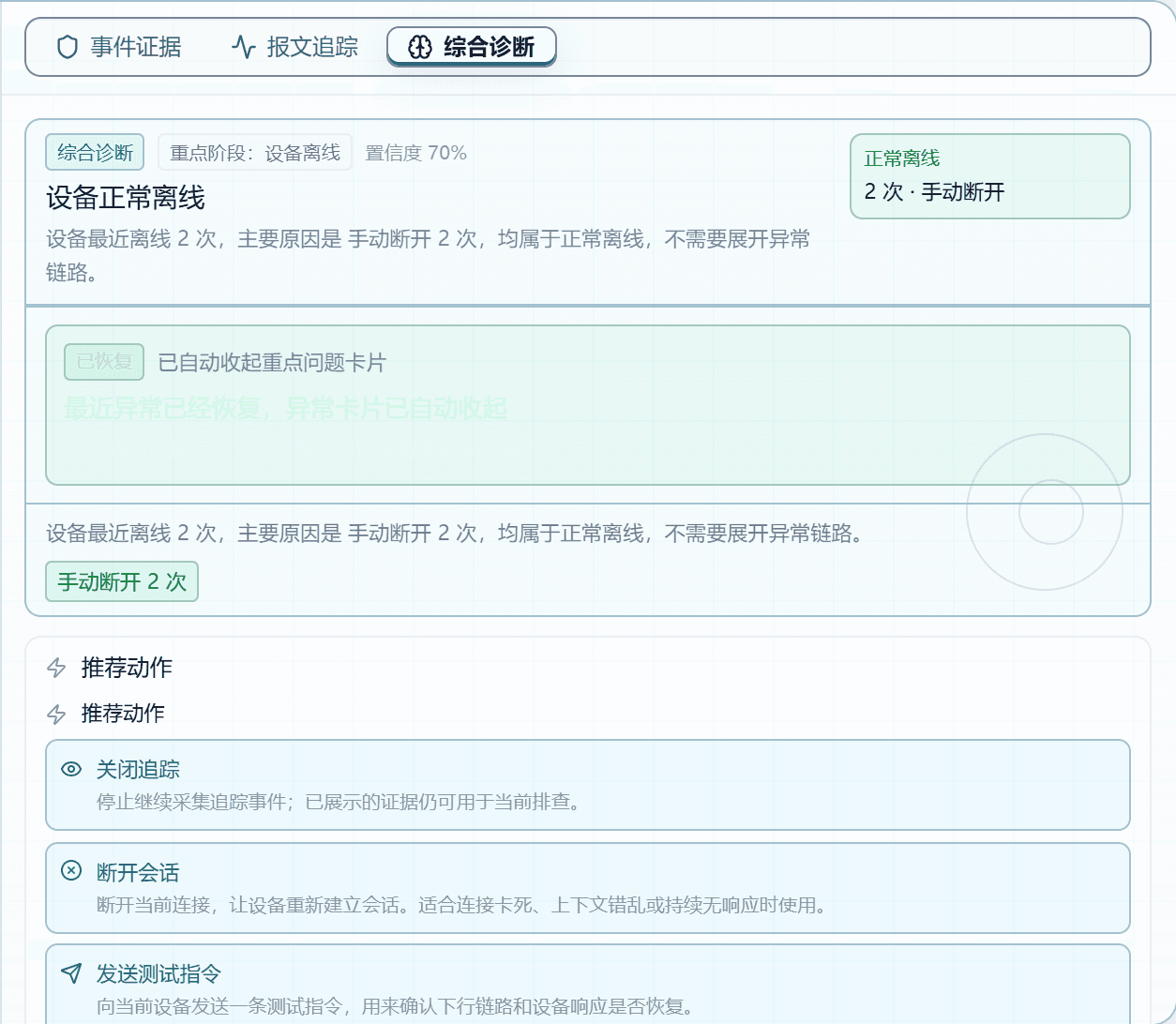
Figure: finally judge the device-side real receipt, platform new events, and comprehensive diagnosis together; historical abnormalities remain but do not mean current communication still fails.
Field Descriptions
| Field / Control | Description |
|---|---|
| Current Conclusion | The current judgment formed from the latest evidence. |
| Historical Abnormalities | Old fault records that are retained; the presence of historical abnormalities does not mean current communication still fails. |
| Recovery Signal | After FMQX actively disconnects and reconnects, it reports again, and a new TRANSPORT_MESSAGE appears in the timeline. |
| Next Checkpoint | The location recommended to check first when current evidence is insufficient. |
Client Page Field Reference
The following explains page fields in the reading order of the client list and detail tabs; areas not applicable to the protocol are explicitly marked, and technical logs are not treated as page fields.
Full Reference
| Field / Unit | Plain Meaning | Data Direction / Source | Normal Judgment | Abnormal Signals and First Checkpoint |
|---|---|---|---|---|
| Locate the Tracked Object | ||||
| Identifier Input- | You can enter a client ID, IP, device number, deviceKey, sessionId, or a full tracking key. | Page runtime state | Consistent with this operation's time, object identity, and protocol. | Data is empty, the time does not belong to this operation, the protocol does not match, or the page shows waiting while the device has already acted. First checkpoint: verify the object identity and that tracking is enabled, then generate a new piece of data in FMQX and refresh. |
| Open Tracked Object- | Parses the input and opens the same object; not used to create a device profile. | Page runtime state | Consistent with this operation's time, object identity, and protocol. | Data is empty, the time does not belong to this operation, the protocol does not match, or the page shows waiting while the device has already acted. First checkpoint: verify the object identity and that tracking is enabled, then generate a new piece of data in FMQX and refresh. |
| Read Workbench Object Status | ||||
| Tracking Status- | Distinguishes Not Started, Tracking, and Ended; new evidence is collected only while tracking is active. | Page runtime state | Consistent with this operation's time, object identity, and protocol. | Data is empty, the time does not belong to this operation, the protocol does not match, or the page shows waiting while the device has already acted. First checkpoint: verify the object identity and that tracking is enabled, then generate a new piece of data in FMQX and refresh. |
| Protocol- | Indicates which communication method the current object is parsed and displayed by. | Page runtime state | Consistent with this operation's time, object identity, and protocol. | Data is empty, the time does not belong to this operation, the protocol does not match, or the page shows waiting while the device has already acted. First checkpoint: verify the object identity and that tracking is enabled, then generate a new piece of data in FMQX and refresh. |
| Risk Conclusion- | The troubleshooting priority given by the platform based on current evidence; not equivalent to the final fault cause. | Page runtime state | Consistent with this operation's time, object identity, and protocol. | Data is empty, the time does not belong to this operation, the protocol does not match, or the page shows waiting while the device has already acted. First checkpoint: verify the object identity and that tracking is enabled, then generate a new piece of data in FMQX and refresh. |
| Tracking Key- | The unique runtime identifier of the current tracked object, used to avoid cross-wiring objects with the same name. | Page runtime state | Consistent with this operation's time, object identity, and protocol. | Data is empty, the time does not belong to this operation, the protocol does not match, or the page shows waiting while the device has already acted. First checkpoint: verify the object identity and that tracking is enabled, then generate a new piece of data in FMQX and refresh. |
| Master the Details Toolbar | ||||
| Back to Workbench- | Returns to the object list without stopping tracking. | Page runtime state | Consistent with this operation's time, object identity, and protocol. | Data is empty, the time does not belong to this operation, the protocol does not match, or the page shows waiting while the device has already acted. First checkpoint: verify the object identity and that tracking is enabled, then generate a new piece of data in FMQX and refresh. |
| Enable/Disable Tracking- | Starts ten minutes of real-time collection, or stops collecting new events. | Page runtime state | Consistent with this operation's time, object identity, and protocol. | Data is empty, the time does not belong to this operation, the protocol does not match, or the page shows waiting while the device has already acted. First checkpoint: verify the object identity and that tracking is enabled, then generate a new piece of data in FMQX and refresh. |
| Download Evidence- | Downloads the current object's evidence text, suitable for handover troubleshooting. | Page runtime state | Consistent with this operation's time, object identity, and protocol. | Data is empty, the time does not belong to this operation, the protocol does not match, or the page shows waiting while the device has already acted. First checkpoint: verify the object identity and that tracking is enabled, then generate a new piece of data in FMQX and refresh. |
| Refresh- | Reads the latest status immediately; the page also auto-refreshes every three seconds. | Page runtime state | Consistent with this operation's time, object identity, and protocol. | Data is empty, the time does not belong to this operation, the protocol does not match, or the page shows waiting while the device has already acted. First checkpoint: verify the object identity and that tracking is enabled, then generate a new piece of data in FMQX and refresh. |
| AI Deep Tracking- | Currently only a reserved entry; do not treat it as a completed diagnosis. | Page runtime state | Consistent with this operation's time, object identity, and protocol. | Data is empty, the time does not belong to this operation, the protocol does not match, or the page shows waiting while the device has already acted. First checkpoint: verify the object identity and that tracking is enabled, then generate a new piece of data in FMQX and refresh. |
| Global Search- | Switches to another tracked object without returning to the workbench. | Page runtime state | Consistent with this operation's time, object identity, and protocol. | Data is empty, the time does not belong to this operation, the protocol does not match, or the page shows waiting while the device has already acted. First checkpoint: verify the object identity and that tracking is enabled, then generate a new piece of data in FMQX and refresh. |
| Read the Object Status Summary | ||||
| Object Identity- | Distinguishes registered devices from runtime-discovered objects; an unconfirmed identity does not mean communication failed. | Page runtime state | Consistent with this operation's time, object identity, and protocol. | Data is empty, the time does not belong to this operation, the protocol does not match, or the page shows waiting while the device has already acted. First checkpoint: verify the object identity and that tracking is enabled, then generate a new piece of data in FMQX and refresh. |
| Running Status- | Indicates whether the object is currently online or collecting; judge it separately from individual message results. | Page runtime state | Consistent with this operation's time, object identity, and protocol. | Data is empty, the time does not belong to this operation, the protocol does not match, or the page shows waiting while the device has already acted. First checkpoint: verify the object identity and that tracking is enabled, then generate a new piece of data in FMQX and refresh. |
| Remaining Time- | How long remains before this real-time tracking session ends automatically. | Page runtime state | Consistent with this operation's time, object identity, and protocol. | Data is empty, the time does not belong to this operation, the protocol does not match, or the page shows waiting while the device has already acted. First checkpoint: verify the object identity and that tracking is enabled, then generate a new piece of data in FMQX and refresh. |
| Timeline Count- | The number of readable events aggregated for the current object. | Page runtime state | Consistent with this operation's time, object identity, and protocol. | Data is empty, the time does not belong to this operation, the protocol does not match, or the page shows waiting while the device has already acted. First checkpoint: verify the object identity and that tracking is enabled, then generate a new piece of data in FMQX and refresh. |
| Source Evidence- | Indicates which runtime source this conclusion is based on. | Page runtime state | Consistent with this operation's time, object identity, and protocol. | Data is empty, the time does not belong to this operation, the protocol does not match, or the page shows waiting while the device has already acted. First checkpoint: verify the object identity and that tracking is enabled, then generate a new piece of data in FMQX and refresh. |
| Key Issues- | The number of abnormal or identity issues that should be reviewed first. | Page runtime state | Consistent with this operation's time, object identity, and protocol. | Data is empty, the time does not belong to this operation, the protocol does not match, or the page shows waiting while the device has already acted. First checkpoint: verify the object identity and that tracking is enabled, then generate a new piece of data in FMQX and refresh. |
| Collection Mode- | Live means collecting; Standby means read-only access to existing evidence. | Page runtime state | Consistent with this operation's time, object identity, and protocol. | Data is empty, the time does not belong to this operation, the protocol does not match, or the page shows waiting while the device has already acted. First checkpoint: verify the object identity and that tracking is enabled, then generate a new piece of data in FMQX and refresh. |
| Read the Timeline | ||||
| Occurrence Time- | The time the event entered the tracking timeline, used to align with FMQX device time. | Page runtime state | Consistent with this operation's time, object identity, and protocol. | Data is empty, the time does not belong to this operation, the protocol does not match, or the page shows waiting while the device has already acted. First checkpoint: verify the object identity and that tracking is enabled, then generate a new piece of data in FMQX and refresh. |
| Stage- | Indicates whether the event is in the connect, report, parse, output, or recovery stage. | Page runtime state | Consistent with this operation's time, object identity, and protocol. | Data is empty, the time does not belong to this operation, the protocol does not match, or the page shows waiting while the device has already acted. First checkpoint: verify the object identity and that tracking is enabled, then generate a new piece of data in FMQX and refresh. |
| Event Type- | The stable type of the runtime raw event, used for precise location. | Page runtime state | Consistent with this operation's time, object identity, and protocol. | Data is empty, the time does not belong to this operation, the protocol does not match, or the page shows waiting while the device has already acted. First checkpoint: verify the object identity and that tracking is enabled, then generate a new piece of data in FMQX and refresh. |
| Flow Status- | Indicates whether downstream links have captured, are waiting for, or lack evidence. | Page runtime state | Consistent with this operation's time, object identity, and protocol. | Data is empty, the time does not belong to this operation, the protocol does not match, or the page shows waiting while the device has already acted. First checkpoint: verify the object identity and that tracking is enabled, then generate a new piece of data in FMQX and refresh. |
| Stage Filter- | Only changes the current list scope; does not delete evidence. | Page runtime state | Consistent with this operation's time, object identity, and protocol. | Data is empty, the time does not belong to this operation, the protocol does not match, or the page shows waiting while the device has already acted. First checkpoint: verify the object identity and that tracking is enabled, then generate a new piece of data in FMQX and refresh. |
| Verify Protocol Context | ||||
| Source Evidence- | Indicates which runtime source this conclusion is based on. | Page runtime state | Consistent with this operation's time, object identity, and protocol. | Data is empty, the time does not belong to this operation, the protocol does not match, or the page shows waiting while the device has already acted. First checkpoint: verify the object identity and that tracking is enabled, then generate a new piece of data in FMQX and refresh. |
| Protocol Context- | MQTT uses Topic and QoS; this example subscribes to the function downlink Topic, and the device side completes a send/receive self-check. | Page runtime state | Consistent with this operation's time, object identity, and protocol. | Data is empty, the time does not belong to this operation, the protocol does not match, or the page shows waiting while the device has already acted. First checkpoint: verify the object identity and that tracking is enabled, then generate a new piece of data in FMQX and refresh. |
| Source Time- | The time the evidence was generated, used to verify it belongs to this operation. | Page runtime state | Consistent with this operation's time, object identity, and protocol. | Data is empty, the time does not belong to this operation, the protocol does not match, or the page shows waiting while the device has already acted. First checkpoint: verify the object identity and that tracking is enabled, then generate a new piece of data in FMQX and refresh. |
| View All Source Evidence- | Expands all sources of the current object without changing the runtime state. | Page runtime state | Consistent with this operation's time, object identity, and protocol. | Data is empty, the time does not belong to this operation, the protocol does not match, or the page shows waiting while the device has already acted. First checkpoint: verify the object identity and that tracking is enabled, then generate a new piece of data in FMQX and refresh. |
| Read Full Message Tracing | ||||
| Link Type- | Indicates whether the current comparison is between device reporting and MQ forwarding, or a device command or Modbus poll. | MQTT Device ↔ FMQ | Consistent with this operation's time, object identity, and protocol. | Data is empty, the time does not belong to this operation, the protocol does not match, or the page shows waiting while the device has already acted. First checkpoint: verify the object identity and that tracking is enabled, then generate a new piece of data in FMQX and refresh. |
| Event Time- | The time the currently selected event occurred; should be close to the device-side send or reply time. | MQTT Device ↔ FMQ | Consistent with this operation's time, object identity, and protocol. | Data is empty, the time does not belong to this operation, the protocol does not match, or the page shows waiting while the device has already acted. First checkpoint: verify the object identity and that tracking is enabled, then generate a new piece of data in FMQX and refresh. |
| Device Report Status- | Captured means the platform retained the raw message entering FMQ from the device; a non-report event does not mean communication failed. | MQTT Device ↔ FMQ | Consistent with this operation's time, object identity, and protocol. | Data is empty, the time does not belong to this operation, the protocol does not match, or the page shows waiting while the device has already acted. First checkpoint: verify the object identity and that tracking is enabled, then generate a new piece of data in FMQX and refresh. |
| Platform Rule or Connector Status- | Indicates whether the current event found matching uplink rules and connector flow evidence. | MQTT Device ↔ FMQ | Consistent with this operation's time, object identity, and protocol. | Data is empty, the time does not belong to this operation, the protocol does not match, or the page shows waiting while the device has already acted. First checkpoint: verify the object identity and that tracking is enabled, then generate a new piece of data in FMQX and refresh. |
| MQ Forwarding Status- | Forwarded means the connector has submitted; when waiting or not captured, continue checking rules and connectors. | MQTT Device ↔ FMQ | Consistent with this operation's time, object identity, and protocol. | Data is empty, the time does not belong to this operation, the protocol does not match, or the page shows waiting while the device has already acted. First checkpoint: verify the object identity and that tracking is enabled, then generate a new piece of data in FMQX and refresh. |
| Link Conclusion- | A complete link only proves tracking has seen the device message and forwarding evidence; whether the business system consumed it must be confirmed separately. | MQTT Device ↔ FMQ | Consistent with this operation's time, object identity, and protocol. | Data is empty, the time does not belong to this operation, the protocol does not match, or the page shows waiting while the device has already acted. First checkpoint: verify the object identity and that tracking is enabled, then generate a new piece of data in FMQX and refresh. |
| Device Protocol- | The protocol on the device report card; should match the current tracked object. | MQTT Device ↔ FMQ | Consistent with this operation's time, object identity, and protocol. | Data is empty, the time does not belong to this operation, the protocol does not match, or the page shows waiting while the device has already acted. First checkpoint: verify the object identity and that tracking is enabled, then generate a new piece of data in FMQX and refresh. |
| Source Topic or Address- | MQTT shows the Topic, TCP shows the remote address, and Modbus TCP shows the polling endpoint or response clue. | MQTT Device ↔ FMQ | Consistent with this operation's time, object identity, and protocol. | Data is empty, the time does not belong to this operation, the protocol does not match, or the page shows waiting while the device has already acted. First checkpoint: verify the object identity and that tracking is enabled, then generate a new piece of data in FMQX and refresh. |
| Device Event Type- | The raw event type recorded by the platform, used to distinguish connect, report, parse, and reply. | MQTT Device ↔ FMQ | Consistent with this operation's time, object identity, and protocol. | Data is empty, the time does not belong to this operation, the protocol does not match, or the page shows waiting while the device has already acted. First checkpoint: verify the object identity and that tracking is enabled, then generate a new piece of data in FMQX and refresh. |
| Running Node- | The FMQ node that processed this message, used to troubleshoot cluster node differences. | MQTT Device ↔ FMQ | Consistent with this operation's time, object identity, and protocol. | Data is empty, the time does not belong to this operation, the protocol does not match, or the page shows waiting while the device has already acted. First checkpoint: verify the object identity and that tracking is enabled, then generate a new piece of data in FMQX and refresh. |
| traceId- | The correlation identifier of the device-side event, used to cross-check with logs, rules, or downstream records. | MQTT Device ↔ FMQ | Consistent with this operation's time, object identity, and protocol. | Data is empty, the time does not belong to this operation, the protocol does not match, or the page shows waiting while the device has already acted. First checkpoint: verify the object identity and that tracking is enabled, then generate a new piece of data in FMQX and refresh. |
| Device Raw Message- | The raw Payload or hexadecimal frame retained when the device entered FMQ; the basis for judging what the device actually sent. | MQTT Device ↔ FMQ | Consistent with this operation's time, object identity, and protocol. | Data is empty, the time does not belong to this operation, the protocol does not match, or the page shows waiting while the device has already acted. First checkpoint: verify the object identity and that tracking is enabled, then generate a new piece of data in FMQX and refresh. |
| Output Target- | Indicates which connector or external target this uplink message is about to be delivered to. | MQTT Device ↔ FMQ | Consistent with this operation's time, object identity, and protocol. | Data is empty, the time does not belong to this operation, the protocol does not match, or the page shows waiting while the device has already acted. First checkpoint: verify the object identity and that tracking is enabled, then generate a new piece of data in FMQX and refresh. |
| Delivery Address- | Shows the Topic, Exchange/RoutingKey, or other actual delivery address, used to verify the target selection. | MQTT Device ↔ FMQ | Consistent with this operation's time, object identity, and protocol. | Data is empty, the time does not belong to this operation, the protocol does not match, or the page shows waiting while the device has already acted. First checkpoint: verify the object identity and that tracking is enabled, then generate a new piece of data in FMQX and refresh. |
| flowId- | The correlation identifier of one platform forwarding process, used to string processing stages into the same link. | MQTT Device ↔ FMQ | Consistent with this operation's time, object identity, and protocol. | Data is empty, the time does not belong to this operation, the protocol does not match, or the page shows waiting while the device has already acted. First checkpoint: verify the object identity and that tracking is enabled, then generate a new piece of data in FMQX and refresh. |
| MQ Forwarded Message- | The message body handed to the connector after rule processing; can be compared with the device raw message for field changes. | MQTT Device ↔ FMQ | Consistent with this operation's time, object identity, and protocol. | Data is empty, the time does not belong to this operation, the protocol does not match, or the page shows waiting while the device has already acted. First checkpoint: verify the object identity and that tracking is enabled, then generate a new piece of data in FMQX and refresh. |
| Forwarding Process and Duration- | When expanded, shows rule matching, action submission, and connector execution times by stage; on failure, find the first abnormal stage first. | MQTT Device ↔ FMQ | Consistent with this operation's time, object identity, and protocol. | Data is empty, the time does not belong to this operation, the protocol does not match, or the page shows waiting while the device has already acted. First checkpoint: verify the object identity and that tracking is enabled, then generate a new piece of data in FMQX and refresh. |
| Technical Fields- | When expanded, lists message, node, exception, and correlation identifiers for implementation and R&D to locate further. | MQTT Device ↔ FMQ | Consistent with this operation's time, object identity, and protocol. | Data is empty, the time does not belong to this operation, the protocol does not match, or the page shows waiting while the device has already acted. First checkpoint: verify the object identity and that tracking is enabled, then generate a new piece of data in FMQX and refresh. |
| Understand Diagnosis and Protocol Actions | ||||
| Diagnosis Conclusion- | A plain-language conclusion about the currently selected event. | Page runtime state | Consistent with this operation's time, object identity, and protocol. | Data is empty, the time does not belong to this operation, the protocol does not match, or the page shows waiting while the device has already acted. First checkpoint: verify the object identity and that tracking is enabled, then generate a new piece of data in FMQX and refresh. |
| Possible Causes- | Troubleshooting directions listed by the platform from existing evidence; does not mean the root cause is confirmed. | Page runtime state | Consistent with this operation's time, object identity, and protocol. | Data is empty, the time does not belong to this operation, the protocol does not match, or the page shows waiting while the device has already acted. First checkpoint: verify the object identity and that tracking is enabled, then generate a new piece of data in FMQX and refresh. |
| Suggested Actions- | The next step matching the current event, protocol, and session context. | Page runtime state | Consistent with this operation's time, object identity, and protocol. | Data is empty, the time does not belong to this operation, the protocol does not match, or the page shows waiting while the device has already acted. First checkpoint: verify the object identity and that tracking is enabled, then generate a new piece of data in FMQX and refresh. |
| Action Conditions- | Send Test Command, Retry Last Delivery, and Disconnect Session only take effect on the currently online MQTT session; after disconnection the device must reconnect itself. | Page runtime state | Consistent with this operation's time, object identity, and protocol. | Data is empty, the time does not belong to this operation, the protocol does not match, or the page shows waiting while the device has already acted. First checkpoint: verify the object identity and that tracking is enabled, then generate a new piece of data in FMQX and refresh. |
| Identify Abnormal and Recovery Events | ||||
| Abnormality Time- | The time the fault or disconnection was recorded. | Page runtime state | Consistent with this operation's time, object identity, and protocol. | Data is empty, the time does not belong to this operation, the protocol does not match, or the page shows waiting while the device has already acted. First checkpoint: verify the object identity and that tracking is enabled, then generate a new piece of data in FMQX and refresh. |
| Abnormality Stage- | Indicates whether the failure occurred in connect, send, waiting for reply, parse, or output. | Page runtime state | Consistent with this operation's time, object identity, and protocol. | Data is empty, the time does not belong to this operation, the protocol does not match, or the page shows waiting while the device has already acted. First checkpoint: verify the object identity and that tracking is enabled, then generate a new piece of data in FMQX and refresh. |
| Abnormality Cause- | The observable error or offline cause this time. | Page runtime state | Consistent with this operation's time, object identity, and protocol. | Data is empty, the time does not belong to this operation, the protocol does not match, or the page shows waiting while the device has already acted. First checkpoint: verify the object identity and that tracking is enabled, then generate a new piece of data in FMQX and refresh. |
| New Events After Recovery- | After FMQX actively disconnects and reconnects, it reports again, and a new TRANSPORT_MESSAGE appears in the timeline. | Page runtime state | Consistent with this operation's time, object identity, and protocol. | Data is empty, the time does not belong to this operation, the protocol does not match, or the page shows waiting while the device has already acted. First checkpoint: verify the object identity and that tracking is enabled, then generate a new piece of data in FMQX and refresh. |
| Confirm Recovery Status | ||||
| Current Conclusion- | The current judgment formed from the latest evidence. | Page runtime state | Consistent with this operation's time, object identity, and protocol. | Data is empty, the time does not belong to this operation, the protocol does not match, or the page shows waiting while the device has already acted. First checkpoint: verify the object identity and that tracking is enabled, then generate a new piece of data in FMQX and refresh. |
| Historical Abnormalities- | Old fault records that are retained; the presence of historical abnormalities does not mean current communication still fails. | Page runtime state | Old records may remain; new post-recovery evidence should also appear. | Data is empty, the time does not belong to this operation, the protocol does not match, or the page shows waiting while the device has already acted. First checkpoint: verify the object identity and that tracking is enabled, then generate a new piece of data in FMQX and refresh. |
| Recovery Signal- | After FMQX actively disconnects and reconnects, it reports again, and a new TRANSPORT_MESSAGE appears in the timeline. | Page runtime state | Consistent with this operation's time, object identity, and protocol. | Data is empty, the time does not belong to this operation, the protocol does not match, or the page shows waiting while the device has already acted. First checkpoint: verify the object identity and that tracking is enabled, then generate a new piece of data in FMQX and refresh. |
| Next Checkpoint- | The location recommended to check first when current evidence is insufficient. | Page runtime state | Consistent with this operation's time, object identity, and protocol. | Data is empty, the time does not belong to this operation, the protocol does not match, or the page shows waiting while the device has already acted. First checkpoint: verify the object identity and that tracking is enabled, then generate a new piece of data in FMQX and refresh. |
FMQX MQTT Session
Full Reference
| Field/Control | Purpose | Default/Recommended/Example | Options | Effect | Effective Conditions |
|---|---|---|---|---|---|
| Connect/Reconnect | Establishes a real device session of the current protocol in FMQX. | Default: — Recommended: — Example: — | N/A | Establishes a real device session of the current protocol in FMQX. | Scope: current tracked object · Publish: not required · Restart: not required · Reconnect: not required |
| Send | Sends real device data from FMQX to FMQ. | Default: — Recommended: — Example: — | N/A | Sends real device data from FMQX to FMQ. | Scope: current tracked object · Publish: not required · Restart: not required · Reconnect: not required |
Device Tracking Workbench
Full Reference
| Field/Control | Purpose | Default/Recommended/Example | Options | Effect | Effective Conditions |
|---|---|---|---|---|---|
| Open Tracked Object | Parses the input identifier and enters the corresponding tracking details. | Default: — Recommended: — Example: — | N/A | Parses the input identifier and enters the corresponding tracking details. | Scope: current tracked object · Publish: not required · Restart: not required · Reconnect: not required |
| Status/Protocol Filter | Narrows the workbench list scope without changing the tracking state. | Default: — Recommended: — Example: — | All: All; shows only the All scope. Not Started: Not Started; shows only the Not Started scope. Tracking: Tracking; shows only the Tracking scope. Ended: Ended; shows only the Ended scope. MQTT: MQTT; shows only the MQTT scope. | Narrows the workbench list scope without changing the tracking state. | Scope: current tracked object · Publish: not required · Restart: not required · Reconnect: not required |
| Delete | Removes the current object from the workbench; an active object also has its tracking closed. | Default: — Recommended: — Example: — | N/A | Removes the current object from the workbench; an active object also has its tracking closed. | Scope: current tracked object · Publish: not required · Restart: not required · Reconnect: not required |
| Clear List | Clears the workbench objects and closes any tracking still active among them. | Default: — Recommended: — Example: — | N/A | Clears the workbench objects and closes any tracking still active among them. | Scope: current tracked object · Publish: not required · Restart: not required · Reconnect: not required |
| View Details | Opens the tracking details of the current object. | Default: — Recommended: — Example: — | N/A | Opens the tracking details of the current object. | Scope: current tracked object · Publish: not required · Restart: not required · Reconnect: not required |
MQTT Tracking Details
Full Reference
| Field/Control | Purpose | Default/Recommended/Example | Options | Effect | Effective Conditions |
|---|---|---|---|---|---|
| Back to Workbench | Returns to the Device Tracking workbench. | Default: — Recommended: — Example: — | N/A | Returns to the Device Tracking workbench. | Scope: current tracked object · Publish: not required · Restart: not required · Reconnect: not required |
| Enable/Disable Tracking | Starts ten minutes of real-time collection or stops further collection; already displayed evidence is retained. | Default: — Recommended: — Example: — | N/A | Starts ten minutes of real-time collection or stops further collection; already displayed evidence is retained. | Scope: current tracked object · Publish: not required · Restart: not required · Reconnect: not required |
| Download Evidence Package | Downloads the current object's text evidence for offline troubleshooting. | Default: — Recommended: — Example: — | N/A | Downloads the current object's text evidence for offline troubleshooting. | Scope: current tracked object · Publish: not required · Restart: not required · Reconnect: not required |
| Refresh | Immediately re-reads the current object's latest status and evidence. | Default: — Recommended: — Example: — | N/A | Immediately re-reads the current object's latest status and evidence. | Scope: current tracked object · Publish: not required · Restart: not required · Reconnect: not required |
| AI Deep Tracking | Currently a reserved entry; does not mean an AI diagnosis has been executed. | Default: — Recommended: — Example: — | N/A | Currently a reserved entry; does not mean an AI diagnosis has been executed. | Scope: current tracked object · Publish: not required · Restart: not required · Reconnect: not required |
| Details Page Global Search | Switches the tracked object after entering another object identifier. | Default: — Recommended: — Example: — | N/A | Switches the tracked object after entering another object identifier. | Scope: current tracked object · Publish: not required · Restart: not required · Reconnect: not required |
| Timeline Filter | Narrows the timeline scope by stage or polling state. | Default: — Recommended: — Example: — | Device Online: Device Online; shows only the Device Online scope. Device Offline: Device Offline; shows only the Device Offline scope. Data Report: Data Report; shows only the Data Report scope. Data Parsing: Data Parsing; shows only the Data Parsing scope. Message Output: Message Output; shows only the Message Output scope. Abnormal and Recovery: Abnormal and Recovery; shows only the Abnormal and Recovery scope. | Narrows the timeline scope by stage or polling state. | Scope: current tracked object · Publish: not required · Restart: not required · Reconnect: not required |
| Event Evidence | Views the source and context of the selected event. | Default: — Recommended: — Example: — | N/A | Views the source and context of the selected event. | Scope: current tracked object · Publish: not required · Restart: not required · Reconnect: not required |
| Message Tracing | Views the raw message, flow direction, and processing layers. | Default: — Recommended: — Example: — | N/A | Views the raw message, flow direction, and processing layers. | Scope: current tracked object · Publish: not required · Restart: not required · Reconnect: not required |
| Comprehensive Diagnosis | Views the conclusion, causes, and suggested actions. | Default: — Recommended: — Example: — | N/A | Views the conclusion, causes, and suggested actions. | Scope: current tracked object · Publish: not required · Restart: not required · Reconnect: not required |
| View All Source Evidence | Expands all source evidence of the current object. | Default: — Recommended: — Example: — | N/A | Expands all source evidence of the current object. | Scope: current tracked object · Publish: not required · Restart: not required · Reconnect: not required |
| Send Test Command | Sends one piece of test data to the current MQTT session; only appears when an executable session exists. | Default: — Recommended: — Example: — | N/A | Sends one piece of test data to the current MQTT session; only appears when an executable session exists. | Scope: current tracked object · Publish: not required · Restart: not required · Reconnect: not required |
| Retry Last Delivery | Resends the most recent downlink message that is safe to replay; does not appear when no replayable message exists. | Default: — Recommended: — Example: — | N/A | Resends the most recent downlink message that is safe to replay; does not appear when no replayable message exists. | Scope: current tracked object · Publish: not required · Restart: not required · Reconnect: not required |
| Disconnect Session | Disconnects the current running session; the device must reconnect itself. | Default: — Recommended: — Example: — | N/A | Disconnects the current running session; the device must reconnect itself. | Scope: current tracked object · Publish: not required · Restart: not required · Reconnect: not required |
FAQ
How does FastBee's Device Tracking locate an MQTT device?
Go to Tracking → Device Tracking, enter a client ID, IP, device number, deviceKey, sessionId, or a full tracking key, and open the same tracked object to start viewing evidence.
How long does Device Tracking collect after being enabled?
Enabling tracking starts ten minutes of real-time collection, and the page auto-refreshes every three seconds; disabling tracking only stops collecting new events — already displayed evidence is retained, and you can also download the evidence text for handover troubleshooting.
Is the risk conclusion in Tracking Details the final fault cause?
No. The risk conclusion is the troubleshooting priority given by the platform based on current evidence; it is not equivalent to the final fault cause and must be confirmed further with Event Evidence, Message Tracing, and Comprehensive Diagnosis.
Are FMQX and MQTTX the same tool?
No. FMQX is a FastBee self-developed client tool, different from the third-party MQTTX; this page uses FMQX to establish the MQTT session and generate real uplink data.
Production Operation Notice
The screenshots and examples illustrate operation locations and judgment methods and do not represent the current production state. Before publishing, starting/stopping, rebinding, retrying, or deleting, confirm the target environment, scope of impact, and recovery plan, and have authorized personnel perform the operation.
Fengxin IoT (FastBee) · FMQ Operation Manual