

Verified Project or Demo Case
Page Guide
1. Case Background
An elderly-care community wanted to improve its safety assurance capability without increasing night-duty staffing, and built a demo environment covering dozens of bedrooms, public bathrooms, and corridors. The demo goals focused on three types of high-frequency risks:
- Emergency call when an elderly person suddenly feels unwell: after a bedside or bathroom pull-cord button is pressed, the on-duty desk must receive it instantly and locate the room;
- Passive risks such as falls and prolonged inactivity: detected automatically by millimeter-wave radar without requiring any action from the elderly person;
- Environmental safety such as smoke and gas: alarms must reach both the on-duty desk and the fire-safety duty officer at the same time.
The demo environment uses private deployment, with the platform running on the community's intranet server, validating the "data never leaves the institution" deployment form.
2. Solution Implementation
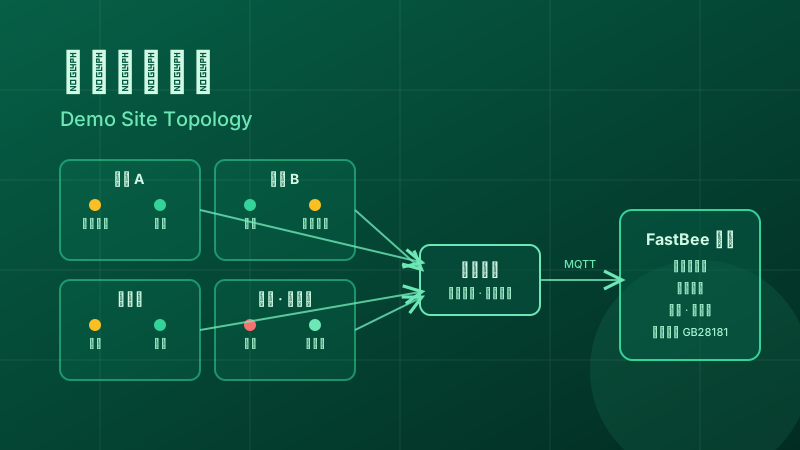
2.1. Device Access
Call buttons and millimeter-wave radar connect directly to the gateway over MQTT; smoke detectors and gas alarms use Modbus interfaces and report after passthrough conversion by the gateway; two cameras in public areas are connected to the platform's video module over GB28181. All devices are registered at the two levels of "product—device", and devices of the same type share one product Thing Model.
2.2. Thing Model Modeling
Thing Models were built for each device type: readings such as heart rate and activity status are defined as properties, actions such as muting an audible-visual alarm are defined as methods, and SOS calls, falls, smoke, and gas leaks are defined as events. After modeling, data reported to the platform is immediately visible, property history is automatically stored, and it can be searched by room and device.
2.3. Alarm and Linkage Configuration
Three core rules were configured in the rule engine:
- SOS event → pop up on the dashboard with the room number marked, and simultaneously push to the nursing staff's mobile app;
- fall and prolonged-inactivity events → escalate to the shift supervisor and notify the bound family members by SMS;
- smoke and gas events → trigger on-site audible-visual alerts and push to the fire-safety duty officer.
A device offline timeout alarm was also configured to avoid device failures going unnoticed. All of the above rules are configured visually, with no coding required.
3. Feature Showcase

- On-duty dashboard: the real-time alarm list is color-coded by level, the bed status grid gives a one-screen overview, and alarm trend curves support shift scheduling decisions; when an alarm is triggered, a pop-up links to the corresponding camera feed, so on-duty staff verify before acting. For dashboard configuration ideas, see IoT Data Visualization.
- Mobile app: nursing staff receive alarm push notifications and register handling results on the mobile app after arriving on site, forming a handling record.
- Family notification: bound family members receive SMS notifications containing the elderly person's room number, alarm type, and time, avoiding the delay of one-by-one phone calls.
4. Operation Results
During the demo run, the alarm chain performed stably: call-type alarms reach the dashboard pop-up and mobile push almost instantly after a button press, and on-duty response shifted from "discovered during rounds" to "alarm-driven"; passive alarms for falls and prolonged inactivity filled the blind spot when the elderly cannot call for help, and the pressure on night duty dropped significantly. The generation, notification, and handling of all alarms are recorded on the platform, traceable and countable, providing a basis for later optimization of shift scheduling and care workflows.
The demo environment also validated the weak-network fallback capability: when an external network outage was simulated, on-site audible-visual linkage still triggered as expected, data was automatically backfilled after the link recovered, and the platform had no data gaps.
5. FAQ
Can this demo case be directly reused in other elderly-care institutions?
The device access methods, Thing Models, and alarm rules can all be reused following the same approach; the bed count, notification targets, and alarm grading need to be adjusted to each institution's actual situation. For solution-level design, see Monitoring and Alarm Notification Reference Solution.
What types of devices were used in the demo?
Emergency call buttons, smart wristbands, millimeter-wave radar (fall and prolonged-inactivity monitoring), smoke detectors and gas alarms, and cameras in public areas; devices of the same type are connected through a unified Thing Model, and vendor models can be swapped at the access layer.
How are family members notified of alarms?
The demo environment uses a combination of SMS notification to family members and mobile push to nursing staff; phone voice notification requires integration with a third-party voice service and can be added optionally according to the institution's budget.
Want to see real project forms of the platform in other industries?
You can refer to the published Smart Agriculture Complete Case, or return to the Industry Case Overview to view all solutions and project reviews.