

Monitoring and Alarm Notification Reference Solution
Page Guide
1. Solution Overview
The core tension in elderly care is "risks are discovered late" versus "on-duty staffing is expensive": falls and sudden discomfort often happen at night or when the elderly are alone, and response chains that rely on manual rounds are long with a high risk of missed incidents; families want to be informed of abnormalities promptly, while institutions need to control on-duty costs as the number of beds grows.
This solution uses the FastBee IoT platform as the foundation, unifying access for emergency call buttons, smart wristbands, millimeter-wave radar, smoke detectors, and gas alarms. The platform centrally performs event judgment, alarm grading, and multi-channel notification: instant pop-ups on the on-duty dashboard, mobile push notifications, and SMS and phone calls to family members, with on-site audible and visual alerts triggered when necessary. The platform supports private deployment, keeping monitoring data on the institution's own premises and meeting the privacy and data security requirements of elderly-care scenarios.
2. System Architecture
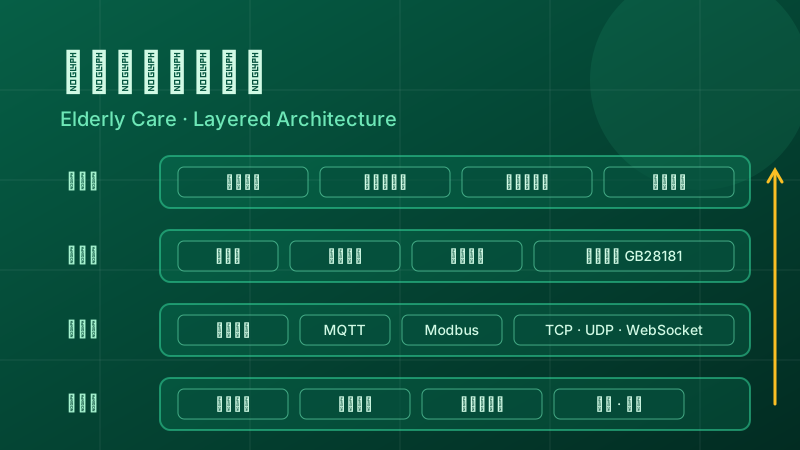
The system is divided into four layers from bottom to top:
- Device layer: emergency call buttons, smart wristbands (heart rate, blood oxygen, positioning), millimeter-wave radar (fall and prolonged-inactivity monitoring), smoke detectors and gas alarms, door sensors, water-leak sensors, and other environmental sensors.
- Access layer: unified access through FastBee gateways, supporting protocols such as MQTT, Modbus, TCP, UDP, and WebSocket; with edge computing capability, key linkage can be maintained locally when the on-site network is down.
- Platform layer: the Thing Model abstracts all device types into properties, methods, and events; the rule engine triggers scene linkage based on conditions; the alarm center handles alarm generation, grading, notification, and record keeping; the video module integrates the institution's surveillance cameras over GB28181.
- Application layer: the on-duty dashboard, management workbench, mobile app, and family notification entry, covering the full flow of "detection—handling—notification—traceability".
3. Core Features
3.1. Vital Signs and Environmental Monitoring
Wristbands report vital-sign properties such as heart rate and blood oxygen on a schedule, radar reports activity status, and smoke, gas, and water-leak devices report environmental readings. All data is normalized through the Thing Model and visible in real time on the platform, with historical curves and report statistics supported.
3.2. One-touch Call and Fall Alarms
Pressing a bedside or bathroom call button immediately generates an SOS event; when the millimeter-wave radar detects a fall or prolonged inactivity, it automatically generates an alarm event without requiring any action from the elderly person, covering the blind spot of "being unable to call for help".
3.3. Multi-level Alarm Notification
Alarms are matched to notification policies by level: general reminders go to the on-duty list, while urgent alarms simultaneously trigger dashboard pop-ups, mobile push notifications, and SMS and phone calls to family members; failed notifications can be escalated and resent, and handling results are written back and recorded, forming a closed loop.
3.4. Visual Dashboard
The on-duty room dashboard centrally displays bed status, the real-time alarm list, alarm trends, and device online status, with filtering by floor and room, giving a one-screen overview of the entire institution's operating status.
3.5. Mobile App
Nursing staff receive alarms, view device data, and register handling results on the mobile app; on the family side, bound family members receive notifications of the elderly person's abnormalities, reducing back-and-forth communication.
3.6. Video Surveillance Linkage
When an alarm is triggered, the system can link to camera feeds (accessed over GB28181) at the door of the elderly person's room and in public areas, so on-duty staff can verify the on-site situation directly on the dashboard before deciding whether to respond in person or reassure remotely.
4. Device Access
4.1. Gateway and Protocols
Elderly-care institutions have devices from various vendors with different protocols; all are accessed through the FastBee gateway: call buttons and radar mostly connect directly over MQTT or TCP, fire-safety devices such as smoke detectors and gas alarms commonly use Modbus or TCP passthrough, and consumer-grade devices such as wristbands are forwarded through the vendor's service and then report over MQTT. For the trade-offs in protocol selection, see Comparing Common IoT Communication Protocols.
4.2. Thing Model
Devices of the same type are abstracted into a unified product Thing Model: vital-sign and environmental readings are defined as properties (such as heart rate, activity status, smoke concentration), platform-initiated actions are defined as methods (such as issuing wristband positioning or muting an audible-visual alarm), and abnormality reports are defined as events (such as SOS calls, fall alarms, gas leaks). For modeling methodology, see Thing Model Design.
4.3. Scene Linkage and Alarm Rules
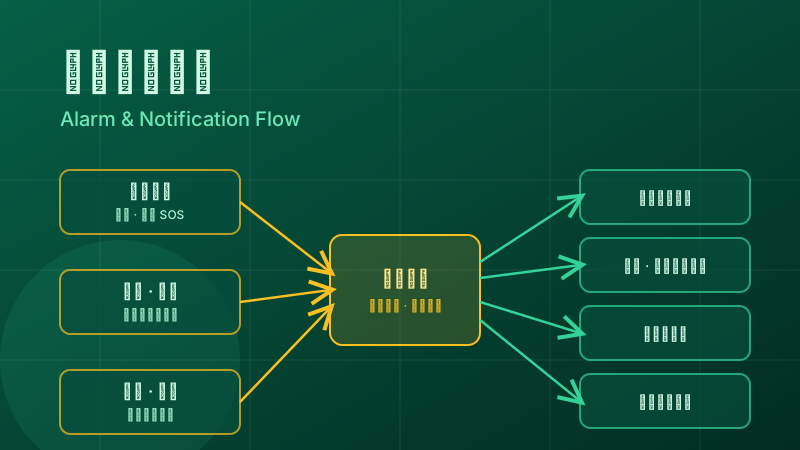
The rule engine turns "event—condition—action" into configuration. Typical rules include:
- SOS call event → pop up on the on-duty dashboard and notify the nursing staff of the corresponding floor;
- fall or prolonged-inactivity event → escalate to the shift supervisor, and notify family members by SMS and phone call;
- smoke and gas alarms → trigger on-site audible-visual alerts and push to the fire-safety duty officer;
- device offline timeout → generate an operations alarm, avoiding the situation where "a device fails and nobody knows".
For configuration details of linkage rules, see Rule Engine and Scene Linkage.
5. Deployment and Implementation
The platform supports private deployment on the institution's intranet or a dedicated cloud host, so monitoring data never leaves the institution; the on-site network is designed to "run on weak networks", with key linkage taking effect locally on the edge gateway and data automatically backfilled after connectivity is restored. For edge-side design thinking, see Edge Computing and IoT.
It is recommended to proceed in five stages:
- Site survey: determine the bed count, room layout, existing device protocols, and network conditions, and define the alarm grading and notification target matrix;
- Network and gateway deployment: deploy gateways and the on-site network, and establish two-way connectivity with the platform;
- Device access and modeling: build Thing Models by product, connect devices category by category, and verify reported data;
- Rule and notification configuration: configure scene linkage, alarm levels, SMS, phone, and push channels, and complete the dashboard view configuration;
- Pilot run and handover: validate the alarm chain in a small-scale pilot run, train on-duty staff, and then hand over the whole system.
6. FAQ
Which channels does alarm notification support?
The in-platform alarm list and on-duty dashboard pop-ups are the base channels, mobile push covers nursing staff, and SMS and phone calls reach family members through integration with third-party notification services; different alarm levels can be combined with different channels, and urgent alarms are recommended to have at least two redundant channels.
Can alarms still be triggered when the on-site network is down?
After deploying an edge gateway, key rules such as linking calls to audible-visual alerts can execute locally on the gateway without depending on the external network; data is automatically backfilled once the platform link recovers. For institutions with high reliability requirements, dual-link networking is recommended for key areas.
Can devices from different vendors be integrated in a unified way?
Yes. FastBee gateways support common protocols such as MQTT, Modbus, TCP, UDP, and WebSocket; similar products are modeled with a unified Thing Model, vendor differences are masked at the access layer, and the platform sees unified properties, methods, and events.
Where is the monitoring data stored, and how is privacy protected?
With private deployment, data is stored on the institution's own servers, and the platform provides hierarchical permission control over the access scope; sensitive data such as vital signs is visible only to authorized roles, and alarm records meet internal audit needs.