

HVAC Monitoring and Control Reference Solution
Page Guide
HVAC (heating, ventilation, and air conditioning) systems are at the core of a building's energy consumption and comfort. This solution uses FastBee as the platform foundation to centrally connect HVAC equipment distributed across equipment rooms, floors, and terminal endpoints, enabling centralized monitoring, remote control, and on-demand linkage.
1. Solution Overview
1.1. Industry Pain Points
Common problems in building HVAC systems fall into four areas:
- Scattered equipment with inconsistent protocols: chillers, fresh air units, fan coil units, pumps, and cooling towers often come from different vendors; their controllers are mostly Modbus RTU/TCP, each forming an isolated island.
- Reliance on manual inspections: temperature anomalies and equipment failures are discovered through patrol inspections, leading to delayed responses, especially at night and on holidays.
- Invisible energy consumption: chilled water pumps, cooling water pumps, and chillers run at fixed frequency year-round, with no energy statistics by zone or system, leaving energy-saving retrofits without a starting point.
- Coarse control: fresh air and air conditioning run on fixed schedules and cannot be adjusted dynamically based on indoor CO₂ concentration, temperature, or occupancy.
1.2. Solution Positioning
This solution is positioned as a "lightweight HVAC monitoring and control platform": without replacing the existing HVAC controllers, legacy equipment is uniformly connected to FastBee through edge gateways, where thing model modeling, remote control, scene linkage, alert notification, and visualization are completed on the platform. The platform supports private deployment, keeping data within the owner's intranet.
2. System Architecture
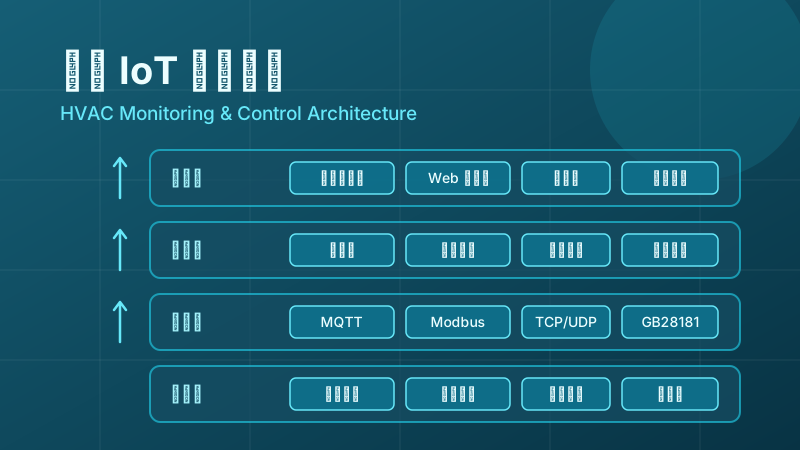
The solution is divided into four layers: the device layer, the access layer, the platform layer, and the application layer.
2.1. Device Layer
The device layer includes all field equipment of the HVAC system: chillers and unit controllers, fresh air units, fan coil units, chilled/cooling water pumps, motorized control valves, and environmental sensors for temperature and humidity, CO₂, PM2.5, and differential pressure. Surveillance cameras are used for video review of equipment rooms and key areas.
2.2. Access Layer
The access layer relies on edge gateways for protocol conversion: Modbus RTU serial devices are polled and collected through the gateway, Modbus TCP devices connect directly to the gateway over Ethernet, and cameras are connected via GB28181. The gateways uniformly communicate with the platform over MQTT and support offline data caching with retransmission, automatically backfilling data once the network recovers. For details on gateway protocol capabilities, refer to the article IoT Protocols Comparison.
2.3. Platform Layer
The platform layer is the FastBee core: the thing model abstracts HVAC equipment into properties, functions, and events; the scene linkage engine triggers control actions based on thresholds, schedules, and device events; the Alert Center handles the notification distribution of over-limit and offline alerts; and Device Management maintains the device ledger, online status, and runtime logs.
2.4. Application Layer
The application layer serves different roles: the visualization large screen is used for centralized duty in the monitoring center, the Web management console is used for device configuration and policy maintenance, the mobile app allows operations personnel to check status and operate remotely at any time, and the report center outputs temperature curves and energy consumption statistics.
3. Core Features
3.1. Environmental and Equipment Data Collection
The platform acquires the temperature, humidity, and CO₂ concentration of each floor and zone at the configured collection cycle, along with equipment parameters such as the operating status of air conditioning units, supply and return water temperatures, pump frequencies, and valve openings, forming a unified historical database that supports retrospective queries over any time period.
3.2. Remote Control and Scheduled Policies
Operations personnel can remotely start and stop air conditioning units and fresh air fans, adjust fan coil unit fan speeds and temperature setpoints, and control pumps and motorized valves from the Web console or mobile app. Scheduled tasks support orchestrating operating plans by workday/holiday—for example, starting air conditioning pre-cooling before work hours on workdays and automatically shutting down terminal equipment after work.
3.3. Scene Linkage
Scene linkage upgrades "monitoring" to "automatic control": when the indoor CO₂ concentration stays above the configured threshold beyond the allowed duration, the fresh air fan for the corresponding zone is automatically started; when a zone's temperature exceeds its limit, the fan coil unit fan speed is automatically adjusted; when a device reports a fault event, an alert is triggered immediately and the related circuits are shut down in linkage. For the configuration approach of linkage rules, refer to Rule Engine and Scene Linkage.
3.4. Alert Notification
The platform generates alerts for conditions such as over-limit temperature, abnormal humidity, device offline events, and fault events, and pushes them to on-duty personnel by severity through in-site messages and notification channels. Alerts are associated with devices and zones, and support acknowledgment and closed-loop handling, preventing alerts from going unattended.
3.5. Visualization Large Screen and Reports
The visualization large screen centrally displays the temperature and humidity distribution of each zone, device online status, real-time alerts, and energy consumption trends, making it suitable for monitoring centers and equipment room duty scenarios. The report center performs statistical analysis on reported properties and outputs operating reports by zone and system, providing a basis for energy-saving evaluation.
3.6. Mobile Operations
The mobile app provides device viewing and control capabilities consistent with the Web console, allowing operations personnel to handle alerts and remotely start or stop devices while on patrol. Devices can be shared with multiple users for collaborative management, with view and operation permissions assigned by role.
4. Device Access
4.1. Gateways and Protocols
HVAC sites are dominated by Modbus devices. The gateway handles serial/Ethernet-to-MQTT protocol conversion and also supports TCP, UDP, WebSocket, and other access methods; cameras are connected via the GB28181 national standard, enabling preview, playback, and PTZ control of equipment room footage. The gateway has edge computing capabilities and can execute visual programming logic locally to maintain basic linkage when the platform is unreachable. For details, see Edge Computing in IoT.
4.2. Thing Model Modeling
Create a product thing model on the platform for each type of HVAC equipment:
- Properties: such as "indoor temperature", "temperature setpoint", "fan speed", "valve opening", and "operating status", supporting reporting as well as read/write.
- Functions: such as "power on", "power off", "set temperature", and "switch mode", corresponding to control commands delivered by the platform.
- Events: such as "fault alarm" and "filter reminder", proactively reported by devices and used to trigger linkage and alerts.
Devices of the same model share one product thing model; adding a new device only requires instantiation, so the modeling cost is amortized as the scale grows.
4.3. Linkage Rule Configuration
Linkage rules are configured in the form of "trigger condition → execution action". Conditions support combinations of property thresholds, schedules, and device events; actions support device control and alert notification.

5. Deployment and Implementation
5.1. Implementation Steps
- Site survey: inventory the HVAC equipment, controller models, and communication protocols, and determine gateway installation points and network conditions.
- Gateway wiring: connect serial devices to the gateway's RS485 bus and Ethernet devices to the LAN, then complete protocol parameter configuration.
- Platform modeling: create products and thing models, register devices in batches, and verify that the collected data matches the field.
- Policy configuration: configure scheduled tasks, linkage rules, and alert thresholds; run a pilot in a single zone before rolling out.
- Acceptance and handover: verify the large screen display, remote control, and alert notification links, and deliver an operations manual.
5.2. Private Deployment
The platform supports private deployment in the owner's equipment room or private cloud, keeping data inside the intranet and meeting the data security requirements of buildings and campuses. For deployment methods, refer to the Installation and Deployment documentation; for the basic platform access process, see the Device Access documentation.
6. FAQ
Do the original HVAC controllers need to be replaced?
Generally not. As long as the controller supports common protocols such as Modbus RTU/TCP, it can be connected to the platform through an edge gateway, keeping the original control logic intact while the platform layers centralized monitoring and linkage capabilities on top.
Can HVAC equipment still operate normally when the network is down?
Yes. The local control logic of HVAC equipment is not affected; the gateway supports offline data caching with retransmission and can execute preset linkage logic at the edge, with data automatically backfilled to the platform once the network recovers.
Can the platform connect to surveillance cameras in the equipment room?
Yes. The platform connects cameras and NVRs via the GB28181 national standard, supporting live preview, PTZ control, and recording playback for video review of equipment rooms and key areas.
How to evaluate the effect of an energy-saving retrofit?
Use the report center to compare energy consumption and operating duration by zone and system before and after go-live, and evaluate policy effectiveness together with the temperature compliance rate. It is recommended to run energy statistics for one full cooling season before formulating tuning policies.