

Kafka Installation
Install Kafka
Kafka is used as the message queue and data-integration dependency for cluster scenarios. You can install it with Docker Compose for quick deployment or use a binary package for manual deployment.
Docker Compose
Make sure Docker and Docker Compose are installed, then prepare docker-compose.yml:
services:
  kafka:
    image: bitnami/kafka:3.6
    container_name: kafka
    ports:
      - "9092:9092"
    environment:
      - KAFKA_CFG_PROCESS_ROLES=broker,controller
      - KAFKA_CFG_NODE_ID=1
      - KAFKA_CFG_CONTROLLER_QUORUM_VOTERS=1@localhost:9093
      - KAFKA_CFG_LISTENERS=PLAINTEXT://0.0.0.0:9092,CONTROLLER://0.0.0.0:9093
      - KAFKA_CFG_ADVERTISED_LISTENERS=PLAINTEXT://kafka:9092
      - KAFKA_CFG_LISTENER_SECURITY_PROTOCOL_MAP=PLAINTEXT:PLAINTEXT,CONTROLLER:PLAINTEXT
      - KAFKA_CFG_INTER_BROKER_LISTENER_NAME=PLAINTEXT
      - KAFKA_CFG_CONTROLLER_LISTENER_NAMES=CONTROLLER
      - KAFKA_CFG_LOG_DIRS=/opt/kafka-logs
      - KAFKA_CFG_NUM_PARTITIONS=1
      - KAFKA_CFG_DEFAULT_REPLICATION_FACTOR=1
      - KAFKA_CFG_OFFSETS_TOPIC_REPLICATION_FACTOR=1
      - KAFKA_CFG_TRANSACTION_STATE_LOG_REPLICATION_FACTOR=1
      - KAFKA_CFG_TRANSACTION_STATE_LOG_MIN_ISR=1
      - KAFKA_CFG_MIN_INSYNC_REPLICAS=1
      - ALLOW_PLAINTEXT_LISTENER=yes
    volumes:
      - kafka-data:/opt/kafka-logs
    networks:
      - kafka-network

networks:
  kafka-network:
    driver: bridge

volumes:
  kafka-data:
name: my-kafka-dataStart Kafka:
docker-compose up -dCheck logs:
docker logs kafkaIf the log indicates insufficient permission for the mounted log directory, check and adjust the volume directory:
sudo ls -ld /var/lib/docker/volumes/my-kafka-data/_data
sudo chown -R 1001:1001 /var/lib/docker/volumes/my-kafka-data/_data
sudo chmod -R 755 /var/lib/docker/volumes/my-kafka-data/_data
docker compose -f docker-compose.yml up -d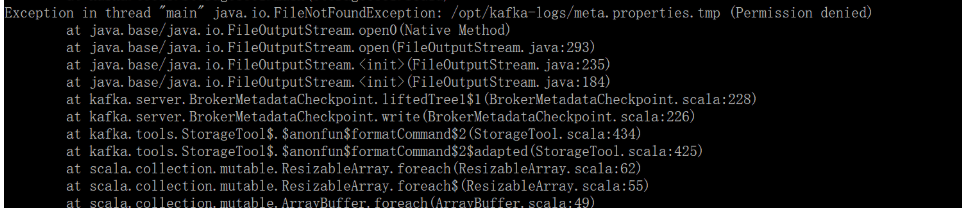
Binary Installation
Kafka runs on the JVM. Use JDK 1.8 or later. The example below uses Kafka 3.6.0:
wget https://archive.apache.org/dist/kafka/3.6.0/kafka_2.12-3.6.0.tgz
tar -xzf kafka_2.12-3.6.0.tgz
cd kafka_2.12-3.6.0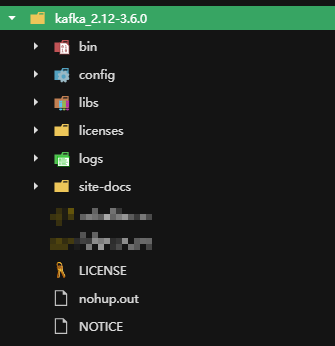
Configure config/zookeeper.properties:
dataDir=/opt/software/kafka/zookeeper
dataLogDir=/opt/software/kafka/zookeeper/log
clientPort=2181
maxClientCnxns=100
tickTimes=2000
initLimit=10
syncLimit=5Configure config/server.properties:
broker.id=0
port=9092
host.name=SERVER_IP
listeners=PLAINTEXT://0.0.0.0:9092
advertised.listeners=PLAINTEXT://SERVER_IP:9092Test Kafka
Enter the Kafka container:
docker exec -it --user root kafka bashCreate and list a topic:
kafka-topics.sh --bootstrap-server localhost:9092 --create --topic test-topic --partitions 1 --replication-factor 1
kafka-topics.sh --bootstrap-server localhost:9092 --listProduce messages:
kafka-console-producer.sh --bootstrap-server localhost:9092 --topic test-topicOpen another terminal and consume messages:
docker exec -it --user root kafka bash
kafka-console-consumer.sh --bootstrap-server localhost:9092 --topic test-topic --from-beginningIf the consumer receives the message entered in the producer terminal, Kafka is working.