Shared Subscriptions
1. Shared Subscriptions
Shared subscription is a subscription mode used to implement load balancing across multiple subscribers. Clients can be divided into multiple subscription groups; messages are still forwarded to all subscription groups, but only one client within each subscription group receives the message. You can add a prefix to the original topic of a group of subscribers to enable shared subscriptions. MQTT supports two shared subscription prefix formats: shared subscriptions with a group (prefix $share/<group-name>/) and shared subscriptions without a group (prefix $queue/). Examples of the two shared subscription formats are as follows:
| Prefix Format | Example | Prefix | Real Topic Name |
|---|---|---|---|
| With group format | $share/post/test/1 | $share/post/ | test/1 |
| Without group format | $queue/t/1 | $queue/ | t/1 |
Shared Subscriptions with a Group
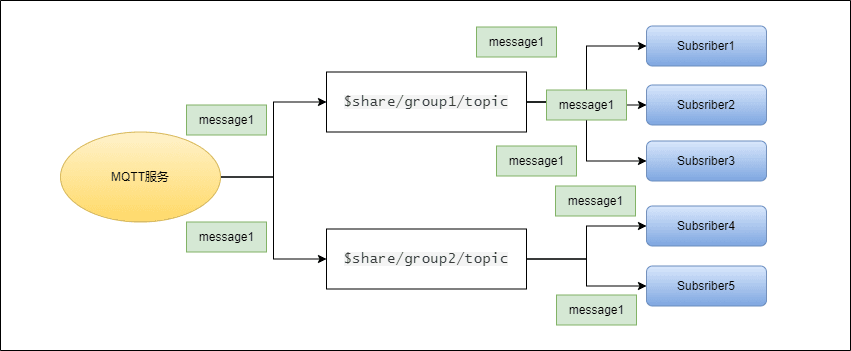
You can enable shared subscriptions for grouped subscribers by adding the $share/<group-name> prefix before the original topic. The group name can be any string. MQTT forwards messages to different groups at the same time, and subscribers belonging to the same group receive messages with load balancing.
For example, if subscribers subscriber1, subscriber2, and subscriber3 are members of group group1, subscribers subscriber4 and subscriber5 are members of group group2, and all subscribers subscribe to the original topic test1. The shared subscription topics must be $share/group/test1 and $share/group2/test1. When MQTT publishes message msg1 to the original topic test1:
- MQTT sends
message01to both groupsgroup1andgroup2. - One of the subscribers
subscriber1,subscriber2, andsubscriber3will receive ``message1`. - One of the subscribers
subscriber4andsubscriber5will receive ``message1`.
Shared Subscriptions without a Group
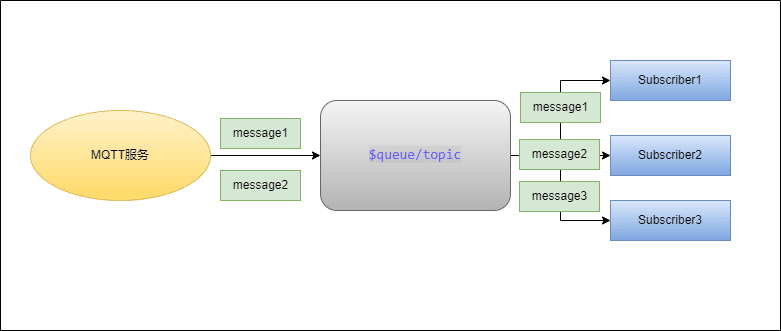
Shared subscriptions prefixed with $queue/ are shared subscriptions without a group. They are a special case of $share subscriptions. You can think of it as all subscribers being in one subscription group, such as $share/$queue.
Demo of Shared Subscriptions with a Group
In the Connections pane, select each subscriber client in turn and click Add Subscription to create shared subscriptions for each subscriber. Enter the correct topic in the topic field according to the rules below.
To group multiple subscribers, you need to add the group name {group} before the subscribed topic t/1. To have them subscribe to the same topic at the same time, you also need to add the prefix $share before the group name.
In the Add Subscription pop-up window:
- Set the Topic subscribed by
Subscribe1andSubscriber2to$share/test/1.
In the above topic example,
The prefix
$shareindicates that this is a shared subscription.t/1is the original topic.