

Rule Engine
1. Rule Definition
The rule engine is FMQ's built-in data-processing feature. It orchestrates rules with SQL statements and is triggered by messages, client events, and external data systems, enabling one-stop IoT data extraction, filtering, enrichment, and transformation without writing code, and outputs the processed data to actions or external data systems.
Rules provide powerful data integration capabilities. Used together with connectors and actions and based on SQL-orchestrated rules, they enable one-stop IoT data extraction, filtering, transformation, storage, and processing without writing code, accelerating application integration and business development.
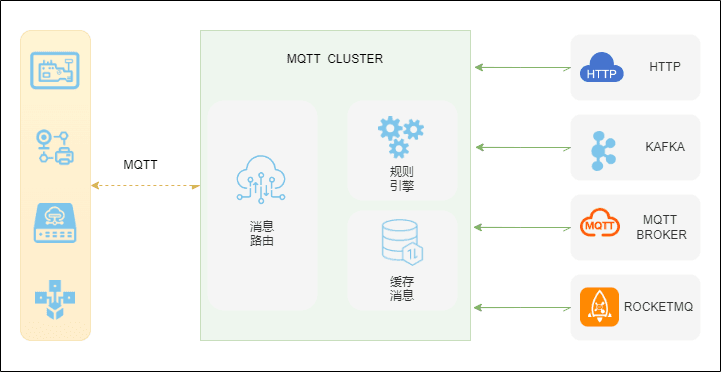
2. Rule Composition
The rule engine is composed of three parts: connectors, actions, and SQL orchestration.

It describes a process of MQTT data source, data matching and processing, and data routing.
- MQTT data source: a rule's data source can be messages or events; the rule specifies the data source through the SQL FROM clause;
- Data matching and processing: the rule uses SQL orchestration statements. The SQL WHERE clause is used to filter data, while the SELECT clause and SQL functions are used to extract and transform data;
- Data routing: a rule can define one or more actions to process the SQL output. If the SQL executes successfully, the rule executes the corresponding actions in order and sends the results to external data systems, such as RocketMQ, Kafka, MQTT services, etc.
3. Rule SQL Examples
Rule SQL specifies the data source.
The data source is an MQTT event
select
  *
from
"$events/client_connected"
where topic =~ '/property/post'- Data source: event — the connection-established event
"$events/client_connected" - Data matching: matches data by topic; here
=~is used to match all topics containingproperty/post - Data selection:
*, meaning all fields of all matching connection-established events
The data source is a message
SELECT
    payload,
    clientId
FROM
    "test/abc"
WHERE
clientId = "fastbee"- Data source: message — messages matching the topic
test/abc - Data matching: filters by
clientIdfor the valuefastbee - Data selection: here the two fields
clientIdandpayloadare retrieved
4. FAQ
4.1. What if the rule is not triggered?
First confirm the rule is enabled, then check that the SQL FROM topic or event matches the actual messages (you can use =~ for fuzzy topic matching), and finally confirm that the messages actually reach FMQ (you can verify by subscribing to the same topic with a client).
4.2. SQL executes successfully but the action produces no output?
Actions execute in order. First check the action's configured target address, authentication parameters, and network connectivity; if outputting to an external data system (Kafka, RocketMQ, MQTT service, etc.), confirm that the corresponding connector has been created and its connection is healthy.
4.3. What is the difference between event topics and message topics?
Message topics (such as test/abc) come from business messages published by clients; event topics (such as "$events/client_connected") come from system events such as client connection and disconnection. The SQL syntax for both is the same; only the data source in FROM differs.