

Local Run and Deployment
1. Local Environment Preparation
Java Environment
Make sure a suitable version of the Java Development Kit (JDK) is installed locally; JDK 17 or above is recommended. You can check the installation and version information by running the java -version command on the command line. If it is not installed, go to Oracle's official website (for Oracle JDK) or another reliable open-source JDK provider (such as the OpenJDK website) to download the corresponding version and complete the installation following the installation wizard.
Database Environment
The database type used by the project is MySQL. Install the corresponding database management system and configure it correctly.
Maven
The project is built with Maven, so you need to install Maven and configure the local repository path and mirror source (in China, you can configure a mirror such as the Alibaba Cloud mirror to speed up dependency downloads). You can verify the installation by running mvn -v on the command line.
Frontend Environment Installation:
Node.js: the version must be greater than 18.18.0. Go to the official Node.js website (https://nodejs.org/) to download and install the Long-Term Support (LTS) version of Node.js. After installation, run
node -vandnpm -von the command line to check whether Node.js and its package manager npm are installed successfully and meet the project requirements.Frontend build tool Vite: if you have not installed
pnpmyet, run the following command to install it (macusers who encounter installation errors should prefix the command withsudo)rubynpm install -g pnpmFrontend dependency installation: run the following command in the frontend project root directory. This installs all frontend dependency packages according to the project's
package.jsonfile. The installation may take some time, depending on network conditions and the number of dependencies.bashpnpm install
2. Running in IDEA
Adding VM Run Parameters
Some permissions need to be enabled in the virtual machine runtime environment, so the following run parameters need to be added:
--add-opens=java.base/java.lang=ALL-UNNAMED
--add-opens=java.base/java.lang.invoke=ALL-UNNAMED
--add-opens=java.base/java.util=ALL-UNNAMED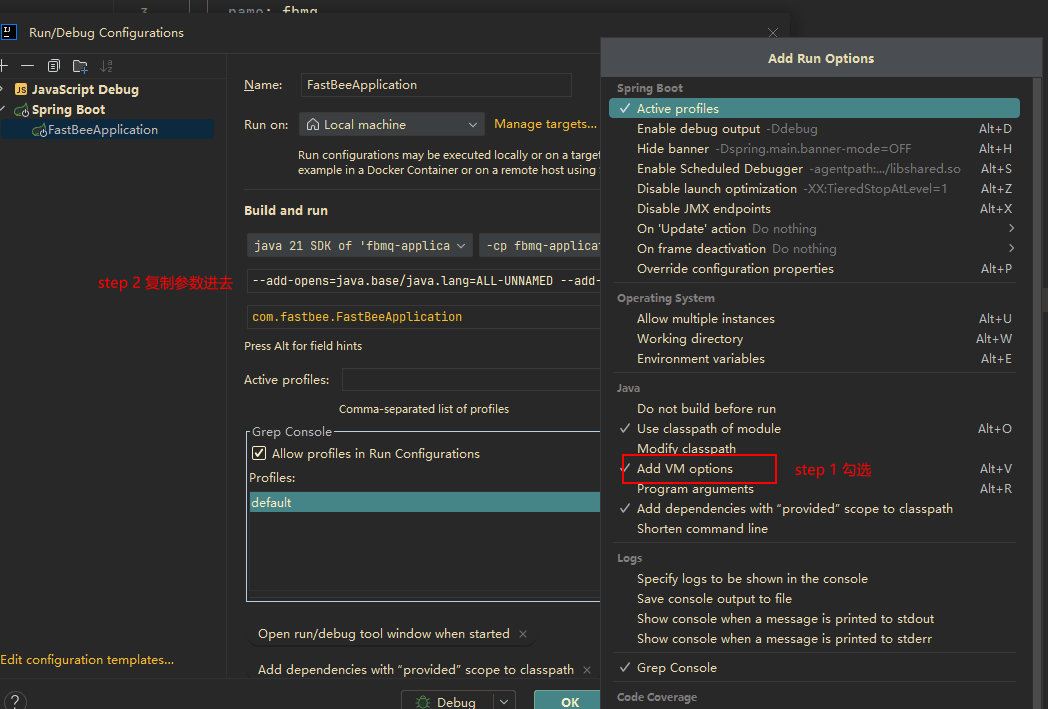
Database File
Execute the database file. Currently only MySQL is supported; the SQL file must be requested from customer service.
Packaging the Frontend and Integrating It into the Backend for Deployment
Method 1: run the following command in the frontend to package it, then copy the packaged files to the backend
fbmq-application/src/main/resources/staticMethod 2: run the backend packaging command
maven packagedirectly; after it completes, the frontend is automatically packaged into the backendfbmq-application/src/main/resources/static
Running the Spring Boot Startup Class
Click the Spring Boot startup class. When the following success banner appears, the startup is successful.
 * * * * * * * * * * * * * * * * * * * * * * * * * * * * * * * * * * * * *
 *           _⚲_⚲_            ______        _     ____                   *
 *     |   /       \   |     |  ____|      | |   |  _ \                  *
 *     |  |  | ● |  |  |     | |__ __ _ ___| |_  | |_) | ___  ___        *
 *     |   \       /   |     |  __/ _` / __| __| |  _ < / _ \/ _ \       *
 *           \   /           | | | (_| \__ \ |_  | |_) |  __/  __/       *
 *             V             |_|  \__,_|___/\__| |____/ \___|\___|       *
 *                                                                       *
* * * * * * * * * * * * FastBee物联网平台[✔启动成功] * * * * * * * * * * * *3. Deployment
Database Configuration
Import the database
SQL file; theSQL filemust be obtained from customer service. Configure the imported database. Currently only MySQL is supported.
fastbee:
  datasource:
    url: jdbc:mysql://127.0.0.1:3306/fmq?useSSL=false
    username: root
password: fastbeeCluster Configuration
Local run IP configuration, as follows:
fastbee:
  cluster: # cluster configuration
    localAddress: 127.0.0.1
    addresses: [ "127.0.0.1" ] # internal network address
node-id: fastbee # node idCluster configuration: use internal network IPs for the IP addresses.
  fastbee:
  cluster: # cluster configuration
    localAddress: 10.0.xx.xx
    addresses: ["10.0.xx.xx","10.0.xx.xx"] # internal network address
node-id: fastbee1 # node idPackaging
First run maven clean to clear the cache, then run maven package to package and get the jar package.
Deployment Files
Copy the deployment files to the server (contact customer service to obtain them).
Execute the .sh file to register the service with the system systemctl. The sh file is as follows:
#!/bin/bash
set -e

# Application name, can be passed as a command-line argument; the default value is used if not passed
APP_NAME="${1:-fbmq-application.jar}"
# Application directory, determined by the directory of the current script
APP_DIR=$(pwd)
# Assume the JRE directory is jre, in the same directory as the project; can be passed as a command-line argument; the default value is used if not passed
JRE_DIR="${3:-$APP_DIR/vjre}"

# Log file path, can be passed as a command-line argument
LOG_FILE="${2:-$APP_DIR/app.log}"

service_name="fbmq"

service_description="fbmq"
....Starting the Service
Run systemctl start fbmq to start the service.
systemctl start fbmq   // start
systemctl status fbmq  // check status
systemctl stop fbmq // stopRun systemctl status fbmq to check whether it started successfully. Startup completion banner:
 * * * * * * * * * * * * * * * * * * * * * * * * * * * * * * * * * * * * *
 *           _⚲_⚲_            ______        _     ____                   *
 *     |   /       \   |     |  ____|      | |   |  _ \                  *
 *     |  |  | ● |  |  |     | |__ __ _ ___| |_  | |_) | ___  ___        *
 *     |   \       /   |     |  __/ _` / __| __| |  _ < / _ \/ _ \       *
 *           \   /           | | | (_| \__ \ |_  | |_) |  __/  __/       *
 *             V             |_|  \__,_|___/\__| |____/ \___|\___|       *
 *                                                                       *
 * * * * * * * * * * * * FastBee物联网平台[✔启动成功] * * * * * * * * * * * *