


Alink JSON and MQTT Temperature-Control Access
This page is organized from an existing operations manual as an online operations reference. Operations marked as expected or not executed in the original must still be verified against the actual environment.
Verify item by item the send/receive, independent properties, history, and stop/recovery specified in this guide; after the send/receive, separately check the current publish synchronization.
Before starting: you have product, device, model, publish, control, and history permissions; the local application, single-node FMQ, and FMQX Web are available; and the connection parameters for this device have been obtained
Before You Start
This guide uses MQTT with Alink JSON to verify temperature reporting, setpoint control, independent status reporting, historical data, and stop/recovery.
The first-time configuration screenshots follow the original tutorial; this round reuses the retained product, device, and session. The connection parameters and existing subscriptions are read-only checks performed after the send/receive ended; nothing was re-imported, re-saved, or re-subscribed.
This round's samples came first, and the current publish synchronization supplementary check came after; the two pieces of evidence are described separately. A full business re-verification after the current publish is still pending, so do not claim that this draft has been fully accepted.
FMQX Web is used to demonstrate device send/receive and execution replies; whether the physical device actually actuates still needs confirmation on the device side.
Replace These Parameters Before Copying the Templates
The code in this guide uses plain template names; the screenshots retain the actual historical resources. Complete the following checks before saving as a UTF-8 file or sending a message.
- The top-level id of an Alink message is the message number; regenerate it for each new message and never reuse it; keep the property identifiers in params consistent with the Thing Model.
- temperature and setpoint are the template property identifiers for temperature and setpoint temperature; they can be kept when generating a Thing Model for the first time, but must be replaced with the real identifiers of that product when reusing an existing product, and all messages and initialState keys must be updated accordingly.
- demo-device is the Device Number template. Replace the device number in clientId, the device number in every send/receive topic, and the clientId of TCP reporting together with the platform's device number for this device; the product ID and tenant ID in the MQTT identity must also be replaced with the current device connection parameters.
- The host, port, and listen direction in the connection file must be changed to the actual addresses of the current environment; 127.0.0.1 means the local machine running FMQX. When MQTT is involved, also check the product ID, username, subscription topics, and responseRoute; the password is entered securely only on the connection page.
- Group, session, and subscription ids are internal references of the import file; if renaming is needed, groupId must match the corresponding group id. Check before importing, and do not create a connection with the same name again on a retained session.
- The code blocks are customer templates rewritten from existing password-free assets or original code; this version of the template has not yet been proven to import successfully. Historical screenshots, send times, and the scope of business passes still follow the records of each step; do not treat template names as the actual resource names in old evidence.
1. First-Time Creation and Configuration Example
If the resources of this guide already exist, reuse them directly without recreating. The following eight steps retain the screenshots and boundaries of the original first-time configuration.
Wizard object samplejson
{

  "temperature": 20,

  "setpoint": 30

}The wizard generates only two fields first. Replaceable customer template names are used here; check against the replacement list in this section before importing or sending.
1. First-Time Configuration · Example: Select New Product
Location: IoT*→Device Access→*Access Source Steps: Select New Product and fill in the name of this guide; for re-acceptance, directly reuse the retained product.
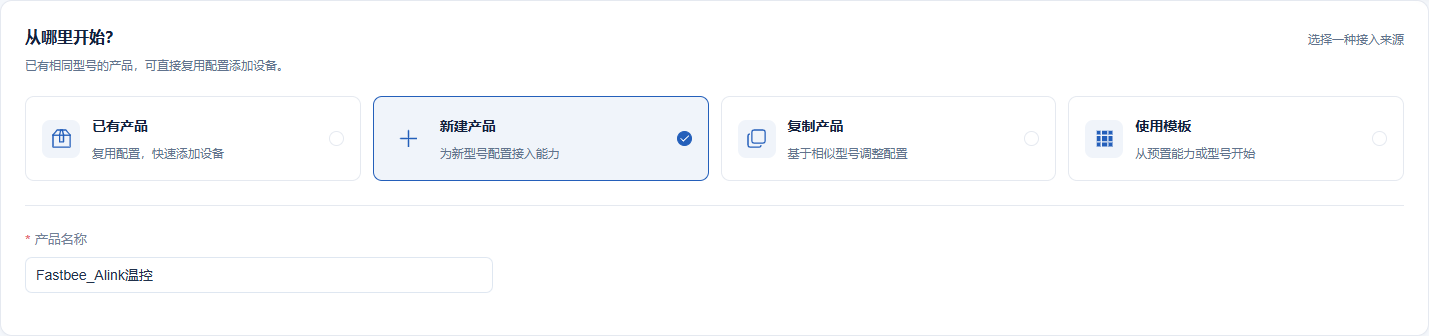
This image retakes the creation entry; creation was not submitted repeatedly, and subsequent devices and history follow the resources of this guide.
Screenshot Key Points
| Field / Control | Description |
|---|---|
| Access Source | Create an independent resource the first time; use the retained resource for re-verification. Required · Fill in: New Product |
| Product/Device Name | Locate this guide with a concise business name. Required · Fill in: FastBee_Alink温控 |
Expected result (not executed): as shown in the historical screenshot: this image retakes the creation entry; creation was not submitted repeatedly, and subsequent devices and history follow the resources of this guide. Risk and recovery: re-prepare after checking this guide's identity, format, and parameters.
2. First-Time Configuration · Example: Generate Two Fields from the Object Sample
Location: Device Access*→*Collect Data Steps: Create the product of this guide and parse the object sample.

Generate plain object fields first, then save the formal Alink JSON.
Screenshot Key Points
| Field / Control | Description |
|---|---|
| Access Source | Create an independent resource the first time; use the retained resource for re-verification. Required · Fill in: New Product |
| Product/Device Name | Locate this guide with a concise business name. Required · Fill in: FastBee_Alink温控 |
| Wizard Object Sample | The wizard first parses a plain object to generate two fields; switch to Alink JSON later in the product details. Required · Fill in: {"FastBee_temperature":20,"FastBee_setpoint":30} |
Expected result (not executed): as shown in the historical screenshot: generate plain object fields first, then save the formal Alink JSON. Risk and recovery: stop repeated commands, check this guide's identity, format, model, and actual send/receive; after recovery, report status first.
3. First-Time Configuration · Example: Check Field Types and Units
Location: Device Access*→*Collection Fields Steps: Check the two fixed identifiers, integer type, and ℃.
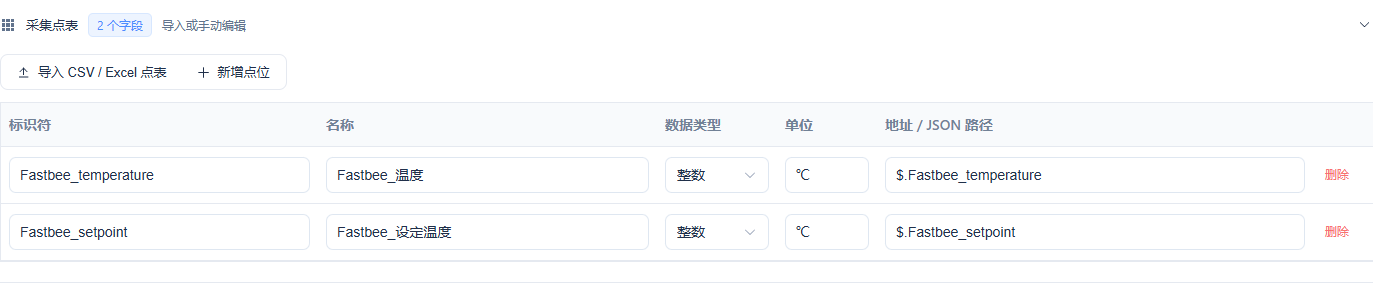
The params keys of the formal Alink reporting match the model identifiers.
Screenshot Key Points
| Field / Control | Description |
|---|---|
| Field/Type/Unit | Two integer ℃ fields; the identifiers match the params keys. Required · Fill in: FastBee_temperature/FastBee_setpoint; integer; ℃ |
Expected result (not executed): as shown in the historical screenshot: the params keys of the formal Alink reporting match the model identifiers.
4. First-Time Configuration · Example: Fill in the Independent Device Number
Location: Device Access*→*Add Device Steps: Fill in the number and name of this guide.

Retain this device for re-acceptance.
Screenshot Key Points
| Field / Control | Description |
|---|---|
| Device Identifier | The platform number matches the device identity used by this session. Required · Fill in: FastBee_AlinkMQTT_Tutorial_01 |
| Product/Device Name | Locate this guide with a concise business name. Required · Fill in: FastBee_Alink温控 |
Expected result (not executed): as shown in the historical screenshot: retain this device for re-acceptance.
5. First-Time Configuration · Example: Check the Initial Access Overview
Location: Device Access*→*Confirm Steps: Check 1 device, 2 fields and then create.

Initial JSON/MQTT; change to this guide's formal format in the next step.
Screenshot Key Points
| Field / Control | Description |
|---|---|
| Initial Overview | 1 device, 2 fields; the wizard starts with JSON/MQTT, and the formal protocol is saved afterward. Required · Fill in: 1 device, 2 fields |
Expected result (not executed): as shown in the historical screenshot: initial JSON/MQTT; change to this guide's formal format in the next step.
6. First-Time Configuration · Example: Save the Formal Alink JSON and Transport
Location: Product Management*→*Product Information Steps: Select Alink JSON, MQTT, and WIFI, then save.
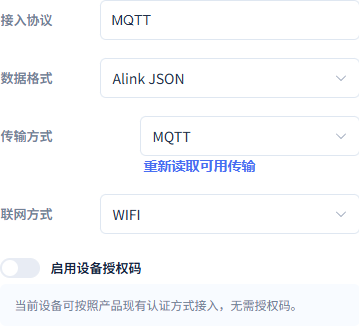
The formal configuration matches the connections and messages of this guide.
Screenshot Key Points
| Field / Control | Description |
|---|---|
| Data Format | Alink JSON is formally adopted; reporting is an id/version/method/params object. Required · Fill in: Alink JSON |
| Transport | Choose per this guide; changing only the connection port is not enough. Required · Fill in: MQTT |
| Network Type | WIFI for this guide; the actual endpoint is configured separately. Required · Fill in: WIFI |
Expected result (not executed): as shown in the historical screenshot: the formal configuration matches the connections and messages of this guide.
7. First-Time Configuration · Example: Save the Writable Setpoint and History
Location: Product Management*→Function Definition→*Setpoint Steps: Add Setpoint, uncheck read-only, enable history, then click Modify.
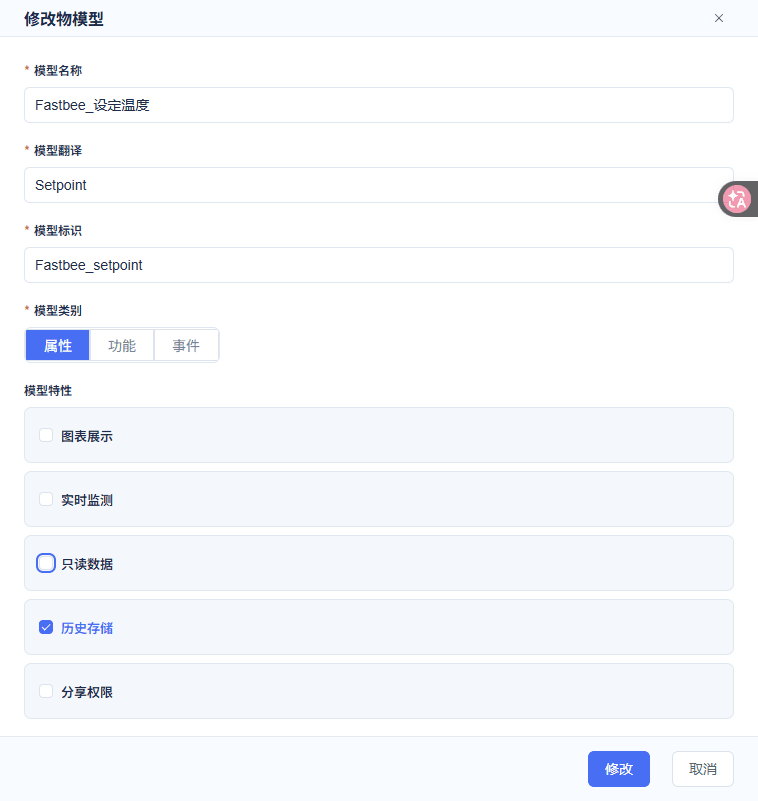
Setpoint 16~35℃, step 1; chart and monitoring disabled.
Screenshot Key Points
| Field / Control | Description |
|---|---|
| Model Translation | Complete the English names. Required · Fill in: Temperature/Setpoint |
| Model Identifier | The keys of the params object match these identifiers verbatim. Required · Fill in: FastBee_temperature/FastBee_setpoint |
| Model Category | Both fields are properties. Required · Fill in: Property |
| Read-only Data | Temperature checked, setpoint unchecked. Required · Fill in: Temperature read-only; setpoint writable |
| History Storage | Enabled for both fields. Required · Fill in: Checked |
| Chart Display/Real-time Monitoring | Temperature on, setpoint off. Required · Fill in: Temperature on; setpoint off |
| Share Permission | Disabled in this guide. Required · Fill in: Unchecked |
| Range/Unit/Step | Temperature -40~100℃, setpoint 16~35℃, integer step 1. Required · Fill in: Integer; ℃; step 1 |
| Modify | Save after completing the required items. Required · Fill in: Modify |
Expected result (not executed): as shown in the historical screenshot: setpoint 16~35℃, step 1; chart and monitoring disabled.
8. First-Time Configuration · Example: Save the Read-only Temperature and History
Location: Product Management*→Function Definition→*Temperature Steps: Add Temperature, keep read-only, history, and chart monitoring, then click Modify.
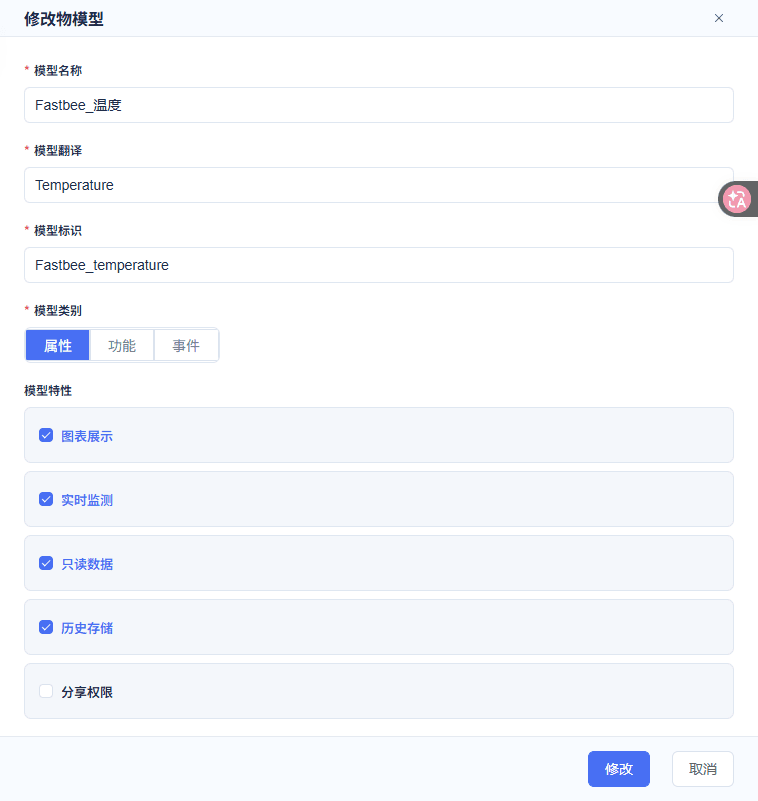
Temperature -40~100℃, step 1.
Screenshot Key Points
| Field / Control | Description |
|---|---|
| Model Translation | Complete the English names. Required · Fill in: Temperature/Setpoint |
| Read-only Data | Temperature checked, setpoint unchecked. Required · Fill in: Temperature read-only; setpoint writable |
| History Storage | Enabled for both fields. Required · Fill in: Checked |
| Chart Display/Real-time Monitoring | Temperature on, setpoint off. Required · Fill in: Temperature on; setpoint off |
| Share Permission | Disabled in this guide. Required · Fill in: Unchecked |
| Range/Unit/Step | Temperature -40~100℃, setpoint 16~35℃, integer step 1. Required · Fill in: Integer; ℃; step 1 |
| Modify | Save after completing the required items. Required · Fill in: Modify |
Expected result (not executed): as shown in the historical screenshot: temperature -40~100℃, step 1.
2. Reuse and Check the Device Session
**First-time import configuration template (no password)**json
{

  "schemaVersion": 3,

  "groups": [

    {

      "id": "tutorial_demo-device",

      "name": "AlinkMQTT教程",

      "sortOrder": 55,

      "isSystem": false

    }

  ],

  "sessions": [

    {

      "id": "import_demo-device",

      "groupId": "tutorial_demo-device",

      "name": "Alink温控",

      "protocol": "MQTT",

      "transport": "TCP",

      "host": "127.0.0.1",

      "port": 1883,

      "clientId": "S&demo-device&880&1",

      "autoReconnect": false,

      "tcpLineMode": false,

      "username": "admin",

      "mqttProtocolVersion": "3.1.1",

      "qos": 1,

      "subscriptions": [

        {

          "id": "platform_downlink",

          "topic": "/880/demo-device/function/get",

          "qos": 1,

          "active": true

        },

        {

          "id": "legacy_default",

          "topic": "S&demo-device&880&1/function/get",

          "qos": 1,

          "active": false

        }

      ],

      "jsonDevice": {

        "format": "ALINK_JSON",

        "responseRoute": "/880/demo-device/property/post",

        "initialState": {

          "temperature": 29,

          "setpoint": 30

        }

      }

    }

  ]

}This round did not re-import; the password is obtained by authorized personnel from the device connection parameters and entered securely, and is not written into the manual. Replaceable customer template names are used here; check against the replacement list in this section before importing or sending.
9. First-Time Configuration · Example: Import This Guide's Session
Location: FMQX Web*→Configuration File→*Import Configuration Steps: On first use, open the import entry and select the configuration file; if this guide's session already exists, reuse it directly.
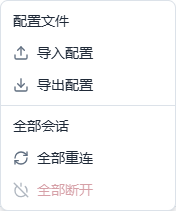
Do not borrow sessions from other tutorials.
Screenshot Key Points
| Field / Control | Description |
|---|---|
| Import Configuration | Import this guide's independent session and group; credentials are provided separately by the administrator. Required · Fill in: FastBee_连接配置.json |
Expected result (not executed): the historical entry image is used to show the location; this session's parameters are checked separately in the next step. Risk and recovery: stop repeated sending, check this guide's device identity, data format, and target address; after reconnecting, independently report the current status first, then decide whether to control again.
10. Check the Current Connection Parameters
Location: FMQX Web*→This Guide's Session→*Connection Configuration Steps: Open the connection configuration and check the name, address, port, and device identity.
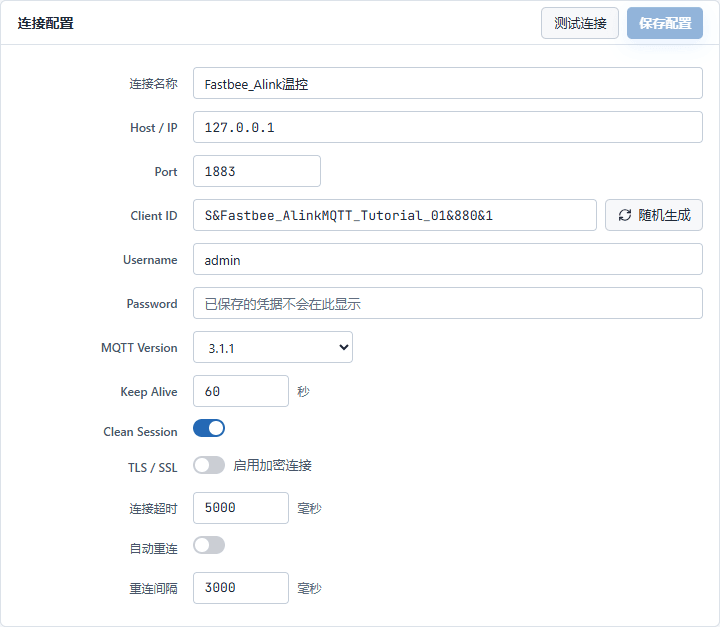
Connection parameters of this guide's retained session
Screenshot Key Points
| Field / Control | Description |
|---|---|
| Host/IP | The machine where the MQTT entry resides; the same machine in this guide. Required · Fill in: per the deployment plan · Example: 127.0.0.1 |
| Port | FMQ's MQTT listen port. Required · Fill in: per the deployment plan · Example: 1883 |
| Client ID | S&device number&product number&tenant number; the session id cannot replace the device number. Required · Fill in: per the deployment plan · Example: S&FastBee_AlinkMQTT_Tutorial_01&880&1 |
| Username/Password | Provided by the administrator per the current authentication method; saved credentials are not shown on the page. Required · Fill in: per the deployment plan · Example: as provided by the administrator |
| MQTT Version | MQTT 3.1.1 in this guide. Required · Fill in: per the deployment plan · Example: 3.1.1 |
| Keep Alive | MQTT keep-alive seconds; not equal to the business property sampling interval. Required · Fill in: per the deployment plan · Example: 60 seconds |
| Clean Session | Clean session is enabled in this guide; check subscriptions after reconnecting. Required · Fill in: per the deployment plan · Example: On |
| TLS/SSL | Disabled for the local demo; for the formal address, follow the parameters provided by the administrator. Required · Fill in: per the deployment plan · Example: Off |
| Connection Timeout | In milliseconds. Endpoint reachability still requires full uplink/downlink verification. Required · Fill in: per the deployment plan · Example: 5000 ms |
| Auto Reconnect | Disabled in this guide; stop/recovery is verified manually. Required · Fill in: per the deployment plan · Example: Off; interval 3000 ms |
| Session Name | Locate by this guide's name to avoid mixing in other sessions. Required · Fill in: FastBee_Alink温控 |
| Address and Port | This round's local FMQ entry; for other environments, provided by the administrator. Required · Fill in: 127.0.0.1:1883 |
| Device Identity | Must correspond to this guide's product and device. Required · Fill in: S&FastBee_AlinkMQTT_Tutorial_01&880&1 |
11. Check the Existing Downlink Subscriptions
Location: FMQX Web*→This Guide's Session→*Subscription Panel Steps: Expand the subscription panel and check the existing topics and QoS one by one.
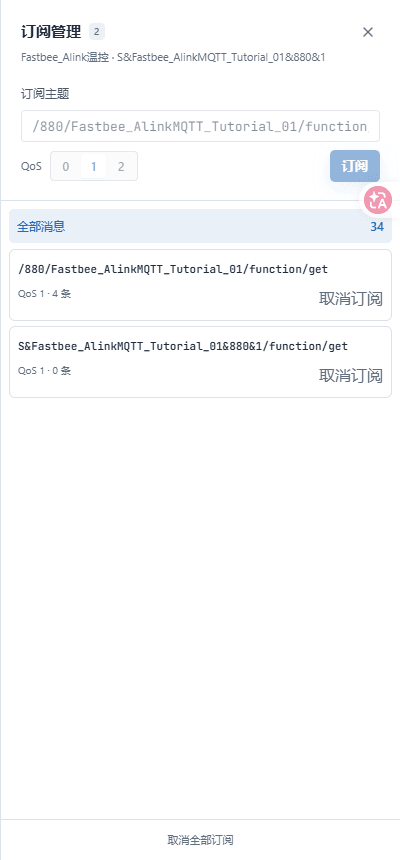
Downlink subscription topics and QoS of this guide's device
Screenshot Key Points
| Field / Control | Description |
|---|---|
| Downlink Subscription Topic | The platform function/get is enabled; the legacy S&... default topic stays disabled. Required · Fill in: per the deployment plan · Example: /880/FastBee_AlinkMQTT_Tutorial_01/function/get |
| Publish QoS | This guide publishes at QoS1; the receive card showing QoS0 follows the actual result. Required · Fill in: per the deployment plan · Example: 1 |
| Platform Downlink Topic | Platform control commands are sent to this topic. Required · Fill in: /880/FastBee_AlinkMQTT_Tutorial_01/function/get |
| Legacy Default Topic | Do not treat the legacy default topic as this guide's platform downlink entry. Required · Fill in: S&FastBee_AlinkMQTT_Tutorial_01&880&1/function/get; disabled |
| Subscription QoS | Check against the existing list. Required · Fill in: 1 |
12. Connect This Guide's Device Session
Location: FMQX Web*→*This Guide's Session Title Bar Steps: Click Connect and wait for Connected.

Restore this guide's independent device session
Screenshot Key Points
| Field / Control | Description |
|---|---|
| Session | Connect only this guide's retained session. Required · Fill in: FastBee_Alink温控 |
3. Report Ten Samples from 61 to 70
First complete messagejson
{"id":"alink_mqtt_1792077785289364300_sample61",

 "version":"1.0","method":"thing.event.property.post",

"params":{"temperature":61,"setpoint":30}}After that, only change the temperature in sequence from 61 to 70, keeping the setpoint at 30; each new Alink sample uses a unique id. Replaceable customer template names are used here; check against the replacement list in this section before importing or sending.
13. Prepare the First 61/30 Sample
Location: FMQX Web*→This Guide's Session→*Send Content Steps: Fill this section's first complete message into the send box.
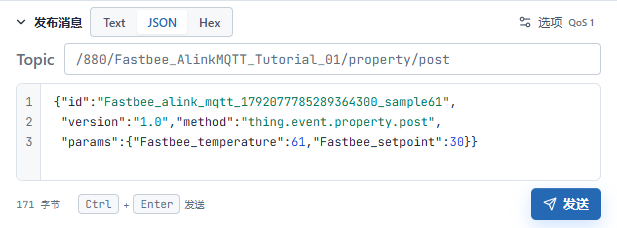
Independent property reporting: 61, 30
Screenshot Key Points
| Field / Control | Description |
|---|---|
| First Message | The complete JSON must not omit the top-level structure or the device identity. Required · Fill in: {"id":"example-batch-fadb7c626d", "version":"1.0","method":"thing.event.property.post", "params":{"FastBee_temperature":61,"FastBee_setpoint":30}} |
| Reporting Topic | The reporting entry for this device's properties and demo replies. Required · Fill in: /880/FastBee_AlinkMQTT_Tutorial_01/property/post |
14. Send and Check the Ten Temperature Samples
Location: FMQX Web Send Content; platform device details*→*Running Status Steps: Send the ten samples with temperatures 61 to 70 and setpoint 30 in sequence, then view this guide's device Current Value.
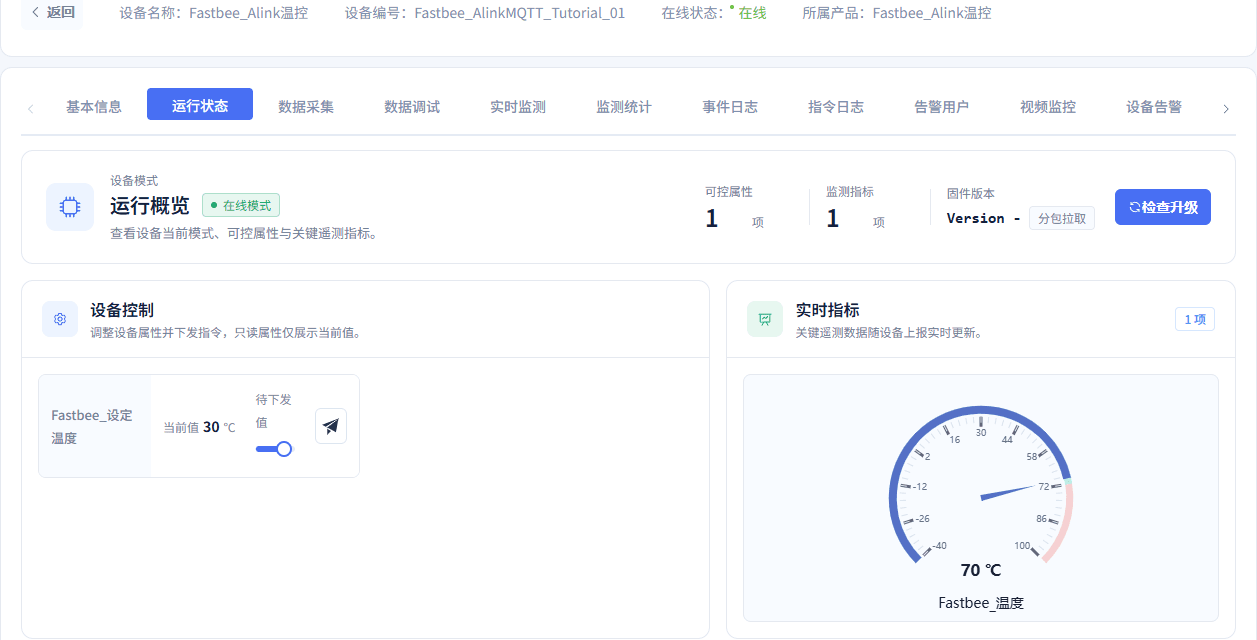
Real-time values after reporting ten temperatures 61 to 70
Screenshot Key Points
| Field / Control | Description |
|---|---|
| Current Value | Refresh and check after independent property reporting; do not substitute a pending target. Required · Fill in: per the deployment plan · Example: 32; final 34 |
| Temperature Sequence | The setpoint stays at 30; each new Alink message uses a different id. Required · Fill in: 61, 62, 63, 64, 65, 66, 67, 68, 69, 70 |
| Sample Time | Shanghai time; record a new window during re-verification. Required · Fill in: 2026-10-15 23:23:05 ~ 2026-10-15 23:23:28 |
The current value only shows the last state; whether the ten samples are complete must also be checked line by line against the actual history later.
4. Deliver 32 and Report Independently
15. Deliver Target 32
Location: Platform device details*→Running Status→*Setpoint Steps: Adjust the setpoint target to 32, check the overlay, and send once.
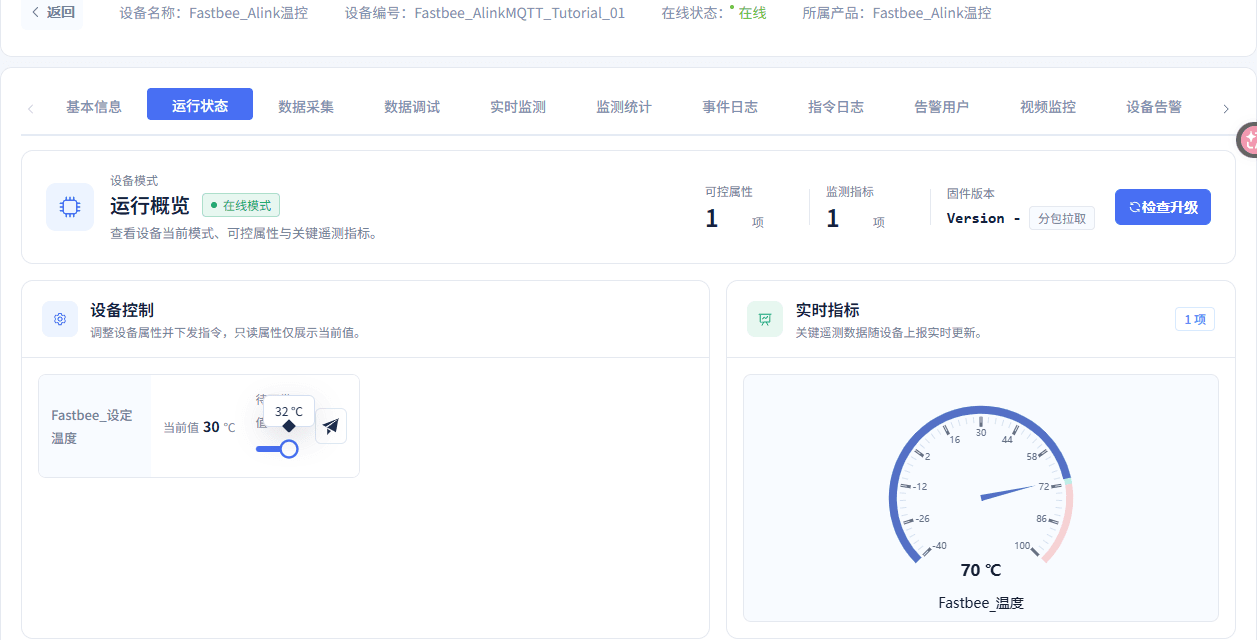
Setpoint 32℃ pending delivery
Screenshot Key Points
| Field / Control | Description |
|---|---|
| Pending Target | Check the overlay; do not treat the current value as the pending target. Required · Fill in: 32 |
16. Check That the 32 Command Was Actually Received
Location: FMQX Web*→This Guide's Session→*Receive Records Steps: Expand the 32 command and check the target value, message id, and message structure.
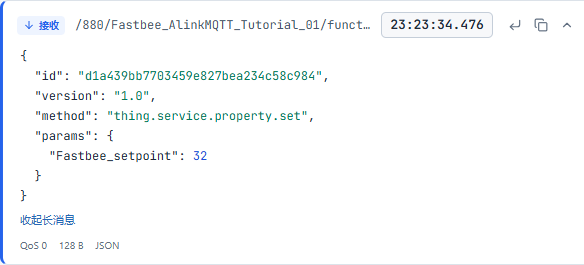
Device actually received setpoint 32
Screenshot Key Points
| Field / Control | Description |
|---|---|
| Actual Receive Record | Check the command id, params object, and targets 32/34. Required · Fill in: per the deployment plan · Example: 32/34; params object |
| This Command id | The subsequent demo reply must correspond to the same id. Required · Fill in: d1a439bb7703459e827bea234c58c984 |
| Target Value | Follow the message received by the device. Required · Fill in: 32 |
17. Check the 32 Demo Reply
Location: FMQX Web*→This Guide's Session→*Send Records Steps: Expand the demo reply with the same id and check the success code, target value, and execution count.
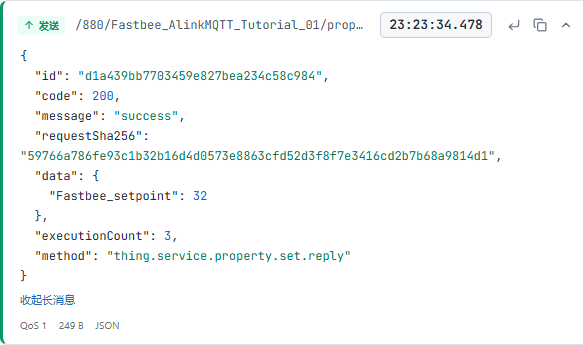
Same-id reply, setpoint 32, 3 cumulative executions
Screenshot Key Points
| Field / Control | Description |
|---|---|
| FMQX Demo Reply | Check the same id, code 200, data, request summary, and actual execution count; each increment is 1, which does not prove physical actuation. Required · Fill in: per the deployment plan · Example: 32: 2→3; 34: 3→4 |
| Execution Count | Use this round's actual baseline; do not treat the cumulative value as the number of executions this time. Required · Fill in: 2 → 3 |
| Command id | Same as the actual receive record. Required · Fill in: d1a439bb7703459e827bea234c58c984 |
Independent 29/32 property reportingjson
{"id":"alink_mqtt_1792077817690350300_report32",

 "version":"1.0","method":"thing.event.property.post",

"params":{"temperature":29,"setpoint":32}}This is a new property message, checked separately from the downlink demo reply. Replaceable customer template names are used here; check against the replacement list in this section before importing or sending.
18. Independently Report 29/32
Location: FMQX Web*→This Guide's Session→*Send Content Steps: Fill in this section's independent property message and send once: temperature 29, setpoint 32.
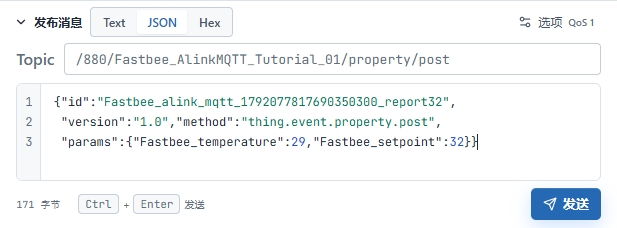
Independent property reporting: 29, 32
Screenshot Key Points
| Field / Control | Description |
|---|---|
| Independent Property Message | Use the property reporting structure; the new Alink message id differs from the downlink id. Required · Fill in: {"id":"example-batch-357f0cac43", "version":"1.0","method":"thing.event.property.post", "params":{"FastBee_temperature":29,"FastBee_setpoint":32}} |
19. Check the Platform's Current 29/32
Location: Platform device details*→*Running Status Steps: Refresh and check this guide's device temperature and setpoint.
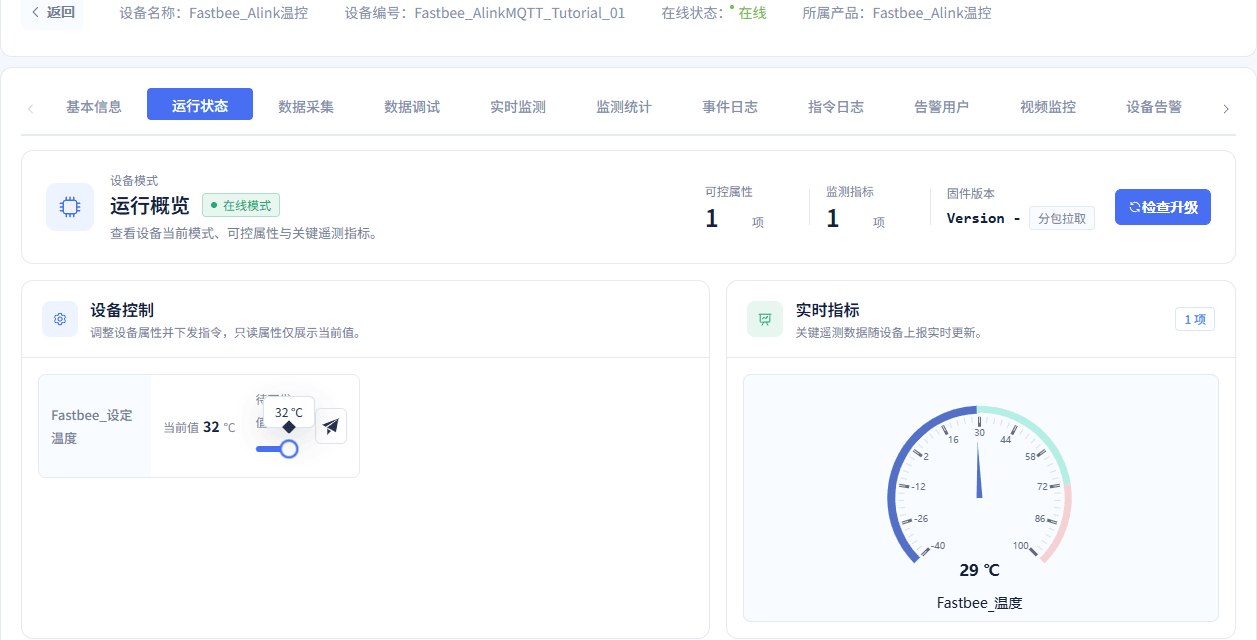
Platform current 32℃ after independent status reporting
Screenshot Key Points
| Field / Control | Description |
|---|---|
| Current Value | Refresh and check after independent property reporting; do not substitute a pending target. Required · Fill in: per the deployment plan · Example: 32; final 34 |
| Current Status | Not the pending slider target. Required · Fill in: Temperature 29; setpoint 32 |
This round's execution count increased from 2 to 3; the cumulative value does not mean multiple executions this time.
5. Verify 34 After Stop and Recovery
20. Stop This Round's Session
Location: FMQX Web*→*This Guide's Session Title Bar Steps: Stop sending and disconnect this guide's session.

This guide's session disconnected, configuration and data retained
Screenshot Key Points
| Field / Control | Description |
|---|---|
| Stop and Retain | Stop sending and disconnect the session; retain business resources and history. Required · Fill in: per the deployment plan · Example: Disconnected; last 29/34 |
21. Restore the Same Device Session
Location: FMQX Web*→*This Guide's Retained Session Steps: Reconnect this guide's session and wait for Connected.

Restore this guide's connection with the original identity
Independent 29/32 property reporting after recoveryjson
{"id":"alink_mqtt_1792077824334070800_restored_state",

 "version":"1.0","method":"thing.event.property.post",

"params":{"temperature":29,"setpoint":32}}The new property message after recovery does not reuse the downlink id. Replaceable customer template names are used here; check against the replacement list in this section before importing or sending.
22. Independently Report 29/32 After Recovery
Location: FMQX Web*→This Guide's Session→*Send Content Steps: Send the post-recovery independent property message: temperature 29, setpoint 32.
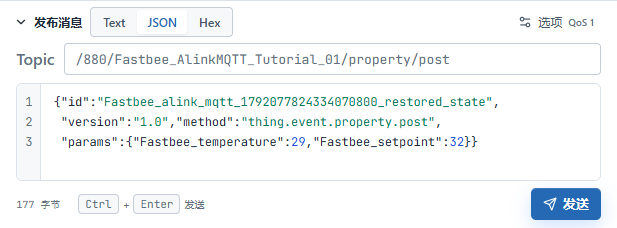
Independent property reporting: 29, 32
Screenshot Key Points
| Field / Control | Description |
|---|---|
| Recovery Property Message | Alink uses a new property message id. Required · Fill in: {"id":"example-batch-939dda4d33", "version":"1.0","method":"thing.event.property.post", "params":{"FastBee_temperature":29,"FastBee_setpoint":32}} |
23. Deliver the Post-recovery Target 34
Location: Platform device details*→Running Status→*Setpoint Steps: Adjust the target to 34, check the overlay, and send once.
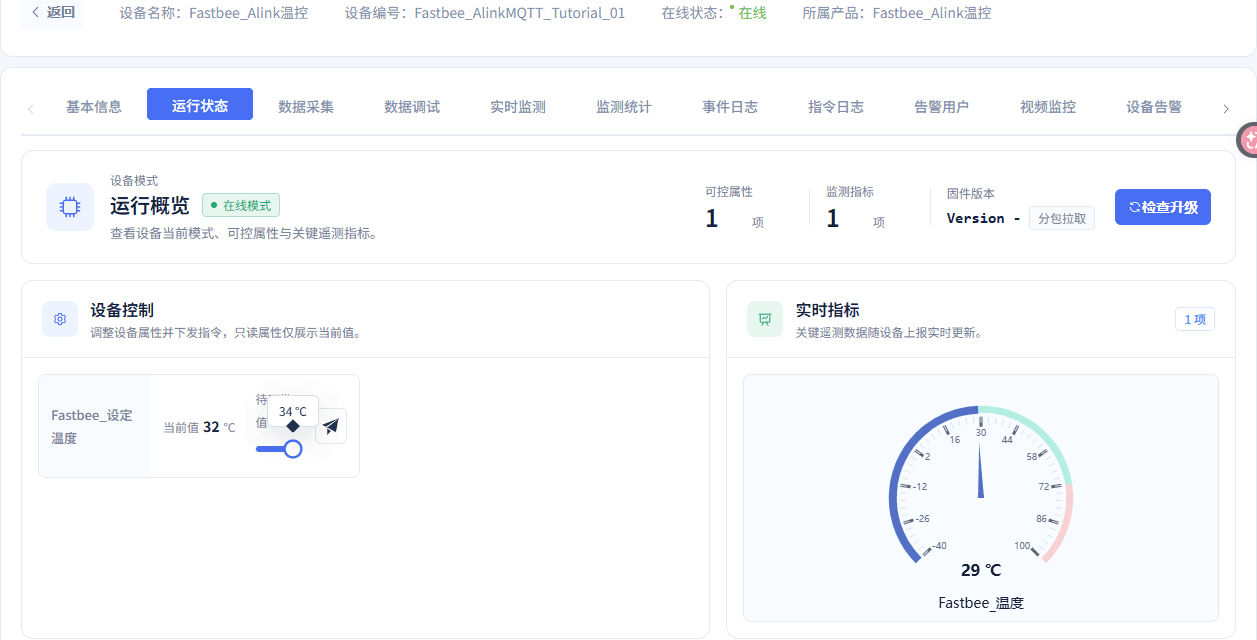
Setpoint 34℃ pending delivery
Screenshot Key Points
| Field / Control | Description |
|---|---|
| Pending Target | Do not write the current value 32 as the pending target. Required · Fill in: 34 |
24. Check That the 34 Command Was Actually Received
Location: FMQX Web*→This Guide's Session→*Receive Records Steps: Expand the 34 command and check the target value and the message id of the same round.
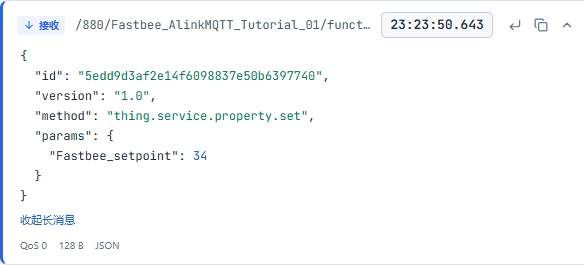
Device actually received setpoint 34
Screenshot Key Points
| Field / Control | Description |
|---|---|
| Actual Receive Record | Check the command id, params object, and targets 32/34. Required · Fill in: per the deployment plan · Example: 32/34; params object |
| This Command id | The subsequent demo reply uses the same id. Required · Fill in: 5edd9d3af2e14f6098837e50b6397740 |
25. Check the 34 Demo Reply
Location: FMQX Web*→This Guide's Session→*Send Records Steps: Expand the demo reply with the same id and check the success code, target value, and execution count.
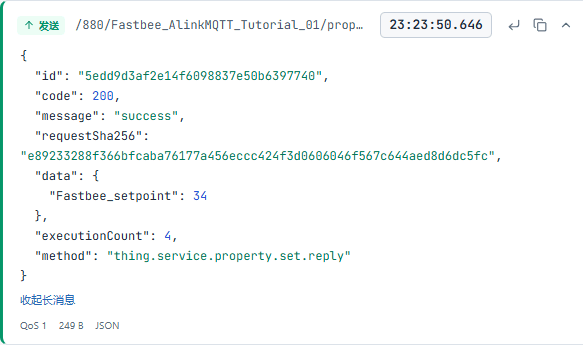
Same-id reply, setpoint 34, 4 cumulative executions
Screenshot Key Points
| Field / Control | Description |
|---|---|
| FMQX Demo Reply | Check the same id, code 200, data, request summary, and actual execution count; each increment is 1, which does not prove physical actuation. Required · Fill in: per the deployment plan · Example: 32: 2→3; 34: 3→4 |
| Execution Count | Use this round's actual baseline; do not treat the cumulative value as the number of executions this time. Required · Fill in: 3 → 4 |
| Command id | Same as the actual receive record. Required · Fill in: 5edd9d3af2e14f6098837e50b6397740 |
Independent 29/34 property reportingjson
{"id":"alink_mqtt_1792077833908869100_report34",

 "version":"1.0","method":"thing.event.property.post",

"params":{"temperature":29,"setpoint":34}}Report the final state with a new property message. Replaceable customer template names are used here; check against the replacement list in this section before importing or sending.
26. Independently Report 29/34
Location: FMQX Web*→This Guide's Session→*Send Content Steps: Fill in this section's independent property message and send once: temperature 29, setpoint 34.
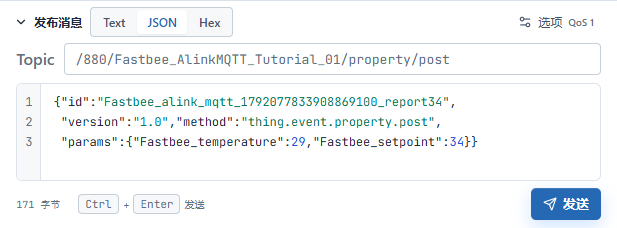
Independent property reporting: 29, 34
Screenshot Key Points
| Field / Control | Description |
|---|---|
| Independent Property Message | Use the property reporting structure; the new Alink message id differs from the downlink id. Required · Fill in: {"id":"example-batch-3c850deddf", "version":"1.0","method":"thing.event.property.post", "params":{"FastBee_temperature":29,"FastBee_setpoint":34}} |
27. Check the Platform's Current 29/34
Location: Platform device details*→*Running Status Steps: Refresh and check this guide's device temperature and setpoint.
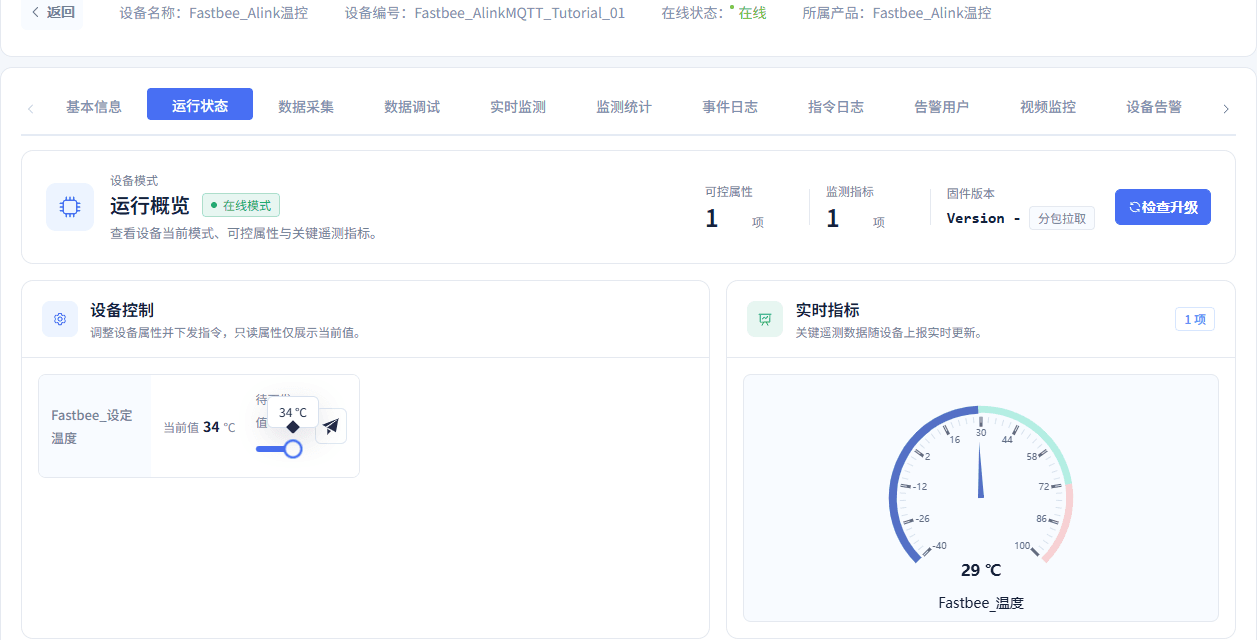
Platform current 34℃ after independent status reporting
Screenshot Key Points
| Field / Control | Description |
|---|---|
| Current Value | Refresh and check after independent property reporting; do not substitute a pending target. Required · Fill in: per the deployment plan · Example: 32; final 34 |
| Current Status | Not the pending slider target. Required · Fill in: Temperature 29; setpoint 34 |
This round's 34 execution count increased from 3 to 4, only 1 more this time.
6. Query and Refresh Historical Data
Temperature window: 2026-10-15 23:23:05 ~ 2026-10-15 23:23:28. Setpoint window: 2026-10-15 23:23:33 ~ 2026-10-15 23:23:57. All times below are Shanghai time.
28. Set the Complete Temperature Query Time
Location: Data Center*→Historical Data→*Date and Start/End Time Steps: Open the date panel, fill in the complete temperature start/end time, and confirm.
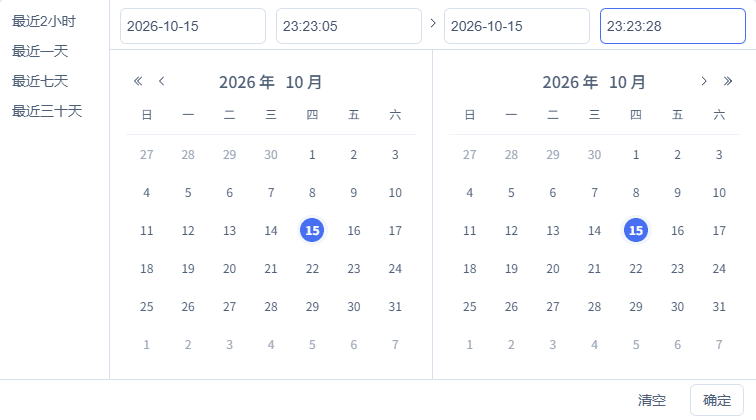
Complete date and start/end time: 2026-10-15 23:23:05 to 2026-10-15 23:23:28
Screenshot Key Points
| Field / Control | Description |
|---|---|
| Date and Start/End Time | Temperature and setpoint each use this guide's actual window. Required · Fill in: per the deployment plan · Example: Temperature 2026-10-15 23:23:05 ~ 2026-10-15 23:23:28; setpoint 2026-10-15 23:23:33 ~ 2026-10-15 23:23:57 |
| Complete Start/End Time | Re-verification should use that round's actual send window. Required · Fill in: 2026-10-15 23:23:05 ~ 2026-10-15 23:23:28 |
29. Select This Device and the Temperature Field
Location: Data Center*→Historical Data→*Filter Conditions Steps: Select the temperature field of FastBee_Alink温控 and query.

Query after checking this guide's device, property, and time range
Screenshot Key Points
| Field / Control | Description |
|---|---|
| Device and Field | Select the temperature or setpoint of this guide's device. Required · Fill in: FastBee_Alink温控; temperature |
30. Refresh the Temperature Query
Location: Data Center*→Historical Data→*Refresh Steps: Click Refresh and wait for loading to complete; if the filter conditions are cleared, restore the same device, field, and complete window and query again.

Refresh and re-query this guide's history
31. Check the Temperature History Results
Location: Data Center*→Historical Data→*Results Table Steps: Read the refreshed temperature history results and check line by line.
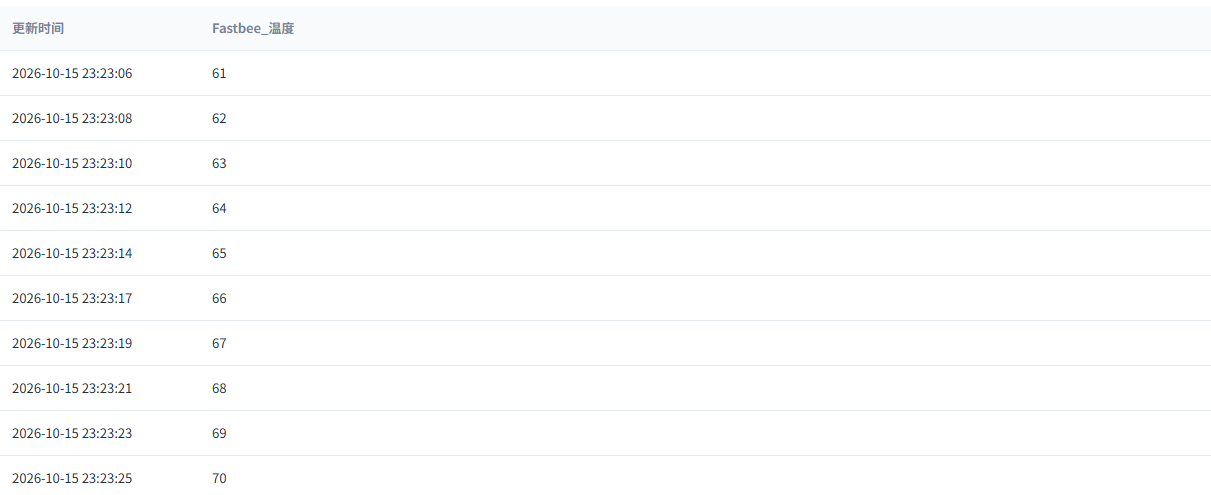
Check this guide's actual history records after refresh
Screenshot Key Points
| Field / Control | Description |
|---|---|
| Device and Field | Select the temperature or setpoint of this guide's device. Required · Fill in: per the deployment plan · Example: FastBee_Alink温控; temperature/setpoint |
| Result Order | Follow the actual table within this round's window. Required · Fill in: 61, 62, 63, 64, 65, 66, 67, 68, 69, 70 |
32. Set the Complete Setpoint Query Time
Location: Data Center*→Historical Data→*Date and Start/End Time Steps: Open the date panel, fill in the complete setpoint start/end time, and confirm.
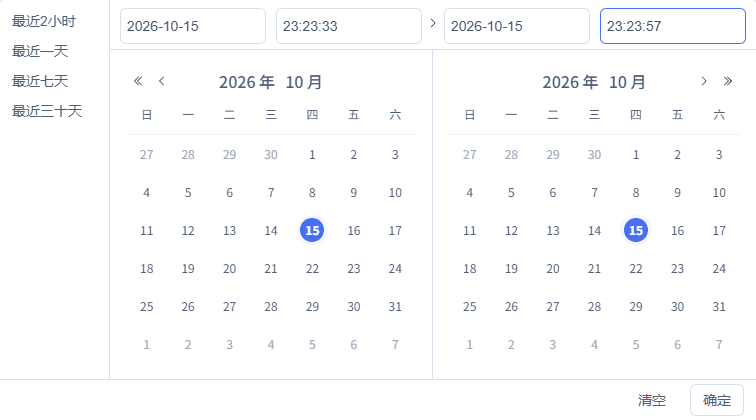
Complete date and start/end time: 2026-10-15 23:23:33 to 2026-10-15 23:23:57
Screenshot Key Points
| Field / Control | Description |
|---|---|
| Date and Start/End Time | Temperature and setpoint each use this guide's actual window. Required · Fill in: per the deployment plan · Example: Temperature 2026-10-15 23:23:05 ~ 2026-10-15 23:23:28; setpoint 2026-10-15 23:23:33 ~ 2026-10-15 23:23:57 |
| Complete Start/End Time | Re-verification should use that round's actual send window. Required · Fill in: 2026-10-15 23:23:33 ~ 2026-10-15 23:23:57 |
33. Select This Device and the Setpoint Field
Location: Data Center*→Historical Data→*Filter Conditions Steps: Select the setpoint field of FastBee_Alink温控 and query.

Query after checking this guide's device, property, and time range
Screenshot Key Points
| Field / Control | Description |
|---|---|
| Device and Field | Select the temperature or setpoint of this guide's device. Required · Fill in: FastBee_Alink温控; setpoint |
34. Refresh the Setpoint Query
Location: Data Center*→Historical Data→*Refresh Steps: Click Refresh and wait for loading to complete; if the filter conditions are cleared, restore the same device, field, and complete window and query again.

Refresh and re-query this guide's history
35. Check the Setpoint History Results
Location: Data Center*→Historical Data→*Results Table Steps: Read the refreshed setpoint history results and check line by line.

Check this guide's actual history records after refresh
Screenshot Key Points
| Field / Control | Description |
|---|---|
| Device and Field | Select the temperature or setpoint of this guide's device. Required · Fill in: per the deployment plan · Example: FastBee_Alink温控; temperature/setpoint |
| Result Order | Follow the actual table within this round's window. Required · Fill in: 32, 32, 34 |
The three setpoint history entries are, in order, the state after the first 32 control, the 32 state after recovery, and the state after the 34 control. All three are independent property history; demo replies cannot substitute for them.
7. Finish and Retain This Guide's Resources
36. Finish Send/Receive and Retain Resources
Location: FMQX Web*→*This Guide's Session Steps: Finish sending and disconnect the session.

This guide's session disconnected, configuration and data retained
Screenshot Key Points
| Field / Control | Description |
|---|---|
| Stop and Retain | Stop sending and disconnect the session; retain business resources and history. Required · Fill in: per the deployment plan · Example: Disconnected; last 29/34 |
For re-verification, use new send times and new Alink message ids, judge each increment against the actual execution-count baseline, and do not reuse old conclusions.
8. Post-send/receive Publish Synchronization Supplementary Check
The following four steps occurred after the above send/receive and are used to check the current publish, automatic page updates, node application, and manual refresh. The device send/receive and history closed loop after the new snapshot still need re-verification.
37. Post-send/receive Supplementary Check: Confirm Publishing the Product
Location: Product Management*→This Guide's Product→*Publish Confirmation Steps: Confirm the current product, then click Confirm Publish.
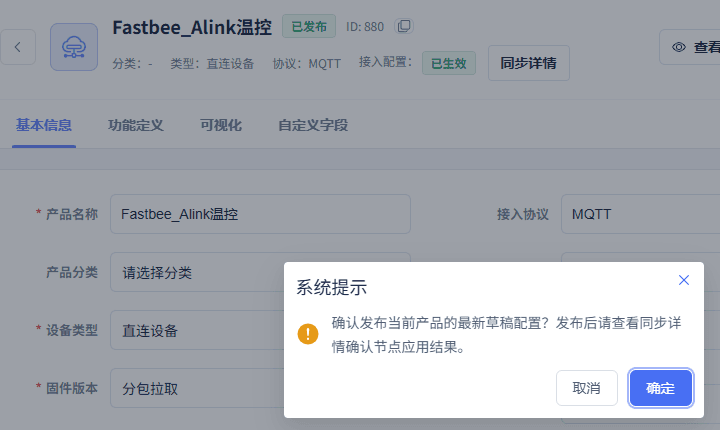
The original screenshot retains this guide's product name, ID, and the complete publish confirmation box.
Screenshot Key Points
| Field / Control | Description |
|---|---|
| Current Product | Operate only this guide's independent product. Required · Fill in: FastBee_Alink温控; 880 |
38. Observe the Automatic Update of the Sync Summary
Location: Product Details*→Product Summary→*Access Configuration Sync Steps: Stay on the current page and wait for the sync summary to update.

This guide's product access configuration has taken effect
Screenshot Key Points
| Field / Control | Description |
|---|---|
| Access Configuration Sync | The current publish receipt after this round's send/receive; it cannot serve as the snapshot source for the earlier ten samples. Required · Fill in: per the deployment plan · Example: APPLIED; success 1, failure 0; snapshot 1988 |
39. Expand the Current Node Application Receipt
Location: Product Details*→*Sync Details Steps: Open Sync Details and check this guide's product identity, node results, and effective time.
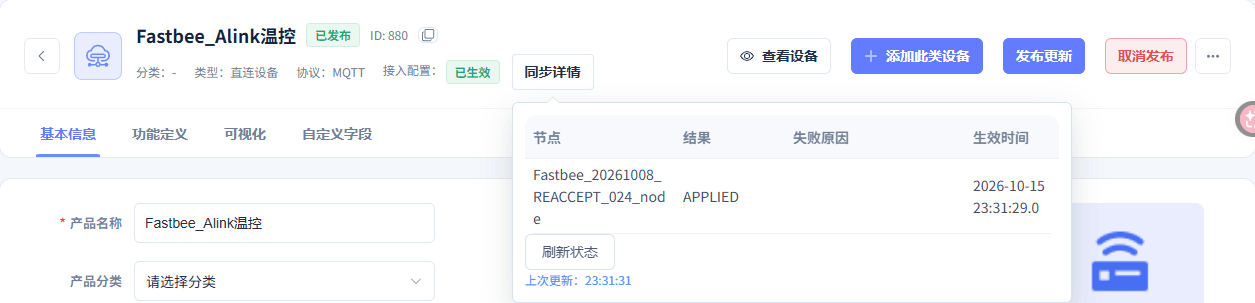
Application receipt for this guide's product and access node
Screenshot Key Points
| Field / Control | Description |
|---|---|
| Access Configuration Sync | The current publish receipt after this round's send/receive; it cannot serve as the snapshot source for the earlier ten samples. Required · Fill in: per the deployment plan · Example: APPLIED; success 1, failure 0; snapshot 1988 |
| Current Snapshot | Only proves this publish synchronization; do not attribute the earlier send/receive to this snapshot. Required · Fill in: 1988 |
40. Manually Refresh the Current Sync Status
Location: Product Details*→Sync Details→*Refresh Status Steps: Click Refresh Status and wait for this check to complete.
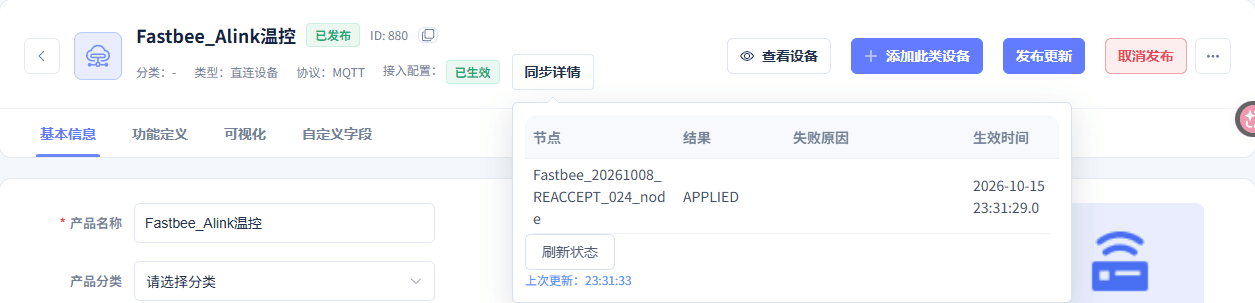
Manually refresh the current node application receipt
Field and Parameter Reference
Device Access Wizard
| Field / Control | Fill-in Instructions |
|---|---|
| Access Source | Create an independent resource the first time; use the retained resource for re-verification. Required · Fill in: New ProductNew Product: adopted in this guide; adopted in this guide. Existing Product: re-verification uses the retained resource; re-verification uses the retained resource. |
| Product/Device Name | Locate this guide with a concise business name. Required · Fill in: FastBee_Alink温控 |
| Wizard Object Sample | The wizard first parses a plain object to generate two fields; switch to Alink JSON later in the product details. Required · Fill in: {"FastBee_temperature":20,"FastBee_setpoint":30} |
| Field/Type/Unit | Two integer ℃ fields; the identifiers match the params keys. Required · Fill in: FastBee_temperature/FastBee_setpoint; integer; ℃ |
| Device Identifier | The platform number matches the device identity used by this session. Required · Fill in: FastBee_AlinkMQTT_Tutorial_01 |
| Initial Overview | 1 device, 2 fields; the wizard starts with JSON/MQTT, and the formal protocol is saved afterward. Required · Fill in: 1 device, 2 fields |
Protocol and Publish Effectiveness
| Field / Control | Fill-in Instructions |
|---|---|
| Data Format | Alink JSON is formally adopted; reporting is an id/version/method/params object. Required · Fill in: Alink JSONPublish after modification. |
| Transport | Choose per this guide; changing only the connection port is not enough. Required · Fill in: MQTTPublish after modification. MQTT: topic messages; topic messages. TCP: the device connects actively; the device connects actively. UDP: identity and return address per datagram; identity and return address per datagram. |
| Network Type | WIFI for this guide; the actual endpoint is configured separately. Required · Fill in: WIFIPublish after modification. |
| Publish/Confirm | Publish after saving the formal configuration, and keep checking APPLIED. Publish after modification. |
| Access Configuration Sync | The current publish receipt after this round's send/receive; it cannot serve as the snapshot source for the earlier ten samples. Required · Fill in: APPLIED; success 1, failure 0; snapshot 1988Publish after modification. |
| Refresh Status | Re-read the current sync summary and node receipts, updating the check time. Publish after modification. |
Function Definition
| Field / Control | Fill-in Instructions |
|---|---|
| Model Translation | Complete the English names. Required · Fill in: Temperature/SetpointPublish after modification. |
| Model Identifier | The keys of the params object match these identifiers verbatim. Required · Fill in: FastBee_temperature/FastBee_setpointPublish after modification. |
| Model Category | Both fields are properties. Required · Fill in: PropertyPublish after modification. Property: adopted in this guide; adopted in this guide. Function: not added in this guide; not added in this guide. Event: not added in this guide; not added in this guide. |
| Read-only Data | Temperature checked, setpoint unchecked. Required · Fill in: Temperature read-only; setpoint writablePublish after modification. Checked: adopted for temperature; adopted for temperature. Unchecked: adopted for setpoint; adopted for setpoint. |
| History Storage | Enabled for both fields. Required · Fill in: CheckedPublish after modification. Checked: this guide keeps actual history; this guide keeps actual history. Unchecked: does not meet this guide's acceptance; does not meet this guide's acceptance. |
| Chart Display/Real-time Monitoring | Temperature on, setpoint off. Required · Fill in: Temperature on; setpoint offPublish after modification. Checked: adopted for temperature; adopted for temperature. Unchecked: adopted for setpoint; adopted for setpoint. |
| Share Permission | Disabled in this guide. Required · Fill in: UncheckedPublish after modification. Unchecked: authorized per account; authorized per account. Checked: sharing configured separately; sharing configured separately. |
| Range/Unit/Step | Temperature -40~100℃, setpoint 16~35℃, integer step 1. Required · Fill in: Integer; ℃; step 1Publish after modification. |
| Modify | Save after completing the required items. Publish after modification. |
FMQX Web Connection
| Field / Control | Fill-in Instructions |
|---|---|
| Import Configuration | Import this guide's independent session and group; credentials are provided separately by the administrator. Reconnect after modification. |
| Host/IP | The machine where the MQTT entry resides; the same machine in this guide. Required · Fill in: 127.0.0.1Reconnect after modification. |
| Port | FMQ's MQTT listen port. Required · Fill in: 1883Reconnect after modification. |
| Client ID | S&device number&product number&tenant number; the session id cannot replace the device number. Required · Fill in: S&FastBee_AlinkMQTT_Tutorial_01&880&1Reconnect after modification. |
| Username/Password | Provided by the administrator per the current authentication method; saved credentials are not shown on the page. Required · Fill in: as provided by the administratorReconnect after modification. |
| MQTT Version | MQTT 3.1.1 in this guide. Required · Fill in: 3.1.1Reconnect after modification. |
| Keep Alive | MQTT keep-alive seconds; not equal to the business property sampling interval. Required · Fill in: 60 secondsReconnect after modification. |
| Clean Session | Clean session is enabled in this guide; check subscriptions after reconnecting. Required · Fill in: OnReconnect after modification. On: adopted in this guide; adopted in this guide. Off: session retention needs separate verification; session retention needs separate verification. |
| TLS/SSL | Disabled for the local demo; for the formal address, follow the parameters provided by the administrator. Required · Fill in: OffReconnect after modification. Off: local test in this guide; local test in this guide. On: formal environments are configured per certificate requirements; formal environments are configured per certificate requirements. |
| Connection Timeout | In milliseconds. Endpoint reachability still requires full uplink/downlink verification. Required · Fill in: 5000 msReconnect after modification. |
| Auto Reconnect | Disabled in this guide; stop/recovery is verified manually. Required · Fill in: Off; interval 3000 msReconnect after modification. Off: manual recovery in this guide; manual recovery in this guide. On: verified separately; verified separately. |
| Test Connection/Save Configuration | Saved during the first configuration; this round only expanded the parameters read-only, without re-saving or testing the connection. Reconnect after modification. |
| Connect/Disconnect | Open after checking this guide's endpoint; close when finished. Reconnect after modification. |
Device Reporting and Demo Reply
| Field / Control | Fill-in Instructions |
|---|---|
| Reporting/Reply Topic | Properties and demo replies are both sent to this device's property/post. Required · Fill in: /880/FastBee_AlinkMQTT_Tutorial_01/property/post |
| Downlink Subscription Topic | The platform function/get is enabled; the legacy S&... default topic stays disabled. Required · Fill in: /880/FastBee_AlinkMQTT_Tutorial_01/function/get |
| Publish QoS | This guide publishes at QoS1; the receive card showing QoS0 follows the actual result. Required · Fill in: 10: the actual level shown on the receive card; the actual level shown on the receive card. 1: this guide's publish level; this guide's publish level. 2: not verified in this guide; not verified in this guide. |
| Alink Message id | Each new sample/independent state uses a different number; do not reuse a downlink id as a new property id. Required · Fill in: FastBee_AlinkMQTT_Tutorial_01_sample_1…10 |
| version/method/params | version 1.0; the property method is thing.event.property.post; params is an object. Required · Fill in: 1.0; thing.event.property.post; params object |
| JSON/Text/Send | Complete UTF-8 JSON; after preparation, send each message once and check one by one. |
| Actual Receive Record | Check the command id, params object, and targets 32/34. Required · Fill in: 32/34; params object |
| FMQX Demo Reply | Check the same id, code 200, data, request summary, and actual execution count; each increment is 1, which does not prove physical actuation. Required · Fill in: 32: 2→3; 34: 3→4 |
Device Running Status
| Field / Control | Fill-in Instructions |
|---|---|
| Setpoint Slider/Send | 32 first, 34 after stop/recovery; the physical device follows the allowed range. |
| Current Value | Refresh and check after independent property reporting; do not substitute a pending target. Required · Fill in: 32; final 34 |
Historical Data
| Field / Control | Fill-in Instructions |
|---|---|
| Device and Field | Select the temperature or setpoint of this guide's device. Required · Fill in: FastBee_Alink温控; temperature/setpoint |
| Date and Start/End Time | Temperature and setpoint each use this guide's actual window. Required · Fill in: Temperature 2026-10-15 23:23:05 ~ 2026-10-15 23:23:28; setpoint 2026-10-15 23:23:33 ~ 2026-10-15 23:23:57 |
| Advanced Filter/Query/Refresh | After refreshing, reselect the same device, field, and complete time, and wait for loading to complete. |
Stop and Recovery
| Field / Control | Fill-in Instructions |
|---|---|
| Stop and Retain | Stop sending and disconnect the session; retain business resources and history. Required · Fill in: Disconnected; last 29/34 |
Where to Check First When Problems Occur
| Symptom | Possible Cause | Where to Check First | How to Recover |
|---|---|---|---|
| Connection failure | Device identity, endpoint, or authorization parameters do not match | First check this guide's session name, address, port, and platform device identity | Fix the authorization configuration and reconnect; no connection-fault injection was performed this round |
| Platform submitted but the device did not actually receive | Downlink route or device connection does not match | Check this device's function/get subscription, topic, and current connection | Stop repeated control, locate the route first, then re-verify with a new command |
| Reply succeeded but the current value did not update | The demo reply and the property state are two different messages | Check the independent property reporting and this device's current value | Report the actual state independently first; do not treat a pending target as the current value |
| History entry count mismatch | The device, field, or query time does not correspond to this round | Expand the complete date panel, restore the same device and field, then refresh | Check line by line against the actual window; do not pad samples with old data |
| Sync status needs reconfirmation | The current viewing time is earlier than the new receipt | Check the current product and snapshot, then click Refresh Status | Retry later if reading fails; the browser did not inject this fault this round, and only component tests cover the recovery path |