


IEC103 and UDP Access
This article reorganizes an existing operation manual into an online operation reference. Operations marked as expected or not executed in the original must still be verified against the actual environment. This article is a supplementary reference with applicability limits; the gap status recorded in the original manual remains unchanged.
Learn the protection point configuration, and verify actual device control, independent reporting, general interrogation end, history, and stop-and-recovery.
Before you begin: You have product, device, model, protocol, publish, control, and history permissions; the administrator provides a reachable FMQ UDP entry; the same-machine demo uses the original FMQX Web session; before re-verification, first check the retained product, device, and point table — the current resources are unpublished and the device side is disconnected
Understanding the Protection Terminal, Addresses, and Verification Method
FastBee manages products, devices, and protection states; FMQ handles device UDP send/receive and runs the IEC103 protocol. This article uses FMQX Web as the device side to demonstrate ten boolean protection states and control of Protection 1.
This article is a trial-reading description of existing pages and results. Menu entry, final protocol selection, some per-item configuration, and the complete date filter still lack dedicated screenshots, so a complete beginner flow cannot yet be considered finished. Desktop, narrow-screen, offline opening, and print checks have not been run.
Prepare product, device, model editing, protocol configuration, publish, control, and history permissions. If resources with the same name already exist, reuse the original product and session first; the retained resources in this article end unpublished with the device side disconnected.
The local target is 127.0.0.1:8889, with the fixed local source port 15293. The target address is provided by the administrator; the loopback address only applies when the device tool and FMQ are on the same machine. The platform web page and the FMQX web address are for the operation interface, not the device entry.
Functional relationship diagram: configuration, device send/receive, and result verification
Arrows indicate functional responsibilities and data direction; the diagram is not a runtime screenshot.
FUN is the function type and INF is the information number; the information object address is calculated as FUN×256+INF. This article uses FUN160, INF1 to 10, corresponding to 40961 to 40970. Both the common address and the link address are 1, but they belong to different protocol layers and must still be verified separately.
Platform boolean properties correspond to the protocol BOOLEAN type, and only true/false states are demonstrated. true displays as Closed and false as Open; only point 1 allows control, while points 2 to 10 are collection-only. Other IEC103 data types and gateway connections are not proven by this article.
One control operation requires verifying the actual device execution, the native acknowledgement, the subsequent independent state report, and the actual history. "Sent" only means the request has been delivered. The SDK service receipt in the device log is not a raw network frame.
1. Understanding Record Creation and Model Filling
1. Choosing the Record Creation Method for an Independent Product
Location: IoT → Device Access → Product Source Steps: Verify Creation Method and Product Name.
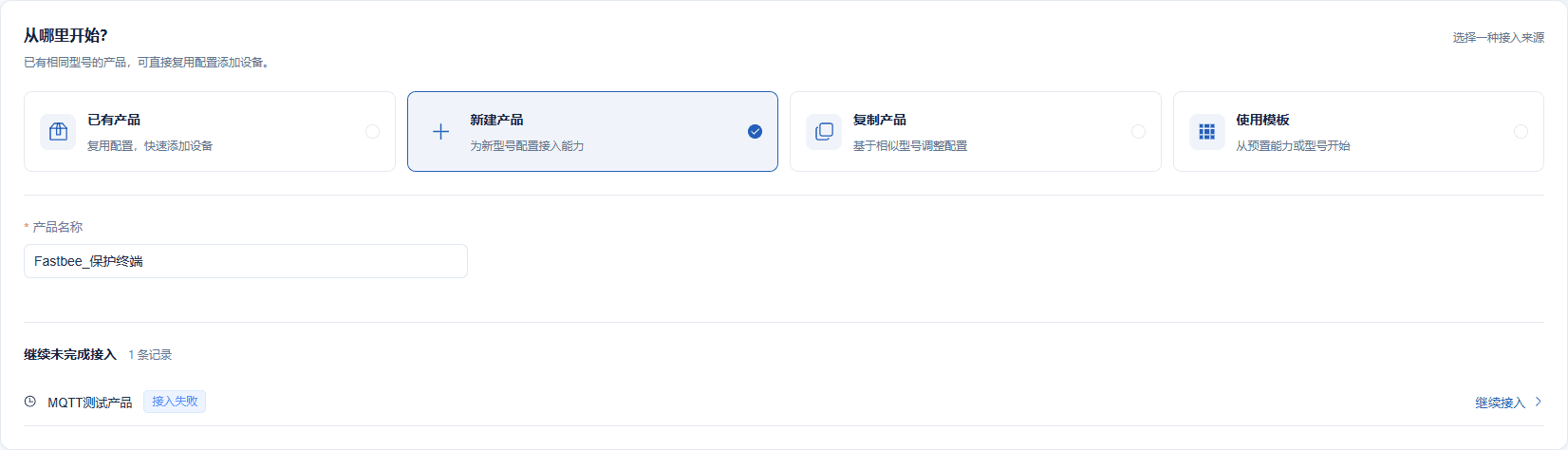
Create the new product FastBee_保护终端; when re-verifying, first check whether it already exists.
Screenshot Highlights
| Field / Control | Description |
|---|---|
| Creation Method | A new model first gets an independent product and device. Required · Fill in: When re-verifying, first look for retained resources to avoid duplicate records. · Example: 新建产品 |
| Product Name | Makes it easy to locate this group of protection points in the product list. Required · Fill in: Keep the name short and consistent with the product bound later. · Example: FastBee_保护终端 |
2. Parsing the Ten-Item Boolean Sample
Location: Device Access Wizard → Sample Steps: Paste the complete object and verify the parsing result.

The sample is only used to quickly generate the model; formal access is set to UDP/IEC103 afterwards.
Screenshot Highlights
| Field / Control | Description |
|---|---|
| JSON Sample | Parses ten true/false values into boolean properties; it does not represent the final device protocol. Required · Fill in: After pasting the complete object, check the parsed count and types. · Example: {"FastBee_iec103_40961": false, "FastBee_iec103_40962": true, "FastBee_iec103_40963": false, "FastBee_iec103_40964": true, "FastBee_iec103_40965": false, "FastBee_iec103_40966": true, "FastBee_iec103_40967": false, "FastBee_iec103_40968": true, "FastBee_iec103_40969": false, "FastBee_iec103_40970": true} |
| Parse Sample | Extracts fields from the sample. Required · Fill in: Verify item by item after one parse to avoid generating the same field twice. · Example: Parsed as collection fields |
3. Verifying the Fields Visible in the Wizard
Location: Device Access Wizard → Collection Fields Steps: Verify the identifiers, names, Boolean type, and sample paths.
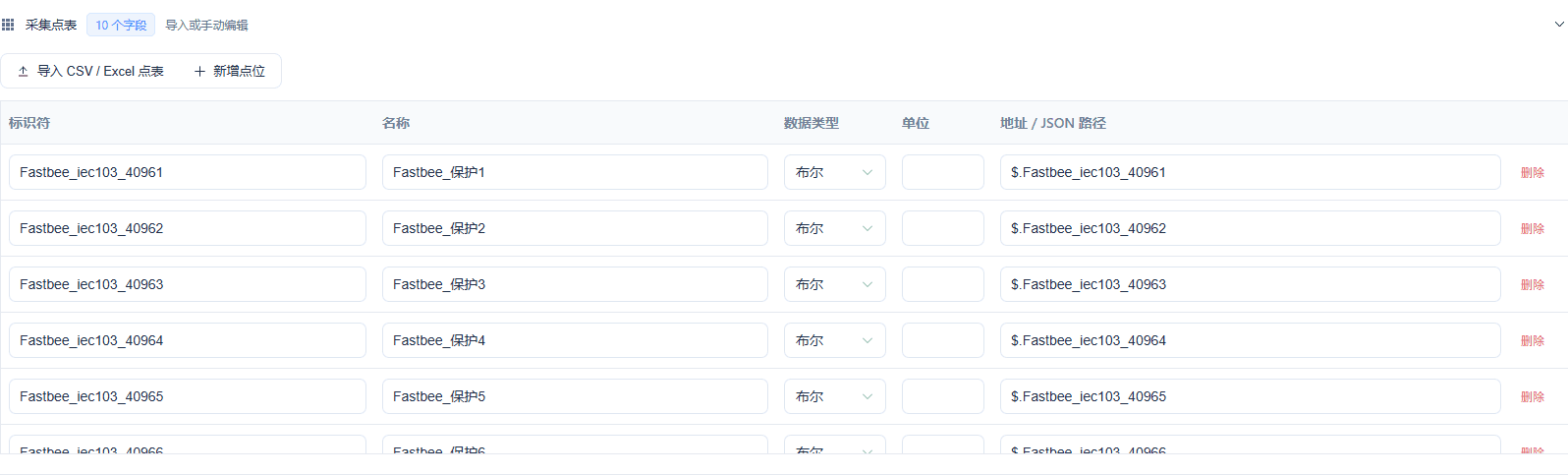
The image fully shows the first 5 items and part of item 6; it cannot prove that all 10 items were captured row by row.
Screenshot Highlights
| Field / Control | Description |
|---|---|
| Identifier | The stable field identity used by later point mapping. Required · Fill in: Match protocol points and control targets verbatim. · Example: FastBee_iec103_40961 to FastBee_iec103_40970 |
| Field Name | The Chinese name shown in running status and history. Required · Fill in: Name by protection point number for easy distinction. · Example: FastBee_保护1 to FastBee_保护10 |
| Field Data Type | This article only collects true/false states. Required · Fill in: Select Boolean for all ten items as device status quantities. · Example: 布尔 |
| Unit | Boolean states have no physical unit. Optional · Fill in: Fill by dimension; status quantities can be left blank. · Example: Left blank |
| Sample Path | Only used to identify JSON fields during initial creation. Required · Fill in: Verify the sample keys; formal IEC103 operation relies on information object address mapping. · Example: FastBee_iec103_40961 |
4. Verifying the Complete Device Number
Location: Device Access Wizard → Device Steps: Check the SN and the device Chinese name.

This device number stays consistent in later platform binding.
Screenshot Highlights
| Field / Control | Description |
|---|---|
| Device Number | The device, binding, and runtime messages use the same identity. Required · Fill in: Obtain from the device nameplate or the administrator; keep the original number when re-verifying. · Example: FastBee_IEC103UDP_Tutorial_01 |
| Device Name | The readable name used by the device list and history filtering. Required · Fill in: Use an easily recognizable name and verify it together with the device number. · Example: FastBee_保护终端 |
5. Verifying Initial Counts and the Protocol Boundary
Location: Device Access Wizard → Confirm Steps: Verify 1 device and 10 fields.

The initial creation confirmation image shows JSON/MQTT; this is the modeling starting point, and final operation must not continue with this protocol.
Screenshot Highlights
| Field / Control | Description |
|---|---|
| Record Verification | Check the product, device, and field counts. Required · Fill in: Confirm the counts before setting the final access protocol. · Example: 1 device, 10 fields; initial creation shows JSON/MQTT |
6. Viewing the Filling Example for Model Item 10
Location: Product Details → Function Definition → Protection 10 Steps: Verify the model name, English name, Boolean text, and collection permission.
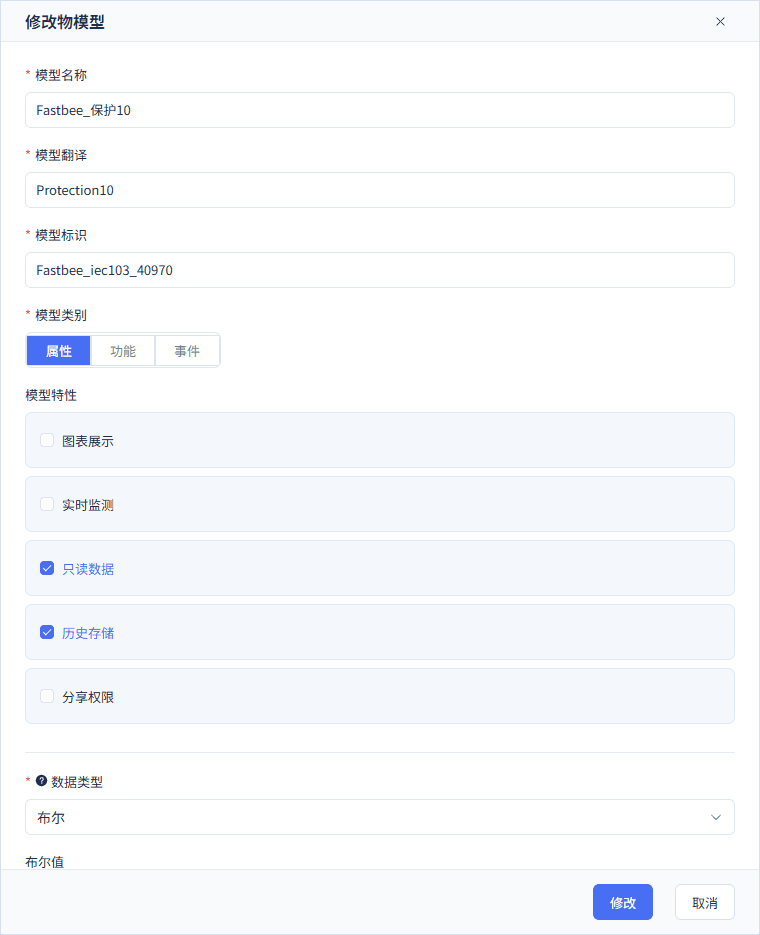
Point 10 is read-only and keeps history; point 1 should be non-read-only, and its complete permission operation image is still to be added.
Screenshot Highlights
| Field / Control | Description |
|---|---|
| Model Name | The Chinese description of the protection point on the platform. Required · Fill in: The name matches the protection point number. · Example: FastBee_保护10 |
| English Name | The multilingual name of the model. Required · Fill in: Provide a non-empty English name that distinguishes each point. · Example: Protection10 |
| Model Identifier | Associates reporting, control, and history with the same property. Required · Fill in: Reuse the identifier generated by the wizard; do not create similar fields. · Example: FastBee_iec103_40970 |
| Model Data Type | The platform stores true/false values. Required · Fill in: Keep consistent with the device status quantity and the protocol BOOLEAN. · Example: 布尔 |
| false Display Text | Displays the false value as a readable device state. Required · Fill in: Fill after verifying against the actual device state meaning. · Example: 断开 |
| true Display Text | Displays the true value as a readable device state. Required · Fill in: Fill after verifying against the actual device state meaning. · Example: 闭合 |
| Display Order | Controls the arrangement of properties on the page. Required · Fill in: Use the protection point number to avoid indistinguishable identical ordering. · Example: Item 10 is 10 |
| Read-only Permission | Determines whether the platform offers an operation entry for writable properties. Required · Fill in: Only open writing for points that need control. · Example: On (point 10 is collection-only) |
| History Storage | Allows later queries of state changes. Required · Fill in: Enable when collection acceptance requires comparing history. · Example: All ten enabled |
| Chart Display | Controls whether the property enters chart display. Required · Fill in: Choose by display needs; the status-quantity demo reuses the verified setting. · Example: Off |
| Real-time Monitoring | Controls extra monitoring display. Required · Fill in: For access verification, prioritize running status and history. · Example: Off |
| Share Permission | Controls the external sharing scope of the model. Required · Fill in: Choose by tenant authorization. · Example: Off |
The initial creation wizard extracts the model from a JSON sample, so the confirmation page still shows JSON/MQTT. After record creation, you must switch to formal UDP transport and the IEC103 format, then configure binding, points, and commands. An accurate operation image of the final protocol selection is still to be added.
All ten items have history enabled; point 1 has read-only off, and points 2 to 10 have read-only on; chart, real-time monitoring, and sharing reuse the off setting. Complete model-editing operation images for point 1 and points 2 to 9 are still to be added and cannot be replaced by the point 10 example.
Ten-item boolean sample used for modelingjson
{

  "FastBee_iec103_40961": false,

  "FastBee_iec103_40962": true,

  "FastBee_iec103_40963": false,

  "FastBee_iec103_40964": true,

  "FastBee_iec103_40965": false,

  "FastBee_iec103_40966": true,

  "FastBee_iec103_40967": false,

  "FastBee_iec103_40968": true,

  "FastBee_iec103_40969": false,

  "FastBee_iec103_40970": true

}Only properties are generated here; final IEC103 send/receive uses protocol point addresses.
2. Verifying Device Binding, Points, and Formal Commands
7. Binding the Original Platform Device and Station Address
Location: Product Details → IEC103 Configuration → Device Binding Steps: Verify the device identity, common address, and link address, then save the draft.
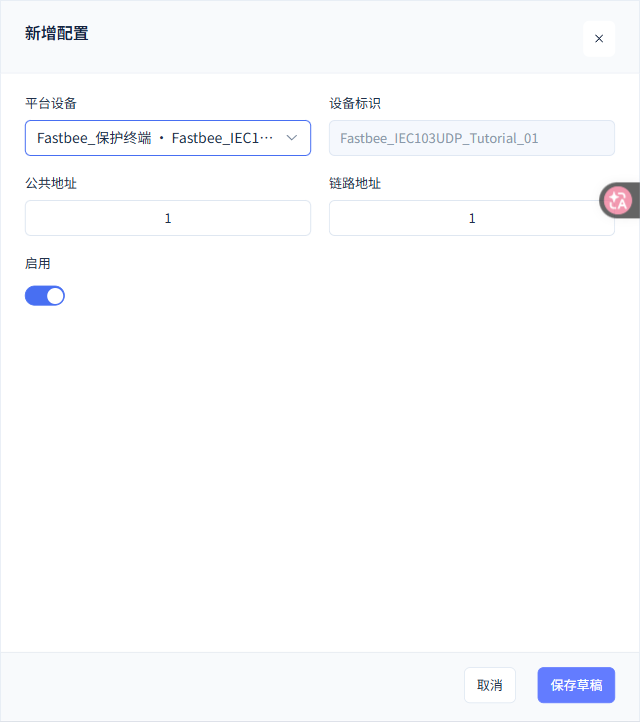
Bind FastBee_IEC103UDP_Tutorial_01, with both the common address and the link address set to 1.
Screenshot Highlights
| Field / Control | Description |
|---|---|
| Platform Device | Binds the protocol identity to an existing device. Required · Fill in: First verify the Chinese name and the complete device number. · Example: FastBee_保护终端 · FastBee_IEC103UDP_Tutorial_01 |
| Common Address | The application-layer address of the station. Required · Fill in: Keep consistent with the device station address, points, and command templates. · Example: 1 |
| Link Address | The address used by the IEC103 link layer. Required · Fill in: Keep consistent with the device-side link configuration. · Example: 1 |
| Enable | Determines whether the current binding or configuration participates in operation. Required · Fill in: Only enable configurations already verified in this article. · Example: On |
| Device Identifier | Brought out with the selected platform device. Required · Fill in: Reuse the platform device number; avoid filling in a different identity. · Example: FastBee_IEC103UDP_Tutorial_01 |
8. Configuring the Only Writable Protection Point 1
Location: Product Details → IEC103 Configuration → Collection Points Steps: Verify 40961 and the point 1 identifier, and turn on Allow Write.
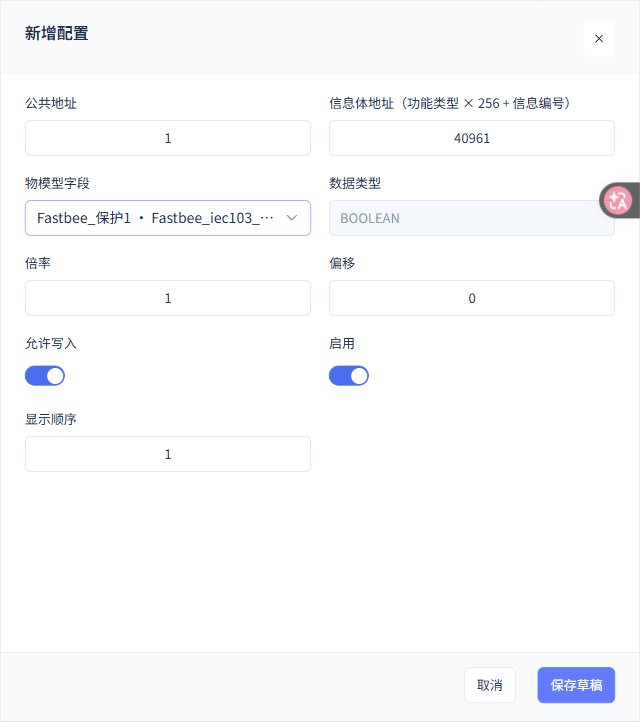
Point 1 address 40961 corresponds to FUN160/INF1; BOOLEAN, scale 1, offset 0, with Allow Write on.
Screenshot Highlights
| Field / Control | Description |
|---|---|
| Common Address | The application-layer address of the station. Required · Fill in: Keep consistent with the device station address, points, and command templates. · Example: 1 |
| Information Object Address | Locates a status point by combining the function type and information number. Required · Fill in: Calculate as FUN×256+INF, then verify against the device point table. · Example: 40961 = 160×256+1 |
| Thing Model Field | The platform property corresponding to the information object address. Required · Fill in: Associate each address only with its corresponding protection point. · Example: FastBee_保护1 · FastBee_iec103_40961 |
| Scale | The multiplier of numeric conversion; this article's booleans are not scaled. Required · Fill in: Keep the original value; avoid converting a status quantity as an analog value. · Example: 1 |
| Offset | The addend of numeric conversion. Required · Fill in: Boolean states take no offset. · Example: 0 |
| Allow Write | Determines whether the protocol point allows downlink control. Required · Fill in: Only enable for device points explicitly allowed to be controlled. · Example: On |
| Enable | Determines whether the current binding or configuration participates in operation. Required · Fill in: Only enable configurations already verified in this article. · Example: On |
| Point Display Order | The ordering value in the configuration list. Required · Fill in: Corresponds to the protection point number. · Example: 1 |
| Protocol Data Type | Derived from the platform thing model type. Required · Fill in: Set the boolean model correctly first, then verify the derived value here. · Example: BOOLEAN |
9. Viewing the Collection-Only Protection Point 10
Location: Product Details → IEC103 Configuration → Collection Points Steps: Verify 40970 and the point 10 identifier, and keep it non-writable.
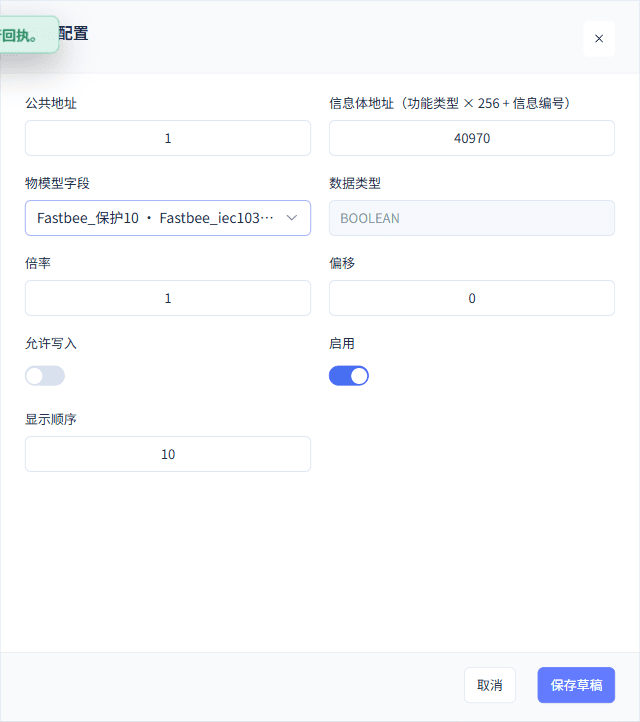
Point 10 address 40970 corresponds to FUN160/INF10; collection-only, write not allowed.
Screenshot Highlights
| Field / Control | Description |
|---|---|
| Common Address | The application-layer address of the station. Required · Fill in: Keep consistent with the device station address, points, and command templates. · Example: 1 |
| Information Object Address | Locates a status point by combining the function type and information number. Required · Fill in: Calculate as FUN×256+INF, then verify against the device point table. · Example: 40970 = 160×256+10 |
| Thing Model Field | The platform property corresponding to the information object address. Required · Fill in: Associate each address only with its corresponding protection point. · Example: FastBee_保护10 · FastBee_iec103_40970 |
| Scale | The multiplier of numeric conversion; this article's booleans are not scaled. Required · Fill in: Keep the original value; avoid converting a status quantity as an analog value. · Example: 1 |
| Offset | The addend of numeric conversion. Required · Fill in: Boolean states take no offset. · Example: 0 |
| Allow Write | Determines whether the protocol point allows downlink control. Required · Fill in: Only enable for device points explicitly allowed to be controlled. · Example: Off |
| Enable | Determines whether the current binding or configuration participates in operation. Required · Fill in: Only enable configurations already verified in this article. · Example: On |
| Point Display Order | The ordering value in the configuration list. Required · Fill in: Corresponds to the protection point number. · Example: 10 |
| Protocol Data Type | Derived from the platform thing model type. Required · Fill in: Set the boolean model correctly first, then verify the derived value here. · Example: BOOLEAN |
10. Verifying the Ten Saved Mappings
Location: Product Details → IEC103 Configuration → Collection Point List Steps: Check the 10 rows of addresses, fields, and write permissions.
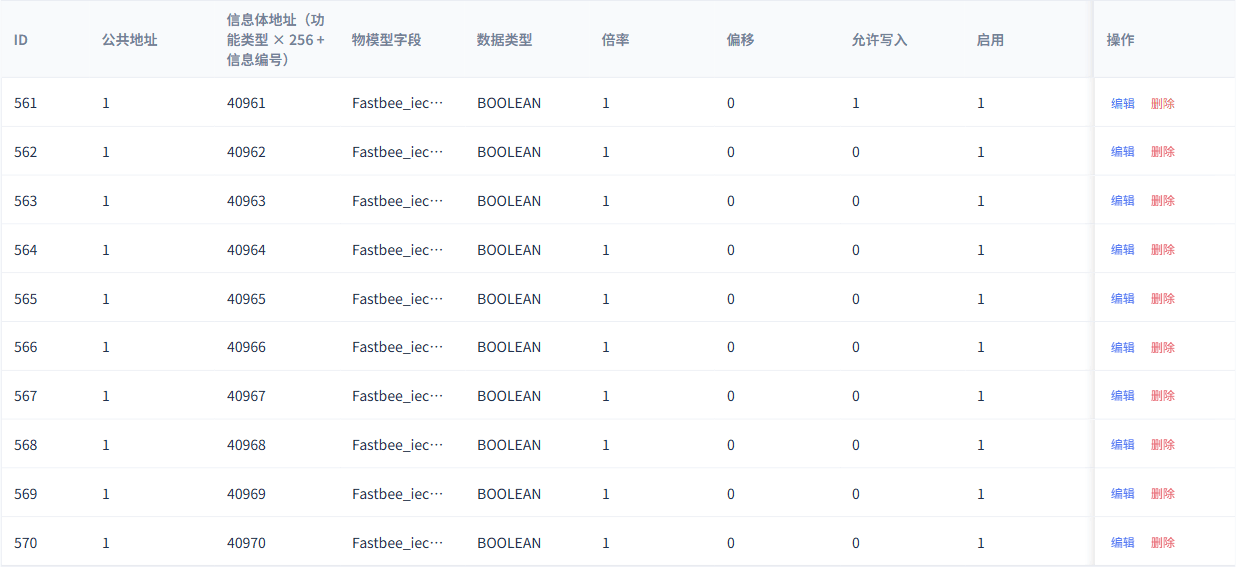
The ten rows of mappings are complete; this result image does not replace the individual add-or-edit operation images for points 2 to 9.
Screenshot Highlights
| Field / Control | Description |
|---|---|
| Point List | Verify the ten saved mappings. Required · Fill in: Check for missing, duplicate addresses, or wrongly bound fields. · Example: 10 items, 40961–40970 |
11. Configuring the Protection Point Control Template
Location: Product Details → IEC103 Configuration → Downlink Commands Steps: Select CONTROL and associate the only writable point.
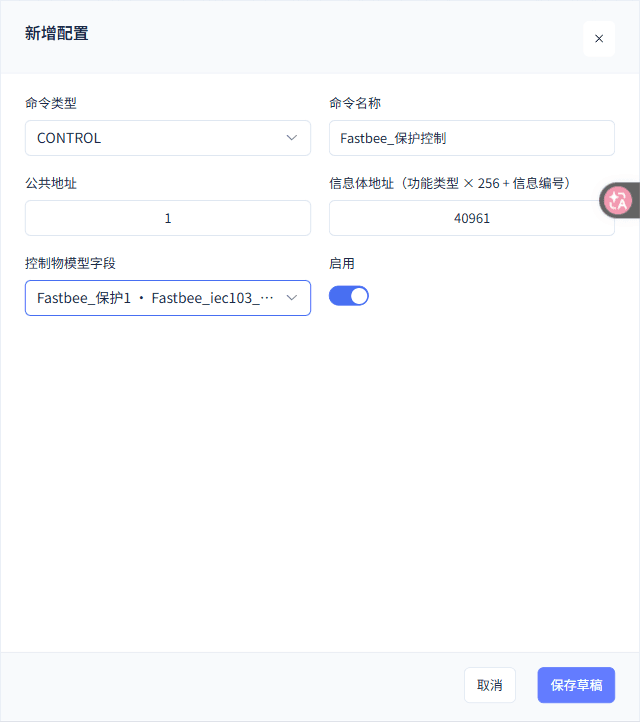
The protection control template uses station address 1 and information object address 40961, associated with Protection 1.
Screenshot Highlights
| Field / Control | Description |
|---|---|
| Command Type | Distinguishes single-point control from station-wide general interrogation. Required · Fill in: Select CONTROL for control; select GENERAL_INTERROGATION to collect the current whole-station state. · Example: CONTROL |
| Command Name | Identifies the operation in the formal template selector. Required · Fill in: Use names to distinguish protection control from protection general interrogation. · Example: FastBee_保护控制 |
| Common Address | The application-layer address of the station. Required · Fill in: Keep consistent with the device station address, points, and command templates. · Example: 1 |
| Template Information Object Address | The address parameter when saving the template. Required · Fill in: Reuse this article's formal template; general interrogation executes per the published template. · Example: 40961 |
| Control Thing Model Field | The platform field associated with the template. Required · Fill in: Control associates the only writable point; a general interrogation template does not mean writing all points. · Example: FastBee_保护1 · FastBee_iec103_40961 |
| Enable | Determines whether the current binding or configuration participates in operation. Required · Fill in: Only enable configurations already verified in this article. · Example: On |
12. Configuring the Formal Protection General Interrogation Template
Location: Product Details → IEC103 Configuration → Downlink Commands Steps: Select GENERAL_INTERROGATION and verify the saved fields.
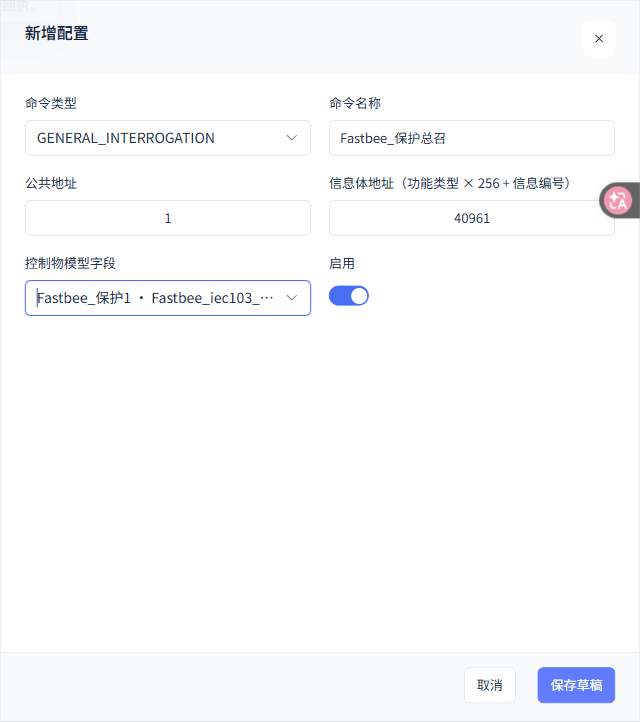
The general interrogation is saved as FastBee_保护总召; showing 40961 and Protection 1 in the template does not mean writing control values to all ten items.
Screenshot Highlights
| Field / Control | Description |
|---|---|
| Command Type | Distinguishes single-point control from station-wide general interrogation. Required · Fill in: Select CONTROL for control; select GENERAL_INTERROGATION to collect the current whole-station state. · Example: GENERAL_INTERROGATION |
| Command Name | Identifies the operation in the formal template selector. Required · Fill in: Use names to distinguish protection control from protection general interrogation. · Example: FastBee_保护总召 |
| Common Address | The application-layer address of the station. Required · Fill in: Keep consistent with the device station address, points, and command templates. · Example: 1 |
| Template Information Object Address | The address parameter when saving the template. Required · Fill in: Reuse this article's formal template; general interrogation executes per the published template. · Example: 40961 |
| Control Thing Model Field | The platform field associated with the template. Required · Fill in: Control associates the only writable point; a general interrogation template does not mean writing all points. · Example: FastBee_保护1 · FastBee_iec103_40961 |
| Enable | Determines whether the current binding or configuration participates in operation. Required · Fill in: Only enable configurations already verified in this article. · Example: On |
13. Verifying the Two Types of Saved Commands
Location: Product Details → IEC103 Configuration → Downlink Command List Steps: Verify one control and one general interrogation entry.

The two template types have different names; later general interrogation uses the published formal template.
Screenshot Highlights
| Field / Control | Description |
|---|---|
| Command List | Verify the two saved types of formal templates. Required · Fill in: Check type, station address, name, and enable status. · Example: One protection control and one protection general interrogation |
The device number, common address, link address, information object address, and model identifier together determine data ownership. After saving the draft, you must still validate and publish, and view the actual runtime node result; a successful save alone does not prove the protocol is running.
The point list shows the ten rows have been saved; the per-item add-or-edit operation images for points 2 to 9 are still to be added. The control and general interrogation templates are saved separately; on the device page, general interrogation uses the published template — do not hand-assemble addresses or raw frames on the device page.
3. Understanding the Original Session Parameters in FMQX Web
14. Verifying the FMQX Target and Fixed Source Port
Location: FMQX Web → Original IEC103 Session → Connection Parameters Steps: Verify the target host, UDP entry, and local source port.
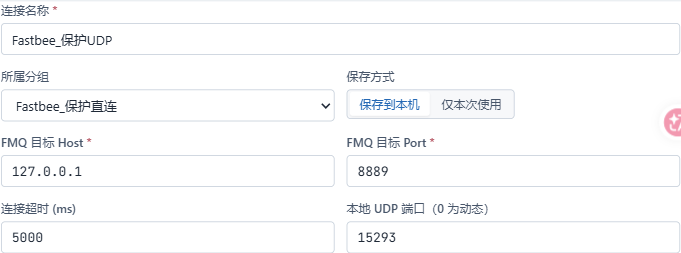
The device sends to 127.0.0.1:8889 and always sends/receives from local port 15293; the platform management port is not the device entry.
Screenshot Highlights
| Field / Control | Description |
|---|---|
| Session Name | Locates the original session in the device tool. Required · Fill in: Select the original session when re-verifying to avoid duplicate occupation of the source port. · Example: FastBee_保护UDP |
| Target Host | The reachable address of the FMQ runtime plane. Required · Fill in: Obtain the FMQ address reachable from the device from the administrator; only use the loopback address on the same machine. · Example: 127.0.0.1 |
| Target Port | The UDP device entry of FMQ. Required · Fill in: Fill according to the enabled UDP listener. · Example: 8889 |
| Local Source Port | The fixed UDP source endpoint of the device. Required · Fill in: Choose an unoccupied port and keep the same value across disconnect and recovery. · Example: 15293 |
15. Verifying UDP Direct Connection and Device Addresses
Location: FMQX Web → IEC103 Device Parameters Steps: Select UDP direct connection and verify the common address and link address.

The two addresses on the device and the platform binding are consistent, both 1.
Screenshot Highlights
| Field / Control | Description |
|---|---|
| Connection Method | The device sends/receives directly to the FMQ UDP entry. Required · Fill in: This article selects direct connection; a gateway connection requires separate device identity and gateway relationship configuration. · Example: UDP直连 |
| Device Common Address | The station address of the device. Required · Fill in: Keep consistent with the platform binding and command templates. · Example: 1 |
| Device Link Address | The link-layer address of the device. Required · Fill in: Keep consistent with the platform binding. · Example: 1 |
16. Verifying the Initial Point Table and Point 1 Write Permission
Location: FMQX Web → IEC103 Point Table Steps: Verify the first 6 initial values in the image and that point 1 allows control.
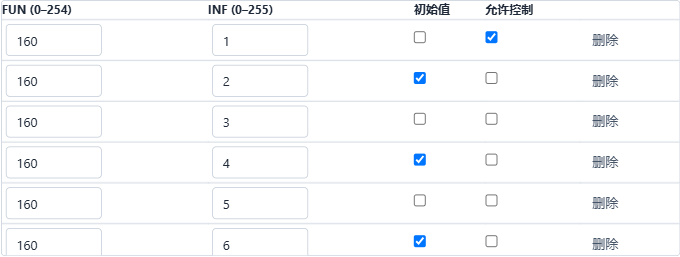
The initial configuration is odd items false and even items true; the image only shows the first 6 items, and the later ten samples use a different set of changed values.
Screenshot Highlights
| Field / Control | Description |
|---|---|
| Initial Point Table | The initial true/false values when the session was saved. Required · Fill in: Distinguish the initial configuration from the later ten-sample changes. · Example: FUN160, INF1–10; odd false, even true |
| Device Allows Control | The device-side permission for control requests. Required · Fill in: Only open the protection points needed for the demo. · Example: Only 160/1 enabled |
17. Understanding the Session Connection Status Entry
Location: FMQX Web → Session Title Bar Steps: View the connected mark and the disconnect button.

This image comes from an earlier real connection and illustrates the entry; this round's recovery is verified by the independent results below.
Screenshot Highlights
| Field / Control | Description |
|---|---|
| Connection Status and Button | After connecting, the disconnect entry is shown. Required · Fill in: Verify the session and source port first, then connect the original session. · Example: Connected; the button shows Disconnect |
This article uses IEC103 with UDP direct connection. The common address and link address of the device tool and the platform are both 1; only point 160/1 allows control. Complete operation images for protocol card selection and the initial values of points 7 to 10 are still to be added.
The saved initial point table is odd items false and even items true; the actual ten samples in the next section change to odd items true and even items false. These are two successive sets of states; do not rewrite the later changes as the initial configuration.
Ten-point addresses and the two sets of statesjson
[

  {

    "FUN": 160,

    "INF": 1,

    "IOA": 40961,

    "模型标识": "FastBee_iec103_40961",

    "初始保存值": false,

    "本轮十样本值": true,

    "允许控制": true

  },

  {

    "FUN": 160,

    "INF": 2,

    "IOA": 40962,

    "模型标识": "FastBee_iec103_40962",

    "初始保存值": true,

    "本轮十样本值": false,

    "允许控制": false

  },

  {

    "FUN": 160,

    "INF": 3,

    "IOA": 40963,

    "模型标识": "FastBee_iec103_40963",

    "初始保存值": false,

    "本轮十样本值": true,

    "允许控制": false

  },

  {

    "FUN": 160,

    "INF": 4,

    "IOA": 40964,

    "模型标识": "FastBee_iec103_40964",

    "初始保存值": true,

    "本轮十样本值": false,

    "允许控制": false

  },

  {

    "FUN": 160,

    "INF": 5,

    "IOA": 40965,

    "模型标识": "FastBee_iec103_40965",

    "初始保存值": false,

    "本轮十样本值": true,

    "允许控制": false

  },

  {

    "FUN": 160,

    "INF": 6,

    "IOA": 40966,

    "模型标识": "FastBee_iec103_40966",

    "初始保存值": true,

    "本轮十样本值": false,

    "允许控制": false

  },

  {

    "FUN": 160,

    "INF": 7,

    "IOA": 40967,

    "模型标识": "FastBee_iec103_40967",

    "初始保存值": false,

    "本轮十样本值": true,

    "允许控制": false

  },

  {

    "FUN": 160,

    "INF": 8,

    "IOA": 40968,

    "模型标识": "FastBee_iec103_40968",

    "初始保存值": true,

    "本轮十样本值": false,

    "允许控制": false

  },

  {

    "FUN": 160,

    "INF": 9,

    "IOA": 40969,

    "模型标识": "FastBee_iec103_40969",

    "初始保存值": false,

    "本轮十样本值": true,

    "允许控制": false

  },

  {

    "FUN": 160,

    "INF": 10,

    "IOA": 40970,

    "模型标识": "FastBee_iec103_40970",

    "初始保存值": true,

    "本轮十样本值": false,

    "允许控制": false

  }

]Only point 1 is writable; after the ten samples, point 1 was changed again by a later control.
4. Verifying Actual Control, Independent Reports, and the Ten Samples
18. Verifying the Downlink Entry for Protection Point 1
Location: Device Details → Running Status → Protection 1 Steps: Confirm Protection 1 is writable and check the target value, then send once.
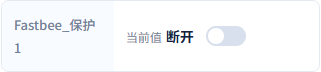
The first control target is true; after sending, you still need to verify the actual device execution and the independent report.
Screenshot Highlights
| Field / Control | Description |
|---|---|
| Value to Send | The target true/false value edited on the platform. Required · Fill in: Distinguish it from the current device state; send only one explicit target at a time. · Example: true |
| Send Control | Initiates one control to the only writable protection point. Required · Fill in: After sending, wait for device execution and the independent state; avoid repeated clicks. · Example: Send once on point 1 |
19. Verifying the First Actual Device Execution
Location: FMQX Web → Event Log → Expand Execution Details Steps: Verify the actual value, execution count, and duplicate flag.

The first true control has execution count 3, duplicate=false, RII1; this is an actual service event — the SDK receipt is not a raw network frame.
Screenshot Highlights
| Field / Control | Description |
|---|---|
| Device Execution Count | The actual control execution count recorded by the device service. Required · Fill in: Each command in this round increases the count only once; verify duplicate=false. · Example: executionCount=3; executed=true; duplicate=false |
| Device Protocol Acknowledgement | The IEC103 confirmation actually returned by the device. Required · Fill in: Verify together with the same command and the device state. · Example: COT20; RII1 |
20. Viewing the Independent State Report Entry
Location: FMQX Web → Point 160/1 Steps: Confirm the device is currently true, and use the single-point report entry.

This image shows the report preparation value and the button; afterwards, the independent report record and the real history together verify the control result.
Screenshot Highlights
| Field / Control | Description |
|---|---|
| Device Independent State | After control, the device side separately reports the current real value. Required · Fill in: Use the current device value; do not infer the state only from the control receipt. · Example: true |
| Single-point Report Button | Actively sends one ASDU1 with the current state. Required · Fill in: Click once per value and wait for the platform and history to match. · Example: Report ASDU1 once |
21. Verifying the First Five Changed Values of This Round
Location: FMQX Web → Points 160/1 to 160/5 Steps: Verify each item's value and its single-point report button.
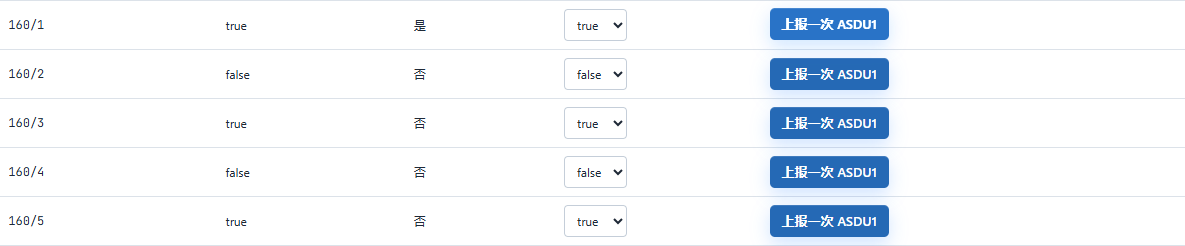
The first 5 items this round are true, false, true, false, true in order; they differ from the saved initial values.
Screenshot Highlights
| Field / Control | Description |
|---|---|
| First Five Samples | The subsequent changes of this round, not the saved initial values. Required · Fill in: Verify FUN/INF and the current true/false value item by item. · Example: INF1–5: true, false, true, false, true |
| Single-point Report Button | Actively sends one ASDU1 with the current state. Required · Fill in: Click once per value and wait for the platform and history to match. · Example: Report ASDU1 once |
22. Verifying the Changed Values of Items 6 to 9 in the Image
Location: FMQX Web → Lower Half of the Point Table Steps: Verify the four values visible in the current image.
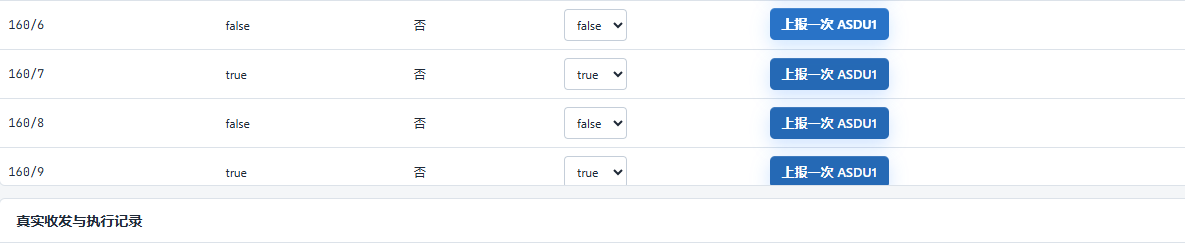
This image actually contains only INF6 to 9; the real report of INF10 is already recorded, but the complete operation screenshot is still to be added.
Screenshot Highlights
| Field / Control | Description |
|---|---|
| Samples of Items 6 to 9 | The last four changes visible in the current image. Required · Fill in: Verify by information number; supplement with the complete operation image for item 10. · Example: INF6–9: false, true, false, true |
| Single-point Report Button | Actively sends one ASDU1 with the current state. Required · Fill in: Click once per value and wait for the platform and history to match. · Example: Report ASDU1 once |
23. Verifying the Second Actual Device Execution
Location: FMQX Web → Event Log → Expand Execution Details Steps: Verify the device execution of the false control.

The second false control has execution count 4 and RII2, with no duplicate execution; the corresponding independent report is false. The independent operation image before sending is still to be added.
Screenshot Highlights
| Field / Control | Description |
|---|---|
| Device Independent State | After control, the device side separately reports the current real value. Required · Fill in: Use the current device value; do not infer the state only from the control receipt. · Example: false |
| Device Execution Count | The actual control execution count recorded by the device service. Required · Fill in: Each command in this round increases the count only once; verify duplicate=false. · Example: executionCount=4; executed=true; duplicate=false |
| Device Protocol Acknowledgement | The IEC103 confirmation actually returned by the device. Required · Fill in: Verify together with the same command and the device state. · Example: COT20; RII2 |
24. Verifying Protection 10 to 6 After Refresh
Location: Device Details → Running Status → Upper Half Steps: Explicitly refresh the page, then compare the five current values.
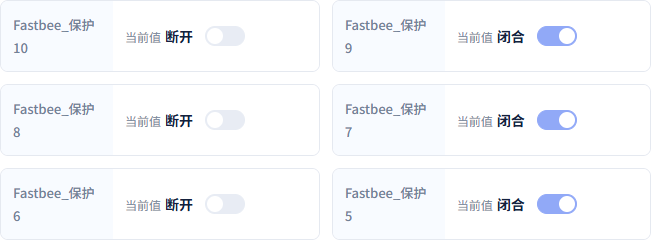
Protection 10 to 6 show false, true, false, true, false; this round did not prove that all ten items refresh automatically.
Screenshot Highlights
| Field / Control | Description |
|---|---|
| Page Refresh | Re-fetches the current device values. Required · Fill in: The ten items in this round require an explicit refresh; full automatic update is not promised. · Example: After refresh, the latest values of this round are shown |
| Upper Half Current Values | After refresh, view Protection 10 to 6. Required · Fill in: Wait for the new reports, explicitly refresh the page, then verify the current values. · Example: Protection 10 to 6: false, true, false, true, false |
25. Verifying Protection 5 to 1 After Refresh
Location: Device Details → Running Status → Lower Half Steps: Verify against the state after the latest control.
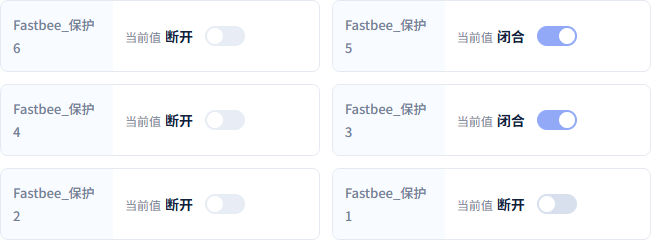
Protection 5 to 1 are true, false, true, false, false; point 1 has already been changed to false by the second control, so the ten-sample odd-true rule no longer applies.
Screenshot Highlights
| Field / Control | Description |
|---|---|
| Lower Half Current Values | After refresh, view Protection 5 to 1. Required · Fill in: Point 1 has been updated by the second control; verify against the latest state. · Example: Protection 5 to 1: true, false, true, false, false |
26. Verifying the Actual History Results for All Ten Items
Location: Data Center → Historical Data → Query Results Steps: Verify the ten samples against the complete time window from 2026-10-13 22:16:00 to 22:17:00.
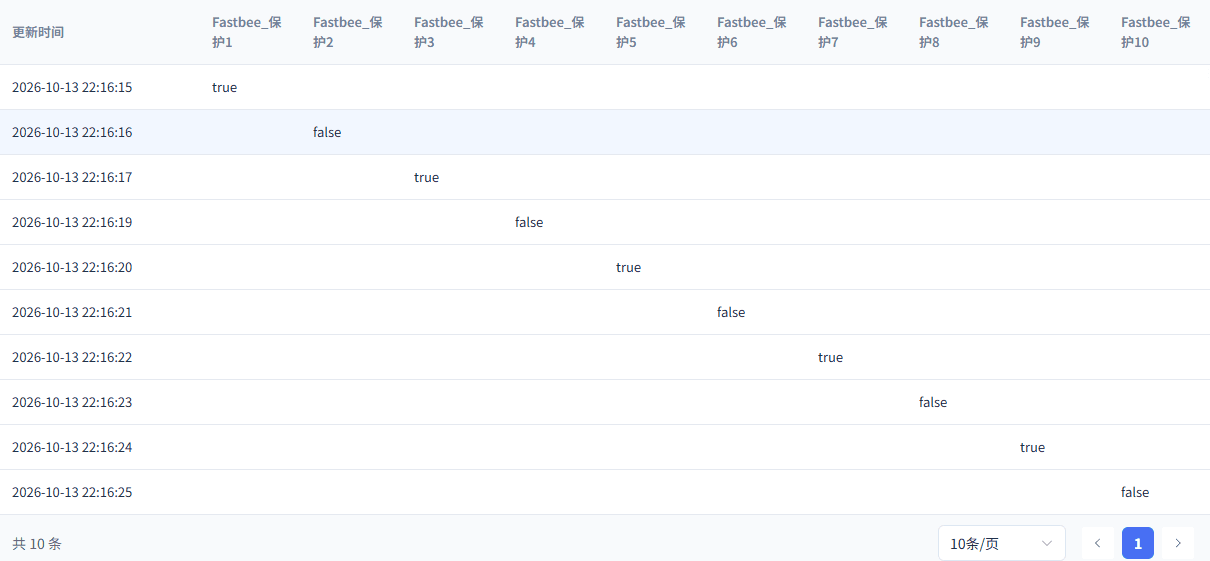
The ten samples from 22:16:15 to 22:16:25 each have real history; this result image does not replace the complete date-filter filling image.
Screenshot Highlights
| Field / Control | Description |
|---|---|
| Query Device | Selects the data scope of this article's device. Required · Fill in: Verify the Chinese name and the complete number at the same time. · Example: FastBee_保护终端 · FastBee_IEC103UDP_Tutorial_01 |
| Query Fields | Selects the protection properties to compare. Required · Fill in: Select all ten for the ten samples; select point 1 separately for a single control. · Example: FastBee_保护1 to FastBee_保护10 |
| Actual History Results | Matches device changes by time and field. Required · Fill in: View the record time and value, and re-check with a refresh under the same conditions. · Example: Each of the ten samples has a record; point 1 is last false |
The execution count after the first true control is 3, and the second false control is 4; earlier demos already used counts 1 and 2, so this round does not start from 1. The independent image before the second control was sent is still to be added; the result is kept as the actual false.
The ten samples were actually operated between 2026-10-13 22:16:15 and 22:16:25. Each item has an independent report and a unique history; the existing second device image only shows INF6 to 9 and does not show INF10, so the image name 6_10 cannot be treated as a complete capture.
Point 1 after refresh is already false from the second control. Protection 3, 5, 7, 9 remain true, and the even points are false; the first ten-sample true in history does not contradict the later current value false.
To query the ten samples, use 2026-10-13 22:16:00 to 22:17:00, select the ten protection fields, and verify the times and values. The existing filter image has a truncated date, and the complete filling image is still to be added; the current result only proves the actual data exists.
5. Understanding the General Interrogation Entry and Verifying the Native End
27. Viewing the Formal General Interrogation Template Entry
Location: Device Details → Running Status → General Interrogation Steps: Verify the protection general interrogation template and the station address.

This image illustrates the real page entry; the image below verifies the actual completion with this round's native end frame.
Screenshot Highlights
| Field / Control | Description |
|---|---|
| Formal General Interrogation Template | Selects the general interrogation configuration from the published version. Required · Fill in: Select the protection general interrogation for this article's station address; do not hand-assemble raw addresses or frames. · Example: FastBee_保护总召 · Station address 1 |
| Initiate General Interrogation | Requests the device to return the current protection states in turn. Required · Fill in: Send only once and wait for the data and the native termination. · Example: Initiate general interrogation |
28. Verifying the Native General Interrogation End of This Round
Location: FMQX Web → Event Log → General Interrogation Termination Details Steps: Confirm ASDU8/COT10 appears after the ten states are returned.

This round first returned ten COT9 items, then received the ASDU8/COT10 termination; a successful send or a single state return alone cannot determine general interrogation completion.
Screenshot Highlights
| Field / Control | Description |
|---|---|
| General Interrogation Termination | The native end frame indicates this general interrogation has ended. Required · Fill in: First receive the ten COT9 items, then verify ASDU8/COT10. · Example: ASDU8 / COT10; RII3 |
General interrogation reads the current whole-station state of the device. After sending, first verify the 10 returned states, then wait for the ASDU8/COT10 termination; COT is the cause of transmission — 9 means general interrogation data and 10 means general interrogation end. Do not treat a successful send or any single report as general interrogation success.
6. Verifying Runtime Recovery and New Control After a Short Disconnect
29. Viewing the Node Application Result After FMQ Recovery
Location: Product Details → Publish Sync → Actual Node Receipt Steps: Verify the APPLIED status and the actual effective time after recovery.
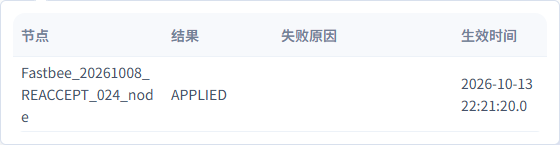
The receipt shows the post-recovery 22:21:20 has taken effect; the first publish confirmation window was not fully captured, so this image cannot replace the complete first publish flow.
Screenshot Highlights
| Field / Control | Description |
|---|---|
| Runtime Node Result | The runtime plane has received and applied the current configuration. Required · Fill in: Open the actual node receipt to verify the version and the effective result. · Example: APPLIED; recovery receipt effective at 22:21:20 |
30. Verifying the First Control After the FMQ Restart
Location: FMQX Web → Expand Execution Details Steps: Verify the post-recovery true control and the independent state.

The first control after the standalone FMQ restart succeeded: execution count 5, RII1, true; an independent true state and history followed.
Screenshot Highlights
| Field / Control | Description |
|---|---|
| Device Independent State | After control, the device side separately reports the current real value. Required · Fill in: Use the current device value; do not infer the state only from the control receipt. · Example: true |
| Post-recovery Control | Re-checks that the control path is still usable. Required · Fill in: After recovery, establish the link first, then send the new target and the independent state. · Example: true after the standalone FMQ restart |
| Device Execution Count | The actual control execution count recorded by the device service. Required · Fill in: Each command in this round increases the count only once; verify duplicate=false. · Example: executionCount=5; duplicate=false |
| Device Protocol Acknowledgement | The IEC103 confirmation actually returned by the device. Required · Fill in: Verify together with the same command and the device state. · Example: COT20; RII1 |
31. Verifying the Short Disconnect of the Original Session
Location: FMQX Web → Original Session Title Bar Steps: Observe the not-connected state and the connect button, keeping the original parameters.

The original session is briefly disconnected; the fixed source port is not changed, and the point table and history are not deleted.
Screenshot Highlights
| Field / Control | Description |
|---|---|
| Local Source Port | The fixed UDP source endpoint of the device. Required · Fill in: Choose an unoccupied port and keep the same value across disconnect and recovery. · Example: 15293 |
| Short Disconnect | After stopping the current session, the connect button is shown. Required · Fill in: Only disconnect this article's session; keep the configuration and the source port. · Example: Disconnected at 22:23:39 |
32. Verifying Reconnection on the Original Endpoint
Location: FMQX Web → Original Session Title Bar Steps: Reconnect using the original session and observe the connected state.

Recovery from the short disconnect still uses the original source endpoint; the button changes to Disconnect, and subsequent send/receive is checked with a new control.
Screenshot Highlights
| Field / Control | Description |
|---|---|
| Local Source Port | The fixed UDP source endpoint of the device. Required · Fill in: Choose an unoccupied port and keep the same value across disconnect and recovery. · Example: 15293 |
| Reconnect | Reconnects with the original session and the fixed source port. Required · Fill in: Keep the endpoint unchanged; after recovery, verify the new handshake and the new control. · Example: Recovered at 22:24:02, source port 15293 |
33. Verifying the New Control After the Short Recovery
Location: FMQX Web → Expand Execution Details Steps: Verify the actual execution of the false control and the independent state.

The fourth control has execution count 6, RII2, false, with no duplicate execution; the subsequent independent state is also false.
Screenshot Highlights
| Field / Control | Description |
|---|---|
| Device Independent State | After control, the device side separately reports the current real value. Required · Fill in: Use the current device value; do not infer the state only from the control receipt. · Example: false |
| Post-recovery Control | Re-checks that the control path is still usable. Required · Fill in: After recovery, establish the link first, then send the new target and the independent state. · Example: false after the short-disconnect recovery |
| Device Execution Count | The actual control execution count recorded by the device service. Required · Fill in: Each command in this round increases the count only once; verify duplicate=false. · Example: executionCount=6; duplicate=false |
| Device Protocol Acknowledgement | The IEC103 confirmation actually returned by the device. Required · Fill in: Verify together with the same command and the device state. · Example: COT20; RII2 |
34. Refreshing Recovery-Phase History Under the Same Conditions
Location: Data Center → Historical Data → Protection 1 Steps: Query from 2026-10-13 22:22:00 to 22:26:00 and refresh again.
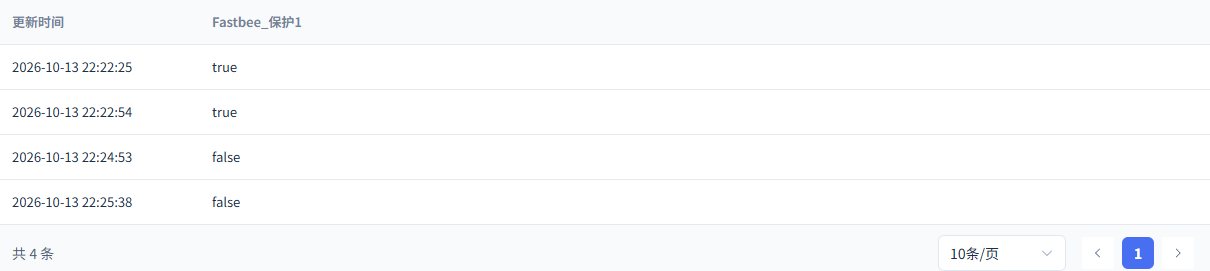
The independent true and false after recovery still have history, the last being false at 22:25:38; the precise storage latency was not sampled.
Screenshot Highlights
| Field / Control | Description |
|---|---|
| Query Device | Selects the data scope of this article's device. Required · Fill in: Verify the Chinese name and the complete number at the same time. · Example: FastBee_保护终端 · FastBee_IEC103UDP_Tutorial_01 |
| Query Fields | Selects the protection properties to compare. Required · Fill in: Select all ten for the ten samples; select point 1 separately for a single control. · Example: FastBee_保护1 |
| Actual History Results | Matches device changes by time and field. Required · Fill in: View the record time and value, and re-check with a refresh under the same conditions. · Example: 22:22:54 true; 22:25:38 false, retained after refresh |
The first true control after the standalone FMQ restart has execution count 5; the false control after the original session's short-disconnect recovery has execution count 6. Both recoveries have separate independent states and history; the complete pre-send operation images are still to be added.
This round saw two link-reset handshakes with FC7 requests and FC0 responses, indicating the protocol link was re-established with the original address. The short disconnect keeps local source port 15293; complete idle expiration and source port migration have not been performed.
For the recovery phase, query 2026-10-13 22:22:00 to 22:26:00, select Protection 1, and refresh again under the same conditions. The history has actually been saved; the precise write-completion time was not sampled, and millisecond storage latency is not promised.
7. Stopping and Preserving Configuration and History
35. Confirming Unpublish for This Article's Product
Location: Product Details → Unpublish Confirmation Steps: Verify this article's independent product, then confirm.
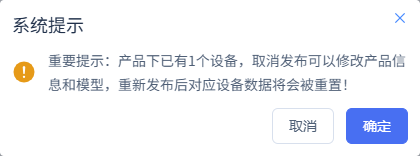
Only this article's runtime configuration is withdrawn; the product, device, points, and history are preserved.
Screenshot Highlights
| Field / Control | Description |
|---|---|
| Unpublish Confirmation | Withdraws the runtime configuration of the current product. Required · Fill in: Only operate on this article's independent product; after confirming, verify the runtime-plane removal result. · Example: Confirm unpublishing the current product |
36. Verifying the Runtime Removal Has Been Applied
Location: Product Details → Publish Sync → Actual Node Receipt Steps: Wait for the node corresponding to REMOVE1954 to return APPLIED.
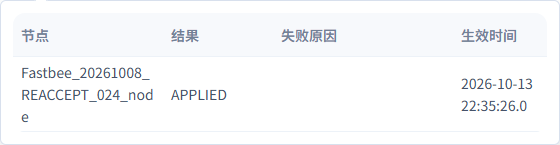
This article's removal operation has been applied; you can no longer assume the runtime configuration is still effective based on the old published state.
Screenshot Highlights
| Field / Control | Description |
|---|---|
| Runtime Removal Result | Confirms the unpublish has been applied to the runtime node. Required · Fill in: Wait for the removal receipt before ending the device session. · Example: REMOVE1954 / APPLIED |
37. Preserving the Original Session and the Final Stopped State
Location: FMQX Web → Original Session Overview Steps: Verify the not-connected state, execution count 6, and the retained point values.
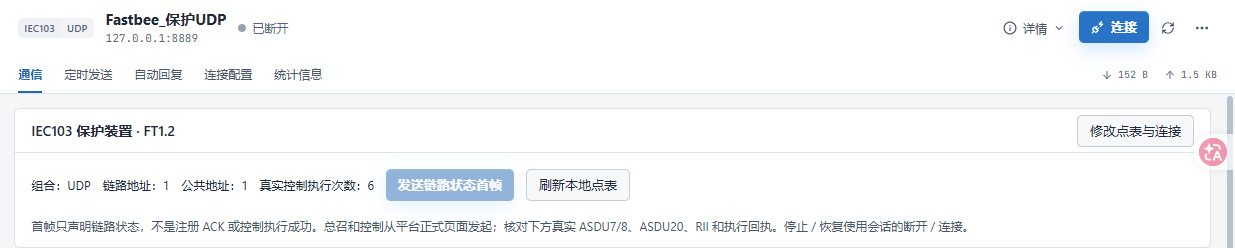
FMQX is finally disconnected, and point 1 is last false; the product, device, point table, and actual history are preserved for re-verification.
Screenshot Highlights
| Field / Control | Description |
|---|---|
| Preserved Stopped State | Ends the connection and preserves the configuration and history for re-verification. Required · Fill in: Verify the original session is disconnected; keep the latest values and history. · Example: Not connected; execution count 6; point 1 last false |
After finishing, keep the original product, device, points, commands, and history. For another re-verification, first verify the original session parameters, republish and wait for the runtime node to apply, then verify with new samples, new controls, and new time windows. The retained values while offline only represent the most recent reports and do not mean the device is still running.
Parameter Sources and Selection Notes
Device Access Wizard
| Field / Control | How to Fill |
|---|---|
| Creation Method | A new model first gets an independent product and device. Required · Fill in: When re-verifying, first look for retained resources to avoid duplicate records. · Example: 新建产品已有产品: Reuse an existing product and model of the current tenant; reuse an existing product and model of the current tenant.新建产品: Create an independent record for a new model; create an independent record for a new model.复制产品: After copying a verified configuration, refill the device identity and field address; after copying a verified configuration, refill the device identity and field address.使用模板: Start from an existing model or capability template and verify; start from an existing model or capability template and verify. |
| Product Name | Makes it easy to locate this group of protection points in the product list. Required · Fill in: Keep the name short and consistent with the product bound later. · Example: FastBee_保护终端 |
| JSON Sample | Parses ten true/false values into boolean properties; it does not represent the final device protocol. |
| Parse Sample | Extracts fields from the sample. |
| Identifier | The stable field identity used by later point mapping. Required · Fill in: Match protocol points and control targets verbatim. · Example: FastBee_iec103_40961 to FastBee_iec103_40970 |
| Field Name | The Chinese name shown in running status and history. Required · Fill in: Name by protection point number for easy distinction. · Example: FastBee_保护1 to FastBee_保护10 |
| Field Data Type | This article only collects true/false states. Required · Fill in: Select Boolean for all ten items as device status quantities. · Example: 布尔整数: Numbers without decimals; numbers without decimals.小数: Numeric values with decimals; numeric values with decimals.布尔: A true or false state, used by the ten items in this article; a true or false state, used by the ten items in this article.文本: String content; string content. |
| Unit | Boolean states have no physical unit. Optional · Fill in: Fill by dimension; status quantities can be left blank. · Example: Left blank |
| Sample Path | Only used to identify JSON fields during initial creation. Required · Fill in: Verify the sample keys; formal IEC103 operation relies on information object address mapping. · Example: FastBee_iec103_40961 |
| Device Number | The device, binding, and runtime messages use the same identity. Required · Fill in: Obtain from the device nameplate or the administrator; keep the original number when re-verifying. · Example: FastBee_IEC103UDP_Tutorial_01This article's real page and retained configuration; physical parameters are provided by the device maintainer. |
| Device Name | The readable name used by the device list and history filtering. Required · Fill in: Use an easily recognizable name and verify it together with the device number. · Example: FastBee_保护终端 |
| Record Verification | Check the product, device, and field counts. |
Function Definition
| Field / Control | How to Fill |
|---|---|
| Model Name | The Chinese description of the protection point on the platform. Required · Fill in: The name matches the protection point number. · Example: FastBee_保护10Publish after changes. |
| English Name | The multilingual name of the model. Required · Fill in: Provide a non-empty English name that distinguishes each point. · Example: Protection10Publish after changes. |
| Model Identifier | Associates reporting, control, and history with the same property. Required · Fill in: Reuse the identifier generated by the wizard; do not create similar fields. · Example: FastBee_iec103_40970Publish after changes. |
| Model Data Type | The platform stores true/false values. Required · Fill in: Keep consistent with the device status quantity and the protocol BOOLEAN. · Example: 布尔Publish after changes.整数: Integer values; integer values.小数: Numeric values with decimals; numeric values with decimals.布尔: The true/false protection states of this article; the true/false protection states of this article.枚举: A finite set of option values; a finite set of option values.文本: Strings; strings.数组: A group of values of the same kind; a group of values of the same kind.对象: Structured fields; structured fields. |
| false Display Text | Displays the false value as a readable device state. Required · Fill in: Fill after verifying against the actual device state meaning. · Example: 断开Publish after changes. |
| true Display Text | Displays the true value as a readable device state. Required · Fill in: Fill after verifying against the actual device state meaning. · Example: 闭合Publish after changes. |
| Display Order | Controls the arrangement of properties on the page. Required · Fill in: Use the protection point number to avoid indistinguishable identical ordering. · Example: Item 10 is 10Publish after changes. |
| Read-only Permission | Determines whether the platform offers an operation entry for writable properties. Required · Fill in: Only open writing for points that need control. · Example: Point 1 off; points 2–10 onPublish after changes. |
| History Storage | Allows later queries of state changes. Required · Fill in: Enable when collection acceptance requires comparing history. · Example: All ten enabledPublish after changes. |
| Chart Display | Controls whether the property enters chart display. Required · Fill in: Choose by display needs; the status-quantity demo reuses the verified setting. · Example: OffPublish after changes. |
| Real-time Monitoring | Controls extra monitoring display. Required · Fill in: For access verification, prioritize running status and history. · Example: OffPublish after changes. |
| Share Permission | Controls the external sharing scope of the model. Required · Fill in: Choose by tenant authorization. · Example: OffPublish after changes. |
Protocol and Publish Effectiveness
| Field / Control | How to Fill |
|---|---|
| Platform Transport Protocol | The data transport method finally used by the device connection. Required · Fill in: Select according to the actual device connection method; do not continue with the initial creation protocol. · Example: UDPPublish after changes.TCP: A direct TCP connection; not run in this article; a direct TCP connection; not run in this article.UDP: The direct UDP connection with the fixed source endpoint used in this article; the direct UDP connection with the fixed source endpoint used in this article.TCP Gateway: Via a TCP gateway, requiring separate gateway identity configuration; not run in this article; via a TCP gateway, requiring separate gateway identity configuration; not run in this article.UDP Gateway: Via a UDP gateway, requiring separate gateway ownership configuration; not run in this article; via a UDP gateway, requiring separate gateway ownership configuration; not run in this article. |
| Platform Data Format | The runtime plane interprets device messages according to this protocol. Required · Fill in: Keep consistent with the device standard and the formal point table. · Example: IEC103Publish after changes.IEC103: Runs with IEC103 binding, point table, and formal commands; runs with IEC103 binding, point table, and formal commands. |
| Platform Device | Binds the protocol identity to an existing device. Required · Fill in: First verify the Chinese name and the complete device number. · Example: FastBee_保护终端 · FastBee_IEC103UDP_Tutorial_01This article's real page and retained configuration; physical parameters are provided by the device maintainer. Publish after changes.FastBee_保护终端 · FastBee_IEC103UDP_Tutorial_01: This article's retained device; the list is produced by querying the devices actually visible to the current tenant; this article's retained device; the list is produced by querying the devices actually visible to the current tenant. |
| Device Identifier | Brought out with the selected platform device. This article's real page and retained configuration; physical parameters are provided by the device maintainer. Publish after changes. |
| Common Address | The application-layer address of the station. Required · Fill in: Keep consistent with the device station address, points, and command templates. · Example: 1Publish after changes. |
| Link Address | The address used by the IEC103 link layer. Required · Fill in: Keep consistent with the device-side link configuration. · Example: 1Publish after changes. |
| Enable | Determines whether the current binding or configuration participates in operation. Required · Fill in: Only enable configurations already verified in this article. · Example: OnPublish after changes. |
| Information Object Address | Locates a status point by combining the function type and information number. Required · Fill in: Calculate as FUN×256+INF, then verify against the device point table. · Example: 40961 (160×256+1) to 40970 (160×256+10)Publish after changes. |
| Thing Model Field | The platform property corresponding to the information object address. Required · Fill in: Associate each address only with its corresponding protection point. · Example: Point 1 → FastBee_iec103_40961; point 10 → FastBee_iec103_40970Publish after changes.FastBee_保护1 · FastBee_iec103_40961: Corresponds to FUN160/INF1; corresponds to FUN160/INF1.FastBee_保护2 · FastBee_iec103_40962: Corresponds to FUN160/INF2; corresponds to FUN160/INF2.FastBee_保护3 · FastBee_iec103_40963: Corresponds to FUN160/INF3; corresponds to FUN160/INF3.FastBee_保护4 · FastBee_iec103_40964: Corresponds to FUN160/INF4; corresponds to FUN160/INF4.FastBee_保护5 · FastBee_iec103_40965: Corresponds to FUN160/INF5; corresponds to FUN160/INF5.FastBee_保护6 · FastBee_iec103_40966: Corresponds to FUN160/INF6; corresponds to FUN160/INF6.FastBee_保护7 · FastBee_iec103_40967: Corresponds to FUN160/INF7; corresponds to FUN160/INF7.FastBee_保护8 · FastBee_iec103_40968: Corresponds to FUN160/INF8; corresponds to FUN160/INF8.FastBee_保护9 · FastBee_iec103_40969: Corresponds to FUN160/INF9; corresponds to FUN160/INF9.FastBee_保护10 · FastBee_iec103_40970: Corresponds to FUN160/INF10; corresponds to FUN160/INF10. |
| Protocol Data Type | Derived from the platform thing model type. Publish after changes. |
| Scale | The multiplier of numeric conversion; this article's booleans are not scaled. Required · Fill in: Keep the original value; avoid converting a status quantity as an analog value. · Example: 1Publish after changes. |
| Offset | The addend of numeric conversion. Required · Fill in: Boolean states take no offset. · Example: 0Publish after changes. |
| Allow Write | Determines whether the protocol point allows downlink control. Required · Fill in: Only enable for device points explicitly allowed to be controlled. · Example: Point 1 on; points 2–10 offPublish after changes. |
| Point Display Order | The ordering value in the configuration list. Required · Fill in: Corresponds to the protection point number. · Example: Point 1 is 1; point 10 is 10Publish after changes. |
| Point List | Verify the ten saved mappings. |
| Command Type | Distinguishes single-point control from station-wide general interrogation. Required · Fill in: Select CONTROL for control; select GENERAL_INTERROGATION to collect the current whole-station state. · Example: CONTROL / GENERAL_INTERROGATIONPublish after changes.GENERAL_INTERROGATION: Station-wide general interrogation, waiting for the native end; station-wide general interrogation, waiting for the native end.CONTROL: Boolean control of the only writable point; boolean control of the only writable point. |
| Command Name | Identifies the operation in the formal template selector. Required · Fill in: Use names to distinguish protection control from protection general interrogation. · Example: FastBee_保护控制 / FastBee_保护总召Publish after changes. |
| Template Information Object Address | The address parameter when saving the template. Required · Fill in: Reuse this article's formal template; general interrogation executes per the published template. · Example: 40961Publish after changes. |
| Control Thing Model Field | The platform field associated with the template. Required · Fill in: Control associates the only writable point; a general interrogation template does not mean writing all points. · Example: FastBee_保护1 · FastBee_iec103_40961Publish after changes.FastBee_保护1 · FastBee_iec103_40961: Only point 1 actually allows control in this article; only point 1 actually allows control in this article.FastBee_保护2 · FastBee_iec103_40962: A read-only property cannot be used as this article's writable control target; a read-only property cannot be used as this article's writable control target.FastBee_保护3 · FastBee_iec103_40963: A read-only property cannot be used as this article's writable control target; a read-only property cannot be used as this article's writable control target.FastBee_保护4 · FastBee_iec103_40964: A read-only property cannot be used as this article's writable control target; a read-only property cannot be used as this article's writable control target.FastBee_保护5 · FastBee_iec103_40965: A read-only property cannot be used as this article's writable control target; a read-only property cannot be used as this article's writable control target.FastBee_保护6 · FastBee_iec103_40966: A read-only property cannot be used as this article's writable control target; a read-only property cannot be used as this article's writable control target.FastBee_保护7 · FastBee_iec103_40967: A read-only property cannot be used as this article's writable control target; a read-only property cannot be used as this article's writable control target.FastBee_保护8 · FastBee_iec103_40968: A read-only property cannot be used as this article's writable control target; a read-only property cannot be used as this article's writable control target.FastBee_保护9 · FastBee_iec103_40969: A read-only property cannot be used as this article's writable control target; a read-only property cannot be used as this article's writable control target.FastBee_保护10 · FastBee_iec103_40970: A read-only property cannot be used as this article's writable control target; a read-only property cannot be used as this article's writable control target. |
| Command List | Verify the two saved types of formal templates. |
| Runtime Node Result | The runtime plane has received and applied the current configuration. |
FMQX Web Connection
| Field / Control | How to Fill |
|---|---|
| Session Name | Locates the original session in the device tool. Required · Fill in: Select the original session when re-verifying to avoid duplicate occupation of the source port. · Example: FastBee_保护UDPReconnect after changes. |
| Device Protocol | The protocol implementation used by the device tool. Required · Fill in: Keep consistent with the platform's formal data format. · Example: IEC103Reconnect after changes.IEC103: Used by the session saved in this article; other FMQX protocols are outside the scope of this manual; used by the session saved in this article; other FMQX protocols are outside the scope of this manual. |
| Connection Method | The device sends/receives directly to the FMQ UDP entry. Required · Fill in: This article selects direct connection; a gateway connection requires separate device identity and gateway relationship configuration. · Example: UDP直连Reconnect after changes.TCP直连: A direct TCP link, not run in this article; a direct TCP link, not run in this article.UDP直连: The device UDP send/receive of this article; the device UDP send/receive of this article.TCP网关: The TCP gateway form, requiring separate verification; the TCP gateway form, requiring separate verification.UDP网关: The UDP gateway form, requiring separate verification; the UDP gateway form, requiring separate verification. |
| Target Host | The reachable address of the FMQ runtime plane. Required · Fill in: Obtain the FMQ address reachable from the device from the administrator; only use the loopback address on the same machine. · Example: 127.0.0.1This article's real page and retained configuration; physical parameters are provided by the device maintainer. Reconnect after changes. |
| Target Port | The UDP device entry of FMQ. Required · Fill in: Fill according to the enabled UDP listener. · Example: 8889This article's real page and retained configuration; physical parameters are provided by the device maintainer. Reconnect after changes. |
| Local Source Port | The fixed UDP source endpoint of the device. Required · Fill in: Choose an unoccupied port and keep the same value across disconnect and recovery. · Example: 15293This article's real page and retained configuration; physical parameters are provided by the device maintainer. Reconnect after changes. |
| Device Common Address | The station address of the device. Required · Fill in: Keep consistent with the platform binding and command templates. · Example: 1Reconnect after changes. |
| Device Link Address | The link-layer address of the device. Required · Fill in: Keep consistent with the platform binding. · Example: 1Reconnect after changes. |
| Initial Point Table | The initial true/false values when the session was saved. Required · Fill in: Distinguish the initial configuration from the later ten-sample changes. · Example: FUN160, INF1–10; odd false, even trueReconnect after changes. |
| Device Allows Control | The device-side permission for control requests. Required · Fill in: Only open the protection points needed for the demo. · Example: Only 160/1 enabledReconnect after changes. |
| Connection Status and Button | After connecting, the disconnect entry is shown. Reconnect after changes. |
Device Running Status
| Field / Control | How to Fill |
|---|---|
| Value to Send | The target true/false value edited on the platform. Required · Fill in: Distinguish it from the current device state; send only one explicit target at a time. · Example: First time true; second time false |
| Send Control | Initiates one control to the only writable protection point. |
| Upper Half Current Values | After refresh, view Protection 10 to 6. |
| Lower Half Current Values | After refresh, view Protection 5 to 1. |
| Page Refresh | Re-fetches the current device values. |
| Formal General Interrogation Template | Selects the general interrogation configuration from the published version. Required · Fill in: Select the protection general interrogation for this article's station address; do not hand-assemble raw addresses or frames. · Example: FastBee_保护总召 · Station address 1FastBee_保护总召 · Station address 1: Select a formal template of the current product that is published and effective; select a formal template of the current product that is published and effective. |
| Initiate General Interrogation | Requests the device to return the current protection states in turn. |
Device Reporting and Demo Replies
| Field / Control | How to Fill |
|---|---|
| Device Execution Count | The actual control execution count recorded by the device service. |
| Device Protocol Acknowledgement | The IEC103 confirmation actually returned by the device. |
| Device Independent State | After control, the device side separately reports the current real value. Required · Fill in: Use the current device value; do not infer the state only from the control receipt. · Example: 1st/3rd true; 2nd/4th falsefalse: Shown as Open in this article; shown as Open in this article.true: Shown as Closed in this article; shown as Closed in this article. |
| Single-point Report Button | Actively sends one ASDU1 with the current state. |
| First Five Samples | The subsequent changes of this round, not the saved initial values. Required · Fill in: Verify FUN/INF and the current true/false value item by item. · Example: INF1–5: true, false, true, false, truefalse: Shown as Open in this article; shown as Open in this article.true: Shown as Closed in this article; shown as Closed in this article. |
| Samples of Items 6 to 9 | The last four changes visible in the current image. Required · Fill in: Verify by information number; supplement with the complete operation image for item 10. · Example: INF6–9: false, true, false, truefalse: Shown as Open in this article; shown as Open in this article.true: Shown as Closed in this article; shown as Closed in this article. |
| General Interrogation Termination | The native end frame indicates this general interrogation has ended. |
Historical Data
| Field / Control | How to Fill |
|---|---|
| Query Device | Selects the data scope of this article's device. Required · Fill in: Verify the Chinese name and the complete number at the same time. · Example: FastBee_保护终端 · FastBee_IEC103UDP_Tutorial_01FastBee_保护终端 · FastBee_IEC103UDP_Tutorial_01: Only query this article's retained device; only query this article's retained device. |
| Query Fields | Selects the protection properties to compare. Required · Fill in: Select all ten for the ten samples; select point 1 separately for a single control. · Example: FastBee_保护1 to FastBee_保护10FastBee_保护1: Query the real historical states of Protection 1; query the real historical states of Protection 1.FastBee_保护2: Query the real historical states of Protection 2; query the real historical states of Protection 2.FastBee_保护3: Query the real historical states of Protection 3; query the real historical states of Protection 3.FastBee_保护4: Query the real historical states of Protection 4; query the real historical states of Protection 4.FastBee_保护5: Query the real historical states of Protection 5; query the real historical states of Protection 5.FastBee_保护6: Query the real historical states of Protection 6; query the real historical states of Protection 6.FastBee_保护7: Query the real historical states of Protection 7; query the real historical states of Protection 7.FastBee_保护8: Query the real historical states of Protection 8; query the real historical states of Protection 8.FastBee_保护9: Query the real historical states of Protection 9; query the real historical states of Protection 9.FastBee_保护10: Query the real historical states of Protection 10; query the real historical states of Protection 10. |
| Complete Time Window | Limited to the local time when the actual operations occurred. Required · Fill in: Take the start and end times from the actual operation records; the existing filter image has a truncated date, so a complete image is needed. · Example: Ten samples 2026-10-13 22:16:00–22:17:00; recovery 22:22:00–22:26:00 |
| Actual History Results | Matches device changes by time and field. |
Stop and Recovery
| Field / Control | How to Fill |
|---|---|
| Post-recovery Control | Re-checks that the control path is still usable. |
| Short Disconnect | After stopping the current session, the connect button is shown. |
| Reconnect | Reconnects with the original session and the fixed source port. |
| Unpublish Confirmation | Withdraws the runtime configuration of the current product. |
| Runtime Removal Result | Confirms the unpublish has been applied to the runtime node. |
| Preserved Stopped State | Ends the connection and preserves the configuration and history for re-verification. |
FAQ and Next Steps
| Symptom | Possible Cause | Where to Check First | How to Recover |
|---|---|---|---|
| Connected but no states | The formal protocol, station address, link address, or point mapping is inconsistent. | Verify UDP/IEC103, target 8889, address 1/1, FUN160, and the corresponding INFs. | Fix and republish, report one new state first, and wait for the actual result. |
| Point 1 has no control entry | The thing model is still read-only, the point is not writable, or control permission is missing. | Point 1 is non-read-only, the protocol allows write, and the device side allows 160/1 control. | Fix only this article's point 1, save and publish, then refresh the device page. |
| Sent but the device did not change | The send prompt cannot prove real execution; device feedback may not have been received yet. | The device execution, native acknowledgement, independent state, and history of the same command. | Stop repeated clicks; verify the address, template, and connection, then send a new target. |
| The current page still shows old values | The ten current values of this round require an explicit page refresh. | Check the most recent report time and the refresh result after the operation. | Refresh the same device page; do not judge new values from old screenshots. |
| Ten-sample point 1 is true, but the current value is false | The second control after the ten samples already changed it to false. | Compare the time order of the 22:16 samples, the 22:17 control, and the subsequent independent states. | Judge the current value by the latest device state, and keep the earlier real history. |
| General interrogation only shows a successful send | Not all states and the native end have been confirmed yet. | ASDU8/COT10 appears after the 10 COT9 items and is associated with this general interrogation. | Wait for the end or check the failure cause; avoid initiating general interrogations continuously. |
| Downlink unreachable after recovery | The source endpoint changed, the source port is occupied, or the link was not re-established. | The original session, the fixed 15293, and the new reset handshake. | Restore the original endpoint, verify a new report first, then control once; changing the source port requires separate verification. |
| History does not show this change | The device, fields, or time window do not match, or history is not enabled. | Local time Asia/Shanghai, complete start and end times, protection fields, and history permission. | Refresh under the same conditions and verify against the actual operation time; do not add or delete original records. |