

FMQ Message Push
Understand the division of work between rules and connectors, complete a RabbitMQ push, and confirm actual receipt in the external queue.
How to Read
Confirm the entry point, permissions, and target object first, then follow the numbered steps. Each step includes the expected result; detailed fields and options are collected in expandable reference tables.
About the Screenshots
The screenshots come from the original operation manual. The public edition hides real node addresses, connection addresses, and credentials; the statuses, times, and data in the examples do not represent the current production environment.
Before You Start
| Item | Description |
|---|---|
| What you can do | Understand the division of work between rules and connectors, complete a RabbitMQ push, and confirm actual receipt in the external queue. |
| Entry point | Integration → Message Push |
| Required permissions | Task management, connector usage permissions, and approved external test resources. |
| Estimated time | 45 minutes |
Message Push Overview
Message Push is the FMQ feature that filters device events already on the platform by rules and sends them to external business systems. It answers "which events need to go out, where they go, and how to confirm they truly arrived"; it is not used to configure how devices connect to FMQ.
For example, every report from a temperature sensor forms a property event. The rule only lets through events where temperature is greater than or equal to 30, and the push action then uses a RabbitMQ connector to send a standard Alink message to the alarm system. 25°C is not sent; 31.5°C is sent.
- Create a message push task only when an external system needs to consume device events.
- A connector can be reused by multiple tasks; each task still has its own event, SQL, and target action parameters.
- The completion mark is not "saved successfully", but being able to point out at which level the message sits: rule, action, local queue, Broker, or external queue.
Composition, Boundaries, and Choices
A message push task organizes one complete outbound behavior; the event rule answers "when to trigger"; the push action answers "which Topic, Exchange, or URL to send to"; the connector holds the reusable Broker address, authentication, and connection parameters.
Enable and Disable only control whether real-time events trigger automatically. "Real Push" in the details is a manual verification entry that sends actively even when the task is disabled; before using it you must confirm the target is an approved test resource.
Prefer reuse when an existing connector has the correct type, passed its recent check, and has clear ownership. Create a new one inside the task only when you need independent authentication, an independent Broker, or fault isolation; an external MQTT Broker in particular should be validated in the Connector module first.
Task Composition and Choices
| Field | Purpose | Where the Value Comes From | How to Choose | Wrong-Input Symptom and Recovery | Effective Conditions |
|---|---|---|---|---|---|
| Required Task Name | Lets implementers identify the purpose from the list. Do not name it after only the MQ type.; after saving it affects the current task's subsequent checks or sends; re-verify results with a new sample. | Named by the task owner according to business purpose. | This example uses temperature alarm push, and distinguishes test from production. Recommended: fill in per the integration documents · Default: — · Example: FastBee_温度告警推送 | A value different from the actual event or integration agreement causes misses or wrong send targets.; correct it against the value source, then re-check and verify actual receipt on the target. | Scope: the current message push task · Publish: not required · Restart: not required · Reconnect: not required |
| Task Description | Supplements the trigger condition and receiver; the current save API uses the description as the rule name, so filling in a different description may change the name shown in the list.; after saving it affects the current task's subsequent checks or sends; re-verify results with a new sample. | The task owner. | This example leaves it empty; after saving, go back to the details to verify the name. Recommended: fill in per the integration documents · Default: — · Example: left empty | A value different from the actual event or integration agreement causes misses or wrong send targets.; correct it against the value source, then re-check and verify actual receipt on the target. | Scope: the current message push task · Publish: not required · Restart: not required · Reconnect: not required |
| Enable Status | When enabled, the task joins real-time event matching; when disabled it does not trigger automatically, but a manual real push can still send.; after saving it affects the current task's subsequent checks or sends; re-verify results with a new sample. | Choose according to the current debugging or go-live stage. | A new task may be enabled by default; in this example it must be switched off manually and switched on only after closed-loop verification. Recommended: fill in per the integration documents · Default: — · Example: DisabledEnabled: processes real-time events; triggers automatically on match. Disabled: does not process real-time events; manual real push still has side effects. | A value different from the actual event or integration agreement causes misses or wrong send targets.; correct it against the value source, then re-check and verify actual receipt on the target. | Scope: the current message push task · Publish: not required · Restart: not required · Reconnect: not required |
| Required Trigger Event | Selects the event category to listen to, not a device Topic directly.; after saving it affects the current task's subsequent checks or sends; re-verify results with a new sample. | Judge from the device's business behavior. | For temperature measurement data choose Property Post; for online/offline choose Client Connected or Client Disconnected respectively. Recommended: fill in per the integration documents · Default: — · Example: Property PostProperty Post: triggered when the device reports current properties such as temperature, humidity, and battery level.; telemetry forwarding, threshold alarms, data sync. Event Post: triggered when the device proactively reports an alarm or business event; can be further filtered by eventCode.; alarm center, ticket system, audit notification. Device Status Change: triggered when the business status of a device or protocol channel changes; not equivalent to MQTT client online/offline.; running status sync, channel anomaly notification. Client Connected: triggered when an MQTT client connects successfully and enters the online state.; online notification, login audit, connection trend analysis. Client Disconnected: triggered when an MQTT client goes offline after a normal disconnect, timeout, or network interruption.; offline alarm, connection quality analysis. Dead-letter Message: triggered when the downlink or forwarding link cannot continue processing a message and moves it to dead letter.; failure archiving, manual compensation, anomaly statistics. Reply Message: triggered when the device returns a processing result for a downlink command or service call.; command receipt sync, call result archiving. | Switching the event updates the field selection and SQL; existing conditions must be re-checked.; correct it against the value source, then re-check and verify actual receipt on the target. | Scope: the current message push task · Publish: not required · Restart: not required · Reconnect: not required |
| Required Push Target | Selects the message service the receiver actually uses.; after saving it affects the current task's subsequent checks or sends; re-verify results with a new sample. | The integration plan provided by the receiving system administrator. | Follow the other side's existing protocol; do not choose by icon or familiarity. Recommended: fill in per the integration documents · Default: — · Example: RabbitMQKafka: use when the other side already has Kafka and needs high-throughput, replayable streaming consumption.; shows the connector and action fields of this type. RabbitMQ: use when clear exchange, routing key, and queue binding relationships are needed, or the other side consumes from business queues.; shows the connector and action fields of this type. RocketMQ: use when the other side uses RocketMQ and organizes messages by Topic and Tag.; shows the connector and action fields of this type. WebHook: use when the other side only provides an HTTP interface and can tolerate synchronous requests when events arrive. Real push actually calls this interface.; shows the connector and action fields of this type. MQTT: use when the other side subscribes to data via MQTT Topic; for an external Broker, prefer reusing an external connector already validated in the Connector module.; shows the connector and action fields of this type. | A value different from the actual event or integration agreement causes misses or wrong send targets.; correct it against the value source, then re-check and verify actual receipt on the target. | Scope: the current message push task · Publish: not required · Restart: not required · Reconnect: not required |
| Connector Source | Reuse uses an existing connection; creating a new one builds a new connection configuration.; after saving it affects the current task's subsequent checks or sends; re-verify results with a new sample. | The existing connector list and business isolation requirements. | Prefer reusing a connector that has been validated and targets the correct environment; create a separate one when a new address or independent authentication is needed. Recommended: fill in per the integration documents · Default: — · Example: prefer using an existing connectorReuse existing connector: uses the saved connection resource; does not overwrite the original connection parameters. Create connector within the task: enter limited connection fields; saving creates the connection resource; configure advanced parameters in the Connector module. | A value different from the actual event or integration agreement causes misses or wrong send targets.; correct it against the value source, then re-check and verify actual receipt on the target. | Scope: the current message push task · Publish: not required · Restart: not required · Reconnect: not required |
| Required Existing Connector | Selects the concrete connection resource for the current target type.; after saving it affects the current task's subsequent checks or sends; re-verify results with a new sample. | The connector list, searchable by name or ID. | Verify the target environment and check result; connectors with the same name but different IDs must not be mixed up. Recommended: fill in per the integration documents · Default: — · Example: FastBee_消息推送连接器 | A value different from the actual event or integration agreement causes misses or wrong send targets.; correct it against the value source, then re-check and verify actual receipt on the target. | Scope: the current message push task · Publish: not required · Restart: not required · Reconnect: not required |
| Connection Name | The name of the new connector in create-within-task mode.; after saving it affects the current task's subsequent checks or sends; re-verify results with a new sample. | Specified by the integration owner according to environment and purpose. | When publish confirmation or an external MQTT connection is needed, prefer creating it in the Connector module first and then reusing it. Recommended: fill in per the integration documents · Default: — · Example: FastBee_消息推送连接器 | A value different from the actual event or integration agreement causes misses or wrong send targets.; correct it against the value source, then re-check and verify actual receipt on the target. | Scope: the current message push task · Publish: not required · Restart: not required · Reconnect: not required |
| Task Link Preview | Summarizes the trigger event, the standard Alink content, and the send destination.; used to understand and judge the current result; does not change the task. | The current editing draft. | Only for verifying the configuration; a correct preview does not mean the receiver has received it. Recommended: fill in per the integration documents · Default: — · Example: Property Post → Standard Alink → RabbitMQ | A value different from the actual event or integration agreement causes misses or wrong send targets.; correct it against the value source, then re-check and verify actual receipt on the target. | Scope: the current message push task · Publish: not required · Restart: not required · Reconnect: not required |
| Create Task / Save Changes | Saves the connector, action, and rule step by step. It is not one atomic business send.; after saving it affects the current task's subsequent checks or sends; re-verify results with a new sample. | The operation entry on the current page. | Save while disabled, return to the details to verify the reference relationships, then check. Recommended: fill in per the integration documents · Default: — · Example: Create Task / Save Changes | A partial save failure may leave behind an already-created connector or action; do not repeatedly create new ones in a row.; save while disabled, return to the details to verify the reference relationships, then check. | Scope: the current message push task · Publish: not required · Restart: not required · Reconnect: not required |
| Cancel / Close | Exits the current form.; after saving it affects the current task's subsequent checks or sends; re-verify results with a new sample. | The operation entry on the current page. | Cancelling is enough when only the draft was modified; if some resources were already submitted, check the lists. Recommended: fill in per the integration documents · Default: — · Example: Cancel / Close | Unsaved changes are lost.; cancelling is enough when only the draft was modified; if some resources were already submitted, check the lists. | Scope: the current message push task · Publish: not required · Restart: not required · Reconnect: not required |
RabbitMQ Full Walkthrough
This walkthrough keeps the task disabled first and verifies in the order: 25°C does not match, 31.5°C matches, manual real push, monitoring, actual receipt in the queue, and wrong-route recovery; only at the end is the task enabled, using the LinkPilot GUI to send a real 32.6°C property event.
Preparation materials come in three groups: the FMQ administrator provides a usable RabbitMQ message push connector and permissions; the RabbitMQ administrator provides the AMQP address, vhost, exchange type, and authorization; the external receiver confirms the Queue and Binding. Passwords are only entered through controlled channels.
In this example the exchange FastBee_push_7e9c24_exchange is of topic type, and the queue FastBee_push_7e9c24_queue is bound with FastBee.push.7e9c24. Confirm the queue is empty and has no other consumers before running the test. Publish confirmation must be explicitly enabled in the Connector module; the simplified in-task form does not offer that option.
Record the pre-send counters first, then verify the increment brought by each test. The full walkthrough produces multiple messages; read and confirm the previous one before starting the next, and do not mistake historical messages for this round's actual receipt.
1. Open the Message Push List
Location: Integration → Message Push
Open Integration → Message Push and first review the existing tasks, enable states, and recent results.
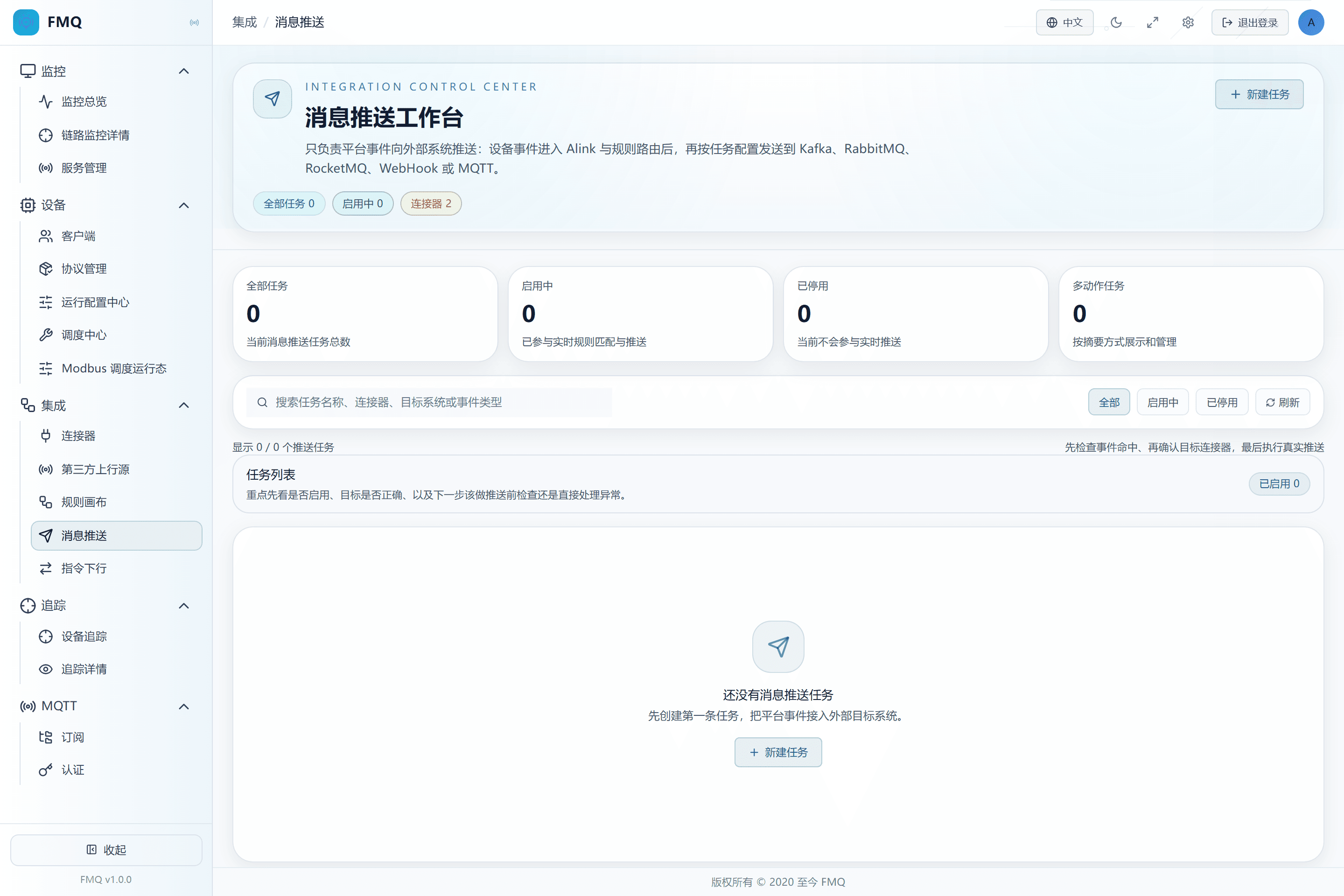
Figure: the Message Push list shows the entries for creating, searching, filtering, and refreshing.
Field Descriptions
| Field / Control | Description |
|---|---|
| Search | Locates by task identity and the description scope supported by the page.; after saving it affects the current task's subsequent checks or sends; re-verify results with a new sample. Optional · Source: task names and similar information in the current list. Choice: if nothing is found, clear the condition and status filters first. Recommended: fill in per the integration documents · Example: FastBee_温度告警推送 |
| Status Filter | Shows only tasks in the selected enabled/disabled state.; after saving it affects the current task's subsequent checks or sends; re-verify results with a new sample. Optional · Source: the task's current status. Choice: when you cannot find a task during troubleshooting, switch to All first. Recommended: fill in per the integration documents · Example: All |
2. Prepare the RabbitMQ Integration Materials
Location: Integration → Message Push
Obtain a usable connector from the RabbitMQ administrator, and confirm the binding relationship among the Exchange, the target queue, and the Routing Key.
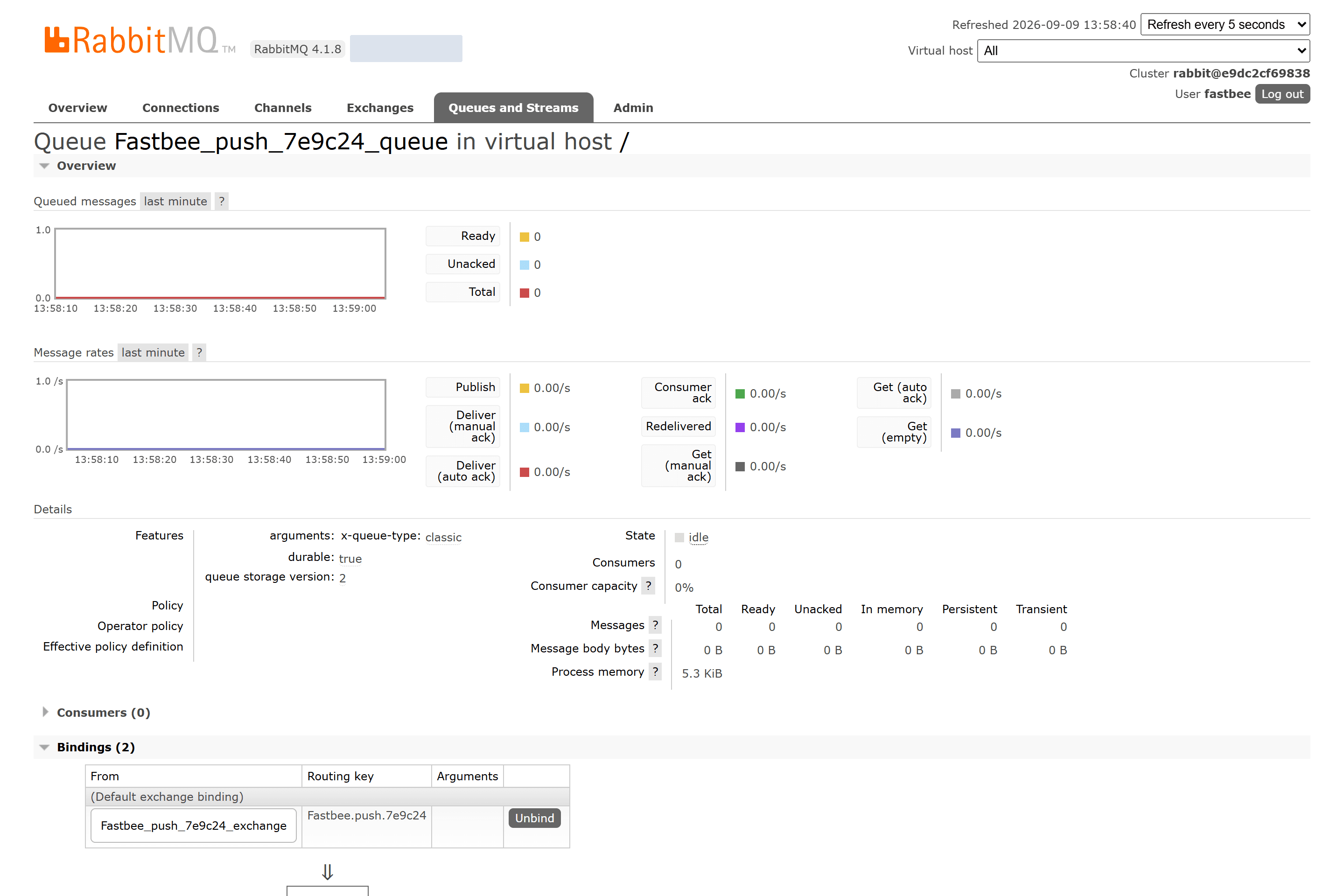
Figure: the dedicated RabbitMQ queue is already bound to this batch's Exchange, the Routing Key matches the integration documents, and there are no messages initially.
Field Descriptions
| Field / Control | Description |
|---|---|
| Connector Source | Reuse uses an existing connection; creating a new one builds a new connection configuration.; after saving it affects the current task's subsequent checks or sends; re-verify results with a new sample. Optional · Source: the existing connector list and business isolation requirements. Choice: prefer reusing a connector that has been validated and targets the correct environment; create a separate one when a new address or independent authentication is needed. Recommended: fill in per the integration documents · Example: prefer using an existing connector |
| Action level: Exchange | Which exchange this task publishes to. Verify the action value separately from the connector default; the walkthrough fills it in explicitly.; after saving it affects the current task's subsequent checks or sends; re-verify results with a new sample. Optional · Source: the RabbitMQ administrator provides the declared exchange and its type. Choice: this example uses a topic exchange; do not put a Queue name here. An empty exchange carries default-exchange semantics and is not used as this example's configuration. Recommended: fill in per the integration documents · Example: FastBee_push_7e9c24_exchange |
| Action level: Routing Key | Matches the binding rule between exchange and queue, deciding which queue the message enters.; after saving it affects the current task's subsequent checks or sends; re-verify results with a new sample. Required · Source: the queue Binding agreement. Choice: verify with the receiver first, then use an actual message to confirm the target received the correct content. Recommended: fill in per the integration documents · Example: FastBee.push.7e9c24 |
3. Fill in the Task Name and Keep It Disabled
Location: Integration → Message Push
Click New Push Task, fill in the task name FastBee_温度告警推送, and switch off the enable toggle first.
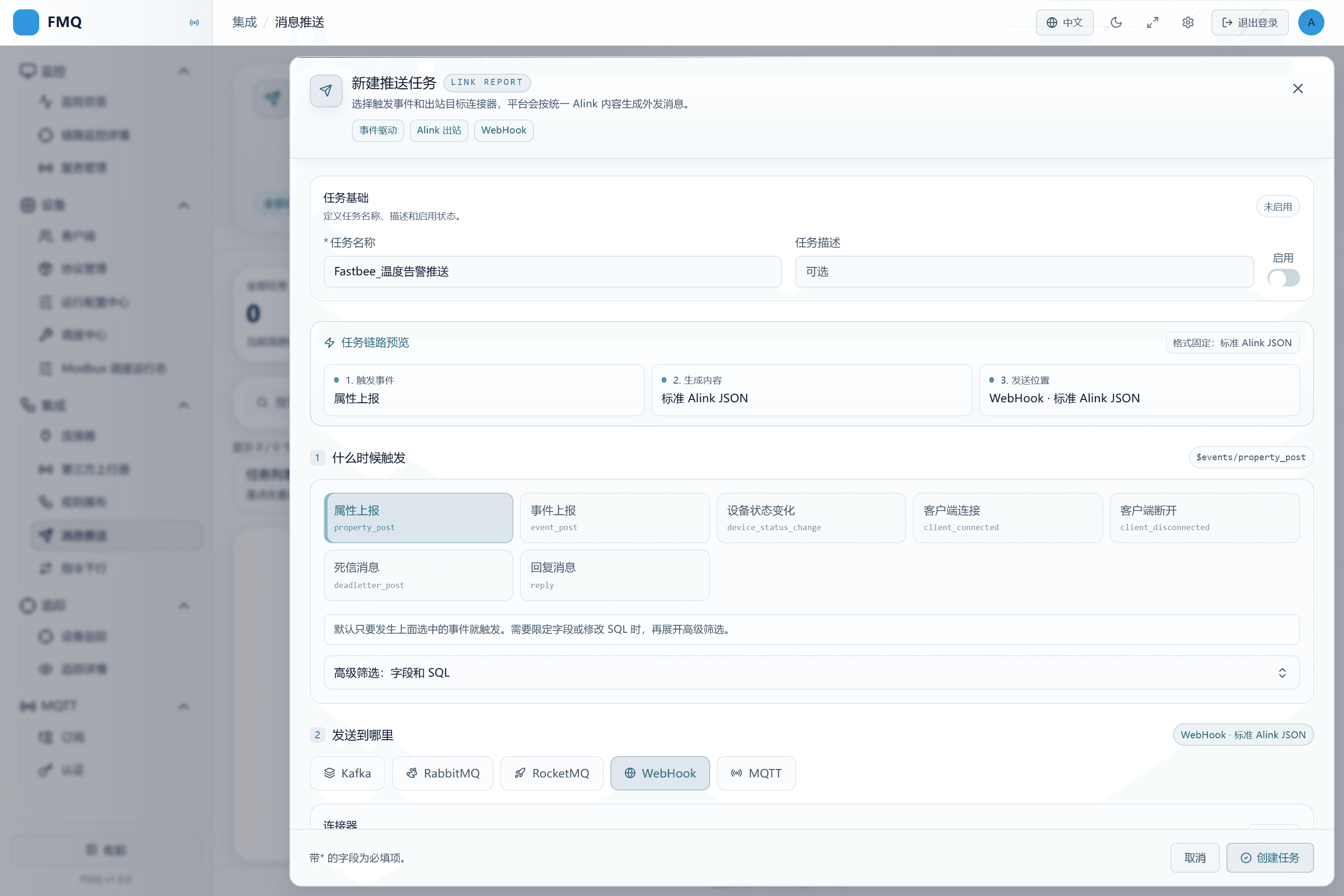
Figure: the new task name is filled in and the enable toggle is off.
Field Descriptions
| Field / Control | Description |
|---|---|
| Task Name | Lets implementers identify the purpose from the list. Do not name it after only the MQ type.; after saving it affects the current task's subsequent checks or sends; re-verify results with a new sample. Required · Source: named by the task owner according to business purpose. Choice: this example uses temperature alarm push, and distinguishes test from production. Recommended: fill in per the integration documents · Example: FastBee_温度告警推送 |
| Task Description | Supplements the trigger condition and receiver; the current save API uses the description as the rule name, so filling in a different description may change the name shown in the list.; after saving it affects the current task's subsequent checks or sends; re-verify results with a new sample. Optional · Source: the task owner. Choice: this example leaves it empty; after saving, go back to the details to verify the name. Recommended: fill in per the integration documents · Example: left empty |
| Enable Status | When enabled, the task joins real-time event matching; when disabled it does not trigger automatically, but a manual real push can still send.; after saving it affects the current task's subsequent checks or sends; re-verify results with a new sample. Optional · Source: choose according to the current debugging or go-live stage. Choice: a new task may be enabled by default; in this example it must be switched off manually and switched on only after closed-loop verification. Recommended: fill in per the integration documents · Example: Disabled |
4. Select the Property Post Event
Location: Integration → Message Push
Under "when to trigger", select Property Post.
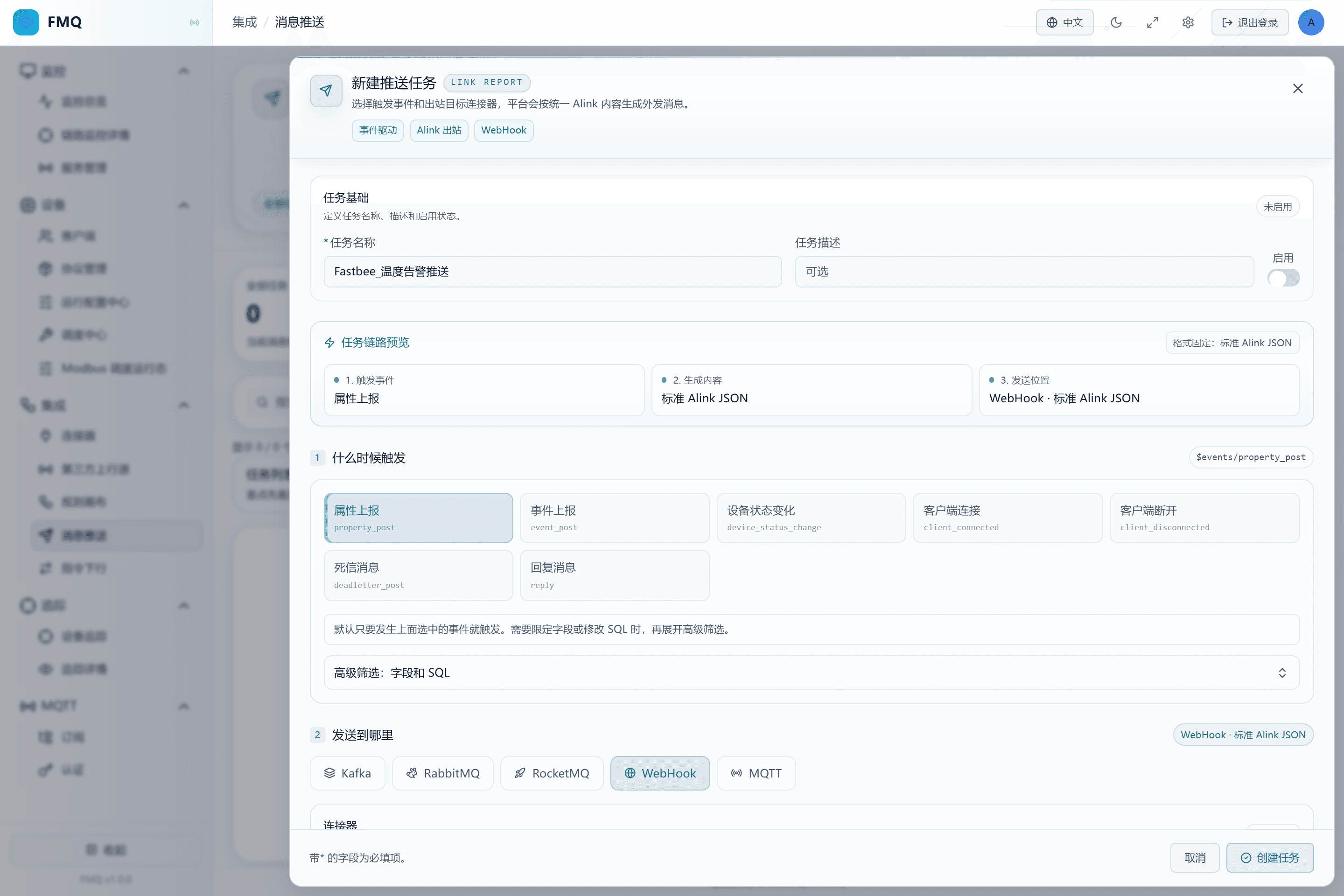
Figure: Property Post is selected, with the event source $events/property_post.
Field Descriptions
| Field / Control | Description |
|---|---|
| Trigger Event | Selects the event category to listen to, not a device Topic directly.; after saving it affects the current task's subsequent checks or sends; re-verify results with a new sample. Required · Source: judge from the device's business behavior. Choice: for temperature measurement data choose Property Post; for online/offline choose Client Connected or Client Disconnected respectively. Recommended: fill in per the integration documents · Example: Property Post |
5. Fill in the Temperature Filter SQL
Location: Integration → Message Push
Expand the advanced filter and fill in the SELECT, FROM, and WHERE given by the manual, with the condition payloadJson.temperature >= 30.
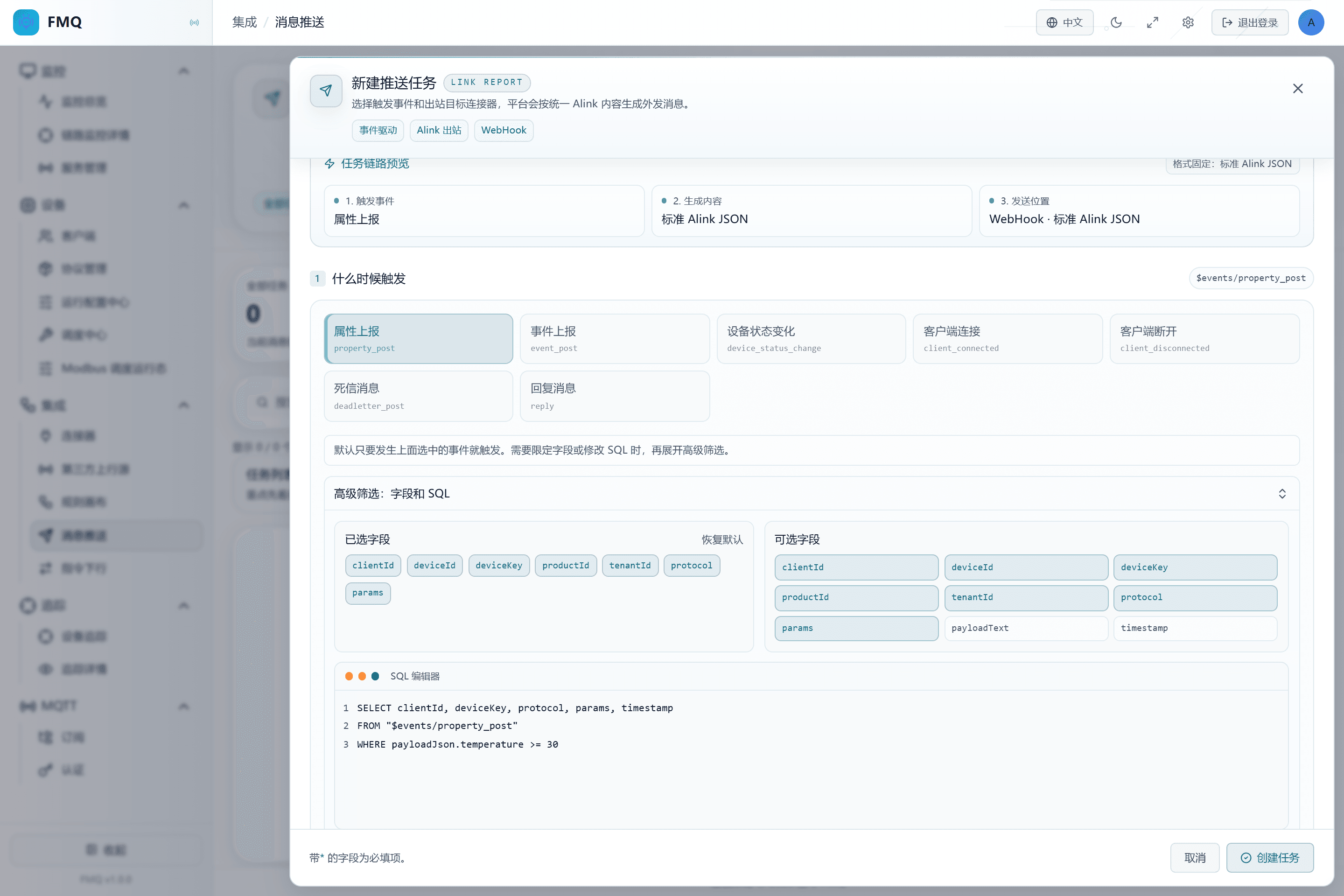
Figure: the SQL filters property post events for messages with temperature greater than or equal to 30.
Field Descriptions
| Field / Control | Description |
|---|---|
| Selected / Available Fields | The selection buttons modify the SELECT list, mainly to make the SQL easier to generate and read.; after saving it affects the current task's subsequent checks or sends; re-verify results with a new sample. Optional · Source: the field catalog of the selected event. Choice: select the fields you care about; the selection does not remove other properties from the outbound params. Recommended: fill in per the integration documents · Example: clientId, deviceKey, protocol, params, timestamp |
| FROM Event Source | Limits which kind of event is accepted.; after saving it affects the current task's subsequent checks or sends; re-verify results with a new sample. Optional · Source: select the page event first, then use the corresponding event source. Choice: wrap the event source in double quotes; Property Post uses this example's value. Recommended: fill in per the integration documents · Example: FROM "$events/property_post" |
| Filter SQL / WHERE | Decides which events meet the send condition; without WHERE, all events from that source pass.; after saving it affects the current task's subsequent checks or sends; re-verify results with a new sample. Optional · Source: business thresholds and real event fields. Choice: use the number 31.5 for temperature, not a string with a unit. The boundary 30 is included, so this example means reaching 30°C rather than strictly exceeding 30°C. Recommended: fill in per the integration documents · Example: SELECT clientId, deviceKey, protocol, params, timestamp FROM "$events/property_post" WHERE payloadJson.temperature >= 30 |
6. Reuse the Validated RabbitMQ Connector
Location: Integration → Message Push
Select RabbitMQ as the push target, choose "prefer using an existing connector" for the connector, and select FastBee_消息推送连接器.
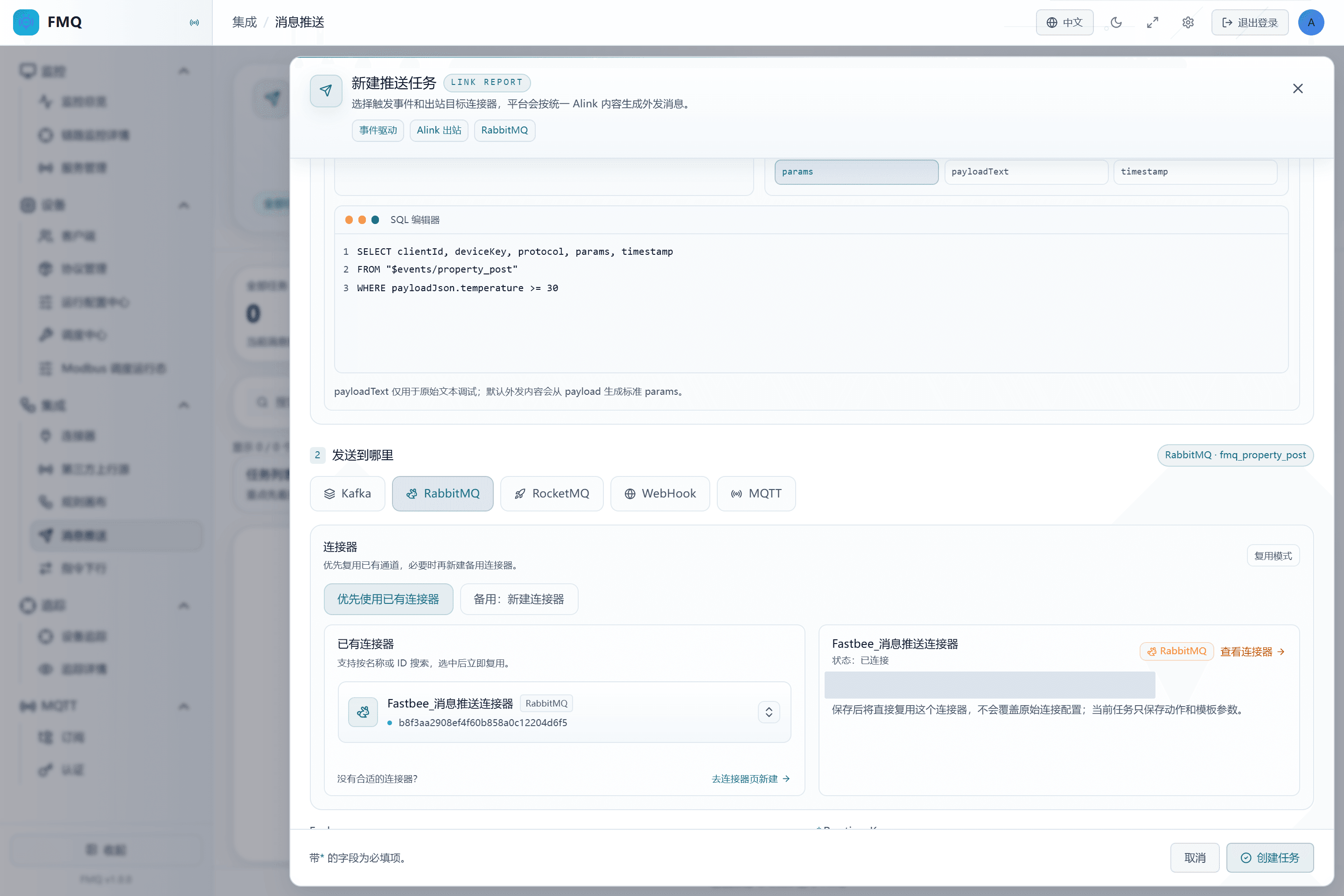
Figure: the RabbitMQ target reuses the dedicated validated connector.
Field Descriptions
| Field / Control | Description |
|---|---|
| Push Target | Selects the message service the receiver actually uses.; after saving it affects the current task's subsequent checks or sends; re-verify results with a new sample. Required · Source: the integration plan provided by the receiving system administrator. Choice: follow the other side's existing protocol; do not choose by icon or familiarity. Recommended: fill in per the integration documents · Example: RabbitMQ |
| Connector Source | Reuse uses an existing connection; creating a new one builds a new connection configuration.; after saving it affects the current task's subsequent checks or sends; re-verify results with a new sample. Optional · Source: the existing connector list and business isolation requirements. Choice: prefer reusing a connector that has been validated and targets the correct environment; create a separate one when a new address or independent authentication is needed. Recommended: fill in per the integration documents · Example: prefer using an existing connector |
| Existing Connector | Selects the concrete connection resource for the current target type.; after saving it affects the current task's subsequent checks or sends; re-verify results with a new sample. Required · Source: the connector list, searchable by name or ID. Choice: verify the target environment and check result; connectors with the same name but different IDs must not be mixed up. Recommended: fill in per the integration documents · Example: FastBee_消息推送连接器 |
7. Fill in the Exchange and Routing Key
Location: Integration → Message Push
Fill in FastBee_push_7e9c24_exchange for Exchange and FastBee.push.7e9c24 for Routing Key.
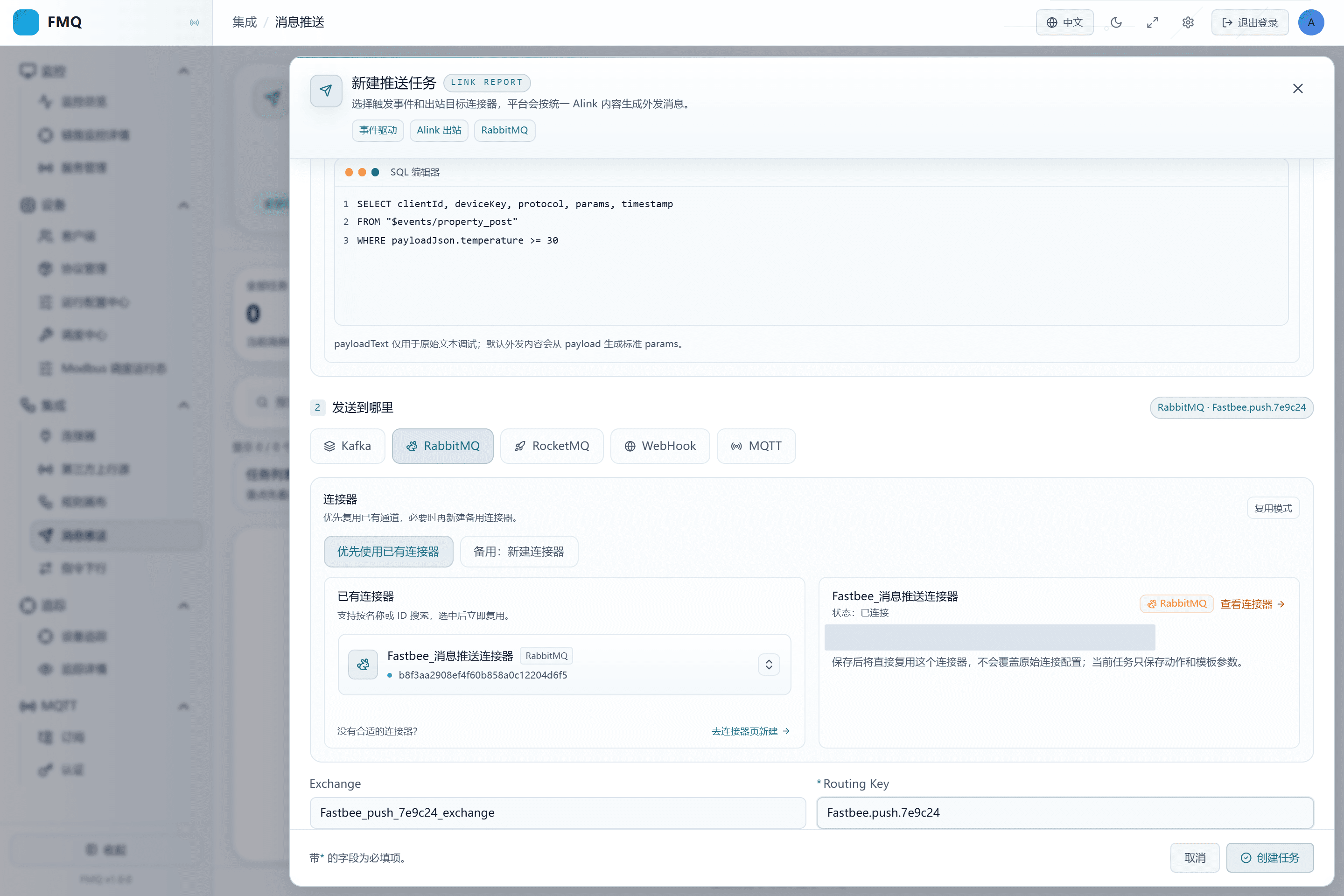
Figure: the task action fills in the Exchange and Routing Key separately, without modifying the connector authentication.
Field Descriptions
| Field / Control | Description |
|---|---|
| Action level: Exchange | Which exchange this task publishes to. Verify the action value separately from the connector default; the walkthrough fills it in explicitly.; after saving it affects the current task's subsequent checks or sends; re-verify results with a new sample. Optional · Source: the RabbitMQ administrator provides the declared exchange and its type. Choice: this example uses a topic exchange; do not put a Queue name here. An empty exchange carries default-exchange semantics and is not used as this example's configuration. Recommended: fill in per the integration documents · Example: FastBee_push_7e9c24_exchange |
| Action level: Routing Key | Matches the binding rule between exchange and queue, deciding which queue the message enters.; after saving it affects the current task's subsequent checks or sends; re-verify results with a new sample. Required · Source: the queue Binding agreement. Choice: verify with the receiver first, then use an actual message to confirm the target received the correct content. Recommended: fill in per the integration documents · Example: FastBee.push.7e9c24 |
8. Create the Disabled Task
Location: Integration → Message Push
Click Create Task, and after returning to the details confirm again that the task is still disabled.
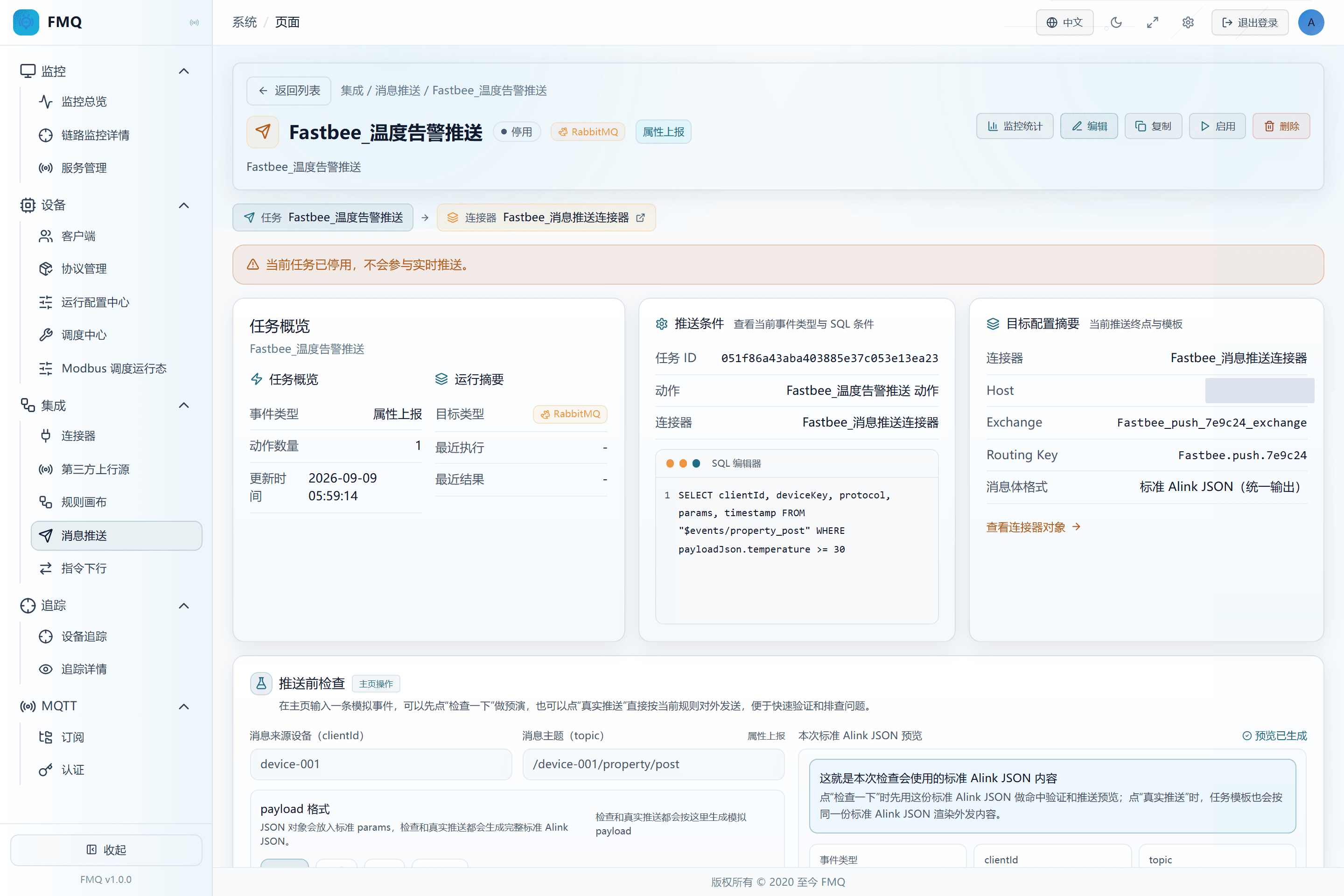
Figure: the task has been created and saved from the page, is currently disabled, and the details show the property event and RabbitMQ target.
Field Descriptions
| Field / Control | Description |
|---|---|
| Enable Status | When enabled, the task joins real-time event matching; when disabled it does not trigger automatically, but a manual real push can still send.; after saving it affects the current task's subsequent checks or sends; re-verify results with a new sample. Optional · Source: choose according to the current debugging or go-live stage. Choice: a new task may be enabled by default; in this example it must be switched off manually and switched on only after closed-loop verification. Recommended: fill in per the integration documents · Example: Disabled |
9. Verify No Match with 25°C
Location: Integration → Message Push
Enter temperature=25 in the test area and click Check.
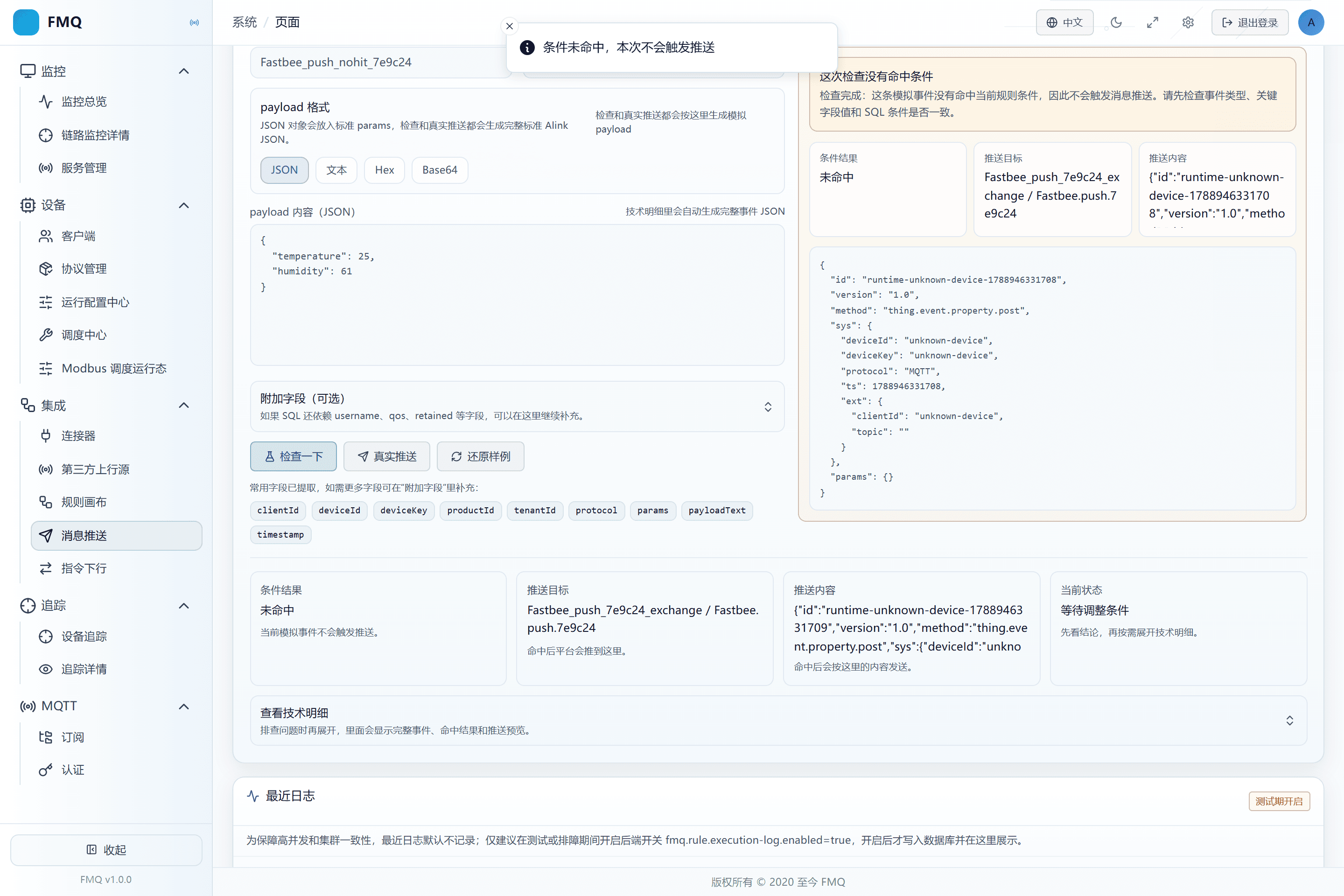
Figure: the 25-degree check does not match, and no real push is executed.
Field Descriptions
| Field / Control | Description |
|---|---|
| Filter SQL / WHERE | Decides which events meet the send condition; without WHERE, all events from that source pass.; after saving it affects the current task's subsequent checks or sends; re-verify results with a new sample. Optional · Source: business thresholds and real event fields. Choice: use the number 31.5 for temperature, not a string with a unit. The boundary 30 is included, so this example means reaching 30°C rather than strictly exceeding 30°C. Recommended: fill in per the integration documents · Example: SELECT clientId, deviceKey, protocol, params, timestamp FROM "$events/property_post" WHERE payloadJson.temperature >= 30 |
10. Verify a Match with 31.5°C
Location: Integration → Message Push
Change the test temperature to 31.5 and click Check again.
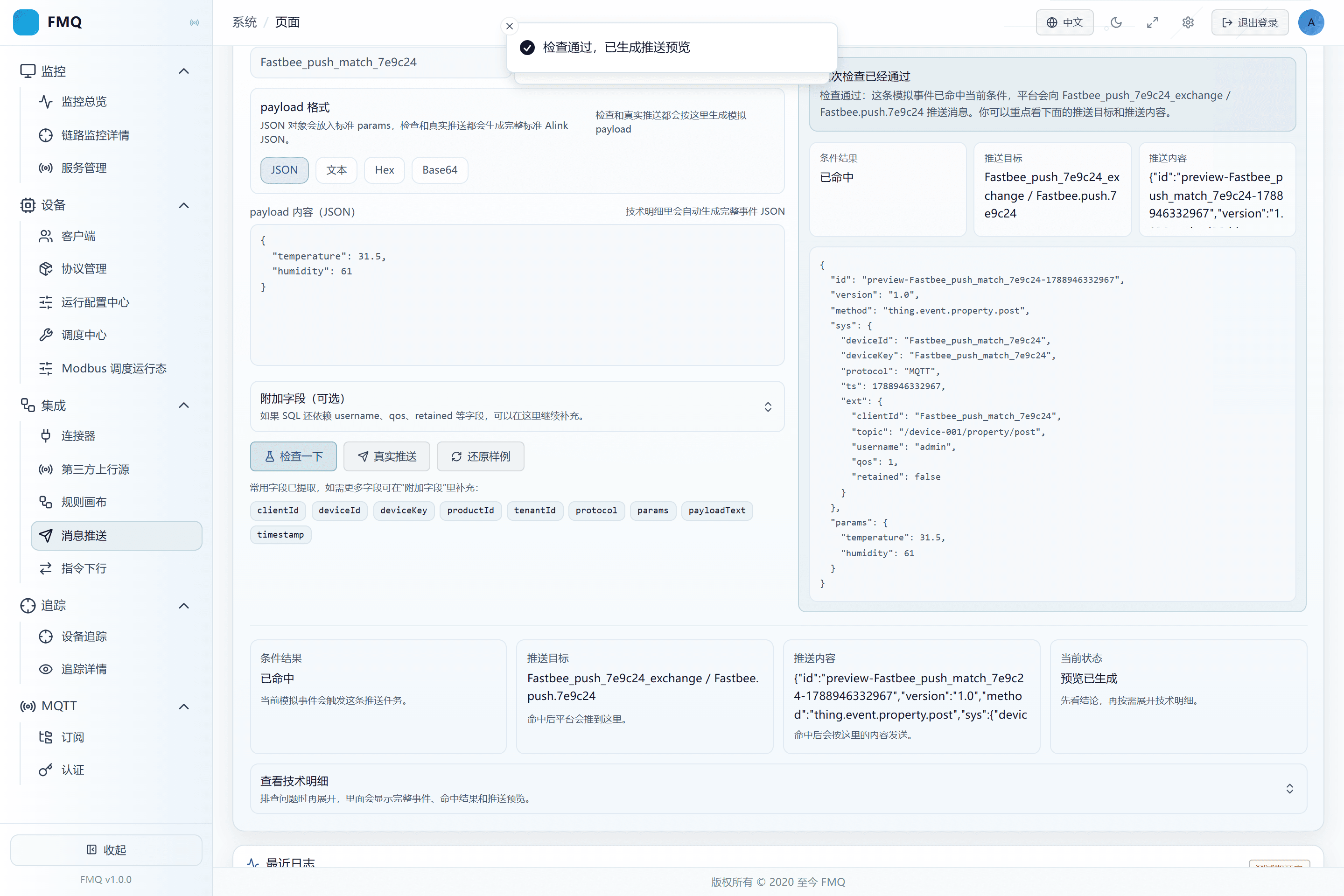
Figure: the 31.5-degree check matches and generates an Alink preview, but nothing has been really sent yet.
Field Descriptions
| Field / Control | Description |
|---|---|
| Filter SQL / WHERE | Decides which events meet the send condition; without WHERE, all events from that source pass.; after saving it affects the current task's subsequent checks or sends; re-verify results with a new sample. Optional · Source: business thresholds and real event fields. Choice: use the number 31.5 for temperature, not a string with a unit. The boundary 30 is included, so this example means reaching 30°C rather than strictly exceeding 30°C. Recommended: fill in per the integration documents · Example: SELECT clientId, deviceKey, protocol, params, timestamp FROM "$events/property_post" WHERE payloadJson.temperature >= 30 |
11. Execute a Real Push While Disabled
Location: Integration → Message Push
Keep the task disabled, click Real Push, and confirm sending with the current simulated event.
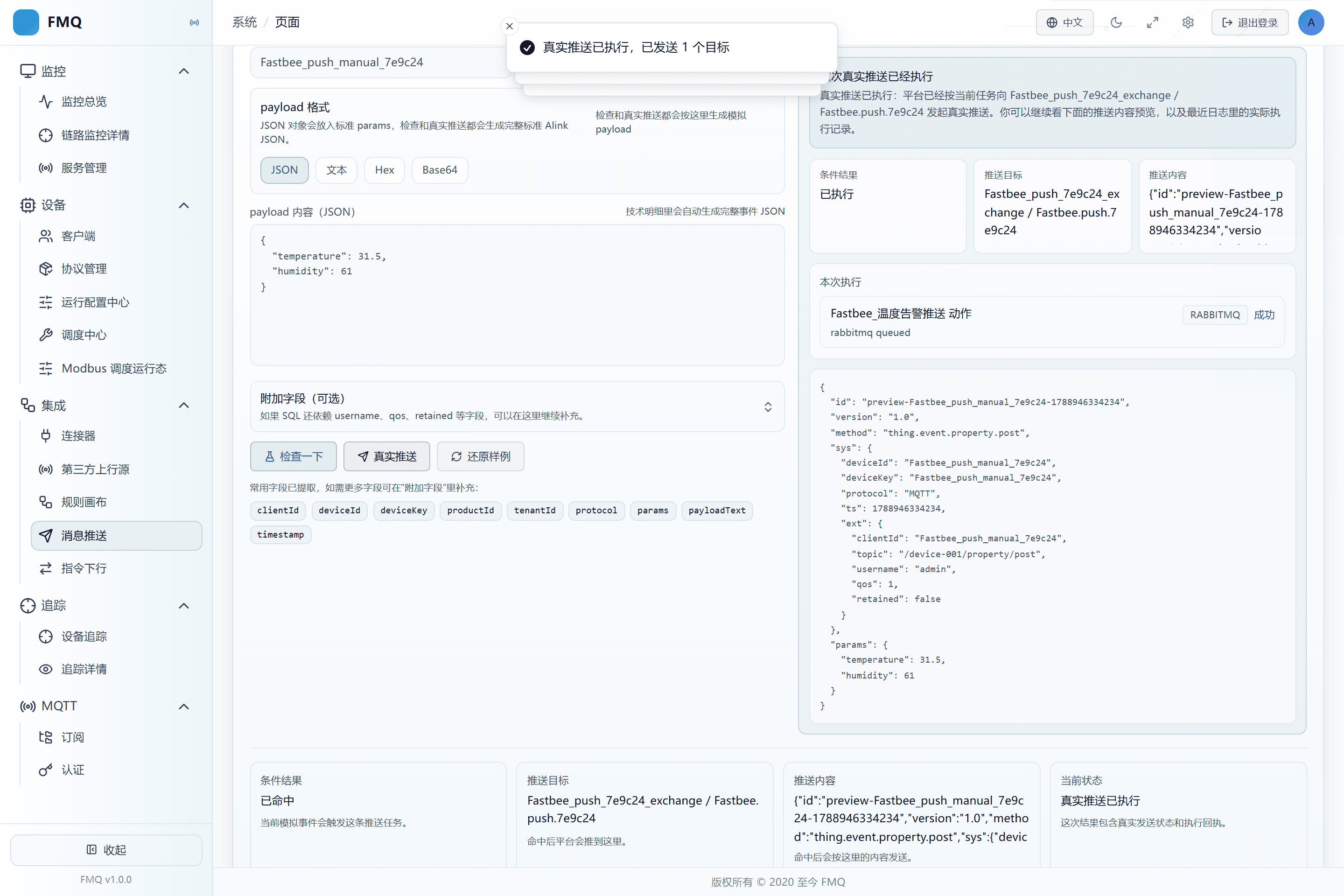
Figure: the disabled task submitted the RabbitMQ action through a manual real push.
Field Descriptions
| Field / Control | Description |
|---|---|
| Enable Status | When enabled, the task joins real-time event matching; when disabled it does not trigger automatically, but a manual real push can still send.; after saving it affects the current task's subsequent checks or sends; re-verify results with a new sample. Optional · Source: choose according to the current debugging or go-live stage. Choice: a new task may be enabled by default; in this example it must be switched off manually and switched on only after closed-loop verification. Recommended: fill in per the integration documents · Example: Disabled |
12. Distinguish Action Submission from Broker Actual Success
Location: Integration → Message Push
Open Monitoring and review submitted successfully, actually succeeded, backlog, discarded, queue capacity, and the latest exception separately.
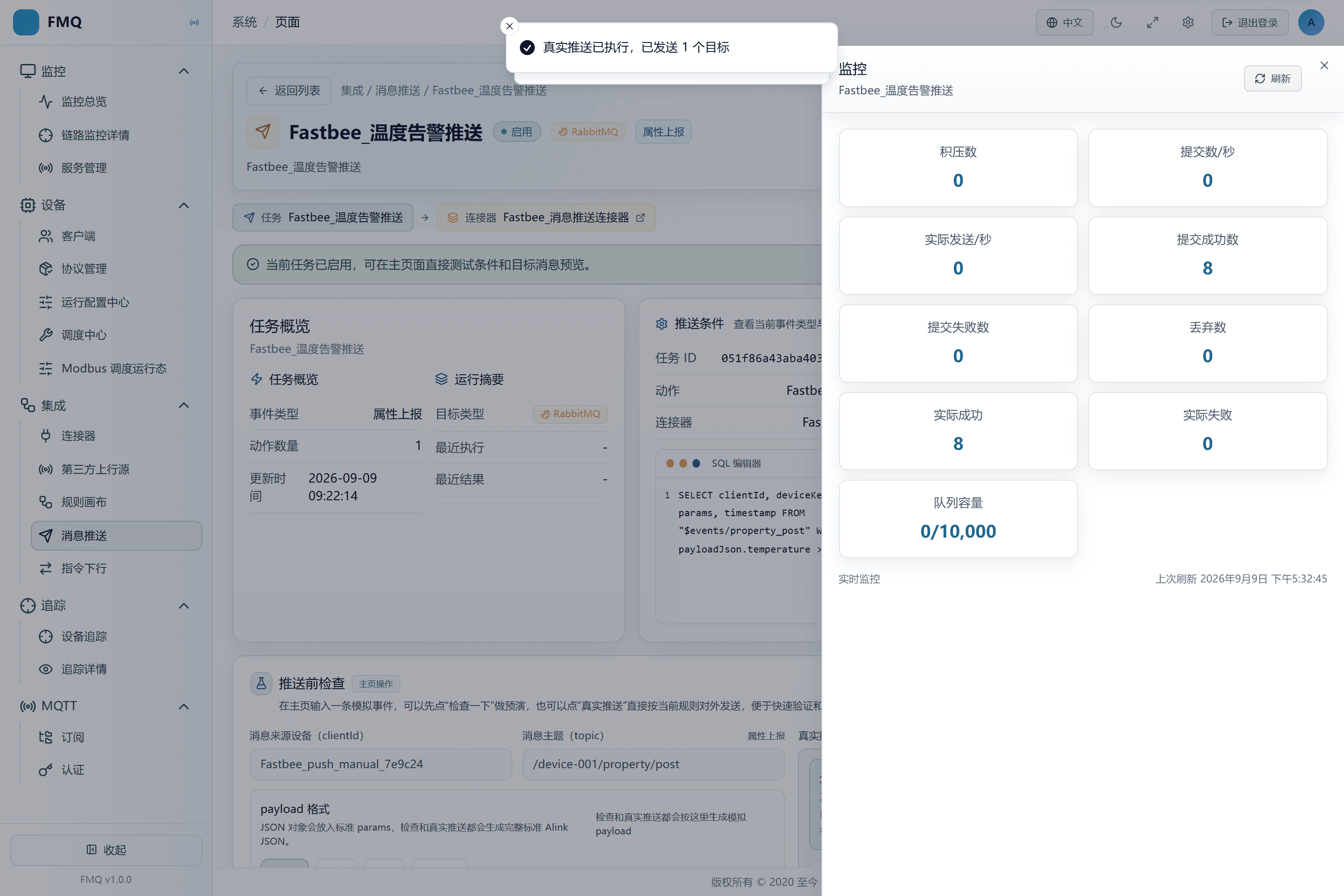
Figure: the task monitoring shows submitted successfully, actually succeeded, backlog, and capacity separately.
13. First Verify the Routing and Alink Envelope of the Received Message
Location: Integration → Message Push
In the approved RabbitMQ management interface, read FastBee_push_7e9c24_queue, and first verify the message number, Exchange, Routing Key, and the Alink id, version, method, and sys.
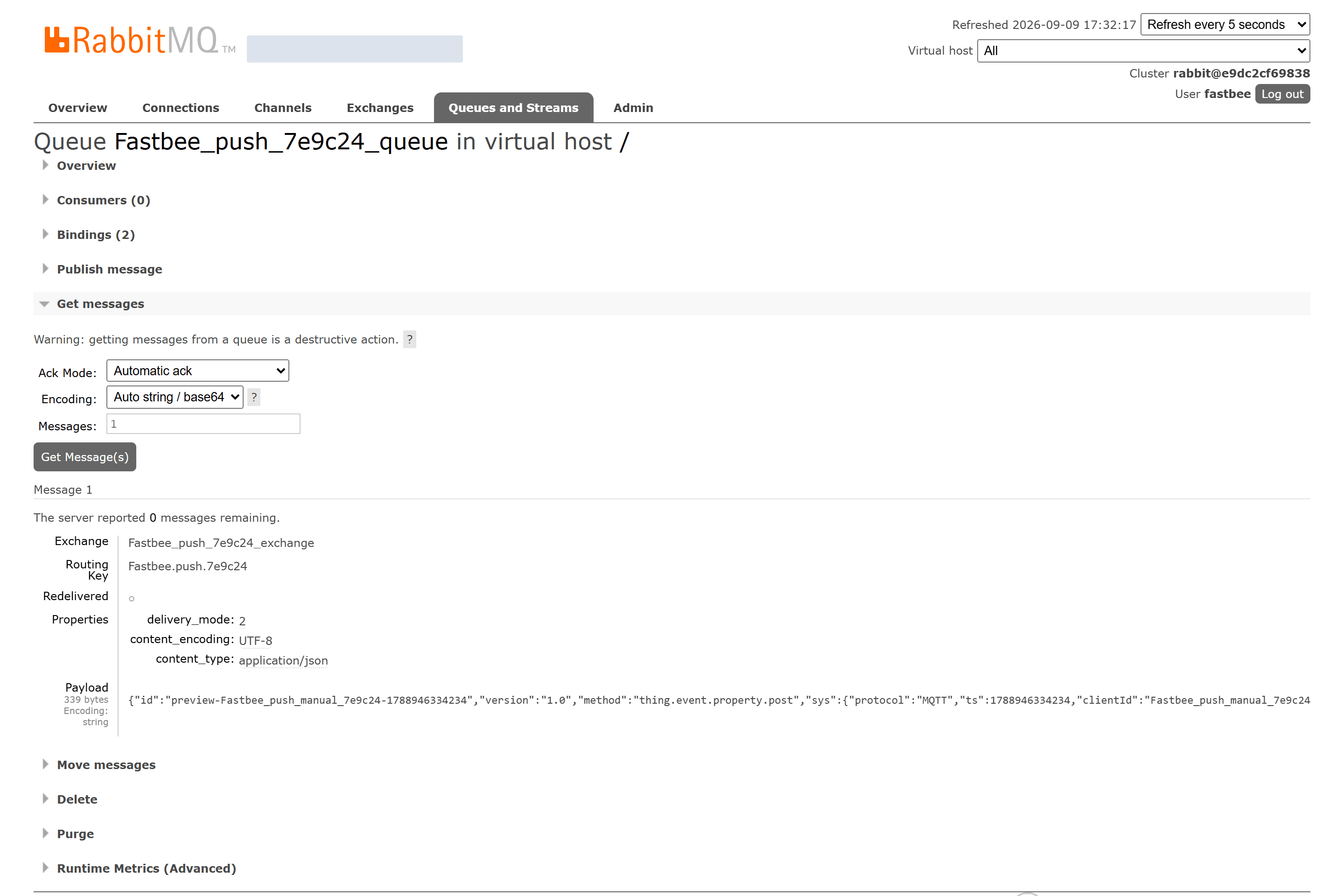
Figure: the RabbitMQ target queue received Message 1, with the Exchange, Routing Key, and Alink envelope fields correct.
14. Then Verify the params of the Same Message
Location: Integration → Message Push
Stay on the Message 1 just read and look horizontally at the tail of the Payload.
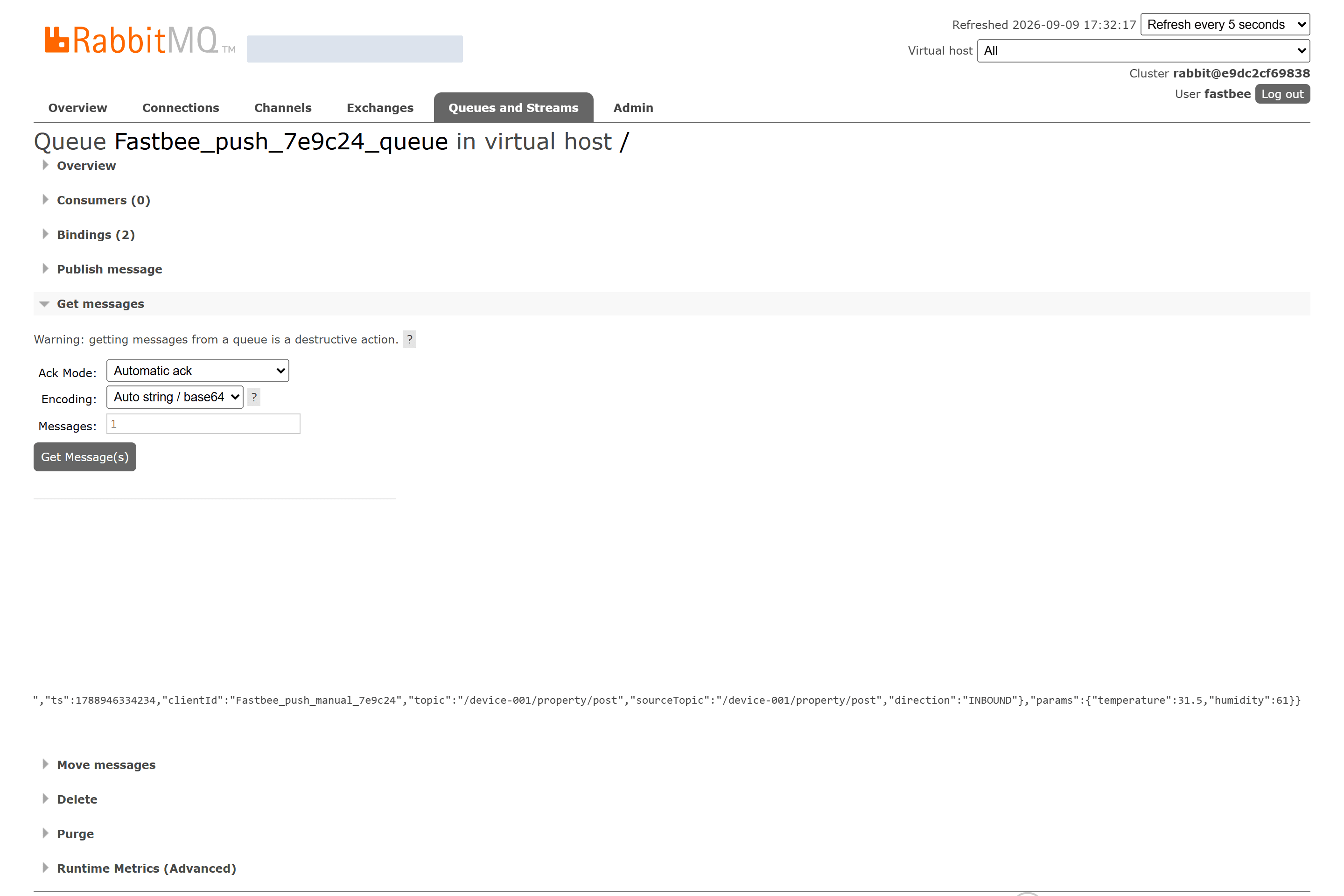
Figure: the tail of the same Message 1's Payload shows params.temperature=31.5.
15. Change the Isolated Task to a Wrong Routing Key
Location: Integration → Message Push
In the isolated task, change the Routing Key to FastBee.push.7e9c24.missing and save, then execute a real push again with 31.5°C.
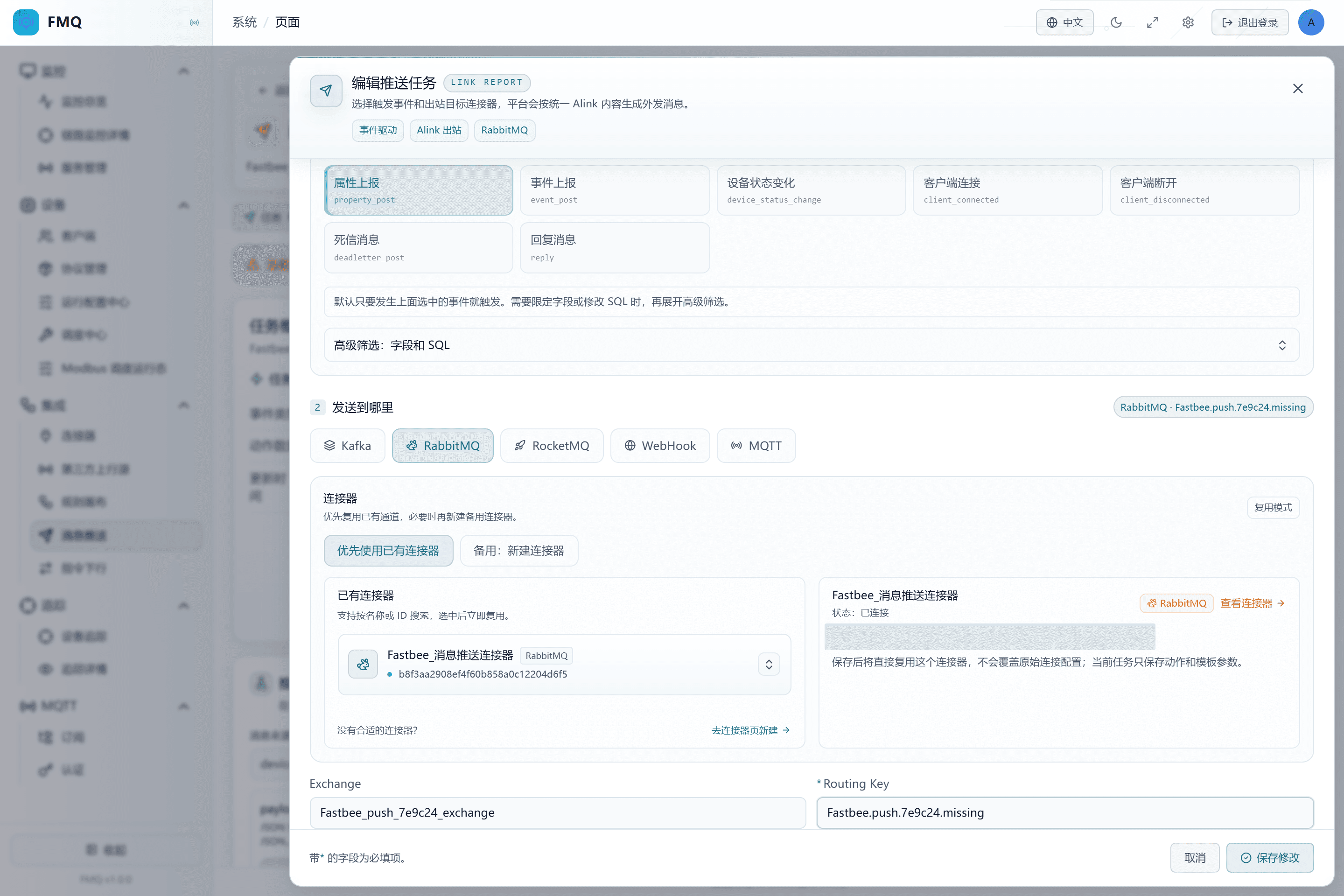
Figure: the current task's Routing Key is filled in as FastBee.push.7e9c24.missing
Field Descriptions
| Field / Control | Description |
|---|---|
| Action level: Routing Key | Matches the binding rule between exchange and queue, deciding which queue the message enters.; after saving it affects the current task's subsequent checks or sends; re-verify results with a new sample. Required · Source: the queue Binding agreement. Choice: verify with the receiver first, then use an actual message to confirm the target received the correct content. Recommended: fill in per the integration documents · Example: FastBee.push.7e9c24 |
16. Confirm the Wrong Route Is Still Accepted by the Broker
Location: Integration → Message Push
After executing this real push, open Monitoring Statistics and record the Broker actual success count.
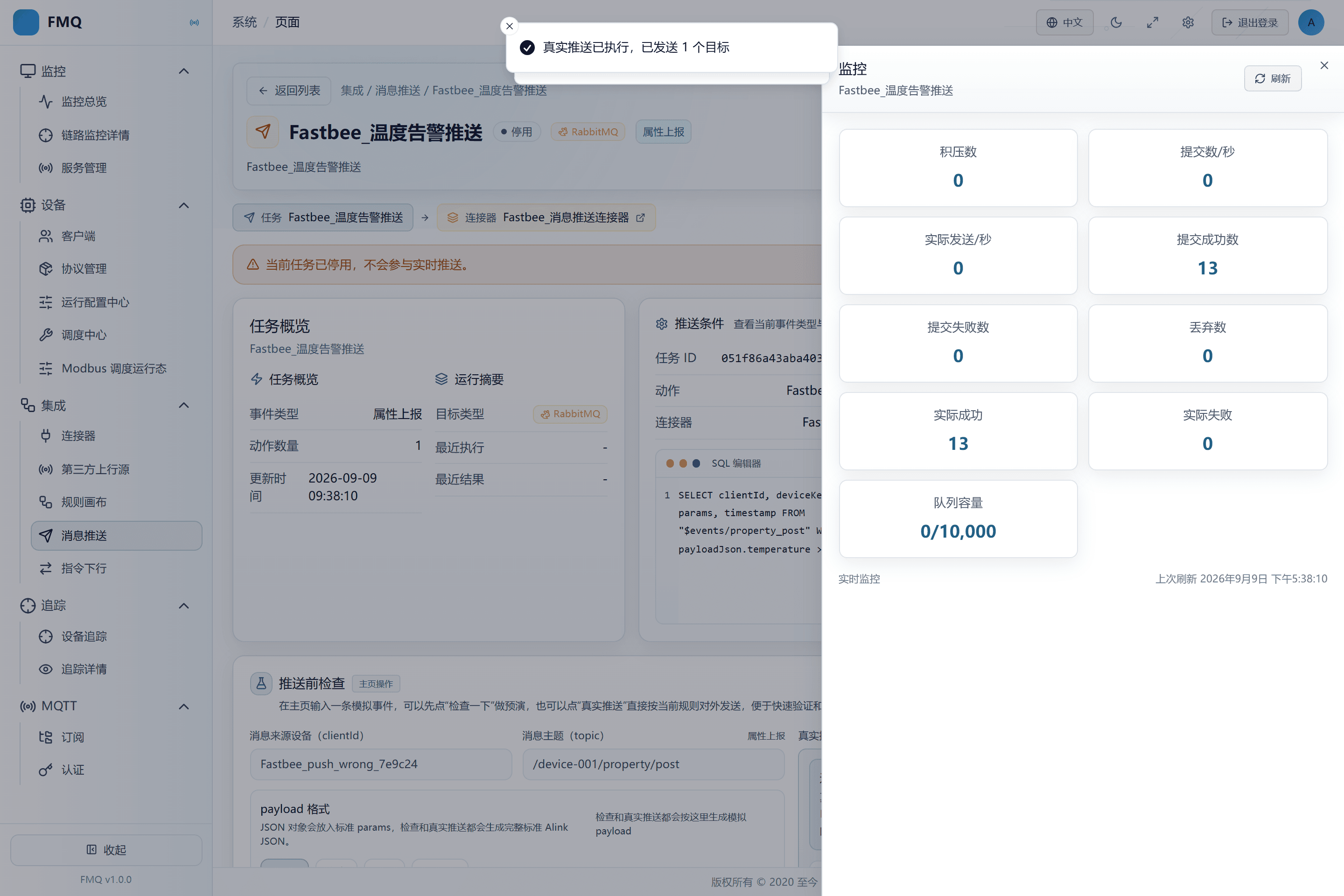
Figure: the task monitoring shows submitted successfully, actually succeeded, backlog, and capacity separately.
17. Confirm the Wrong Route Did Not Enter the Target Queue
Location: Integration → Message Push
Open FastBee_push_7e9c24_queue and expand Overview; confirm Ready is 0 and there are no other consumers.
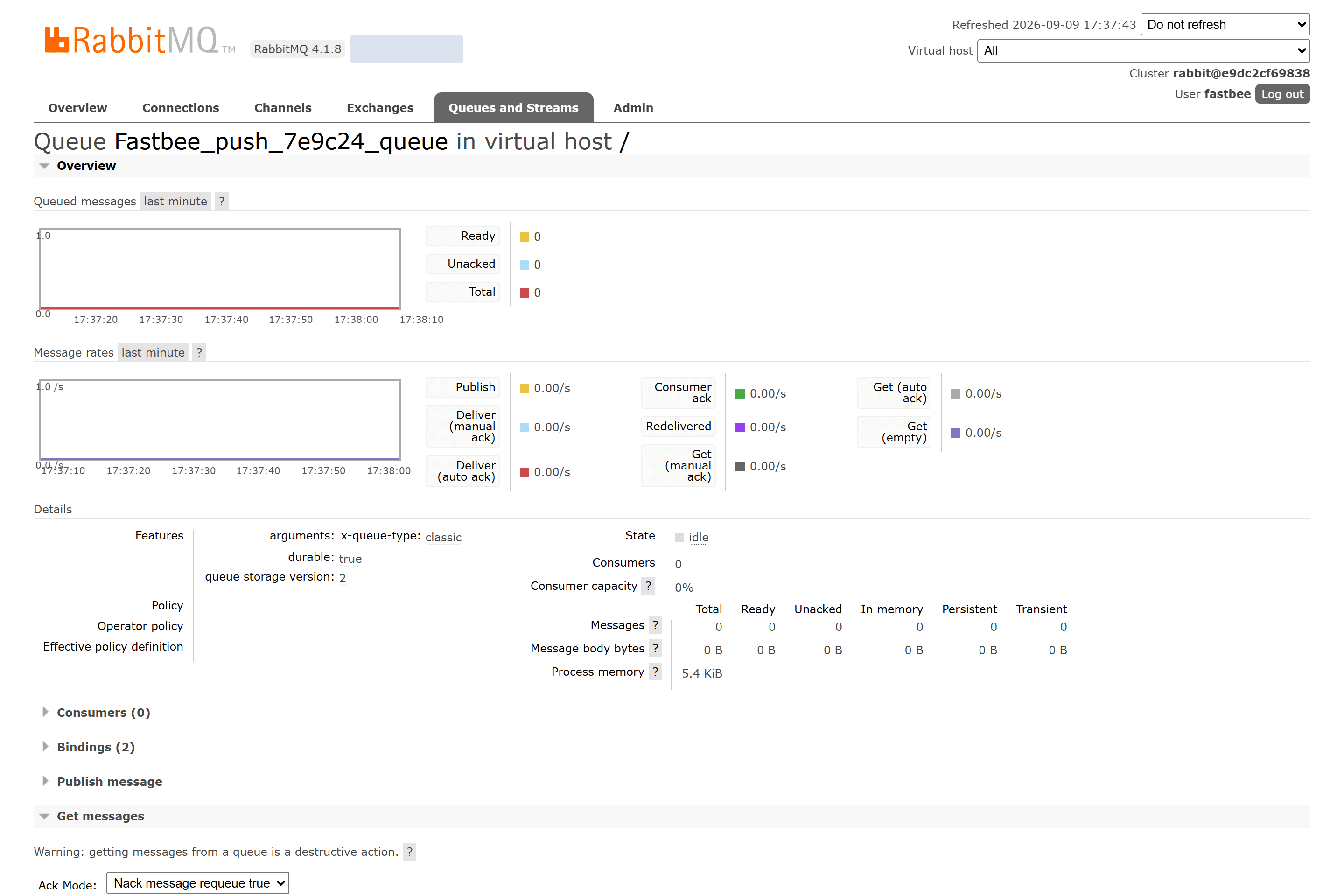
Figure: the wrong Routing Key was confirmed by the Broker, but the dedicated queue shows Ready=0, Unacked=0, Total=0 and no other consumers.
Field Descriptions
| Field / Control | Description |
|---|---|
| Action level: Routing Key | Matches the binding rule between exchange and queue, deciding which queue the message enters.; after saving it affects the current task's subsequent checks or sends; re-verify results with a new sample. Required · Source: the queue Binding agreement. Choice: verify with the receiver first, then use an actual message to confirm the target received the correct content. Recommended: fill in per the integration documents · Example: FastBee.push.7e9c24 |
18. Change Back to the Correct Routing Key
Location: Integration → Message Push
Change the Routing Key back to FastBee.push.7e9c24 and save, then execute a real push again with 31.5°C.
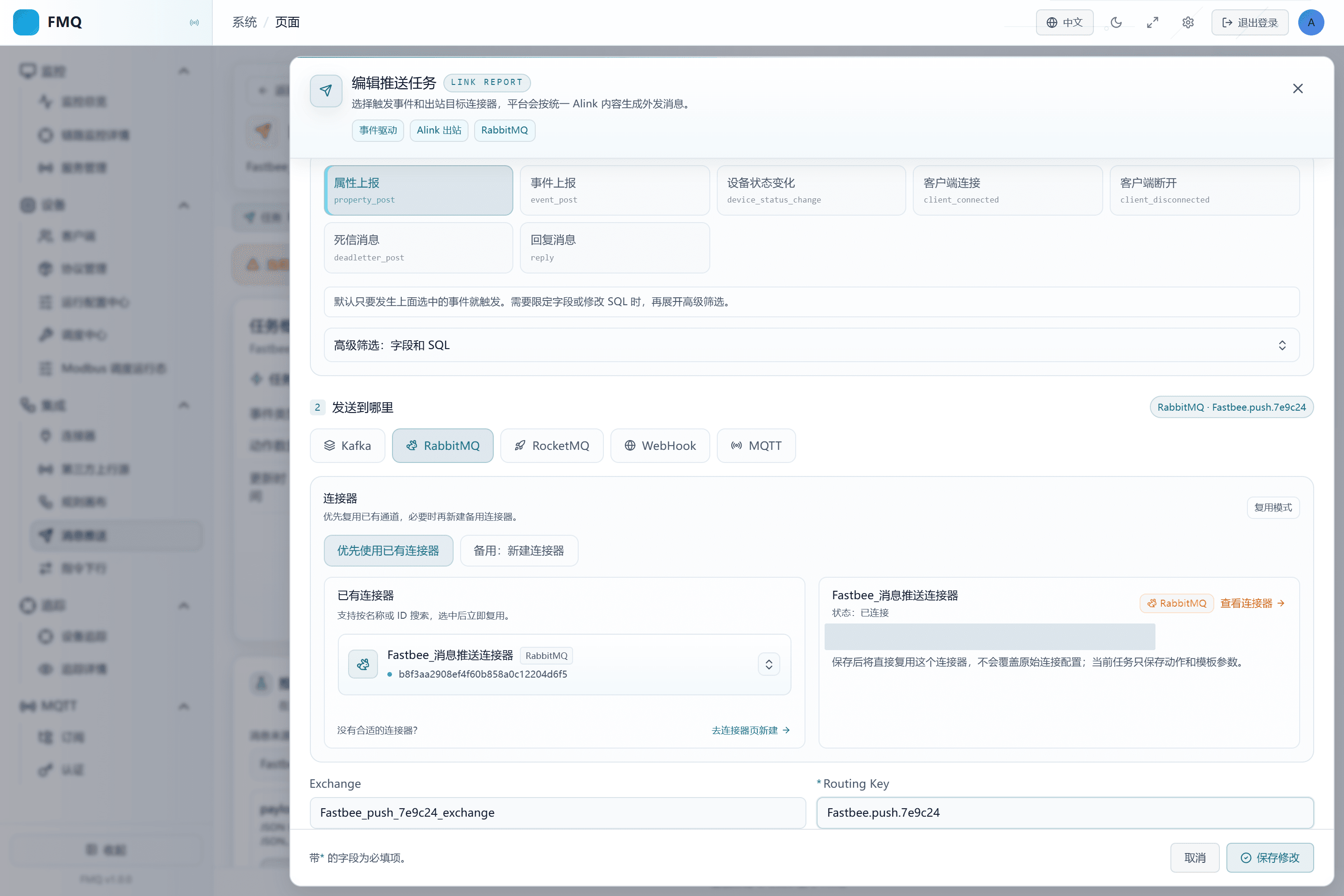
Figure: the current task's Routing Key is filled in as FastBee.push.7e9c24
Field Descriptions
| Field / Control | Description |
|---|---|
| Action level: Routing Key | Matches the binding rule between exchange and queue, deciding which queue the message enters.; after saving it affects the current task's subsequent checks or sends; re-verify results with a new sample. Required · Source: the queue Binding agreement. Choice: verify with the receiver first, then use an actual message to confirm the target received the correct content. Recommended: fill in per the integration documents · Example: FastBee.push.7e9c24 |
19. Confirm the Broker Succeeds Again After Recovery
Location: Integration → Message Push
Open Monitoring and confirm that the post-recovery real push increases submitted successfully and actual success again.
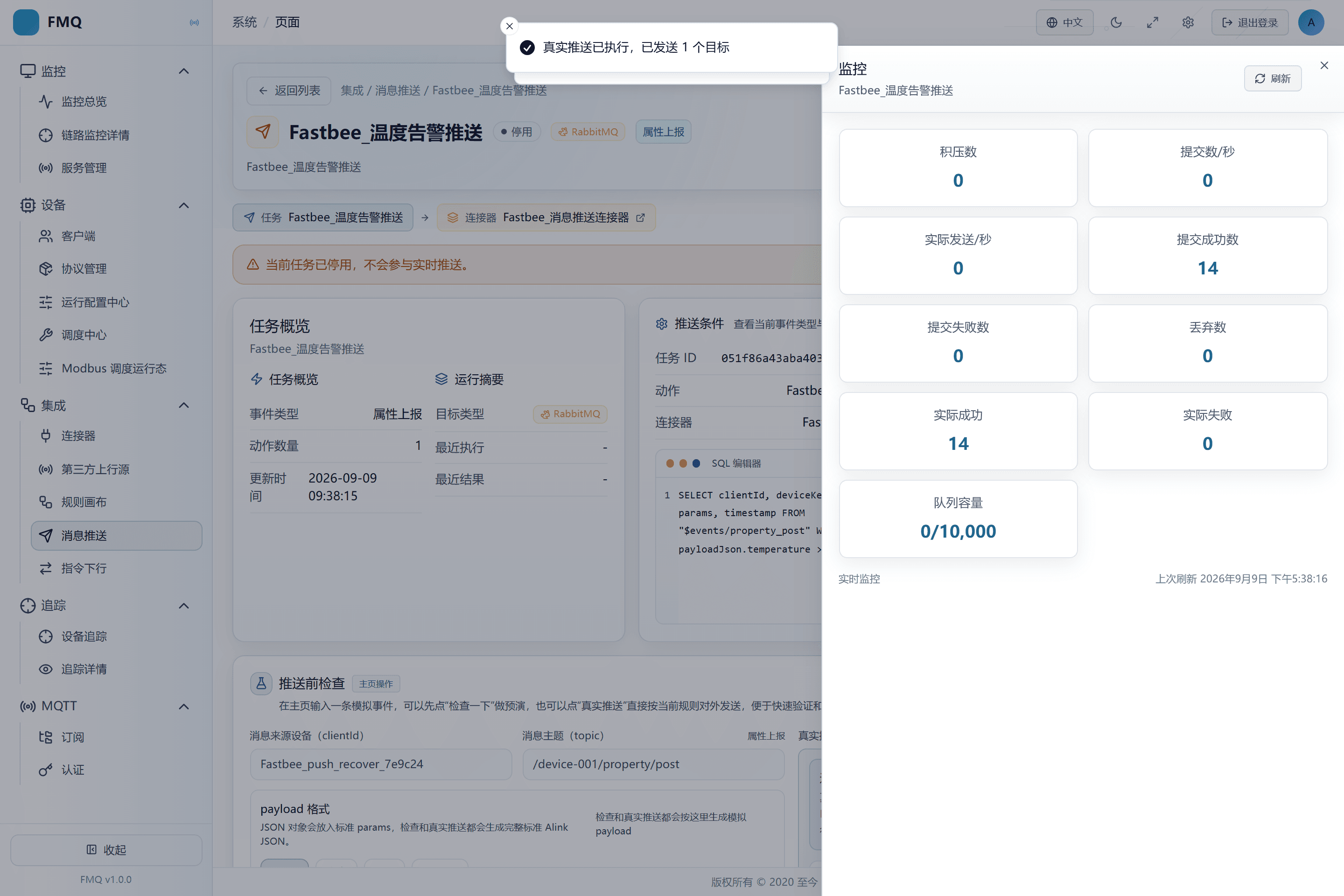
Figure: the task monitoring shows submitted successfully, actually succeeded, backlog, and capacity separately.
20. Confirm the Correct Route Restores External Actual Receipt
Location: Integration → Message Push
Read the Message 1 that newly arrived in the target queue after recovery, and look at the tail of the Payload.
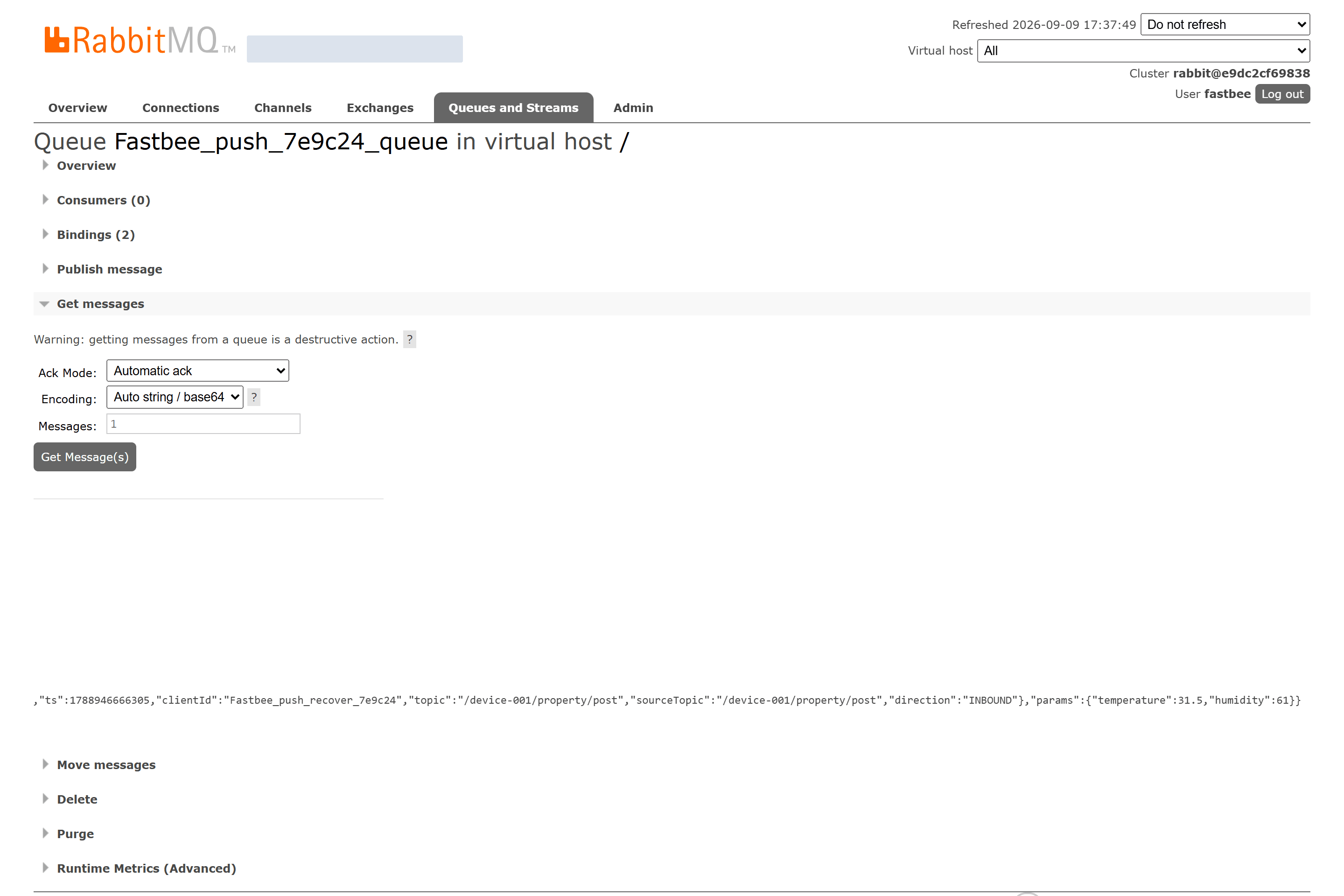
Figure: the RabbitMQ target queue actually received this round, params.temperature=31.5; after confirming the read, remove the message from the dedicated queue.
21. Enable the Task
Location: Integration → Message Push
Return to the task details and click Enable.
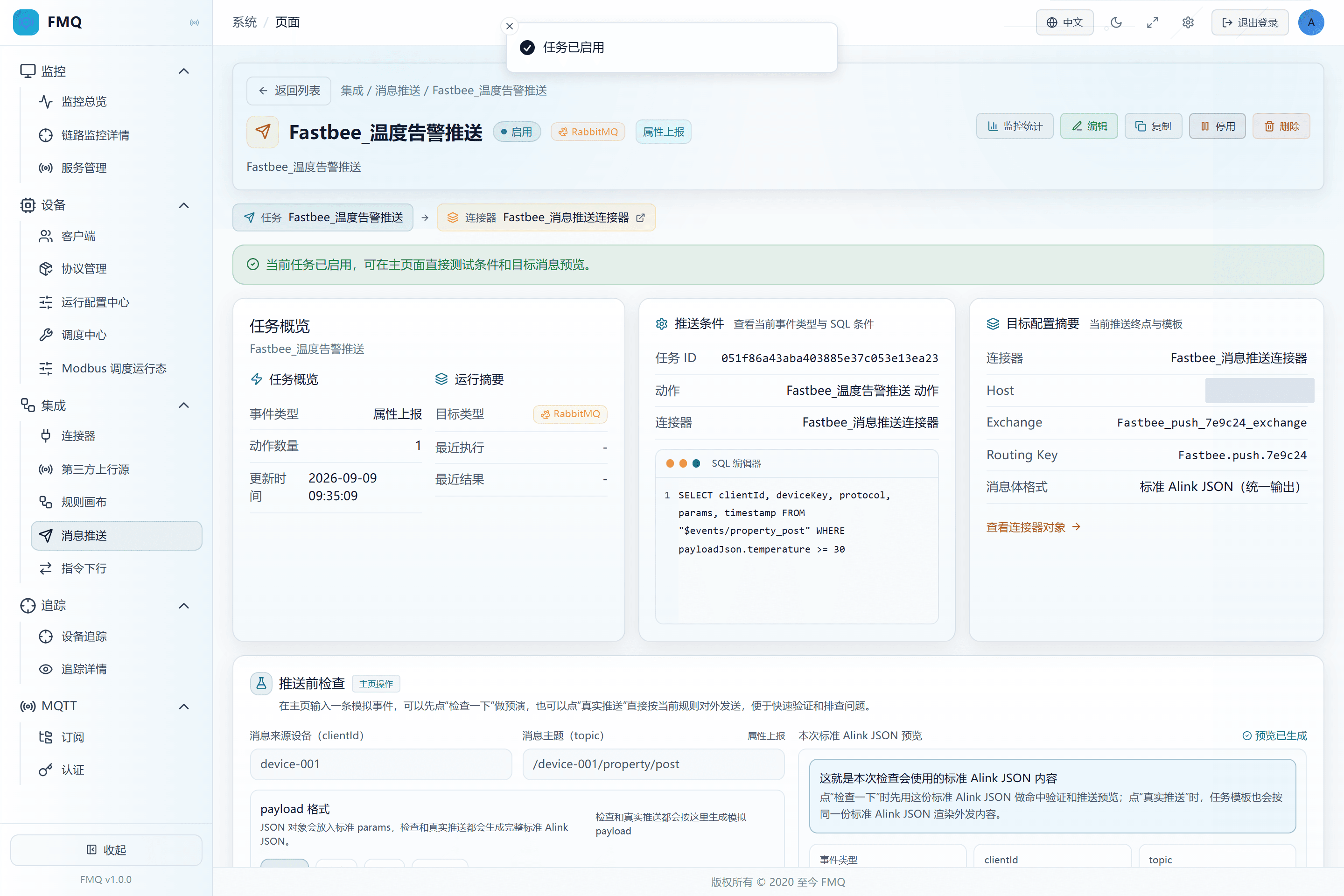
Figure: the task is enabled and ready to receive real device property events.
Field Descriptions
| Field / Control | Description |
|---|---|
| Enable Status | When enabled, the task joins real-time event matching; when disabled it does not trigger automatically, but a manual real push can still send.; after saving it affects the current task's subsequent checks or sends; re-verify results with a new sample. Optional · Source: choose according to the current debugging or go-live stage. Choice: a new task may be enabled by default; in this example it must be switched off manually and switched on only after closed-loop verification. Recommended: fill in per the integration documents · Example: Disabled |
22. Send a 32.6°C Property Event with the LinkPilot GUI
Location: Integration → Message Push
Establish a real MQTT session in the LinkPilot GUI and send a device property JSON with temperature=32.6 to the current FMQ. FMQ assembles it into a standard Alink message on the uplink.
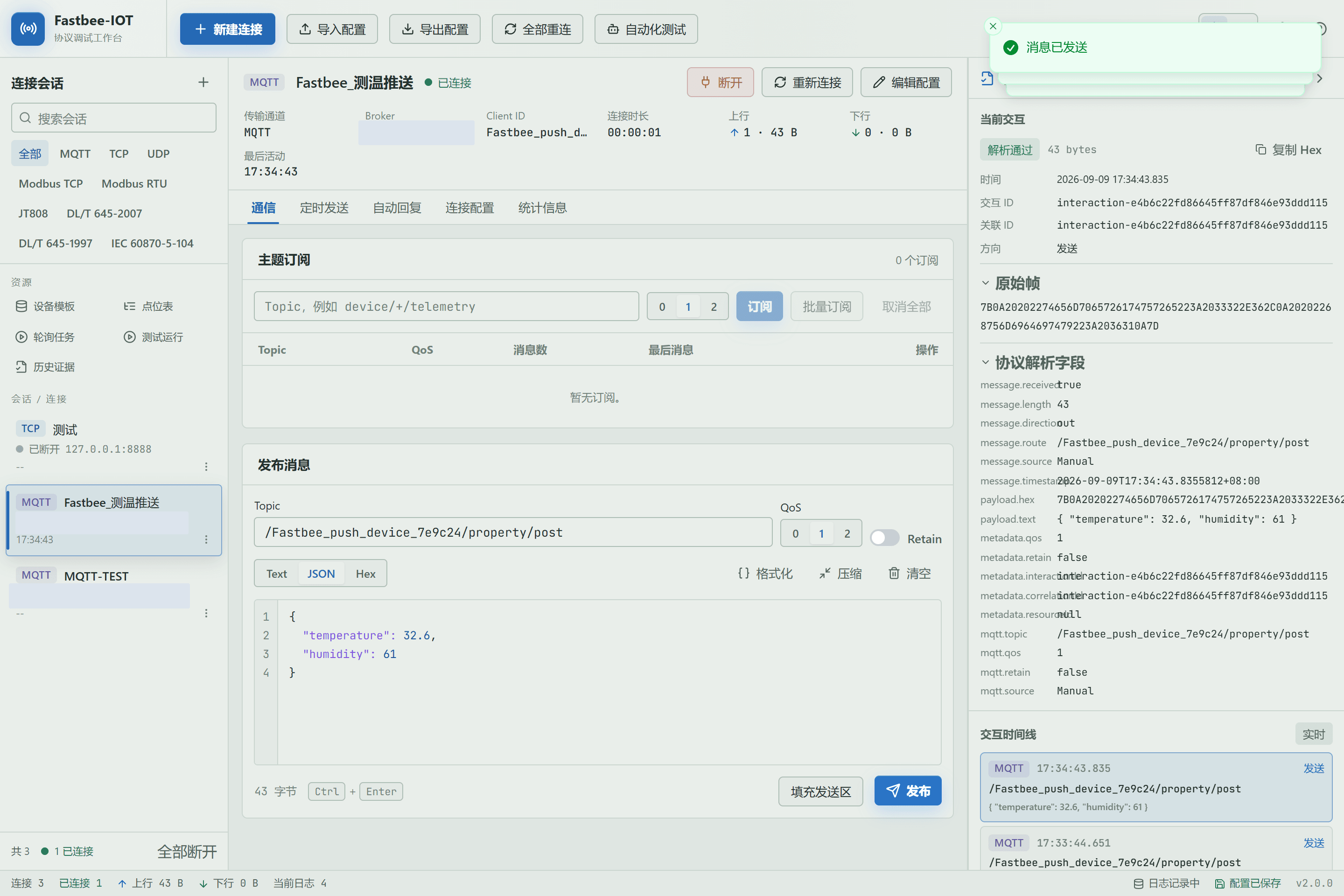
Figure: the LinkPilot real MQTT session sends a device property JSON with temperature=32.6; FMQ assembles a standard Alink message on the uplink.
Field Descriptions
| Field / Control | Description |
|---|---|
| Enable Status | When enabled, the task joins real-time event matching; when disabled it does not trigger automatically, but a manual real push can still send.; after saving it affects the current task's subsequent checks or sends; re-verify results with a new sample. Optional · Source: choose according to the current debugging or go-live stage. Choice: a new task may be enabled by default; in this example it must be switched off manually and switched on only after closed-loop verification. Recommended: fill in per the integration documents · Example: Disabled |
| Filter SQL / WHERE | Decides which events meet the send condition; without WHERE, all events from that source pass.; after saving it affects the current task's subsequent checks or sends; re-verify results with a new sample. Optional · Source: business thresholds and real event fields. Choice: use the number 31.5 for temperature, not a string with a unit. The boundary 30 is included, so this example means reaching 30°C rather than strictly exceeding 30°C. Recommended: fill in per the integration documents · Example: SELECT clientId, deviceKey, protocol, params, timestamp FROM "$events/property_post" WHERE payloadJson.temperature >= 30 |
23. Confirm the Real Device Event Triggered the Push
Location: Integration → Message Push
Return to the task details, open Monitoring, and compare the submitted successfully and Broker actual success counters before and after the LinkPilot send.
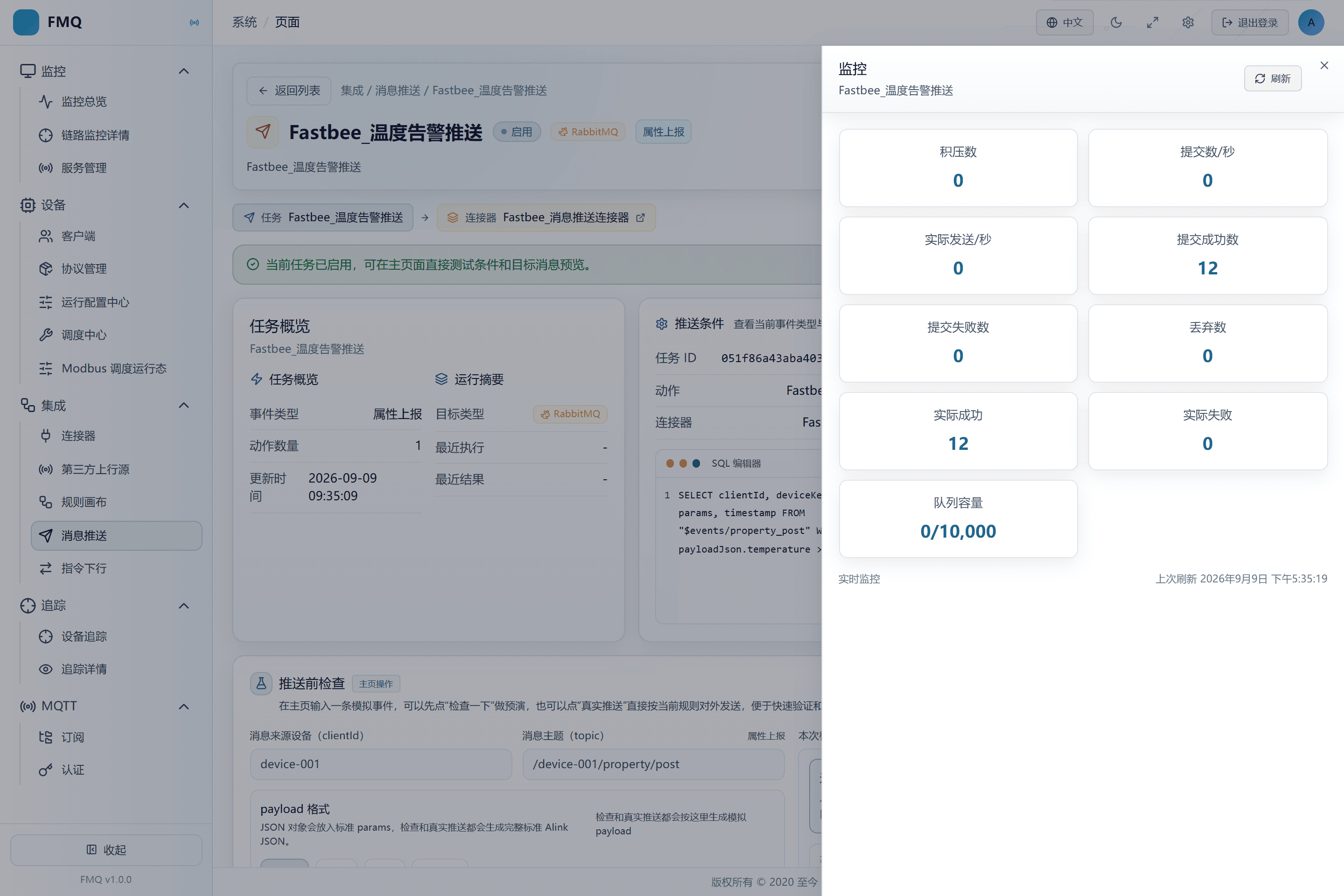
Figure: the task monitoring shows submitted successfully, actually succeeded, backlog, and capacity separately.
24. Confirm the Automatically Triggered Message Is Received Again
Location: Integration → Message Push
Read the message that newly arrived in the RabbitMQ target queue after the LinkPilot send, and review the device Topic, method, and params.
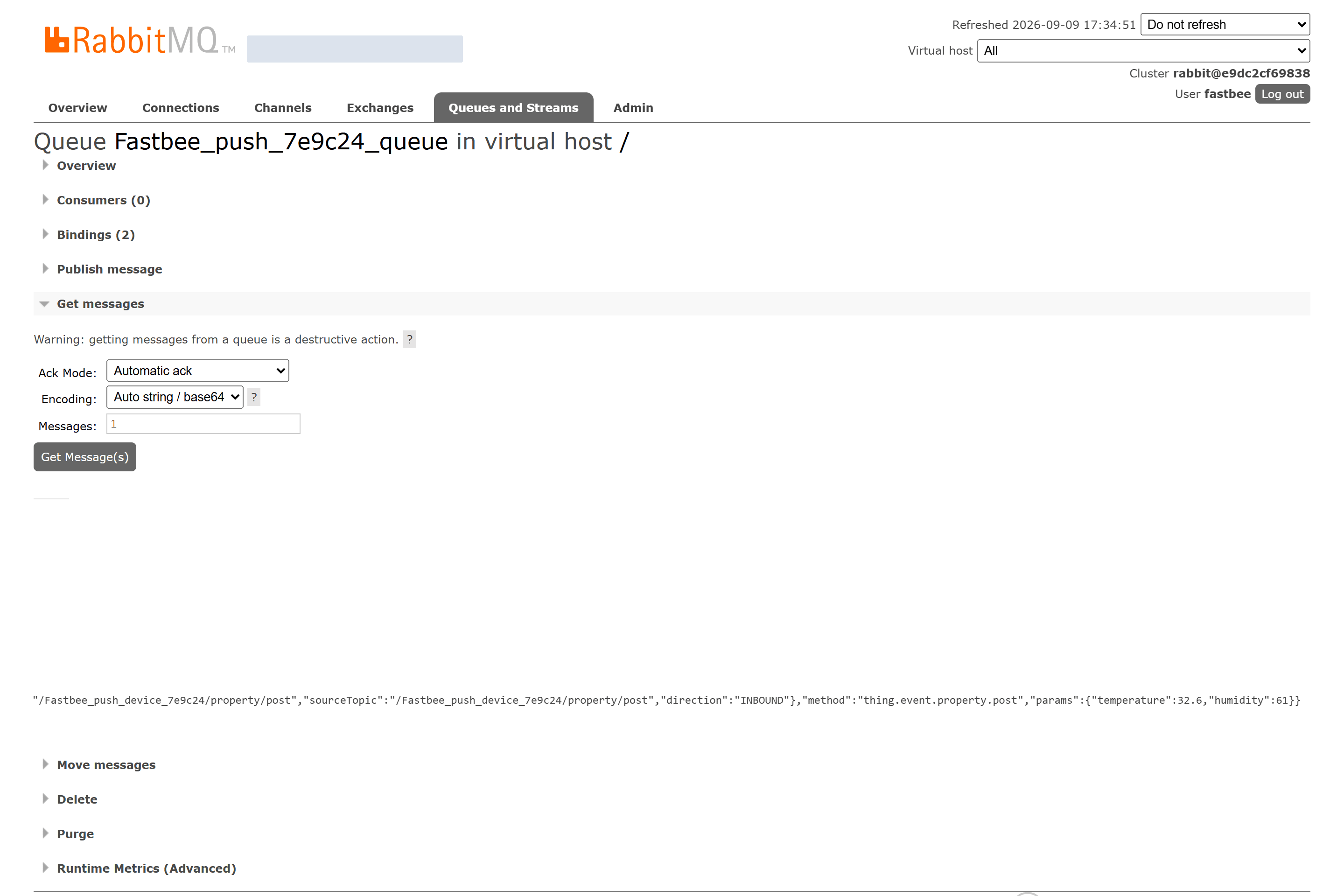
Figure: the RabbitMQ target queue actually received this round, params.temperature=32.6; after confirming the read, remove the message from the dedicated queue.
Seven Trigger Event Types and Field Reference
The field catalog given by the page describes which values an event type may provide; it does not mean every message has all of them non-empty. Differences in device protocol, message source, and runtime stage can all leave productId, tenantId, username, ip, reason, or params missing; confirm with a real sample before writing a WHERE clause.
Property Post
| Field | Purpose | Where the Value Comes From | How to Choose | Wrong-Input Symptom and Recovery | Effective Conditions |
|---|---|---|---|---|---|
| Trigger Timing and Source | Triggered when the device reports current properties such as temperature, humidity, and battery level.; used to understand and judge the current result; does not change the task. | The platform event catalog and the actual event classification. | Telemetry forwarding, threshold alarms, data sync. Example: a temperature sensor reports temperature=31.5. Recommended: fill in per the integration documents · Default: — · Example: $events/property_post | A value different from the actual event or integration agreement causes misses or wrong send targets.; correct it against the value source, then re-check and verify actual receipt on the target. | Scope: the current message push task · Publish: not required · Restart: not required · Reconnect: not required |
| Client Identifier (clientId) | The client the current event belongs to, used to distinguish the sending source.; used to understand and judge the current result; does not change the task. | The client identifier in the session or in the standard Alink sys. | Used for telemetry forwarding, threshold alarms, data sync. Confirm the field exists in a real sample before writing a condition. Judge missing values with IS NULL / IS NOT NULL first. Recommended: fill in per the integration documents · Default: — · Example: FastBee_测温 | The field catalog is not a non-empty guarantee.; confirm the field's source and actual value in similar real samples instead of relying on the page's default sample. | Scope: the current message push task · Publish: not required · Restart: not required · Reconnect: not required |
| Device ID (deviceId) | The device master-data identifier; may be empty without a binding, so do not require every event to carry it.; used to understand and judge the current result; does not change the task. | Device binding information or Alink sys. | Used for telemetry forwarding, threshold alarms, data sync. Confirm the field exists in a real sample before writing a condition. Judge missing values with IS NULL / IS NOT NULL first. Recommended: fill in per the integration documents · Default: — · Example: per the actual device record | The field catalog is not a non-empty guarantee.; confirm the field's source and actual value in similar real samples instead of relying on the page's default sample. | Scope: the current message push task · Publish: not required · Restart: not required · Reconnect: not required |
| Device Key (deviceKey) | The identifier that locates a device across protocols; not necessarily the same as the client ID.; used to understand and judge the current result; does not change the task. | Alink sys and the protocol runtime context. | Used for telemetry forwarding, threshold alarms, data sync. Confirm the field exists in a real sample before writing a condition. Judge missing values with IS NULL / IS NOT NULL first. Recommended: fill in per the integration documents · Default: — · Example: per the actual device key | The field catalog is not a non-empty guarantee.; confirm the field's source and actual value in similar real samples instead of relying on the page's default sample. | Scope: the current message push task · Publish: not required · Restart: not required · Reconnect: not required |
| Product ID (productId) | The product the device belongs to; samples without a product association may be empty.; used to understand and judge the current result; does not change the task. | The product association in Alink sys. | Used for telemetry forwarding, threshold alarms, data sync. Confirm the field exists in a real sample before writing a condition. Judge missing values with IS NULL / IS NOT NULL first. Recommended: fill in per the integration documents · Default: — · Example: per the actual product | The field catalog is not a non-empty guarantee.; confirm the field's source and actual value in similar real samples instead of relying on the page's default sample. | Scope: the current message push task · Publish: not required · Restart: not required · Reconnect: not required |
| Tenant ID (tenantId) | The tenant the message belongs to; may be empty without a tenant context.; used to understand and judge the current result; does not change the task. | The tenant association in Alink sys. | Used for telemetry forwarding, threshold alarms, data sync. Confirm the field exists in a real sample before writing a condition. Judge missing values with IS NULL / IS NOT NULL first. Recommended: fill in per the integration documents · Default: — · Example: per the actual tenant | The field catalog is not a non-empty guarantee.; confirm the field's source and actual value in similar real samples instead of relying on the page's default sample. | Scope: the current message push task · Publish: not required · Restart: not required · Reconnect: not required |
| Protocol (protocol) | The protocol identifier used by the source device, not the MQ type of the push target.; used to understand and judge the current result; does not change the task. | The access adapter or Alink sys. | Used for telemetry forwarding, threshold alarms, data sync. Confirm the field exists in a real sample before writing a condition. Judge missing values with IS NULL / IS NOT NULL first. Recommended: fill in per the integration documents · Default: — · Example: MQTT | The field catalog is not a non-empty guarantee.; confirm the field's source and actual value in similar real samples instead of relying on the page's default sample. | Scope: the current message push task · Publish: not required · Restart: not required · Reconnect: not required |
| Business Parameters (params) | Property values, event parameters, or reply results; the object can be empty.; used to understand and judge the current result; does not change the task. | Standard Alink params. | Used for telemetry forwarding, threshold alarms, data sync. Confirm the field exists in a real sample before writing a condition. Judge missing values with IS NULL / IS NOT NULL first. Recommended: fill in per the integration documents · Default: — · Example: | The field catalog is not a non-empty guarantee.; confirm the field's source and actual value in similar real samples instead of relying on the page's default sample. | Scope: the current message push task · Publish: not required · Restart: not required · Reconnect: not required |
| Message Text (payloadText) | The textual representation of the message; in the standard Alink chain it is usually the entire Alink JSON, not just params.; used to understand and judge the current result; does not change the task. | The actual message serialization result. | Used for telemetry forwarding, threshold alarms, data sync. Confirm the field exists in a real sample before writing a condition. Judge missing values with IS NULL / IS NOT NULL first. Recommended: fill in per the integration documents · Default: — · Example: complete Alink JSON | The field catalog is not a non-empty guarantee.; confirm the field's source and actual value in similar real samples instead of relying on the page's default sample. | Scope: the current message push task · Publish: not required · Restart: not required · Reconnect: not required |
| Event Time (timestamp) | The event context time, usually a millisecond timestamp; not the monitoring sampling time.; used to understand and judge the current result; does not change the task. | sys.ts; when missing, the runtime fills it in per implementation. | Used for telemetry forwarding, threshold alarms, data sync. Confirm the field exists in a real sample before writing a condition. Judge missing values with IS NULL / IS NOT NULL first. Recommended: fill in per the integration documents · Default: — · Example: millisecond timestamp | The field catalog is not a non-empty guarantee.; confirm the field's source and actual value in similar real samples instead of relying on the page's default sample. | Scope: the current message push task · Publish: not required · Restart: not required · Reconnect: not required |
Event Post
| Field | Purpose | Where the Value Comes From | How to Choose | Wrong-Input Symptom and Recovery | Effective Conditions |
|---|---|---|---|---|---|
| Trigger Timing and Source | Triggered when the device proactively reports an alarm or business event; can be further filtered by eventCode.; used to understand and judge the current result; does not change the task. | The platform event catalog and the actual event classification. | Alarm center, ticket system, audit notification. Example: the device reports a high-temperature alarm with eventCode=alarm. Recommended: fill in per the integration documents · Default: — · Example: $events/event_post | A value different from the actual event or integration agreement causes misses or wrong send targets.; correct it against the value source, then re-check and verify actual receipt on the target. | Scope: the current message push task · Publish: not required · Restart: not required · Reconnect: not required |
| Client Identifier (clientId) | The client the current event belongs to, used to distinguish the sending source.; used to understand and judge the current result; does not change the task. | The client identifier in the session or in the standard Alink sys. | Used for alarm center, ticket system, audit notification. Confirm the field exists in a real sample before writing a condition. Judge missing values with IS NULL / IS NOT NULL first. Recommended: fill in per the integration documents · Default: — · Example: FastBee_测温 | The field catalog is not a non-empty guarantee.; confirm the field's source and actual value in similar real samples instead of relying on the page's default sample. | Scope: the current message push task · Publish: not required · Restart: not required · Reconnect: not required |
| Device Key (deviceKey) | The identifier that locates a device across protocols; not necessarily the same as the client ID.; used to understand and judge the current result; does not change the task. | Alink sys and the protocol runtime context. | Used for alarm center, ticket system, audit notification. Confirm the field exists in a real sample before writing a condition. Judge missing values with IS NULL / IS NOT NULL first. Recommended: fill in per the integration documents · Default: — · Example: per the actual device key | The field catalog is not a non-empty guarantee.; confirm the field's source and actual value in similar real samples instead of relying on the page's default sample. | Scope: the current message push task · Publish: not required · Restart: not required · Reconnect: not required |
| Event Code (eventCode) | The category of the business event, used to distinguish events such as alarm.; used to understand and judge the current result; does not change the task. | Identified from the Alink method. | Used for alarm center, ticket system, audit notification. Confirm the field exists in a real sample before writing a condition. Judge missing values with IS NULL / IS NOT NULL first. Recommended: fill in per the integration documents · Default: — · Example: alarm | The field catalog is not a non-empty guarantee.; confirm the field's source and actual value in similar real samples instead of relying on the page's default sample. | Scope: the current message push task · Publish: not required · Restart: not required · Reconnect: not required |
| Business Parameters (params) | Property values, event parameters, or reply results; the object can be empty.; used to understand and judge the current result; does not change the task. | Standard Alink params. | Used for alarm center, ticket system, audit notification. Confirm the field exists in a real sample before writing a condition. Judge missing values with IS NULL / IS NOT NULL first. Recommended: fill in per the integration documents · Default: — · Example: | The field catalog is not a non-empty guarantee.; confirm the field's source and actual value in similar real samples instead of relying on the page's default sample. | Scope: the current message push task · Publish: not required · Restart: not required · Reconnect: not required |
| Message Text (payloadText) | The textual representation of the message; in the standard Alink chain it is usually the entire Alink JSON, not just params.; used to understand and judge the current result; does not change the task. | The actual message serialization result. | Used for alarm center, ticket system, audit notification. Confirm the field exists in a real sample before writing a condition. Judge missing values with IS NULL / IS NOT NULL first. Recommended: fill in per the integration documents · Default: — · Example: complete Alink JSON | The field catalog is not a non-empty guarantee.; confirm the field's source and actual value in similar real samples instead of relying on the page's default sample. | Scope: the current message push task · Publish: not required · Restart: not required · Reconnect: not required |
| Event Time (timestamp) | The event context time, usually a millisecond timestamp; not the monitoring sampling time.; used to understand and judge the current result; does not change the task. | sys.ts; when missing, the runtime fills it in per implementation. | Used for alarm center, ticket system, audit notification. Confirm the field exists in a real sample before writing a condition. Judge missing values with IS NULL / IS NOT NULL first. Recommended: fill in per the integration documents · Default: — · Example: millisecond timestamp | The field catalog is not a non-empty guarantee.; confirm the field's source and actual value in similar real samples instead of relying on the page's default sample. | Scope: the current message push task · Publish: not required · Restart: not required · Reconnect: not required |
Device Status Change
| Field | Purpose | Where the Value Comes From | How to Choose | Wrong-Input Symptom and Recovery | Effective Conditions |
|---|---|---|---|---|---|
| Trigger Timing and Source | Triggered when the business status of a device or protocol channel changes; not equivalent to MQTT client online/offline.; used to understand and judge the current result; does not change the task. | The platform event catalog and the actual event classification. | Running status sync, channel anomaly notification. Example: a Modbus channel changes from the active state to INACTIVE. Recommended: fill in per the integration documents · Default: — · Example: $events/device_status_change | A value different from the actual event or integration agreement causes misses or wrong send targets.; correct it against the value source, then re-check and verify actual receipt on the target. | Scope: the current message push task · Publish: not required · Restart: not required · Reconnect: not required |
| Client Identifier (clientId) | The client the current event belongs to, used to distinguish the sending source.; used to understand and judge the current result; does not change the task. | The client identifier in the session or in the standard Alink sys. | Used for running status sync, channel anomaly notification. Confirm the field exists in a real sample before writing a condition. Judge missing values with IS NULL / IS NOT NULL first. Recommended: fill in per the integration documents · Default: — · Example: FastBee_测温 | The field catalog is not a non-empty guarantee.; confirm the field's source and actual value in similar real samples instead of relying on the page's default sample. | Scope: the current message push task · Publish: not required · Restart: not required · Reconnect: not required |
| Device Key (deviceKey) | The identifier that locates a device across protocols; not necessarily the same as the client ID.; used to understand and judge the current result; does not change the task. | Alink sys and the protocol runtime context. | Used for running status sync, channel anomaly notification. Confirm the field exists in a real sample before writing a condition. Judge missing values with IS NULL / IS NOT NULL first. Recommended: fill in per the integration documents · Default: — · Example: per the actual device key | The field catalog is not a non-empty guarantee.; confirm the field's source and actual value in similar real samples instead of relying on the page's default sample. | Scope: the current message push task · Publish: not required · Restart: not required · Reconnect: not required |
| Protocol (protocol) | The protocol identifier used by the source device, not the MQ type of the push target.; used to understand and judge the current result; does not change the task. | The access adapter or Alink sys. | Used for running status sync, channel anomaly notification. Confirm the field exists in a real sample before writing a condition. Judge missing values with IS NULL / IS NOT NULL first. Recommended: fill in per the integration documents · Default: — · Example: MQTT | The field catalog is not a non-empty guarantee.; confirm the field's source and actual value in similar real samples instead of relying on the page's default sample. | Scope: the current message push task · Publish: not required · Restart: not required · Reconnect: not required |
| Status Event Type (eventType) | The concrete category of a protocol channel or device status change.; used to understand and judge the current result; does not change the task. | An extension field generated by the protocol adapter. | Used for running status sync, channel anomaly notification. Confirm the field exists in a real sample before writing a condition. Judge missing values with IS NULL / IS NOT NULL first. Recommended: fill in per the integration documents · Default: — · Example: MODBUS_CHANNEL_INACTIVE | The field catalog is not a non-empty guarantee.; confirm the field's source and actual value in similar real samples instead of relying on the page's default sample. | Scope: the current message push task · Publish: not required · Restart: not required · Reconnect: not required |
| Status Summary (summary) | A short description of this status change; not suitable as a stable code.; used to understand and judge the current result; does not change the task. | Extension information generated by the protocol runtime. | Used for running status sync, channel anomaly notification. Confirm the field exists in a real sample before writing a condition. Judge missing values with IS NULL / IS NOT NULL first. Recommended: fill in per the integration documents · Default: — · Example: channel unavailable | The field catalog is not a non-empty guarantee.; confirm the field's source and actual value in similar real samples instead of relying on the page's default sample. | Scope: the current message push task · Publish: not required · Restart: not required · Reconnect: not required |
| Status Value (status) | The status after the current change; 3 for client connected, 4 for disconnected, and other status events may be text.; used to understand and judge the current result; does not change the task. | The event classification and extension information such as Alink sys.ext. | Used for running status sync, channel anomaly notification. Confirm the field exists in a real sample before writing a condition. Judge missing values with IS NULL / IS NOT NULL first. Recommended: fill in per the integration documents · Default: — · Example: 3 / 4 / INACTIVE | The field catalog is not a non-empty guarantee.; confirm the field's source and actual value in similar real samples instead of relying on the page's default sample. | Scope: the current message push task · Publish: not required · Restart: not required · Reconnect: not required |
| Event Time (timestamp) | The event context time, usually a millisecond timestamp; not the monitoring sampling time.; used to understand and judge the current result; does not change the task. | sys.ts; when missing, the runtime fills it in per implementation. | Used for running status sync, channel anomaly notification. Confirm the field exists in a real sample before writing a condition. Judge missing values with IS NULL / IS NOT NULL first. Recommended: fill in per the integration documents · Default: — · Example: millisecond timestamp | The field catalog is not a non-empty guarantee.; confirm the field's source and actual value in similar real samples instead of relying on the page's default sample. | Scope: the current message push task · Publish: not required · Restart: not required · Reconnect: not required |
Client Connected
| Field | Purpose | Where the Value Comes From | How to Choose | Wrong-Input Symptom and Recovery | Effective Conditions |
|---|---|---|---|---|---|
| Trigger Timing and Source | Triggered when an MQTT client connects successfully and enters the online state.; used to understand and judge the current result; does not change the task. | The platform event catalog and the actual event classification. | Online notification, login audit, connection trend analysis. Example: device device-001 comes online from 192.0.2.10. Recommended: fill in per the integration documents · Default: — · Example: $events/client_connected | A value different from the actual event or integration agreement causes misses or wrong send targets.; correct it against the value source, then re-check and verify actual receipt on the target. | Scope: the current message push task · Publish: not required · Restart: not required · Reconnect: not required |
| Client Identifier (clientId) | The client the current event belongs to, used to distinguish the sending source.; used to understand and judge the current result; does not change the task. | The client identifier in the session or in the standard Alink sys. | Used for online notification, login audit, connection trend analysis. Confirm the field exists in a real sample before writing a condition. Judge missing values with IS NULL / IS NOT NULL first. Recommended: fill in per the integration documents · Default: — · Example: FastBee_测温 | The field catalog is not a non-empty guarantee.; confirm the field's source and actual value in similar real samples instead of relying on the page's default sample. | Scope: the current message push task · Publish: not required · Restart: not required · Reconnect: not required |
| Device Key (deviceKey) | The identifier that locates a device across protocols; not necessarily the same as the client ID.; used to understand and judge the current result; does not change the task. | Alink sys and the protocol runtime context. | Used for online notification, login audit, connection trend analysis. Confirm the field exists in a real sample before writing a condition. Judge missing values with IS NULL / IS NOT NULL first. Recommended: fill in per the integration documents · Default: — · Example: per the actual device key | The field catalog is not a non-empty guarantee.; confirm the field's source and actual value in similar real samples instead of relying on the page's default sample. | Scope: the current message push task · Publish: not required · Restart: not required · Reconnect: not required |
| Connection Username (username) | The identity information of the source client, not the RabbitMQ connector account.; used to understand and judge the current result; does not change the task. | Client session extension information. | Used for online notification, login audit, connection trend analysis. Confirm the field exists in a real sample before writing a condition. Judge missing values with IS NULL / IS NOT NULL first. Recommended: fill in per the integration documents · Default: — · Example: actual device identity | The field catalog is not a non-empty guarantee.; confirm the field's source and actual value in similar real samples instead of relying on the page's default sample. | Scope: the current message push task · Publish: not required · Restart: not required · Reconnect: not required |
| Source IP (ip) | The client network address; may be missing depending on the proxy, protocol, and event source.; used to understand and judge the current result; does not change the task. | The connection session or event extension. | Used for online notification, login audit, connection trend analysis. Confirm the field exists in a real sample before writing a condition. Judge missing values with IS NULL / IS NOT NULL first. Recommended: fill in per the integration documents · Default: — · Example: 192.0.2.10 | The field catalog is not a non-empty guarantee.; confirm the field's source and actual value in similar real samples instead of relying on the page's default sample. | Scope: the current message push task · Publish: not required · Restart: not required · Reconnect: not required |
| Status Value (status) | The status after the current change; 3 for client connected, 4 for disconnected, and other status events may be text.; used to understand and judge the current result; does not change the task. | The event classification and extension information such as Alink sys.ext. | Used for online notification, login audit, connection trend analysis. Confirm the field exists in a real sample before writing a condition. Judge missing values with IS NULL / IS NOT NULL first. Recommended: fill in per the integration documents · Default: — · Example: 3 / 4 / INACTIVE | The field catalog is not a non-empty guarantee.; confirm the field's source and actual value in similar real samples instead of relying on the page's default sample. | Scope: the current message push task · Publish: not required · Restart: not required · Reconnect: not required |
| Clean Session Flag (cleanSession) | Describes the session option when the client connects; not the task enable/disable switch.; used to understand and judge the current result; does not change the task. | MQTT connection event extension. | Used for online notification, login audit, connection trend analysis. Confirm the field exists in a real sample before writing a condition. Judge missing values with IS NULL / IS NOT NULL first. Recommended: fill in per the integration documents · Default: — · Example: true | The field catalog is not a non-empty guarantee.; confirm the field's source and actual value in similar real samples instead of relying on the page's default sample. | Scope: the current message push task · Publish: not required · Restart: not required · Reconnect: not required |
| Event Time (timestamp) | The event context time, usually a millisecond timestamp; not the monitoring sampling time.; used to understand and judge the current result; does not change the task. | sys.ts; when missing, the runtime fills it in per implementation. | Used for online notification, login audit, connection trend analysis. Confirm the field exists in a real sample before writing a condition. Judge missing values with IS NULL / IS NOT NULL first. Recommended: fill in per the integration documents · Default: — · Example: millisecond timestamp | The field catalog is not a non-empty guarantee.; confirm the field's source and actual value in similar real samples instead of relying on the page's default sample. | Scope: the current message push task · Publish: not required · Restart: not required · Reconnect: not required |
Client Disconnected
| Field | Purpose | Where the Value Comes From | How to Choose | Wrong-Input Symptom and Recovery | Effective Conditions |
|---|---|---|---|---|---|
| Trigger Timing and Source | Triggered when an MQTT client goes offline after a normal disconnect, timeout, or network interruption.; used to understand and judge the current result; does not change the task. | The platform event catalog and the actual event classification. | Offline alarm, connection quality analysis. Example: a device goes offline due to keepalive_timeout. Recommended: fill in per the integration documents · Default: — · Example: $events/client_disconnected | A value different from the actual event or integration agreement causes misses or wrong send targets.; correct it against the value source, then re-check and verify actual receipt on the target. | Scope: the current message push task · Publish: not required · Restart: not required · Reconnect: not required |
| Client Identifier (clientId) | The client the current event belongs to, used to distinguish the sending source.; used to understand and judge the current result; does not change the task. | The client identifier in the session or in the standard Alink sys. | Used for offline alarm, connection quality analysis. Confirm the field exists in a real sample before writing a condition. Judge missing values with IS NULL / IS NOT NULL first. Recommended: fill in per the integration documents · Default: — · Example: FastBee_测温 | The field catalog is not a non-empty guarantee.; confirm the field's source and actual value in similar real samples instead of relying on the page's default sample. | Scope: the current message push task · Publish: not required · Restart: not required · Reconnect: not required |
| Device Key (deviceKey) | The identifier that locates a device across protocols; not necessarily the same as the client ID.; used to understand and judge the current result; does not change the task. | Alink sys and the protocol runtime context. | Used for offline alarm, connection quality analysis. Confirm the field exists in a real sample before writing a condition. Judge missing values with IS NULL / IS NOT NULL first. Recommended: fill in per the integration documents · Default: — · Example: per the actual device key | The field catalog is not a non-empty guarantee.; confirm the field's source and actual value in similar real samples instead of relying on the page's default sample. | Scope: the current message push task · Publish: not required · Restart: not required · Reconnect: not required |
| Reason (reason) | Explains why the disconnect or dead letter occurred; not every message provides it.; used to understand and judge the current result; does not change the task. | The corresponding fault or disconnect event extension. | Used for offline alarm, connection quality analysis. Confirm the field exists in a real sample before writing a condition. Judge missing values with IS NULL / IS NOT NULL first. Recommended: fill in per the integration documents · Default: — · Example: keepalive_timeout | The field catalog is not a non-empty guarantee.; confirm the field's source and actual value in similar real samples instead of relying on the page's default sample. | Scope: the current message push task · Publish: not required · Restart: not required · Reconnect: not required |
| Status Value (status) | The status after the current change; 3 for client connected, 4 for disconnected, and other status events may be text.; used to understand and judge the current result; does not change the task. | The event classification and extension information such as Alink sys.ext. | Used for offline alarm, connection quality analysis. Confirm the field exists in a real sample before writing a condition. Judge missing values with IS NULL / IS NOT NULL first. Recommended: fill in per the integration documents · Default: — · Example: 3 / 4 / INACTIVE | The field catalog is not a non-empty guarantee.; confirm the field's source and actual value in similar real samples instead of relying on the page's default sample. | Scope: the current message push task · Publish: not required · Restart: not required · Reconnect: not required |
| Source IP (ip) | The client network address; may be missing depending on the proxy, protocol, and event source.; used to understand and judge the current result; does not change the task. | The connection session or event extension. | Used for offline alarm, connection quality analysis. Confirm the field exists in a real sample before writing a condition. Judge missing values with IS NULL / IS NOT NULL first. Recommended: fill in per the integration documents · Default: — · Example: 192.0.2.10 | The field catalog is not a non-empty guarantee.; confirm the field's source and actual value in similar real samples instead of relying on the page's default sample. | Scope: the current message push task · Publish: not required · Restart: not required · Reconnect: not required |
| Event Time (timestamp) | The event context time, usually a millisecond timestamp; not the monitoring sampling time.; used to understand and judge the current result; does not change the task. | sys.ts; when missing, the runtime fills it in per implementation. | Used for offline alarm, connection quality analysis. Confirm the field exists in a real sample before writing a condition. Judge missing values with IS NULL / IS NOT NULL first. Recommended: fill in per the integration documents · Default: — · Example: millisecond timestamp | The field catalog is not a non-empty guarantee.; confirm the field's source and actual value in similar real samples instead of relying on the page's default sample. | Scope: the current message push task · Publish: not required · Restart: not required · Reconnect: not required |
Dead-letter Message
| Field | Purpose | Where the Value Comes From | How to Choose | Wrong-Input Symptom and Recovery | Effective Conditions |
|---|---|---|---|---|---|
| Trigger Timing and Source | Triggered when the downlink or forwarding link cannot continue processing a message and moves it to dead letter.; used to understand and judge the current result; does not change the task. | The platform event catalog and the actual event classification. | Failure archiving, manual compensation, anomaly statistics. Example: a message enters the dead-letter chain because the target is unavailable. Recommended: fill in per the integration documents · Default: — · Example: $events/deadletter_post | A value different from the actual event or integration agreement causes misses or wrong send targets.; correct it against the value source, then re-check and verify actual receipt on the target. | Scope: the current message push task · Publish: not required · Restart: not required · Reconnect: not required |
| Client Identifier (clientId) | The client the current event belongs to, used to distinguish the sending source.; used to understand and judge the current result; does not change the task. | The client identifier in the session or in the standard Alink sys. | Used for failure archiving, manual compensation, anomaly statistics. Confirm the field exists in a real sample before writing a condition. Judge missing values with IS NULL / IS NOT NULL first. Recommended: fill in per the integration documents · Default: — · Example: FastBee_测温 | The field catalog is not a non-empty guarantee.; confirm the field's source and actual value in similar real samples instead of relying on the page's default sample. | Scope: the current message push task · Publish: not required · Restart: not required · Reconnect: not required |
| Device Key (deviceKey) | The identifier that locates a device across protocols; not necessarily the same as the client ID.; used to understand and judge the current result; does not change the task. | Alink sys and the protocol runtime context. | Used for failure archiving, manual compensation, anomaly statistics. Confirm the field exists in a real sample before writing a condition. Judge missing values with IS NULL / IS NOT NULL first. Recommended: fill in per the integration documents · Default: — · Example: per the actual device key | The field catalog is not a non-empty guarantee.; confirm the field's source and actual value in similar real samples instead of relying on the page's default sample. | Scope: the current message push task · Publish: not required · Restart: not required · Reconnect: not required |
| Source Topic (topic) | The topic of the original message, not this task's target RabbitMQ queue.; used to understand and judge the current result; does not change the task. | The source topic in the event or Alink sys. | Used for failure archiving, manual compensation, anomaly statistics. Confirm the field exists in a real sample before writing a condition. Judge missing values with IS NULL / IS NOT NULL first. Recommended: fill in per the integration documents · Default: — · Example: /FastBee_测温/property/post | The field catalog is not a non-empty guarantee.; confirm the field's source and actual value in similar real samples instead of relying on the page's default sample. | Scope: the current message push task · Publish: not required · Restart: not required · Reconnect: not required |
| Reason (reason) | Explains why the disconnect or dead letter occurred; not every message provides it.; used to understand and judge the current result; does not change the task. | The corresponding fault or disconnect event extension. | Used for failure archiving, manual compensation, anomaly statistics. Confirm the field exists in a real sample before writing a condition. Judge missing values with IS NULL / IS NOT NULL first. Recommended: fill in per the integration documents · Default: — · Example: keepalive_timeout | The field catalog is not a non-empty guarantee.; confirm the field's source and actual value in similar real samples instead of relying on the page's default sample. | Scope: the current message push task · Publish: not required · Restart: not required · Reconnect: not required |
| Message Text (payloadText) | The textual representation of the message; in the standard Alink chain it is usually the entire Alink JSON, not just params.; used to understand and judge the current result; does not change the task. | The actual message serialization result. | Used for failure archiving, manual compensation, anomaly statistics. Confirm the field exists in a real sample before writing a condition. Judge missing values with IS NULL / IS NOT NULL first. Recommended: fill in per the integration documents · Default: — · Example: complete Alink JSON | The field catalog is not a non-empty guarantee.; confirm the field's source and actual value in similar real samples instead of relying on the page's default sample. | Scope: the current message push task · Publish: not required · Restart: not required · Reconnect: not required |
| Event Time (timestamp) | The event context time, usually a millisecond timestamp; not the monitoring sampling time.; used to understand and judge the current result; does not change the task. | sys.ts; when missing, the runtime fills it in per implementation. | Used for failure archiving, manual compensation, anomaly statistics. Confirm the field exists in a real sample before writing a condition. Judge missing values with IS NULL / IS NOT NULL first. Recommended: fill in per the integration documents · Default: — · Example: millisecond timestamp | The field catalog is not a non-empty guarantee.; confirm the field's source and actual value in similar real samples instead of relying on the page's default sample. | Scope: the current message push task · Publish: not required · Restart: not required · Reconnect: not required |
Reply Message
| Field | Purpose | Where the Value Comes From | How to Choose | Wrong-Input Symptom and Recovery | Effective Conditions |
|---|---|---|---|---|---|
| Trigger Timing and Source | Triggered when the device returns a processing result for a downlink command or service call.; used to understand and judge the current result; does not change the task. | The platform event catalog and the actual event classification. | Command receipt sync, call result archiving. Example: the device returns the execution success result corresponding to messageId. Recommended: fill in per the integration documents · Default: — · Example: $events/reply | A value different from the actual event or integration agreement causes misses or wrong send targets.; correct it against the value source, then re-check and verify actual receipt on the target. | Scope: the current message push task · Publish: not required · Restart: not required · Reconnect: not required |
| Client Identifier (clientId) | The client the current event belongs to, used to distinguish the sending source.; used to understand and judge the current result; does not change the task. | The client identifier in the session or in the standard Alink sys. | Used for command receipt sync, call result archiving. Confirm the field exists in a real sample before writing a condition. Judge missing values with IS NULL / IS NOT NULL first. Recommended: fill in per the integration documents · Default: — · Example: FastBee_测温 | The field catalog is not a non-empty guarantee.; confirm the field's source and actual value in similar real samples instead of relying on the page's default sample. | Scope: the current message push task · Publish: not required · Restart: not required · Reconnect: not required |
| Device Key (deviceKey) | The identifier that locates a device across protocols; not necessarily the same as the client ID.; used to understand and judge the current result; does not change the task. | Alink sys and the protocol runtime context. | Used for command receipt sync, call result archiving. Confirm the field exists in a real sample before writing a condition. Judge missing values with IS NULL / IS NOT NULL first. Recommended: fill in per the integration documents · Default: — · Example: per the actual device key | The field catalog is not a non-empty guarantee.; confirm the field's source and actual value in similar real samples instead of relying on the page's default sample. | Scope: the current message push task · Publish: not required · Restart: not required · Reconnect: not required |
| Message ID (messageId) | Used to correlate a message or reply; the correlation rule is agreed by the sender.; used to understand and judge the current result; does not change the task. | The Alink id. | Used for command receipt sync, call result archiving. Confirm the field exists in a real sample before writing a condition. Judge missing values with IS NULL / IS NOT NULL first. Recommended: fill in per the integration documents · Default: — · Example: the correlation ID of this command | The field catalog is not a non-empty guarantee.; confirm the field's source and actual value in similar real samples instead of relying on the page's default sample. | Scope: the current message push task · Publish: not required · Restart: not required · Reconnect: not required |
| Reply Code (code) | The processing result code returned by the device or service, not the HTTP transport status.; used to understand and judge the current result; does not change the task. | The code field of the Alink reply. | Used for command receipt sync, call result archiving. Confirm the field exists in a real sample before writing a condition. Judge missing values with IS NULL / IS NOT NULL first. Recommended: fill in per the integration documents · Default: — · Example: 200 | The field catalog is not a non-empty guarantee.; confirm the field's source and actual value in similar real samples instead of relying on the page's default sample. | Scope: the current message push task · Publish: not required · Restart: not required · Reconnect: not required |
| Reply Message (message) | Supplements the meaning of the reply result; you cannot conclude the device executed it from the text alone.; used to understand and judge the current result; does not change the task. | The message field of the Alink reply. | Used for command receipt sync, call result archiving. Confirm the field exists in a real sample before writing a condition. Judge missing values with IS NULL / IS NOT NULL first. Recommended: fill in per the integration documents · Default: — · Example: success | The field catalog is not a non-empty guarantee.; confirm the field's source and actual value in similar real samples instead of relying on the page's default sample. | Scope: the current message push task · Publish: not required · Restart: not required · Reconnect: not required |
| Business Parameters (params) | Property values, event parameters, or reply results; the object can be empty.; used to understand and judge the current result; does not change the task. | Standard Alink params. | Used for command receipt sync, call result archiving. Confirm the field exists in a real sample before writing a condition. Judge missing values with IS NULL / IS NOT NULL first. Recommended: fill in per the integration documents · Default: — · Example: | The field catalog is not a non-empty guarantee.; confirm the field's source and actual value in similar real samples instead of relying on the page's default sample. | Scope: the current message push task · Publish: not required · Restart: not required · Reconnect: not required |
| Message Text (payloadText) | The textual representation of the message; in the standard Alink chain it is usually the entire Alink JSON, not just params.; used to understand and judge the current result; does not change the task. | The actual message serialization result. | Used for command receipt sync, call result archiving. Confirm the field exists in a real sample before writing a condition. Judge missing values with IS NULL / IS NOT NULL first. Recommended: fill in per the integration documents · Default: — · Example: complete Alink JSON | The field catalog is not a non-empty guarantee.; confirm the field's source and actual value in similar real samples instead of relying on the page's default sample. | Scope: the current message push task · Publish: not required · Restart: not required · Reconnect: not required |
| Event Time (timestamp) | The event context time, usually a millisecond timestamp; not the monitoring sampling time.; used to understand and judge the current result; does not change the task. | sys.ts; when missing, the runtime fills it in per implementation. | Used for command receipt sync, call result archiving. Confirm the field exists in a real sample before writing a condition. Judge missing values with IS NULL / IS NOT NULL first. Recommended: fill in per the integration documents · Default: — · Example: millisecond timestamp | The field catalog is not a non-empty guarantee.; confirm the field's source and actual value in similar real samples instead of relying on the page's default sample. | Scope: the current message push task · Publish: not required · Restart: not required · Reconnect: not required |
SQL Filtering and Alink Messages
Only the simple SELECT, FROM, and WHERE supported by event rules are used here. You can combine =, !=, >, >=, <, <=, LIKE, IS NULL, IS NOT NULL, AND, OR, NOT, and parentheses; do not apply JOIN, subqueries, aggregation, or database functions.
The SELECT fields mainly help the page generate and read SQL; the current runtime does not trim the outbound content by the SELECT list. What is really sent is standard Alink: business values go into params; runtime information such as clientId and protocol goes into sys. Do not reassemble internal context fields into business parameters.
SQL and Standard Alink
| Field | Purpose | Where the Value Comes From | How to Choose | Wrong-Input Symptom and Recovery | Effective Conditions |
|---|---|---|---|---|---|
| Selected / Available Fields | The selection buttons modify the SELECT list, mainly to make the SQL easier to generate and read.; after saving it affects the current task's subsequent checks or sends; re-verify results with a new sample. | The field catalog of the selected event. | Select the fields you care about; the selection does not remove other properties from the outbound params. Recommended: fill in per the integration documents · Default: — · Example: clientId, deviceKey, protocol, params, timestamp | A value different from the actual event or integration agreement causes misses or wrong send targets.; correct it against the value source, then re-check and verify actual receipt on the target. | Scope: the current message push task · Publish: not required · Restart: not required · Reconnect: not required |
| FROM Event Source | Limits which kind of event is accepted.; after saving it affects the current task's subsequent checks or sends; re-verify results with a new sample. | Select the page event first, then use the corresponding event source. | Wrap the event source in double quotes; Property Post uses this example's value. Recommended: fill in per the integration documents · Default: — · Example: FROM "$events/property_post" | A value different from the actual event or integration agreement causes misses or wrong send targets.; correct it against the value source, then re-check and verify actual receipt on the target. | Scope: the current message push task · Publish: not required · Restart: not required · Reconnect: not required |
| Filter SQL / WHERE | Decides which events meet the send condition; without WHERE, all events from that source pass.; after saving it affects the current task's subsequent checks or sends; re-verify results with a new sample. | Business thresholds and real event fields. | Use the number 31.5 for temperature, not a string with a unit. The boundary 30 is included, so this example means reaching 30°C rather than strictly exceeding 30°C. Recommended: fill in per the integration documents · Default: — · Example: SELECT clientId, deviceKey, protocol, params, timestamp FROM "$events/property_post" WHERE payloadJson.temperature >= 30 | A value different from the actual event or integration agreement causes misses or wrong send targets.; correct it against the value source, then re-check and verify actual receipt on the target. | Scope: the current message push task · Publish: not required · Restart: not required · Reconnect: not required |
| SELECT Does Not Trim Outbound Content | The current runtime returns the complete matched context, and the Alink generator assembles the message independently.; used to understand and judge the current result; does not change the task. | The SQL runtime implementation and the Alink generation implementation. | To control the scope of sensitive data, unchecking fields is not enough; confirm the params provided upstream first. Recommended: fill in per the integration documents · Default: — · Example: selecting only clientId can still send temperature and humidity. | A value different from the actual event or integration agreement causes misses or wrong send targets.; correct it against the value source, then re-check and verify actual receipt on the target. | Scope: the current message push task · Publish: not required · Restart: not required · Reconnect: not required |
| Restore Default Fields | Restores the default field selection of the current event.; after saving it affects the current task's subsequent checks or sends; re-verify results with a new sample. | The operation entry on the current page. | After restoring, re-verify the WHERE; switching the event also requires re-checking the SQL. Recommended: fill in per the integration documents · Default: — · Example: Restore Default Fields | Default fields do not imply a message integrity check.; after restoring, re-verify the WHERE; switching the event also requires re-checking the SQL. | Scope: the current message push task · Publish: not required · Restart: not required · Reconnect: not required |
| = | Equal to; used to understand and judge the current result; does not change the task. | Business judgment and the current event sample. | Check once with a matching sample and once with a non-matching sample; do not apply full database SQL behavior. Recommended: fill in per the integration documents · Default: — · Example: protocol = 'MQTT' | A value different from the actual event or integration agreement causes misses or wrong send targets.; correct it against the value source, then re-check and verify actual receipt on the target. | Scope: the current message push task · Publish: not required · Restart: not required · Reconnect: not required |
| != | Not equal to; used to understand and judge the current result; does not change the task. | Business judgment and the current event sample. | Check once with a matching sample and once with a non-matching sample; do not apply full database SQL behavior. Recommended: fill in per the integration documents · Default: — · Example: code != 200 | A value different from the actual event or integration agreement causes misses or wrong send targets.; correct it against the value source, then re-check and verify actual receipt on the target. | Scope: the current message push task · Publish: not required · Restart: not required · Reconnect: not required |
| > | Strictly greater than; used to understand and judge the current result; does not change the task. | Business judgment and the current event sample. | Check once with a matching sample and once with a non-matching sample; do not apply full database SQL behavior. Recommended: fill in per the integration documents · Default: — · Example: payloadJson.temperature > 30 | A value different from the actual event or integration agreement causes misses or wrong send targets.; correct it against the value source, then re-check and verify actual receipt on the target. | Scope: the current message push task · Publish: not required · Restart: not required · Reconnect: not required |
| >= | Greater than or equal to; used to understand and judge the current result; does not change the task. | Business judgment and the current event sample. | Check once with a matching sample and once with a non-matching sample; do not apply full database SQL behavior. Recommended: fill in per the integration documents · Default: — · Example: payloadJson.temperature >= 30 | A value different from the actual event or integration agreement causes misses or wrong send targets.; correct it against the value source, then re-check and verify actual receipt on the target. | Scope: the current message push task · Publish: not required · Restart: not required · Reconnect: not required |
| < | Strictly less than; used to understand and judge the current result; does not change the task. | Business judgment and the current event sample. | Check once with a matching sample and once with a non-matching sample; do not apply full database SQL behavior. Recommended: fill in per the integration documents · Default: — · Example: payloadJson.temperature < 30 | A value different from the actual event or integration agreement causes misses or wrong send targets.; correct it against the value source, then re-check and verify actual receipt on the target. | Scope: the current message push task · Publish: not required · Restart: not required · Reconnect: not required |
| <= | Less than or equal to; used to understand and judge the current result; does not change the task. | Business judgment and the current event sample. | Check once with a matching sample and once with a non-matching sample; do not apply full database SQL behavior. Recommended: fill in per the integration documents · Default: — · Example: payloadJson.temperature <= 30 | A value different from the actual event or integration agreement causes misses or wrong send targets.; correct it against the value source, then re-check and verify actual receipt on the target. | Scope: the current message push task · Publish: not required · Restart: not required · Reconnect: not required |
| LIKE | Text pattern matching, % for any length, _ for a single character; used to understand and judge the current result; does not change the task. | Business judgment and the current event sample. | Check once with a matching sample and once with a non-matching sample; do not apply full database SQL behavior. Recommended: fill in per the integration documents · Default: — · Example: eventCode LIKE 'alarm%' | A value different from the actual event or integration agreement causes misses or wrong send targets.; correct it against the value source, then re-check and verify actual receipt on the target. | Scope: the current message push task · Publish: not required · Restart: not required · Reconnect: not required |
| IS NULL | Judges a missing or null value, which is not the same as an empty string; used to understand and judge the current result; does not change the task. | Business judgment and the current event sample. | Check once with a matching sample and once with a non-matching sample; do not apply full database SQL behavior. Recommended: fill in per the integration documents · Default: — · Example: reason IS NULL | A value different from the actual event or integration agreement causes misses or wrong send targets.; correct it against the value source, then re-check and verify actual receipt on the target. | Scope: the current message push task · Publish: not required · Restart: not required · Reconnect: not required |
| IS NOT NULL | Judge that the field exists first, then compare; used to understand and judge the current result; does not change the task. | Business judgment and the current event sample. | Check once with a matching sample and once with a non-matching sample; do not apply full database SQL behavior. Recommended: fill in per the integration documents · Default: — · Example: payloadJson.temperature IS NOT NULL | A value different from the actual event or integration agreement causes misses or wrong send targets.; correct it against the value source, then re-check and verify actual receipt on the target. | Scope: the current message push task · Publish: not required · Restart: not required · Reconnect: not required |
| AND | Both sides must hold; used to understand and judge the current result; does not change the task. | Business judgment and the current event sample. | Check once with a matching sample and once with a non-matching sample; do not apply full database SQL behavior. Recommended: fill in per the integration documents · Default: — · Example: protocol = 'MQTT' AND payloadJson.temperature >= 30 | A value different from the actual event or integration agreement causes misses or wrong send targets.; correct it against the value source, then re-check and verify actual receipt on the target. | Scope: the current message push task · Publish: not required · Restart: not required · Reconnect: not required |
| OR | At least one side holds; used to understand and judge the current result; does not change the task. | Business judgment and the current event sample. | Check once with a matching sample and once with a non-matching sample; do not apply full database SQL behavior. Recommended: fill in per the integration documents · Default: — · Example: code = 200 OR code = 201 | A value different from the actual event or integration agreement causes misses or wrong send targets.; correct it against the value source, then re-check and verify actual receipt on the target. | Scope: the current message push task · Publish: not required · Restart: not required · Reconnect: not required |
| NOT | Negates a condition; used to understand and judge the current result; does not change the task. | Business judgment and the current event sample. | Check once with a matching sample and once with a non-matching sample; do not apply full database SQL behavior. Recommended: fill in per the integration documents · Default: — · Example: NOT (code = 200) | A value different from the actual event or integration agreement causes misses or wrong send targets.; correct it against the value source, then re-check and verify actual receipt on the target. | Scope: the current message push task · Publish: not required · Restart: not required · Reconnect: not required |
| Parentheses | Make the combination order explicit and avoid AND/OR combination misunderstanding; used to understand and judge the current result; does not change the task. | Business judgment and the current event sample. | Check once with a matching sample and once with a non-matching sample; do not apply full database SQL behavior. Recommended: fill in per the integration documents · Default: — · Example: (code = 200 OR code = 201) AND messageId IS NOT NULL | A value different from the actual event or integration agreement causes misses or wrong send targets.; correct it against the value source, then re-check and verify actual receipt on the target. | Scope: the current message push task · Publish: not required · Restart: not required · Reconnect: not required |
| Message Identifier (id) | Kept from the source Alink or generated by the platform, used to trace the message; you cannot judge idempotence from the field's existence alone.; used to understand and judge the current result; does not change the task. | The source Alink and the platform standard message generator. | Look at the JSON actually received in the external queue, then verify the device, time, and business values. Recommended: fill in per the integration documents · Default: — · Example: FastBee_演示消息 | A value different from the actual event or integration agreement causes misses or wrong send targets.; correct it against the value source, then re-check and verify actual receipt on the target. | Scope: the current message push task · Publish: not required · Restart: not required · Reconnect: not required |
| Version (version) | The standard message structure version.; used to understand and judge the current result; does not change the task. | The source Alink and the platform standard message generator. | Look at the JSON actually received in the external queue, then verify the device, time, and business values. Recommended: fill in per the integration documents · Default: — · Example: 1.0 | A value different from the actual event or integration agreement causes misses or wrong send targets.; correct it against the value source, then re-check and verify actual receipt on the target. | Scope: the current message push task · Publish: not required · Restart: not required · Reconnect: not required |
| Method (method) | States whether this is a property, event, status, or reply. Property Post uses thing.event.property.post.; used to understand and judge the current result; does not change the task. | The source Alink and the platform standard message generator. | Look at the JSON actually received in the external queue, then verify the device, time, and business values. Recommended: fill in per the integration documents · Default: — · Example: thing.event.property.post | A value different from the actual event or integration agreement causes misses or wrong send targets.; correct it against the value source, then re-check and verify actual receipt on the target. | Scope: the current message push task · Publish: not required · Restart: not required · Reconnect: not required |
| System Context (sys) | Device, protocol, time, and source information; tenantId/productId and similar fields can be empty. Do not treat this group of information as business properties.; used to understand and judge the current result; does not change the task. | The source Alink and the platform standard message generator. | Look at the JSON actually received in the external queue, then verify the device, time, and business values. Recommended: fill in per the integration documents · Default: — · Example: | A value different from the actual event or integration agreement causes misses or wrong send targets.; correct it against the value source, then re-check and verify actual receipt on the target. | Scope: the current message push task · Publish: not required · Restart: not required · Reconnect: not required |
| Business Parameters (params) | Actual measured values or business event content. Temperature and humidity are here, not in sys.; used to understand and judge the current result; does not change the task. | The source Alink and the platform standard message generator. | Look at the JSON actually received in the external queue, then verify the device, time, and business values. Recommended: fill in per the integration documents · Default: — · Example: | A value different from the actual event or integration agreement causes misses or wrong send targets.; correct it against the value source, then re-check and verify actual receipt on the target. | Scope: the current message push task · Publish: not required · Restart: not required · Reconnect: not required |
Five Push Target Parameter Reference
Connector-level parameters decide how FMQ connects to the external system; task action parameters decide where this task specifically sends. The two must be verified separately; a passed connector check does not prove that the business receiver of a Topic, Routing Key, or URL has received anything.
Kafka: Connection and Action
| Field | Purpose | Where the Value Comes From | How to Choose | Wrong-Input Symptom and Recovery | Effective Conditions |
|---|---|---|---|---|---|
| Connector level: Broker Address | The Kafka bootstrap address; multiple comma-separated endpoints are allowed; only shown for in-task creation. For advanced connection configuration see the connector manual.; after saving it affects the current task's subsequent checks or sends; re-verify results with a new sample. | Provided by the external system administrator; fill in an endpoint actually reachable from the FMQ server. | Verify with the receiver first, then use an actual message to confirm the target received the correct content. Recommended: fill in per the integration documents · Default: — · Example: fill in per the integration checklist | A value different from the actual event or integration agreement causes misses or wrong send targets.; correct it against the value source, then re-check and verify actual receipt on the target. | Scope: the current message push task · Publish: not required · Restart: not required · Reconnect: not required |
| Action level: Topic | The topic messages are published to; the page preset only fills the value quickly and does not create a consumer for the receiver.; after saving it affects the current task's subsequent checks or sends; re-verify results with a new sample. | Agreed between the receiving system owner and the sender. | Verify with the receiver first, then use an actual message to confirm the target received the correct content. Recommended: fill in per the integration documents · Default: — · Example: FastBee_温度 | A value different from the actual event or integration agreement causes misses or wrong send targets.; correct it against the value source, then re-check and verify actual receipt on the target. | Scope: the current message push task · Publish: not required · Restart: not required · Reconnect: not required |
| Action level: Message Key | The message key can be used for partitioning or retrieval. Template substitution takes fields from the current event.; after saving it affects the current task's subsequent checks or sends; re-verify results with a new sample. | The partition key agreed by the receiver; fields come from the event context. | Fill in ${clientId} when the same device needs a stable key; when there is no requirement, agree with the receiver to leave it empty. Cross-partition ordering cannot be promised. Recommended: fill in per the integration documents · Default: — · Example: $ | A value different from the actual event or integration agreement causes misses or wrong send targets.; correct it against the value source, then re-check and verify actual receipt on the target. | Scope: the current message push task · Publish: not required · Restart: not required · Reconnect: not required |
RabbitMQ: Connection and Action
| Field | Purpose | Where the Value Comes From | How to Choose | Wrong-Input Symptom and Recovery | Effective Conditions |
|---|---|---|---|---|---|
| Connector level: Host | The RabbitMQ host; do not fill in the management UI URL.; after saving it affects the current task's subsequent checks or sends; re-verify results with a new sample. | Provided by the external system administrator; fill in an endpoint actually reachable from the FMQ server. | Verify with the receiver first, then use an actual message to confirm the target received the correct content. Recommended: fill in per the integration documents · Default: — · Example: fill in per the integration checklist | A value different from the actual event or integration agreement causes misses or wrong send targets.; correct it against the value source, then re-check and verify actual receipt on the target. | Scope: the current message push task · Publish: not required · Restart: not required · Reconnect: not required |
| Connector level: Port | The AMQP port, not the management UI's 15672.; after saving it affects the current task's subsequent checks or sends; re-verify results with a new sample. | Provided by the external system administrator; fill in an endpoint actually reachable from the FMQ server. | Verify with the receiver first, then use an actual message to confirm the target received the correct content. Recommended: fill in per the integration documents · Default: — · Example: 5672 (subject to the deployment) | A value different from the actual event or integration agreement causes misses or wrong send targets.; correct it against the value source, then re-check and verify actual receipt on the target. | Scope: the current message push task · Publish: not required · Restart: not required · Reconnect: not required |
| Connector level: Username | Used to connect to the Broker; should have write permission on the corresponding vhost.; after saving it affects the current task's subsequent checks or sends; re-verify results with a new sample. | Provided by the RabbitMQ administrator through controlled channels. | Verify with the receiver first, then use an actual message to confirm the target received the correct content. Recommended: fill in per the integration documents · Default: — · Example: provided by the administrator | A value different from the actual event or integration agreement causes misses or wrong send targets.; correct it against the value source, then re-check and verify actual receipt on the target. | Scope: the current message push task · Publish: not required · Restart: not required · Reconnect: not required |
| Connector level: Password | The authentication information corresponding to the RabbitMQ username.; after saving it affects the current task's subsequent checks or sends; re-verify results with a new sample. | Provided by the RabbitMQ administrator through controlled channels. | Verify with the receiver first, then use an actual message to confirm the target received the correct content. Recommended: fill in per the integration documents · Default: — · Example: entered under control, not written into the manual | When wrong, authentication fails; plaintext must not appear in screenshots or logs.; correct it against the value source, then re-check and verify actual receipt on the target. | Scope: the current message push task · Publish: not required · Restart: not required · Reconnect: not required |
| Connector level: Virtual Host | The business isolation space inside the Broker; the same exchange name can exist in different vhosts.; after saving it affects the current task's subsequent checks or sends; re-verify results with a new sample. | The RabbitMQ administrator provides the name and authorization scope. | Verify with the receiver first, then use an actual message to confirm the target received the correct content. Recommended: fill in per the integration documents · Default: — · Example: / (subject to the deployment) | A value different from the actual event or integration agreement causes misses or wrong send targets.; correct it against the value source, then re-check and verify actual receipt on the target. | Scope: the current message push task · Publish: not required · Restart: not required · Reconnect: not required |
| Connector level: Publish Confirmation | With publisher_confirms enabled, actual success comes from the Broker confirmation, which still does not prove actual receipt in the target queue.; after saving it affects the current task's subsequent checks or sends; re-verify results with a new sample. | Configured in the Connector module. | This walkthrough explicitly enables it before reuse; the simplified in-task creation form does not have this switch, so do not assume it is enabled automatically. Recommended: fill in per the integration documents · Default: — · Example: true | A value different from the actual event or integration agreement causes misses or wrong send targets.; correct it against the value source, then re-check and verify actual receipt on the target. | Scope: the current message push task · Publish: not required · Restart: not required · Reconnect: not required |
| Action level: Exchange | Which exchange this task publishes to. Verify the action value separately from the connector default; the walkthrough fills it in explicitly.; after saving it affects the current task's subsequent checks or sends; re-verify results with a new sample. | The RabbitMQ administrator provides the declared exchange and its type. | This example uses a topic exchange; do not put a Queue name here. An empty exchange carries default-exchange semantics and is not used as this example's configuration. Recommended: fill in per the integration documents · Default: — · Example: FastBee_push_7e9c24_exchange | A value different from the actual event or integration agreement causes misses or wrong send targets.; correct it against the value source, then re-check and verify actual receipt on the target. | Scope: the current message push task · Publish: not required · Restart: not required · Reconnect: not required |
| Required Action level: Routing Key | Matches the binding rule between exchange and queue, deciding which queue the message enters.; after saving it affects the current task's subsequent checks or sends; re-verify results with a new sample. | The queue Binding agreement. | Verify with the receiver first, then use an actual message to confirm the target received the correct content. Recommended: fill in per the integration documents · Default: — · Example: FastBee.push.7e9c24 | A typo can still get a Broker confirmation while the target queue stays at 0.; compare against the correct Binding, fix the same Routing Key, and re-verify actual receipt. | Scope: the current message push task · Publish: not required · Restart: not required · Reconnect: not required |
RocketMQ: Connection and Action
| Field | Purpose | Where the Value Comes From | How to Choose | Wrong-Input Symptom and Recovery | Effective Conditions |
|---|---|---|---|---|---|
| Connector level: NameServer | The service discovery address, not a business Topic; multiple addresses are separated per the deployment convention.; after saving it affects the current task's subsequent checks or sends; re-verify results with a new sample. | Provided by the external system administrator; fill in an endpoint actually reachable from the FMQ server. | Verify with the receiver first, then use an actual message to confirm the target received the correct content. Recommended: fill in per the integration documents · Default: — · Example: fill in per the integration checklist | A value different from the actual event or integration agreement causes misses or wrong send targets.; correct it against the value source, then re-check and verify actual receipt on the target. | Scope: the current message push task · Publish: not required · Restart: not required · Reconnect: not required |
| Connector level: Producer Group | The sender-side producer group, not the receiver's consumer group.; after saving it affects the current task's subsequent checks or sends; re-verify results with a new sample. | The producer group agreed by the RocketMQ administrator. | Verify with the receiver first, then use an actual message to confirm the target received the correct content. Recommended: fill in per the integration documents · Default: — · Example: FastBee_push_group | A value different from the actual event or integration agreement causes misses or wrong send targets.; correct it against the value source, then re-check and verify actual receipt on the target. | Scope: the current message push task · Publish: not required · Restart: not required · Reconnect: not required |
| Action level: Topic | The message target topic.; after saving it affects the current task's subsequent checks or sends; re-verify results with a new sample. | Agreed between the receiving system owner and the sender. | Verify with the receiver first, then use an actual message to confirm the target received the correct content. Recommended: fill in per the integration documents · Default: — · Example: FastBee_温度 | A value different from the actual event or integration agreement causes misses or wrong send targets.; correct it against the value source, then re-check and verify actual receipt on the target. | Scope: the current message push task · Publish: not required · Restart: not required · Reconnect: not required |
| Action level: Tag | A message tag for the receiver to filter by category; not a device property.; after saving it affects the current task's subsequent checks or sends; re-verify results with a new sample. | The receiver's tag convention. | Fill in the concrete tag per the other side's subscription agreement; do not mistake the * in a subscription expression for the sender broadcasting all Tags. Recommended: fill in per the integration documents · Default: — · Example: temperature | A value different from the actual event or integration agreement causes misses or wrong send targets.; correct it against the value source, then re-check and verify actual receipt on the target. | Scope: the current message push task · Publish: not required · Restart: not required · Reconnect: not required |
| Action level: Message Key | A message retrieval identifier; event field templates can be used; it is not a deduplication guarantee.; after saving it affects the current task's subsequent checks or sends; re-verify results with a new sample. | Agreed between the receiving system owner and the sender. | Verify with the receiver first, then use an actual message to confirm the target received the correct content. Recommended: fill in per the integration documents · Default: — · Example: $ | A value different from the actual event or integration agreement causes misses or wrong send targets.; correct it against the value source, then re-check and verify actual receipt on the target. | Scope: the current message push task · Publish: not required · Restart: not required · Reconnect: not required |
WebHook: Connection and Action
| Field | Purpose | Where the Value Comes From | How to Choose | Wrong-Input Symptom and Recovery | Effective Conditions |
|---|---|---|---|---|---|
| Connector level: Request Method | Decided by the receiving interface contract; in-task creation currently offers POST, GET, and PUT.; after saving it affects the current task's subsequent checks or sends; re-verify results with a new sample. | The interface owner provides the method. | Verify with the receiver first, then use an actual message to confirm the target received the correct content. Recommended: fill in per the integration documents · Default: — · Example: POSTPOST: submits data; produces a write per the interface contract. GET: a read-semantics request; do not assume by default it can carry a standard JSON body. PUT: write-or-replace semantics; you must confirm whether it overwrites external data. | A value different from the actual event or integration agreement causes misses or wrong send targets.; correct it against the value source, then re-check and verify actual receipt on the target. | Scope: the current message push task · Publish: not required · Restart: not required · Reconnect: not required |
| Connector level: URL | The complete receiving address including protocol, host, port, and path.; after saving it affects the current task's subsequent checks or sends; re-verify results with a new sample. | The test environment address provided by the interface owner. | Verify with the receiver first, then use an actual message to confirm the target received the correct content. Recommended: fill in per the integration documents · Default: — · Example: https://example.com/iot/events | A real push really calls the interface and may produce business side effects such as tickets or notifications.; correct it against the value source, then re-check and verify actual receipt on the target. | Scope: the current message push task · Publish: not required · Restart: not required · Reconnect: not required |
| Connector level: Headers (JSON) | The request header object, which can carry the content type and the authentication the interface requires; reuse mode reads the existing connector.; after saving it affects the current task's subsequent checks or sends; re-verify results with a new sample. | The interface documentation; authentication values are only obtained through controlled channels. | Use a JSON object, not an array or a comma-separated string. Authentication headers must not appear in screenshots. Recommended: fill in per the integration documents · Default: — · Example: | A value different from the actual event or integration agreement causes misses or wrong send targets.; correct it against the value source, then re-check and verify actual receipt on the target. | Scope: the current message push task · Publish: not required · Restart: not required · Reconnect: not required |
| Action level: Standard Alink Request Body | This page does not offer a custom business message template. Reusing a connector does not overwrite its original URL, method, or Headers.; used to understand and judge the current result; does not change the task. | The platform-wide Alink generator and the selected connector. | Verify against what the interface actually receives; an HTTP response alone does not necessarily mean business processing completed. Recommended: fill in per the integration documents · Default: — · Example: id, version, method, sys, params | A value different from the actual event or integration agreement causes misses or wrong send targets.; correct it against the value source, then re-check and verify actual receipt on the target. | Scope: the current message push task · Publish: not required · Restart: not required · Reconnect: not required |
MQTT: Connection and Action
| Field | Purpose | Where the Value Comes From | How to Choose | Wrong-Input Symptom and Recovery | Effective Conditions |
|---|---|---|---|---|---|
| Connector level: External Broker | An external connector holds the Host, Port, publishing client ID, and authentication; in-task MQTT creation is currently local mode, which is not the same as connecting to an external Broker.; used to understand and judge the current result; does not change the task. | An MQTT connector already validated in the Connector module. | To send to an external Broker, first create an external connector in the Connector module, then select it for reuse here. Recommended: fill in per the integration documents · Default: — · Example: external connector | A value different from the actual event or integration agreement causes misses or wrong send targets.; correct it against the value source, then re-check and verify actual receipt on the target. | Scope: the current message push task · Publish: not required · Restart: not required · Reconnect: not required |
| Action level: Client ID | In local mode it locates the target online session; in external mode the connector's publishing client identity is used, and this field does not designate the external subscriber.; after saving it affects the current task's subsequent checks or sends; re-verify results with a new sample. | The event context and the target session agreement. | Verify with the receiver first, then use an actual message to confirm the target received the correct content. Recommended: fill in per the integration documents · Default: — · Example: $ | Mixing the local action clientId with the external publishing clientId leads to a wrong target.; correct it against the value source, then re-check and verify actual receipt on the target. | Scope: the current message push task · Publish: not required · Restart: not required · Reconnect: not required |
| Required Action level: Topic | The topic actually published to; event field templates are supported.; after saving it affects the current task's subsequent checks or sends; re-verify results with a new sample. | Agreed with the subscriber. | Verify with the receiver first, then use an actual message to confirm the target received the correct content. Recommended: fill in per the integration documents · Default: — · Example: /${clientId}/property/post | Publishing back into the same automatic rule entry may form repeated forwarding; use an independent outbound Topic.; correct it against the value source, then re-check and verify actual receipt on the target. | Scope: the current message push task · Publish: not required · Restart: not required · Reconnect: not required |
| Action level: QoS | Selects the MQTT transport delivery level, not a guarantee that the external system finished business processing.; after saving it affects the current task's subsequent checks or sends; re-verify results with a new sample. | Determined together with the receiver and the Broker's supported range. | Verify with the receiver first, then use an actual message to confirm the target received the correct content. Recommended: fill in per the integration documents · Default: — · Example: 00: at most once; does not wait for protocol-level acknowledgment. 1: at least once; may duplicate, the receiver should be able to deduplicate. 2: protocol-level exactly once; higher handshake overhead, still not equivalent to exactly-once business processing. | A value different from the actual event or integration agreement causes misses or wrong send targets.; correct it against the value source, then re-check and verify actual receipt on the target. | Scope: the current message push task · Publish: not required · Restart: not required · Reconnect: not required |
| Action level: Retain | Asks the Broker to retain the last message of that Topic for later subscribers.; after saving it affects the current task's subsequent checks or sends; re-verify results with a new sample. | Whether the receiver needs the last known state. | Usually off for ordinary alarm events; turn it on when new subscribers need to read the last state. Recommended: fill in per the integration documents · Default: — · Example: false | When on, new subscribers may read an old alarm; when cleaning up tests you must check retained messages.; correct it against the value source, then re-check and verify actual receipt on the target. | Scope: the current message push task · Publish: not required · Restart: not required · Reconnect: not required |
Check, Monitoring, Maintenance, and Troubleshooting
"Check" only computes rule matching and produces a push preview; "Real Push" invokes the real action. In monitoring, submitted successfully means the task entered the send queue, and Broker actual success means the middleware confirmed it; external actual receipt still has to be verified on the target queue, Topic, or interface side.
Recent logs are off by default, so an empty log alone cannot judge a task abnormal. Look at backlog, submit success/failure, discarded, Broker actual success/failure, queue capacity, and the latest exception first, then locate the problem along the chain. A multi-action task can be viewed, tested, enabled/disabled, and deleted, but the current page does not support editing or copying it.
25. Locate a Task with Search, Filter, and Refresh
Location: Integration → Message Push
Search by task name, filter by enable status, and click refresh when you need the latest counters.
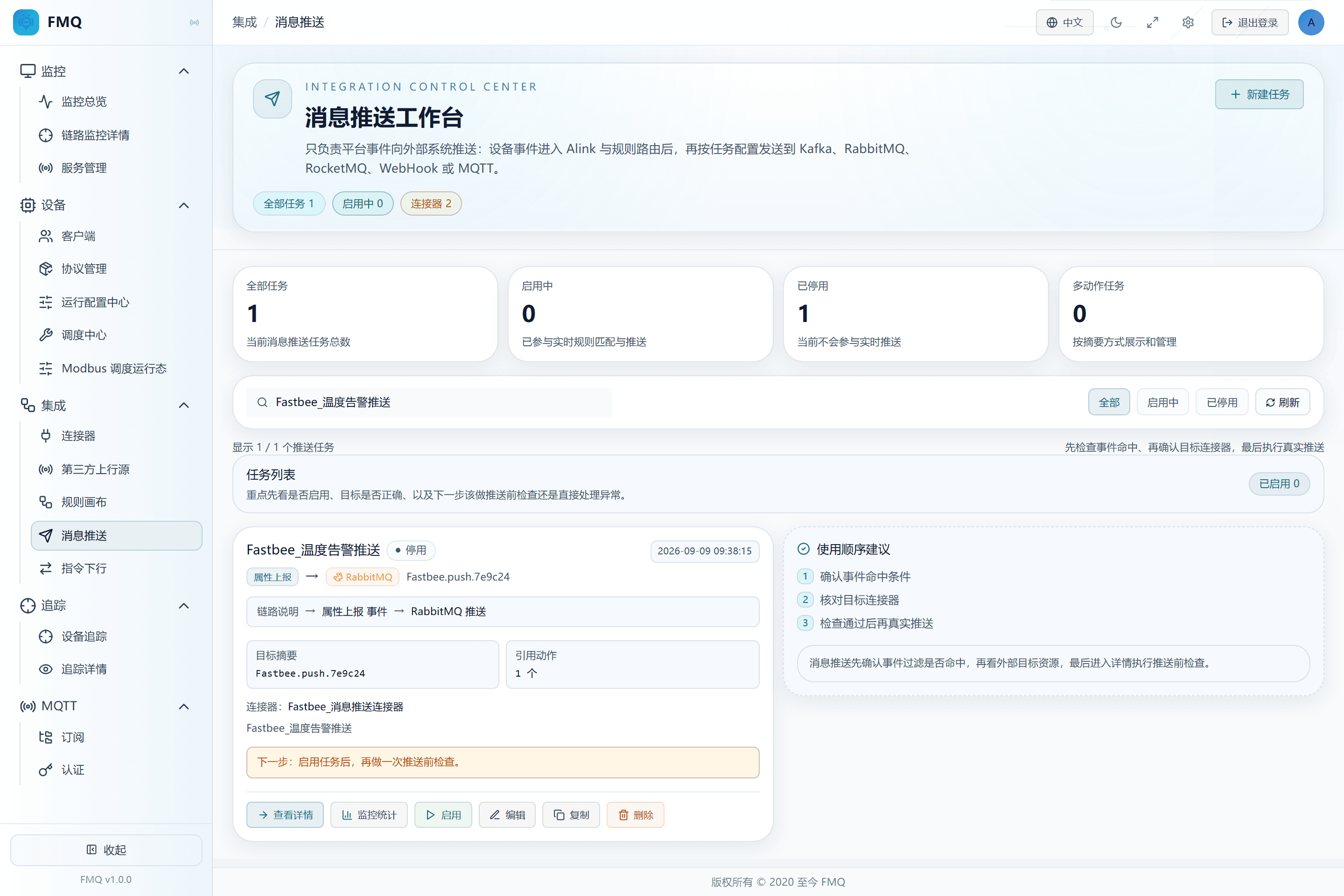
Figure: searching by task name and refreshing; the target task is visible in the current filtered results.
Field Descriptions
| Field / Control | Description |
|---|---|
| Search | Locates by task identity and the description scope supported by the page.; after saving it affects the current task's subsequent checks or sends; re-verify results with a new sample. Optional · Source: task names and similar information in the current list. Choice: if nothing is found, clear the condition and status filters first. Recommended: fill in per the integration documents · Example: FastBee_温度告警推送 |
| Status Filter | Shows only tasks in the selected enabled/disabled state.; after saving it affects the current task's subsequent checks or sends; re-verify results with a new sample. Optional · Source: the task's current status. Choice: when you cannot find a task during troubleshooting, switch to All first. Recommended: fill in per the integration documents · Example: All |
26. Edit a Simple Task
Location: Integration → Message Push
Open the edit entry of a simple task; before modifying, record the SQL, action, and connector reference.
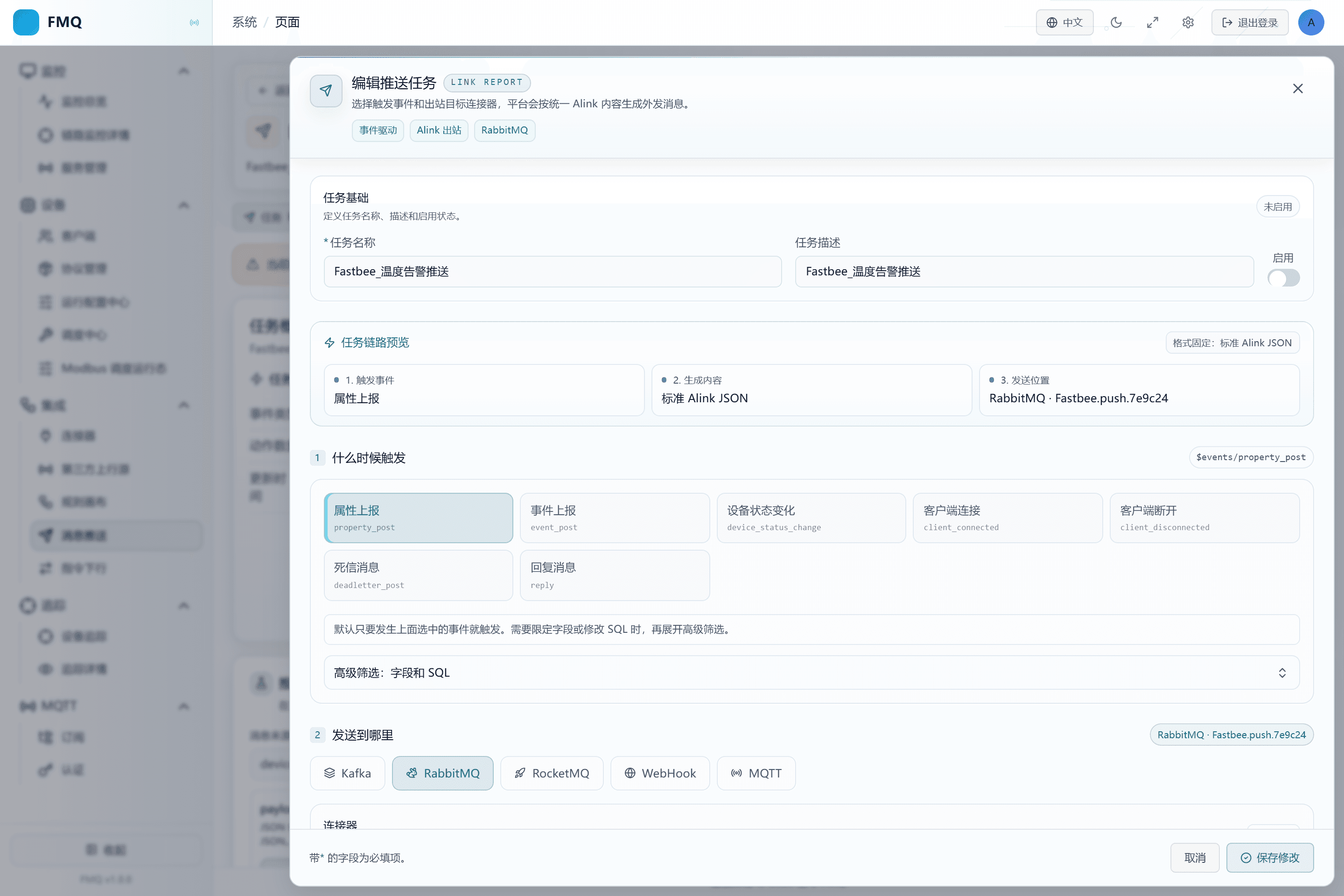
Figure: the edit form of this batch's simple task is open, with the name and configuration verified; no business parameters are changed this time.
27. Copy a Simple Task
Location: Integration → Message Push
Click Copy, change the new task's name and target, then save.
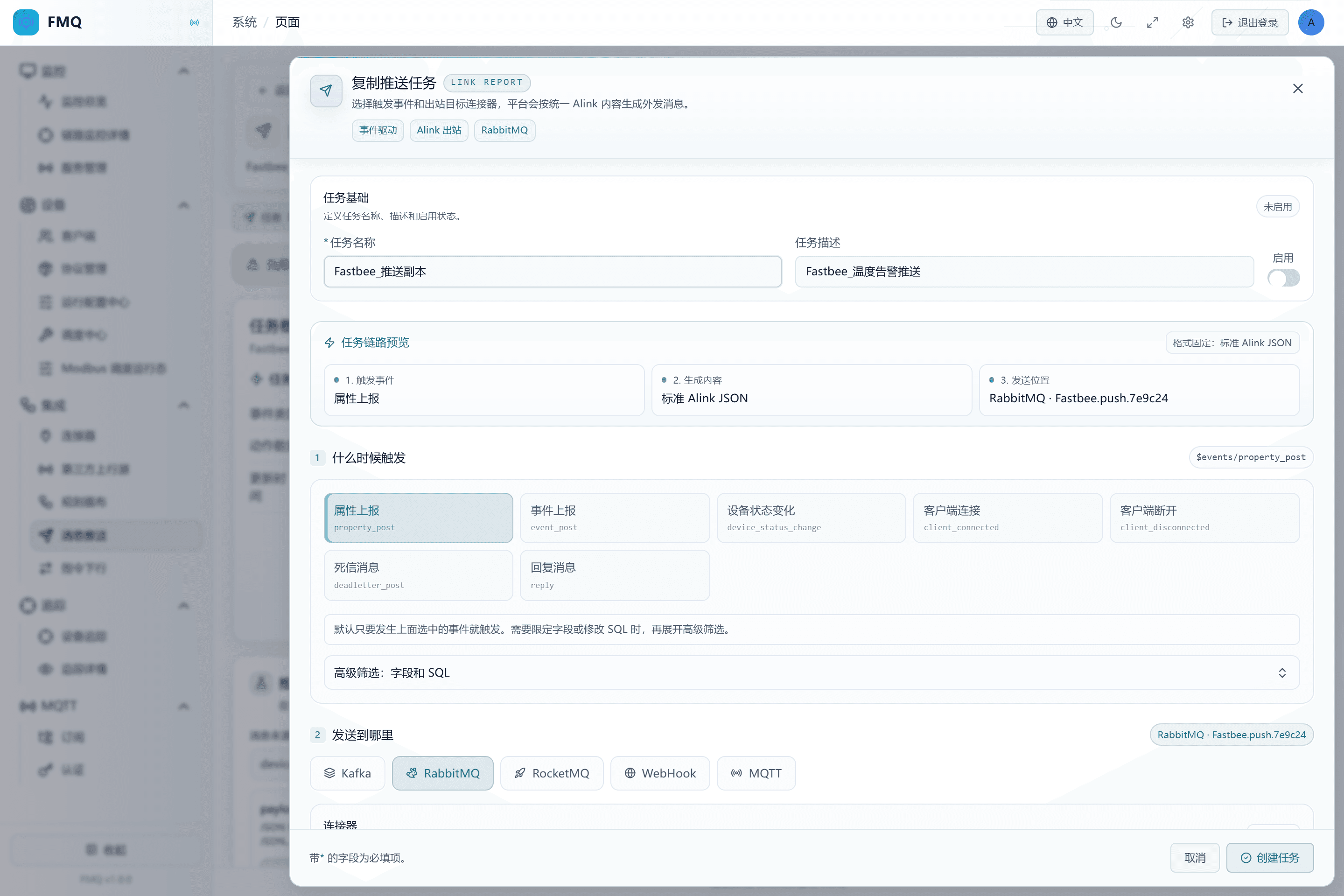
Figure: the copied draft has been renamed and its enable switched off, and the original task is unchanged; this time it is cancelled and no duplicate task is created.
28. Disable a Task That Should No Longer Trigger Automatically
Location: Integration → Message Push
Click Disable and confirm the status changes to Disabled.
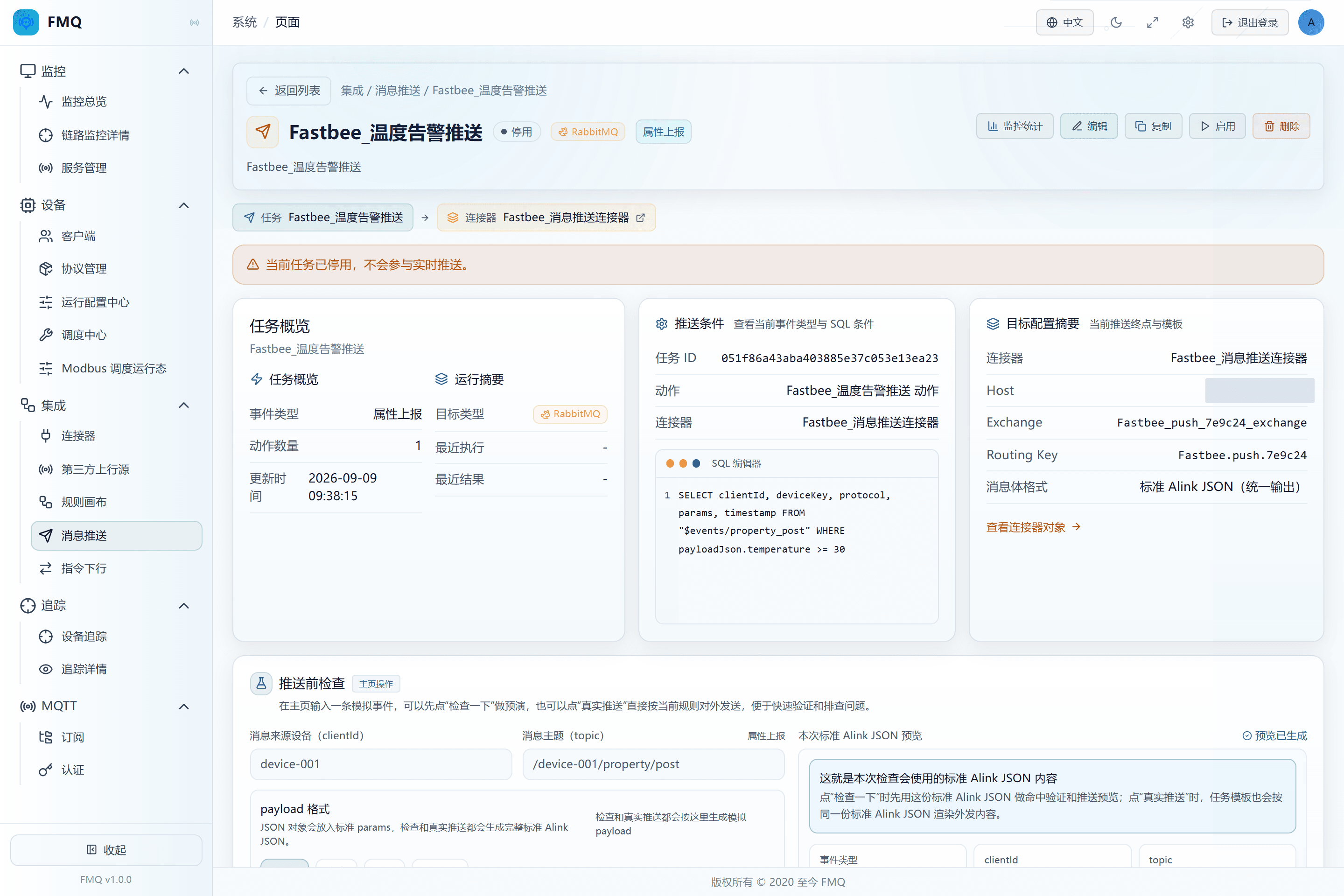
Figure: the task is currently disabled and no longer matches real-time events automatically.
Field Descriptions
| Field / Control | Description |
|---|---|
| Enable Status | When enabled, the task joins real-time event matching; when disabled it does not trigger automatically, but a manual real push can still send.; after saving it affects the current task's subsequent checks or sends; re-verify results with a new sample. Optional · Source: choose according to the current debugging or go-live stage. Choice: a new task may be enabled by default; in this example it must be switched off manually and switched on only after closed-loop verification. Recommended: fill in per the integration documents · Example: Disabled |
29. Review the Delete Impact; Cancel This Time
Location: Integration → Message Push
Click Delete and read the task name and cleanup scope in the confirmation box; because this task is still needed for newcomer blind testing, click Cancel this time.
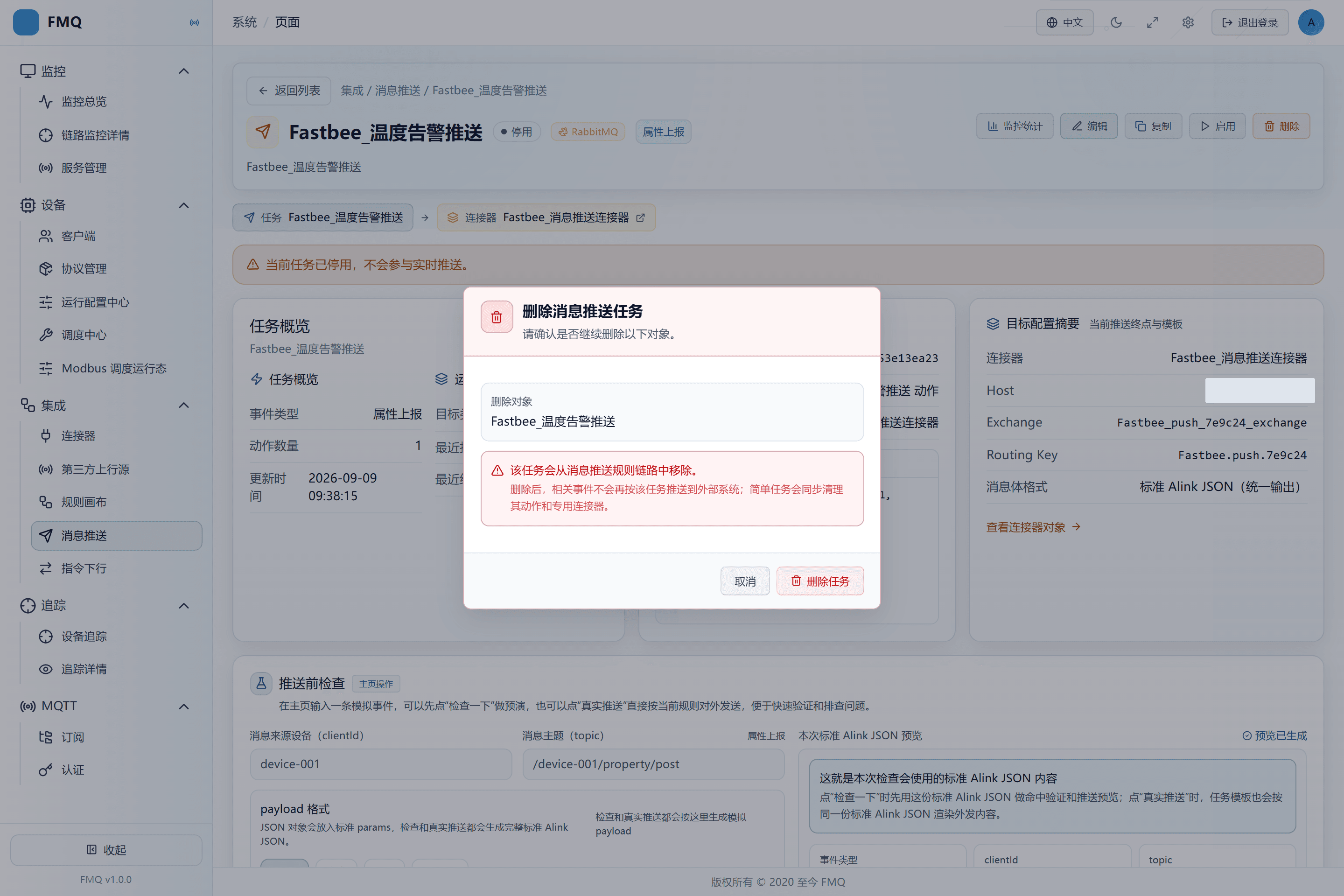
Figure: the delete confirmation shows the task name and impact scope; cancelled this time, with unified cleanup after precise resource verification.
Check, Monitoring, and Daily Operations
| Field | Purpose | Where the Value Comes From | How to Choose | Wrong-Input Symptom and Recovery | Effective Conditions |
|---|---|---|---|---|---|
| Check | Computes whether the SQL matches and generates a preview, without calling the real target.; after saving it affects the current task's subsequent checks or sends; re-verify results with a new sample. | The operation entry on the current page. | Check once with 25°C and once with 31.5°C, seeing no match and match respectively. Recommended: fill in per the integration documents · Default: — · Example: Check | A successful check cannot replace network, Broker, and actual-receipt verification.; check once with 25°C and once with 31.5°C, seeing no match and match respectively. | Scope: the current message push task · Publish: not required · Restart: not required · Reconnect: not required |
| Real Push | Executes the real action on the current simulated event; a disabled task can also send.; after saving it affects the current task's subsequent checks or sends; re-verify results with a new sample. | The operation entry on the current page. | Click only after confirming the isolated target, then watch monitoring and external actual receipt. Recommended: fill in per the integration documents · Default: — · Example: Real Push | Produces external business side effects.; click only after confirming the isolated target, then watch monitoring and external actual receipt. | Scope: the current message push task · Publish: not required · Restart: not required · Reconnect: not required |
| Monitoring | Opens the task send monitoring, showing submitted and actual results separately.; after saving it affects the current task's subsequent checks or sends; re-verify results with a new sample. | The operation entry on the current page. | Compare increments in the same observation window before and after sending; the current count is not a permanent historical total. Recommended: fill in per the integration documents · Default: — · Example: Monitoring | Do not take successes from other times as this round's success.; compare increments in the same observation window before and after sending; the current count is not a permanent historical total. | Scope: the current message push task · Publish: not required · Restart: not required · Reconnect: not required |
| Search | Locates by task identity and the description scope supported by the page.; after saving it affects the current task's subsequent checks or sends; re-verify results with a new sample. | Task names and similar information in the current list. | If nothing is found, clear the condition and status filters first. Recommended: fill in per the integration documents · Default: — · Example: FastBee_温度告警推送 | A value different from the actual event or integration agreement causes misses or wrong send targets.; correct it against the value source, then re-check and verify actual receipt on the target. | Scope: the current message push task · Publish: not required · Restart: not required · Reconnect: not required |
| Status Filter | Shows only tasks in the selected enabled/disabled state.; after saving it affects the current task's subsequent checks or sends; re-verify results with a new sample. | The task's current status. | When you cannot find a task during troubleshooting, switch to All first. Recommended: fill in per the integration documents · Default: — · Example: AllAll: all tasks; no status restriction. Enabled: currently matching real-time events; disabled tasks hidden. Disabled: no automatic triggering; enabled tasks hidden. | A value different from the actual event or integration agreement causes misses or wrong send targets.; correct it against the value source, then re-check and verify actual receipt on the target. | Scope: the current message push task · Publish: not required · Restart: not required · Reconnect: not required |
| Refresh | Reloads the list or the current monitoring.; after saving it affects the current task's subsequent checks or sends; re-verify results with a new sample. | The operation entry on the current page. | Be clear about the current sampling time; for network errors check the access status first. Recommended: fill in per the integration documents · Default: — · Example: Refresh | Refreshing does not resend messages.; be clear about the current sampling time; for network errors check the access status first. | Scope: the current message push task · Publish: not required · Restart: not required · Reconnect: not required |
| Enable | Makes the rule join real-time matching.; after saving it affects the current task's subsequent checks or sends; re-verify results with a new sample. | The operation entry on the current page. | Enable only after the real push verification succeeds and the target actually receives. Recommended: fill in per the integration documents · Default: — · Example: Enable | May immediately process all matched events entering the platform.; enable only after the real push verification succeeds and the target actually receives. | Scope: the current message push task · Publish: not required · Restart: not required · Reconnect: not required |
| Disable | Stops automatic triggering of real-time events.; after saving it affects the current task's subsequent checks or sends; re-verify results with a new sample. | The operation entry on the current page. | Disable before maintenance or deletion, and watch whether the backlog drains. Recommended: fill in per the integration documents · Default: — · Example: Disable | Messages already in the send queue may still complete; manual real push is not limited by this.; disable before maintenance or deletion, and watch whether the backlog drains. | Scope: the current message push task · Publish: not required · Restart: not required · Reconnect: not required |
| Edit | Modifies the rule or action of a simple task.; after saving it affects the current task's subsequent checks or sends; re-verify results with a new sample. | The operation entry on the current page. | Record the original values and re-verify after saving; multi-action tasks are not supported. Recommended: fill in per the integration documents · Default: — · Example: Edit | When modifying a shared object, the page may copy a new object; verify the references.; record the original values and re-verify after saving; multi-action tasks are not supported. | Scope: the current message push task · Publish: not required · Restart: not required · Reconnect: not required |
| Copy | Creates a new draft from a simple task; the original task is kept.; after saving it affects the current task's subsequent checks or sends; re-verify results with a new sample. | The operation entry on the current page. | Change the name and disable first, and verify whether the connector is reused or newly created. Recommended: fill in per the integration documents · Default: — · Example: Copy | If both the old and new rules are enabled, pushes may be duplicated.; change the name and disable first, and verify whether the connector is reused or newly created. | Scope: the current message push task · Publish: not required · Restart: not required · Reconnect: not required |
| Delete | Deletes the rule; for a simple task the page also tries to delete the action and connector.; after saving it affects the current task's subsequent checks or sends; re-verify results with a new sample. | The operation entry on the current page. | Disable first and confirm whether the objects are dedicated; do not casually delete shared resources. Recommended: fill in per the integration documents · Default: — · Example: Delete | There is no undo button; recovery requires rebuilding from a backup configuration.; disable first and confirm whether the objects are dedicated; do not casually delete shared resources. | Scope: the current message push task · Publish: not required · Restart: not required · Reconnect: not required |
| Delete Shared-Resource Boundary | A connector still referenced by a local action is refused for deletion; a connector with no remaining references may be deleted along the way by the page.; used to understand and judge the current result; does not change the task. | The page delete flow and the connector reference check. | Before deleting, verify the purpose and references in the Connector module; do not simply assume the platform keeps a reused connector forever. Recommended: fill in per the integration documents · Default: — · Example: cancel an unclear deletion | A value different from the actual event or integration agreement causes misses or wrong send targets.; correct it against the value source, then re-check and verify actual receipt on the target. | Scope: the current message push task · Publish: not required · Restart: not required · Reconnect: not required |
| Multi-action Task Limitation | View, test, enable/disable, and delete are supported; editing or copying on the current page is not.; used to understand and judge the current result; does not change the task. | The number of task actions. | Review the test results one by one; do not look at only the first target. Recommended: fill in per the integration documents · Default: — · Example: more than 1 action | A value different from the actual event or integration agreement causes misses or wrong send targets.; correct it against the value source, then re-check and verify actual receipt on the target. | Scope: the current message push task · Publish: not required · Restart: not required · Reconnect: not required |
| Recent Logs | Off by default; the list is empty when off.; used to understand and judge the current result; does not change the task. | The rule execution log configuration and recent query results. | Look at the monitoring counters first; when logs are needed, contact operations to enable them on demand and evaluate the load. Recommended: fill in per the integration documents · Default: — · Example: an empty list does not mean an exception | A value different from the actual event or integration agreement causes misses or wrong send targets.; correct it against the value source, then re-check and verify actual receipt on the target. | Scope: the current message push task · Publish: not required · Restart: not required · Reconnect: not required |
| External Queue Actual Receipt | Only actually reading this round's message from the target queue proves the target route works.; used to understand and judge the current result; does not change the task. | The RabbitMQ management interface or an approved consumer. | Verify the queue name, device identifier, time, and temperature; a read confirmation removes the message, so only operate on a dedicated queue. Recommended: fill in per the integration documents · Default: — · Example: params.temperature=31.5 | A value different from the actual event or integration agreement causes misses or wrong send targets.; correct it against the value source, then re-check and verify actual receipt on the target. | Scope: the current message push task · Publish: not required · Restart: not required · Reconnect: not required |
| LinkPilot Real Input | Sends a property event with a real device tool session, without clicking FMQ Real Push.; used to understand and judge the current result; does not change the task. | The connection and send records of the LinkPilot GUI. | Verify the client, target Broker, Topic, and the 32.6°C content, then verify the same message in the target queue. Recommended: fill in per the integration documents · Default: — · Example: 32.6°C | A value different from the actual event or integration agreement causes misses or wrong send targets.; correct it against the value source, then re-check and verify actual receipt on the target. | Scope: the current message push task · Publish: not required · Restart: not required · Reconnect: not required |
| Backlog Count | The number of send tasks submitted but not yet completed.; used to understand and judge the current result; does not change the task. | Task monitoring snapshot, unit: messages; current runtime statistics. | Should trend toward 0 after input stops; a brief backlog during continuous input is not necessarily abnormal. If it keeps increasing or not falling after input stops, check the Broker latency and failures first. Recommended: fill in per the integration documents · Default: — · Example: subject to the difference before and after this send | A value different from the actual event or integration agreement causes misses or wrong send targets.; correct it against the value source, then re-check and verify actual receipt on the target. | Scope: the current message push task · Publish: not required · Restart: not required · Reconnect: not required |
| Submit Success Count | The number of actions that successfully entered the local send queue, not the number of Broker confirmations.; used to understand and judge the current result; does not change the task. | Task monitoring snapshot, unit: times; current runtime statistics. | Should increase after a rule matches and a send is initiated. If an event matches but this does not increase, check the action and connector references. Recommended: fill in per the integration documents · Default: — · Example: subject to the difference before and after this send | A value different from the actual event or integration agreement causes misses or wrong send targets.; correct it against the value source, then re-check and verify actual receipt on the target. | Scope: the current message push task · Publish: not required · Restart: not required · Reconnect: not required |
| Submit Failure Count | The count of failed action submissions.; used to understand and judge the current result; does not change the task. | Task monitoring snapshot, unit: times; current runtime statistics. | Should not increase during a normal submission this time. When it increases, verify the action's required parameters and the error feedback first. Recommended: fill in per the integration documents · Default: — · Example: subject to the difference before and after this send | A value different from the actual event or integration agreement causes misses or wrong send targets.; correct it against the value source, then re-check and verify actual receipt on the target. | Scope: the current message push task · Publish: not required · Restart: not required · Reconnect: not required |
| Discarded Count | The number of tasks not retained under conditions such as send queue overload.; used to understand and judge the current result; does not change the task. | Task monitoring snapshot, unit: times; current runtime statistics. | Should not increase with this send under normal capacity. When it increases, look at capacity and backlog first; do not just resend repeatedly. Recommended: fill in per the integration documents · Default: — · Example: subject to the difference before and after this send | A value different from the actual event or integration agreement causes misses or wrong send targets.; correct it against the value source, then re-check and verify actual receipt on the target. | Scope: the current message push task · Publish: not required · Restart: not required · Reconnect: not required |
| Actual Success | The actual success recorded by the send layer. In this example, with publish confirmation enabled, it corresponds to the RabbitMQ confirmation.; used to understand and judge the current result; does not change the task. | Task monitoring snapshot, unit: times; current runtime statistics. | Increases after the actual send completes; actual receipt in the target queue is still required. If submissions increase but this does not, check the backlog and actual failures. Recommended: fill in per the integration documents · Default: — · Example: subject to the difference before and after this send | A value different from the actual event or integration agreement causes misses or wrong send targets.; correct it against the value source, then re-check and verify actual receipt on the target. | Scope: the current message push task · Publish: not required · Restart: not required · Reconnect: not required |
| Actual Failure | The count of Broker send or confirmation failures.; used to understand and judge the current result; does not change the task. | Task monitoring snapshot, unit: times; current runtime statistics. | Should not increase during a normal send this time. When it increases, look at the latest exception and connector status first. Recommended: fill in per the integration documents · Default: — · Example: subject to the difference before and after this send | A value different from the actual event or integration agreement causes misses or wrong send targets.; correct it against the value source, then re-check and verify actual receipt on the target. | Scope: the current message push task · Publish: not required · Restart: not required · Reconnect: not required |
| Queue Capacity | The capacity of the FMQ local send queue, not the RabbitMQ queue capacity.; used to understand and judge the current result; does not change the task. | Task monitoring snapshot, unit: messages; current runtime statistics. | The remaining capacity should be enough to absorb the current traffic. If the remainder approaches 0 while the backlog grows, check the downstream processing speed. Recommended: fill in per the integration documents · Default: — · Example: subject to the difference before and after this send | A value different from the actual event or integration agreement causes misses or wrong send targets.; correct it against the value source, then re-check and verify actual receipt on the target. | Scope: the current message push task · Publish: not required · Restart: not required · Reconnect: not required |
| Remaining Capacity | The currently available space of the local send queue.; used to understand and judge the current result; does not change the task. | Task monitoring snapshot, unit: messages; current runtime statistics. | Usually high under low load and can approach the total capacity when idle. When it stays near 0, reduce the input and check the Broker. Recommended: fill in per the integration documents · Default: — · Example: subject to the difference before and after this send | A value different from the actual event or integration agreement causes misses or wrong send targets.; correct it against the value source, then re-check and verify actual receipt on the target. | Scope: the current message push task · Publish: not required · Restart: not required · Reconnect: not required |
| Latest Exception | The most recent Broker send error, not a SQL check error.; used to understand and judge the current result; does not change the task. | Task monitoring snapshot, unit: text; current runtime statistics. | Empty when there is no error; historical errors must be judged together with the failure time. When a new error appears, check by its connection, permission, or timeout cause. Recommended: fill in per the integration documents · Default: — · Example: subject to the difference before and after this send | A value different from the actual event or integration agreement causes misses or wrong send targets.; correct it against the value source, then re-check and verify actual receipt on the target. | Scope: the current message push task · Publish: not required · Restart: not required · Reconnect: not required |
| Sampling Time | The time this monitoring snapshot was taken, not the time a message occurred.; used to understand and judge the current result; does not change the task. | Task monitoring snapshot, unit: time; current runtime statistics. | Updates with refresh when monitoring is open. If it does not update for a long time, check the page network first and do not treat old numbers as real-time results. Recommended: fill in per the integration documents · Default: — · Example: subject to the difference before and after this send | A value different from the actual event or integration agreement causes misses or wrong send targets.; correct it against the value source, then re-check and verify actual receipt on the target. | Scope: the current message push task · Publish: not required · Restart: not required · Reconnect: not required |
| Submissions per Second | The submit success increment between adjacent samples divided by the time difference.; used to understand and judge the current result; does not change the task. | Adjacent monitoring samples on the page, usually refreshed every 3 seconds; the first sample cannot form a rate. | Varies with load when there is input; 0 during business silence is normal. Recommended: fill in per the integration documents · Default: — · Example: messages/second | A value different from the actual event or integration agreement causes misses or wrong send targets.; correct it against the value source, then re-check and verify actual receipt on the target. | Scope: the current message push task · Publish: not required · Restart: not required · Reconnect: not required |
| Actual Sends per Second | The Broker success increment between adjacent samples divided by the time difference.; used to understand and judge the current result; does not change the task. | Adjacent monitoring samples on the page, usually refreshed every 3 seconds; the first sample cannot form a rate. | When there is a backlog but it stays 0 for a long time, check the actual failures and Broker availability. Recommended: fill in per the integration documents · Default: — · Example: messages/second | A value different from the actual event or integration agreement causes misses or wrong send targets.; correct it against the value source, then re-check and verify actual receipt on the target. | Scope: the current message push task · Publish: not required · Restart: not required · Reconnect: not required |
| Test Source Client | The source identifier of the test event; does not automatically establish a real device connection.; only affects the next check or manual real push; does not change real device events. | The current test sample or a real desensitized event. | This example uses JSON mode and only adjusts temperature to 25 or 31.5. Recommended: fill in per the integration documents · Default: — · Example: FastBee_测温 | A value different from the actual event or integration agreement causes misses or wrong send targets.; correct it against the value source, then re-check and verify actual receipt on the target. | Scope: the current message push task · Publish: not required · Restart: not required · Reconnect: not required |
| Test Message Topic | The source Topic of the test event, not the RabbitMQ destination queue.; only affects the next check or manual real push; does not change real device events. | The current test sample or a real desensitized event. | This example uses JSON mode and only adjusts temperature to 25 or 31.5. Recommended: fill in per the integration documents · Default: — · Example: /FastBee_测温/property/post | A value different from the actual event or integration agreement causes misses or wrong send targets.; correct it against the value source, then re-check and verify actual receipt on the target. | Scope: the current message push task · Publish: not required · Restart: not required · Reconnect: not required |
| JSON Business Content | Enter a JSON object, which the platform puts into the Alink params.; only affects the next check or manual real push; does not change real device events. | The current test sample or a real desensitized event. | This example uses JSON mode and only adjusts temperature to 25 or 31.5. Recommended: fill in per the integration documents · Default: — · Example: | A value different from the actual event or integration agreement causes misses or wrong send targets.; correct it against the value source, then re-check and verify actual receipt on the target. | Scope: the current message push task · Publish: not required · Restart: not required · Reconnect: not required |
| Text Content | Text is written into params.payloadText; without a temperature number, this example's temperature condition cannot apply.; only affects the next check or manual real push; does not change real device events. | The current test sample or a real desensitized event. | This example uses JSON mode and only adjusts temperature to 25 or 31.5. Recommended: fill in per the integration documents · Default: — · Example: hello | A value different from the actual event or integration agreement causes misses or wrong send targets.; correct it against the value source, then re-check and verify actual receipt on the target. | Scope: the current message push task · Publish: not required · Restart: not required · Reconnect: not required |
| Hex Content | Even-length hexadecimal, written into params.payloadHex with payloadLength attached.; only affects the next check or manual real push; does not change real device events. | The current test sample or a real desensitized event. | This example uses JSON mode and only adjusts temperature to 25 or 31.5. Recommended: fill in per the integration documents · Default: — · Example: 6869 | A value different from the actual event or integration agreement causes misses or wrong send targets.; correct it against the value source, then re-check and verify actual receipt on the target. | Scope: the current message push task · Publish: not required · Restart: not required · Reconnect: not required |
| Base64 Content | A Base64 representation written into params.payloadBase64; it does not automatically parse bytes into a temperature.; only affects the next check or manual real push; does not change real device events. | The current test sample or a real desensitized event. | This example uses JSON mode and only adjusts temperature to 25 or 31.5. Recommended: fill in per the integration documents · Default: — · Example: aGk= | A value different from the actual event or integration agreement causes misses or wrong send targets.; correct it against the value source, then re-check and verify actual receipt on the target. | Scope: the current message push task · Publish: not required · Restart: not required · Reconnect: not required |
| Additional Fields | Supplements the test event with context such as protocol and time; a JSON object; credentials must not be entered.; only affects the next check or manual real push; does not change real device events. | The current test sample or a real desensitized event. | This example uses JSON mode and only adjusts temperature to 25 or 31.5. Recommended: fill in per the integration documents · Default: — · Example: | A value different from the actual event or integration agreement causes misses or wrong send targets.; correct it against the value source, then re-check and verify actual receipt on the target. | Scope: the current message push task · Publish: not required · Restart: not required · Reconnect: not required |
| Test Content Mode | Selects the encoding form of the test business content.; after saving it affects the current task's subsequent checks or sends; re-verify results with a new sample. | The type of message to be verified. | Choose JSON for the temperature walkthrough; for other forms, rewrite the corresponding WHERE first. Recommended: fill in per the integration documents · Default: — · Example: JSONJSON: represents business content as JSON; after switching, check the actual Alink preview. Text: represents business content as text; after switching, check the actual Alink preview. Hex: represents business content as Hex; after switching, check the actual Alink preview. Base64: represents business content as Base64; after switching, check the actual Alink preview. | A value different from the actual event or integration agreement causes misses or wrong send targets.; correct it against the value source, then re-check and verify actual receipt on the target. | Scope: the current message push task · Publish: not required · Restart: not required · Reconnect: not required |
Reference Table 2
| Symptom | Possible Cause | What to Check First | How to Recover |
|---|---|---|---|
| 25°C also shows a match | The WHERE condition or field path is wrong | Verify payloadJson.temperature and >= 30 | Fix the SQL and repeat the no-match check first |
| The check matches but no send is executed | Check was used, or the real push request was not submitted | Look at dryRun and dispatched | After confirming the isolated target, click Real Push |
| Submit succeeded but Broker actual success does not increase | Local backlog, connection exception, or send failure | Look at backlog, actual failures, and the latest exception | Fix the connector and retest; do not pile up repeated requests |
| Broker succeeded but the RabbitMQ queue is at 0 | The Exchange, Routing Key, or queue binding does not match | Compare the task action with the RabbitMQ Binding item by item | Change back to the correct Routing Key, then retest actual receipt over the same connection |
| Recent logs are empty | The recent logs capability is off by default, or there are no records in the current window | Look at the monitoring counters and runtime configuration first | Do not judge failure from an empty log alone; enable controlled logging on demand before querying |
| Cannot find Edit or Copy | The task contains multiple actions | Look at the action count and the page hint | Keep the original task; manually create a new simple task from the summary, or use the supported view, test, enable/disable, and delete operations |
Production Operation Notice
The screenshots and examples illustrate operation locations and judgment methods; they do not represent the current production state. When publishing, enabling/disabling, rebinding, retrying, or deleting is involved, confirm the target environment, impact scope, and recovery plan first, and have authorized personnel execute it.
Fengxin IoT (FastBee) · FMQ Operation Manual