


Modbus RTU over MQTT Passthrough Access
This article is compiled from an existing operation manual into an online operation reference. Operations marked as expected or not executed in the original text must still be verified against the actual environment.
Complete ten consecutive collections at the same address, two FC06 writes, independent FC03 read-backs, history refresh, and a normal stop and recovery.
Before you start: you have permissions for products, devices, models, publishing, control, and history; the local application, single-node FMQ, and FMQX Web are available, and this device's connection parameters have been obtained.
Before You Start
This article carries complete Modbus RTU frames over MQTT, with FMQX Web as the demo slave, covering read, write, independent read-back, history query, and a normal stop and recovery.
The point table's zero-based addresses 0-9 with 201-210 each are the initial samples for the ten addresses. This round's ten consecutive samples are 411-420 in sequence at the same zero-based address 0, and 421 is read after recovery.
The write setpoint uses zero-based address 100. The FC06 reception, echo, register state, and the other FC03 response are verified separately.
Replace These Parameters Before Copying the Templates
The code in this article uses generic template names; the screenshots keep the actual historical resources. Complete the following checks before saving anything as a UTF-8 file or sending any message.
register_0and similar are point-table template identifiers; the identifier in the platform point table, the mappings, and the FMQX Thing Model must match item by item. Addresses, station numbers, and read/write attributes follow the official on-site point table.demo-deviceis a device number template. Replace the device number in the clientId, the device number in every send/receive topic, and the clientId reported over TCP together with the platform's device number; the product number and tenant number in the MQTT identity must also be replaced with the current device connection parameters.- The host, port, and listening direction in the connection file must be changed to the actual addresses of the current environment; 127.0.0.1 means the local machine running FMQX. When MQTT is involved, also verify the product number, username, subscription topics, and responseRoute; enter passwords only on the connection page, never in the file.
- Group, session, and subscription ids are internal references of the import file; if you rename anything, the groupId must match the corresponding group id. Verify before importing, and do not create duplicate connections with the same name on retained sessions.
- The code blocks are customer templates rewritten from existing password-free assets or original code; this version of the template has not been proven to import successfully. Historical screenshots, send times, and business pass scope still follow the records of each step; do not treat template names as the actual resource names in the old evidence.
1. Initial Configuration and Reused Resources
The original sources of the first configuration or import on 2026-10-13 are retained; this round reuses the existing product, device, point table, and session, without recreating, saving models, or importing again.
Full 11-point UTF-8 collection point table CSV template csv
identifier,name,datatype,unit,registerarea,wiredatatype,byteorder,wordorder,functioncode,addressbase,startaddress,quantity,scale,offset,intervalms

register_0,采集点1,integer,,HOLDING_REGISTER,UINT16,BE,BE,3,0,0,1,1,0,5000

register_1,采集点2,integer,,HOLDING_REGISTER,UINT16,BE,BE,3,0,1,1,1,0,5000

register_2,采集点3,integer,,HOLDING_REGISTER,UINT16,BE,BE,3,0,2,1,1,0,5000

register_3,采集点4,integer,,HOLDING_REGISTER,UINT16,BE,BE,3,0,3,1,1,0,5000

register_4,采集点5,integer,,HOLDING_REGISTER,UINT16,BE,BE,3,0,4,1,1,0,5000

register_5,采集点6,integer,,HOLDING_REGISTER,UINT16,BE,BE,3,0,5,1,1,0,5000

register_6,采集点7,integer,,HOLDING_REGISTER,UINT16,BE,BE,3,0,6,1,1,0,5000

register_7,采集点8,integer,,HOLDING_REGISTER,UINT16,BE,BE,3,0,7,1,1,0,5000

register_8,采集点9,integer,,HOLDING_REGISTER,UINT16,BE,BE,3,0,8,1,1,0,5000

register_9,采集点10,integer,,HOLDING_REGISTER,UINT16,BE,BE,3,0,9,1,1,0,5000

register_100,写入设定,integer,,HOLDING_REGISTER,UINT16,BE,BE,3,0,100,1,1,0,500011 data points plus 1 header row; 0-9 are the ten collection addresses and 100 is the write address. Save as RTU-point-table.csv. Replaceable customer template names are used here; check them against the replacement list in this section before importing or sending.
1. Initial configuration: import the 11 formal register points
Location: IoT*→Device Access→*Collection Point Table Steps: after checking the full CSV above against the replacement list, save it as a UTF-8 file RTU-point-table.csv and import it into the platform; verify the 11 fields and the zero-based addresses. The original screenshot is a record of the initial configuration; this round reuses the saved resources.
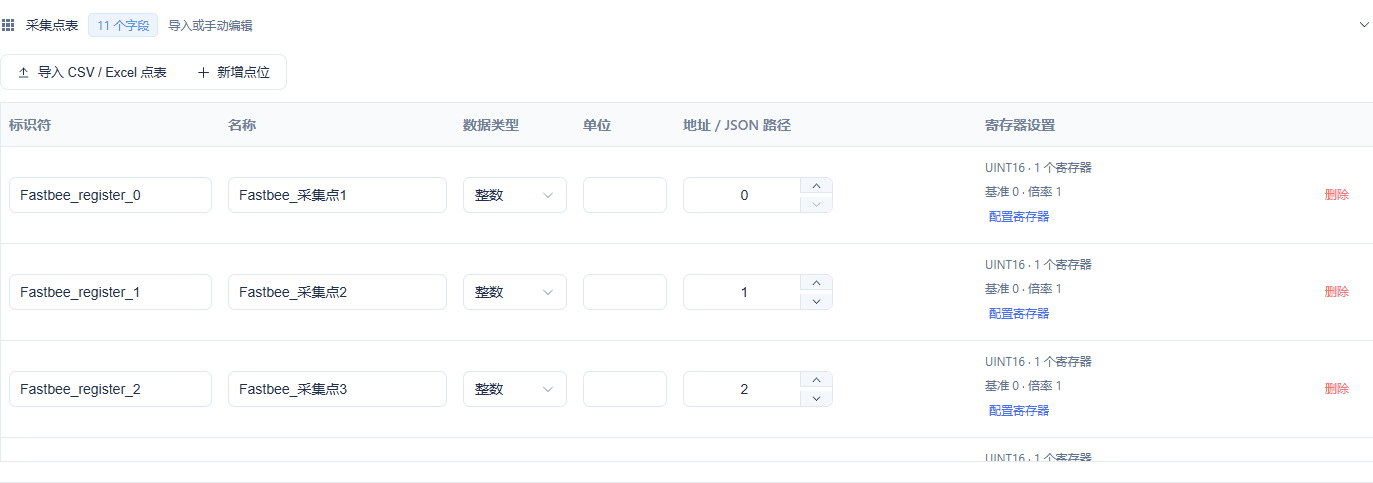
Collection points 0-9 and write point 100, quantity 1 each.
Screenshot Key Points
| Field / Control | Description |
|---|---|
| Polling Start Address | One range each for 0-9 and 100; zero-based addresses are used. Required · Enter: 0-9, 100 |
| Address Base, Scale, and Offset | Zero-based address 0 is often written as 40001 in reference numbering; physical quantity = raw value x scale + offset. Required · Enter: base 0 / scale 1 / offset 0 |
| Collection Point Table | Import 11 integer points; 0-9 are the ten collection addresses and 100 is the write address. This round's ten consecutive samples are all done at address 0. Required · Enter: RTU-point-table.csv |
2. Initial configuration: fill in this article's device identity and station number
Location: Device Access Wizard*→*Device Steps: fill in Device Identifier with this article's number, the name with this article's name, and slave address 1. This step keeps the initial configuration record; this round reuses the saved resources.
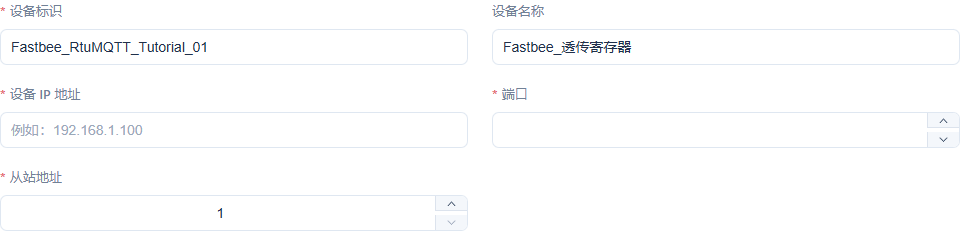
The device number matches the subsequent binding and session. The MQTT access IP/port uses the FMQX Broker parameters.
Screenshot Key Points
| Field / Control | Description |
|---|---|
| Device Identifier | A device number unique within the product; consistent with the runtime binding and the FMQX identity. Required · Enter: FastBee_RtuMQTT_Tutorial_01 |
| Slave Address / Unit ID | The station number in the first byte of the RTU frame. Required · Enter: 1 |
3. Initial configuration: confirm the product, protocol, and device scope
Location: Device Access Wizard*→*Confirm Steps: verify MODBUS_RTU, Transport, 1 device, and 11 collection fields. This step keeps the initial configuration record; this round reuses the saved resources.

Confirm this article's standalone product and device; do not mix in resources from other tutorials.
Screenshot Key Points
| Field / Control | Description |
|---|---|
| Product Name | Each article uses a standalone product; re-verification reuses the retained resources. Required · Enter: FastBee_透传寄存器 |
| Device Protocol | The payload is a Modbus RTU binary frame with station number, function code, and CRC. Required · Enter: MODBUS_RTU |
| Transport | The network channel carrying RTU frames; it must match the FMQX session. Required · Enter: MQTT |
4. Initial configuration: set collection points to read-only and store history
Location: Product Details*→Function Definition→*Collection Point 1 Steps: enable chart, real-time monitor, read-only, and history; verify the other 9 points have the same settings. This step keeps the initial configuration record; this round reuses the saved resources.
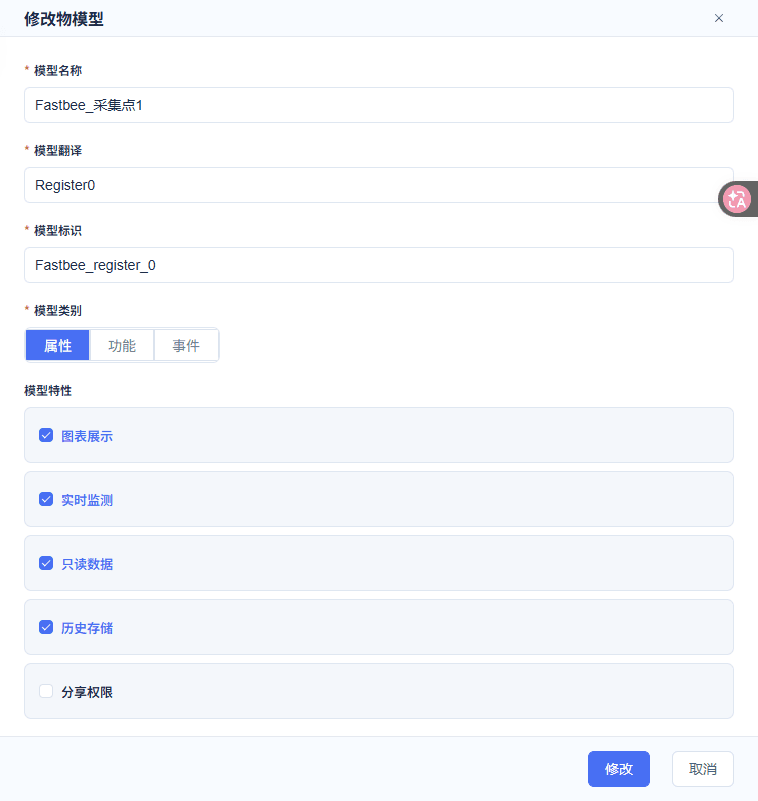
Collection points allow history queries and have no write control.
Screenshot Key Points
| Field / Control | Description |
|---|---|
| Collection Point Identifier | 0-9 are mapped to FastBee_register_0-9, with original initial values 201-210 respectively; address 0 is changed to 411-420 in this round. Required · Enter: FastBee_register_0 |
| Read-only Data | On for the ten collection points; off for the write setpoint. Required · Enter: collection points on; write setpoint off |
| History Storage | Enabled for all 11 properties; only an independent read-back produces the corresponding property history. Required · Enter: On |
| Chart Display and Real-time Monitor | On for the ten collection points; off for the write setpoint. Required · Enter: collection points on; write setpoint off |
| Integer Range and Unit | UINT16 takes 0-65535 with step 1; this article has no engineering unit — fill in per the official point table for real devices. Required · Enter: 0-65535; step 1; unit left empty |
5. Initial configuration: set address 100 as a writable property
Location: Product Details*→Function Definition→*Write Setpoint Steps: uncheck read-only, enable history, turn off chart and real-time monitor, then save. This step keeps the initial configuration record; this round reuses the saved resources.
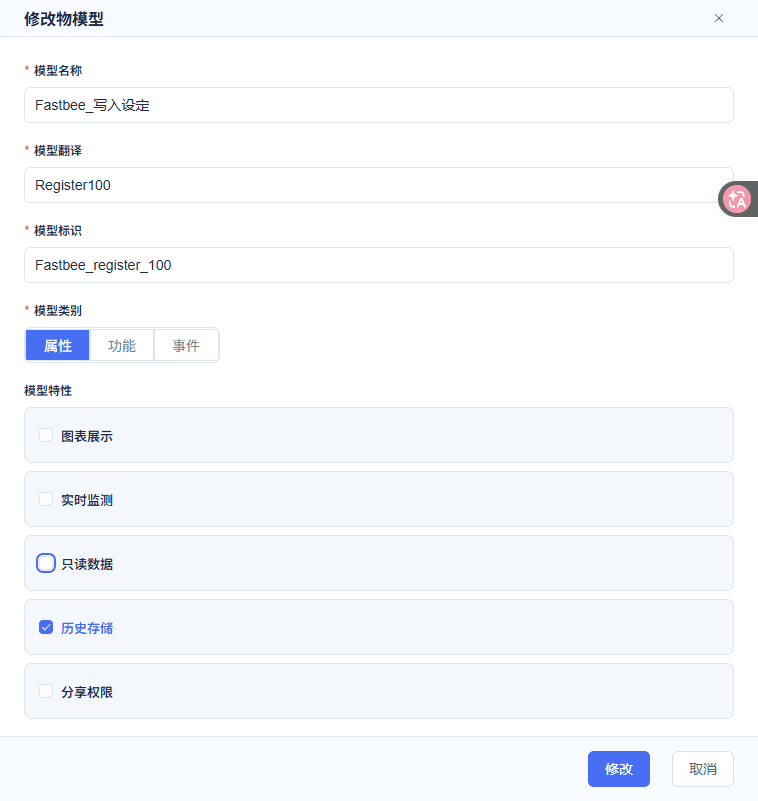
The write setpoint keeps running-status control and history.
Screenshot Key Points
| Field / Control | Description |
|---|---|
| Write Property Identifier | The writable integer property corresponding to holding register address 100. Required · Enter: FastBee_register_100 |
| Read-only Data | On for the ten collection points; off for the write setpoint. Required · Enter: collection points on; write setpoint off |
| History Storage | Enabled for all 11 properties; only an independent read-back produces the corresponding property history. Required · Enter: On |
| Integer Range and Unit | UINT16 takes 0-65535 with step 1; this article has no engineering unit — fill in per the official point table for real devices. Required · Enter: 0-65535; step 1; unit left empty |
6. Initial configuration: verify device binding and Unit ID
Location: Product Details*→Modbus Protocol Configuration→*Device Binding Steps: select this article's device, with Unit ID 1, and enable it. This step keeps the initial configuration record; this round reuses the saved resources.

All reads and writes are bound to the same slave identity.
Screenshot Key Points
| Field / Control | Description |
|---|---|
| Device Binding | Select this article's device, Unit ID 1, enabled; do not bind devices from other tutorials. Required · Enter: FastBee_RtuMQTT_Tutorial_01 / 1 / enabled |
| Slave Address / Unit ID | The station number in the first byte of the RTU frame. Required · Enter: 1 |
7. Initial configuration: verify the FC03 polling ranges
Location: Product Details*→Modbus Protocol Configuration→*Polling Ranges Steps: addresses 0-9 and 100 each read 1 register, with a 5000 ms interval. This step keeps the initial configuration record; this round reuses the saved resources.
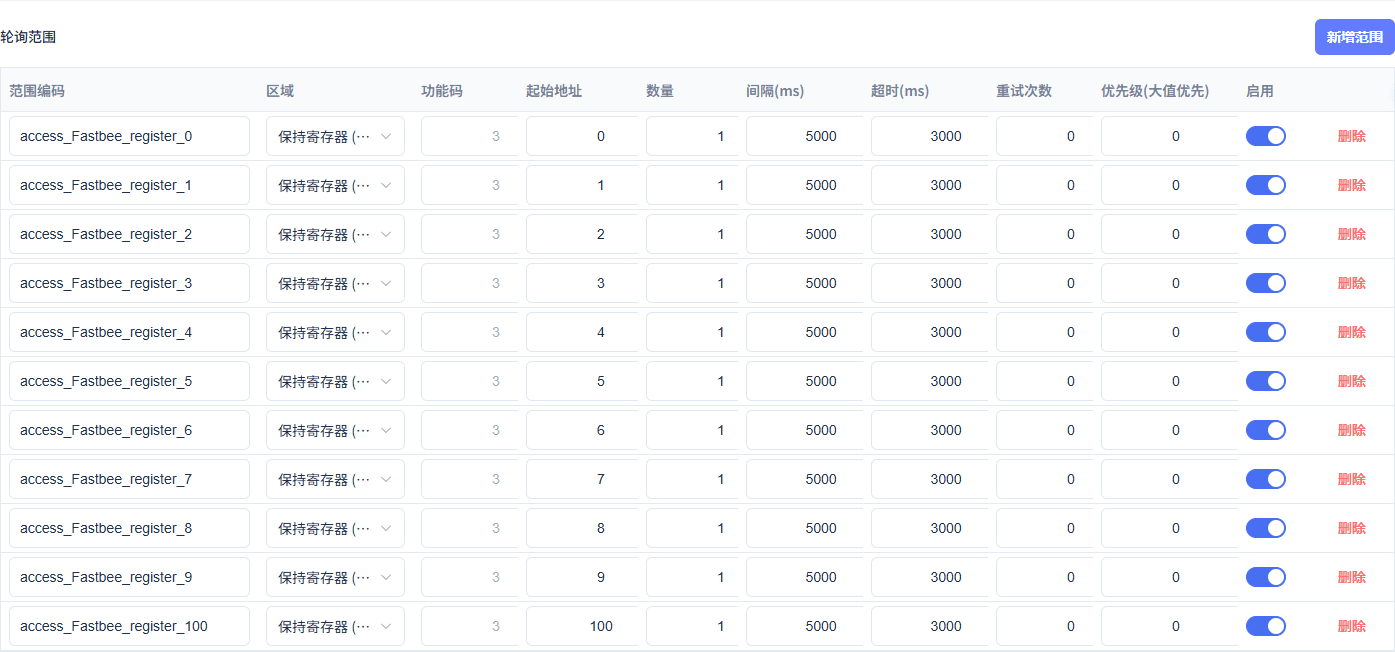
11 enabled ranges, 3000 ms timeout, 0 retries.
Screenshot Key Points
| Field / Control | Description |
|---|---|
| Read Function Code | FC03 reads holding registers; an FC06 echo must not be treated as a read. Required · Enter: 3 |
| Polling Start Address | One range each for 0-9 and 100; zero-based addresses are used. Required · Enter: 0-9, 100 |
| Quantity | One 16-bit register per read. Required · Enter: 1 |
| Polling Interval | Each range is read every 5000 ms; polling should be stopped when re-verification ends. Required · Enter: 5000 ms |
| Timeout and Retries | This article uses a 3000 ms timeout, 0 retries, priority 0; on failure check the connection and addresses first. Required · Enter: 3000 ms / 0 / 0 |
Full connection and point JSON template (no password) json
{

  "schemaVersion": 3,

  "groups": [

    {

      "id": "tutorial_demo-device",

      "name": "RTU透传教程",

      "sortOrder": 60,

      "isSystem": false

    }

  ],

  "sessions": [

    {

      "id": "import_demo-device",

      "groupId": "tutorial_demo-device",

      "name": "透传寄存器",

      "protocol": "ModbusRTU",

      "transport": "MQTT",

      "host": "127.0.0.1",

      "port": 1883,

      "unitId": 1,

      "autoReconnect": false,

      "clientId": "S&demo-device&883&1",

      "username": "admin",

      "mqttProtocolVersion": "3.1.1",

      "qos": 1,

      "requestTopic": "/883/demo-device/function/get",

      "responseTopic": "/883/demo-device/property/post",

      "modbusThingModels": [

        {

          "modelName": "采集点1",

          "identifier": "register_0",

          "type": 1,

          "dataType": "Integer",

          "isReadonly": true,

          "initialValue": 201,

          "mapping": {

            "dataArea": "HoldingRegisters",

            "address": 0,

            "length": 1,

            "wireFormat": "UInt16",

            "byteOrder": "BigEndian",

            "wordOrder": "HighWordFirst",

            "scale": 1,

            "offset": 0

          }

        },

        {

          "modelName": "采集点2",

          "identifier": "register_1",

          "type": 1,

          "dataType": "Integer",

          "isReadonly": true,

          "initialValue": 202,

          "mapping": {

            "dataArea": "HoldingRegisters",

            "address": 1,

            "length": 1,

            "wireFormat": "UInt16",

            "byteOrder": "BigEndian",

            "wordOrder": "HighWordFirst",

            "scale": 1,

            "offset": 0

          }

        },

        {

          "modelName": "采集点3",

          "identifier": "register_2",

          "type": 1,

          "dataType": "Integer",

          "isReadonly": true,

          "initialValue": 203,

          "mapping": {

            "dataArea": "HoldingRegisters",

            "address": 2,

            "length": 1,

            "wireFormat": "UInt16",

            "byteOrder": "BigEndian",

            "wordOrder": "HighWordFirst",

            "scale": 1,

            "offset": 0

          }

        },

        {

          "modelName": "采集点4",

          "identifier": "register_3",

          "type": 1,

          "dataType": "Integer",

          "isReadonly": true,

          "initialValue": 204,

          "mapping": {

            "dataArea": "HoldingRegisters",

            "address": 3,

            "length": 1,

            "wireFormat": "UInt16",

            "byteOrder": "BigEndian",

            "wordOrder": "HighWordFirst",

            "scale": 1,

            "offset": 0

          }

        },

        {

          "modelName": "采集点5",

          "identifier": "register_4",

          "type": 1,

          "dataType": "Integer",

          "isReadonly": true,

          "initialValue": 205,

          "mapping": {

            "dataArea": "HoldingRegisters",

            "address": 4,

            "length": 1,

            "wireFormat": "UInt16",

            "byteOrder": "BigEndian",

            "wordOrder": "HighWordFirst",

            "scale": 1,

            "offset": 0

          }

        },

        {

          "modelName": "采集点6",

          "identifier": "register_5",

          "type": 1,

          "dataType": "Integer",

          "isReadonly": true,

          "initialValue": 206,

          "mapping": {

            "dataArea": "HoldingRegisters",

            "address": 5,

            "length": 1,

            "wireFormat": "UInt16",

            "byteOrder": "BigEndian",

            "wordOrder": "HighWordFirst",

            "scale": 1,

            "offset": 0

          }

        },

        {

          "modelName": "采集点7",

          "identifier": "register_6",

          "type": 1,

          "dataType": "Integer",

          "isReadonly": true,

          "initialValue": 207,

          "mapping": {

            "dataArea": "HoldingRegisters",

            "address": 6,

            "length": 1,

            "wireFormat": "UInt16",

            "byteOrder": "BigEndian",

            "wordOrder": "HighWordFirst",

            "scale": 1,

            "offset": 0

          }

        },

        {

          "modelName": "采集点8",

          "identifier": "register_7",

          "type": 1,

          "dataType": "Integer",

          "isReadonly": true,

          "initialValue": 208,

          "mapping": {

            "dataArea": "HoldingRegisters",

            "address": 7,

            "length": 1,

            "wireFormat": "UInt16",

            "byteOrder": "BigEndian",

            "wordOrder": "HighWordFirst",

            "scale": 1,

            "offset": 0

          }

        },

        {

          "modelName": "采集点9",

          "identifier": "register_8",

          "type": 1,

          "dataType": "Integer",

          "isReadonly": true,

          "initialValue": 209,

          "mapping": {

            "dataArea": "HoldingRegisters",

            "address": 8,

            "length": 1,

            "wireFormat": "UInt16",

            "byteOrder": "BigEndian",

            "wordOrder": "HighWordFirst",

            "scale": 1,

            "offset": 0

          }

        },

        {

          "modelName": "采集点10",

          "identifier": "register_9",

          "type": 1,

          "dataType": "Integer",

          "isReadonly": true,

          "initialValue": 210,

          "mapping": {

            "dataArea": "HoldingRegisters",

            "address": 9,

            "length": 1,

            "wireFormat": "UInt16",

            "byteOrder": "BigEndian",

            "wordOrder": "HighWordFirst",

            "scale": 1,

            "offset": 0

          }

        },

        {

          "modelName": "写入设定",

          "identifier": "register_100",

          "type": 1,

          "dataType": "Integer",

          "isReadonly": false,

          "initialValue": 0,

          "mapping": {

            "dataArea": "HoldingRegisters",

            "address": 100,

            "length": 1,

            "wireFormat": "UInt16",

            "byteOrder": "BigEndian",

            "wordOrder": "HighWordFirst",

            "scale": 1,

            "offset": 0

          }

        }

      ]

    }

  ]

}After checking against the replacement list, save it as connection-config.json and choose Import Configuration in FMQX Web; this rewrite of the body text does not mean this template has actually been imported. Replaceable customer template names are used here; check them against the replacement list in this section before importing or sending.
8. Initial configuration: import the FMQX Web connection configuration
Location: FMQX Web*→*Configuration File Steps: after checking this section's full JSON against the replacement list, save it as a UTF-8 file connection-config.json, and in FMQX Web choose Import Configuration under More Actions. The original step screenshot keeps the original batch operation.
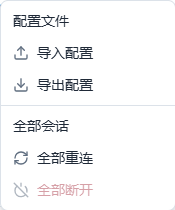
Use this article's group and session; credentials are filled in separately.
Screenshot Key Points
| Field / Control | Description |
|---|---|
| Protocol and Operating Mode | FMQ handles master reads and commands; the FMQX Web demo slave provides registers and RTU protocol responses. Required · Enter: Modbus RTU / MQTT / slave simulator |
| Import Configuration | Import this article's UTF-8 JSON from the FMQX Web configuration file menu; credentials are provided separately by the administrator. Required · Enter: connection-config.json |
2. Publish and Confirm the Running Configuration
9. Confirm publishing this article's product
Location: Product Details*→*Basic Information Steps: verify this article's product name and number, and click OK in the publish confirmation box.
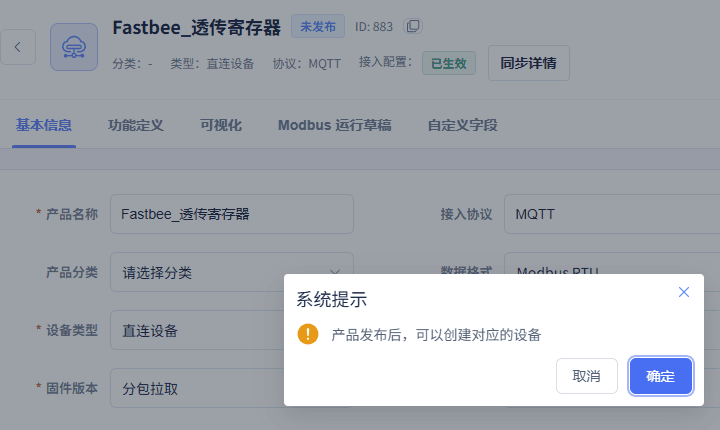
Confirm publishing the current MQTT passthrough product, keeping the product name, ID, and the full confirmation box.
10. Confirm the running configuration has been applied
Location: Product Details*→*Sync Details Steps: open the sync details and verify the application status of the current snapshot.
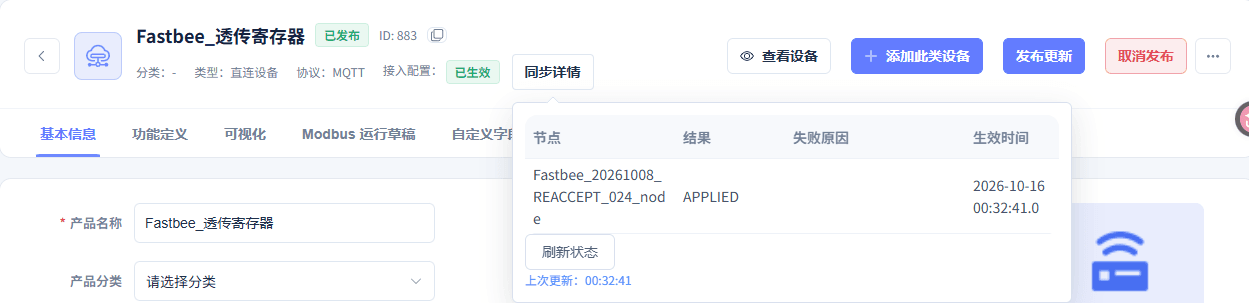
This article's node has applied the current configuration
3. Verify Parameters and Connect the Slave
11. Read-only verification of the full connection parameters
Location: FMQX Web*→This Session→*Connection Configuration Steps: read-only verification of host, port, identity, station number, and RTU parameters.
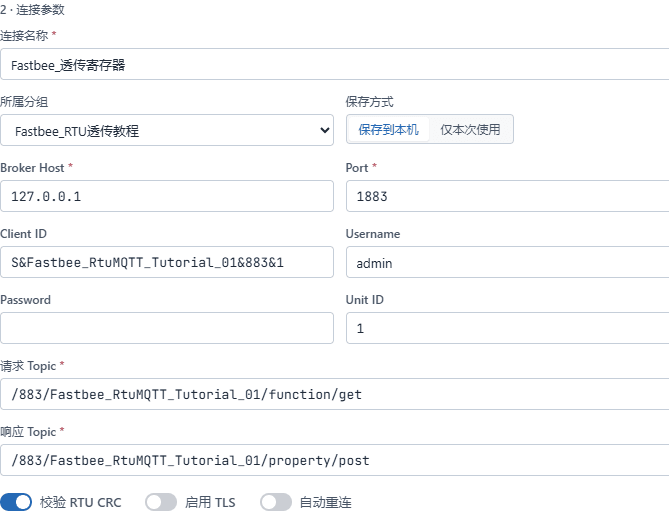
Verify this article's connection direction, target address, port, station number, MQTT identity, and request/response topics
Screenshot Key Points
| Field / Control | Description |
|---|---|
| Full Connection Parameters | Read-only verification of host, port, identity, station number, RTU checksum, and reconnect settings; this supplementary capture was not saved. Required · Enter: fill in per the implementation plan · Example: fill in per the actual environment |
12. Confirm the account and credentials are saved
Location: FMQX Web*→This Session→*Connection Configuration Steps: verify the Client ID and Username, and confirm the password box indicates it is saved and is not echoed back.
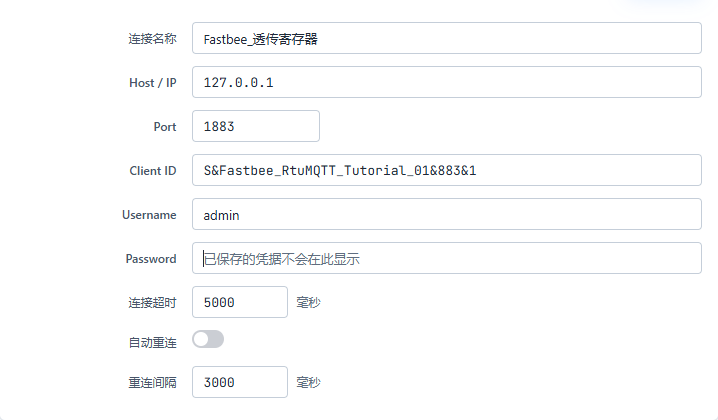
The passthrough MQTT password is saved and is not echoed back
Screenshot Key Points
| Field / Control | Description |
|---|---|
| MQTT Account and Saved Credentials | Use this device's formal connection information; the password is not echoed after saving and is not written into the manual. Required · Enter: fill in per the implementation plan · Example: saved credentials are not shown here |
13. Verify the reused point table and write point
Location: FMQX Web*→This Session→*Thing Model Parameters Steps: verify zero-based addresses 0-9 and 100, and confirm that address 100 is writable.
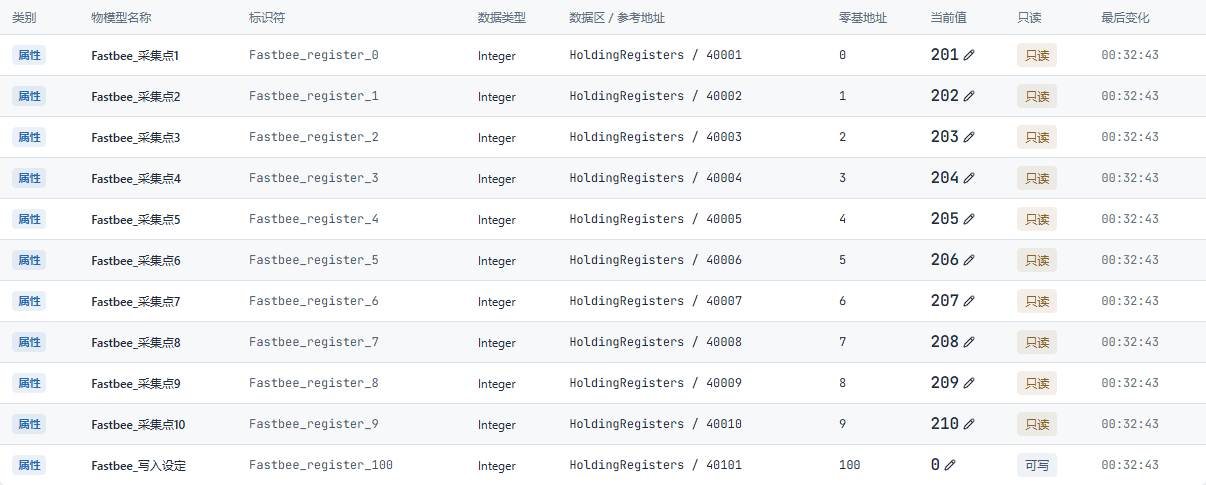
This article's 11 formal register points and initial values
14. Connect this article's slave session
Location: FMQX Web*→*This Session Steps: after verifying the session name, click Connect and wait for it to show Connected.

This article's original-identity slave session is connected.
4. Ten Consecutive Collections at the Same Address
15. Enter the first value 411 at the same address
Location: FMQX Web*→Thing Model Parameters→*Collection Point 1 Steps: enter 411 in the edit box of zero-based address 0, verify the address, and confirm.
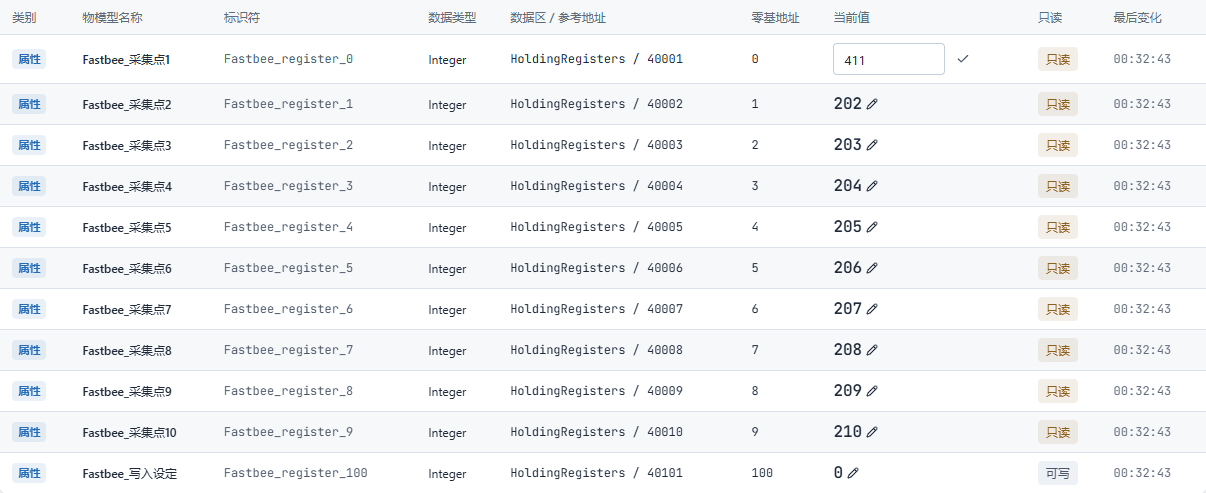
New sampled value 411 at the same address 0
Screenshot Key Points
| Field / Control | Description |
|---|---|
| Slave Register Value | Enter 411-420 in sequence at the same zero-based address 0; set 421 after recovery. Required · Enter: fill in per the implementation plan · Example: 411-420; 421 after recovery |
| Zero-based Address | Used to complete "Enter the first value 411 at the same address". Required · Enter: 0 |
| First Value | Used to complete "Enter the first value 411 at the same address". Required · Enter: 411 |
16. Collect up to 420 in sequence at the same address
Location: FMQX Web*→Thing Model Parameters→*Collection Point 1 Steps: still at address 0, set 412-420 in sequence, waiting for one actual collection after each confirmation; the figure shows the final 420 pending confirmation.
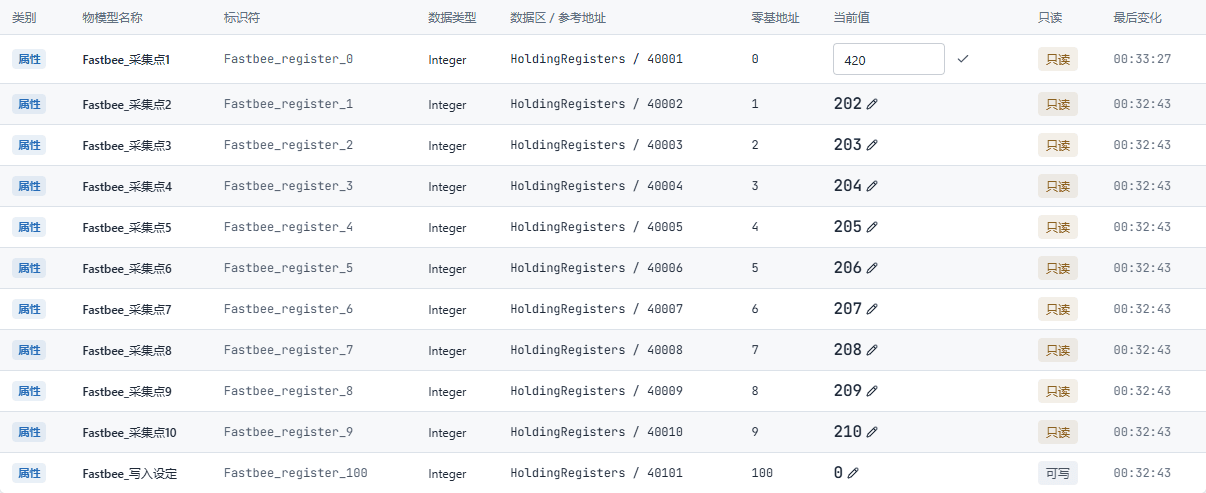
New sampled value 420 at the same address 0
Screenshot Key Points
| Field / Control | Description |
|---|---|
| Slave Register Value | Enter 411-420 in sequence at the same zero-based address 0; set 421 after recovery. Required · Enter: fill in per the implementation plan · Example: 411-420; 421 after recovery |
| Consecutive Values | Used to complete "Collect up to 420 in sequence at the same address". Required · Enter: 411-420 |
| Zero-based Address | Used to complete "Collect up to 420 in sequence at the same address". Required · Enter: 0 |
5. First Write of 42 and Independent Read-back
17. First send setpoint 42 to address 100
Location: Device Details*→Running Status→*Write Setpoint Steps: verify the current value before writing, set the pending target to 42, and click send once; the figure keeps only the pre-write baseline and the send entry — the actual target is confirmed by the raw frame in the next step.

This run's pre-write current value and send entry; the original image does not show the pending target number.
Screenshot Key Points
| Field / Control | Description |
|---|---|
| Write Address | Used to complete "First send setpoint 42 to address 100". Required · Enter: 100 |
| This Target | Used to complete "First send setpoint 42 to address 100". Required · Enter: 42 |
18. Confirm the slave received the write-42 request
Location: FMQX Web*→This Session→*Real Log Steps: view the FC06 write-single-register request received this time, and verify address 100 and value 42.
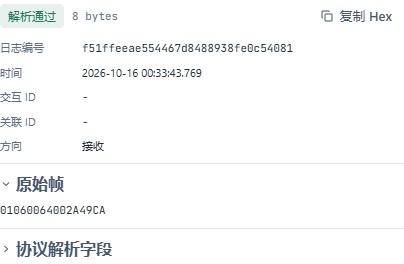
FC06 write 42: device receives the request
19. Confirm the slave echoed the write of 42
Location: FMQX Web*→This Session→*Real Log Steps: view the send echo immediately following this request, and verify the function code, address, and value.
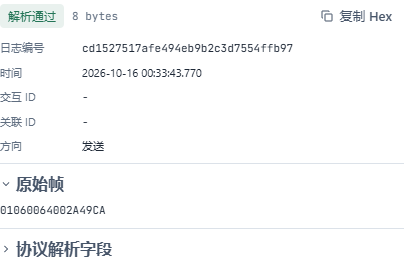
FC06 write 42: device echo
20. View the slave's current 42 at address 100
Location: FMQX Web*→This Session→*Thing Model Parameters Steps: verify that the current value of zero-based address 100 is 42.
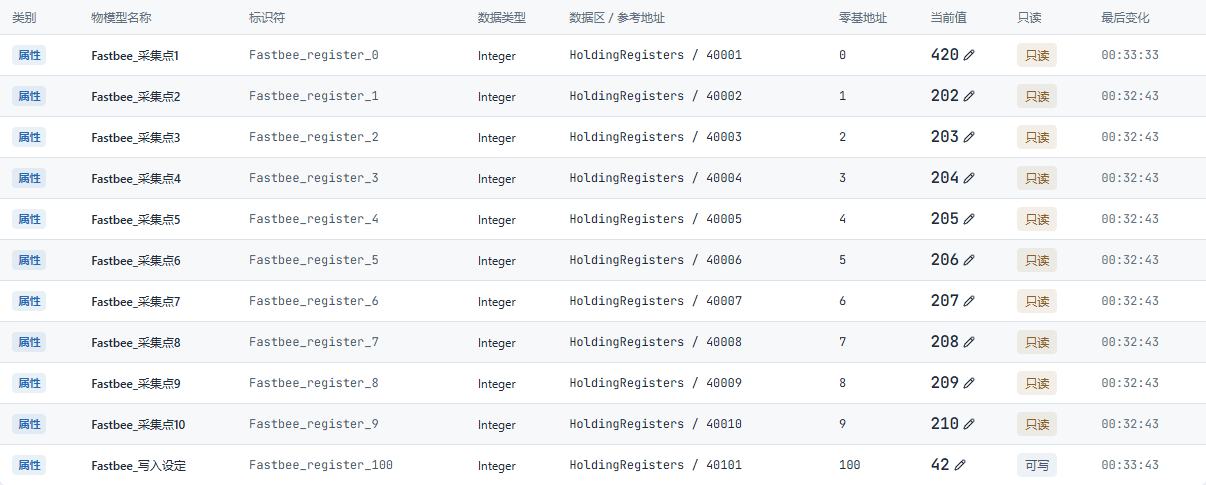
Device register 100 actual value 42
21. Verify another FC03 response of 42
Location: FMQX Web*→This Session→*Real Log Steps: view another FC03 response after the FC06, and verify that the read-back value of address 100 is 42 — do not treat the FC06 echo as a read.
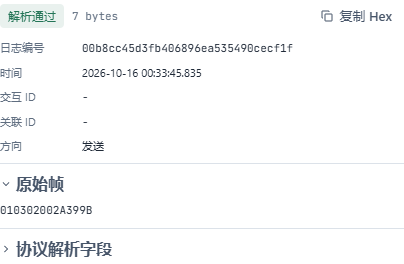
Independent FC03 read-back of setpoint 42
22. View the platform's read-back current value 42
Location: Device Details*→*Running Status Steps: refresh this article's device running status and view the write setpoint current value 42.

Platform current value 42 after the independent FC03 read-back
6. Normal Stop and Read Recovery
This round was disconnected and reconnected normally by the operator; do not call this process network-failure recovery.
23. Normally stop this article's connection
Location: FMQX Web*→*This Session Steps: click Disconnect and wait until this article's session shows Disconnected.

The slave is disconnected; configuration and history remain retained
24. Resume the same session connection
Location: FMQX Web*→*This Session Steps: continue using the original session and identity, click Connect, and verify Connected plus the retained current value 420 at address 0.
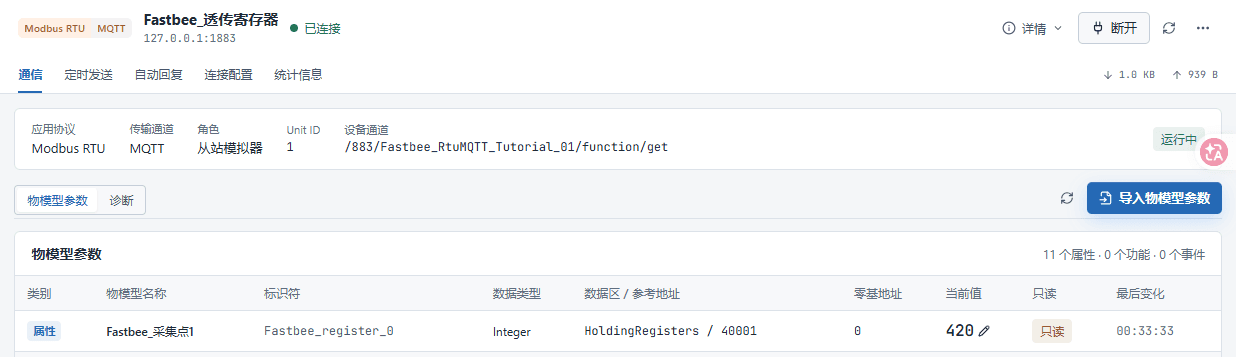
After a normal reconnection, the current session, Modbus RTU/MQTT, traffic, address 0's current 420, and the change time are retained.
25. Verify the new read of 421 after recovery
Location: FMQX Web*→This Session→*Real Log Steps: view the new FC03 response for address 0 after the normal recovery, and verify the new value 421.
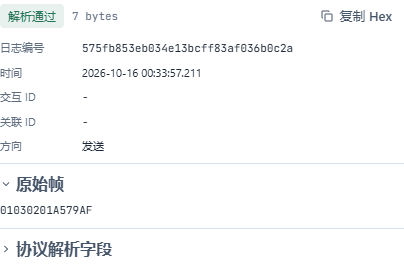
FC03 reads address 0 after recovery, returning 421
Screenshot Key Points
| Field / Control | Description |
|---|---|
| Zero-based Address | Used to complete "Verify the new read of 421 after recovery". Required · Enter: 0 |
| New Value After Recovery | Used to complete "Verify the new read of 421 after recovery". Required · Enter: 421 |
7. Write 43 After Recovery and Independent Read-back
26. Send setpoint 43 to address 100 after recovery
Location: Device Details*→Running Status→*Write Setpoint Steps: verify the current value before writing, set the pending target to 43, and click send once; the figure keeps only the pre-write baseline and the send entry — the actual target is confirmed by the raw frame in the next step.

This run's pre-write current value and send entry; the original image does not show the pending target number.
Screenshot Key Points
| Field / Control | Description |
|---|---|
| Write Address | Used to complete "Send setpoint 43 to address 100 after recovery". Required · Enter: 100 |
| This Target | Used to complete "Send setpoint 43 to address 100 after recovery". Required · Enter: 43 |
27. Confirm the slave received the write-43 request
Location: FMQX Web*→This Session→*Real Log Steps: view the FC06 write-single-register request received this time, and verify address 100 and value 43.
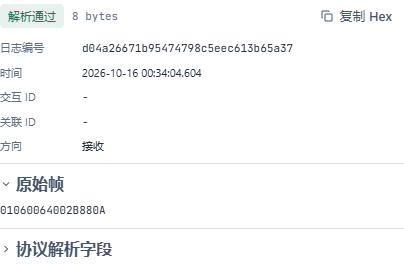
FC06 write 43: device receives the request
28. Confirm the slave echoed the write of 43
Location: FMQX Web*→This Session→*Real Log Steps: view the send echo immediately following this request, and verify the function code, address, and value.
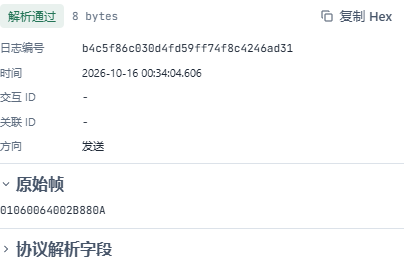
FC06 write 43: device echo
29. View the slave's current 43 at address 100
Location: FMQX Web*→This Session→*Thing Model Parameters Steps: verify that the current value of zero-based address 100 is 43.
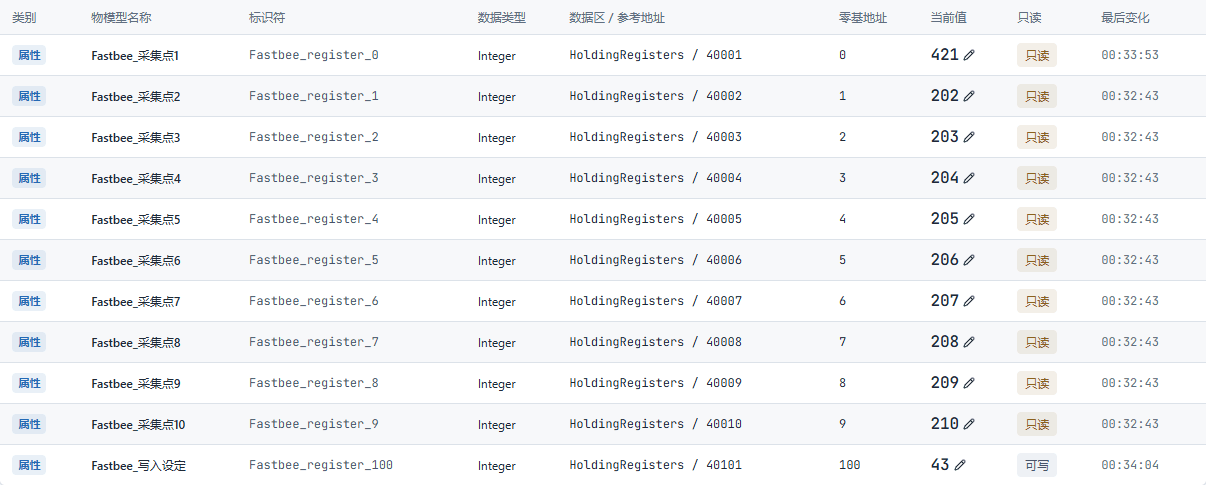
Device register 100 actual value 43
30. Verify another FC03 response of 43
Location: FMQX Web*→This Session→*Real Log Steps: view another FC03 response after the FC06, and verify that the read-back value of address 100 is 43 — do not treat the FC06 echo as a read.
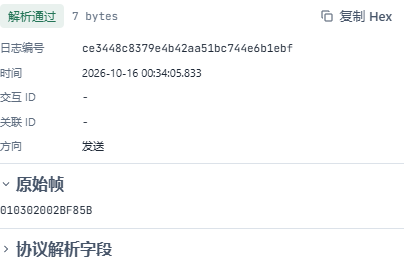
Independent FC03 read-back of setpoint 43
31. View the platform's read-back current value 43
Location: Device Details*→*Running Status Steps: refresh this article's device running status and view the write setpoint current value 43.

Platform current value 43 after the independent FC03 read-back
8. Stop Polling and Retain Resources
32. Final disconnect while keeping the current values
Location: FMQX Web*→*This Session Steps: click Disconnect, and verify Disconnected, not started, and the retained current value 421 at address 0.
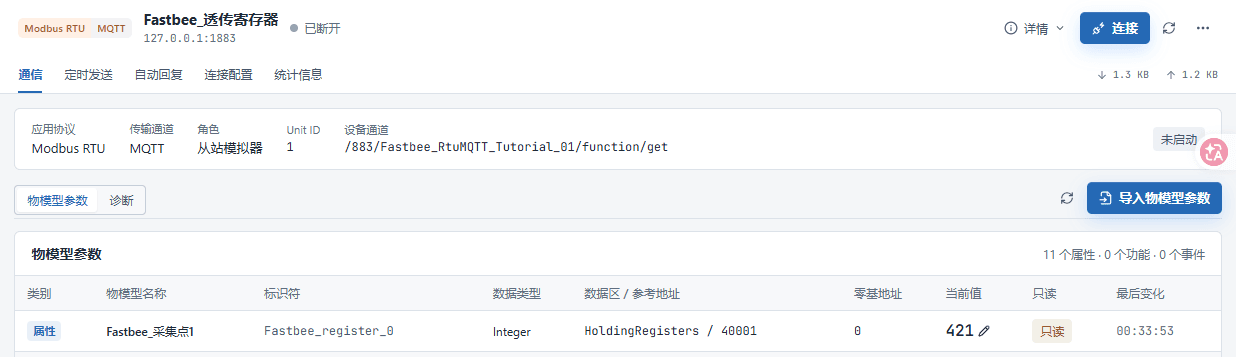
Final normal disconnect; the current session, Modbus RTU/MQTT, traffic, address 0's current 421, and the change time are retained.
33. Confirm unpublishing stops polling
Location: Product Details*→*Unpublish Steps: click OK in the unpublish confirmation box of this article's product.
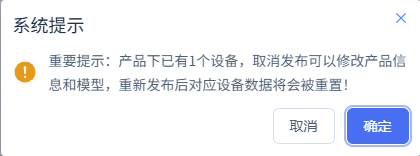
Stop this article's polling while keeping configuration and history
34. Confirm the stop configuration has been applied
Location: Product Details*→*Sync Details Steps: verify the REMOVE snapshot after unpublishing and its application result.
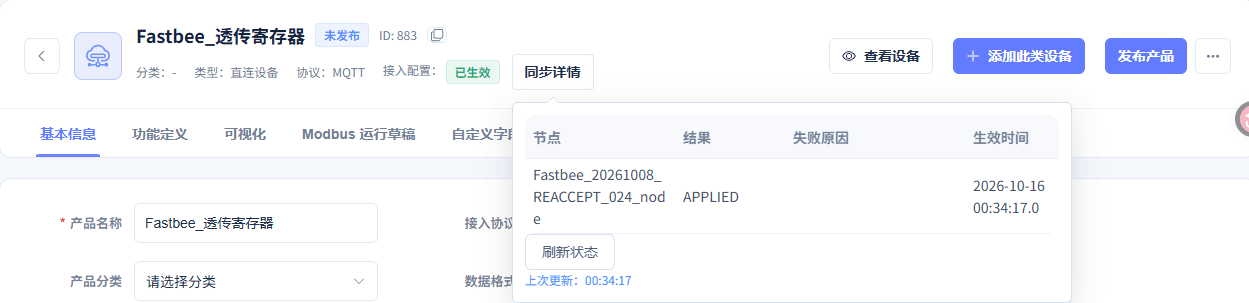
This article's node has applied the current configuration
9. Filter, Refresh, and Verify the Actual History
Write history keeps the pre-write values and duplicate values from normal polling. Verify the two post-write read-backs against this run's times and raw frames; do not equate the total number of history rows with the number of writes.
35. Fill in the full time range for Collection Point 1
Location: Data Center*→*Historical Data Steps: fill in the start and end date-times covering this run.
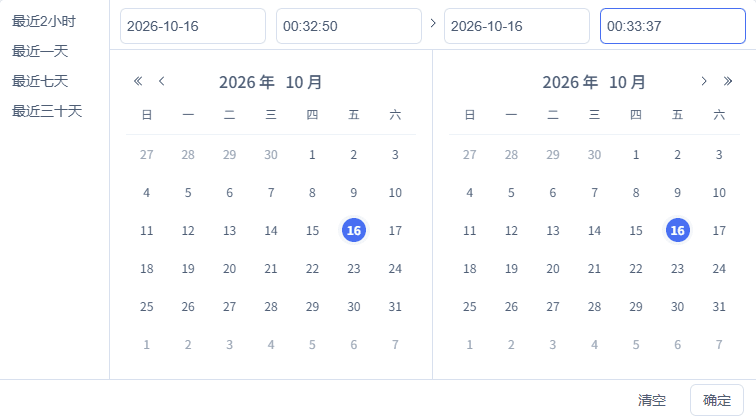
Full date and start/end times: 2026-10-16 00:32:50 to 2026-10-16 00:33:37
Screenshot Key Points
| Field / Control | Description |
|---|---|
| Full Date-time of This Round | Use the real run time range; avoid mixing in the initial configuration or other runs. Optional · Enter: fill in per the implementation plan · Example: fill in per the actual environment |
| Start Time | Used to complete "Fill in the full time range for Collection Point 1". Required · Enter: 2026-10-16 00:32:50 |
| End Time | Used to complete "Fill in the full time range for Collection Point 1". Required · Enter: 2026-10-16 00:33:37 |
36. Filter for this article's device and Collection Point 1
Location: Data Center*→*Historical Data Steps: select this article's device and the Collection Point 1 field, and verify the query target.

Query after verifying this article's device, property, and time range
Screenshot Key Points
| Field / Control | Description |
|---|---|
| Device and Field Filter | Collection Point 1 corresponds to address 0, and Write Setpoint corresponds to address 100; keep this article's device. Optional · Enter: fill in per the implementation plan · Example: fill in per the actual environment |
| Query Field | Used to complete "Filter for this article's device and Collection Point 1". Required · Enter: Collection Point 1 |
37. Refresh and query Collection Point 1 history
Location: Data Center*→*Historical Data Steps: keep this article's device, field, and time conditions, and click the refresh button in the result area to query again.

Refresh and re-query this article's history
38. Verify the actual history results of Collection Point 1
Location: Data Center*→Historical Data→*Query Results Steps: verify by time and value the ten consecutive changes 411-420 at the same zero-based address 0.
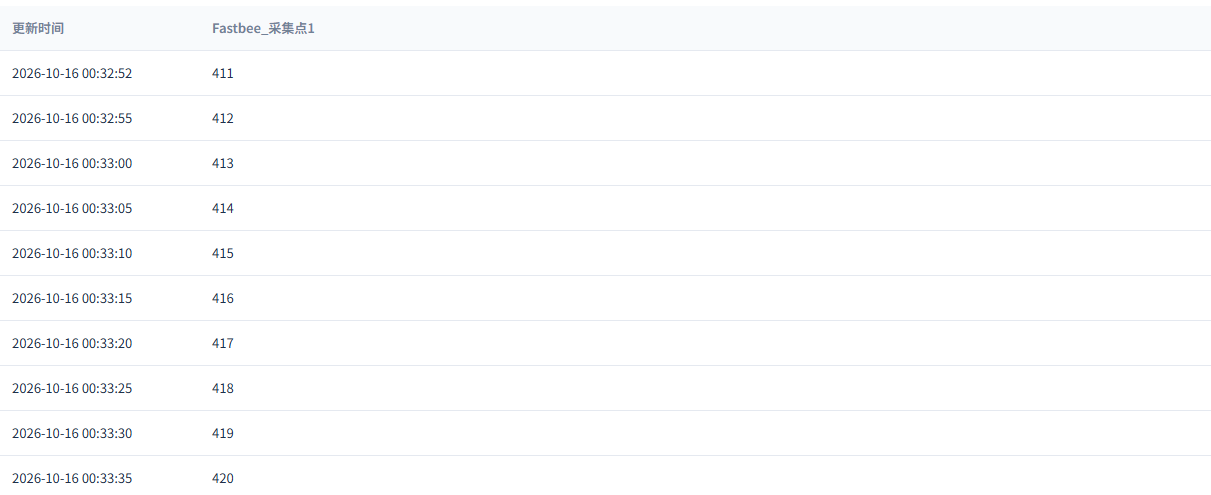
Verify this article's actual history records after refresh
39. Fill in the full time range for Write Setpoint
Location: Data Center*→*Historical Data Steps: fill in the start and end date-times covering this run.
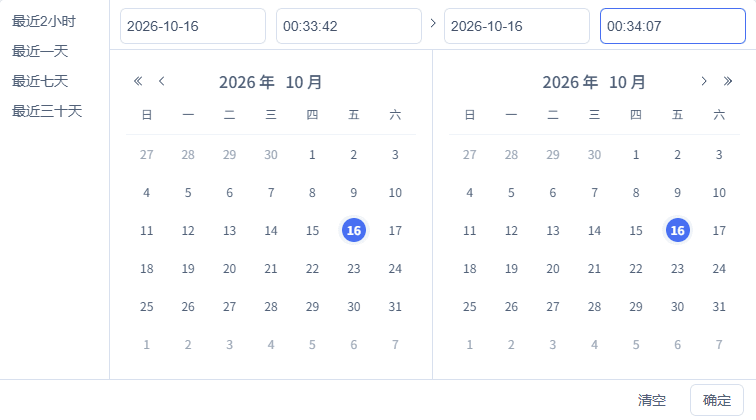
Full date and start/end times: 2026-10-16 00:33:42 to 2026-10-16 00:34:07
Screenshot Key Points
| Field / Control | Description |
|---|---|
| Full Date-time of This Round | Use the real run time range; avoid mixing in the initial configuration or other runs. Optional · Enter: fill in per the implementation plan · Example: fill in per the actual environment |
| Start Time | Used to complete "Fill in the full time range for Write Setpoint". Required · Enter: 2026-10-16 00:33:42 |
| End Time | Used to complete "Fill in the full time range for Write Setpoint". Required · Enter: 2026-10-16 00:34:07 |
40. Filter for this article's device and Write Setpoint
Location: Data Center*→*Historical Data Steps: select this article's device and the Write Setpoint field, and verify the query target.

Query after verifying this article's device, property, and time range
Screenshot Key Points
| Field / Control | Description |
|---|---|
| Device and Field Filter | Collection Point 1 corresponds to address 0, and Write Setpoint corresponds to address 100; keep this article's device. Optional · Enter: fill in per the implementation plan · Example: fill in per the actual environment |
| Query Field | Used to complete "Filter for this article's device and Write Setpoint". Required · Enter: Write Setpoint |
41. Refresh and query Write Setpoint history
Location: Data Center*→*Historical Data Steps: keep this article's device, field, and time conditions, and click the refresh button in the result area to query again.

Refresh and re-query this article's history
42. Verify the actual history results of Write Setpoint
Location: Data Center*→Historical Data→*Query Results Steps: verify by time and value the two post-write read-backs, 42 and 43, at the same zero-based address 100.

Verify this article's actual history records after refresh
Where Parameters Come From and How to Fill Them
Device Access Wizard
| Field / Control | How to Fill |
|---|---|
| Product Name | Each article uses a standalone product; re-verification reuses the retained resources. Required · Enter: FastBee_透传寄存器 |
| Device Protocol | The payload is a Modbus RTU binary frame with station number, function code, and CRC. Required · Enter: MODBUS_RTUMODBUS_RTU: the payload is a Modbus RTU binary frame with station number, function code, and CRC; the payload is a Modbus RTU binary frame with station number, function code, and CRC. |
| Transport | The network channel carrying RTU frames; it must match the FMQX session. Required · Enter: MQTTMQTT: the network channel carrying RTU frames; it must match the FMQX session; the network channel carrying RTU frames; it must match the FMQX session. |
| Collection Point Table | Import 11 integer points; 0-9 are the ten collection addresses and 100 is for writing. This round's ten consecutive samples always use address 0. |
| Device Identifier | A device number unique within the product; consistent with the runtime binding and the FMQX identity. Required · Enter: FastBee_RtuMQTT_Tutorial_01 |
| Slave Address / Unit ID | The station number in the first byte of the RTU frame. Required · Enter: 1 |
Function Definition
| Field / Control | How to Fill |
|---|---|
| Collection Point Identifier | 0-9 are mapped to FastBee_register_0-9, with original initial values 201-210 respectively; address 0 is changed to 411-420 in this round. Required · Enter: FastBee_register_0Publishing is required after changes. |
| Write Property Identifier | The writable integer property corresponding to holding register address 100. Required · Enter: FastBee_register_100Publishing is required after changes. |
| Read-only Data | On for the ten collection points; off for the write setpoint. Required · Enter: collection points on; write setpoint offPublishing is required after changes. |
| History Storage | Enabled for all 11 properties; only an independent read-back produces the corresponding property history. Required · Enter: OnPublishing is required after changes. |
| Chart Display and Real-time Monitor | On for the ten collection points; off for the write setpoint. Required · Enter: collection points on; write setpoint offPublishing is required after changes. |
| Integer Range and Unit | UINT16 takes 0-65535 with step 1; this article has no engineering unit — fill in per the official point table for real devices. Required · Enter: 0-65535; step 1; unit left emptyPublishing is required after changes. |
Protocol and Publish Effectiveness
| Field / Control | How to Fill |
|---|---|
| Device Binding | Select this article's device, Unit ID 1, enabled; do not bind devices from other tutorials. Required · Enter: FastBee_RtuMQTT_Tutorial_01 / 1 / enabledPublishing is required after changes. |
| Read Function Code | FC03 reads holding registers; an FC06 echo must not be treated as a read. Required · Enter: 3Publishing is required after changes. |
| Polling Start Address | One range each for 0-9 and 100; zero-based addresses are used. Required · Enter: 0-9, 100Publishing is required after changes. |
| Quantity | One 16-bit register per read. Required · Enter: 1Publishing is required after changes. |
| Polling Interval | Each range is read every 5000 ms; polling should be stopped when re-verification ends. Required · Enter: 5000 msPublishing is required after changes. |
| Timeout and Retries | This article uses a 3000 ms timeout, 0 retries, priority 0; on failure check the connection and addresses first. Required · Enter: 3000 ms / 0 / 0Publishing is required after changes. |
| Wire Type, Byte Order, and Word Order | UINT16, BE/BE per point; BE means high byte / high word first. Single registers are still saved per the formal configuration. Required · Enter: UINT16 / BE / BEPublishing is required after changes. |
| Address Base, Scale, and Offset | Zero-based address 0 is often written as 40001 in reference numbering; physical quantity = raw value x scale + offset. Required · Enter: base 0 / scale 1 / offset 0Publishing is required after changes. |
| Save and Publish | Publish after saving the model and protocol drafts, and wait for this article's snapshot to be actually applied. Publishing is required after changes. |
FMQX Web Connection
| Field / Control | How to Fill |
|---|---|
| Import Configuration | Import this article's UTF-8 JSON from the FMQX Web configuration file menu; credentials are provided separately by the administrator. Reconnecting is required after changes. |
| Protocol and Operating Mode | FMQ handles master reads and commands; the FMQX Web demo slave provides registers and RTU protocol responses. Required · Enter: Modbus RTU / MQTT / slave simulatorReconnecting is required after changes.Modbus RTU / MQTT / slave simulator: FMQ handles master reads and commands; the FMQX Web demo slave provides registers and RTU protocol responses; FMQ handles master reads and commands; the FMQX Web demo slave provides registers and RTU protocol responses. |
| Connection Host | For local regression, connect to the current FMQ; for real devices, enter the FMQ address reachable from the device side. Required · Enter: 127.0.0.1Reconnecting is required after changes. |
| Connection Port | Use the actual FMQ listening port; reconnect after changing it. Required · Enter: 1883Reconnecting is required after changes. |
| Verify RTU CRC | The last two bytes of an RTU frame are the CRC, low byte first; keep it on. Required · Enter: OnReconnecting is required after changes. |
| Auto Reconnect | Off in this article; stop and recovery are both performed explicitly by the operator. Required · Enter: OffReconnecting is required after changes. |
| Connect | Confirm this article's session is connected; a successful connection alone cannot replace actual collection and post-write read-back. Reconnecting is required after changes. |
| MQTT Client ID | Use the full identity from this device's connection information; S, the product number, and the tenant number must not be omitted. Required · Enter: S&FastBee_RtuMQTT_Tutorial_01&883&1Reconnecting is required after changes. |
| Request Topic | FMQX subscribes to this address to receive the RTU frames read or written by the FMQ master. Required · Enter: /883/FastBee_RtuMQTT_Tutorial_01/function/getReconnecting is required after changes. |
| Response Topic | FMQX publishes the slave's RTU responses to this address. Required · Enter: /883/FastBee_RtuMQTT_Tutorial_01/property/postReconnecting is required after changes. |
| MQTT Version and TLS | Locally use MQTT 3.1.1 with TLS off; on site, fill in per the enabled listener and credentials. Required · Enter: 3.1.1 / TLS offReconnecting is required after changes. |
Device Reporting and Demo Replies
| Field / Control | How to Fill |
|---|---|
| Ten Consecutive Samples at the Same Address | 411-420 in sequence at the same zero-based address 0; the original point table's 201-210 at 0-9 are the initial values of the different addresses. Required · Enter: address 0: 411, 412, 413, 414, 415, 416, 417, 418, 419, 420 |
Device Running Status
| Field / Control | How to Fill |
|---|---|
| Platform Current Value | Verify the independent FC03 read-back of address 100 per the current stage; the slider's pending value is not evidence of device execution. Required · Enter: first read-back 42; read-back 43 after recovery |
| Write Setpoint 42 | Set 42 in Running Status and click send; corresponds to FC06, station 1, address 100. Required · Enter: 42 |
| Recovery Write 43 | After stopping and resuming the connection, send the new target 43, with an independent FC03 read-back. Required · Enter: 43 |
| Post-write Independent Read | After the FC06 echo, wait for the next FC03 read of address 100, and verify the platform and history. Required · Enter: FC03 / 100 / 1 |
Historical Data
| Field / Control | How to Fill |
|---|---|
| Device and Field | Query only this article's device and the properties to be verified. Required · Enter: FastBee_RtuMQTT_Tutorial_01 / FastBee_register_0 or 100 |
| Collection Time Window | Fill in the full date-time covering this article's current collection or post-write independent read. Required · Enter: follow this round's real history filter screenshot |
| 42 Time Window | Fill in the full date-time covering this article's current collection or post-write independent read. Required · Enter: follow this round's real history filter screenshot |
| 43 Time Window | Fill in the full date-time covering this article's current collection or post-write independent read. Required · Enter: follow this round's real history filter screenshot |
| Query and Refresh | Fully select the device, field, and time; verify row by row after the page finishes loading. |
Stop and Recovery
| Field / Control | How to Fill |
|---|---|
| Stop and Disconnect | Stop this article's sending, polling, and connection; resources and history are retained. |
| Unpublish to Stop Polling | At the end, unpublish this article's product and wait for REMOVE to be applied; re-acceptance requires publishing again. |
Current Run Re-verification and History Check
| Field / Control | How to Fill |
|---|---|
| Publish and Application Status | Confirm the product identity; after publishing, wait for this round's running snapshot to show APPLIED. Publishing is required after changes. |
| Full Connection Parameters | Read-only verification of host, port, identity, station number, RTU checksum, and reconnect settings; this supplementary capture was not saved. Required · Enter: fill in per the actual configurationReconnecting is required after changes. |
| MQTT Account and Saved Credentials | Use this device's formal connection information; the password is not echoed after saving and is not written into the manual. Required · Enter: saved credentials are not shown hereReconnecting is required after changes. |
| Zero-based Addresses and Current Values | Address 0 is used for the consecutive 411-420 and the recovery 421; address 100 is used for the two writes. |
| Connect the Current Session | Keep this article's original-identity connection; continue real collection once connected. |
| Disconnect the Current Session | Stopped normally by the operator; scheduled sending and auto-reply both stay stopped. |
| Slave Register Value | Enter 411-420 in sequence at the same zero-based address 0; set 421 after recovery. Required · Enter: 411-420; 421 after recovery |
| Address 100 Setpoint and Send | Verify the pre-write value, set the new target, and send only once; confirm the target against the FC06 raw frame. |
| Real RTU Frames | View the received FC06, the sent echo, and the other FC03 response separately; verify direction, time, address, and value. |
| Platform Read-back Current Value | The current value should match the independent FC03 response; do not treat dispatch status as execution. |
| Unpublish to Stop Polling | Stops only this article's running polling; confirm REMOVE/APPLIED and keep business resources and history. |
| Full Date-time of This Round | Use the real run time range; avoid mixing in the initial configuration or other runs. Optional · Enter: fill in per the actual configuration |
| Device and Field Filter | Collection Point 1 corresponds to address 0, and Write Setpoint corresponds to address 100; keep this article's device. Optional · Enter: fill in per the actual configuration |
| Query and Refresh | Keep the same device, field, and full time range when re-querying. |
| Actual History Results | Verify the ten 411-420 at address 0 and the two post-write read-backs at address 100; the recovery 421 is verified separately. |
Where to Check First When Problems Occur
| Symptom | Possible Cause | Where to Check First | How to Recover |
|---|---|---|---|
| Cannot connect | Address, port, device identity, or credentials inconsistent | Verify this article's product applied status and the platform connection information | Keep it stopped, fix the connection parameters, then read a known point first. |
| Connected but readings do not match | Address base, station number, data type, or CRC configuration inconsistent | Compare against the official point table and the real FC03 requests and responses | Stop repeated writes and verify a known address first. |
| Current value not updated after a write | Only dispatched or echoed; no independent read obtained yet | Verify the FC06 request, the echo, and the subsequent independent FC03 separately | Wait for an independent poll, then refresh history; avoid continuous resending. |
| Connection information not ready yet | Product publishing or runtime sync has not completed | After confirming the product and snapshot are applied, re-obtain this device's connection information | Wait for the formal credentials to be ready; do not fill in an empty identity or reuse another device's password. |