


FMQ Third-party Upstream Sources
Understand third-party upstream sources, complete MQTT source configuration, and judge whether real messages reach external systems by four levels of results.
How to Read
Confirm the entry point, permissions, and target object first, then complete the operations in numbered order. Each step includes the expected result; detailed fields and options are collected in expandable reference tables.
About the Screenshots
The screenshots come from the original operation manual. The public version hides real node addresses, connection addresses, and credentials; the statuses, times, and data in the examples do not represent the current production environment.
Before You Start
| Item | Description |
|---|---|
| What you can do | Ingest third-party HTTP, MQTT, or Kafka data into FMQ and hand it to designated uplink rules. |
| Entry point | Integration → Third-party Upstream Sources |
| Required permissions | Upstream source and rule maintenance permissions; authorized source Broker and external verification resources. |
| Estimated time | 35 minutes |
Functions and Boundaries
Third-party upstream sources are used to ingest data that external systems already have into FMQ. A third party can actively call HTTP, or place data in MQTT or Kafka for FMQ to read continuously; FMQ then organizes the messages into unified uplink events and hands them to designated rules for processing.
For example, a vendor has already published temperature and humidity JSON to its own MQTT Topic. FMQ subscribes to that Topic, extracts the device identity and data by field paths, and then an uplink rule sends it to the business system through RabbitMQ.
- This module is responsible for ingestion, authentication, field mapping, device identity judgment, and rule scoping.
- Connectors are responsible for the outbound connections after rule processing; they are not third-party upstream sources.
- Logical identity passthrough does not automatically create devices; use strict association when device governance is required.
What the Page Shows
The four summary items at the top of the page are used to judge whether any source is currently running, whether FMQ has received data, whether connectors have confirmed sends, and whether failures have occurred. The list is used to select a specific source.
After selecting a source, the overview shows the ingestion address and recent results, the configuration shows field paths, rule bindings show the processing scope, and running nodes show whether the version has taken effect; failure records and version history are only used for troubleshooting or recovery.
Main Page Content
| Item | Purpose and Usage Advice | Effect and Recovery |
|---|---|---|
| Running Sources | The number of running upstream sources versus the total; how to read: when the number does not match, check the published version and running nodes of the specific source. | Data source: summary of the current node and cluster expected state; for viewing and judgment only, does not change the running state. |
| Ingestion Rate / Cumulative Ingested | The speed and cumulative count of third-party messages received by FMQ; how to read: an increase only proves that messages have reached FMQ. | Data source: upstream source runtime metrics; for viewing and judgment only, does not change the running state. |
| Connector Confirmation Rate / Cumulative Confirmed | The number of rule actions that received Broker confirmation through connectors; how to read: it still does not equal the target queue having received the message. | Data source: connector runtime results; for viewing and judgment only, does not change the running state. |
| Failure Count | Failures recorded in the authentication, parsing, identity, rule, or connector stages; how to read: when it grows, enter the failure records of that upstream source to view the stage and reason. | Data source: failure records from the last 24 hours; for viewing and judgment only, does not change the running state. |
| Upstream Source List | Shows source name, type, draft/published versions, cluster running state, latest message, and confirmations/failures; how to read: select the target row first, then look at the details below. | Data source: upstream source catalog and runtime snapshot; for viewing and judgment only, does not change the running state. |
| Cluster Application and Running State | APPLIED means the target version has been applied; RUNNING means the current node is receiving; how to read: after publishing, verify both the version and the state. | Data source: cluster node state; for viewing and judgment only, does not change the running state. |
| Detail Tabs | Overview shows the ingestion address and recent results; Configuration shows the mappings; Rule Bindings shows the rules; Running Nodes shows the version; failure records and version history are used for recovery; how to read: pick the tab by the problem, no need to go through every page. | Data source: the currently selected upstream source; for viewing and judgment only, does not change the running state. |
Creation and Configuration
Prepare three things before you start: the third party's access method and connection parameters, one real desensitized sample message, and the enabled rule responsible for processing this batch of data. This example uses MQTT, JSON field mapping, and logical identity passthrough.
Configure the field paths against the sample message first, then choose the identity strategy and rules. Paths use dots to read nested fields and are case-sensitive; data should point to the business parameter object.
1. Open Third-party Upstream Sources
Location: Integration → Third-party Upstream Sources
From the left menu, enter Integration → Third-party Upstream Sources, and first check the running sources, cumulative ingested, connector confirmations, and failure count.
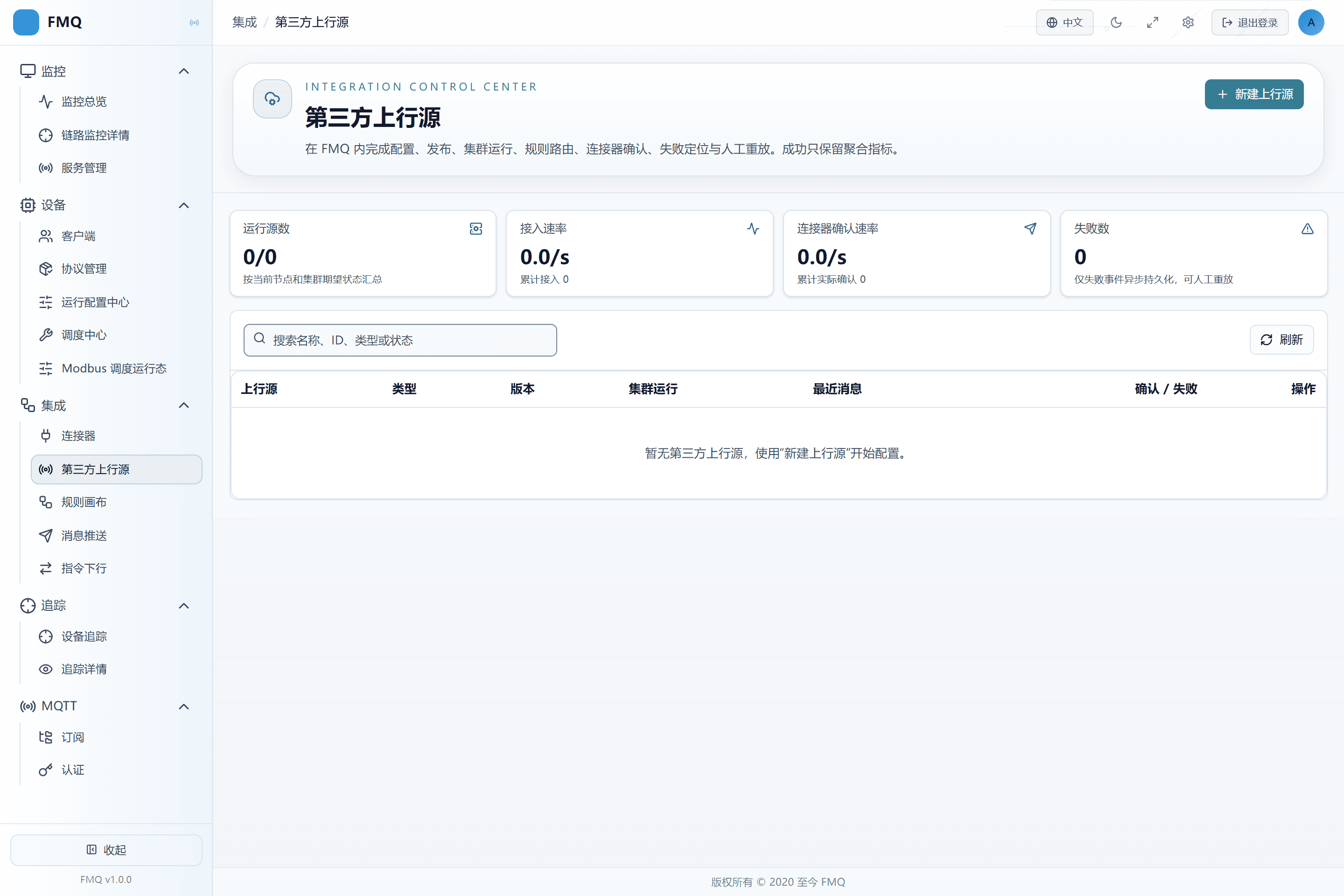
Figure: the Third-party Upstream Sources page first shows four categories of status — running sources, ingestion, connector confirmations, and failures — then provides the upstream source list.
2. Choose MQTT and Fill In the Source
Location: Integration → Third-party Upstream Sources
Click New Upstream Source, enter the name FastBee_供应商温度上行, choose MQTT Subscription as the access type, and fill in the Broker address, Topic, and single-primary lease.
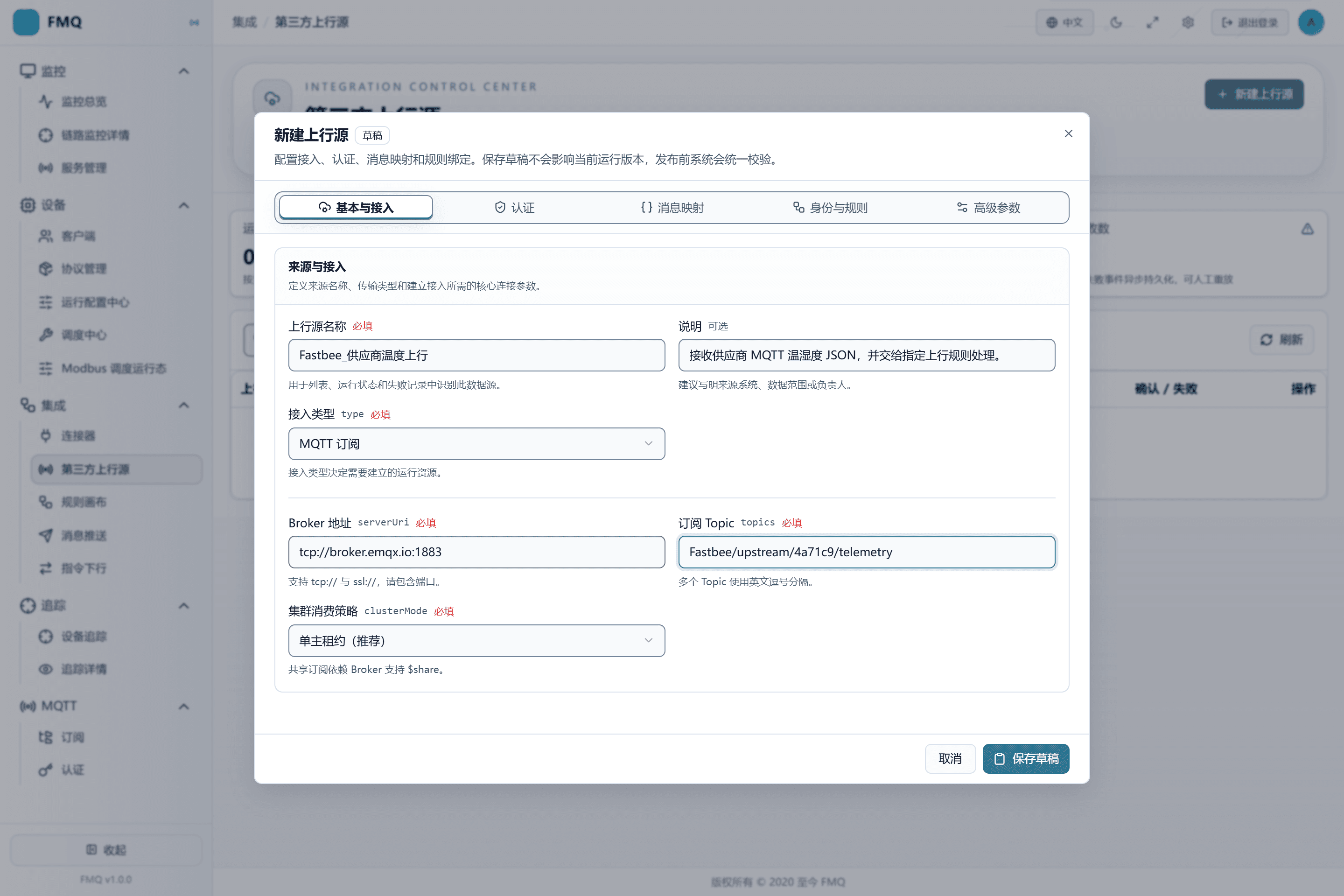
Figure: after choosing MQTT Subscription, fill in the Broker address and Topic; the demo uses a public Broker, while production environments should use a controlled Broker.
Field Descriptions
| Field / Control | Description |
|---|---|
| Upstream Source Name | Used to identify the source in lists, running states, and failure records; after saving it enters the current upstream source draft; it affects runtime only after publishing. Required · Source: named by the implementation owner according to the source system and data purpose. Choice: the name must distinguish sources; do not write just MQTT. Recommended: fill in per the integration documents · Example: FastBee_供应商温度上行 |
| Access Type | Determines who initiates the connection and what runtime resources FMQ creates; after saving it enters the current upstream source draft; it affects runtime only after publishing. Required · Source: the way the third party currently provides data. Choice: choose HTTP when they can call an API; choose MQTT when an MQTT Topic already exists; choose Kafka when a Kafka Topic already exists. Recommended: fill in per the integration documents · Example: MQTT |
| Broker Address | The MQTT address FMQ connects to; must include the protocol and port; after saving it enters the current upstream source draft; it affects runtime only after publishing. Required · Source: an FMQ-reachable address provided by the MQTT administrator. Choice: use tcp:// for plaintext links and ssl:// for TLS; do not fill in the management console address. Recommended: fill in per the integration documents · Example: tcp://broker.example.com:1883 |
| Subscribed Topic | The Topic FMQ listens to continuously; multiple entries are allowed; after saving it enters the current upstream source draft; it affects runtime only after publishing. Required · Source: the sender's publishing convention. Choice: separate multiple Topics with English commas; wildcard scope must be authorized. Recommended: fill in per the integration documents · Example: vendor/+/telemetry |
| Cluster Consumption Strategy | Determines whether one source is subscribed by a single node or shared-consumed by multiple nodes; after saving it enters the current upstream source draft; it affects runtime only after publishing. Required · Source: FMQ cluster size and Broker capability. Choice: use single-primary lease by default; choose shared subscription only when the Broker supports shared subscriptions and parallel consumption is needed. Recommended: fill in per the integration documents · Example: single-primary lease |
3. Configure Field Paths Against the Real JSON
Location: Integration → Third-party Upstream Sources
Choose JSON Field Mapping as the message mode, and confirm the actual paths of clientId, deviceKey, timestamp, messageType, and data from the vendor's sample.
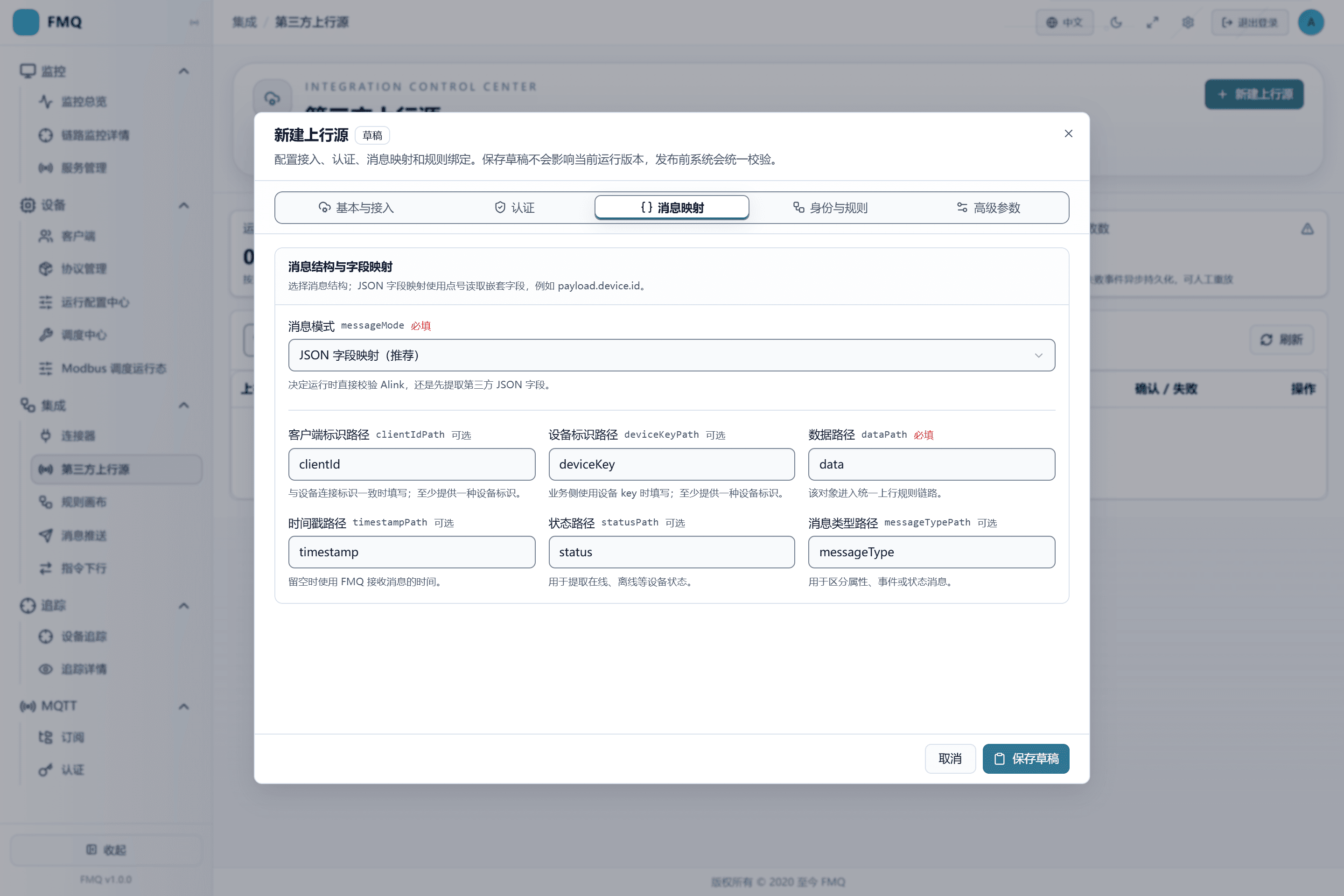
Figure: JSON field mapping reads the device identity, time, message type, and data object from the third-party message.
Field Descriptions
| Field / Control | Description |
|---|---|
| Message Mode | Determines whether to validate standard Alink directly or extract fields from third-party JSON first; after saving it enters the current upstream source draft; it affects runtime only after publishing. Required · Source: the third party's real sample message. Choice: choose field mapping for ordinary business JSON; choose Alink JSON only when the message already conforms to Alink. Recommended: fill in per the integration documents · Example: JSON Field Mapping |
| Client Identity Path | Reads clientId from the third-party JSON; used when it is consistent with the device connection identity; after saving it enters the current upstream source draft; it affects runtime only after publishing. Optional · Source: the third-party message field names and hierarchy. Choice: fill in at least one of this and the device identity path; paths are case-sensitive. Recommended: fill in per the integration documents · Example: clientId |
| Device Identity Path | Reads the business device key from the third-party JSON; after saving it enters the current upstream source draft; it affects runtime only after publishing. Optional · Source: the third-party message field names and hierarchy. Choice: fill in when the business side stably uses deviceKey. Recommended: fill in per the integration documents · Example: deviceKey |
| Data Path | Points to the business object to hand to the uplink rule; after saving it enters the current upstream source draft; it affects runtime only after publishing. Required · Source: the third party's real message structure. Choice: fill in data when temperature and humidity are under data; do not point to the entire message. Recommended: fill in per the integration documents · Example: data |
| Timestamp Path | Reads the message generation time; when left empty, the FMQ receive time is used; after saving it enters the current upstream source draft; it affects runtime only after publishing. Optional · Source: the third-party message convention. Choice: fill in when the source time is reliable and is a platform-recognizable timestamp. Recommended: fill in per the integration documents · Example: timestamp |
| Message Type Path | Distinguishes property, event, or status messages; after saving it enters the current upstream source draft; it affects runtime only after publishing. Optional · Source: the third-party message convention. Choice: fill in when the source mixes multiple message types; this example uses PROPERTY. Recommended: fill in per the integration documents · Example: messageType |
4. Choose the Identity Strategy and Rule
Location: Integration → Third-party Upstream Sources
For this trial integration, choose Logical Identity Passthrough, then search for and check FastBee_第三方上行转发.
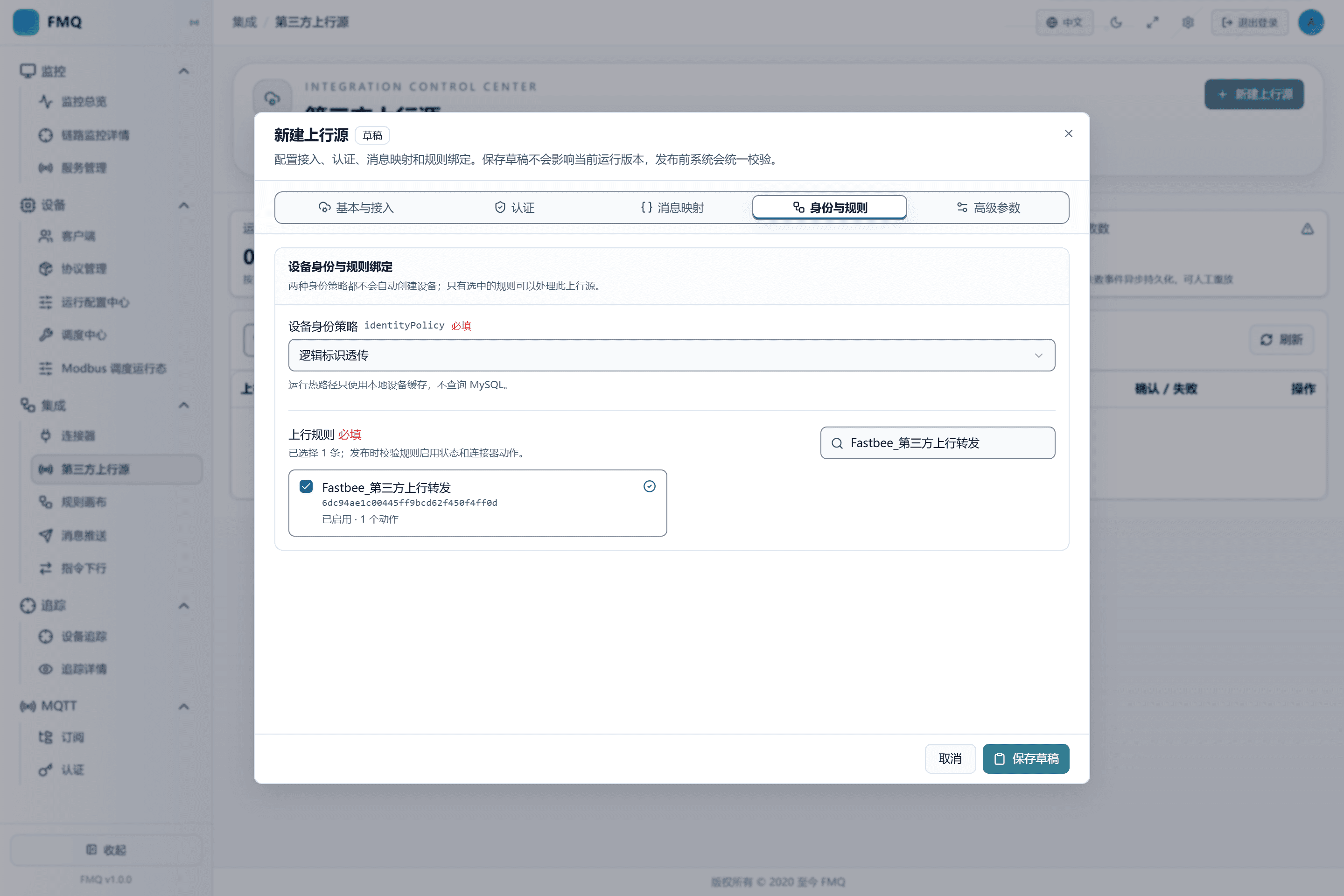
Figure: the demo chooses logical identity passthrough and binds only the enabled rule responsible for this source's data.
Field Descriptions
| Field / Control | Description |
|---|---|
| Device Identity Strategy | Determines whether messages that do not match a platform device can continue into the rules; after saving it enters the current upstream source draft; it affects runtime only after publishing. Required · Source: platform device governance requirements. Choice: prefer strict association for formal device data; passthrough can be used for trial integration or logical objects. Neither method automatically creates devices. Recommended: fill in per the integration documents · Example: Logical Identity Passthrough |
5. Check the Advanced Parameters and Save the Draft
Location: Integration → Third-party Upstream Sources
Fill in the Client ID with the unique identity of this source, keep QoS at 1, check Start Immediately After First Publish, then click Save Draft.
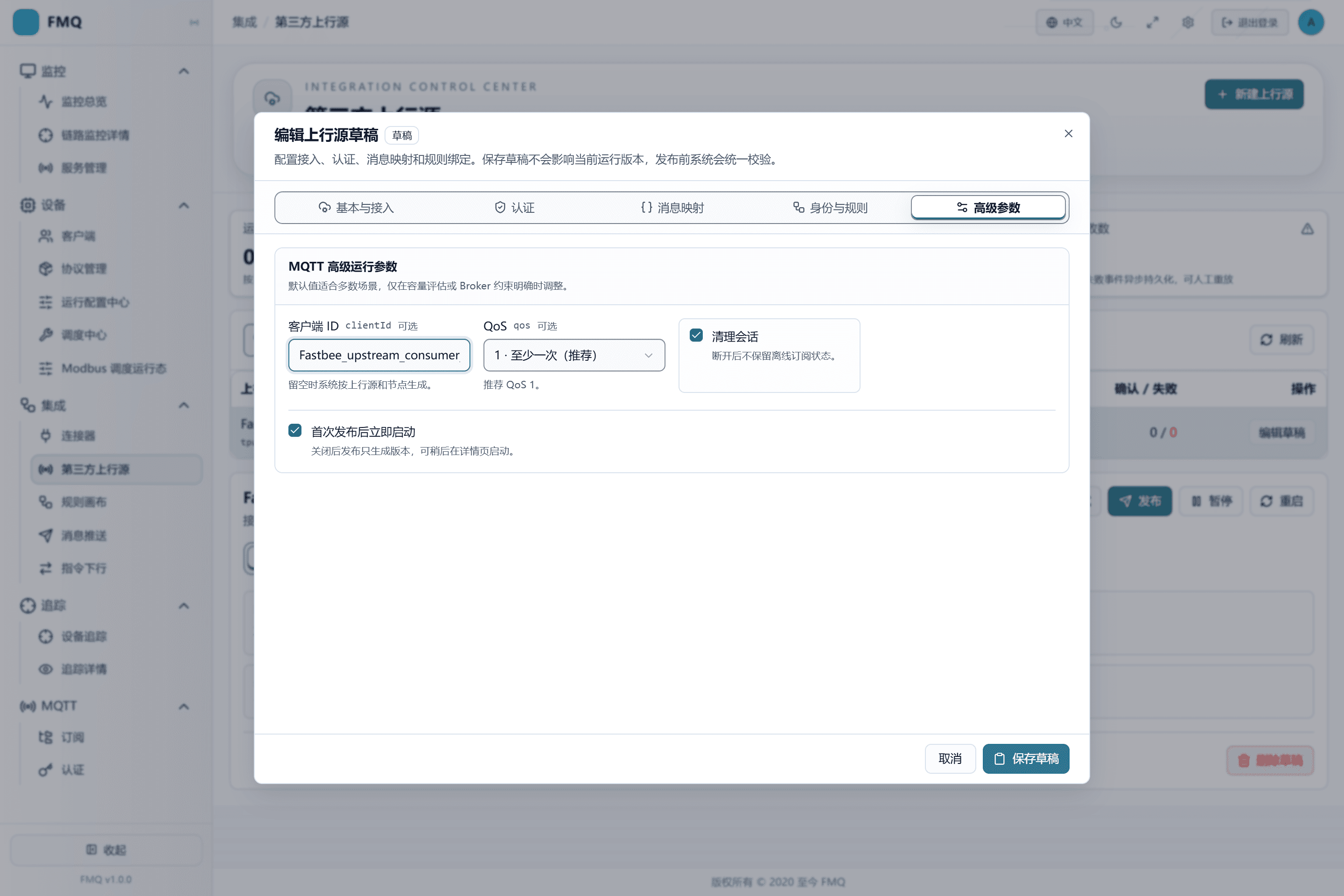
Figure: the Client ID identifies FMQ's subscription session; QoS stays at 1, and Start Immediately After First Publish is checked.
Field Descriptions
| Field / Control | Description |
|---|---|
| Client ID | The Broker uses it to identify FMQ's subscription session; after saving it enters the current upstream source draft; it affects runtime only after publishing. Optional · Source: the Broker naming convention. Choice: leaving it empty lets the system generate it; when filling it in manually, it must not duplicate other clients. Recommended: fill in per the integration documents · Example: FastBee_upstream_consumer |
| QoS | Determines the subscription delivery level; after saving it enters the current upstream source draft; it affects runtime only after publishing. Optional · Source: send reliability and performance requirements. Choice: most businesses choose 1; QoS 2 requires joint support from the Broker and the sender. Recommended: 1 · Example: 1 |
| Clean Session | Whether to discard the offline subscription state after disconnection; after saving it enters the current upstream source draft; it affects runtime only after publishing. Optional · Source: the Broker session recovery requirement. Choice: enabled by default; when offline backlog is needed, a fixed clientId and the Broker strategy must be evaluated together. Recommended: true · Example: enabled |
Source and Access
| Item | Purpose and Usage Advice | Effect and Recovery |
|---|---|---|
| Required Upstream Source Name | Used to identify the source in lists, running states, and failure records; how to choose: the name must distinguish sources, do not write just MQTT; where the value comes from: named by the implementation owner according to the source system and data purpose; advice: follow the deployment or integration documents; example: FastBee_供应商温度上行. | After saving it enters the current upstream source draft; it affects runtime only after publishing; scope: the current third-party upstream source; effective requirement: publishing is required; when wrong: a value inconsistent with the real source may make messages unable to be ingested or unable to enter rules; recovery: correct per the source party's documents, re-validate, and verify with a new message. |
| Description | Briefly describes the source system, data scope, or owner; how to choose: state clearly what data is received and avoid duplicate names; where the value comes from: the integration plan; advice: follow the deployment or integration documents; example: receiving vendor MQTT temperature and humidity JSON. | After saving it enters the current upstream source draft; it affects runtime only after publishing; scope: the current third-party upstream source; effective requirement: publishing is required; when wrong: a value inconsistent with the real source may make messages unable to be ingested or unable to enter rules; recovery: correct per the source party's documents, re-validate, and verify with a new message. |
| Required Access Type | Determines who initiates the connection and what runtime resources FMQ creates; how to choose: choose HTTP when they can call an API; choose MQTT when an MQTT Topic already exists; choose Kafka when a Kafka Topic already exists; where the value comes from: the way the third party currently provides data; advice: follow the deployment or integration documents; example: MQTT. HTTP Push: the third party actively calls an FMQ dedicated API; one request corresponds to one uplink message. MQTT Subscription: FMQ actively connects to the Broker and subscribes to the Topic; continuously receives messages in the Topic. Kafka Consumption: FMQ joins a consumer group to read the Topic; consumes messages continuously by partition. | After saving it enters the current upstream source draft; it affects runtime only after publishing; scope: the current third-party upstream source; effective requirement: publishing is required; when wrong: a value inconsistent with the real source may make messages unable to be ingested or unable to enter rules; recovery: correct per the source party's documents, re-validate, and verify with a new message. |
Message, Identity, and Rules
| Item | Purpose and Usage Advice | Effect and Recovery |
|---|---|---|
| Required Message Mode | Determines whether to validate standard Alink directly or extract fields from third-party JSON first; how to choose: choose field mapping for ordinary business JSON; choose Alink JSON only when the message already conforms to Alink; where the value comes from: the third party's real sample message; advice: follow the deployment or integration documents; example: JSON Field Mapping. JSON Field Mapping: reads the device, time, and data by field paths; generates a unified uplink event. Alink JSON: the message already contains id, version, method, sys, params; validated directly without reading the path configuration. | After saving it enters the current upstream source draft; it affects runtime only after publishing; scope: the current third-party upstream source; effective requirement: publishing is required; when wrong: a value inconsistent with the real source may make messages unable to be ingested or unable to enter rules; recovery: correct per the source party's documents, re-validate, and verify with a new message. |
| Client Identity Path | Reads clientId from the third-party JSON; used when it is consistent with the device connection identity; how to choose: fill in at least one of this and the device identity path; paths are case-sensitive; where the value comes from: the third-party message field names and hierarchy; advice: follow the deployment or integration documents; example: clientId. | After saving it enters the current upstream source draft; it affects runtime only after publishing; scope: the current third-party upstream source; effective requirement: publishing is required; when wrong: a value inconsistent with the real source may make messages unable to be ingested or unable to enter rules; recovery: correct per the source party's documents, re-validate, and verify with a new message. |
| Device Identity Path | Reads the business device key from the third-party JSON; how to choose: fill in when the business side stably uses deviceKey; where the value comes from: the third-party message field names and hierarchy; advice: follow the deployment or integration documents; example: deviceKey. | After saving it enters the current upstream source draft; it affects runtime only after publishing; scope: the current third-party upstream source; effective requirement: publishing is required; when wrong: a value inconsistent with the real source may make messages unable to be ingested or unable to enter rules; recovery: correct per the source party's documents, re-validate, and verify with a new message. |
| Required Data Path | Points to the business object to hand to the uplink rule; how to choose: fill in data when temperature and humidity are under data; do not point to the entire message; where the value comes from: the third party's real message structure; advice: follow the deployment or integration documents; example: data. | After saving it enters the current upstream source draft; it affects runtime only after publishing; scope: the current third-party upstream source; effective requirement: publishing is required; when wrong: a value inconsistent with the real source may make messages unable to be ingested or unable to enter rules; recovery: correct per the source party's documents, re-validate, and verify with a new message. |
| Timestamp Path | Reads the message generation time; when left empty, the FMQ receive time is used; how to choose: fill in when the source time is reliable and is a platform-recognizable timestamp; where the value comes from: the third-party message convention; advice: follow the deployment or integration documents; example: timestamp. | After saving it enters the current upstream source draft; it affects runtime only after publishing; scope: the current third-party upstream source; effective requirement: publishing is required; when wrong: a value inconsistent with the real source may make messages unable to be ingested or unable to enter rules; recovery: correct per the source party's documents, re-validate, and verify with a new message. |
| Status Path | Extracts status values such as online and offline; how to choose: can be left empty when only property data is ingested; where the value comes from: the third-party status message structure; advice: follow the deployment or integration documents; example: status. | After saving it enters the current upstream source draft; it affects runtime only after publishing; scope: the current third-party upstream source; effective requirement: publishing is required; when wrong: a value inconsistent with the real source may make messages unable to be ingested or unable to enter rules; recovery: correct per the source party's documents, re-validate, and verify with a new message. |
| Message Type Path | Distinguishes property, event, or status messages; how to choose: fill in when the source mixes multiple message types; this example uses PROPERTY; where the value comes from: the third-party message convention; advice: follow the deployment or integration documents; example: messageType. | After saving it enters the current upstream source draft; it affects runtime only after publishing; scope: the current third-party upstream source; effective requirement: publishing is required; when wrong: a value inconsistent with the real source may make messages unable to be ingested or unable to enter rules; recovery: correct per the source party's documents, re-validate, and verify with a new message. |
| Required Device Identity Strategy | Determines whether messages that do not match a platform device can continue into the rules; how to choose: prefer strict association for formal device data; passthrough can be used for trial integration or logical objects. Neither method automatically creates devices; where the value comes from: platform device governance requirements; advice: follow the deployment or integration documents; example: Logical Identity Passthrough. Strict Association: only accepts identities that hit the local device cache; when not hit, an identity failure is recorded. Logical Identity Passthrough: allows unassociated identities to enter rules; the message carries an unassociated mark, but no device is created. | After saving it enters the current upstream source draft; it affects runtime only after publishing; scope: the current third-party upstream source; effective requirement: publishing is required; when wrong: a value inconsistent with the real source may make messages unable to be ingested or unable to enter rules; recovery: correct per the source party's documents, re-validate, and verify with a new message. |
| Required Uplink Rules | Limits which enabled rules the messages of this source are handed to; how to choose: select only the rules that truly process this source, and do not check unrelated rules just to pass validation; where the value comes from: the rule list; the rules must be enabled and contain valid connector actions; advice: follow the deployment or integration documents; example: FastBee_第三方上行转发. | After saving it enters the current upstream source draft; it affects runtime only after publishing; scope: the current third-party upstream source; effective requirement: publishing is required; when wrong: a value inconsistent with the real source may make messages unable to be ingested or unable to enter rules; recovery: correct per the source party's documents, re-validate, and verify with a new message. |
Validation, Publishing, and Real Ingestion
Operate in the order "Save Draft → Configuration Validation → MQTT/Kafka Connection Test or HTTP Mapping Preview → Publish → Check Running Nodes → Real Send". Each step proves a different scope; do not skip levels.
Real success is judged by four levels: FMQ ingestion increases, rule processing, connector confirmation increases, and actual receipt on the external system. In this example, the endpoint is the RabbitMQ queue receiving the 32.6°C standard Alink.
6. Run Configuration Validation First
Location: Integration → Third-party Upstream Sources
Select the upstream source just saved and click Validate.
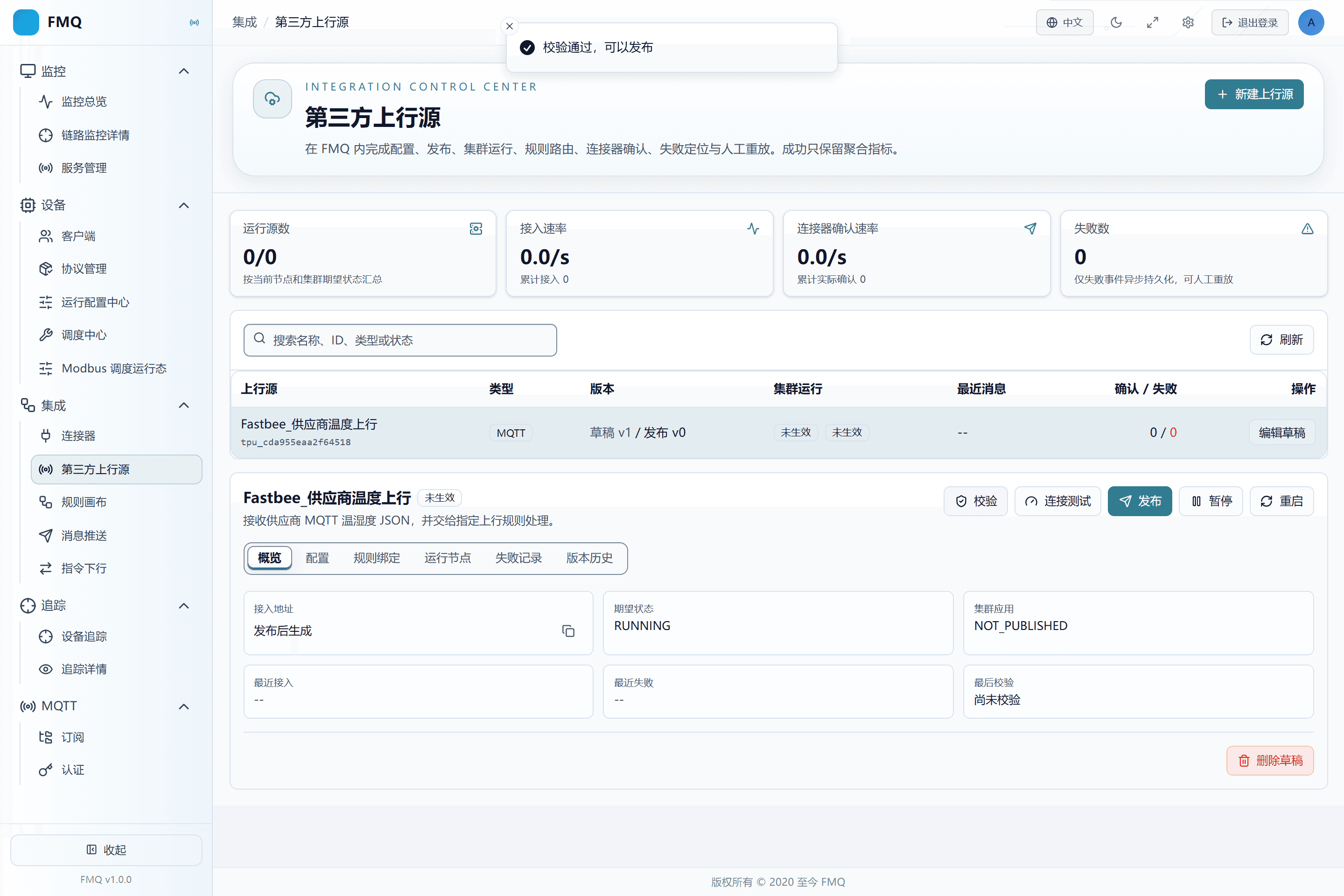
Figure: the draft has been saved as v1; passing validation only proves that the fields, rules, and pre-publish constraints are satisfied.
7. Then Run the MQTT Connection Test
Location: Integration → Third-party Upstream Sources
Click Connection Test and wait for the platform to complete the connection and subscription probes.
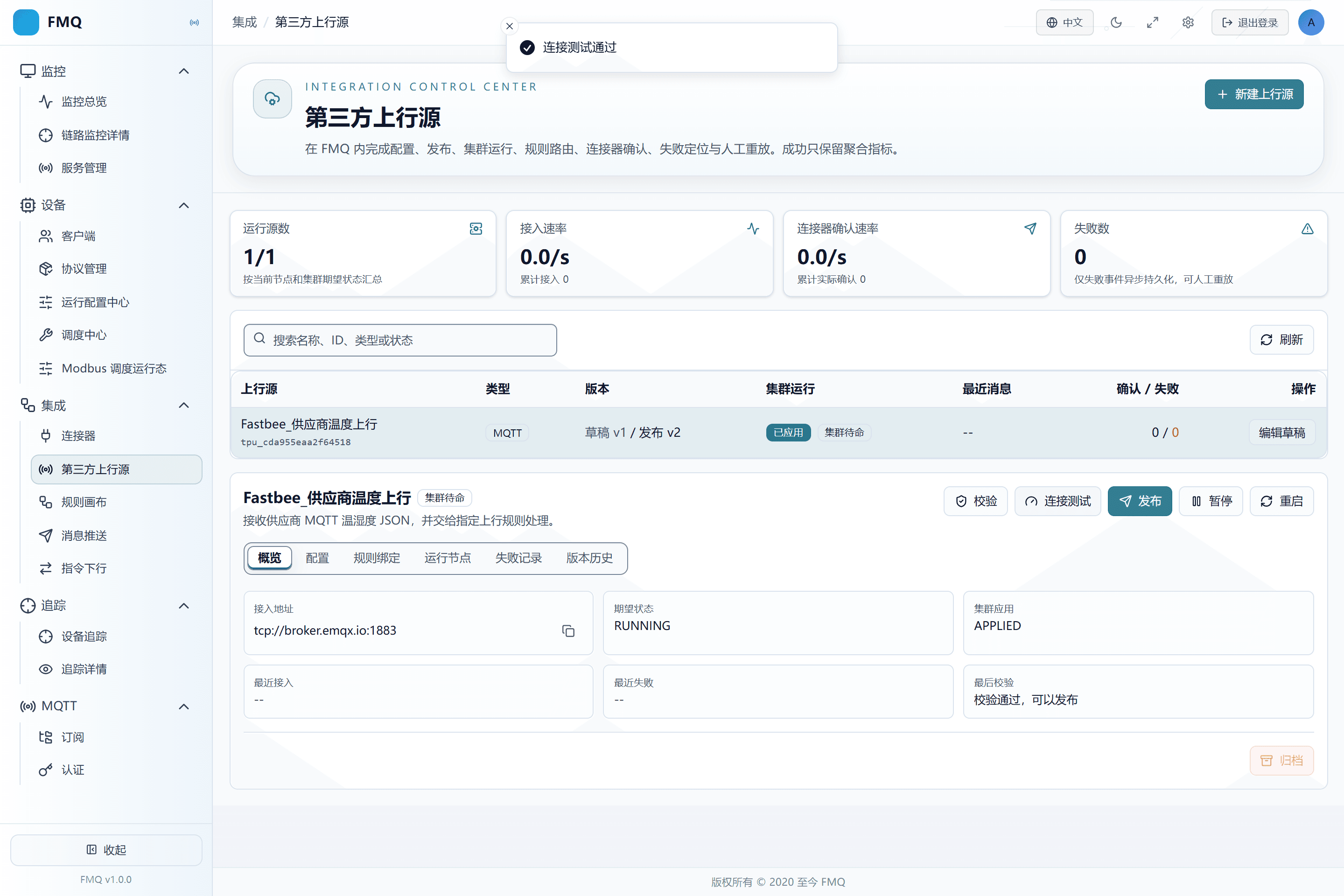
Figure: the connection test passed, which means FMQ can connect to the Broker and subscribe to the Topic; it has not yet proven real messages or external actual receipt.
Field Descriptions
| Field / Control | Description |
|---|---|
| Broker Address | The MQTT address FMQ connects to; must include the protocol and port; after saving it enters the current upstream source draft; it affects runtime only after publishing. Required · Source: an FMQ-reachable address provided by the MQTT administrator. Choice: use tcp:// for plaintext links and ssl:// for TLS; do not fill in the management console address. Recommended: fill in per the integration documents · Example: tcp://broker.example.com:1883 |
| Subscribed Topic | The Topic FMQ listens to continuously; multiple entries are allowed; after saving it enters the current upstream source draft; it affects runtime only after publishing. Required · Source: the sender's publishing convention. Choice: separate multiple Topics with English commas; wildcard scope must be authorized. Recommended: fill in per the integration documents · Example: vendor/+/telemetry |
8. Publish and Confirm the Running Version
Location: Integration → Third-party Upstream Sources
Click Publish; then open Running Nodes and check the published version, target/actual version, cluster application, and running state.
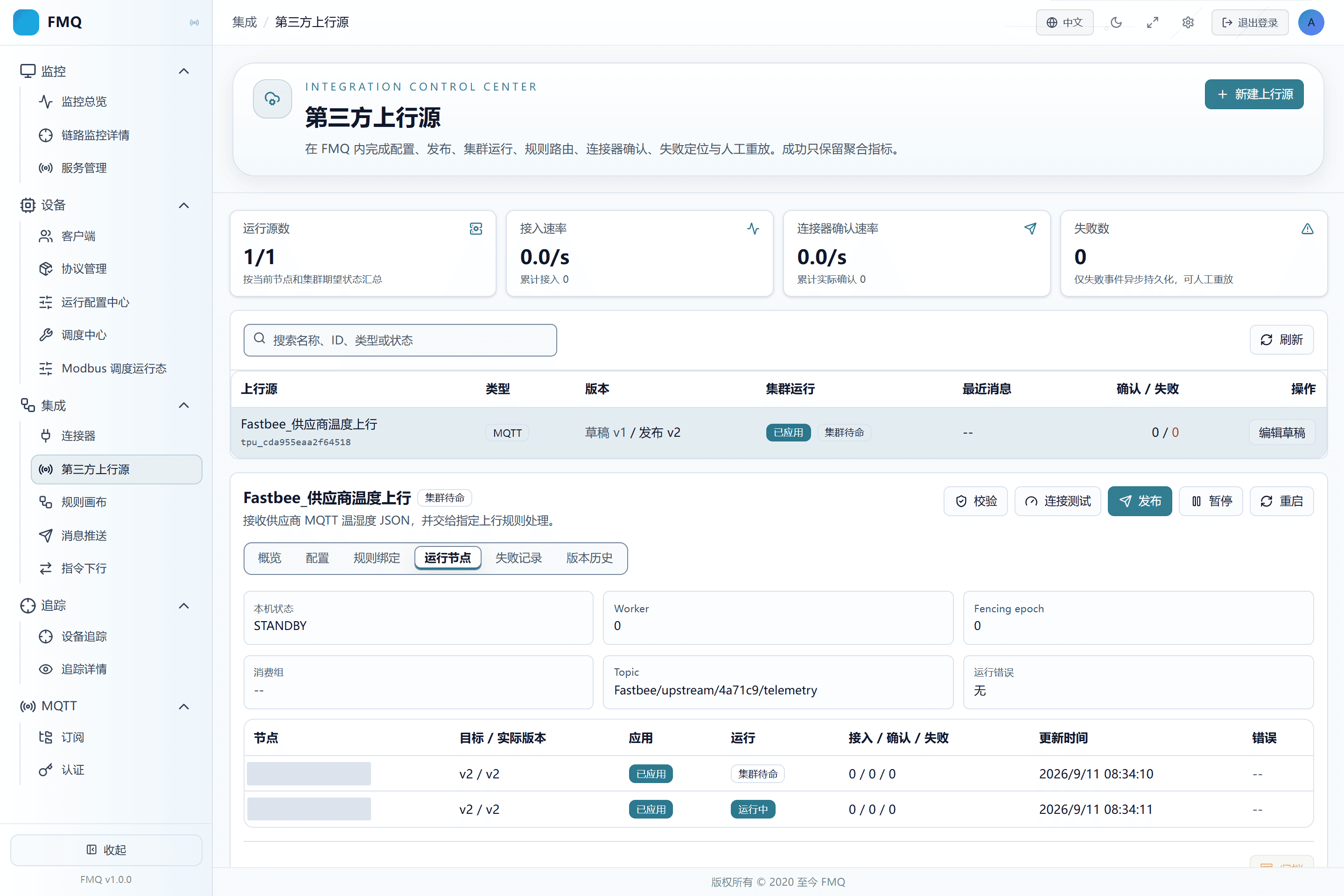
Figure: published v2 has been applied to two nodes; one node is running and one node is on standby, and the target version matches the actual version.
9. Send a Real MQTT Message with the New FMQX
Location: FMQX
Create a new MQTT session in FMQX, connect to the source Broker, and send a valid JSON with temperature=32.6 to this example's Topic.
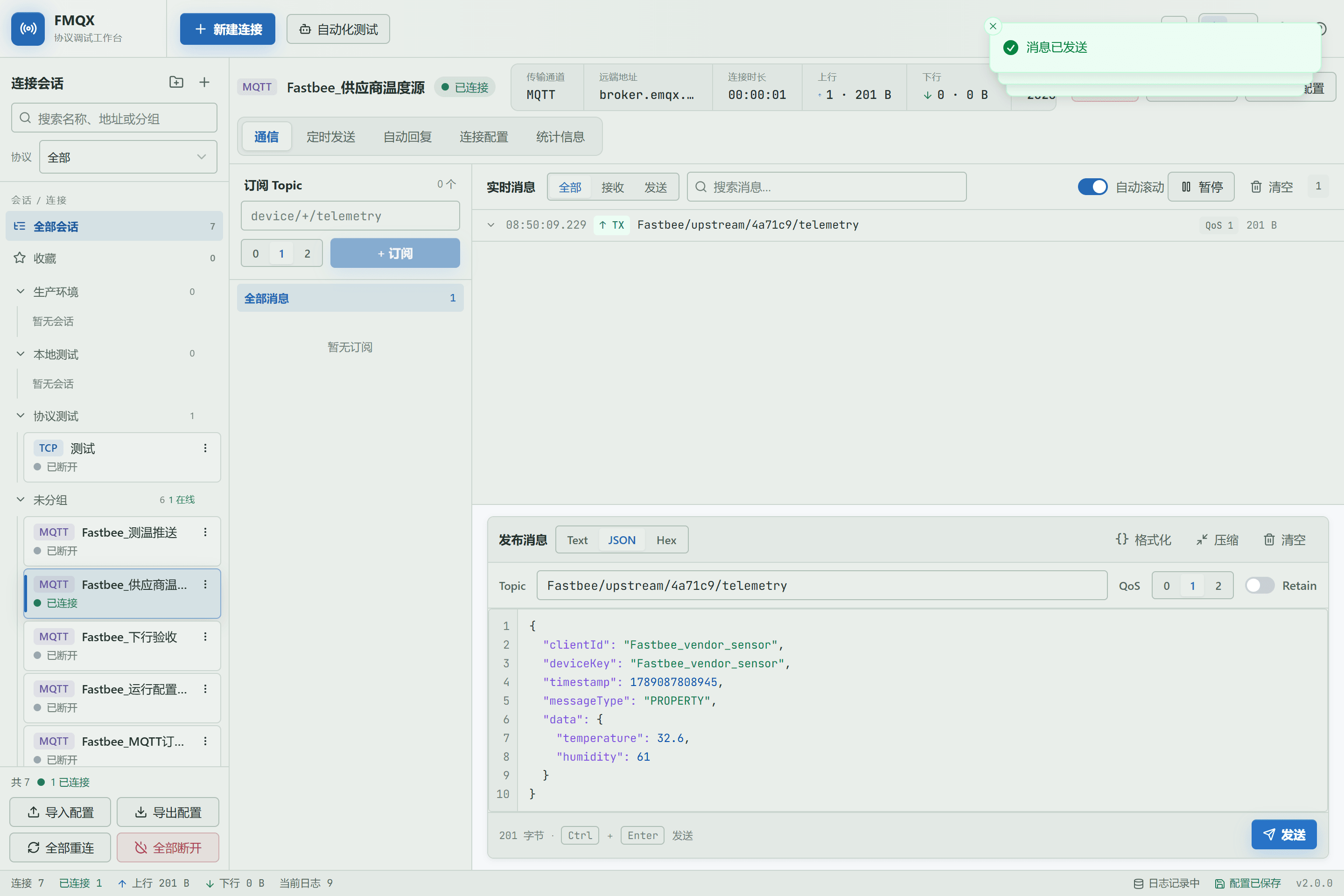
Figure: the new FMQX connects to the public MQTT Broker and sends 32.6°C third-party JSON to the demo Topic.
Field Descriptions
| Field / Control | Description |
|---|---|
| Broker Address | The MQTT address FMQ connects to; must include the protocol and port; after saving it enters the current upstream source draft; it affects runtime only after publishing. Required · Source: an FMQ-reachable address provided by the MQTT administrator. Choice: use tcp:// for plaintext links and ssl:// for TLS; do not fill in the management console address. Recommended: fill in per the integration documents · Example: tcp://broker.example.com:1883 |
| Subscribed Topic | The Topic FMQ listens to continuously; multiple entries are allowed; after saving it enters the current upstream source draft; it affects runtime only after publishing. Required · Source: the sender's publishing convention. Choice: separate multiple Topics with English commas; wildcard scope must be authorized. Recommended: fill in per the integration documents · Example: vendor/+/telemetry |
| Message Mode | Determines whether to validate standard Alink directly or extract fields from third-party JSON first; after saving it enters the current upstream source draft; it affects runtime only after publishing. Required · Source: the third party's real sample message. Choice: choose field mapping for ordinary business JSON; choose Alink JSON only when the message already conforms to Alink. Recommended: fill in per the integration documents · Example: JSON Field Mapping |
10. Verify Ingestion, Rules, and Connector Confirmations
Location: Integration → Third-party Upstream Sources
Return to the upstream source details, refresh, and compare cumulative ingestion, confirmations, and failures; when necessary, check the running nodes and rule monitoring.
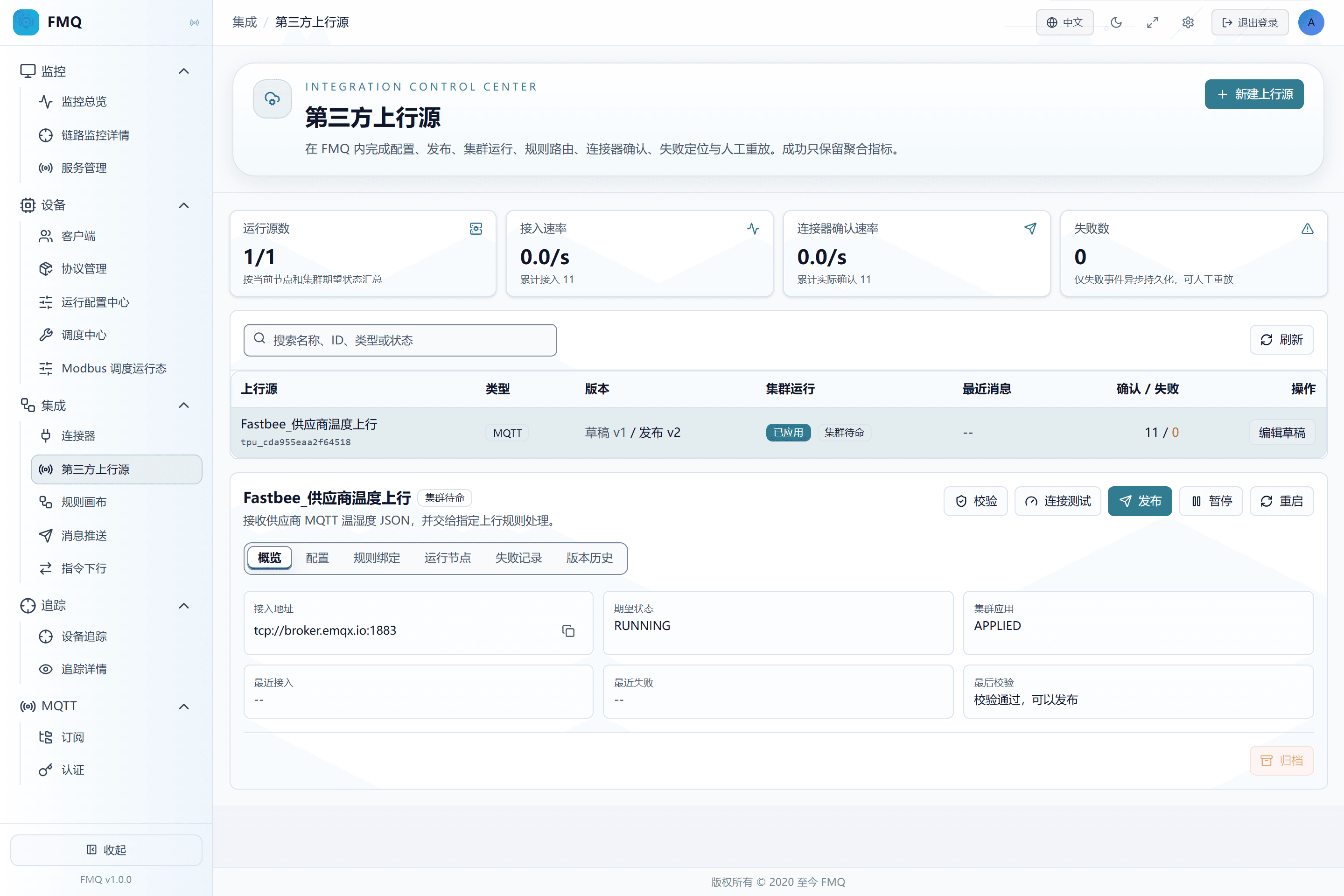
Figure: the ingestion count and confirmation count have increased: FMQ has received the message, and the bound rule has submitted it to the connector.
11. Confirm the RabbitMQ Queue Actually Received It
Location: RabbitMQ Management Console
Read this batch's queue in the authorized RabbitMQ management console, and verify the standard Alink id, version, method, sys, and params.temperature=32.6.
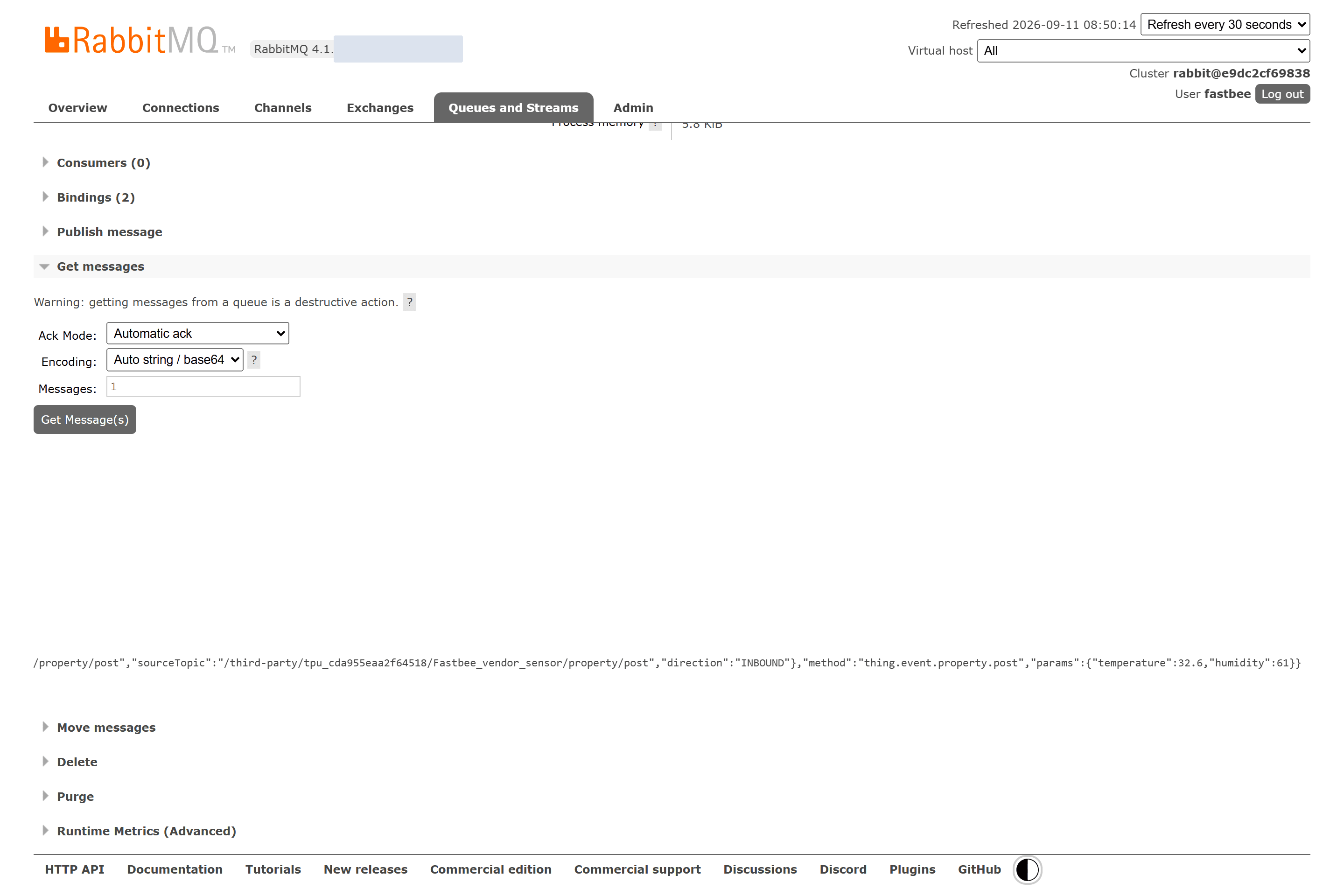
Figure: the dedicated RabbitMQ queue received the standard Alink message with the business parameter temperature=32.6.
When to Use Each Button
| Item | Purpose and Usage Advice | Effect and Recovery |
|---|---|---|
| Save Draft | Saves the next version of the configuration; when to use: can be saved before all parameters are entered; validate after saving, and do not treat the draft as already effective. | The draft version increases while the current published version stays unchanged; on failure: can be saved before all parameters are entered; validate after saving, and do not treat the draft as already effective. |
| Validate | Checks fields, source type, identity strategy, and rule bindings; when to use: run before publishing for all types. | Records the validation summary; on failure: run before publishing for all types. |
| Mapping Preview | Uses a sample to verify field extraction of HTTP JSON; when to use: run before publishing for HTTP + JSON field mapping; use a real desensitized sample. | Only parses and maps, does not enter the rules; on failure: run before publishing for HTTP + JSON field mapping; use a real desensitized sample. |
| Connection Test | Checks the current connection parameters and subscription conditions of MQTT/Kafka; when to use: run after modifying MQTT or Kafka connection fields. | Saves the test result for the current connection configuration fingerprint; on failure: run after modifying MQTT or Kafka connection fields. |
| Publish | Generates an immutable runtime version from the validated draft and notifies the cluster to apply it; when to use: use after validation and necessary tests pass. | The published version increases; the cluster starts applying the target version; on failure: use after validation and necessary tests pass. |
| Start | Makes a published and paused upstream source start receiving new messages; when to use: when the first publish did not start immediately, or after maintenance ends. | The expected state changes to RUNNING; on failure: when the first publish did not start immediately, or after maintenance ends. |
| Pause | Stops receiving new messages; when to use: before maintenance, source switching, or archiving. | The expected state changes to STOPPED; on failure: before maintenance, source switching, or archiving. |
| Restart | Re-establishes the connection or consumption resources with the current published version; when to use: when the configuration is unchanged but the connection state is abnormal. | Does not create a new version; on failure: when the configuration is unchanged but the connection state is abnormal. |
| Rollback | Generates a new published version based on a selected historical snapshot; when to use: when the new version is abnormal and the old version still fits the current environment. | The version number keeps increasing; on failure: when the new version is abnormal and the old version still fits the current environment. |
| Replay | Creates a new event for a replayable failed payload; when to use: fix the failure cause first, and only when the page shows it is replayable. | The original failure record is retained, and the new event re-enters the link; on failure: fix the failure cause first, and only when the page shows it is replayable. |
| Archive | Ends the use of a published upstream source; when to use: pause first and confirm there are no new messages, then archive. | The lifecycle changes to ARCHIVED; on failure: pause first and confirm there are no new messages, then archive. |
How to Judge That a Message Truly Succeeded
| Item | Purpose and Usage Advice | Effect and Recovery |
|---|---|---|
| 1. FMQ Ingestion | Cumulative ingestion or the ingestion rate increases, which means the source message has reached FMQ; how to read: confirm receipt first, then check failures and rules. | Data source: upstream source runtime metrics; for viewing and judgment only, does not change the running state. |
| 2. Rule Processing | The message passes mapping and identity judgment and enters the bound rule; how to read: when the rule is not hit, check the data path, message type, and rule conditions. | Data source: rule runtime results and failure records; for viewing and judgment only, does not change the running state. |
| 3. Connector Confirmation | The connector has received the target Broker's send confirmation; how to read: after confirmations increase, still check the target queue or consumer side. | Data source: connector confirmation count; for viewing and judgment only, does not change the running state. |
| 4. External System Actual Receipt | The target queue or consumer program actually fetches and can parse the message; how to read: this is the closed-loop endpoint of this hands-on exercise. | Data source: RabbitMQ management console or a controlled consumer; for viewing and judgment only, does not change the running state. |
Start/Stop, Versions, and Failure Handling
Pause is used to stop receiving new messages; restart is used to rebuild the current runtime resources when the configuration is unchanged; rollback generates a new published version based on an old snapshot. When the configuration itself is wrong, correct the draft, retest, and republish.
For failure records, look at the stage and reason first. Replay is possible only when the payload is safely stored and the page shows it is replayable; replay creates a new event and does not modify the original failure record. When a published source is no longer used, pause it first and then archive it.
12. Send an Invalid JSON
Location: FMQX
In FMQX, switch to text mode and send a message lacking a valid JSON value to the same Topic.
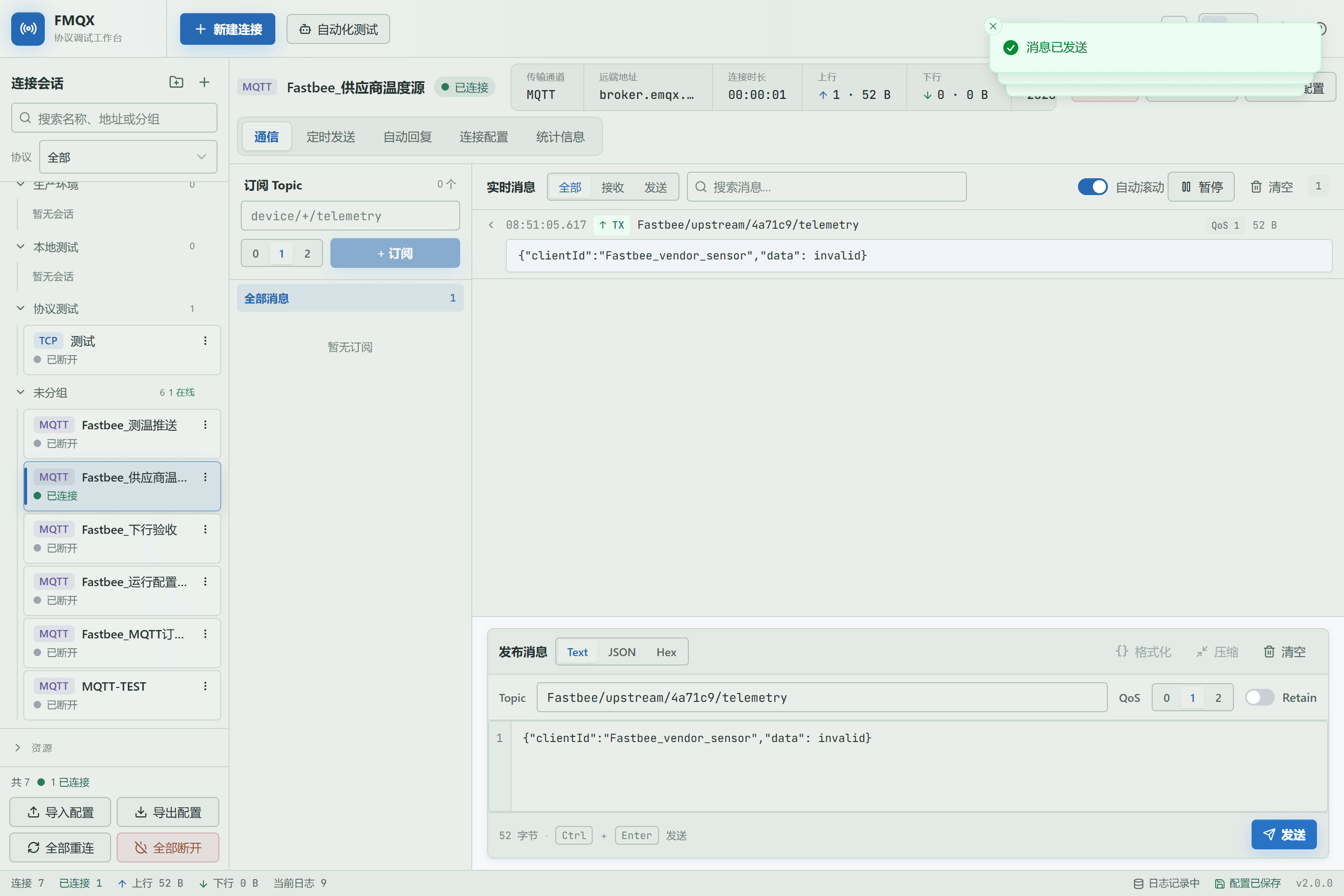
Figure: the new FMQX sends a controllable invalid JSON in text mode to demonstrate a parsing failure.
Field Descriptions
| Field / Control | Description |
|---|---|
| Message Mode | Determines whether to validate standard Alink directly or extract fields from third-party JSON first; after saving it enters the current upstream source draft; it affects runtime only after publishing. Required · Source: the third party's real sample message. Choice: choose field mapping for ordinary business JSON; choose Alink JSON only when the message already conforms to Alink. Recommended: fill in per the integration documents · Example: JSON Field Mapping |
13. View the Parsing Failure Reason
Location: Integration → Third-party Upstream Sources
Return to FMQ, open Failure Records, and view the stage, reason, and description.
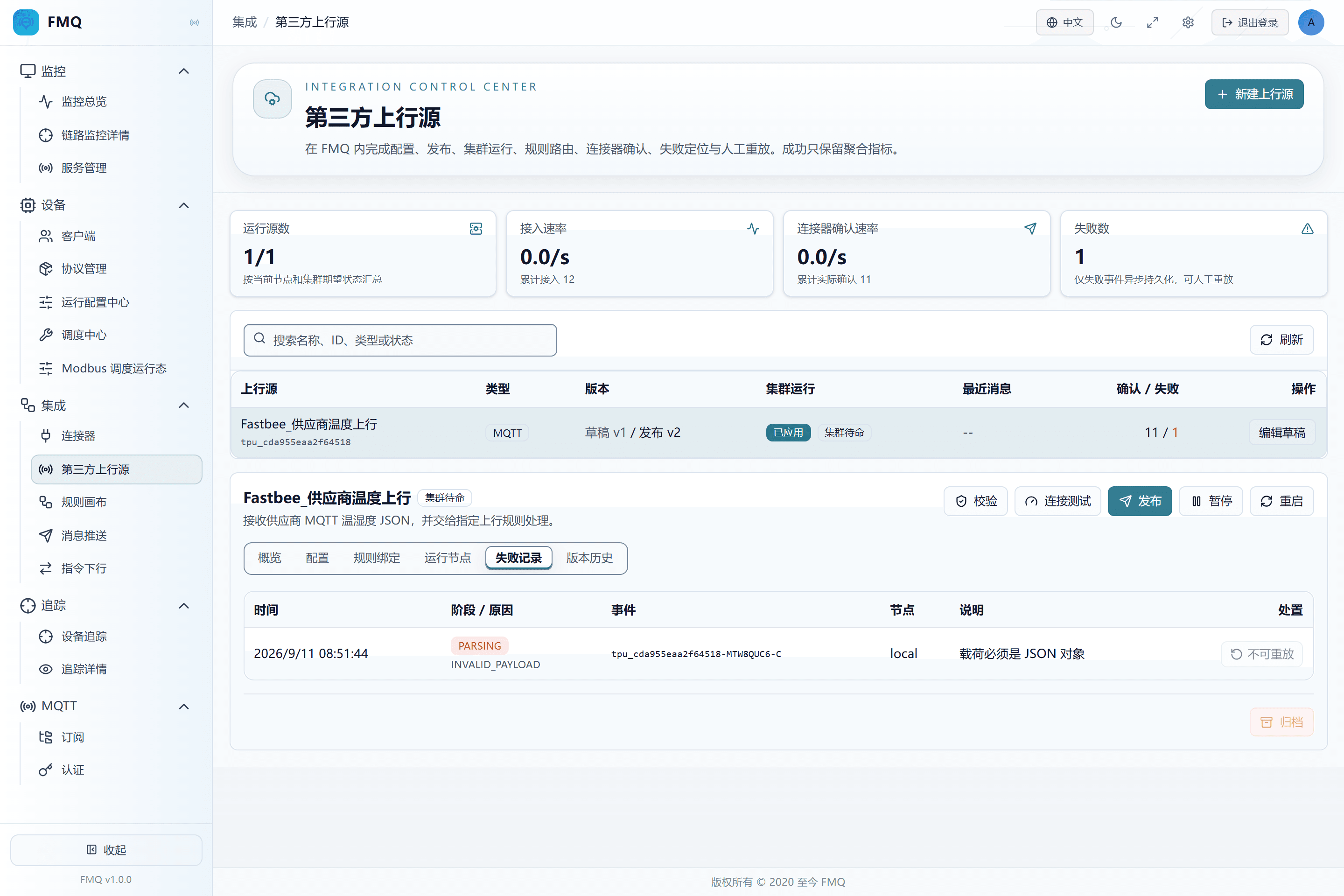
Figure: the failure record shows the parsing stage and reason; the invalid JSON did not enter the rules and was not delivered to RabbitMQ.
14. Resend After Fixing the JSON
Location: FMQX
In FMQX, switch back to JSON mode, change temperature to 33.1, and resend to the same Topic.
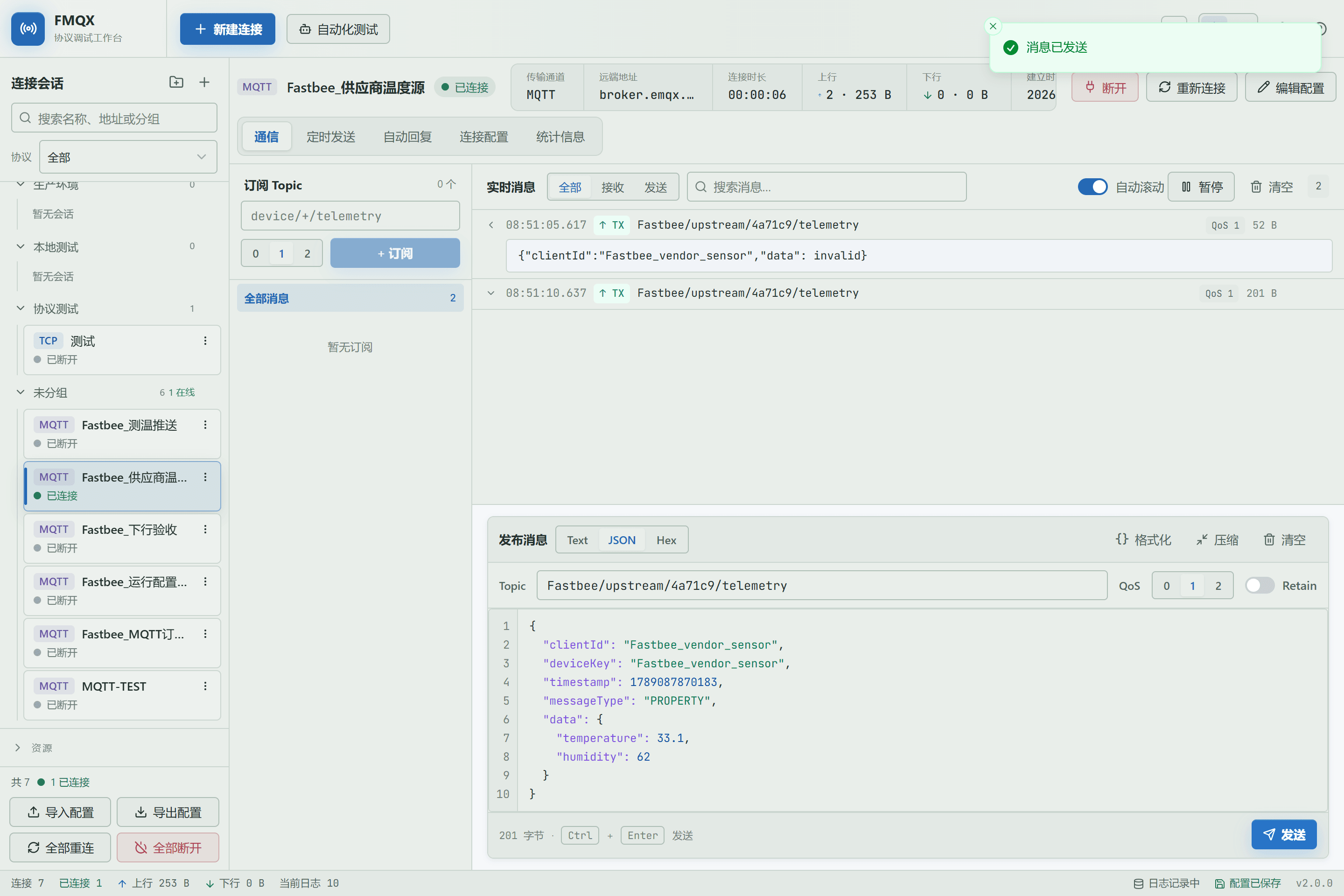
Figure: after fixing the message into valid JSON, resend the 33.1°C data in the new FMQX.
Field Descriptions
| Field / Control | Description |
|---|---|
| Message Mode | Determines whether to validate standard Alink directly or extract fields from third-party JSON first; after saving it enters the current upstream source draft; it affects runtime only after publishing. Required · Source: the third party's real sample message. Choice: choose field mapping for ordinary business JSON; choose Alink JSON only when the message already conforms to Alink. Recommended: fill in per the integration documents · Example: JSON Field Mapping |
| Subscribed Topic | The Topic FMQ listens to continuously; multiple entries are allowed; after saving it enters the current upstream source draft; it affects runtime only after publishing. Required · Source: the sender's publishing convention. Choice: separate multiple Topics with English commas; wildcard scope must be authorized. Recommended: fill in per the integration documents · Example: vendor/+/telemetry |
15. Confirm the Corrected Message Was Actually Received
Location: RabbitMQ Management Console
Read the new message in the RabbitMQ target queue and verify the standard Alink and params.temperature=33.1.
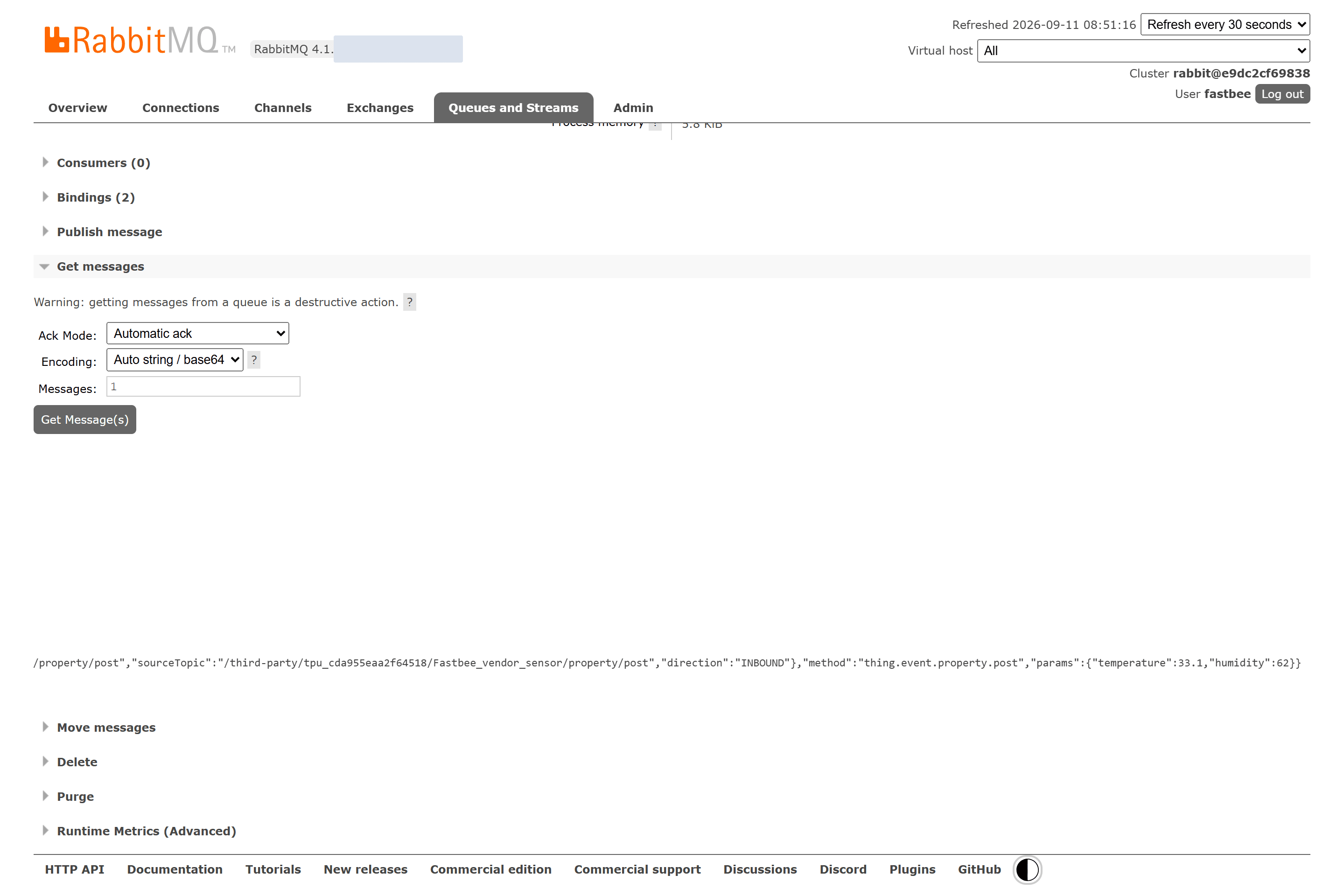
Figure: the dedicated RabbitMQ queue received the standard Alink message with the business parameter temperature=33.1.
16. View Versions and Understand Rollback
Location: Integration → Third-party Upstream Sources
Open Version History and confirm the current version; only when the new version is abnormal and the old configuration still applies, choose an old snapshot to roll back.
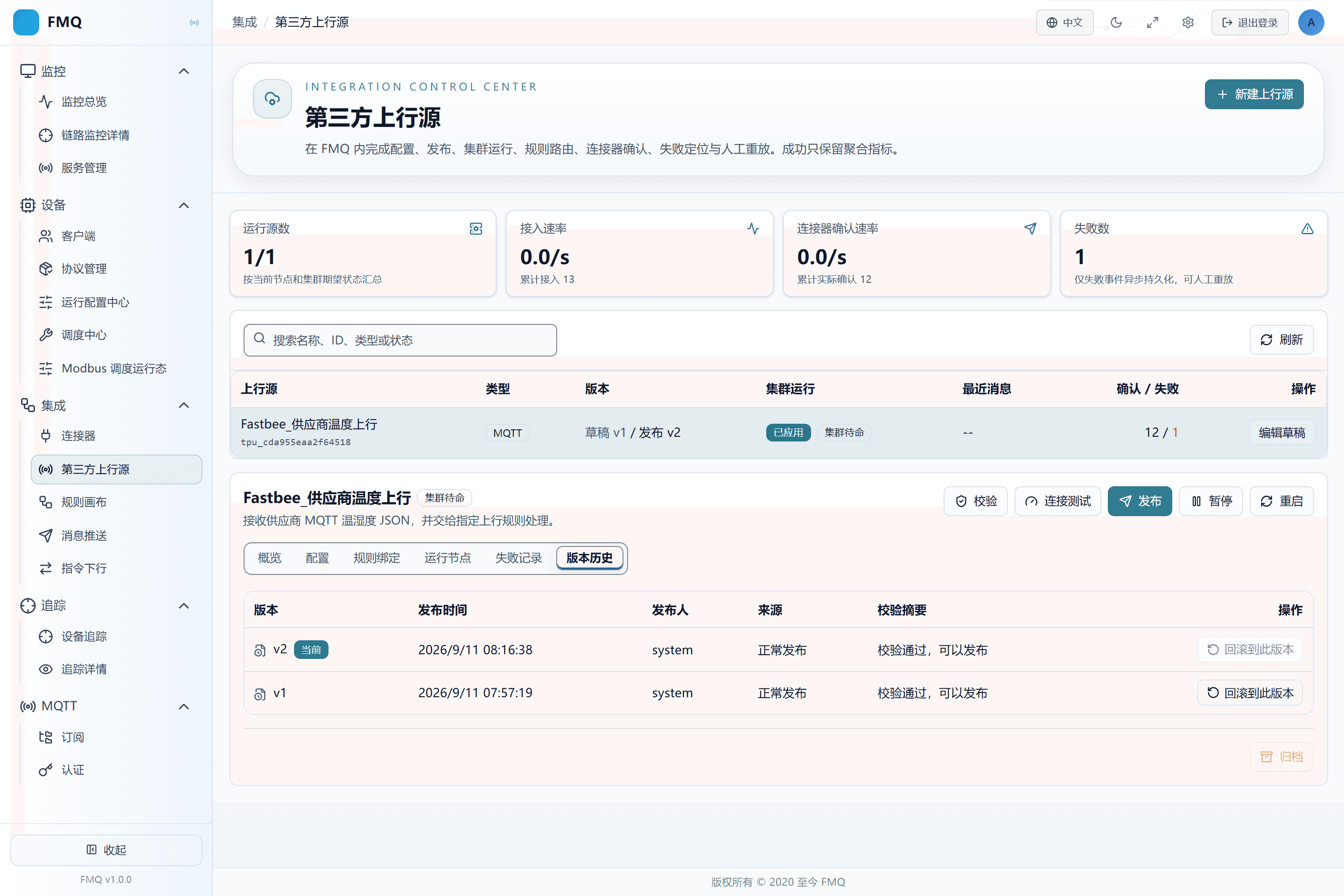
Figure: the version history shows the current published version v2; rollback generates a new published version, and the version number never goes backward.
17. Pause the Source and Distinguish It from Restart
Location: Integration → Third-party Upstream Sources
Click Pause before maintenance or switching the data source; use Restart only when the configuration is unchanged but the connection is abnormal.
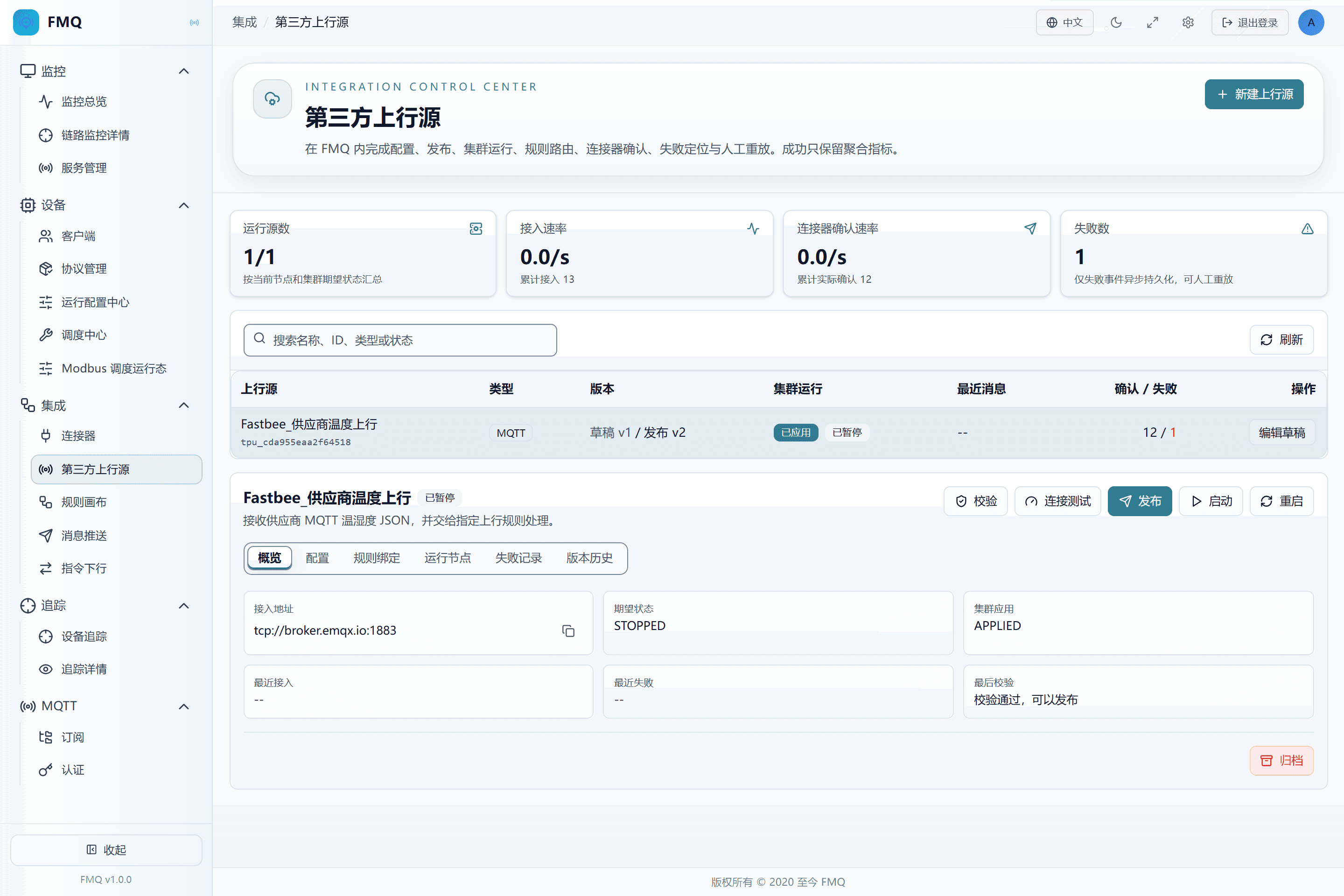
Figure: after pausing, no new messages are received; existing versions and failure records are retained, and the source can be started again.
18. Archive After Stopping the Source
Location: Integration → Third-party Upstream Sources
After confirming the upstream source is paused and there are no new messages, click Archive.
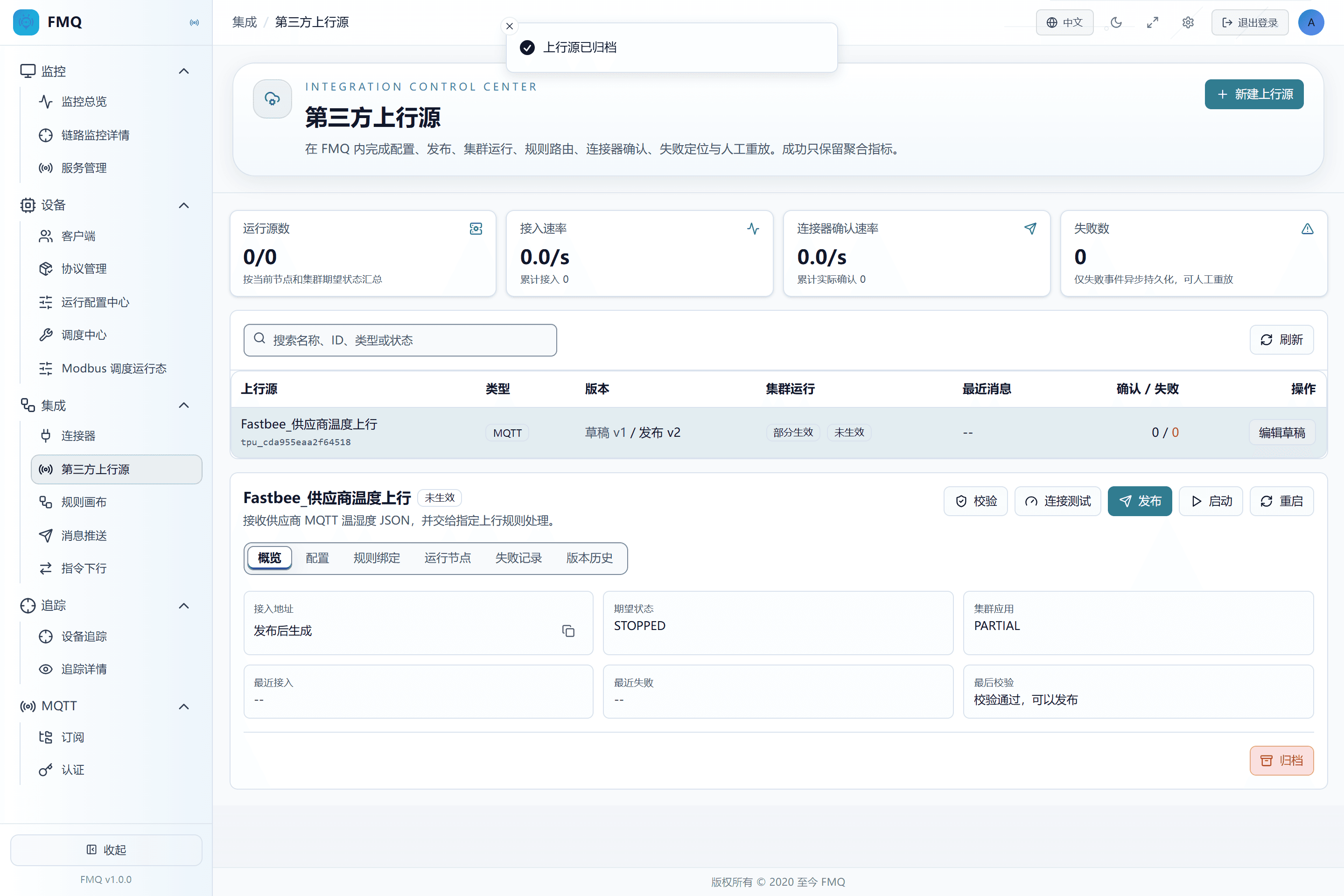
Figure: an upstream source must be paused before it can be archived; after archiving, history is retained and it is no longer used as a running source.
Three Source Types' Parameters and FAQ
Choose the access type according to the third party's existing capabilities, not personal familiarity. Addresses, accounts, Topics, consumer groups, and authentication methods are provided by the corresponding system administrators; capacity and retry parameters are adjusted only when peaks, partition counts, or stress-test evidence are clear.
HTTP Push Parameters
| Item | Purpose and Usage Advice | Effect and Recovery |
|---|---|---|
| Required Authentication Method | Determines how the caller proves its identity; how to choose: prefer HMAC-SHA256 in production; choose Bearer for a fixed Token; no authentication is allowed only in explicitly permitted development environments; where the value comes from: the two parties' API security agreement; advice: follow the deployment or integration documents; example: HMAC-SHA256. HMAC-SHA256: verifies the timestamp, nonce, and request body signature; prevents tampering and replay. Bearer Token: the Authorization header carries a fixed Token; simple to implement, but must be strictly guarded. No Authentication: caller identity is not verified; the default production configuration blocks publishing. | After saving it enters the current upstream source draft; it affects runtime only after publishing; scope: the current third-party upstream source; effective requirement: publishing is required; when wrong: after leakage, third parties can forge requests; it must not enter screenshots or logs; recovery: correct per the source party's documents, re-validate, and verify with a new message. |
| Required Signing Key / Bearer Token | The key paired with the authentication method; how to choose: enter a high-strength value when creating; when editing, leave it empty or keep the masked value to indicate no change; where the value comes from: agreed by both parties through a controlled channel; advice: follow the deployment or integration documents; example: not shown in the manual. | After saving it enters the current upstream source draft; it affects runtime only after publishing; scope: the current third-party upstream source; effective requirement: publishing is required; when wrong: after leakage, third parties can forge requests; it must not enter screenshots or logs; recovery: correct per the source party's documents, re-validate, and verify with a new message. |
| Single Payload Limit | The maximum request body size in bytes; exceeding it returns 413; how to choose: default 1 MiB; adjust only when samples are truly larger; where the value comes from: the real maximum message size and the security limit; advice: 1048576. | After saving it enters the current upstream source draft; it affects runtime only after publishing; scope: the current third-party upstream source; effective requirement: publishing is required; when wrong: a value inconsistent with the real source may make messages unable to be ingested or unable to enter rules; recovery: correct per the source party's documents, re-validate, and verify with a new message. |
| Requests Per Second | The sustained request rate allowed for a single upstream source; exceeding it returns 429; how to choose: default 1000; keep it when there is no stress-test basis; where the value comes from: normal peak and capacity testing; advice: 1000. | After saving it enters the current upstream source draft; it affects runtime only after publishing; scope: the current third-party upstream source; effective requirement: publishing is required; when wrong: a value inconsistent with the real source may make messages unable to be ingested or unable to enter rules; recovery: correct per the source party's documents, re-validate, and verify with a new message. |
| Burst Capacity | Extra request tokens allowed in a short period; how to choose: should cover reasonable bursts but must not be amplified without bound; where the value comes from: burst traffic evaluation; advice: 2000. | After saving it enters the current upstream source draft; it affects runtime only after publishing; scope: the current third-party upstream source; effective requirement: publishing is required; when wrong: a value inconsistent with the real source may make messages unable to be ingested or unable to enter rules; recovery: correct per the source party's documents, re-validate, and verify with a new message. |
| Signature Clock Skew | The number of seconds an HMAC request time is allowed to deviate from the server; how to choose: default 300 seconds; fix clock synchronization first instead of blindly enlarging it; where the value comes from: the clock synchronization status of both servers; advice: 300; example: 300 seconds. | After saving it enters the current upstream source draft; it affects runtime only after publishing; scope: the current third-party upstream source; effective requirement: publishing is required; when wrong: a value inconsistent with the real source may make messages unable to be ingested or unable to enter rules; recovery: correct per the source party's documents, re-validate, and verify with a new message. |
| Access Address | The dedicated HTTP address generated by accessKey after the draft is saved; how to read: hand it only to authorized callers; it can receive only after publishing and starting. | Data source: the platform details overview; for viewing and judgment only, does not change the running state. |
MQTT Subscription Parameters
| Item | Purpose and Usage Advice | Effect and Recovery |
|---|---|---|
| Required Broker Address | The MQTT address FMQ connects to; must include the protocol and port; how to choose: use tcp:// for plaintext links and ssl:// for TLS; do not fill in the management console address; where the value comes from: an FMQ-reachable address provided by the MQTT administrator; advice: follow the deployment or integration documents; example: tcp://broker.example.com:1883. | After saving it enters the current upstream source draft; it affects runtime only after publishing; scope: the current third-party upstream source; effective requirement: publishing is required; when wrong: a value inconsistent with the real source may make messages unable to be ingested or unable to enter rules; recovery: correct per the source party's documents, re-validate, and verify with a new message. |
| Required Subscribed Topic | The Topic FMQ listens to continuously; multiple entries are allowed; how to choose: separate multiple Topics with English commas; wildcard scope must be authorized; where the value comes from: the sender's publishing convention; advice: follow the deployment or integration documents; example: vendor/+/telemetry. | After saving it enters the current upstream source draft; it affects runtime only after publishing; scope: the current third-party upstream source; effective requirement: publishing is required; when wrong: a value inconsistent with the real source may make messages unable to be ingested or unable to enter rules; recovery: correct per the source party's documents, re-validate, and verify with a new message. |
| Required Cluster Consumption Strategy | Determines whether one source is subscribed by a single node or shared-consumed by multiple nodes; how to choose: use single-primary lease by default; choose shared subscription only when the Broker supports shared subscriptions and parallel consumption is needed; where the value comes from: FMQ cluster size and Broker capability; advice: follow the deployment or integration documents; example: single-primary lease. Single-primary Lease: one node subscribes, and the lease takes over on failure; avoids duplicate cluster consumption. Shared Subscription: converted into a $share group and consumed in parallel by multiple nodes; depends on the Broker supporting shared subscriptions. | After saving it enters the current upstream source draft; it affects runtime only after publishing; scope: the current third-party upstream source; effective requirement: publishing is required; when wrong: a value inconsistent with the real source may make messages unable to be ingested or unable to enter rules; recovery: correct per the source party's documents, re-validate, and verify with a new message. |
| Username | The MQTT connection identity; how to choose: when anonymous connections are allowed, leave both the username and password empty; where the value comes from: provided by the Broker administrator through a controlled channel; advice: follow the deployment or integration documents; example: fill in as actual. | After saving it enters the current upstream source draft; it affects runtime only after publishing; scope: the current third-party upstream source; effective requirement: publishing is required; when wrong: a value inconsistent with the real source may make messages unable to be ingested or unable to enter rules; recovery: correct per the source party's documents, re-validate, and verify with a new message. |
| Password | The MQTT credential paired with the username; how to choose: when editing, leave it empty or keep the masked value to indicate no change; where the value comes from: provided by the Broker administrator through a controlled channel; advice: follow the deployment or integration documents; example: not shown in the manual. | After saving it enters the current upstream source draft; it affects runtime only after publishing; scope: the current third-party upstream source; effective requirement: publishing is required; when wrong: it must not enter screenshots, logs, or the manual; recovery: correct per the source party's documents, re-validate, and verify with a new message. |
| Client ID | The Broker uses it to identify FMQ's subscription session; how to choose: leaving it empty lets the system generate it; when filling it in manually, it must not duplicate other clients; where the value comes from: the Broker naming convention; advice: follow the deployment or integration documents; example: FastBee_upstream_consumer. | After saving it enters the current upstream source draft; it affects runtime only after publishing; scope: the current third-party upstream source; effective requirement: publishing is required; when wrong: a value inconsistent with the real source may make messages unable to be ingested or unable to enter rules; recovery: correct per the source party's documents, re-validate, and verify with a new message. |
| QoS | Determines the subscription delivery level; how to choose: most businesses choose 1; QoS 2 requires joint support from the Broker and the sender; where the value comes from: send reliability and performance requirements; advice: 1. 0 · At most once: lowest overhead, loss allowed; suitable for discardable high-frequency data. 1 · At least once: may duplicate, balances reliability and performance; the business side needs to consider idempotency by message identity. 2 · Exactly once: the most handshakes and highest overhead; use only when explicitly needed. | After saving it enters the current upstream source draft; it affects runtime only after publishing; scope: the current third-party upstream source; effective requirement: publishing is required; when wrong: a value inconsistent with the real source may make messages unable to be ingested or unable to enter rules; recovery: correct per the source party's documents, re-validate, and verify with a new message. |
| Clean Session | Whether to discard the offline subscription state after disconnection; how to choose: enabled by default; when offline backlog is needed, a fixed clientId and the Broker strategy must be evaluated together; where the value comes from: the Broker session recovery requirement; advice: true; example: enabled. | After saving it enters the current upstream source draft; it affects runtime only after publishing; scope: the current third-party upstream source; effective requirement: publishing is required; when wrong: a value inconsistent with the real source may make messages unable to be ingested or unable to enter rules; recovery: correct per the source party's documents, re-validate, and verify with a new message. |
Kafka Consumption Parameters
| Item | Purpose and Usage Advice | Effect and Recovery |
|---|---|---|
| Required Broker Address | Kafka bootstrap addresses; multiple entries are allowed; how to choose: separate multiple endpoints with English commas; where the value comes from: an FMQ-reachable address provided by the Kafka administrator; advice: follow the deployment or integration documents; example: kafka-1:9092,kafka-2:9092. | After saving it enters the current upstream source draft; it affects runtime only after publishing; scope: the current third-party upstream source; effective requirement: publishing is required; when wrong: a value inconsistent with the real source may make messages unable to be ingested or unable to enter rules; recovery: correct per the source party's documents, re-validate, and verify with a new message. |
| Required Subscribed Topic | One or more Topics to consume; how to choose: separate multiple Topics with English commas; where the value comes from: the data producer's convention; advice: follow the deployment or integration documents; example: vendor-telemetry. | After saving it enters the current upstream source draft; it affects runtime only after publishing; scope: the current third-party upstream source; effective requirement: publishing is required; when wrong: a value inconsistent with the real source may make messages unable to be ingested or unable to enter rules; recovery: correct per the source party's documents, re-validate, and verify with a new message. |
| Consumer Group | Kafka uses consumer groups to manage partition ownership and offsets; how to choose: when left empty, the system generates a stable consumer group per upstream source; to reuse existing consumption progress, reuse the agreed group name; where the value comes from: the Kafka integration convention; advice: follow the deployment or integration documents; example: leave empty for system generation. | After saving it enters the current upstream source draft; it affects runtime only after publishing; scope: the current third-party upstream source; effective requirement: publishing is required; when wrong: a value inconsistent with the real source may make messages unable to be ingested or unable to enter rules; recovery: correct per the source party's documents, re-validate, and verify with a new message. |
| Required Security Protocol | Determines whether SASL authentication and TLS encryption are used; how to choose: must be consistent with the cluster; prefer SASL_SSL for cross-network production environments; where the value comes from: the Kafka cluster security configuration; advice: follow the deployment or integration documents; example: SASL_SSL. SASL_SSL: authenticates and encrypts the link; requires correct certificates and authentication configuration. SASL_PLAINTEXT: authenticates but does not encrypt the link; only for trusted networks. | After saving it enters the current upstream source draft; it affects runtime only after publishing; scope: the current third-party upstream source; effective requirement: publishing is required; when wrong: a value inconsistent with the real source may make messages unable to be ingested or unable to enter rules; recovery: correct per the source party's documents, re-validate, and verify with a new message. |
| Required SASL Mechanism | The Kafka identity authentication algorithm; how to choose: choose the one consistent with the cluster among PLAIN, SCRAM-SHA-256, and SCRAM-SHA-512; where the value comes from: provided by the Kafka administrator; advice: follow the deployment or integration documents; example: SCRAM-SHA-256. PLAIN: plaintext password mechanism, usually paired with TLS; consistent with the Broker configuration. SCRAM-SHA-256: challenge-response authentication; consistent with the Broker configuration. SCRAM-SHA-512: challenge-response authentication with a longer digest; consistent with the Broker configuration. | After saving it enters the current upstream source draft; it affects runtime only after publishing; scope: the current third-party upstream source; effective requirement: publishing is required; when wrong: a value inconsistent with the real source may make messages unable to be ingested or unable to enter rules; recovery: correct per the source party's documents, re-validate, and verify with a new message. |
| Required Username | The Kafka SASL identity; how to choose: fill in together with the password; where the value comes from: provided by the Kafka administrator through a controlled channel; advice: follow the deployment or integration documents; example: fill in as actual. | After saving it enters the current upstream source draft; it affects runtime only after publishing; scope: the current third-party upstream source; effective requirement: publishing is required; when wrong: a value inconsistent with the real source may make messages unable to be ingested or unable to enter rules; recovery: correct per the source party's documents, re-validate, and verify with a new message. |
| Required Password | The credential paired with the Kafka username; how to choose: when editing, leave it empty or keep the masked value to indicate no change; where the value comes from: provided by the Kafka administrator through a controlled channel; advice: follow the deployment or integration documents; example: not shown in the manual. | After saving it enters the current upstream source draft; it affects runtime only after publishing; scope: the current third-party upstream source; effective requirement: publishing is required; when wrong: it must not enter screenshots, logs, or the manual; recovery: correct per the source party's documents, re-validate, and verify with a new message. |
| Concurrent Consumers | The number of consumers running simultaneously for the same upstream source; how to choose: must not exceed the number of available partitions; default 1; where the value comes from: Topic partition count and throughput testing; advice: 1. | After saving it enters the current upstream source draft; it affects runtime only after publishing; scope: the current third-party upstream source; effective requirement: publishing is required; when wrong: a value inconsistent with the real source may make messages unable to be ingested or unable to enter rules; recovery: correct per the source party's documents, re-validate, and verify with a new message. |
| Single Fetch Limit | The maximum number of records returned by one poll; how to choose: default 500; avoid overly large batches that cause processing timeouts or memory peaks; where the value comes from: per-record processing time, memory, and throughput testing; advice: 500. | After saving it enters the current upstream source draft; it affects runtime only after publishing; scope: the current third-party upstream source; effective requirement: publishing is required; when wrong: a value inconsistent with the real source may make messages unable to be ingested or unable to enter rules; recovery: correct per the source party's documents, re-validate, and verify with a new message. |
| Poison Message Retry Count | The maximum number of retries for a single unparseable message before its offset is committed; how to choose: default 2; permanent errors should be recorded as failures as soon as possible to avoid blocking the partition; where the value comes from: data quality and retry cost; advice: 2. | After saving it enters the current upstream source draft; it affects runtime only after publishing; scope: the current third-party upstream source; effective requirement: publishing is required; when wrong: a value inconsistent with the real source may make messages unable to be ingested or unable to enter rules; recovery: correct per the source party's documents, re-validate, and verify with a new message. |
| No-offset Starting Point | Where to start when the consumer group has no committed offset; how to choose: choose latest when a newly launched source only takes new data; choose earliest when history backfill is explicitly needed and capacity has been evaluated; where the value comes from: whether historical data backfill is needed; advice: follow the deployment or integration documents; default: latest. latest · From the latest: only consumes new data after startup; does not automatically backfill history. earliest · From the earliest: backfills data from the earliest available position; may generate a large amount of historical traffic. | After saving it enters the current upstream source draft; it affects runtime only after publishing; scope: the current third-party upstream source; effective requirement: publishing is required; when wrong: a value inconsistent with the real source may make messages unable to be ingested or unable to enter rules; recovery: correct per the source party's documents, re-validate, and verify with a new message. |
Reference Table 4
| Symptom | Possible Cause | What to Check First | How to Recover |
|---|---|---|---|
| Validation passed, but publishing is not possible | The publish stage also checks the current connection test, HTTP mapping preview, rule actions, and the platform integration master key. | Look at the publish error first, then confirm the test results still correspond to the current draft. | Republish after completing the prerequisites; do not repeatedly save the same draft. |
| Connection test passed, but ingestion stays at 0 | The sender is not sending to the same Broker/Topic, or the upstream source is not running. | Check RUNNING, the Topic, the send time, and the FMQX session. | Fix the Topic or start the source, then send a new message with a unique value. |
| Ingestion increases, but connector confirmations do not | Mapping, identity, rule conditions, or the connector action failed. | Check the failure stage, rule bindings, and connector status. | Fix from the layer below the last successful level, then send a new message. |
| Connector confirmations increase, but the target queue is empty | The Exchange, Routing Key, and queue Binding do not match, or the message was taken by another consumer. | Check the queue, bindings, consumers, and this message's unique value. | Fix the routing or set up an isolated observation window, then verify actual receipt. |
| Strict association keeps failing | The message identity does not hit the current FMQ local device cache. | Check the clientId/deviceKey paths, device synchronization, and cache state. | Complete device registration and synchronization; for trial integration scenarios, logical passthrough can be evaluated. |
Production Operation Notice
The screenshots and examples illustrate operation locations and judgment methods and do not represent the current production state. Before publishing, starting/stopping, rebinding, retrying, or deleting, confirm the target environment, scope of impact, and recovery plan, and have authorized personnel perform the operation.
Fengxin IoT (FastBee) · FMQ Operation Manual