


FMQ Protocol Management
Shows the real protocol catalog, detail fields, and runtime limits, and explains the correct boundaries for debugging, the external package lifecycle, WEB authorization, and AI parsing.
How to Read
Confirm the entry point, permissions, and target object first, then complete the operations in numbered order. Each step includes the expected result; detailed fields and options are collected in expandable reference tables.
Screenshot Notes
The screenshots come from the original operations manual. The public edition hides real node addresses, connection addresses, and credentials; the statuses, times, and data in the examples do not represent the current production environment.
Before You Start
| Item | Description |
|---|---|
| What you can do | First understand the protocol catalog and details, then understand the debugging, external package, and AI import operations according to protocol differences. |
| Where to enter | Devices → Protocol Management |
| Required permissions | Logged in to the FMQ console; write operations must be performed by authorized personnel during a maintenance window. |
| Estimated time | 12 minutes |
Procedure
1. Protocol Scope and Statistics
Location: Devices → Protocol Management
Go to Protocol Management from the Devices menu, read the statistics cards first, and do not click Upload or AI Parse.
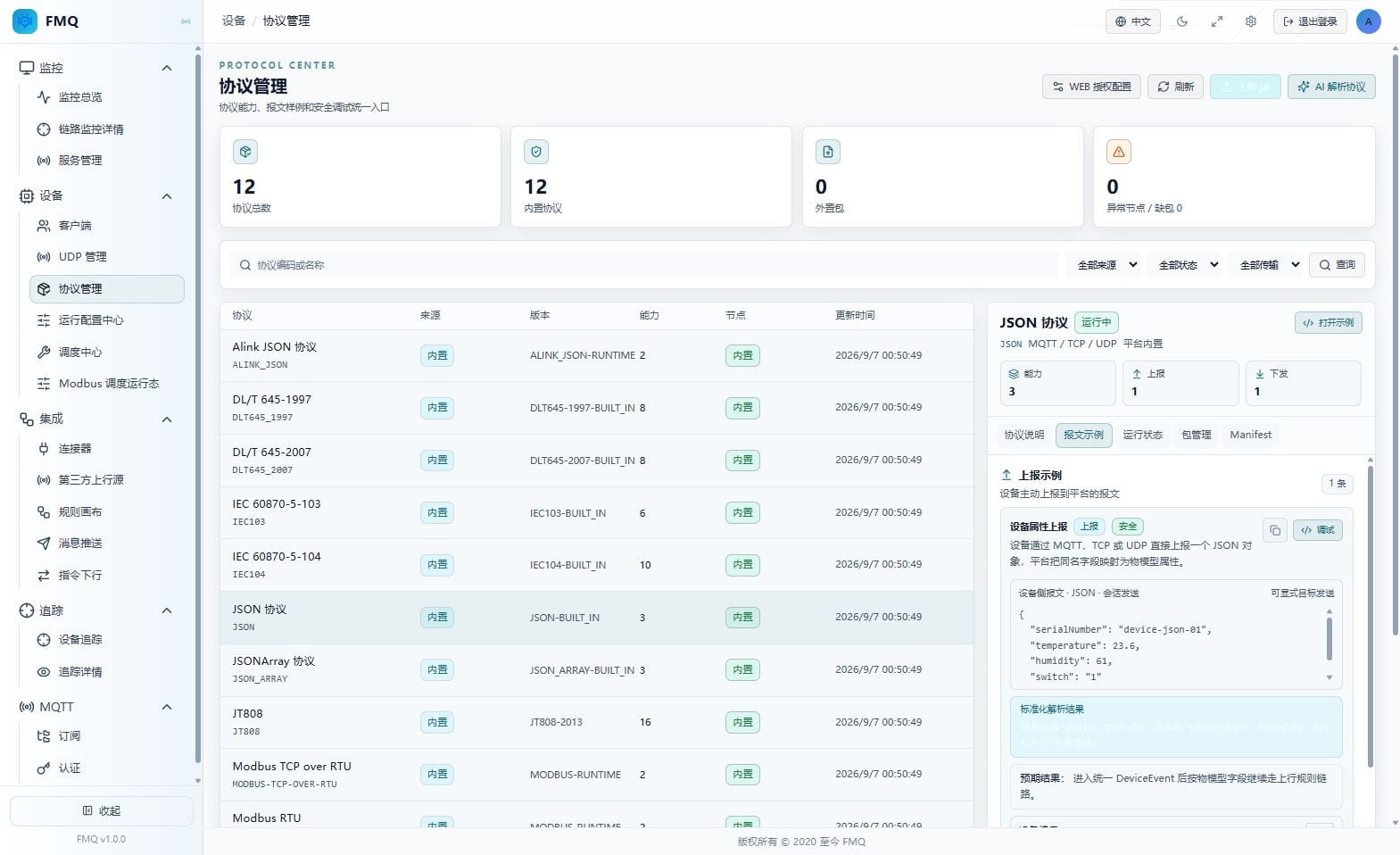
Figure: Protocol scope and statistics on the real Protocol Management page; the circled numbers locate the areas.
Field Descriptions
| Field / Control | Description |
|---|---|
| Monitoring Scope | This page reads the FMQ protocol catalog and the currently selected protocol details; it does not mean the device business link has been accepted. |
| Overall Health | The overall loading health of the protocol catalog, reflected by the abnormal node and missing package statistics. |
| Total Protocols | The number of protocols returned by the current catalog. |
| Built-in Protocols | The number of protocols provided by the FMQ built-in runtime. |
| External Packages | The number of protocols maintained via jar packages. |
| Abnormal Nodes | The number of nodes reporting exceptions in the protocol catalog. |
| Missing Packages | The number of runtime packages declared as required by nodes but not found. |
2. Filters and Protocol Catalog
Location: Devices → Protocol Management
Enter a keyword in Protocol Code or Name, select Source Filter, Status Filter, and Transport Filter as needed, then click Query.
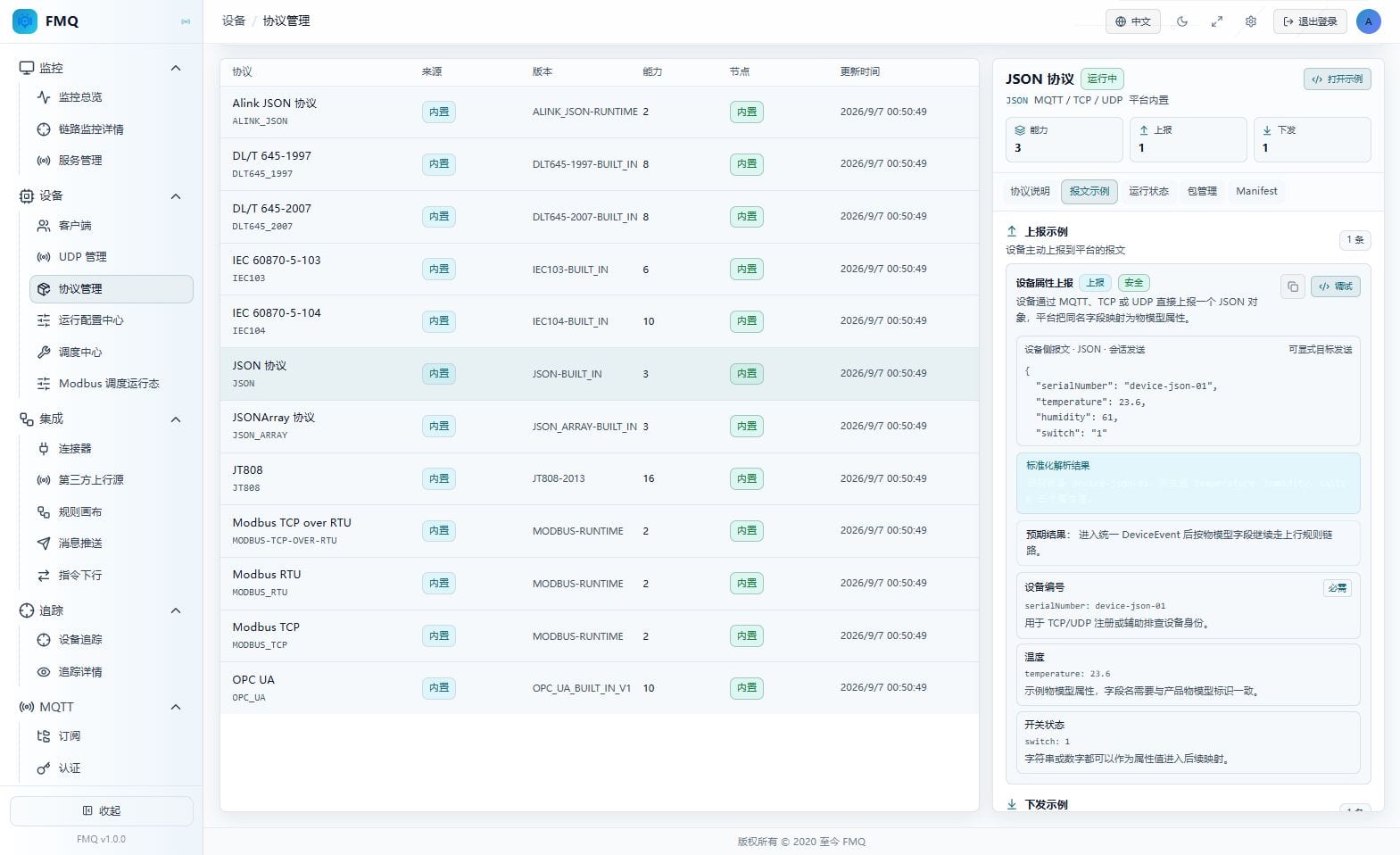
Figure: Filters and protocol catalog on the real Protocol Management page; the circled numbers locate the areas.
Field Descriptions
| Field / Control | Description |
|---|---|
| Protocol Code or Name | The keyword used to narrow the protocol catalog. |
| Source Filter | Distinguishes built-in protocols from external package protocols. |
| Status Filter | Filters by running, validated, disabled, or failed status. |
| Transport Filter | Filters by TCP, UDP, or RTU transport type. |
| Protocol/Source/Version/Capabilities/Nodes/Updated At | Each catalog row shows the protocol identity, source, version, capabilities, nodes, and update time. |
3. Protocol Description and Capabilities
Location: Devices → Protocol Management
In the selected protocol's details, open the Protocol Description tab and check the code, transport type, maintenance mode, and capabilities; do not click write operations.
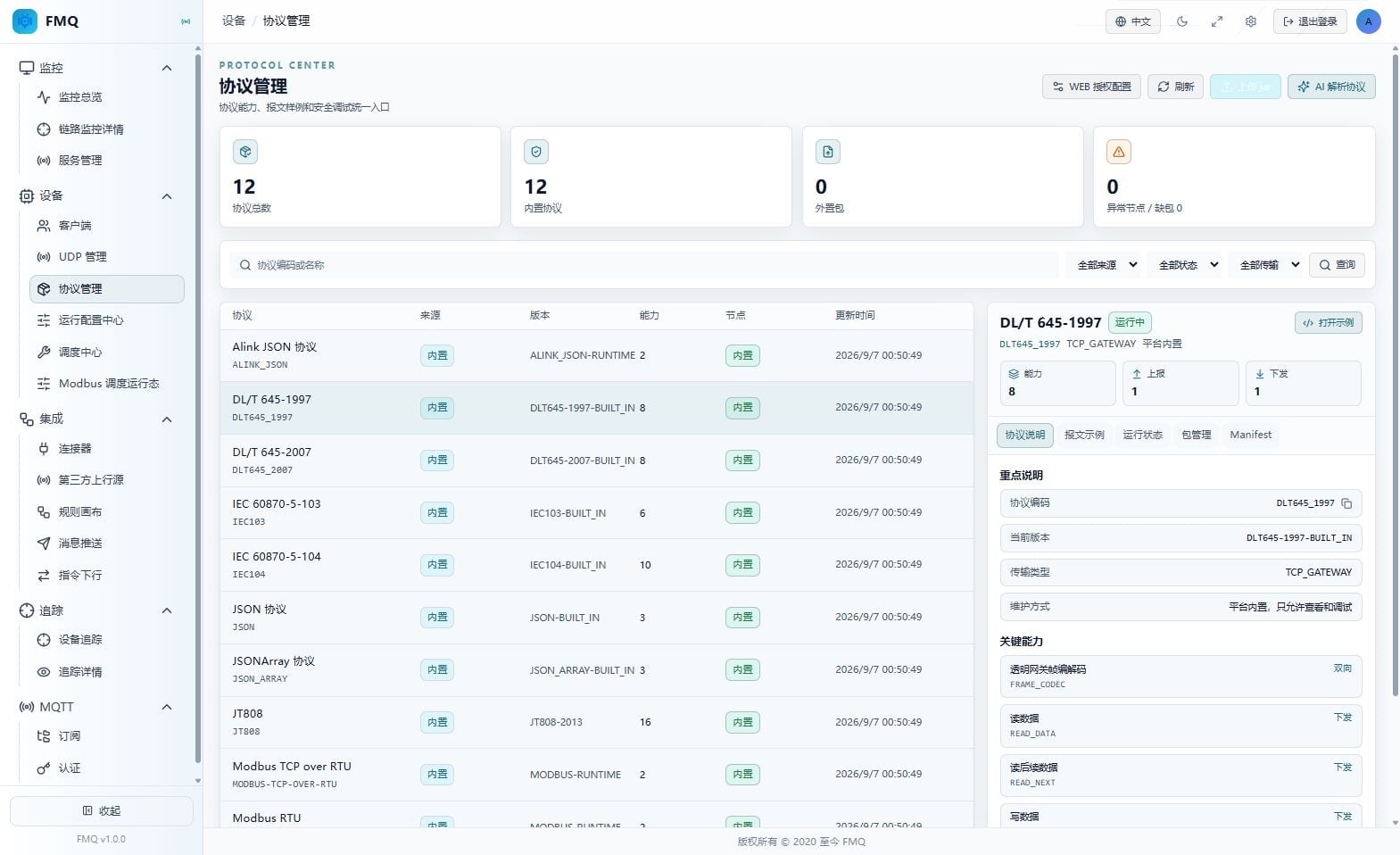
Figure: Protocol description and capabilities on the real Protocol Management page; the circled numbers locate the areas.
Field Descriptions
| Field / Control | Description |
|---|---|
| Protocol Code and Name | The detail title and protocol code on the right. |
| Transport Type | The transport types supported by the protocol, such as MQTT/TCP/UDP for JSON or the actual access method for DL/T645. |
| Maintenance Mode | Distinguishes read-only debugging of built-in protocols from validate-and-activate of external packages. |
| Capability Declarations | The number and labels of uplink, downlink, or bidirectional capabilities supported by the protocol. |
| Read-only Limit | Built-in protocols only allow viewing and debugging; package lifecycle operations are not provided. |
4. Message Examples
Location: Devices → Protocol Management
Open the Message Examples tab and read the uplink, downlink, payload type, and sending limits separately; page viewing only.
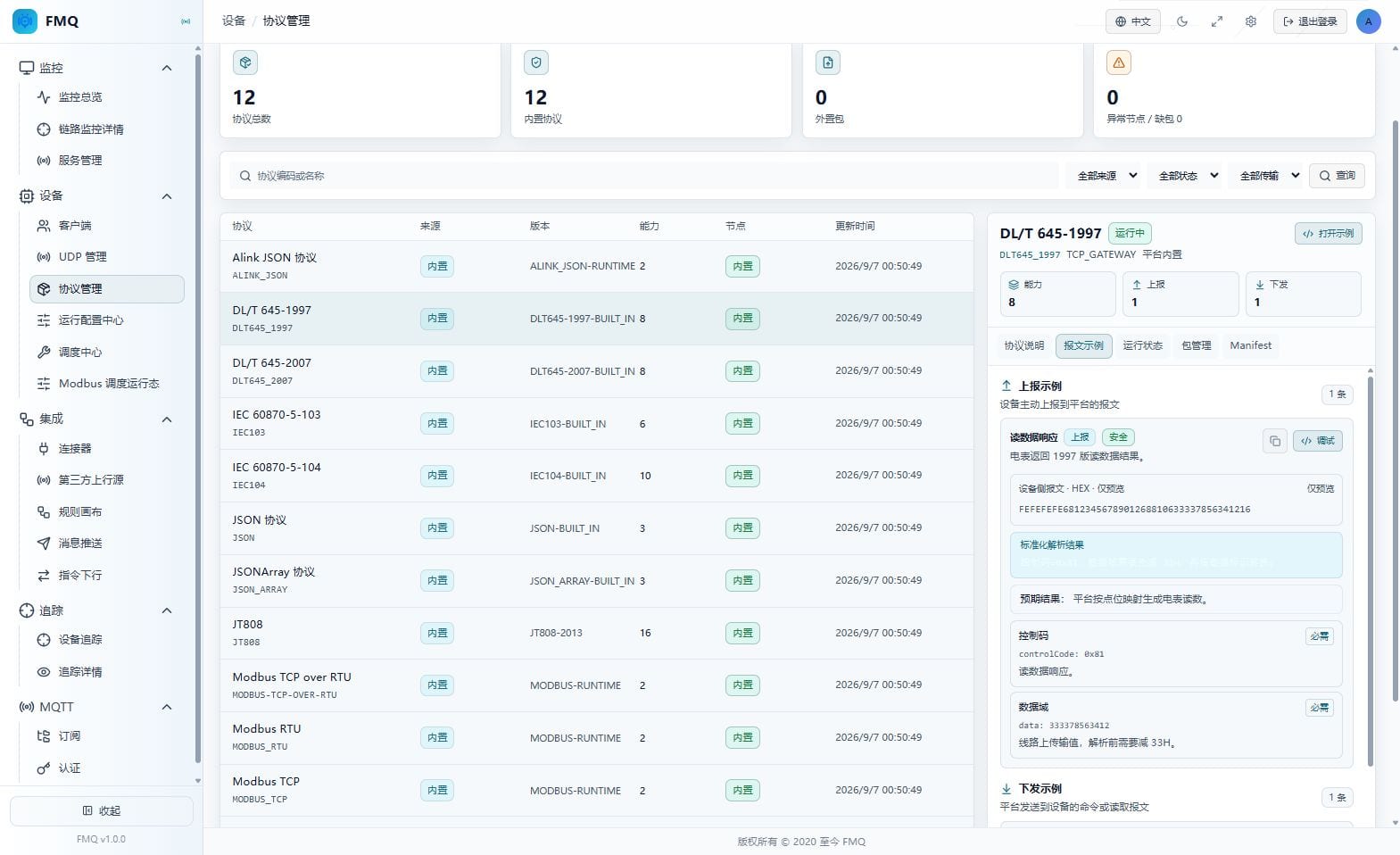
Figure: Message examples on the real Protocol Management page; the circled numbers locate the areas.
Field Descriptions
| Field / Control | Description |
|---|---|
| Uplink Examples | The number and content of samples the device actively reports to the platform. |
| Downlink Examples | The number and content of command or read samples the platform sends to the device. |
| Payload Type | The JSON, hexadecimal, or other payload type used by the examples. |
| Send Mode | Marks session send, manual command, or preview only. |
| Risk Level | Indicates whether an example is safe, caution, or dangerous. |
5. Runtime Status
Location: Devices → Protocol Management
Switch to the Runtime Status tab and read the status, nodes, recent errors, and validation time; do not perform a reload.
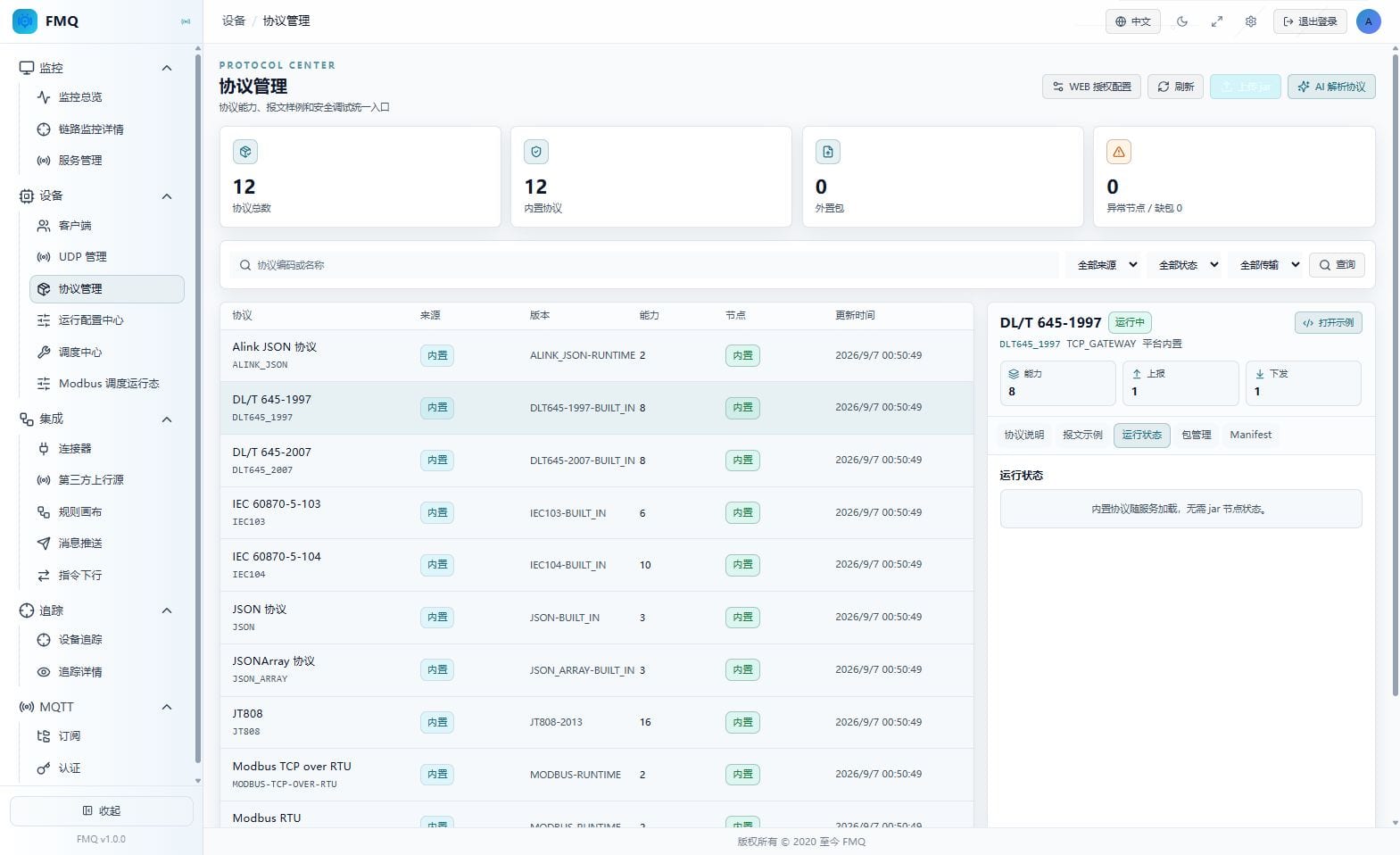
Figure: Runtime status on the real Protocol Management page; the circled numbers locate the areas.
Field Descriptions
| Field / Control | Description |
|---|---|
| Runtime Status | The protocol's runtime status on the nodes. |
| Node Status | The protocol's loading result on each node. |
| Recent Error | A summary of the most recent loading, validation, or runtime error. |
| Validation Time | The time of the most recent protocol validation or runtime check. |
6. External Package Management
Location: Devices → Protocol Management
Switch to the Package Management tab and read the version, status, digest, and node results; this time, do not click Activate, Disable, Roll Back, or Delete.
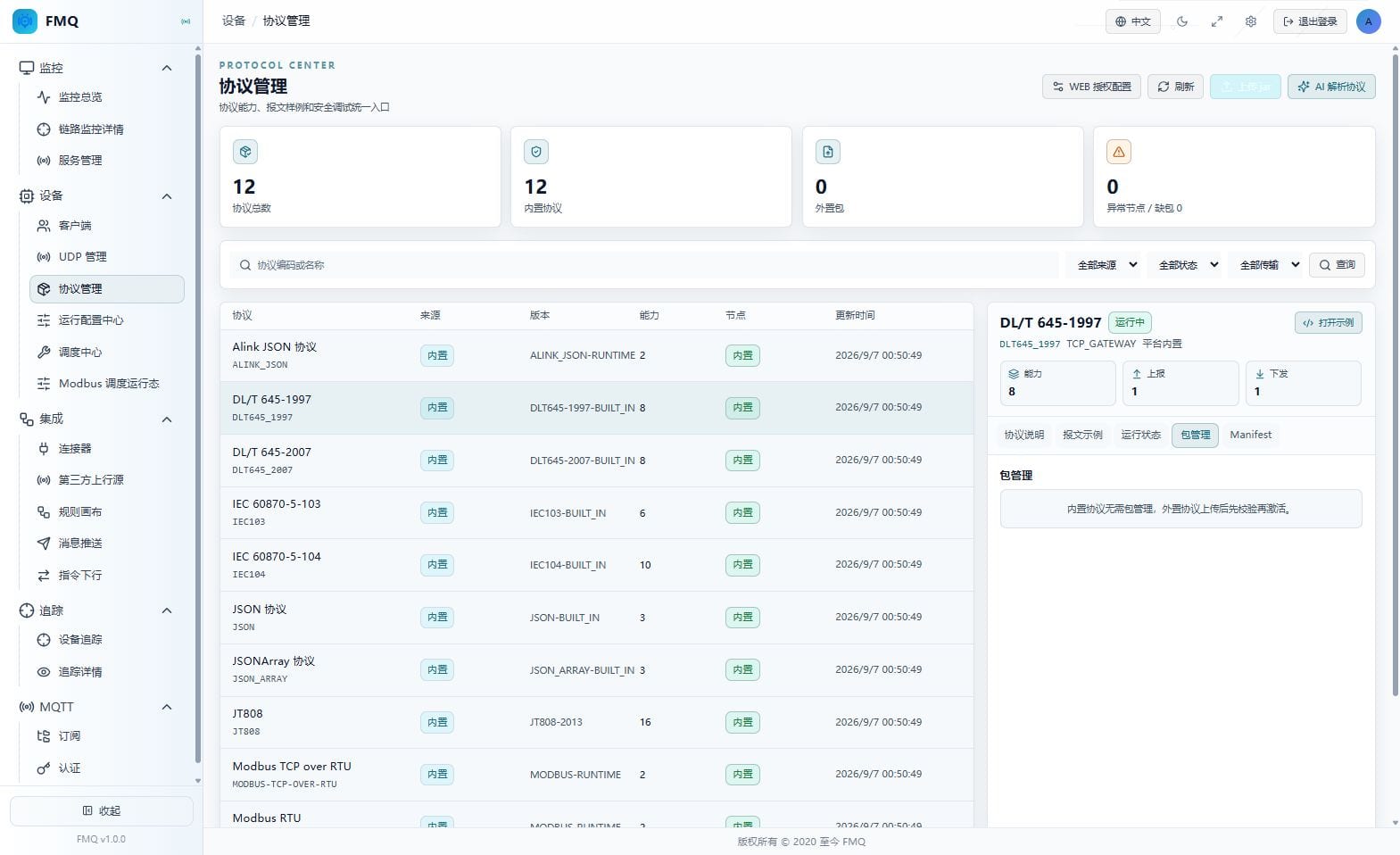
Figure: External package management on the real Protocol Management page; the circled numbers locate the areas.
Field Descriptions
| Field / Control | Description |
|---|---|
| Package Version | The protocol version of the external jar. |
| Package Status | Distinguishes validated, running, disabled, rollback-available, and other statuses. |
| SHA-256 | Used to confirm the uploaded file content has not been replaced. |
| Node Loading Results | Shows whether each node has loaded the package. |
| Activate/Disable/Roll Back/Delete | The external package lifecycle buttons and their status limits. |
7. Manifest Declarations and Integrity
Location: Devices → Protocol Management
Switch to the Manifest tab and check the code, version, capabilities, signature, SHA-256, and plugin check results item by item.
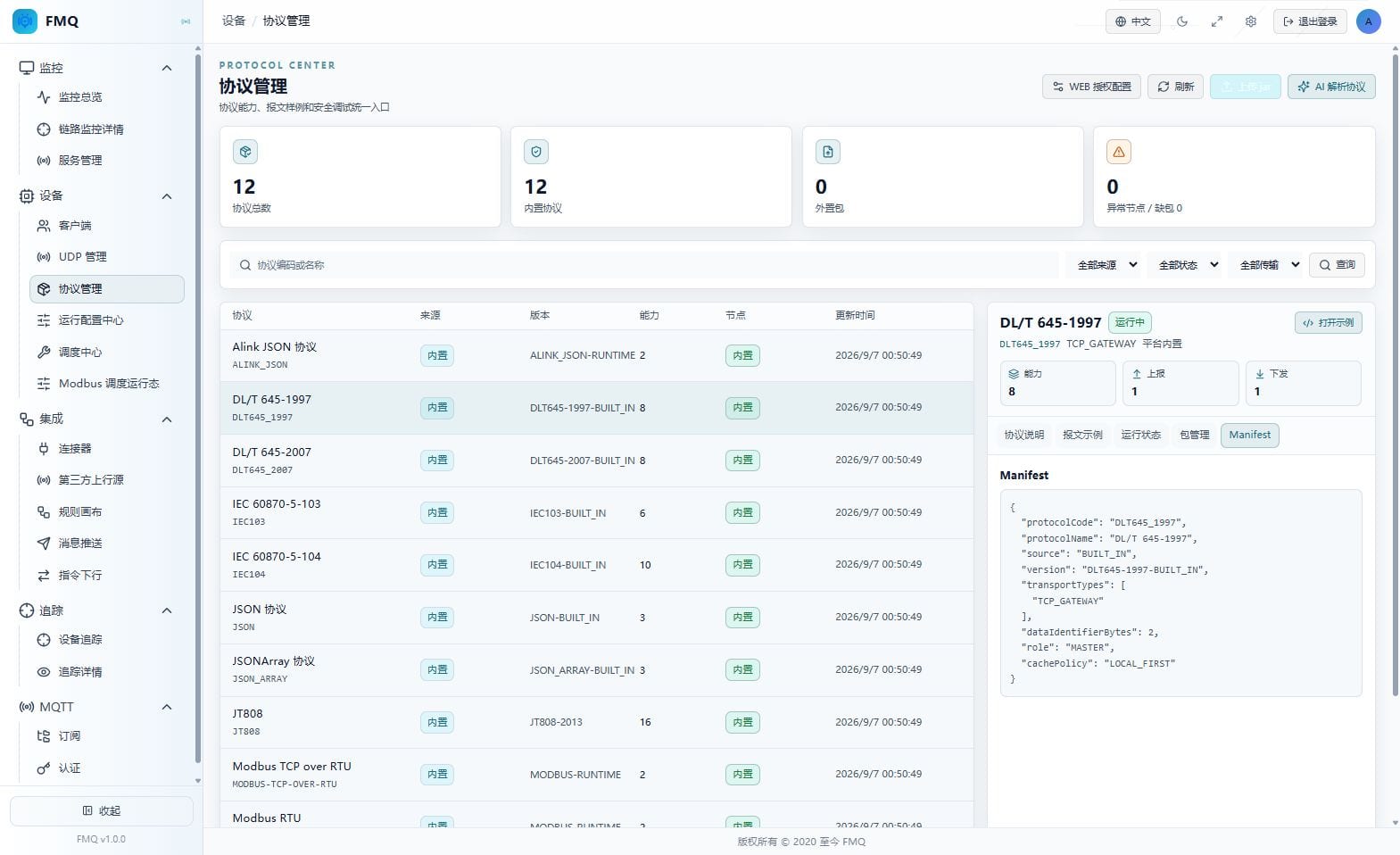
Figure: Manifest declarations and integrity on the real Protocol Management page; the circled numbers locate the areas.
Field Descriptions
| Field / Control | Description |
|---|---|
| Protocol Code | The protocol code declared in the Manifest. |
| Version | The runtime version declared in the Manifest. |
| Capability Declarations | The protocol capabilities and transport types declared in the Manifest. |
| Signature and Certificate Digest | Used to verify the package signature and certificate fingerprint. |
| File SHA-256 | The Manifest's digest of the uploaded file content. |
| Runtime Plugins and Detectors | Shows whether the runtime plugins and detectors can be loaded. |
8. Use the Protocol Message Debug Console
Location: Devices → Protocol Management
Click Debug on an example card, fill in the required Session ID or Device Key, and first verify the result with Preview or Parse Preview; this time, Send to Device was not clicked.
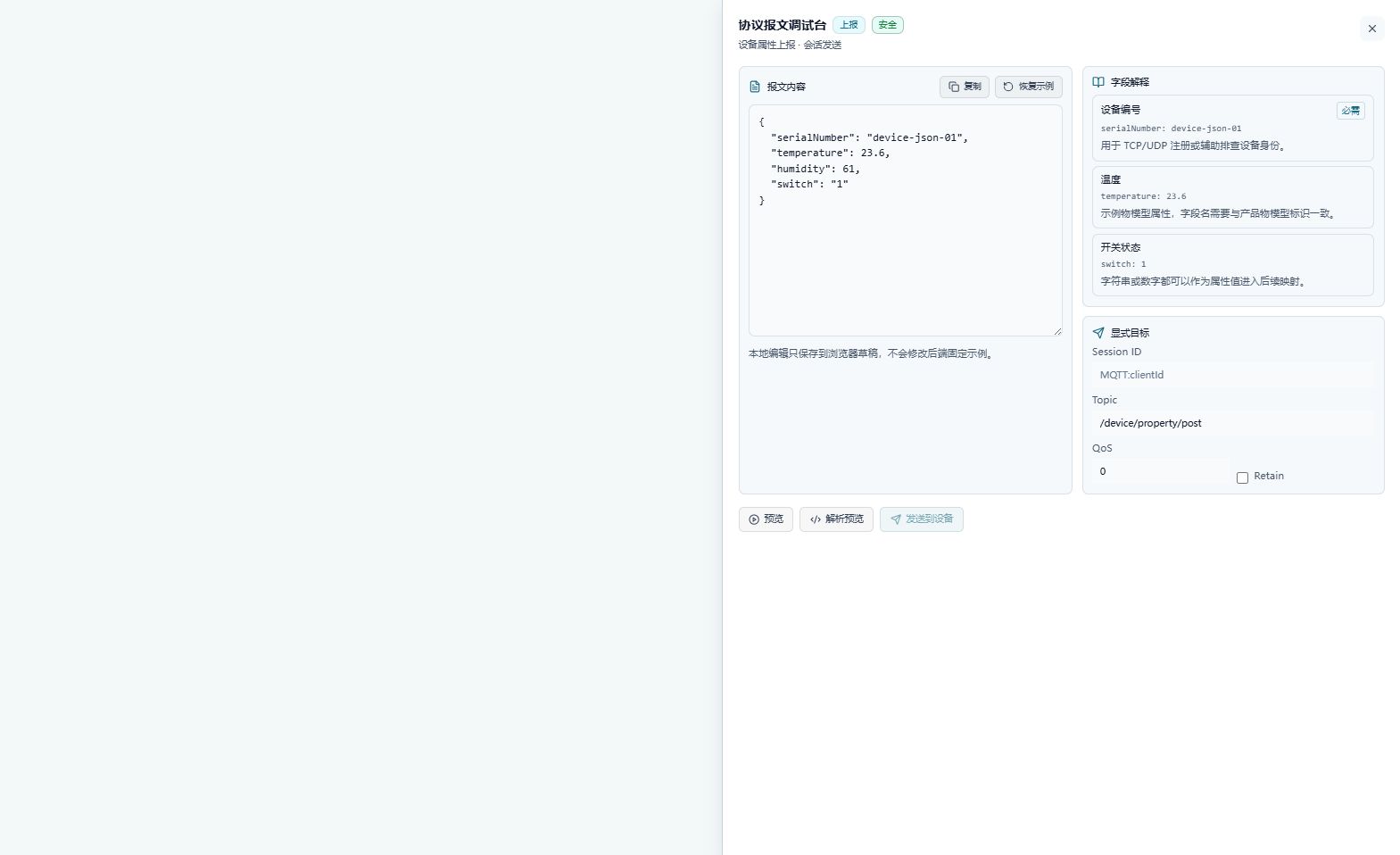
Figure: Screenshot of the real page panel; this step only describes the operation location and expected result — no write operation was performed.
Field Descriptions
| Field / Control | Description |
|---|---|
| Session ID | The target session identifier for MQTT session send mode. Required · Recommended: verify against the on-site protocol and maintenance window · Example: use the on-site value |
| Device Key | The target device identifier for Modbus or DL/T 645 manual commands. Required · Recommended: verify against the on-site protocol and maintenance window · Example: use the on-site value |
| Message Content | The raw message content to preview, parse, or send. Required · Recommended: verify against the on-site protocol and maintenance window · Example: use the on-site value |
| Operation Reason | The audit reason that must be filled in before a high-risk send. Required · Recommended: verify against the on-site protocol and maintenance window · Example: use the on-site value |
Operation Boundary
Expected result (not executed): Expected: Preview only shows the message, and Parse Preview shows the standardized result; before sending, the target and reason checks must also pass. Risks and recovery: If you find the protocol only supports preview or a target field is missing, stop; for dangerous commands, cancel at the second confirmation and do not send.
9. Configure the FastBee WEB Authorization Address
Location: Devices → Protocol Management
Open the WEB authorization configuration and fill in the FastBee WEB request address; during actual maintenance, choose Save or Test Connection separately. This time, only the panel was viewed — nothing was saved or tested.
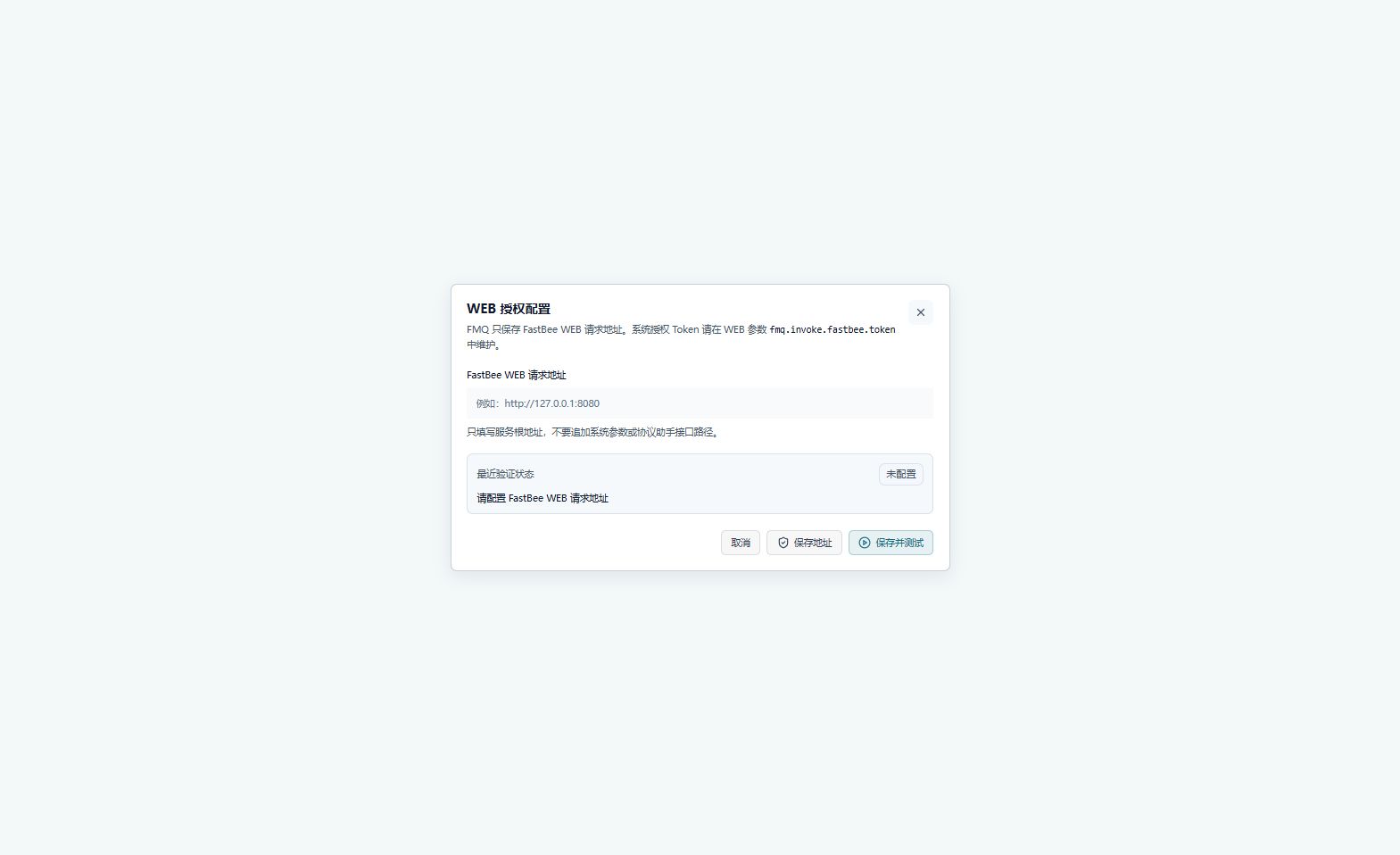
Figure: Screenshot of the real page panel; this step only describes the operation location and expected result — no write operation was performed.
Field Descriptions
| Field / Control | Description |
|---|---|
| FastBee WEB Request Address | The root address FMQ uses to call FastBee WEB; the authorization Token is not filled in on this page. Required · Recommended: verify against the on-site protocol and maintenance window · Example: use the on-site value |
Operation Boundary
Expected result (not executed): Expected: the address takes effect immediately after saving; Test Connection should return that authorization is available or a clear failure reason. The Token continues to be maintained in the WEB system parameters. Risks and recovery: If the address is empty or the connection fails, cancel the panel and check the root address and WEB parameters; do not treat saving the address as passing authorization verification.
10. Upload and Validate an External Protocol Package
Location: Devices → Protocol Management
Click Upload jar, select the Protocol jar File, then perform Upload and Validate during the maintenance window. This time, no file was selected and nothing was uploaded.
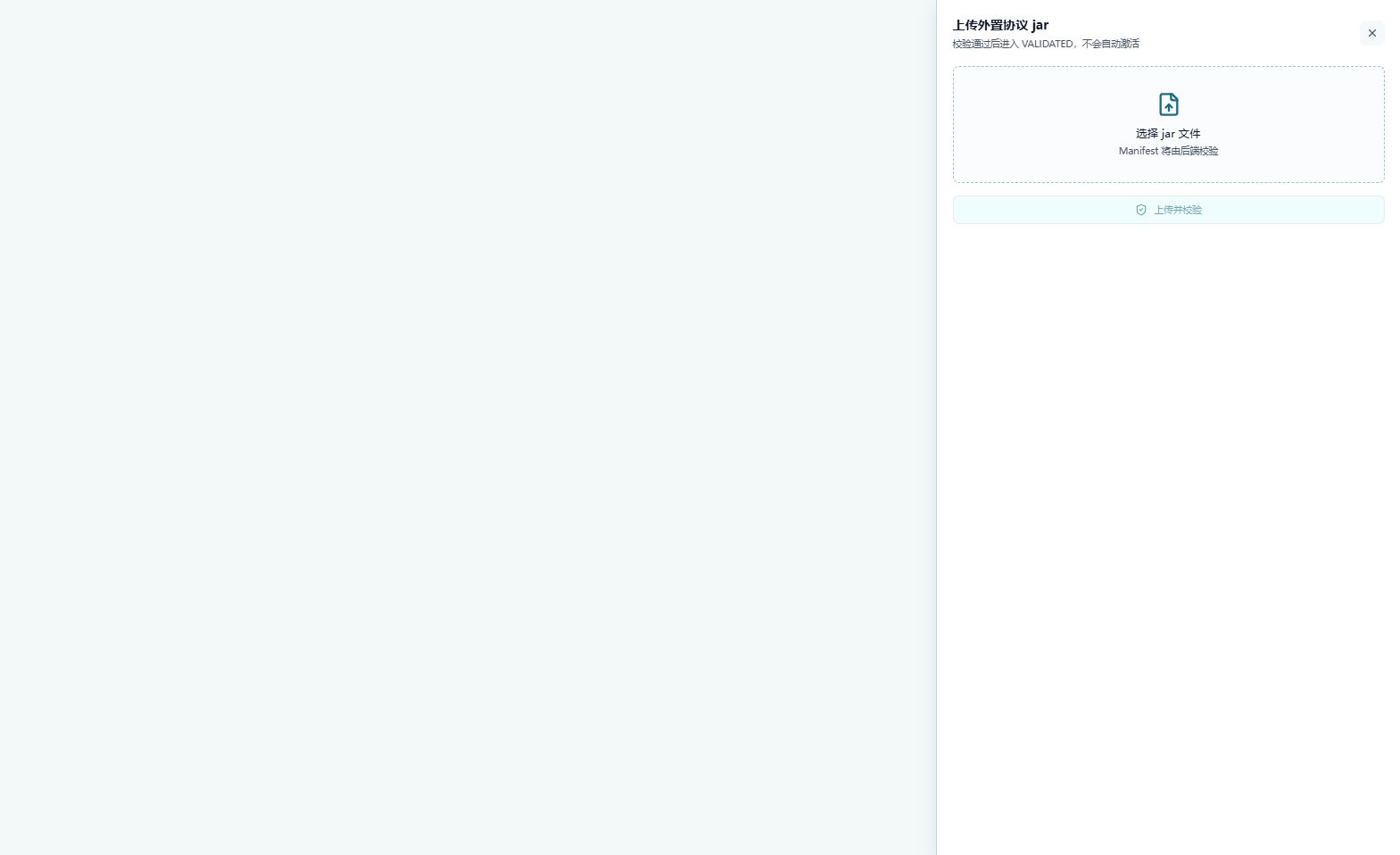
Figure: Screenshot of the real page panel; this step only describes the operation location and expected result — no write operation was performed.
Field Descriptions
| Field / Control | Description |
|---|---|
| Protocol jar File | Select the external protocol jar containing the Manifest and runtime plugins. Required · Recommended: verify against the on-site protocol and maintenance window · Example: use the on-site value |
Operation Boundary
Expected result (not executed): Expected: after validation passes, the protocol package enters VALIDATED and is not automatically activated; the result should include the protocol code, version, SHA-256, and validation messages. Risks and recovery: If file format, Manifest, signature, SHA-256, or plugin validation fails, keep the currently running package and do not activate the failed package.
11. Understand the External Package Lifecycle
Location: Devices → Protocol Management
In Package Management, first confirm the version and status, then choose Activate, Disable, Roll Back, or Delete as needed; this time, no lifecycle button was clicked.
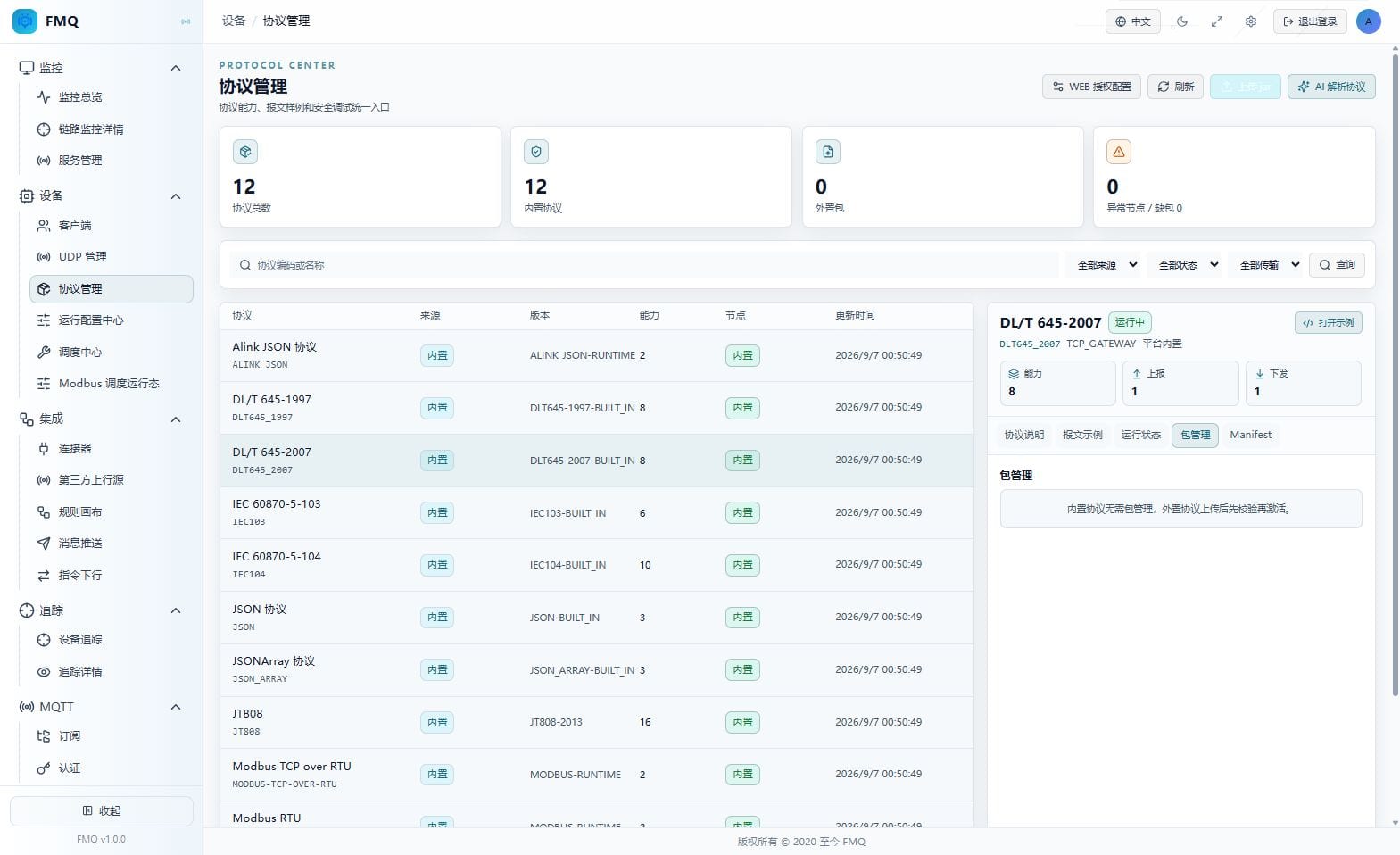
Figure: Screenshot of the real page panel; this step only describes the operation location and expected result — no write operation was performed.
Operation Boundary
Expected result (not executed): Expected: activation only accepts validated packages; disabling and rolling back affect the running version; a running package cannot be deleted directly. Risks and recovery: If the status does not allow the operation or node loading fails, cancel the operation, keep the current running version, and first check Runtime Status and Recent Error.
12. Use the AI Protocol Parsing Assistant
Location: Devices → Protocol Management
Open AI Parse Protocol, submit the Protocol Materials, then process them in the order "Parse → Confirm DSL → FMQ Validation → Import to FMQ". This time, no task was created, no materials were uploaded, and nothing was confirmed or imported.
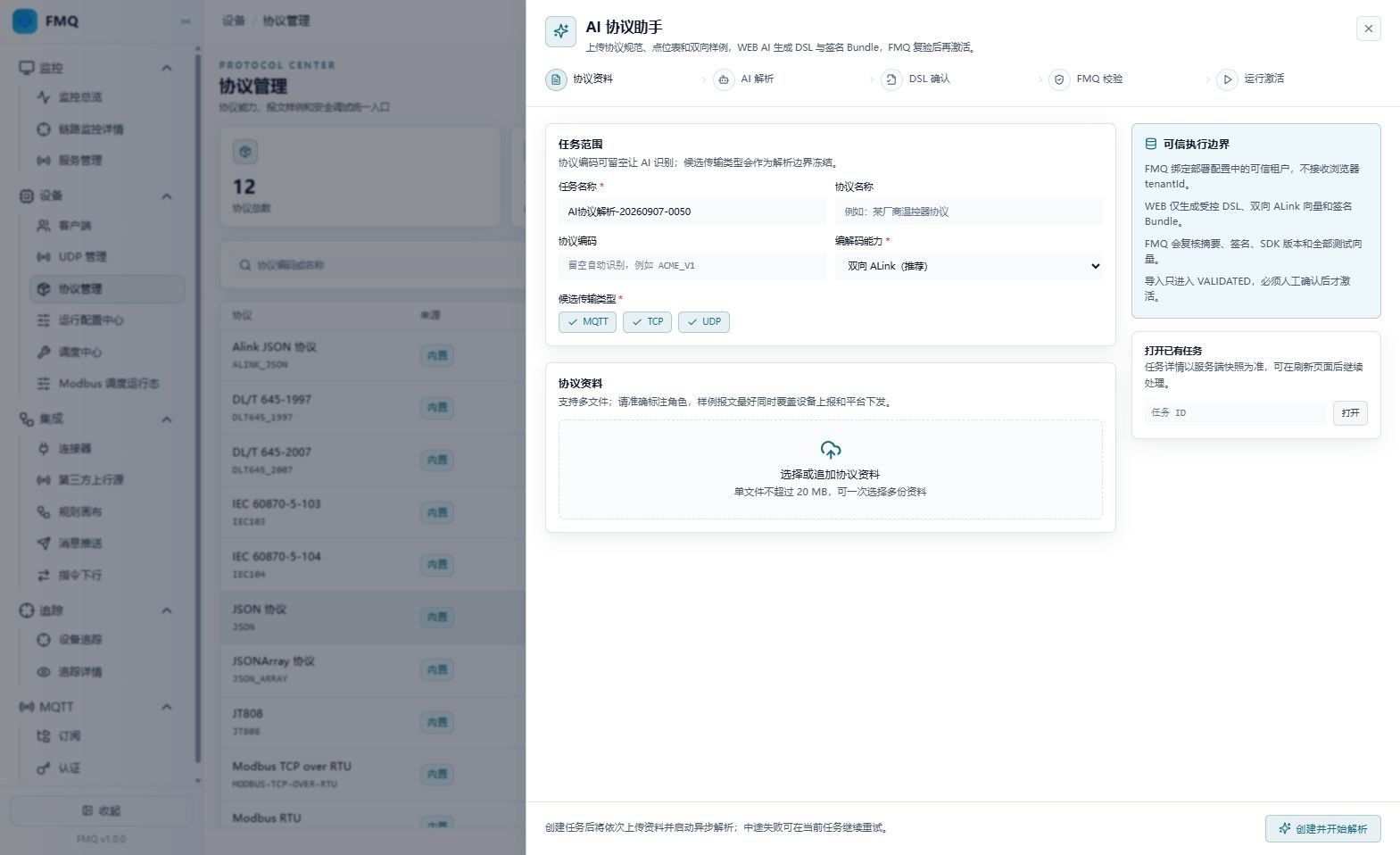
Figure: Screenshot of the real page panel; this step only describes the operation location and expected result — no write operation was performed.
Field Descriptions
| Field / Control | Description |
|---|---|
| Protocol Materials | Provide materials such as the protocol specification, point table, or uplink/downlink samples. Required · Recommended: verify against the on-site protocol and maintenance window · Example: use the on-site value |
Operation Boundary
Expected result (not executed): Expected: AI results first enter the pending-confirmation/validated stage and can only be imported to FMQ after manual confirmation; the import does not skip Manifest, signature, and runtime plugin validation. Risks and recovery: If materials are incomplete, the AI connection is unavailable, or DSL validation fails, cancel the task, keep the current protocol running version, and do not activate directly.
Page Field Reference
Full Reference
| Field / Unit | Plain Meaning | Data Direction / Source | Normal Check | Abnormal Signals and First Checkpoint |
|---|---|---|---|---|
| Protocol Scope and Statistics | ||||
| Monitoring Scope (page) | This page reads the FMQ protocol catalog and the currently selected protocol details; it does not mean the device business link has been accepted. | FMQ protocol catalog/details → current page | The page title and catalog both belong to Protocol Management. | Mistaking protocol catalog statistics for devices being online or business succeeding. First checkpoint: return to the Devices or Monitoring pages to verify business results. |
| Overall Health (status) | The overall loading health of the protocol catalog, reflected by the abnormal node and missing package statistics. | FMQ protocol catalog/details → current page | On the current page, abnormal nodes are 0 and missing packages are 0. | Abnormal nodes or missing packages greater than 0. First checkpoint: check Runtime Status and the Manifest first, then handle package problems. |
| Total Protocols (count) | The number of protocols returned by the current catalog. | FMQ protocol catalog/details → current page | Consistent with the currently deployed catalog. | The count suddenly drops or is inconsistent with the deployment list. First checkpoint: refresh and verify the node runtime versions. |
| Built-in Protocols (count) | The number of protocols provided by the FMQ built-in runtime. | FMQ protocol catalog/details → current page | Built-in protocols can be viewed and debugged. | A built-in protocol fails to load. First checkpoint: check the Runtime Status tab and node logs. |
| External Packages (count) | The number of protocols maintained via jar packages. | FMQ protocol catalog/details → current page | Shows 0 when there are no external packages. | The external package count does not match the Package Management records. First checkpoint: check Package Management and validation status. |
| Abnormal Nodes (count) | The number of nodes reporting exceptions in the protocol catalog. | FMQ protocol catalog/details → current page | The current page shows 0. | Abnormal nodes greater than 0. First checkpoint: locate the node first, then check the protocol runtime status. |
| Missing Packages (count) | The number of runtime packages declared as required by nodes but not found. | FMQ protocol catalog/details → current page | The current page shows 0. | Missing packages greater than 0. First checkpoint: check the external package versions and node loading status. |
| Filters and Protocol Catalog | ||||
| Protocol Code or Name (text) | The keyword used to narrow the protocol catalog. | FMQ protocol catalog/details → current page | Results match the keyword. | The query returns empty results or includes unrelated protocols. First checkpoint: clear the keyword and check the source, status, and transport filters. |
| Source Filter (option) | Distinguishes built-in protocols from external package protocols. | FMQ protocol catalog/details → current page | The filter condition matches the expected source. | Treating a built-in protocol as an uploadable package to manage. First checkpoint: check the Source column and the Package Management tab. |
| Status Filter (option) | Filters by running, validated, disabled, or failed status. | FMQ protocol catalog/details → current page | The status filter is consistent with the node runtime status. | Loading failures, validation failures, or missing statuses appear. First checkpoint: check the corresponding protocol's Runtime Status. |
| Transport Filter (option) | Filters by TCP, UDP, or RTU transport type. | FMQ protocol catalog/details → current page | The transport type matches the device access method. | Mixing protocols of different transports into the same troubleshooting conclusion. First checkpoint: return to Protocol Description to check the transport type. |
| Protocol/Source/Version/Capabilities/Nodes/Updated At (columns) | Each catalog row shows the protocol identity, source, version, capabilities, nodes, and update time. | FMQ protocol catalog/details → current page | Every column has an explainable value. | Column values are empty or the update time has not changed for a long time. First checkpoint: refresh, then check the interface and node status. |
| Protocol Description and Capabilities | ||||
| Protocol Code and Name (identifier) | The detail title and protocol code on the right. | FMQ protocol catalog/details → current page | Consistent with the row selected on the left. | The detail title does not match the list row. First checkpoint: reselect the protocol row and refresh. |
| Transport Type (type) | The transport types supported by the protocol, such as MQTT/TCP/UDP for JSON or the actual access method for DL/T645. | FMQ protocol catalog/details → current page | Matches the device access method. | Applying the wrong transport type to another protocol. First checkpoint: reselect the client method according to the current Protocol Description. |
| Maintenance Mode (description) | Distinguishes read-only debugging of built-in protocols from validate-and-activate of external packages. | FMQ protocol catalog/details → current page | No upload-style maintenance misunderstanding arises for built-in protocols. | Preparing to activate or delete a built-in protocol. First checkpoint: return to the Source column to confirm built-in vs external. |
| Capability Declarations (item) | The number and labels of uplink, downlink, or bidirectional capabilities supported by the protocol. | FMQ protocol catalog/details → current page | Capabilities are consistent with the example directions. | Capabilities are empty or contradict the message examples. First checkpoint: check the Manifest and examples. |
| Read-only Limit (status) | Built-in protocols only allow viewing and debugging; package lifecycle operations are not provided. | FMQ protocol catalog/details → current page | Buttons are consistent with the source limits. | Mistaking the missing Activate button for a page fault. First checkpoint: use the Package Management flow for external packages. |
| Message Examples | ||||
| Uplink Examples (entries) | The number and content of samples the device actively reports to the platform. | FMQ protocol catalog/details → current page | Examples are readable and marked as uplink. | Uplink examples are missing or the parse preview is incomplete. First checkpoint: check the protocol capabilities and Manifest. |
| Downlink Examples (entries) | The number and content of command or read samples the platform sends to the device. | FMQ protocol catalog/details → current page | Only protocols declared as downlink-capable show sendable hints. | Treating a preview-only example as a sendable command. First checkpoint: check the send mode and risk markers. |
| Payload Type (type) | The JSON, hexadecimal, or other payload type used by the examples. | FMQ protocol catalog/details → current page | The type matches the message content. | Copying or parsing with the wrong type. First checkpoint: confirm the payload type before debugging. |
| Send Mode (mode) | Marks session send, manual command, or preview only. | FMQ protocol catalog/details → current page | The send button is limited by the mode. | Attempting to send without a target session or Device Key. First checkpoint: fill in the target fields or only preview. |
| Risk Level (level) | Indicates whether an example is safe, caution, or dangerous. | FMQ protocol catalog/details → current page | Dangerous commands require a reason and second confirmation. | Ignoring the danger hint and sending directly. First checkpoint: cancel the send and verify the target and message. |
| Runtime Status | ||||
| Runtime Status (status) | The protocol's runtime status on the nodes. | FMQ protocol catalog/details → current page | The protocols to be used are in running or validated status. | Loading failure, validation failure, or a status that does not change for a long time. First checkpoint: check the package version, Manifest, and node logs first. |
| Node Status (node) | The protocol's loading result on each node. | FMQ protocol catalog/details → current page | Node status is consistent with the catalog statistics. | A single node is abnormal or missing a package. First checkpoint: locate by node; do not treat a single-node exception as a global one. |
| Recent Error (text) | A summary of the most recent loading, validation, or runtime error. | FMQ protocol catalog/details → current page | No errors, or the errors have been explained. | Signature, SHA-256, Manifest, or plugin errors appear. First checkpoint: return to Package Management or the Manifest according to the error type. |
| Validation Time (time) | The time of the most recent protocol validation or runtime check. | FMQ protocol catalog/details → current page | Consistent with recent release records. | The time is earlier than expected or has not updated for a long time. First checkpoint: refresh and confirm node synchronization. |
| External Package Management | ||||
| Package Version (version) | The protocol version of the external jar. | FMQ protocol catalog/details → current page | The version is consistent with the Manifest and release records. | Version conflicts or multiple active versions of the same protocol. First checkpoint: confirm the currently activated version before deciding on an action. |
| Package Status (status) | Distinguishes validated, running, disabled, rollback-available, and other statuses. | FMQ protocol catalog/details → current page | Action buttons match the status. | Preparing to activate before validation, or preparing to delete while running. First checkpoint: complete validation first and read the lifecycle limits. |
| SHA-256 (digest) | Used to confirm the uploaded file content has not been replaced. | FMQ protocol catalog/details → current page | Consistent with the upload result and the Manifest. | The digest does not match. First checkpoint: stop activation and re-verify the file source. |
| Node Loading Results (node) | Shows whether each node has loaded the package. | FMQ protocol catalog/details → current page | All target nodes have clear results. | A node is missing the package or failed to load it. First checkpoint: resolve the node status before switching versions. |
| Activate/Disable/Roll Back/Delete (operation) | The external package lifecycle buttons and their status limits. | FMQ protocol catalog/details → current page | Only the buttons allowed by the status are available. | Deleting while running or activating before validation. First checkpoint: cancel the operation and verify the package status. |
| Manifest Declarations and Integrity | ||||
| Protocol Code (field) | The protocol code declared in the Manifest. | FMQ protocol catalog/details → current page | Consistent with the list and detail codes. | The codes do not match. First checkpoint: block activation and return to upload validation. |
| Version (field) | The runtime version declared in the Manifest. | FMQ protocol catalog/details → current page | Consistent with the package version. | The package version and the Manifest version do not match. First checkpoint: re-verify the jar against the release records. |
| Capability Declarations (field) | The protocol capabilities and transport types declared in the Manifest. | FMQ protocol catalog/details → current page | Consistent with the Protocol Description and examples. | Capabilities are missing or the declaration exceeds the implementation. First checkpoint: fix the materials or plugin first; do not activate directly. |
| Signature and Certificate Digest (digest) | Used to verify the package signature and certificate fingerprint. | FMQ protocol catalog/details → current page | Signature verification passes. | The signature is missing, invalid, or the fingerprint is not in the trusted range. First checkpoint: stop activation and have the publisher re-sign. |
| File SHA-256 (digest) | The Manifest's digest of the uploaded file content. | FMQ protocol catalog/details → current page | Consistent with the uploaded file digest. | The digest does not match. First checkpoint: re-upload the correct package and keep the original package. |
| Runtime Plugins and Detectors (status) | Shows whether the runtime plugins and detectors can be loaded. | FMQ protocol catalog/details → current page | Both plugins and detectors pass. | A plugin is missing or a detector fails. First checkpoint: keep the validated status, fix the package, then activate. |
Protocol Management and Operation Panels
Full Reference
| Field/Control | Purpose | Default/Recommended/Example | Option Details | Effect and Impact | Effective Conditions |
|---|---|---|---|---|---|
| Protocol Code or Name | Narrow the list by protocol code or name. | Default: follow the current page; Recommended: verify against the on-site protocol and maintenance window; Example: use the on-site value | N/A | Narrow the list by protocol code or name. | Scope: current page or selected protocol; does not automatically extend to other protocols · Publish: not required · Restart: not required · Reconnect: not required |
| Source Filter | Filter protocols by built-in or external source. | Default: follow the current page; Recommended: verify against the on-site protocol and maintenance window; Example: use the on-site value | All sources: do not filter by source; show both built-in and external protocols. Built-in: protocols provided with the platform runtime; keep only built-in protocols. External: protocols maintained as protocol packages; keep only external package protocols. | Filter protocols by built-in or external source. | Scope: current page or selected protocol; does not automatically extend to other protocols · Publish: not required · Restart: not required · Reconnect: not required |
| Status Filter | Filter by running, validated, disabled, or failed status. | Default: follow the current page; Recommended: verify against the on-site protocol and maintenance window; Example: use the on-site value | All statuses: no status filtering; the list shows protocols of every status. Running: filter by Running status; the list shows only running protocols. Validated: filter by Validated status; the list shows only validated protocols. Disabled: filter by Disabled status; the list shows only disabled protocols. Rollback Available: filter by Rollback Available status; the list shows only rollback-available protocols. Validation Failed: filter by Validation Failed status; the list shows only protocols that failed validation. Loading Failed: filter by Loading Failed status; the list shows only protocols that failed to load. | Filter by running, validated, disabled, or failed status. | Scope: current page or selected protocol; does not automatically extend to other protocols · Publish: not required · Restart: not required · Reconnect: not required |
| Transport Filter | Filter by TCP, UDP, or RTU transport type. | Default: follow the current page; Recommended: verify against the on-site protocol and maintenance window; Example: use the on-site value | All transports: no transport filtering; the list shows protocols of every transport type. TCP: filter by TCP transport type; the list shows only TCP protocols. UDP: filter by UDP transport type; the list shows only UDP protocols. RTU: filter by RTU transport type; the list shows only RTU protocols. | Filter by TCP, UDP, or RTU transport type. | Scope: current page or selected protocol; does not automatically extend to other protocols · Publish: not required · Restart: not required · Reconnect: not required |
| Query | Submit the current keyword and filter conditions and re-read the protocol catalog. | Default: follow the current page; Recommended: verify against the on-site protocol and maintenance window; Example: use the on-site value | N/A | Submit the current keyword and filter conditions and re-read the protocol catalog. | Scope: current page or selected protocol; does not automatically extend to other protocols · Publish: not required · Restart: not required · Reconnect: not required |
| Refresh | Re-read the protocol catalog and the current protocol details without saving page edits. | Default: follow the current page; Recommended: verify against the on-site protocol and maintenance window; Example: use the on-site value | N/A | Re-read the protocol catalog and the current protocol details without saving page edits. | Scope: current page or selected protocol; does not automatically extend to other protocols · Publish: not required · Restart: not required · Reconnect: not required |
| Protocol List Row | Select a protocol and load its details on the right. | Default: follow the current page; Recommended: verify against the on-site protocol and maintenance window; Example: use the on-site value | N/A | Select a protocol and load its details on the right. | Scope: current page or selected protocol; does not automatically extend to other protocols · Publish: not required · Restart: not required · Reconnect: not required |
| Source | Shows whether the protocol comes from the built-in runtime or an external protocol package. | Default: follow the current page; Recommended: verify against the on-site protocol and maintenance window; Example: use the on-site value | N/A | Shows whether the protocol comes from the built-in runtime or an external protocol package. | Scope: current page or selected protocol; does not automatically extend to other protocols · Publish: not required · Restart: not required · Reconnect: not required |
| Version | Shows the current runtime version or build version identifier. | Default: follow the current page; Recommended: verify against the on-site protocol and maintenance window; Example: use the on-site value | N/A | Shows the current runtime version or build version identifier. | Scope: current page or selected protocol; does not automatically extend to other protocols · Publish: not required · Restart: not required · Reconnect: not required |
| Capabilities | Shows the number of declared capabilities or the capability labels of the protocol. | Default: follow the current page; Recommended: verify against the on-site protocol and maintenance window; Example: use the on-site value | N/A | Shows the number of declared capabilities or the capability labels of the protocol. | Scope: current page or selected protocol; does not automatically extend to other protocols · Publish: not required · Restart: not required · Reconnect: not required |
| Nodes | Shows the protocol's runtime status on the node side. | Default: follow the current page; Recommended: verify against the on-site protocol and maintenance window; Example: use the on-site value | N/A | Shows the protocol's runtime status on the node side. | Scope: current page or selected protocol; does not automatically extend to other protocols · Publish: not required · Restart: not required · Reconnect: not required |
| Updated At | Shows the most recent update time of the protocol catalog. | Default: follow the current page; Recommended: verify against the on-site protocol and maintenance window; Example: use the on-site value | N/A | Shows the most recent update time of the protocol catalog. | Scope: current page or selected protocol; does not automatically extend to other protocols · Publish: not required · Restart: not required · Reconnect: not required |
| Protocol Description | Shows the protocol code, transport type, maintenance mode, and capability declarations. | Default: follow the current page; Recommended: verify against the on-site protocol and maintenance window; Example: use the on-site value | N/A | Shows the protocol code, transport type, maintenance mode, and capability declarations. | Scope: current page or selected protocol; does not automatically extend to other protocols · Publish: not required · Restart: not required · Reconnect: not required |
| Message Examples | Shows uplink and downlink message examples and sending limits. | Default: follow the current page; Recommended: verify against the on-site protocol and maintenance window; Example: use the on-site value | N/A | Shows uplink and downlink message examples and sending limits. | Scope: current page or selected protocol; does not automatically extend to other protocols · Publish: not required · Restart: not required · Reconnect: not required |
| Runtime Status | Shows the protocol's loading, running, and error status on the nodes. | Default: follow the current page; Recommended: verify against the on-site protocol and maintenance window; Example: use the on-site value | N/A | Shows the protocol's loading, running, and error status on the nodes. | Scope: current page or selected protocol; does not automatically extend to other protocols · Publish: not required · Restart: not required · Reconnect: not required |
| Package Management | Shows external protocol package versions, validation, and lifecycle operations. | Default: follow the current page; Recommended: verify against the on-site protocol and maintenance window; Example: use the on-site value | N/A | Shows external protocol package versions, validation, and lifecycle operations. | Scope: current page or selected protocol; does not automatically extend to other protocols · Publish: not required · Restart: not required · Reconnect: not required |
| Manifest | Shows the declared fields and integrity information of the protocol package Manifest. | Default: follow the current page; Recommended: verify against the on-site protocol and maintenance window; Example: use the on-site value | N/A | Shows the declared fields and integrity information of the protocol package Manifest. | Scope: current page or selected protocol; does not automatically extend to other protocols · Publish: not required · Restart: not required · Reconnect: not required |
| Open Example | Jump from the Protocol Description area to a readable message example. | Default: follow the current page; Recommended: verify against the on-site protocol and maintenance window; Example: use the on-site value | N/A | Jump from the Protocol Description area to a readable message example. | Scope: current page or selected protocol; does not automatically extend to other protocols · Publish: not required · Restart: not required · Reconnect: not required |
| Copy Message | Copy the current message example to the clipboard for offline verification. | Default: follow the current page; Recommended: verify against the on-site protocol and maintenance window; Example: use the on-site value | N/A | Copy the current message example to the clipboard for offline verification. | Scope: current page or selected protocol; does not automatically extend to other protocols · Publish: not required · Restart: not required · Reconnect: not required |
| Debug | Open the protocol message debug console for the current example. | Default: follow the current page; Recommended: verify against the on-site protocol and maintenance window; Example: use the on-site value | N/A | Open the protocol message debug console for the current example. | Scope: current page or selected protocol; does not automatically extend to other protocols · Publish: not required · Restart: not required · Reconnect: not required |
| Preview | Preview the message content without sending a device command. | Default: follow the current page; Recommended: verify against the on-site protocol and maintenance window; Example: use the on-site value | N/A | Preview the message content without sending a device command. | Scope: current page or selected protocol; does not automatically extend to other protocols · Publish: not required · Restart: not required · Reconnect: not required |
| Parse Preview | View the standardized parsing result without sending a device command. | Default: follow the current page; Recommended: verify against the on-site protocol and maintenance window; Example: use the on-site value | N/A | View the standardized parsing result without sending a device command. | Scope: current page or selected protocol; does not automatically extend to other protocols · Publish: not required · Restart: not required · Reconnect: not required |
| Send to Device | Send the message to a specified target according to the send mode allowed by the example. | Default: follow the current page; Recommended: verify against the on-site protocol and maintenance window; Example: use the on-site value | N/A | Send the message to a specified target according to the send mode allowed by the example. | Scope: current page or selected protocol; does not automatically extend to other protocols · Publish: not required · Restart: not required · Reconnect: required |
| Required Session ID | The target session identifier for MQTT session send mode. | Default: follow the current page; Recommended: verify against the on-site protocol and maintenance window; Example: use the on-site value | N/A | The target session identifier for MQTT session send mode. | Scope: current page or selected protocol; does not automatically extend to other protocols · Publish: not required · Restart: not required · Reconnect: not required |
| Required Device Key | The target device identifier for Modbus or DL/T 645 manual commands. | Default: follow the current page; Recommended: verify against the on-site protocol and maintenance window; Example: use the on-site value | N/A | The target device identifier for Modbus or DL/T 645 manual commands. | Scope: current page or selected protocol; does not automatically extend to other protocols · Publish: not required · Restart: not required · Reconnect: not required |
| Required Message Content | The raw message content to preview, parse, or send. | Default: follow the current page; Recommended: verify against the on-site protocol and maintenance window; Example: use the on-site value | N/A | The raw message content to preview, parse, or send. | Scope: current page or selected protocol; does not automatically extend to other protocols · Publish: not required · Restart: not required · Reconnect: not required |
| Required Operation Reason | The audit reason that must be filled in before a high-risk send. | Default: follow the current page; Recommended: verify against the on-site protocol and maintenance window; Example: use the on-site value | N/A | The audit reason that must be filled in before a high-risk send. | Scope: current page or selected protocol; does not automatically extend to other protocols · Publish: not required · Restart: not required · Reconnect: not required |
| WEB Authorization Configuration | Open the FastBee WEB root address configuration panel. | Default: follow the current page; Recommended: verify against the on-site protocol and maintenance window; Example: use the on-site value | N/A | Open the FastBee WEB root address configuration panel. | Scope: current page or selected protocol; does not automatically extend to other protocols · Publish: not required · Restart: not required · Reconnect: not required |
| Required FastBee WEB Request Address | The root address FMQ uses to call FastBee WEB; the authorization Token is not filled in on this page. | Default: follow the current page; Recommended: verify against the on-site protocol and maintenance window; Example: use the on-site value | N/A | The root address FMQ uses to call FastBee WEB; the authorization Token is not filled in on this page. | Scope: current page or selected protocol; does not automatically extend to other protocols · Publish: not required · Restart: not required · Reconnect: not required |
| Save | Save the WEB root address and make it take effect immediately. | Default: follow the current page; Recommended: verify against the on-site protocol and maintenance window; Example: use the on-site value | N/A | Save the WEB root address and make it take effect immediately. | Scope: current page or selected protocol; does not automatically extend to other protocols · Publish: not required · Restart: not required · Reconnect: not required |
| Test Connection | Test the connection using the authorization Token from the WEB system parameters. | Default: follow the current page; Recommended: verify against the on-site protocol and maintenance window; Example: use the on-site value | N/A | Test the connection using the authorization Token from the WEB system parameters. | Scope: current page or selected protocol; does not automatically extend to other protocols · Publish: not required · Restart: not required · Reconnect: not required |
| Upload jar | Open the external protocol jar upload panel. | Default: follow the current page; Recommended: verify against the on-site protocol and maintenance window; Example: use the on-site value | N/A | Open the external protocol jar upload panel. | Scope: current page or selected protocol; does not automatically extend to other protocols · Publish: not required · Restart: not required · Reconnect: not required |
| Required Protocol jar File | Select the external protocol jar containing the Manifest and runtime plugins. | Default: follow the current page; Recommended: verify against the on-site protocol and maintenance window; Example: use the on-site value | N/A | Select the external protocol jar containing the Manifest and runtime plugins. | Scope: current page or selected protocol; does not automatically extend to other protocols · Publish: not required · Restart: not required · Reconnect: not required |
| Upload and Validate | Upload the file and run file, Manifest, signature, and runtime plugin validation. | Default: follow the current page; Recommended: verify against the on-site protocol and maintenance window; Example: use the on-site value | N/A | Upload the file and run file, Manifest, signature, and runtime plugin validation. | Scope: current page or selected protocol; does not automatically extend to other protocols · Publish: not required · Restart: not required · Reconnect: not required |
| Activate | Switch a validated protocol package to the running version. | Default: follow the current page; Recommended: verify against the on-site protocol and maintenance window; Example: use the on-site value | N/A | Switch a validated protocol package to the running version. | Scope: current page or selected protocol; does not automatically extend to other protocols · Publish: not required · Restart: required · Reconnect: required |
| Disable | Disable the current external protocol package, preventing it from remaining the running version. | Default: follow the current page; Recommended: verify against the on-site protocol and maintenance window; Example: use the on-site value | N/A | Disable the current external protocol package, preventing it from remaining the running version. | Scope: current page or selected protocol; does not automatically extend to other protocols · Publish: not required · Restart: not required · Reconnect: required |
| Roll Back | Switch to the previous rollback-available protocol package version. | Default: follow the current page; Recommended: verify against the on-site protocol and maintenance window; Example: use the on-site value | N/A | Switch to the previous rollback-available protocol package version. | Scope: current page or selected protocol; does not automatically extend to other protocols · Publish: not required · Restart: required · Reconnect: required |
| Delete | Delete a protocol package that is not activated; a running package cannot be deleted directly. | Default: follow the current page; Recommended: verify against the on-site protocol and maintenance window; Example: use the on-site value | N/A | Delete a protocol package that is not activated; a running package cannot be deleted directly. | Scope: current page or selected protocol; does not automatically extend to other protocols · Publish: not required · Restart: not required · Reconnect: not required |
| AI Parse Protocol | Open the protocol material parsing flow and generate a protocol DSL pending confirmation. | Default: follow the current page; Recommended: verify against the on-site protocol and maintenance window; Example: use the on-site value | N/A | Open the protocol material parsing flow and generate a protocol DSL pending confirmation. | Scope: current page or selected protocol; does not automatically extend to other protocols · Publish: not required · Restart: not required · Reconnect: not required |
| Required Protocol Materials | Provide materials such as the protocol specification, point table, or uplink/downlink samples. | Default: follow the current page; Recommended: verify against the on-site protocol and maintenance window; Example: use the on-site value | N/A | Provide materials such as the protocol specification, point table, or uplink/downlink samples. | Scope: current page or selected protocol; does not automatically extend to other protocols · Publish: not required · Restart: not required · Reconnect: not required |
| Start Parsing | Submit the materials to AI for analysis and generate a result pending confirmation. | Default: follow the current page; Recommended: verify against the on-site protocol and maintenance window; Example: use the on-site value | N/A | Submit the materials to AI for analysis and generate a result pending confirmation. | Scope: current page or selected protocol; does not automatically extend to other protocols · Publish: not required · Restart: not required · Reconnect: not required |
| Confirm DSL | Confirm the DSL after manual review, then continue with FMQ validation. | Default: follow the current page; Recommended: verify against the on-site protocol and maintenance window; Example: use the on-site value | N/A | Confirm the DSL after manual review, then continue with FMQ validation. | Scope: current page or selected protocol; does not automatically extend to other protocols · Publish: not required · Restart: not required · Reconnect: not required |
| Import to FMQ | Import the AI output that passed validation into FMQ; the status is Validated first. | Default: follow the current page; Recommended: verify against the on-site protocol and maintenance window; Example: use the on-site value | N/A | Import the AI output that passed validation into FMQ; the status is Validated first. | Scope: current page or selected protocol; does not automatically extend to other protocols · Publish: not required · Restart: not required · Reconnect: required |
Production Operation Notice
Screenshots and examples illustrate operation locations and judgment methods; they do not represent current production status. For operations involving publishing, starting/stopping, rebinding, retrying, or deletion, first confirm the target environment, impact scope, and recovery plan, and have authorized personnel perform them.
FastBee · FMQ Operations Manual