


FMQ Command Downlink
Understand the division of responsibilities among entries, tasks, Alink, command status, and device channels; complete a real RabbitMQ-to-MQTT-device downlink and handle one failure.
How to Read
Confirm the entry point, permissions, and target object first, then complete the operations in numbered order. Each step includes the expected result; detailed fields and options are collected in expandable reference tables.
About the Screenshots
The screenshots come from the original operation manual. The public version hides real node addresses, connection addresses, and credentials; the statuses, times, and data in the examples do not represent the current production environment.
Before You Start
| Item | Description |
|---|---|
| What you can do | Understand the division of responsibilities among entries, tasks, Alink, command status, and device channels; complete a real RabbitMQ-to-MQTT-device downlink and handle one failure. |
| Entry point | Integration → Command Downlink |
| Required permissions | Task management, connector usage permissions, and authorized RabbitMQ and device test resources. |
| Estimated time | 50 minutes |
Command Downlink Overview
Command downlink is the entry through which FMQ converts control commands sent by external business systems into unified device commands and delivers them to real devices. It answers "where external commands come in, which device they are sent to, and whether they were actually received in the end" — it is not the message push of devices actively reporting data.
For example, when a business system wants to set an air conditioner's target temperature to 26.5°C: it first publishes a standard Alink command to RabbitMQ; after consuming it, FMQ finds the online MQTT device by clientId and commandTopic, and finally FMQX sees the real downlink message.
- Create command downlink only when an external system needs to actively control devices.
- A task reuses a connector to ingest external commands and then delivers them according to the target protocol; the parameters on both sides must be prepared separately.
- Saving, MQ consumption, SENT, and device-side actual receipt are four different levels and cannot replace each other.
Composition, Boundaries, and Entry Selection
The connector stores the external entry's address, authentication, and consumption parameters; the command downlink task combines the connector, target protocol, input address, and output address; the Alink message carries the device identity, transport method, and business parameters; protocol routing is responsible for handing the unified command to the MQTT, TCP, or UDP channel.
When creating, prefer reusing a connector with the correct type, a recent successful validation, and clear ownership. Create a new one only when an independent Broker, independent credentials, or fault isolation is needed; creating a connector inside a task does not automatically complete parameter validation.
Disabling only stops the external entry from continuing consumption. Send Now on the details page is a manual test entry and may still actually deliver to the device while disabled, so confirm the test target before clicking it as well.
Task Composition and Common Fields
| Field | Purpose | Where the Value Comes From | How to Choose | Wrong-Input Symptom and Recovery | Effective Conditions |
|---|---|---|---|---|---|
| Required Command Name | Lets implementation and operations personnel identify this external command link from the list.; after saving it affects the current command downlink task; after changes, re-check and retest with a real device. | Named by the business owner according to the purpose. | Write the business action and direction; do not write just RabbitMQ. Recommended: fill in per the integration documents Default: — Example: FastBee_温控指令下行 | A value inconsistent with the external entry or the device's actual information causes consumption failure, routing failure, or delivery to the wrong target.; go back to the value provider to verify item by item, and retest with a new command ID after correction. | Scope: the current command downlink task · Publish: not required · Restart: not required · Reconnect: not required |
| Command Description | Supplements the command source, target device, or maintenance boundary.; after saving it affects the current command downlink task; after changes, re-check and retest with a real device. | Provided by the task owner. | Briefly describe the purpose; do not include accounts, passwords, or full connection strings. Recommended: fill in per the integration documents Default: — Example: receive temperature-control commands and deliver them to the MQTT device | A value inconsistent with the external entry or the device's actual information causes consumption failure, routing failure, or delivery to the wrong target.; go back to the value provider to verify item by item, and retest with a new command ID after correction. | Scope: the current command downlink task · Publish: not required · Restart: not required · Reconnect: not required |
| Enabled State | When on, the external entry starts consuming; when off, it no longer consumes automatically, but Send Now may still execute.; after saving it affects the current command downlink task; after changes, re-check and retest with a real device. | Choose according to the debugging, go-live, or maintenance phase. | Create new tasks disabled first; enable them only after manual checks and device-side actual receipt pass. Recommended: fill in per the integration documents Default: — Example: Disabled Enabled: continuously receives external commands; messages already in the queue may also be consumed immediately Disabled: stops external entry consumption; Send Now still actually delivers | A value inconsistent with the external entry or the device's actual information causes consumption failure, routing failure, or delivery to the wrong target.; go back to the value provider to verify item by item, and retest with a new command ID after correction. | Scope: the current command downlink task · Publish: not required · Restart: not required · Reconnect: not required |
| Required External Entry | Determines through which middleware or HTTP entry FMQ receives commands.; after saving it affects the current command downlink task; after changes, re-check and retest with a real device. | The external business system owner provides the existing integration method. | Choose by the external system's real capability, not by the device protocol. Recommended: fill in per the integration documents Default: — Example: RabbitMQ Kafka: the external system writes commands to a Topic, and FMQ consumes continuously as a consumer group.; the other party already uses Kafka and needs high throughput, partition-ordered consumption, or consumption from a specified position. RabbitMQ: the external system publishes commands to an Exchange, and FMQ consumes from a bound Queue.; the other party delivers commands via business queues and wants explicit routing with Exchange, Routing Key, and Queue. RocketMQ: the external system sends commands to a Topic, and FMQ receives them through a consumer group and optional Tag.; the other party's messaging platform is RocketMQ and manages consumption with Topic, Consumer Group, and Tag. MQTT: FMQ connects to an MQTT Broker as a client and subscribes to a specified Topic to receive external commands.; the external system already publishes commands over MQTT and can assign FMQ a unique subscription client. WebHook: the external system POSTs one Alink command to a protected path provided by FMQ.; the other party can actively call an HTTP API and wants an immediate acceptance response for each request. HTTP: receives commands through a protected HTTP path like WebHook, managed as an explicit HTTP access type.; the project has agreed to use the HTTP entry type and needs an independent path and Token; do not confuse it with the outbound WebHook. | A value inconsistent with the external entry or the device's actual information causes consumption failure, routing failure, or delivery to the wrong target.; go back to the value provider to verify item by item, and retest with a new command ID after correction. | Scope: the current command downlink task · Publish: not required · Restart: not required · Reconnect: not required |
| Required Target Protocol | Determines which device transport channel FMQ hands the unified command to.; after saving it affects the current command downlink task; after changes, re-check and retest with a real device. | The device access owner provides the real connection protocol. | Choose MQTT for MQTT devices; choose TCP/UDP devices by their real sessions; the page has no automatic routing option. Recommended: fill in per the integration documents Default: — Example: MQTT MQTT: the target device is online via MQTT, and the client ID and device subscription Topic are known.; SENT means the PUBLISH has been written to a valid session or a remote node channel; the final result still depends on actual receipt by the device client. TCP: the target device uses a TCP session registered on the platform, or the command explicitly gives the target endpoint.; SENT does not mean the device has executed the business command; the current no-response TCP path may still complete when the channel cannot be found, so device-side actual receipt or a device reply must supplement the judgment. UDP: the target device receives commands as UDP datagrams, with a clear endpoint source and connectionless delivery allowed.; SENT means the datagram has been handed to the send channel; UDP itself provides no device business confirmation. | A value inconsistent with the external entry or the device's actual information causes consumption failure, routing failure, or delivery to the wrong target.; go back to the value provider to verify item by item, and retest with a new command ID after correction. | Scope: the current command downlink task · Publish: not required · Restart: not required · Reconnect: not required |
| Connector Source | Reuse an existing connector, or create a connection configuration inside the task.; after saving it affects the current command downlink task; after changes, re-check and retest with a real device. | The connector inventory and isolation requirements. | Prefer reusing a validated connector of the correct type; create a new one only for new addresses or independent credentials. Recommended: fill in per the integration documents Default: — Example: choose an existing connector Choose Existing Connector: reuses the connection and authentication; does not automatically overwrite connector parameters Create New Connector: fill in basic entry parameters in the task; a connector is created on save, but parameter validation is not automatically completed | A value inconsistent with the external entry or the device's actual information causes consumption failure, routing failure, or delivery to the wrong target.; go back to the value provider to verify item by item, and retest with a new command ID after correction. | Scope: the current command downlink task · Publish: not required · Restart: not required · Reconnect: not required |
| Required Existing Connector | Specifies the external entry connection this task reuses.; after saving it affects the current command downlink task; after changes, re-check and retest with a real device. | The current-type list in the connector module. | Verify the name, type, environment, check results, and reference relationships. Recommended: fill in per the integration documents Default: — Example: FastBee_指令下行连接器 | A value inconsistent with the external entry or the device's actual information causes consumption failure, routing failure, or delivery to the wrong target.; go back to the value provider to verify item by item, and retest with a new command ID after correction. | Scope: the current command downlink task · Publish: not required · Restart: not required · Reconnect: not required |
| New Connector Name | The connector name in the create-inside-task mode.; after saving it affects the current command downlink task; after changes, re-check and retest with a real device. | Named by the integration owner according to the environment and purpose. | It should distinguish test, production, and uplink/downlink directions. Recommended: fill in per the integration documents Default: — Example: FastBee_指令下行连接器 | A value inconsistent with the external entry or the device's actual information causes consumption failure, routing failure, or delivery to the wrong target.; go back to the value provider to verify item by item, and retest with a new command ID after correction. | Scope: the current command downlink task · Publish: not required · Restart: not required · Reconnect: not required |
| Required Input Topic / Queue / Path | Where external commands enter FMQ; the meaning varies with the entry type.; after saving it affects the current command downlink task; after changes, re-check and retest with a real device. | Provided by the middleware or API administrator. | Fill in a Queue for RabbitMQ, a subscription Topic for Kafka/RocketMQ/MQTT, and a path for HTTP types. Recommended: fill in per the integration documents Default: — Example: FastBee_downlink_9f3c2b_queue | A value inconsistent with the external entry or the device's actual information causes consumption failure, routing failure, or delivery to the wrong target.; go back to the value provider to verify item by item, and retest with a new command ID after correction. | Scope: the current command downlink task · Publish: not required · Restart: not required · Reconnect: not required |
| Required Output Topic | The Topic template on which the MQTT device finally receives messages.; after saving it affects the current command downlink task; after changes, re-check and retest with a real device. | The device access convention or the commandTopic in the external Alink. | The template must be able to generate the complete Topic the device actually subscribes to; this example generates it by clientId. Recommended: fill in per the integration documents Default: — Example: /${clientId}/function/get | A value inconsistent with the external entry or the device's actual information causes consumption failure, routing failure, or delivery to the wrong target.; go back to the value provider to verify item by item, and retest with a new command ID after correction. | Scope: the current command downlink task · Publish: not required · Restart: not required · Reconnect: not required |
| QoS | The protocol delivery level of the MQTT downlink; does not mean the device business execution is complete.; after saving it affects the current command downlink task; after changes, re-check and retest with a real device. | Determined jointly by the device, the Broker, and the business duplicate tolerance. | Control commands commonly use 1 together with command-ID deduplication; follow the on-site convention. Recommended: fill in per the integration documents Default: — Example: 1 0: at most once; low overhead, may be lost 1: at least once; may duplicate, command idempotency is required 2: protocol-level exactly once; heavier handshake, still not business-level exactly once | A value inconsistent with the external entry or the device's actual information causes consumption failure, routing failure, or delivery to the wrong target.; go back to the value provider to verify item by item, and retest with a new command ID after correction. | Scope: the current command downlink task · Publish: not required · Restart: not required · Reconnect: not required |
| Retain | Asks the MQTT Broker to retain the last message on that Topic.; after saving it affects the current command downlink task; after changes, re-check and retest with a real device. | Whether the device needs to receive the last command after coming online. | Turn it off for ordinary immediate control; turn it on only when the last state is explicitly needed and old commands can be handled. Recommended: fill in per the integration documents Default: — Example: false Off: does not retain old commands; new subscribers do not automatically receive historical commands On: retains the last message; a reconnecting device may receive an old control command | A value inconsistent with the external entry or the device's actual information causes consumption failure, routing failure, or delivery to the wrong target.; go back to the value provider to verify item by item, and retest with a new command ID after correction. | Scope: the current command downlink task · Publish: not required · Restart: not required · Reconnect: not required |
| Advanced Field Mapping | Expands the mapping configuration from external field names to platform field names.; after saving it affects the current command downlink task; after changes, re-check and retest with a real device. | The operation entry provided by the current page. | Standard Alink keeps the default and needs no mapping. Recommended: fill in per the integration documents Default: — Example: Advanced Field Mapping | An empty mapping blocks saving.; check the page feedback and recent status first, correct it, and run once more. | Scope: the current command downlink task · Publish: not required · Restart: not required · Reconnect: not required |
| Advanced Mapping Runtime Boundary | The current page saves the mapping configuration, but the existing runtime link does not use it to rewrite commands.; helps judge which level the current link is at; does not change the running configuration. | Verified against the current frontend and backend implementation. | External systems should preferably send standard Alink and not rely on this feature to fix fields. Recommended: fill in per the integration documents Default: — Example: default, no mapping needed | A value inconsistent with the external entry or the device's actual information causes consumption failure, routing failure, or delivery to the wrong target.; go back to the value provider to verify item by item, and retest with a new command ID after correction. | Scope: the current command downlink task · Publish: not required · Restart: not required · Reconnect: not required |
| Create Command Downlink / Save Changes | Saves the connector reference, conversion configuration, and task.; after saving it affects the current command downlink task; after changes, re-check and retest with a real device. | The operation entry provided by the current page. | Save while disabled first, return to the details to verify, then enable. Recommended: fill in per the integration documents Default: — Example: Create Command Downlink / Save Changes | A successful save does not mean the entry has consumed or the device has received.; check the page feedback and recent status first, correct it, and run once more. | Scope: the current command downlink task · Publish: not required · Restart: not required · Reconnect: not required |
Complete Hands-on: RabbitMQ to an MQTT Device
This hands-on exercise first creates a RabbitMQ inbound task in the disabled state, uses Check to confirm the message structure, and then uses Send Now to prove the device channel works. After that, enable the task, publish an Alink command with a unique ID from RabbitMQ, and verify platform reception, the command's final state, and FMQX actual receipt in order.
The fault demonstration first disconnects this batch's FMQX session, then deliberately uses a nonexistent target and writes the external Alink's transport as udp: the command is consumed by RabbitMQ but ends FAILED because no UDP remote address can be found. After the device reconnects, repeating the old ID is idempotently ignored; you must resend with the correct target, transport, and a new ID until the new command is SENT and the device receives it.
1. Enter the Command Downlink Workbench
Location: Integration → Command Downlink
Open Integration → Command Downlink, and first look at the task count, running states, and the creation entry.
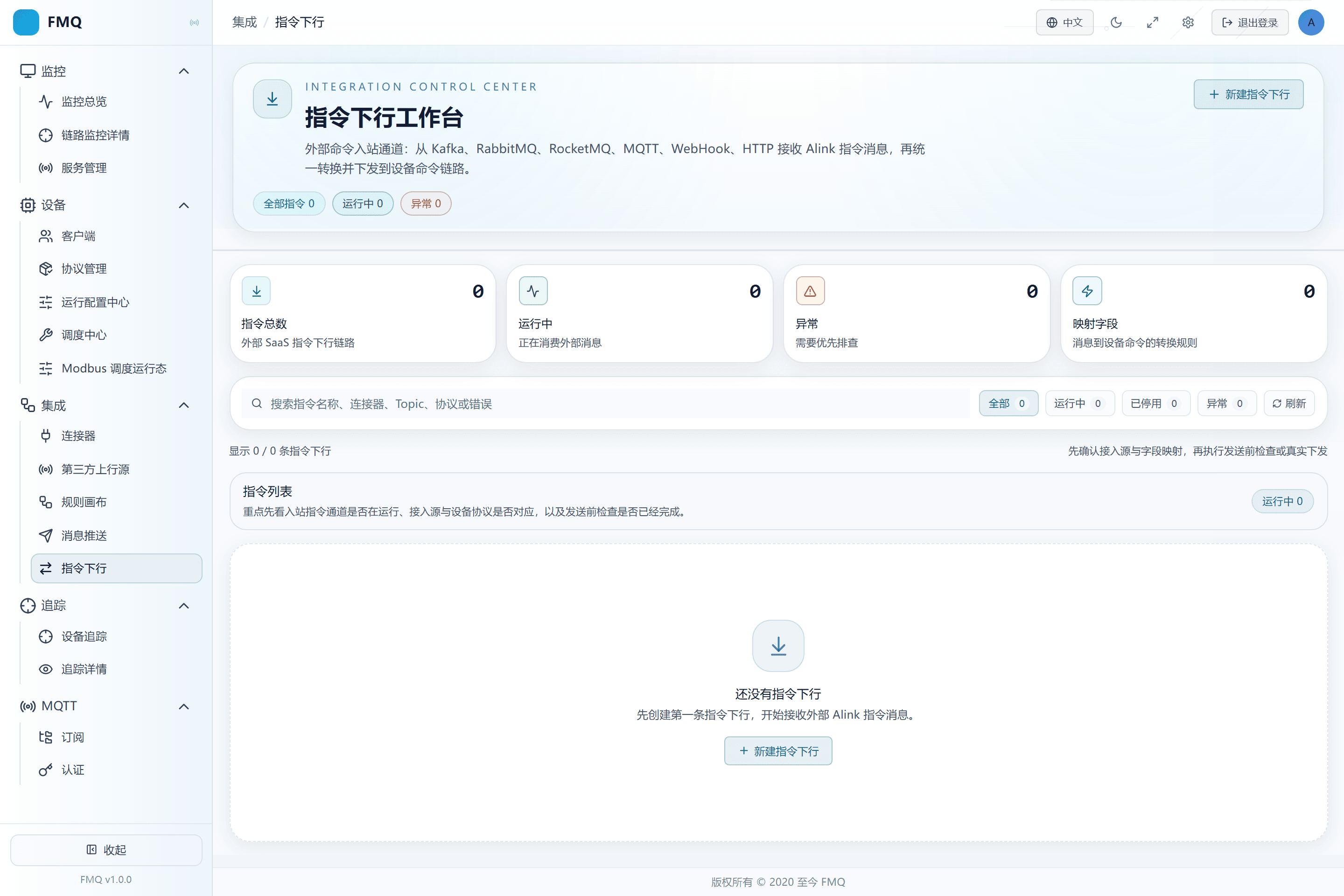
Figure: the Command Downlink list shows task statistics, status filter, refresh, and the creation entry.
Field Descriptions
| Field / Control | Description |
|---|---|
| Search | Locates tasks by task name or the summaries the page supports.; after saving it affects the current command downlink task; after changes, re-check and retest with a real device. Optional · Source: the task identities in the current list. Choice: when nothing is found, clear the status filter and search term, then refresh. Recommended: fill in per the integration documents · Example: FastBee_温控指令下行 |
| Status Filter | Shows only all, running, disabled, or abnormal tasks.; after saving it affects the current command downlink task; after changes, re-check and retest with a real device. Optional · Source: the task's current running state. Choice: when a task cannot be found during troubleshooting, switch back to All first. Recommended: fill in per the integration documents · Example: All |
2. Prepare the Inbound Queue and Device Receiving Information
Location: Integration → Command Downlink
Obtain the already-bound Exchange, Queue, and Routing Key from the RabbitMQ administrator, and the clientId and subscription Topic from the device owner.
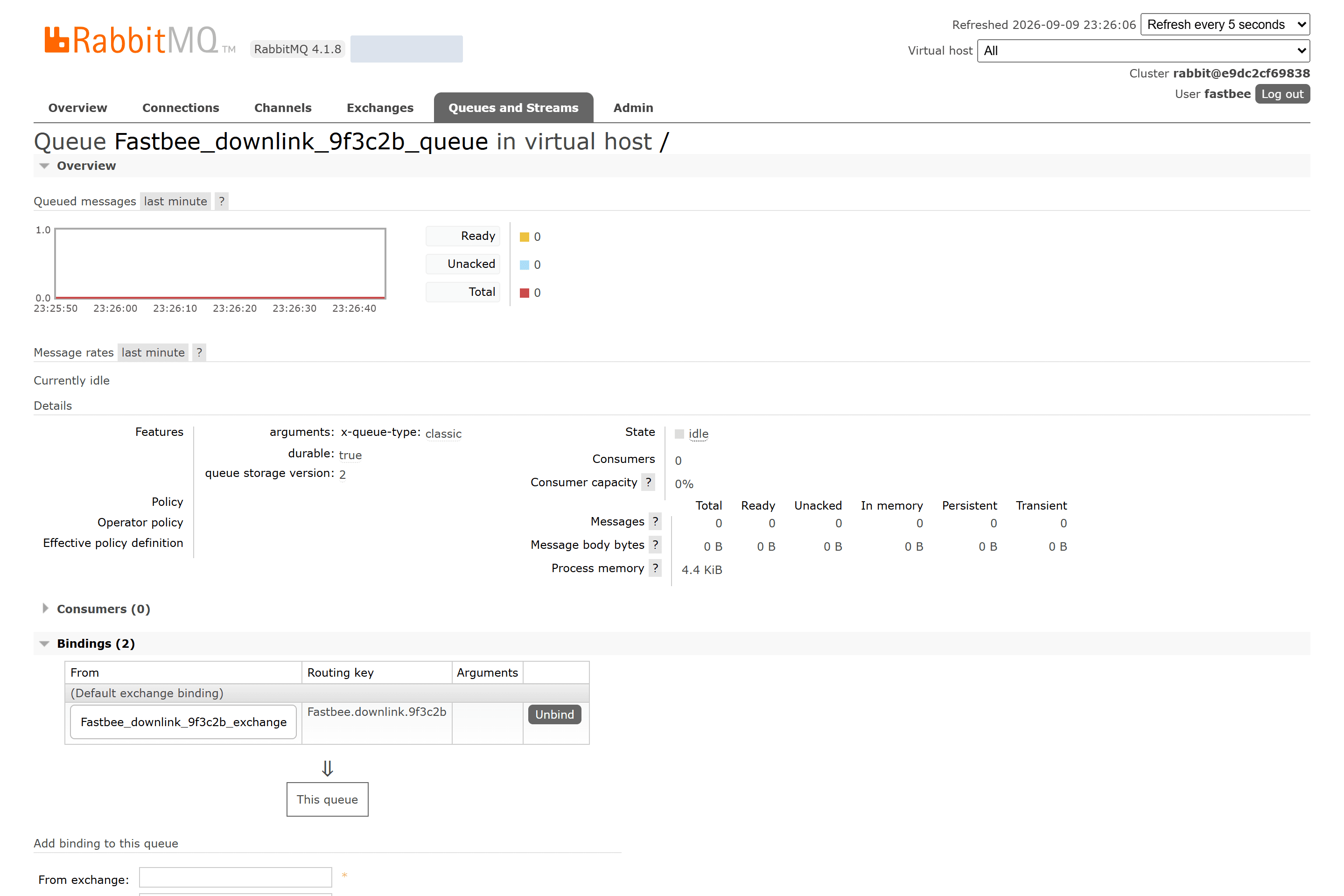
Figure: the dedicated RabbitMQ Queue is already bound to this batch's Exchange and Routing Key, and the device clientId and receiving Topic are recorded separately.
Field Descriptions
| Field / Control | Description |
|---|---|
| Exchange | The exchange to which the external sender publishes commands.; after saving it affects the current command downlink task; after changes, re-check and retest with a real device. Optional · Source: the RabbitMQ administrator provides the declared exchange and its type. Choice: consistent with the external sender and the Queue Binding; do not fill the Queue name here. Recommended: fill in per the integration documents · Example: FastBee_downlink_9f3c2b_exchange |
| Queue | The command queue FMQ actually consumes.; after saving it affects the current command downlink task; after changes, re-check and retest with a real device. Required · Source: the RabbitMQ administrator provides the dedicated queue and binding. Choice: use an independent Queue with clear ownership; multiple consumers compete for messages. Recommended: fill in per the integration documents · Example: FastBee_downlink_9f3c2b_queue |
| Routing Key | The key used by the Exchange to route to the Queue.; after saving it affects the current command downlink task; after changes, re-check and retest with a real device. Optional · Source: agreed by the RabbitMQ Binding. Choice: the external publishing and the Binding must match; FMQ consumes the Queue and does not re-filter by Routing Key. Recommended: fill in per the integration documents · Example: FastBee.downlink.9f3c2b |
| Target Device Number (clientId) | Used to locate the real MQTT/TCP/UDP session.; after saving it affects the current command downlink task; after changes, re-check and retest with a real device. Required · Source: the device access record or Alink sys.ext. Choice: must exactly match the current online session, including case and leading/trailing spaces. Recommended: fill in per the integration documents · Example: FastBee_downlink_device |
| Device Receiving Address (commandTopic) | The complete Topic the MQTT device finally subscribes to.; after saving it affects the current command downlink task; after changes, re-check and retest with a real device. Required · Source: the device protocol convention or the task output Topic template. Choice: the external Alink had better carry it explicitly to avoid ambiguity from templates or default values. Recommended: fill in per the integration documents · Example: /FastBee_downlink_device/function/get |
3. Fill In the Name and Keep It Disabled
Location: Integration → Command Downlink
Click New Command Downlink, enter the name FastBee_温控指令下行, and keep the enable switch off.
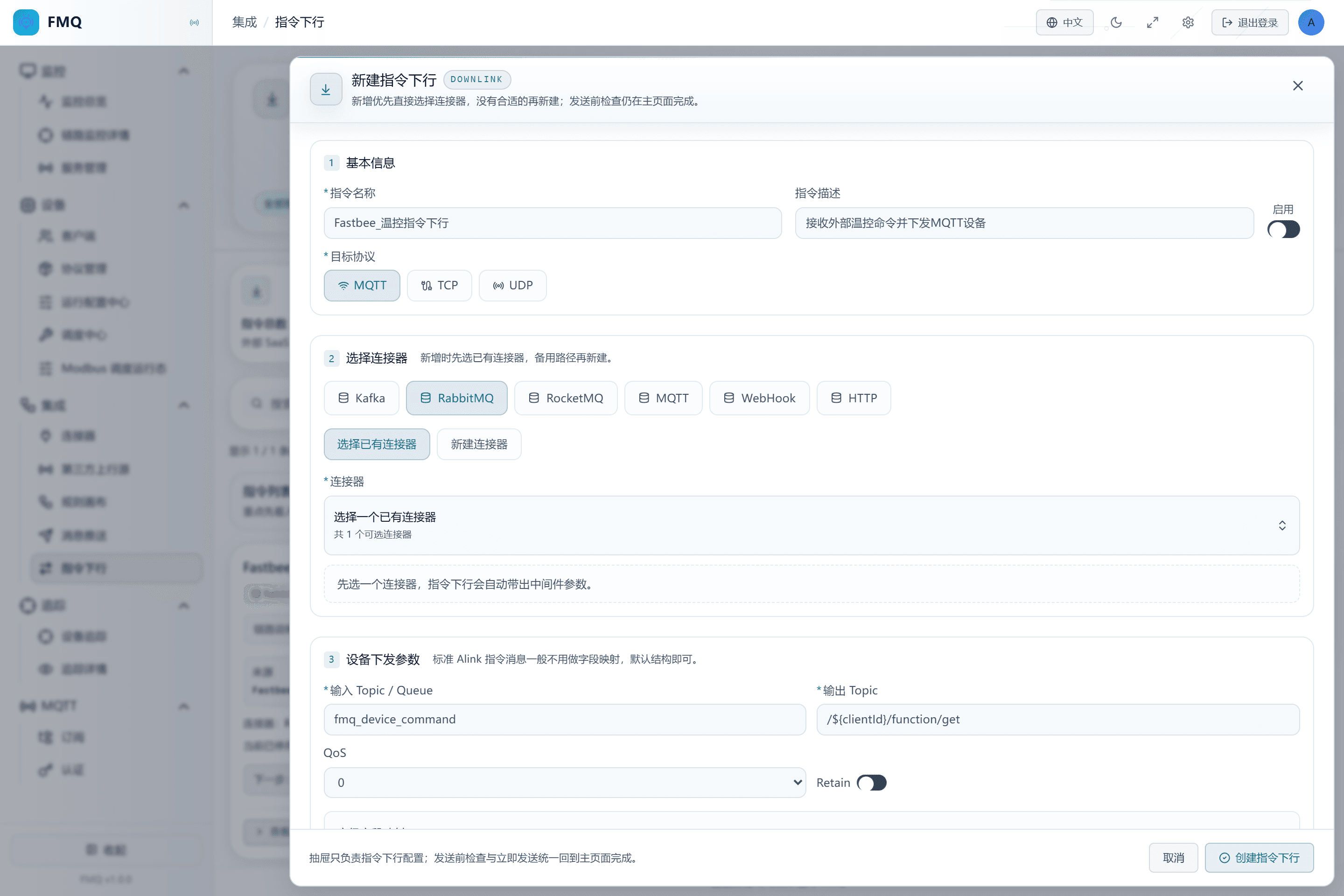
Figure: the new draft has the task name filled in, the enable switch explicitly off, and the target protocol MQTT.
Field Descriptions
| Field / Control | Description |
|---|---|
| Command Name | Lets implementation and operations personnel identify this external command link from the list.; after saving it affects the current command downlink task; after changes, re-check and retest with a real device. Required · Source: named by the business owner according to the purpose. Choice: write the business action and direction; do not write just RabbitMQ. Recommended: fill in per the integration documents · Example: FastBee_温控指令下行 |
| Command Description | Supplements the command source, target device, or maintenance boundary.; after saving it affects the current command downlink task; after changes, re-check and retest with a real device. Optional · Source: provided by the task owner. Choice: briefly describe the purpose; do not include accounts, passwords, or full connection strings. Recommended: fill in per the integration documents · Example: receive temperature-control commands and deliver them to the MQTT device |
| Enabled State | When on, the external entry starts consuming; when off, it no longer consumes automatically, but Send Now may still execute.; after saving it affects the current command downlink task; after changes, re-check and retest with a real device. Optional · Source: choose according to the debugging, go-live, or maintenance phase. Choice: create new tasks disabled first; enable them only after manual checks and device-side actual receipt pass. Recommended: fill in per the integration documents · Example: Disabled |
4. Choose RabbitMQ and Reuse the Validated Connector
Location: Integration → Command Downlink
Choose RabbitMQ as the entry, keep "Choose Existing Connector", and select FastBee_指令下行连接器.
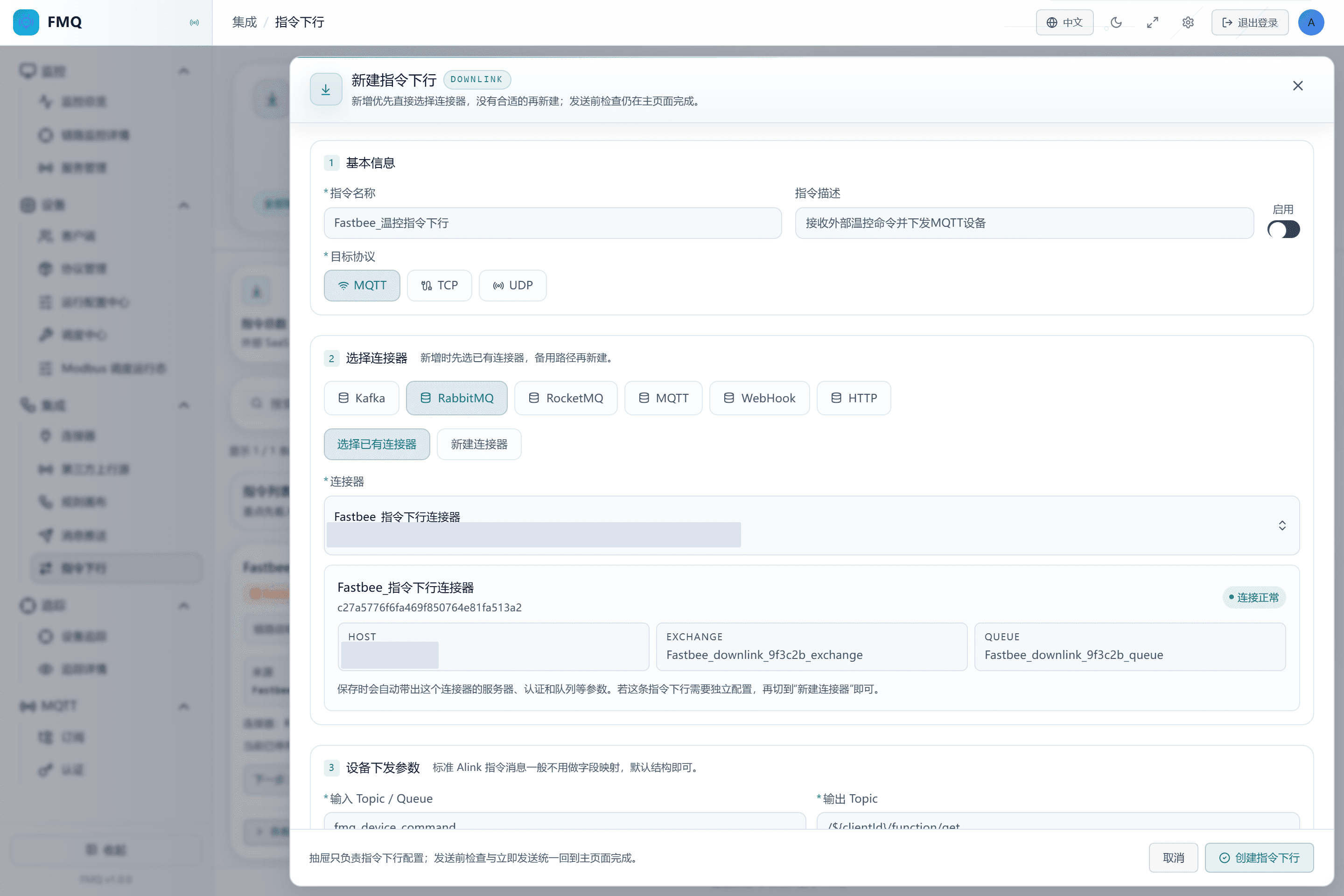
Figure: the RabbitMQ entry reuses the validated connector; the draft stays disabled and shows the connection is normal.
Field Descriptions
| Field / Control | Description |
|---|---|
| External Entry | Determines through which middleware or HTTP entry FMQ receives commands.; after saving it affects the current command downlink task; after changes, re-check and retest with a real device. Required · Source: the external business system owner provides the existing integration method. Choice: choose by the external system's real capability, not by the device protocol. Recommended: fill in per the integration documents · Example: RabbitMQ |
| Connector Source | Reuse an existing connector, or create a connection configuration inside the task.; after saving it affects the current command downlink task; after changes, re-check and retest with a real device. Optional · Source: the connector inventory and isolation requirements. Choice: prefer reusing a validated connector of the correct type; create a new one only for new addresses or independent credentials. Recommended: fill in per the integration documents · Example: choose an existing connector |
| Existing Connector | Specifies the external entry connection this task reuses.; after saving it affects the current command downlink task; after changes, re-check and retest with a real device. Required · Source: the current-type list in the connector module. Choice: verify the name, type, environment, check results, and reference relationships. Recommended: fill in per the integration documents · Example: FastBee_指令下行连接器 |
5. Explicitly Choose the MQTT Device and the Send/Receive Addresses
Location: Integration → Command Downlink
Choose MQTT as the target protocol; fill in FastBee_downlink_9f3c2b_queue for the input Queue, /${clientId}/function/get for the output Topic, QoS 1, and Retain off.
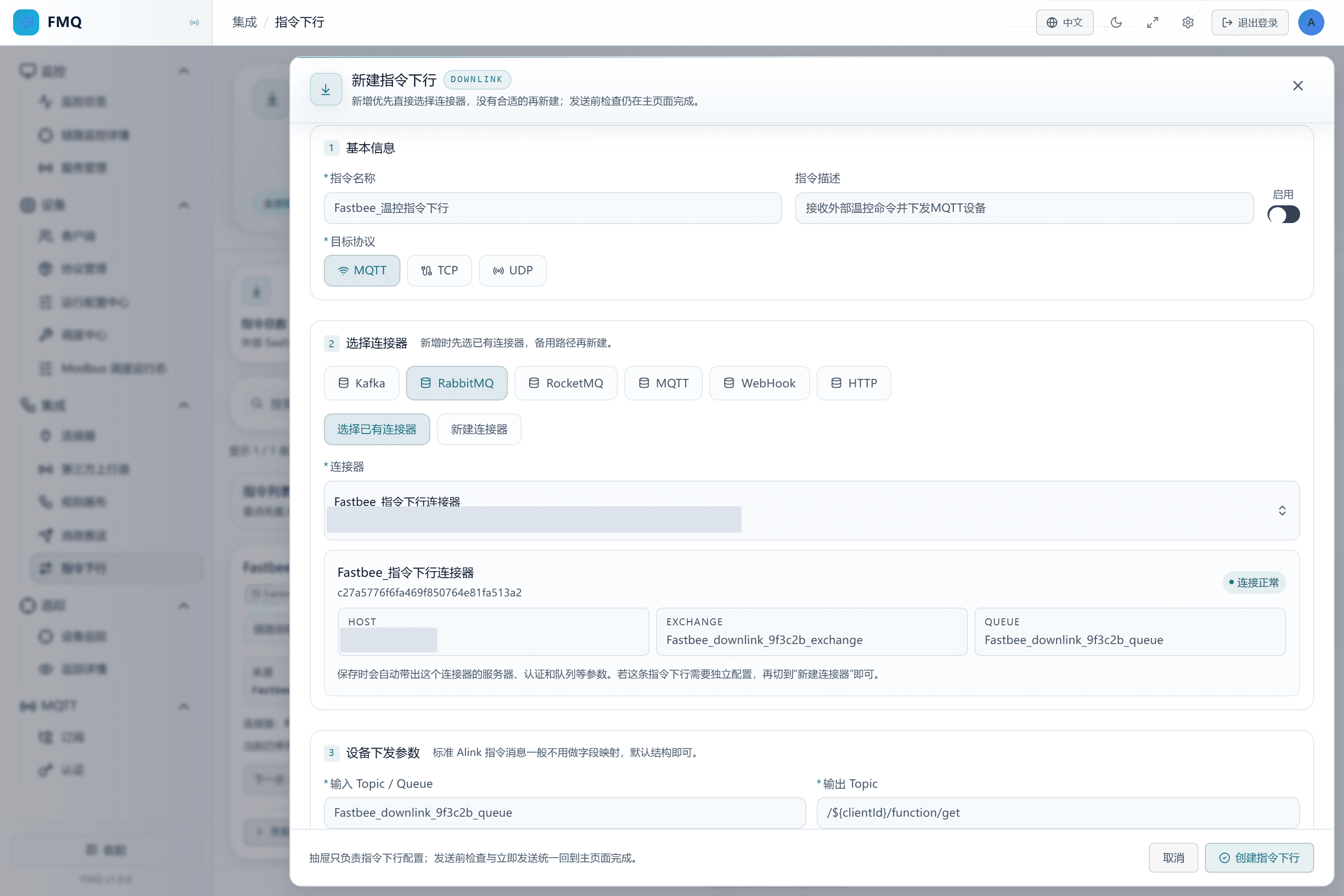
Figure: the draft stays disabled; the input Queue and the output Topic template are filled in separately, with QoS 1 and Retain off.
Field Descriptions
| Field / Control | Description |
|---|---|
| Queue | The command queue FMQ actually consumes.; after saving it affects the current command downlink task; after changes, re-check and retest with a real device. Required · Source: the RabbitMQ administrator provides the dedicated queue and binding. Choice: use an independent Queue with clear ownership; multiple consumers compete for messages. Recommended: fill in per the integration documents · Example: FastBee_downlink_9f3c2b_queue |
| Target Protocol | Determines which device transport channel FMQ hands the unified command to.; after saving it affects the current command downlink task; after changes, re-check and retest with a real device. Required · Source: the device access owner provides the real connection protocol. Choice: choose MQTT for MQTT devices; choose TCP/UDP devices by their real sessions; the page has no automatic routing option. Recommended: fill in per the integration documents · Example: MQTT |
| Input Topic / Queue / Path | Where external commands enter FMQ; the meaning varies with the entry type.; after saving it affects the current command downlink task; after changes, re-check and retest with a real device. Required · Source: provided by the middleware or API administrator. Choice: fill in a Queue for RabbitMQ, a subscription Topic for Kafka/RocketMQ/MQTT, and a path for HTTP types. Recommended: fill in per the integration documents · Example: FastBee_downlink_9f3c2b_queue |
| Output Topic | The Topic template on which the MQTT device finally receives messages.; after saving it affects the current command downlink task; after changes, re-check and retest with a real device. Required · Source: the device access convention or the commandTopic in the external Alink. Choice: the template must be able to generate the complete Topic the device actually subscribes to; this example generates it by clientId. Recommended: fill in per the integration documents · Example: /${clientId}/function/get |
| QoS | The protocol delivery level of the MQTT downlink; does not mean the device business execution is complete.; after saving it affects the current command downlink task; after changes, re-check and retest with a real device. Optional · Source: determined jointly by the device, the Broker, and the business duplicate tolerance. Choice: control commands commonly use 1 together with command-ID deduplication; follow the on-site convention. Recommended: fill in per the integration documents · Example: 1 |
| Retain | Asks the MQTT Broker to retain the last message on that Topic.; after saving it affects the current command downlink task; after changes, re-check and retest with a real device. Optional · Source: whether the device needs to receive the last command after coming online. Choice: turn it off for ordinary immediate control; turn it on only when the last state is explicitly needed and old commands can be handled. Recommended: fill in per the integration documents · Example: false |
6. Keep the Default Field Mapping
Location: Integration → Command Downlink
Expand Advanced Field Mapping, confirm it shows "default, no mapping needed", and do not add mapping rows.
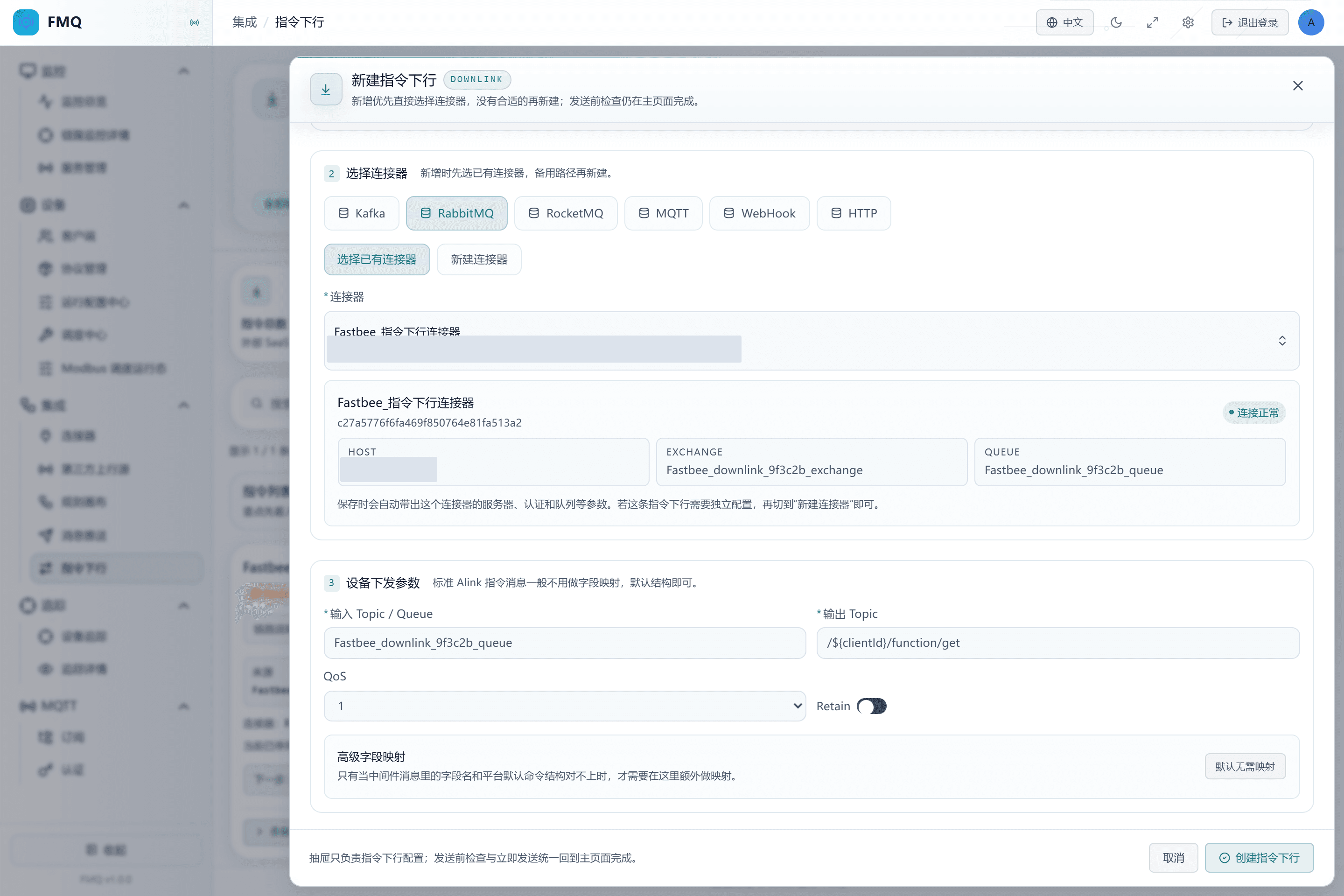
Figure: standard Alink keeps the default command structure with no advanced field mapping added; the draft is still unsaved.
7. Create and Verify the Disabled Task
Location: Integration → Command Downlink
Click Create Command Downlink, and after returning to the details, confirm again that the state is Disabled, the entry is RabbitMQ, and the device protocol is MQTT.
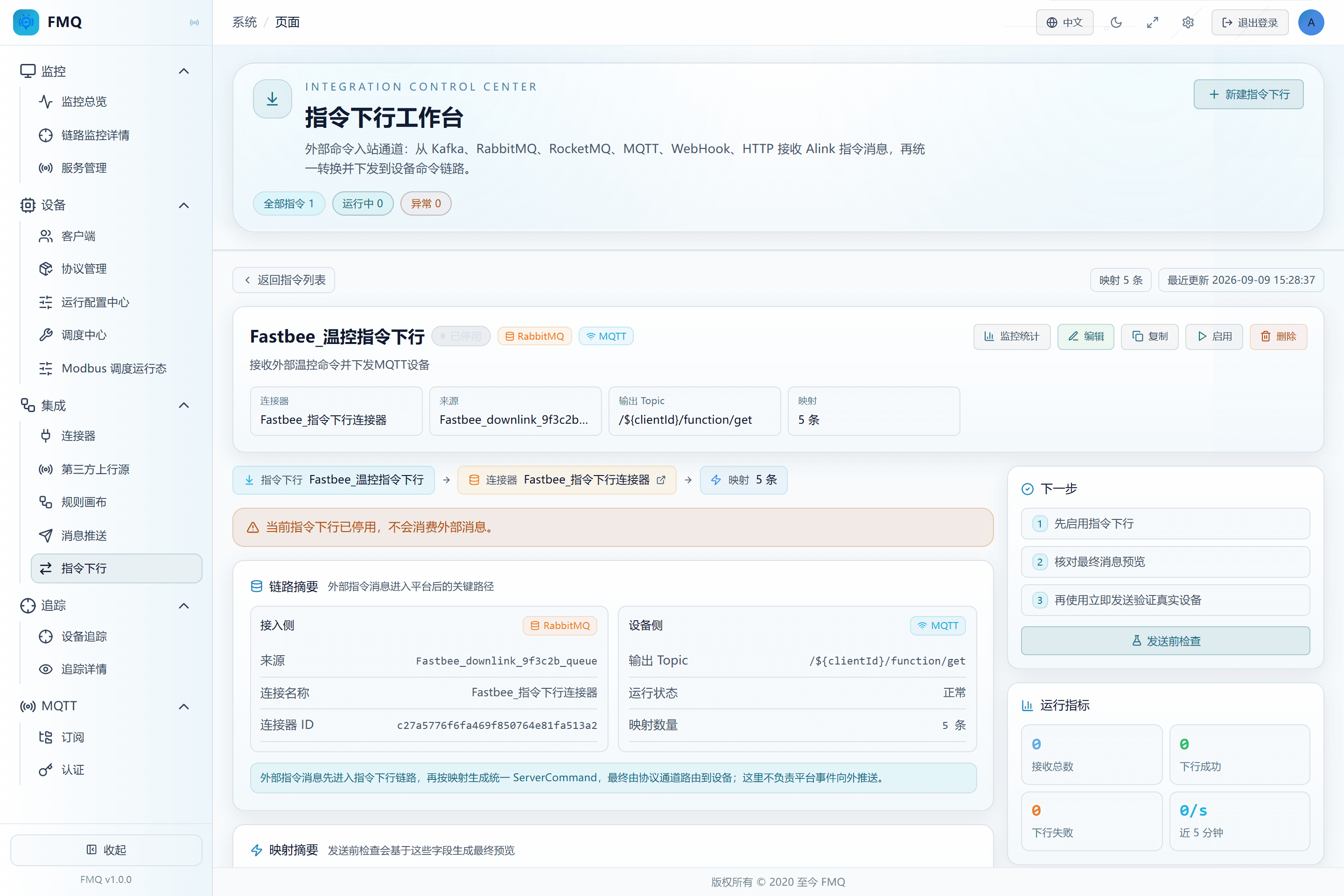
Figure: the task has been saved by the real page and corrected to Disabled; the details show RabbitMQ ingestion and MQTT device delivery.
Field Descriptions
| Field / Control | Description |
|---|---|
| Enabled State | When on, the external entry starts consuming; when off, it no longer consumes automatically, but Send Now may still execute.; after saving it affects the current command downlink task; after changes, re-check and retest with a real device. Optional · Source: choose according to the debugging, go-live, or maintenance phase. Choice: create new tasks disabled first; enable them only after manual checks and device-side actual receipt pass. Recommended: fill in per the integration documents · Example: Disabled |
8. Run the Pre-send Check First
Location: Integration → Command Downlink
Fill in the device clientId, Topic, and JSON content in the test area, then click Check.
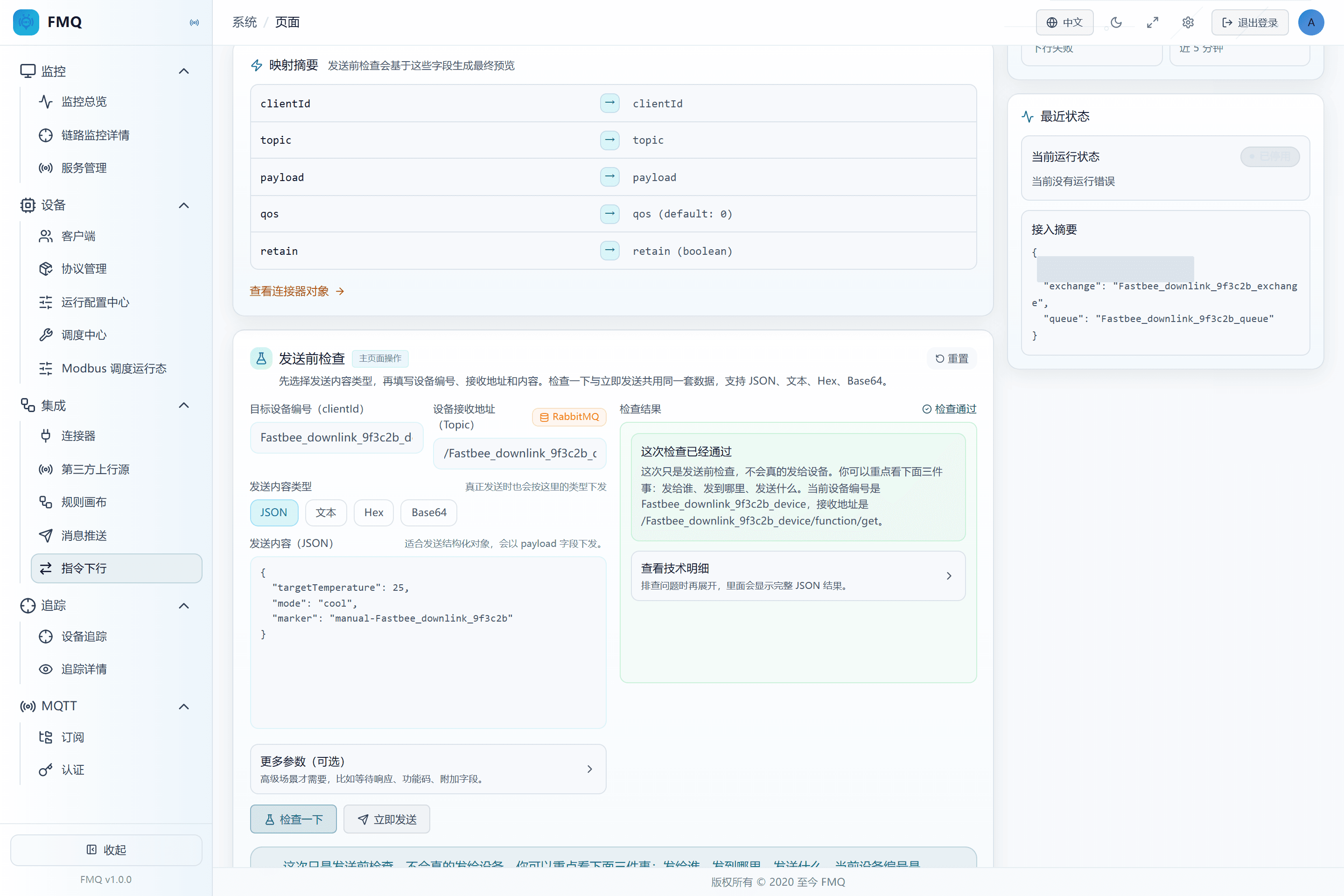
Figure: the pre-send check passed, and the page clearly states that this time it will not actually be sent to the device.
Field Descriptions
| Field / Control | Description |
|---|---|
| Test Target Device Number | The device that the manual check and Send Now should locate.; after saving it affects the current command downlink task; after changes, re-check and retest with a real device. Required · Source: obtained from the device client or the FMQX session. Choice: must match the online clientId; filling it in does not automatically create a session. Recommended: fill in per the integration documents · Example: FastBee_downlink_9f3c2b_device |
| Test Device Receiving Topic | The final receiving address of this manual test.; after saving it affects the current command downlink task; after changes, re-check and retest with a real device. Required · Source: generated from the device subscription or the task output Topic. Choice: fill in the complete Topic, not the RabbitMQ Queue. Recommended: fill in per the integration documents · Example: /FastBee_downlink_9f3c2b_device/function/get |
| Send Content Type | Determines how the page converts the test content into bytes.; after saving it affects the current command downlink task; after changes, re-check and retest with a real device. Required · Source: choose according to the real device command format. Choice: use JSON for structured business objects; use Text, Hex, or Base64 only for plain text or binary protocols. Recommended: fill in per the integration documents · Example: JSON |
| Send Content | The business content of this manual check or delivery.; after saving it affects the current command downlink task; after changes, re-check and retest with a real device. Required · Source: the device protocol and business command definition. Choice: fill in only the business object in JSON mode; the page assembles the command with the clientId and Topic. Recommended: fill in per the integration documents · Example: |
9. Verify the Final Send Content
Location: Integration → Command Downlink
Review the device number, final receiving address, and send content in the check result; expand the technical details only when troubleshooting.
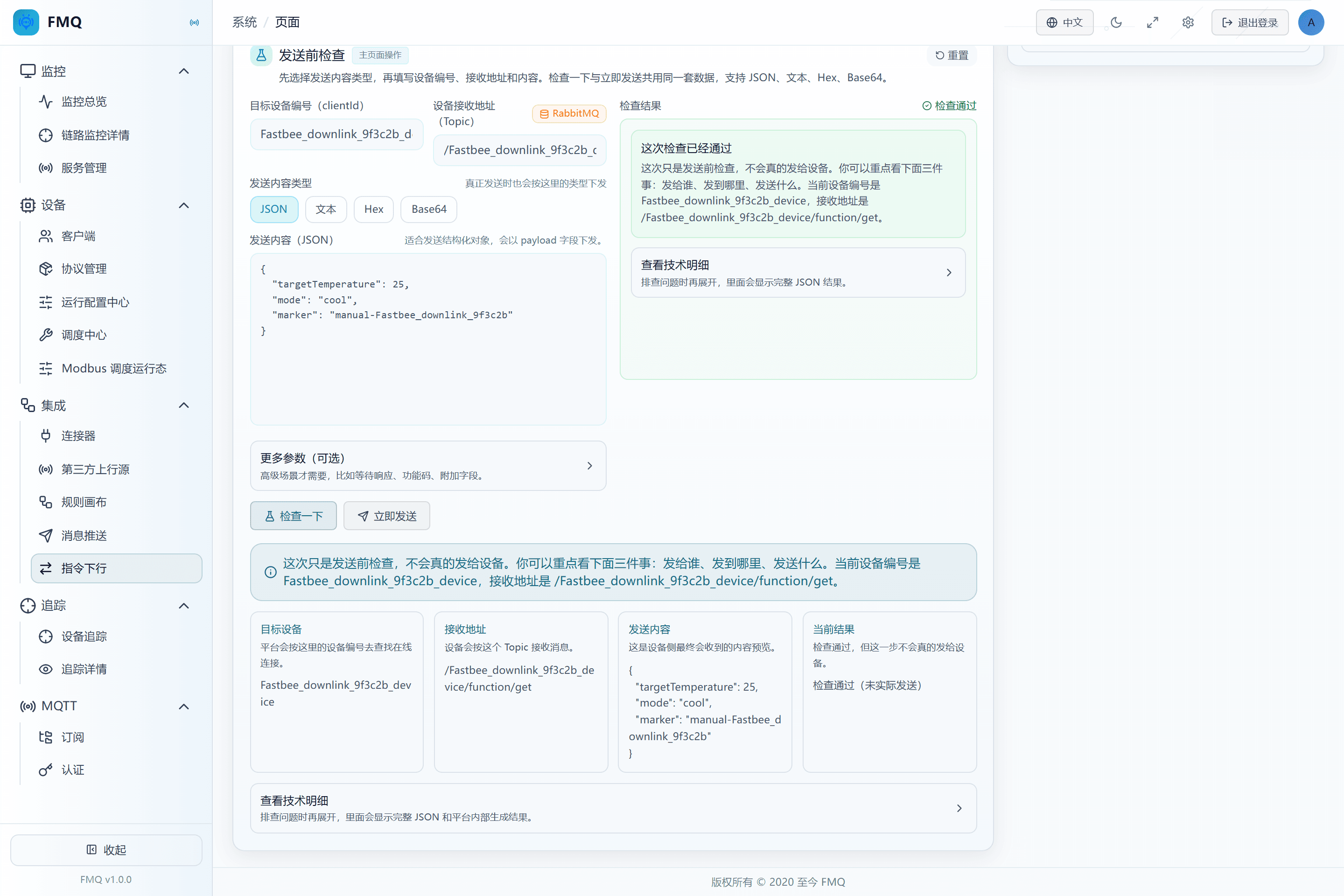
Figure: the final preview shows the target device, the MQTT receiving Topic, and the JSON business content.
10. Execute Send Now While Disabled
Location: Integration → Command Downlink
After confirming the FMQX device is online, click Send Now while the task is still disabled.
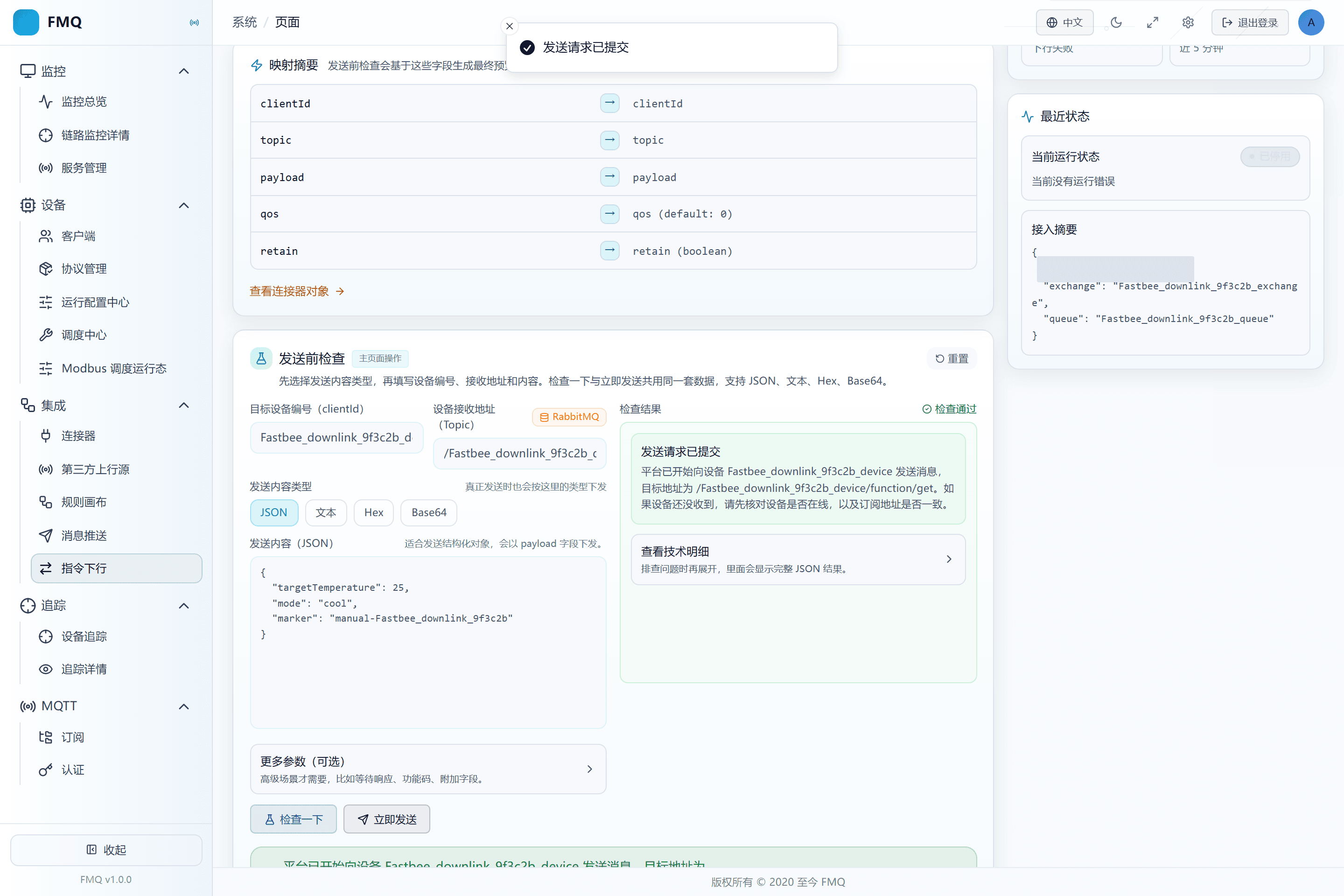
Figure: the task is still disabled, but Send Now has been actually submitted to the MQTT device channel.
Field Descriptions
| Field / Control | Description |
|---|---|
| Enabled State | When on, the external entry starts consuming; when off, it no longer consumes automatically, but Send Now may still execute.; after saving it affects the current command downlink task; after changes, re-check and retest with a real device. Optional · Source: choose according to the debugging, go-live, or maintenance phase. Choice: create new tasks disabled first; enable them only after manual checks and device-side actual receipt pass. Recommended: fill in per the integration documents · Example: Disabled |
11. Confirm FMQX Received the Manual Command
Location: Integration → Command Downlink
View the subscribed messages in the real FMQX MQTT session and verify the Topic and the temperature-control JSON.
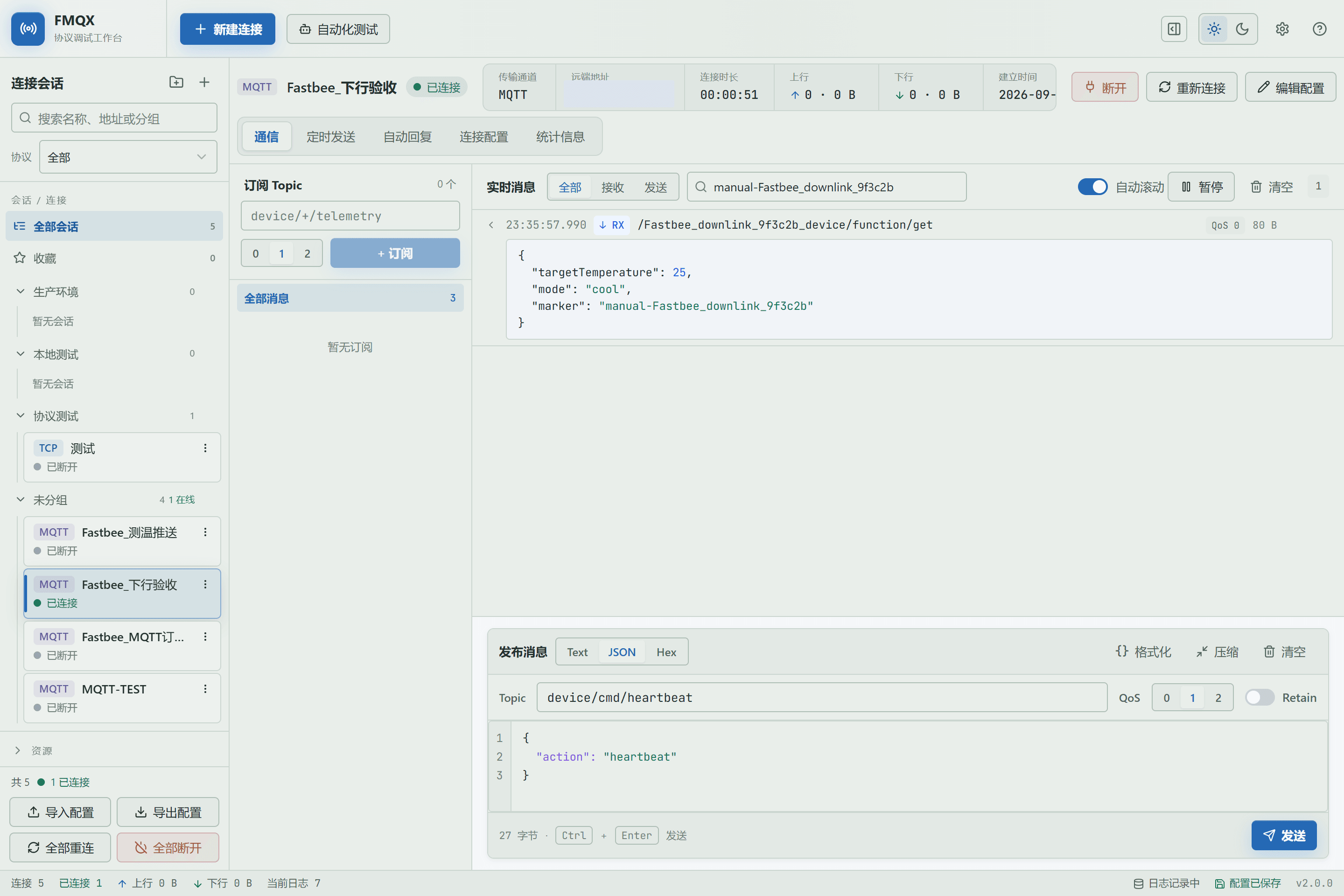
Figure: the real FMQX MQTT session shows the actual receipt record of the manual command in the disabled state, with the Topic and targetTemperature=25.0 correct.
Field Descriptions
| Field / Control | Description |
|---|---|
| Device Receiving Address (commandTopic) | The complete Topic the MQTT device finally subscribes to.; after saving it affects the current command downlink task; after changes, re-check and retest with a real device. Required · Source: the device protocol convention or the task output Topic template. Choice: the external Alink had better carry it explicitly to avoid ambiguity from templates or default values. Recommended: fill in per the integration documents · Example: /FastBee_downlink_device/function/get |
12. Enable Command Downlink
Location: Integration → Command Downlink
Return to the task details and click Enable.
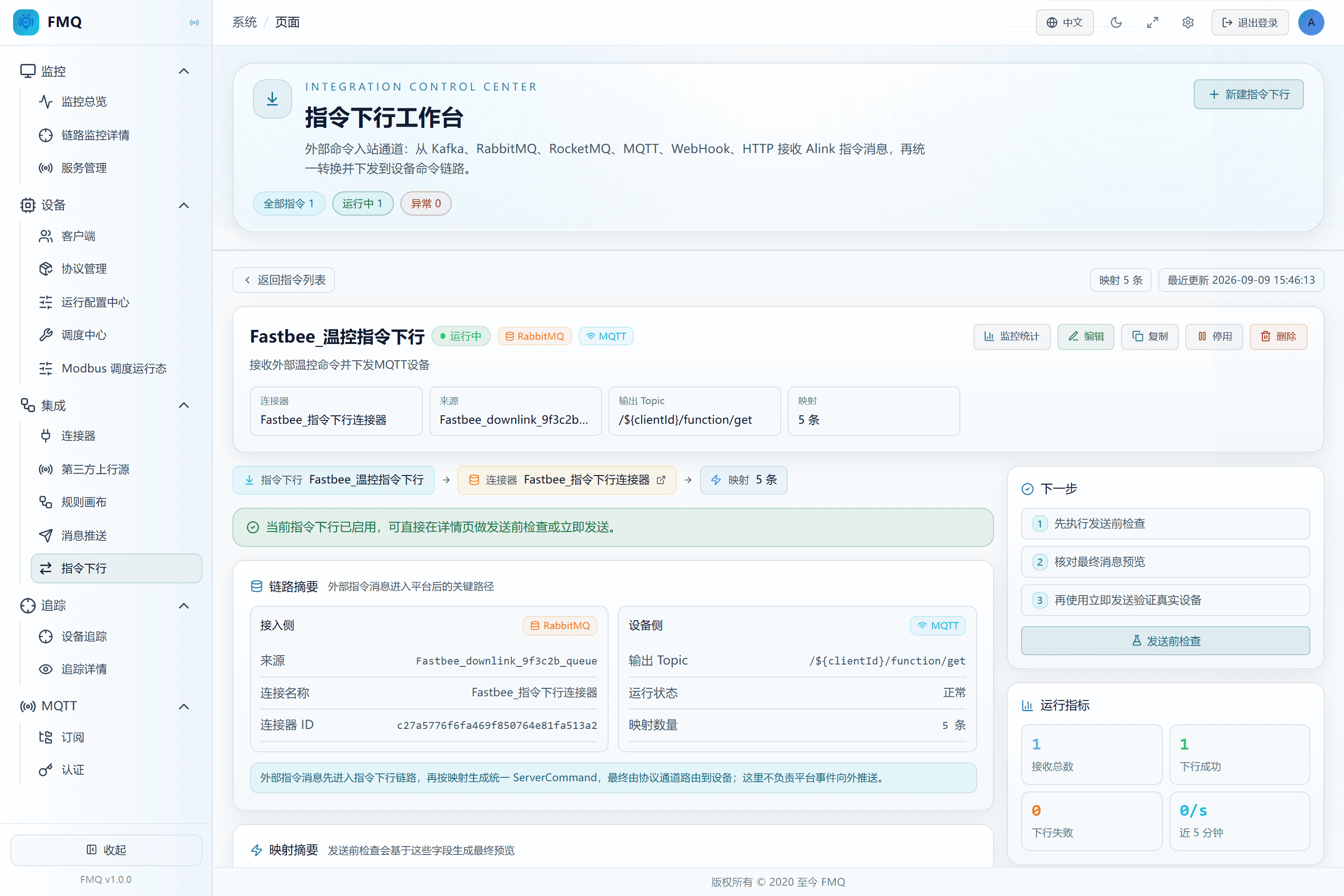
Figure: the task is enabled, and the external RabbitMQ entry starts consuming the dedicated Queue.
Field Descriptions
| Field / Control | Description |
|---|---|
| Enabled State | When on, the external entry starts consuming; when off, it no longer consumes automatically, but Send Now may still execute.; after saving it affects the current command downlink task; after changes, re-check and retest with a real device. Optional · Source: choose according to the debugging, go-live, or maintenance phase. Choice: create new tasks disabled first; enable them only after manual checks and device-side actual receipt pass. Recommended: fill in per the integration documents · Example: Disabled |
13. Publish an Alink Command with a Unique ID from RabbitMQ
Location: Integration → Command Downlink
In the dedicated Exchange's publish area, fill in the Routing Key and the complete Alink with a new id, then click Publish message.
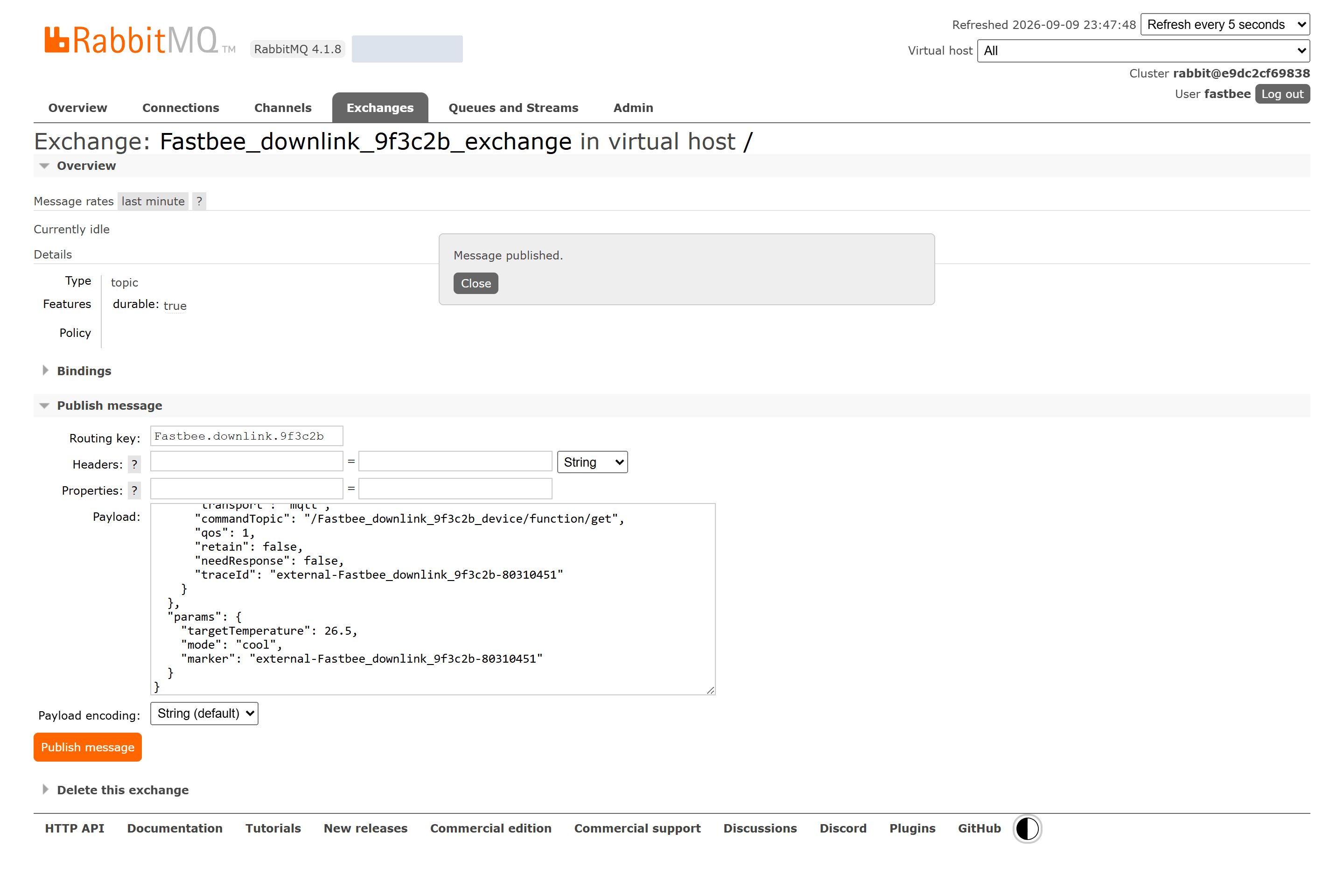
Figure: RabbitMQ has confirmed publishing command FastBee_downlink_9f3c2b_external_80310451 with Routing Key FastBee.downlink.9f3c2b.
Field Descriptions
| Field / Control | Description |
|---|---|
| Command ID (id) | The unique identity of this command, used for query, correlation, and idempotency.; after saving it affects the current command downlink task; after changes, re-check and retest with a real device. Required · Source: generated by the external business system for each actual send. Choice: keeping the ID for the same redelivery prevents duplicates; failure recovery requires a new ID while preserving the business correlation. Recommended: fill in per the integration documents · Example: FastBee_cmd_001 |
| Version (version) | The Alink message structure version.; after saving it affects the current command downlink task; after changes, re-check and retest with a real device. Required · Source: specified by the current access contract. Choice: this manual uses 1.0; do not fill a business software version here. Recommended: fill in per the integration documents · Example: 1.0 |
| Method (method) | States the business action to execute.; after saving it affects the current command downlink task; after changes, re-check and retest with a real device. Required · Source: agreed by the external business and the device capability. Choice: use thing.service.property.set for property setting; other methods must be supported by the current protocol capability. Recommended: fill in per the integration documents · Example: thing.service.property.set |
| System Context (sys) | Carries the device identity, protocol, time, and extended routing; not business parameters.; after saving it affects the current command downlink task; after changes, re-check and retest with a real device. Required · Source: assembled by the external system according to the device profile and the FMQ access convention. Choice: at least ensure deviceId/deviceKey or ext.clientId can locate the target, and explicitly give the actual transport. Recommended: fill in per the integration documents · Example: {"deviceId":"device-001","protocol":"ALINK_JSON","ext":{"transport":"mqtt"}} |
| Business Parameters (params) | The data the device actually executes, such as target temperature and mode.; after saving it affects the current command downlink task; after changes, re-check and retest with a real device. Required · Source: generated by the business system from the command form or rules. Choice: put only business fields; do not stuff clientId, Token, or Broker addresses into params. Recommended: fill in per the integration documents · Example: |
| Routing Key | The key used by the Exchange to route to the Queue.; after saving it affects the current command downlink task; after changes, re-check and retest with a real device. Optional · Source: agreed by the RabbitMQ Binding. Choice: the external publishing and the Binding must match; FMQ consumes the Queue and does not re-filter by Routing Key. Recommended: fill in per the integration documents · Example: FastBee.downlink.9f3c2b |
14. Confirm Entry Acceptance, Then Query Command SENT
Location: Integration → Command Downlink
Return to the task details and open Monitoring Statistics to view total received, downlink successes, downlink failures, and the recent status; then query the final state by this command ID.
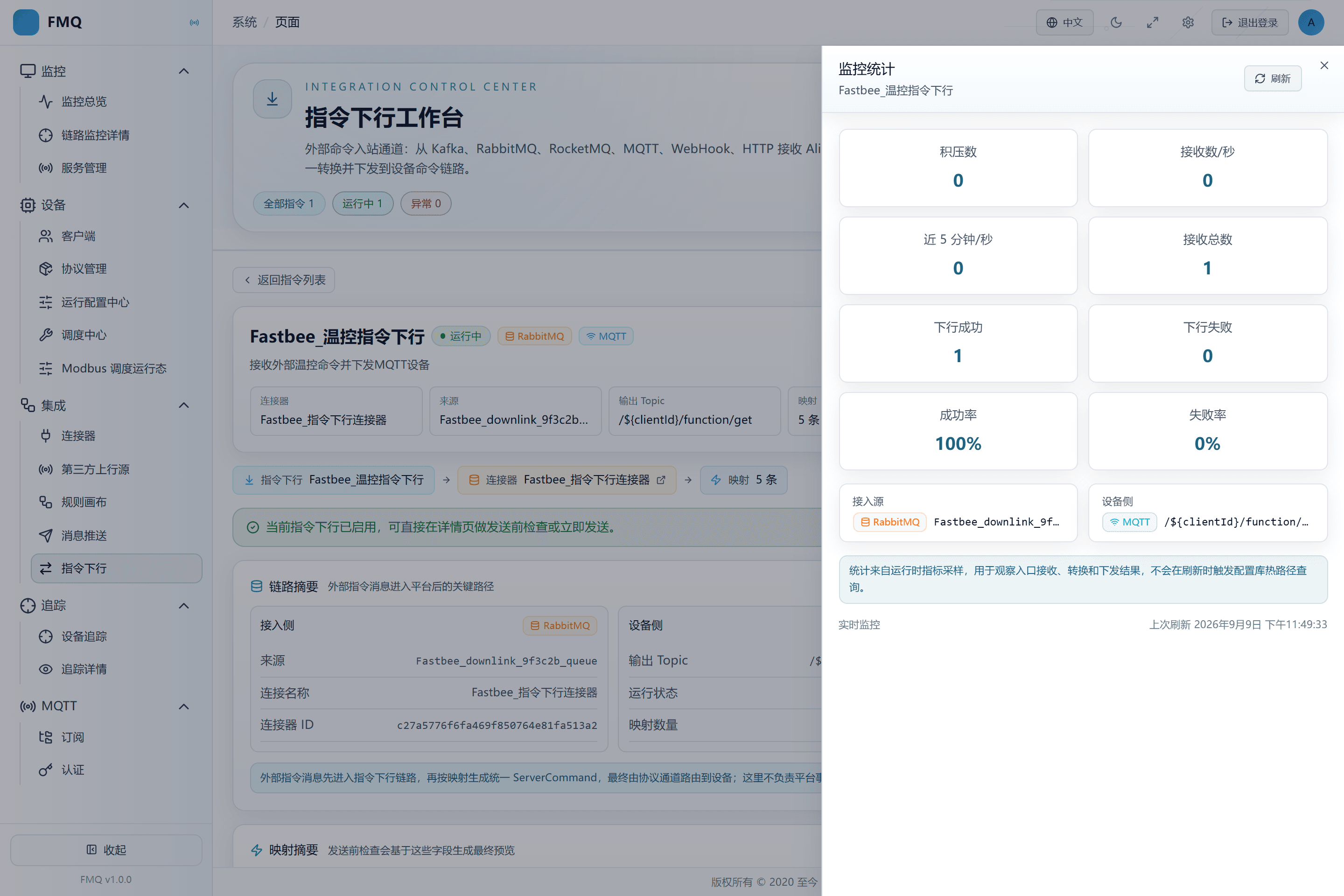
Figure: the RabbitMQ command has been received by FMQ, downlink successes increased, and this command's final state is SENT.
15. Confirm the External Command Reached the Device
Location: Integration → Command Downlink
In FMQX, view the newly received MQTT message and verify this round's marker, targetTemperature=26.5, and the Topic.
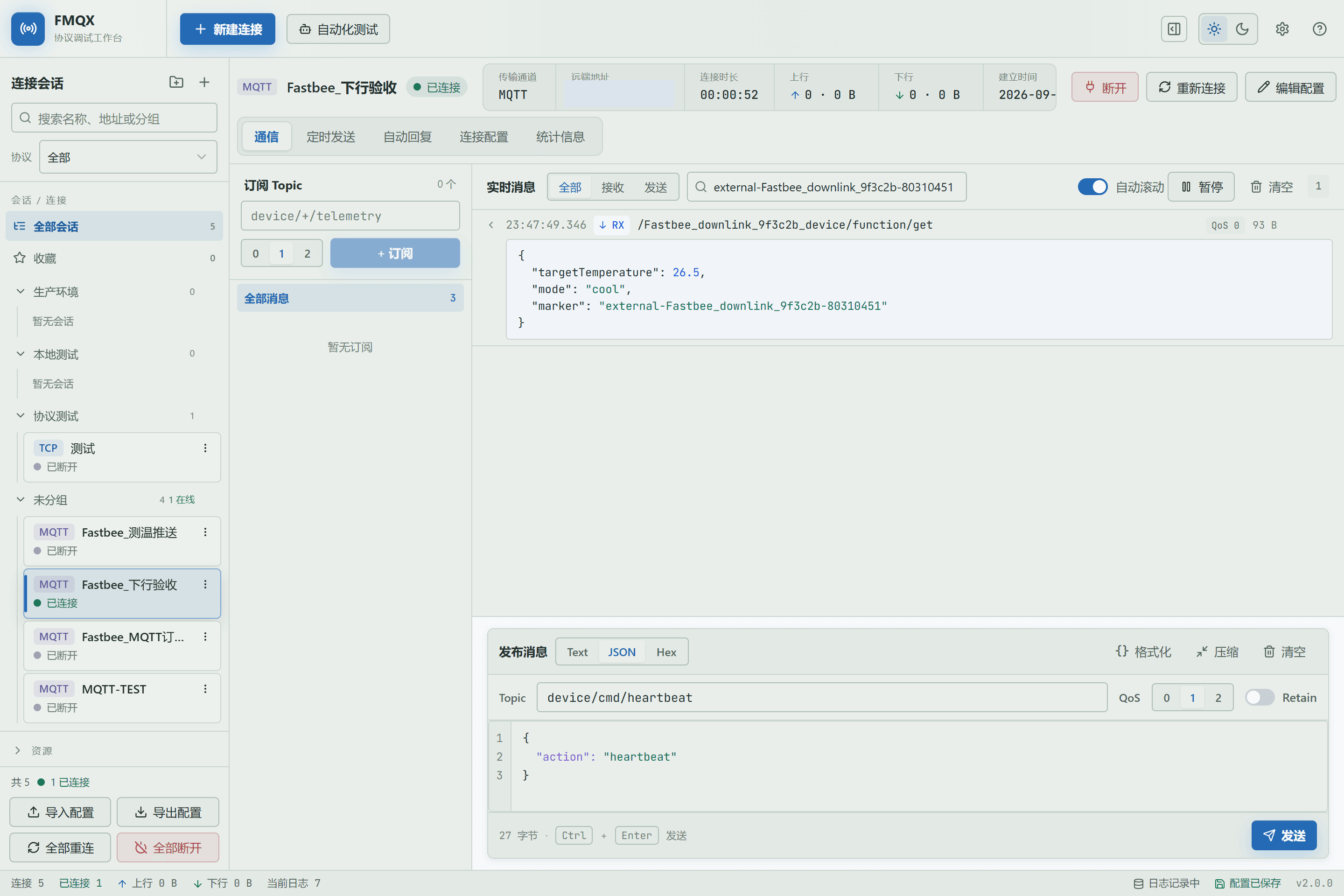
Figure: the real FMQX MQTT session shows the actual receipt record of the external RabbitMQ command, with both the marker and targetTemperature=26.5 matching.
16. Disconnect the Device Session
Location: Integration → Command Downlink
In FMQX, click Disconnect and confirm the session is offline.
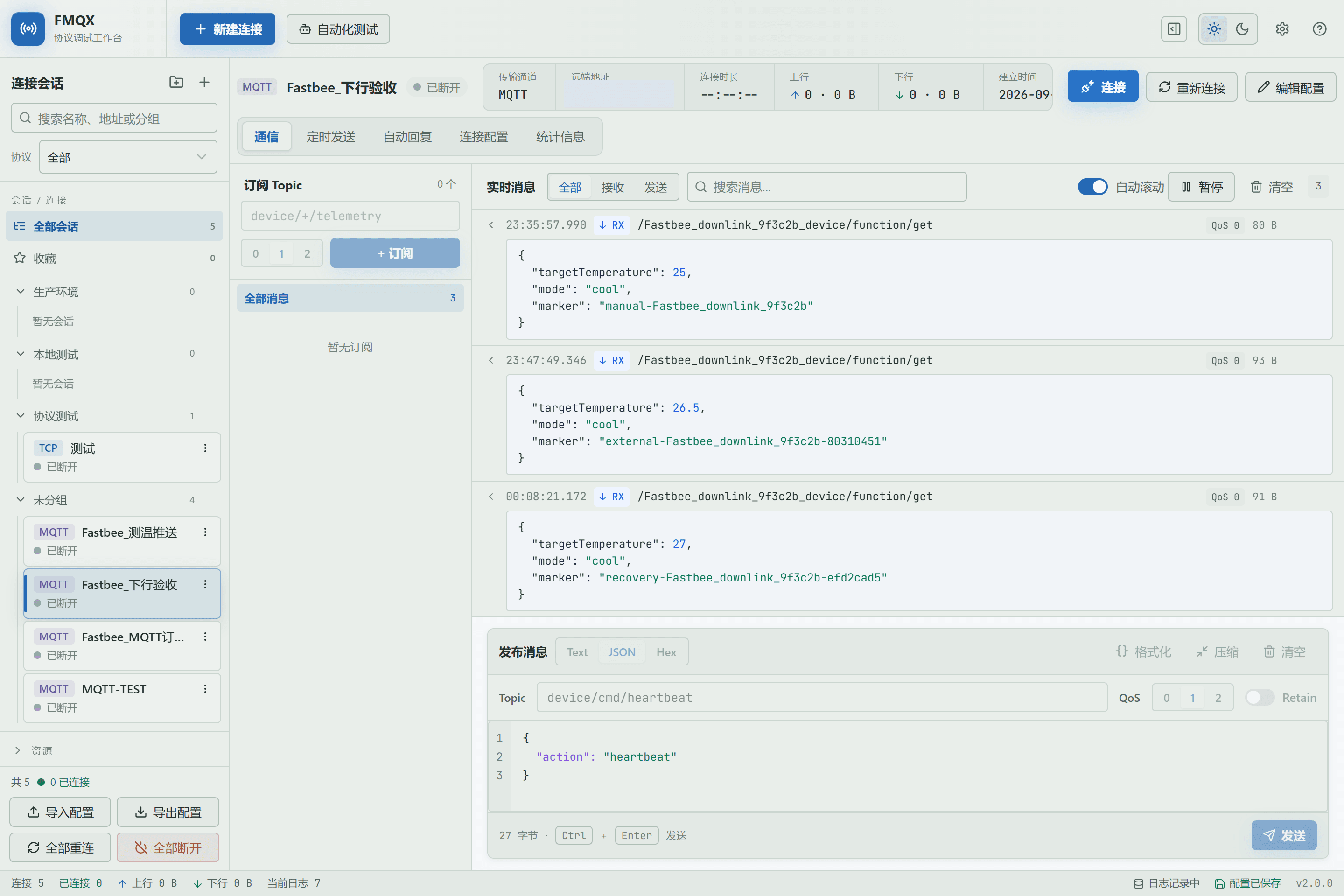
Figure: this batch's MQTT session has been disconnected in the new FMQX; the RabbitMQ entry and the command downlink task are unchanged.
17. Publish a Command with a Wrong Target and transport
Location: Integration → Command Downlink
Still from the same Exchange and Routing Key, publish a command with a new command ID, but deliberately use a nonexistent clientId and write sys.ext.transport as udp; the real device is still MQTT.
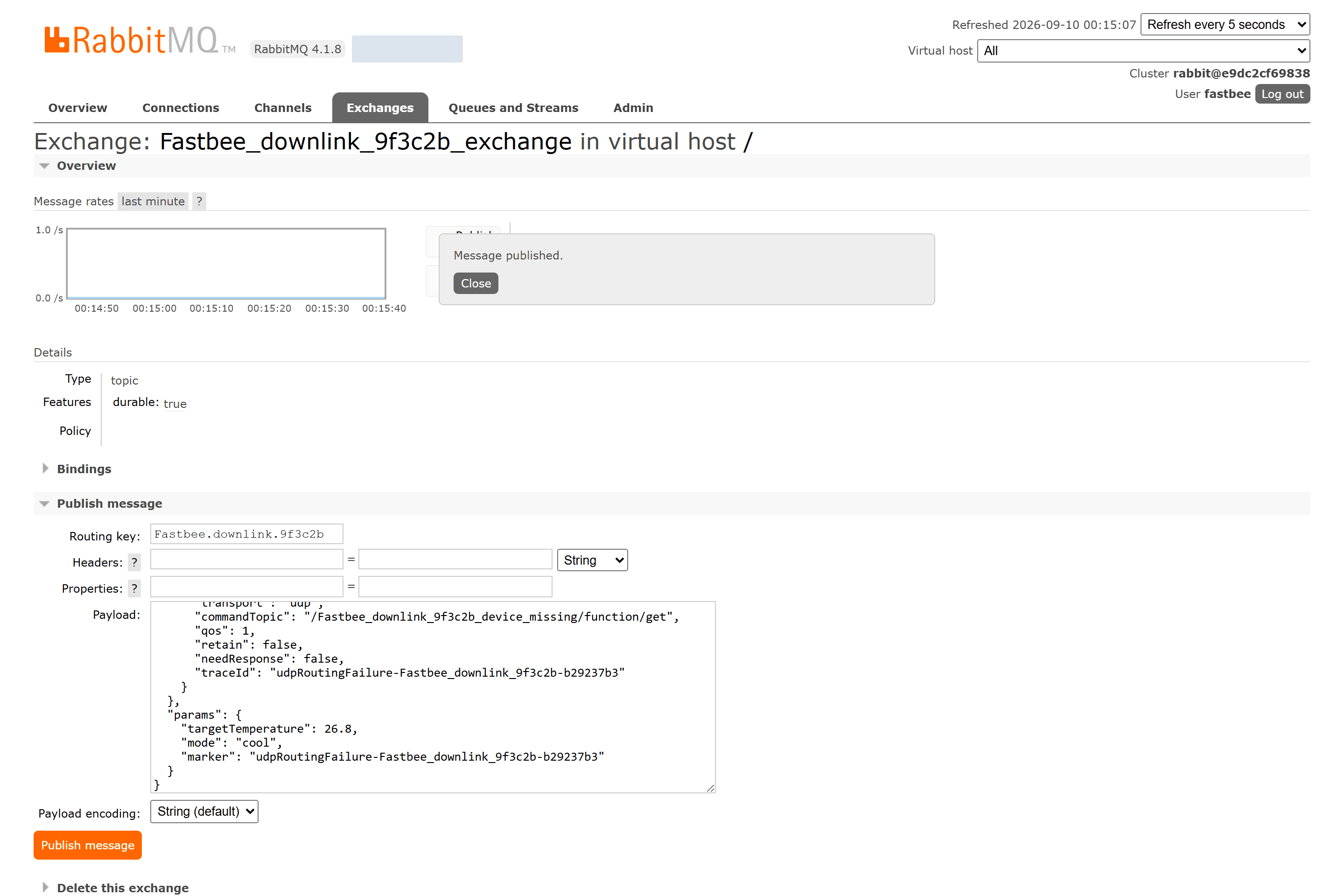
Figure: RabbitMQ has confirmed publishing command FastBee_downlink_9f3c2b_udpRoutingFailure_b29237b3 with Routing Key FastBee.downlink.9f3c2b.
Field Descriptions
| Field / Control | Description |
|---|---|
| Command ID (id) | The unique identity of this command, used for query, correlation, and idempotency.; after saving it affects the current command downlink task; after changes, re-check and retest with a real device. Required · Source: generated by the external business system for each actual send. Choice: keeping the ID for the same redelivery prevents duplicates; failure recovery requires a new ID while preserving the business correlation. Recommended: fill in per the integration documents · Example: FastBee_cmd_001 |
| System Context (sys) | Carries the device identity, protocol, time, and extended routing; not business parameters.; after saving it affects the current command downlink task; after changes, re-check and retest with a real device. Required · Source: assembled by the external system according to the device profile and the FMQ access convention. Choice: at least ensure deviceId/deviceKey or ext.clientId can locate the target, and explicitly give the actual transport. Recommended: fill in per the integration documents · Example: {"deviceId":"device-001","protocol":"ALINK_JSON","ext":{"transport":"mqtt"}} |
| Routing Key | The key used by the Exchange to route to the Queue.; after saving it affects the current command downlink task; after changes, re-check and retest with a real device. Optional · Source: agreed by the RabbitMQ Binding. Choice: the external publishing and the Binding must match; FMQ consumes the Queue and does not re-filter by Routing Key. Recommended: fill in per the integration documents · Example: FastBee.downlink.9f3c2b |
18. Confirm the Entry Accepted It but the Command Ends FAILED
Location: Integration → Command Downlink
Return to FMQ monitoring to confirm the total received has increased, then verify via the command status API that this ID is FAILED.
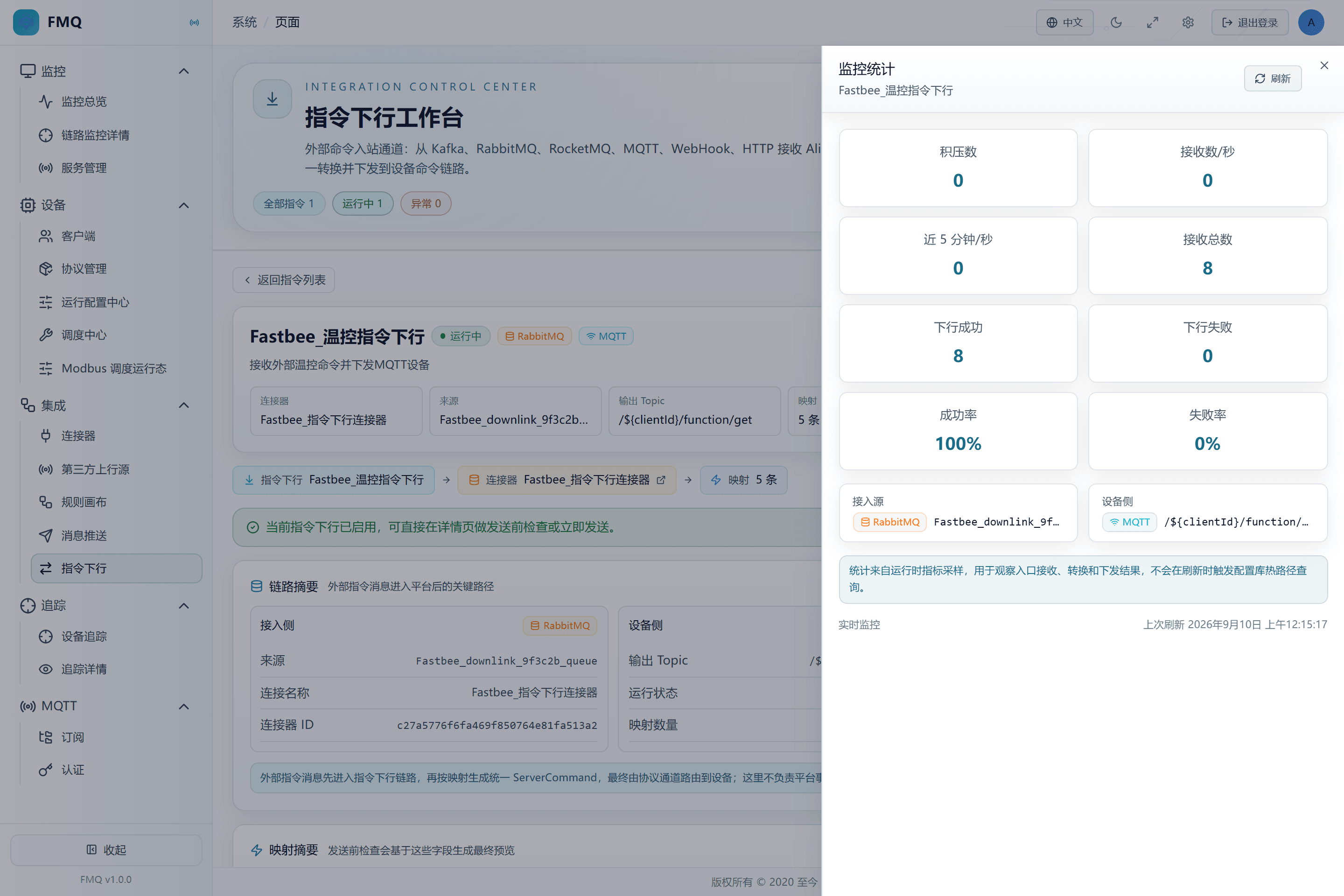
Figure: the wrongly routed command has been consumed by RabbitMQ; the entry monitoring has received it, and the command status API records the final state FAILED.
19. Reconnect FMQX
Location: Integration → Command Downlink
In FMQX, click Connect and confirm the MQTT session and subscription are restored.
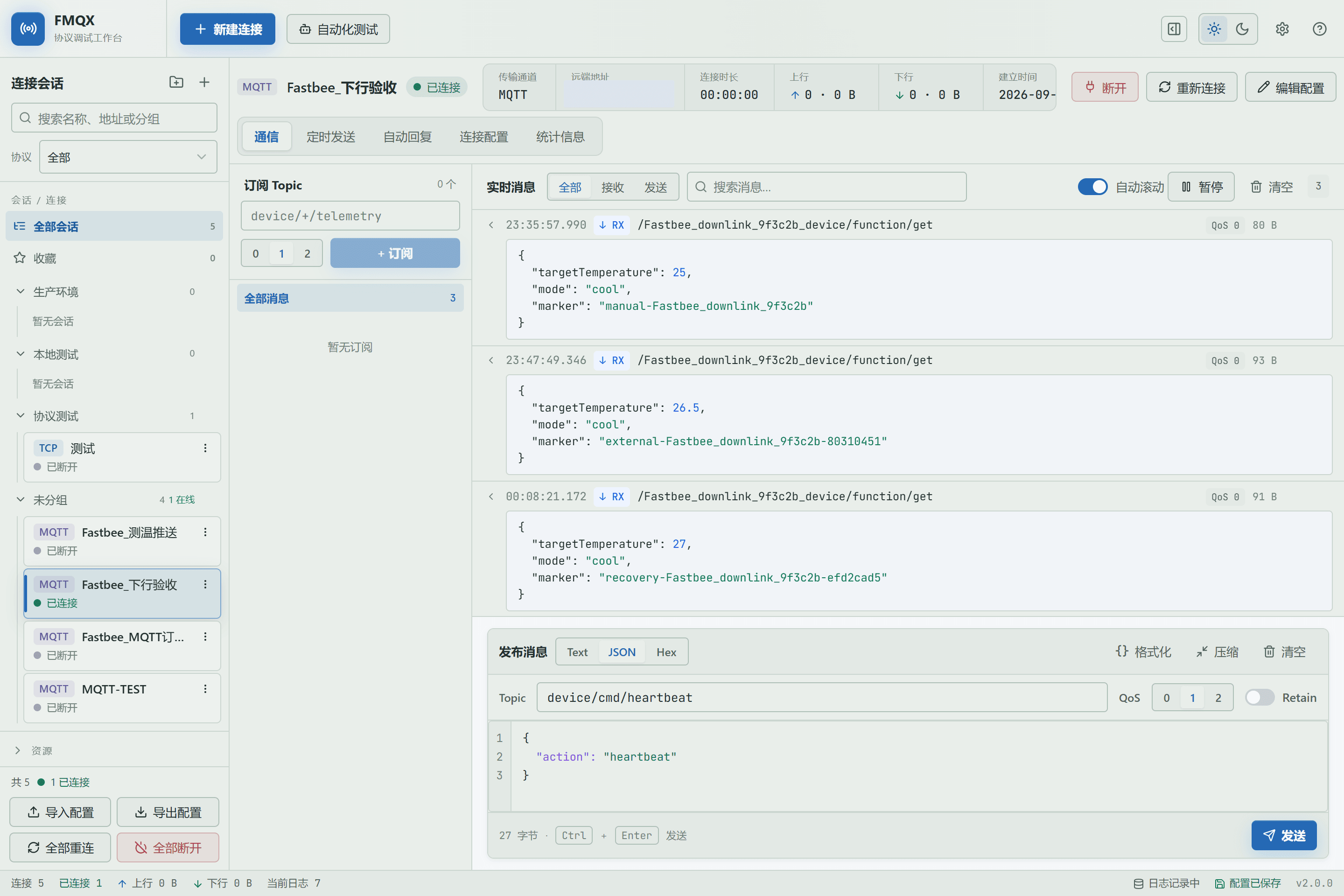
Figure: the new FMQX has reconnected to the MQTT Broker, and the original device Topic subscription remains usable.
Field Descriptions
| Field / Control | Description |
|---|---|
| Device Receiving Address (commandTopic) | The complete Topic the MQTT device finally subscribes to.; after saving it affects the current command downlink task; after changes, re-check and retest with a real device. Required · Source: the device protocol convention or the task output Topic template. Choice: the external Alink had better carry it explicitly to avoid ambiguity from templates or default values. Recommended: fill in per the integration documents · Example: /FastBee_downlink_device/function/get |
20. Repeat the Old ID to Verify Idempotency
Location: Integration → Command Downlink
Republish the same command ID that just went FAILED.
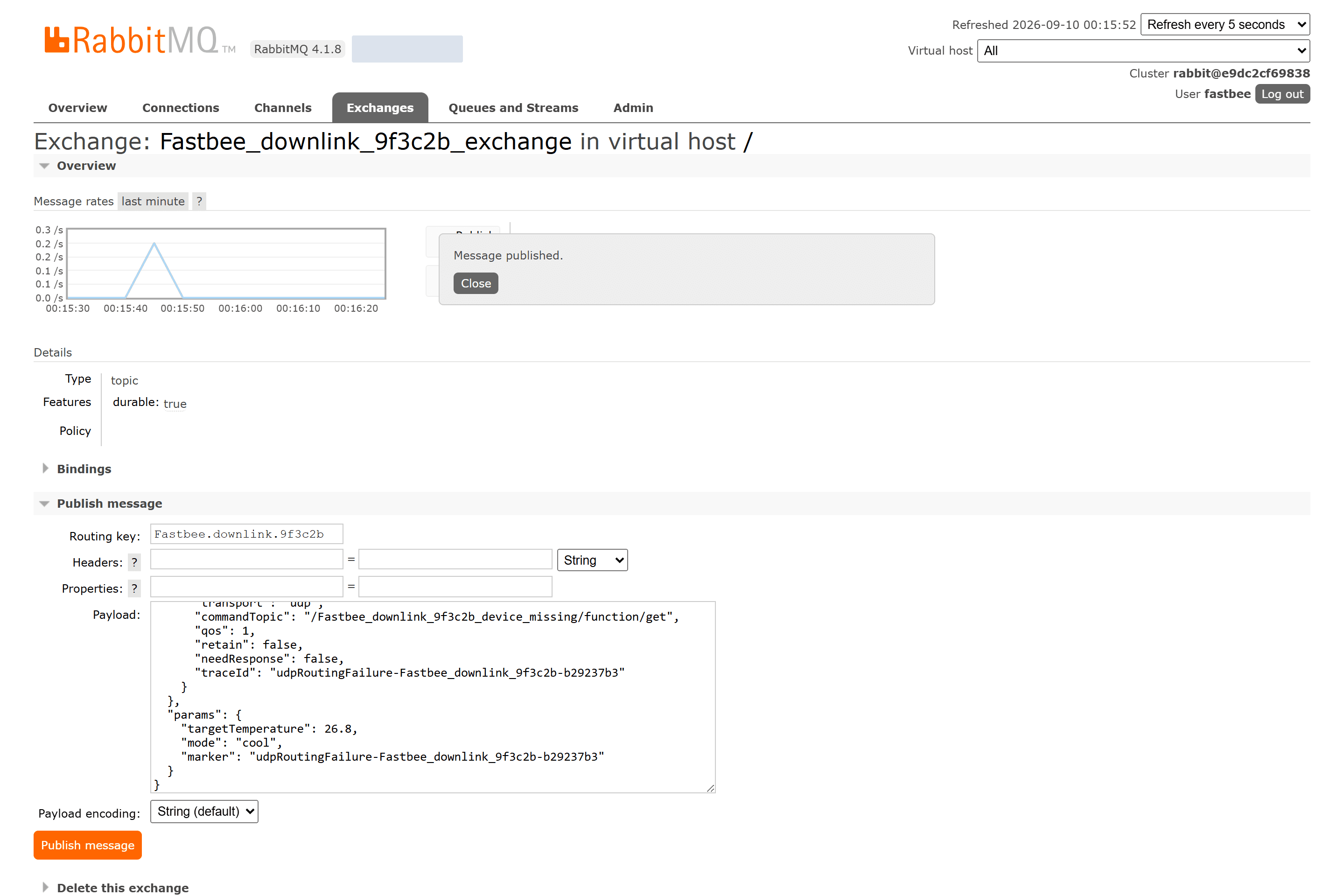
Figure: RabbitMQ has confirmed publishing command FastBee_downlink_9f3c2b_udpRoutingFailure_b29237b3 with Routing Key FastBee.downlink.9f3c2b.
Field Descriptions
| Field / Control | Description |
|---|---|
| Command ID (id) | The unique identity of this command, used for query, correlation, and idempotency.; after saving it affects the current command downlink task; after changes, re-check and retest with a real device. Required · Source: generated by the external business system for each actual send. Choice: keeping the ID for the same redelivery prevents duplicates; failure recovery requires a new ID while preserving the business correlation. Recommended: fill in per the integration documents · Example: FastBee_cmd_001 |
21. Confirm the Old ID Was Not Delivered Again
Location: Integration → Command Downlink
Watch the same window in the FMQX message area and confirm no new copy of the old marker appears.
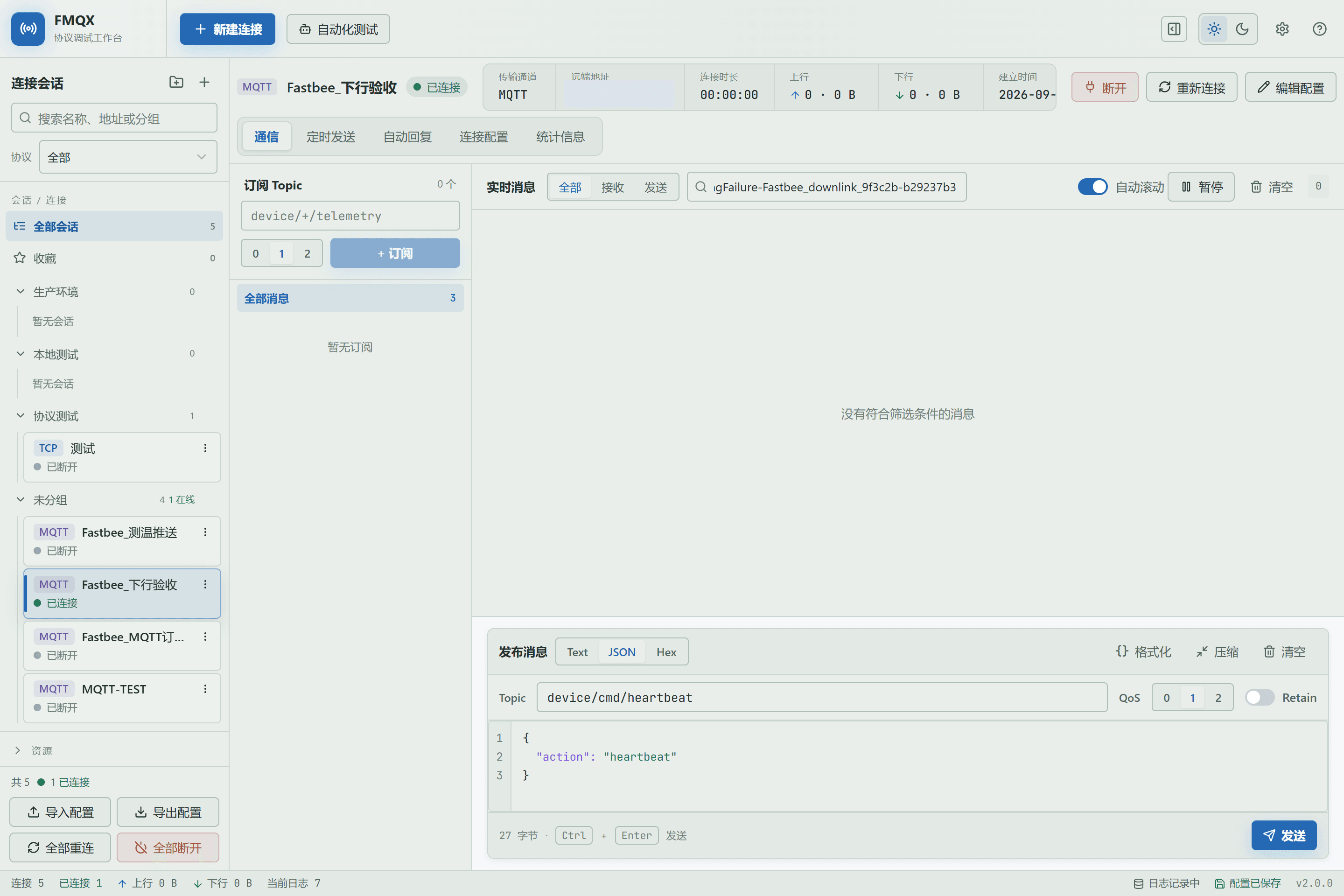
Figure: after searching by the old FAILED command's marker in the FMQX message area there is no device message; independent runtime evidence confirms the repeated old command ID was not delivered again.
22. Resend the Recovery Command with a New ID
Location: Integration → Command Downlink
With the device online, publish again with the same business parameters but a new command ID and marker.
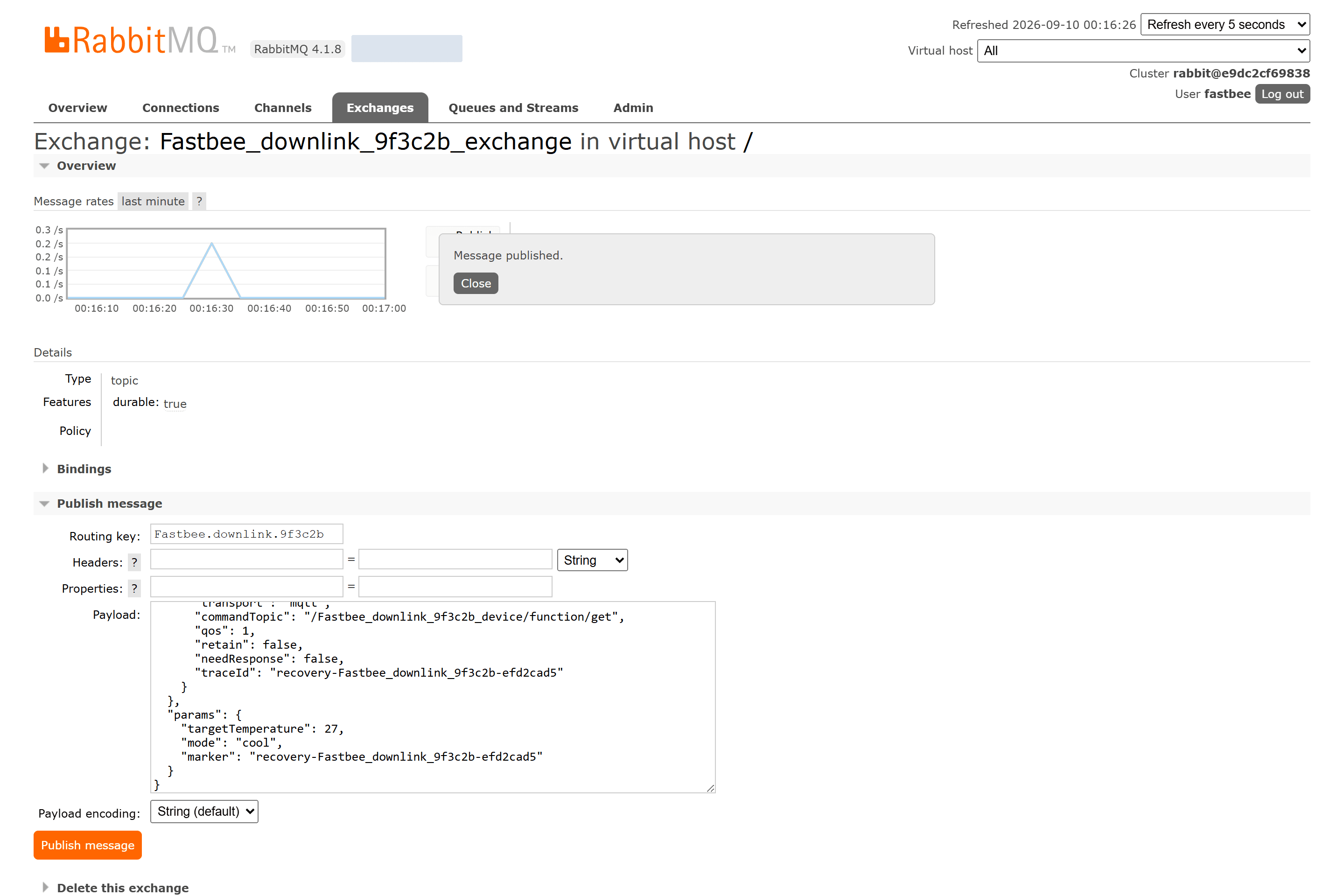
Figure: RabbitMQ has confirmed publishing command FastBee_downlink_9f3c2b_recovery_efd2cad5 with Routing Key FastBee.downlink.9f3c2b.
Field Descriptions
| Field / Control | Description |
|---|---|
| Command ID (id) | The unique identity of this command, used for query, correlation, and idempotency.; after saving it affects the current command downlink task; after changes, re-check and retest with a real device. Required · Source: generated by the external business system for each actual send. Choice: keeping the ID for the same redelivery prevents duplicates; failure recovery requires a new ID while preserving the business correlation. Recommended: fill in per the integration documents · Example: FastBee_cmd_001 |
| Business Parameters (params) | The data the device actually executes, such as target temperature and mode.; after saving it affects the current command downlink task; after changes, re-check and retest with a real device. Required · Source: generated by the business system from the command form or rules. Choice: put only business fields; do not stuff clientId, Token, or Broker addresses into params. Recommended: fill in per the integration documents · Example: |
23. Confirm the New ID Restores Device-Side Actual Receipt
Location: Integration → Command Downlink
Read the recovery message in FMQX and verify the new marker and targetTemperature=27.0.
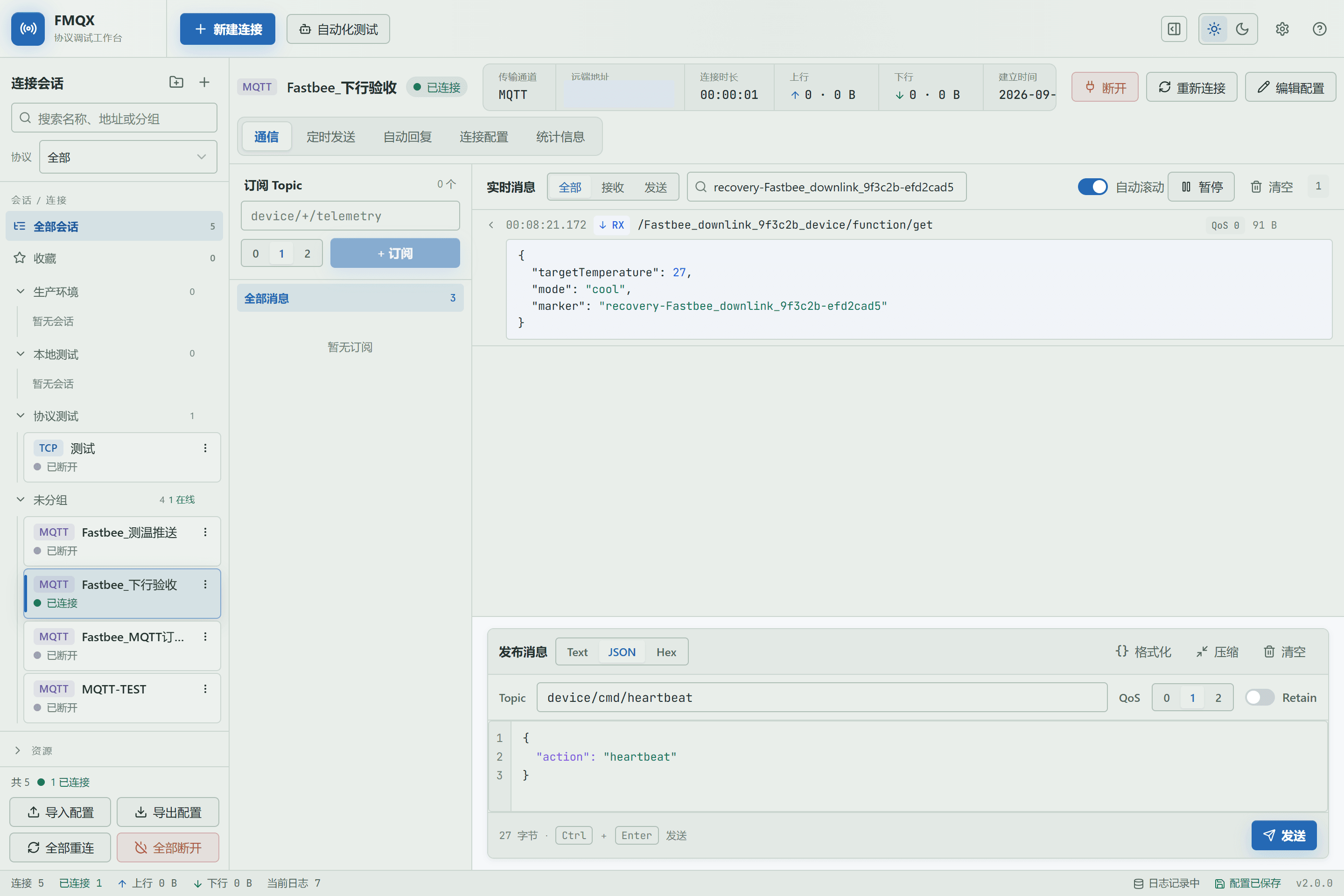
Figure: the new FMQX shows the recovery message of the new command ID, and targetTemperature=27.0 is consistent with the verified runtime evidence.
Alink Downlink Messages and Send Content
External entries should send standard Alink JSON. id is the unique identity of this command, version describes the structure version, method states the business action, sys carries the device and routing context, and params holds the business parameters such as target temperature and mode.
To avoid automatic-routing ambiguity, this hands-on exercise explicitly writes transport=mqtt and commandTopic in sys.ext, and also provides clientId, qos, and retain. The page's JSON, Text, Hex, and Base64 are manual test content modes, not four external Alink protocols.
Standard Alink Downlink Message
| Field | Purpose | Where the Value Comes From | How to Choose | Wrong-Input Symptom and Recovery | Effective Conditions |
|---|---|---|---|---|---|
| Required Command ID (id) | The unique identity of this command, used for query, correlation, and idempotency.; after saving it affects the current command downlink task; after changes, re-check and retest with a real device. | Generated by the external business system for each actual send. | Keeping the ID for the same redelivery prevents duplicates; failure recovery requires a new ID while preserving the business correlation. Recommended: fill in per the integration documents Default: — Example: FastBee_cmd_001 | A value inconsistent with the external entry or the device's actual information causes consumption failure, routing failure, or delivery to the wrong target.; go back to the value provider to verify item by item, and retest with a new command ID after correction. | Scope: the current command downlink task · Publish: not required · Restart: not required · Reconnect: not required |
| Required Version (version) | The Alink message structure version.; after saving it affects the current command downlink task; after changes, re-check and retest with a real device. | Specified by the current access contract. | This manual uses 1.0; do not fill a business software version here. Recommended: fill in per the integration documents Default: — Example: 1.0 | A value inconsistent with the external entry or the device's actual information causes consumption failure, routing failure, or delivery to the wrong target.; go back to the value provider to verify item by item, and retest with a new command ID after correction. | Scope: the current command downlink task · Publish: not required · Restart: not required · Reconnect: not required |
| Required Method (method) | States the business action to execute.; after saving it affects the current command downlink task; after changes, re-check and retest with a real device. | Agreed by the external business and the device capability. | Use thing.service.property.set for property setting; other methods must be supported by the current protocol capability. Recommended: fill in per the integration documents Default: — Example: thing.service.property.set | A value inconsistent with the external entry or the device's actual information causes consumption failure, routing failure, or delivery to the wrong target.; go back to the value provider to verify item by item, and retest with a new command ID after correction. | Scope: the current command downlink task · Publish: not required · Restart: not required · Reconnect: not required |
| Required System Context (sys) | Carries the device identity, protocol, time, and extended routing; not business parameters.; after saving it affects the current command downlink task; after changes, re-check and retest with a real device. | Assembled by the external system according to the device profile and the FMQ access convention. | At least ensure deviceId/deviceKey or ext.clientId can locate the target, and explicitly give the actual transport. Recommended: fill in per the integration documents Default: — Example: {"deviceId":"device-001","protocol":"ALINK_JSON","ext":{"transport":"mqtt"}} | A value inconsistent with the external entry or the device's actual information causes consumption failure, routing failure, or delivery to the wrong target.; go back to the value provider to verify item by item, and retest with a new command ID after correction. | Scope: the current command downlink task · Publish: not required · Restart: not required · Reconnect: not required |
| Required Business Parameters (params) | The data the device actually executes, such as target temperature and mode.; after saving it affects the current command downlink task; after changes, re-check and retest with a real device. | Generated by the business system from the command form or rules. | Put only business fields; do not stuff clientId, Token, or Broker addresses into params. Recommended: fill in per the integration documents Default: — Example: | A value inconsistent with the external entry or the device's actual information causes consumption failure, routing failure, or delivery to the wrong target.; go back to the value provider to verify item by item, and retest with a new command ID after correction. | Scope: the current command downlink task · Publish: not required · Restart: not required · Reconnect: not required |
| Required Target Device Number (clientId) | Used to locate the real MQTT/TCP/UDP session.; after saving it affects the current command downlink task; after changes, re-check and retest with a real device. | The device access record or Alink sys.ext. | Must exactly match the current online session, including case and leading/trailing spaces. Recommended: fill in per the integration documents Default: — Example: FastBee_downlink_device | A value inconsistent with the external entry or the device's actual information causes consumption failure, routing failure, or delivery to the wrong target.; go back to the value provider to verify item by item, and retest with a new command ID after correction. | Scope: the current command downlink task · Publish: not required · Restart: not required · Reconnect: not required |
| Required Device Receiving Address (commandTopic) | The complete Topic the MQTT device finally subscribes to.; after saving it affects the current command downlink task; after changes, re-check and retest with a real device. | The device protocol convention or the task output Topic template. | The external Alink had better carry it explicitly to avoid ambiguity from templates or default values. Recommended: fill in per the integration documents Default: — Example: /FastBee_downlink_device/function/get | A value inconsistent with the external entry or the device's actual information causes consumption failure, routing failure, or delivery to the wrong target.; go back to the value provider to verify item by item, and retest with a new command ID after correction. | Scope: the current command downlink task · Publish: not required · Restart: not required · Reconnect: not required |
| Required Actual Transport (transport) | Explicitly specifies mqtt, tcp, or udp.; after saving it affects the current command downlink task; after changes, re-check and retest with a real device. | The target device's real access protocol. | Fill it in explicitly in the external Alink, consistent with the task target protocol. Recommended: fill in per the integration documents Default: — Example: mqtt MQTT: the target device is online via MQTT, and the client ID and device subscription Topic are known.; SENT means the PUBLISH has been written to a valid session or a remote node channel; the final result still depends on actual receipt by the device client. TCP: the target device uses a TCP session registered on the platform, or the command explicitly gives the target endpoint.; SENT does not mean the device has executed the business command; the current no-response TCP path may still complete when the channel cannot be found, so device-side actual receipt or a device reply must supplement the judgment. UDP: the target device receives commands as UDP datagrams, with a clear endpoint source and connectionless delivery allowed.; SENT means the datagram has been handed to the send channel; UDP itself provides no device business confirmation. | A value inconsistent with the external entry or the device's actual information causes consumption failure, routing failure, or delivery to the wrong target.; go back to the value provider to verify item by item, and retest with a new command ID after correction. | Scope: the current command downlink task · Publish: not required · Restart: not required · Reconnect: not required |
| Complete Alink Downlink Example | Composed of id, version, method, sys, and params; sys.ext contains clientId, transport, commandTopic, qos, and retain.; helps judge which level the current link is at; does not change the running configuration. | This manual's hands-on contract and real runtime messages. | Validate the JSON in the test environment before sending, then deliver it through the external entry. Recommended: fill in per the integration documents Default: — Example: thing.service.property.set | A value inconsistent with the external entry or the device's actual information causes consumption failure, routing failure, or delivery to the wrong target.; go back to the value provider to verify item by item, and retest with a new command ID after correction. | Scope: the current command downlink task · Publish: not required · Restart: not required · Reconnect: not required |
Pre-send Check and Manual Content
| Field | Purpose | Where the Value Comes From | How to Choose | Wrong-Input Symptom and Recovery | Effective Conditions |
|---|---|---|---|---|---|
| Required Test Target Device Number | The device that the manual check and Send Now should locate.; after saving it affects the current command downlink task; after changes, re-check and retest with a real device. | Obtained from the device client or the FMQX session. | Must match the online clientId; filling it in does not automatically create a session. Recommended: fill in per the integration documents Default: — Example: FastBee_downlink_9f3c2b_device | A value inconsistent with the external entry or the device's actual information causes consumption failure, routing failure, or delivery to the wrong target.; go back to the value provider to verify item by item, and retest with a new command ID after correction. | Scope: the current command downlink task · Publish: not required · Restart: not required · Reconnect: not required |
| Required Test Device Receiving Topic | The final receiving address of this manual test.; after saving it affects the current command downlink task; after changes, re-check and retest with a real device. | Generated from the device subscription or the task output Topic. | Fill in the complete Topic, not the RabbitMQ Queue. Recommended: fill in per the integration documents Default: — Example: /FastBee_downlink_9f3c2b_device/function/get | A value inconsistent with the external entry or the device's actual information causes consumption failure, routing failure, or delivery to the wrong target.; go back to the value provider to verify item by item, and retest with a new command ID after correction. | Scope: the current command downlink task · Publish: not required · Restart: not required · Reconnect: not required |
| Required Send Content Type | Determines how the page converts the test content into bytes.; after saving it affects the current command downlink task; after changes, re-check and retest with a real device. | Choose according to the real device command format. | Use JSON for structured business objects; use Text, Hex, or Base64 only for plain text or binary protocols. Recommended: fill in per the integration documents Default: — Example: JSON JSON: parsed into an object before delivery; invalid JSON is blocked on the page Text: sent as the raw string; no JSON structure validation Hex: even-length hexadecimal decoded into bytes; invalid characters or odd length fail Base64: decoded into raw bytes; must be valid Base64 | A value inconsistent with the external entry or the device's actual information causes consumption failure, routing failure, or delivery to the wrong target.; go back to the value provider to verify item by item, and retest with a new command ID after correction. | Scope: the current command downlink task · Publish: not required · Restart: not required · Reconnect: not required |
| Required Send Content | The business content of this manual check or delivery.; after saving it affects the current command downlink task; after changes, re-check and retest with a real device. | The device protocol and business command definition. | Fill in only the business object in JSON mode; the page assembles the command with the clientId and Topic. Recommended: fill in per the integration documents Default: — Example: | A value inconsistent with the external entry or the device's actual information causes consumption failure, routing failure, or delivery to the wrong target.; go back to the value provider to verify item by item, and retest with a new command ID after correction. | Scope: the current command downlink task · Publish: not required · Restart: not required · Reconnect: not required |
| Check | Only parses, converts, and generates a preview; does not call the real device channel.; after saving it affects the current command downlink task; after changes, re-check and retest with a real device. | The operation entry provided by the current page. | Check first after every change to the target or content. Recommended: fill in per the integration documents Default: — Example: Check | A passing check cannot prove the device is online or has received.; check the page feedback and recent status first, correct it, and run once more. | Scope: the current command downlink task · Publish: not required · Restart: not required · Reconnect: not required |
| Send Now | Uses the current test data to actually call the device delivery link.; after saving it affects the current command downlink task; after changes, re-check and retest with a real device. | The operation entry provided by the current page. | Execute only against authorized isolated devices, and then you must look at device-side actual receipt. Recommended: fill in per the integration documents Default: — Example: Send Now | May execute even when the task is disabled; may cause a real device action.; check the page feedback and recent status first, correct it, and run once more. | Scope: the current command downlink task · Publish: not required · Restart: not required · Reconnect: not required |
| Final Device Number | The target clientId finally generated by the check or send.; helps judge which level the current link is at; does not change the running configuration. | The command in the page test result. | Verify it verbatim against the online identity in FMQX or the device client. Recommended: fill in per the integration documents Default: — Example: FastBee_downlink_device | A value inconsistent with the external entry or the device's actual information causes consumption failure, routing failure, or delivery to the wrong target.; go back to the value provider to verify item by item, and retest with a new command ID after correction. | Scope: the current command downlink task · Publish: not required · Restart: not required · Reconnect: not required |
| Final Receiving Address | The MQTT Topic or TCP/UDP endpoint finally generated by the check or send.; helps judge which level the current link is at; does not change the running configuration. | The outputTopic/command in the page test result. | It is not the input Queue; it must match the device's real subscription or endpoint. Recommended: fill in per the integration documents Default: — Example: /device/function/get | A value inconsistent with the external entry or the device's actual information causes consumption failure, routing failure, or delivery to the wrong target.; go back to the value provider to verify item by item, and retest with a new command ID after correction. | Scope: the current command downlink task · Publish: not required · Restart: not required · Reconnect: not required |
| Final Send Content | The content actually handed to the protocol layer after the page input is parsed.; helps judge which level the current link is at; does not change the running configuration. | The command in the page test result. | Check the business fields and values, not just the JSON syntax. Recommended: fill in per the integration documents Default: — Example: | A value inconsistent with the external entry or the device's actual information causes consumption failure, routing failure, or delivery to the wrong target.; go back to the value provider to verify item by item, and retest with a new command ID after correction. | Scope: the current command downlink task · Publish: not required · Restart: not required · Reconnect: not required |
Pre-send Check and Manual Content
| Field | Purpose | Where the Value Comes From | How to Choose | Wrong-Input Symptom and Recovery | Effective Conditions |
|---|---|---|---|---|---|
| Wait for Device Response | Marks whether the command expects a device reply.; after saving it affects the current command downlink task; after changes, re-check and retest with a real device. | Whether the device protocol defines a receipt. | Enable it only when both the device and the platform support the corresponding reply; enabling it does not mean the page waits synchronously for success. Recommended: fill in per the integration documents Default: — Example: false | A value inconsistent with the external entry or the device's actual information causes consumption failure, routing failure, or delivery to the wrong target.; go back to the value provider to verify item by item, and retest with a new command ID after correction. | Scope: the current command downlink task · Publish: not required · Restart: not required · Reconnect: not required |
| Function Code | A numeric function code that protocols such as TCP/UDP may require.; after saving it affects the current command downlink task; after changes, re-check and retest with a real device. | The device protocol document. | Leave it empty for the MQTT JSON hands-on; when required, a number must be filled in. Recommended: fill in per the integration documents Default: — Example: 3 | A value inconsistent with the external entry or the device's actual information causes consumption failure, routing failure, or delivery to the wrong target.; go back to the value provider to verify item by item, and retest with a new command ID after correction. | Scope: the current command downlink task · Publish: not required · Restart: not required · Reconnect: not required |
| Transaction Number | The business identifier correlating the device protocol request and response.; after saving it affects the current command downlink task; after changes, re-check and retest with a real device. | Automatically generated by the external system or the platform. | Leave it empty to let the platform generate one when there is no existing transaction number; do not conflate it with the Alink id semantics. Recommended: fill in per the integration documents Default: — Example: leave empty | A value inconsistent with the external entry or the device's actual information causes consumption failure, routing failure, or delivery to the wrong target.; go back to the value provider to verify item by item, and retest with a new command ID after correction. | Scope: the current command downlink task · Publish: not required · Restart: not required · Reconnect: not required |
| Additional Fields | Supplements the test message with other JSON keys.; after saving it affects the current command downlink task; after changes, re-check and retest with a real device. | Special protocol or troubleshooting needs. | Must be a JSON object; clientId, topic, and send content still follow the main form. Recommended: fill in per the integration documents Default: — Example: | A value inconsistent with the external entry or the device's actual information causes consumption failure, routing failure, or delivery to the wrong target.; go back to the value provider to verify item by item, and retest with a new command ID after correction. | Scope: the current command downlink task · Publish: not required · Restart: not required · Reconnect: not required |
Parameter Reference: Six Entry Types and Three Device Protocols
The entry parameters answer how FMQ receives external commands; the device protocol parameters answer how FMQ delivers commands to devices. Choose the entry by the external system's existing capability, and choose the target protocol by the real device session; there is no automatic correspondence between the two.
The current page only allows choosing MQTT, TCP, or UDP. Historical or API-level auto is normalized into a concrete protocol and is not taught as a page option. Advanced field mapping is currently only saved and is not used as a runtime conversion basis.
Kafka Inbound Parameters
| Field | Purpose | Where the Value Comes From | How to Choose | Wrong-Input Symptom and Recovery | Effective Conditions |
|---|---|---|---|---|---|
| Required Bootstrap Servers | Kafka bootstrap addresses; may contain multiple Broker endpoints.; after saving it affects the current command downlink task; after changes, re-check and retest with a real device. | Provided by the external system or middleware administrator; must be addresses actually reachable from the FMQ server. | Fill in completely per the integration list; do not fill the management console URL. Recommended: fill in per the integration documents Default: — Example: broker-a:9092,broker-b:9092 | A value inconsistent with the external entry or the device's actual information causes consumption failure, routing failure, or delivery to the wrong target.; go back to the value provider to verify item by item, and retest with a new command ID after correction. | Scope: the current command downlink task · Publish: not required · Restart: not required · Reconnect: not required |
| Required Group ID | The consumer group FMQ uses to consume commands.; after saving it affects the current command downlink task; after changes, re-check and retest with a real device. | Assigned jointly by the Kafka administrator and the application owner. | Use an independent, stable group name for the current command link; changing the group name changes the consumption progress ownership. Recommended: fill in per the integration documents Default: — Example: FastBee_downlink_group | A value inconsistent with the external entry or the device's actual information causes consumption failure, routing failure, or delivery to the wrong target.; go back to the value provider to verify item by item, and retest with a new command ID after correction. | Scope: the current command downlink task · Publish: not required · Restart: not required · Reconnect: not required |
| Required Source Topic | The Topic to which external commands are written and which FMQ subscribes to.; after saving it affects the current command downlink task; after changes, re-check and retest with a real device. | Agreed by the external system and the Kafka administrator. | The sender and FMQ must use the same Topic; do not mix it up with the device MQTT Topic. Recommended: fill in per the integration documents Default: — Example: FastBee_downlink_commands | A value inconsistent with the external entry or the device's actual information causes consumption failure, routing failure, or delivery to the wrong target.; go back to the value provider to verify item by item, and retest with a new command ID after correction. | Scope: the current command downlink task · Publish: not required · Restart: not required · Reconnect: not required |
| Initial Consumption Policy | Starts from the latest or earliest position when the group has no committed offset.; after saving it affects the current command downlink task; after changes, re-check and retest with a real device. | Determined by whether historical backlog needs to be processed. | New production links usually use latest; choose earliest only when historical commands explicitly need to be backfilled, and evaluate duplicates and side effects first. Recommended: fill in per the integration documents Default: — Example: latest Latest: starts from new messages; does not actively replay history from before the group was created Earliest: starts from the earliest available position; may execute historical control commands | A value inconsistent with the external entry or the device's actual information causes consumption failure, routing failure, or delivery to the wrong target.; go back to the value provider to verify item by item, and retest with a new command ID after correction. | Scope: the current command downlink task · Publish: not required · Restart: not required · Reconnect: not required |
| Consumer Instance Count | The number of Kafka consumer instances started for the same task.; after saving it affects the current command downlink task; after changes, re-check and retest with a real device. | Evaluated by partition count, throughput, and deployment capacity. | Must not exceed the number of effective partitions; verify with 1 first, then adjust by monitoring. Recommended: fill in per the current business Default: — Example: 1 | A value inconsistent with the external entry or the device's actual information causes consumption failure, routing failure, or delivery to the wrong target.; go back to the value provider to verify item by item, and retest with a new command ID after correction. | Scope: the current command downlink task · Publish: not required · Restart: not required · Reconnect: not required |
Kafka Inbound Parameters
| Field | Purpose | Where the Value Comes From | How to Choose | Wrong-Input Symptom and Recovery | Effective Conditions |
|---|---|---|---|---|---|
| SASL Username | The identity used when Kafka enables SASL.; after saving it affects the current command downlink task; after changes, re-check and retest with a real device. | Provided by the administrator through a controlled channel; must not be written into manuals, screenshots, logs, or manifests. | Fill in only when the cluster requires SASL, and match the security protocol configuration. Recommended: fill in per the integration documents Default: — Example: fill in via the controlled channel | A value inconsistent with the external entry or the device's actual information causes consumption failure, routing failure, or delivery to the wrong target.; go back to the value provider to verify item by item, and retest with a new command ID after correction. | Scope: the current command downlink task · Publish: not required · Restart: not required · Reconnect: not required |
| SASL Password | The password corresponding to the SASL identity.; after saving it affects the current command downlink task; after changes, re-check and retest with a real device. | Provided by the administrator through a controlled channel; must not be written into manuals, screenshots, logs, or manifests. | Provided as a pair with the username; keep the password box masked in screenshots. Recommended: fill in per the integration documents Default: — Example: fill in via the controlled channel | Leakage affects Kafka access security.; go back to the value provider to verify item by item, and retest with a new command ID after correction. | Scope: the current command downlink task · Publish: not required · Restart: not required · Reconnect: not required |
RabbitMQ Inbound Parameters
| Field | Purpose | Where the Value Comes From | How to Choose | Wrong-Input Symptom and Recovery | Effective Conditions |
|---|---|---|---|---|---|
| Required Host | The RabbitMQ host name or IP, without the protocol or management path.; after saving it affects the current command downlink task; after changes, re-check and retest with a real device. | Provided by the external system or middleware administrator; must be an address actually reachable from the FMQ server. | Fill in the AMQP service address, not the RabbitMQ management console address. Recommended: fill in per the integration documents Default: — Example: provided by the administrator | A value inconsistent with the external entry or the device's actual information causes consumption failure, routing failure, or delivery to the wrong target.; go back to the value provider to verify item by item, and retest with a new command ID after correction. | Scope: the current command downlink task · Publish: not required · Restart: not required · Reconnect: not required |
| Required Port | The RabbitMQ AMQP port.; after saving it affects the current command downlink task; after changes, re-check and retest with a real device. | Provided by the external system or middleware administrator; must be an address actually reachable from the FMQ server. | Commonly 5672, but the current deployment prevails; do not fill the 15672 management port. Recommended: fill in per the integration documents Default: — Example: 5672 (subject to the deployment) | A value inconsistent with the external entry or the device's actual information causes consumption failure, routing failure, or delivery to the wrong target.; go back to the value provider to verify item by item, and retest with a new command ID after correction. | Scope: the current command downlink task · Publish: not required · Restart: not required · Reconnect: not required |
| Virtual Host | The business isolation space in RabbitMQ.; after saving it affects the current command downlink task; after changes, re-check and retest with a real device. | The RabbitMQ administrator provides the name and permissions. | Must be consistent with the user authorization and the vhost where the Exchange and Queue reside. Recommended: fill in per the integration documents Default: — Example: / | A value inconsistent with the external entry or the device's actual information causes consumption failure, routing failure, or delivery to the wrong target.; go back to the value provider to verify item by item, and retest with a new command ID after correction. | Scope: the current command downlink task · Publish: not required · Restart: not required · Reconnect: not required |
| Username | The identity that connects to RabbitMQ and consumes the Queue.; after saving it affects the current command downlink task; after changes, re-check and retest with a real device. | Provided by the administrator through a controlled channel; must not be written into manuals, screenshots, logs, or manifests. | Should have at least connection, read, and necessary topology permissions on the corresponding vhost. Recommended: fill in per the integration documents Default: — Example: fill in via the controlled channel | A value inconsistent with the external entry or the device's actual information causes consumption failure, routing failure, or delivery to the wrong target.; go back to the value provider to verify item by item, and retest with a new command ID after correction. | Scope: the current command downlink task · Publish: not required · Restart: not required · Reconnect: not required |
| Password | The authentication information corresponding to the RabbitMQ identity.; after saving it affects the current command downlink task; after changes, re-check and retest with a real device. | Provided by the administrator through a controlled channel; must not be written into manuals, screenshots, logs, or manifests. | Injected only through the controlled environment or entered in the password box. Recommended: fill in per the integration documents Default: — Example: fill in via the controlled channel | Must not enter screenshots, logs, or customer HTML.; go back to the value provider to verify item by item, and retest with a new command ID after correction. | Scope: the current command downlink task · Publish: not required · Restart: not required · Reconnect: not required |
| Exchange | The exchange to which the external sender publishes commands.; after saving it affects the current command downlink task; after changes, re-check and retest with a real device. | The RabbitMQ administrator provides the declared exchange and its type. | Consistent with the external sender and the Queue Binding; do not fill the Queue name here. Recommended: fill in per the integration documents Default: — Example: FastBee_downlink_9f3c2b_exchange | A value inconsistent with the external entry or the device's actual information causes consumption failure, routing failure, or delivery to the wrong target.; go back to the value provider to verify item by item, and retest with a new command ID after correction. | Scope: the current command downlink task · Publish: not required · Restart: not required · Reconnect: not required |
| Required Queue | The command queue FMQ actually consumes.; after saving it affects the current command downlink task; after changes, re-check and retest with a real device. | The RabbitMQ administrator provides the dedicated queue and binding. | Use an independent Queue with clear ownership; multiple consumers compete for messages. Recommended: fill in per the integration documents Default: — Example: FastBee_downlink_9f3c2b_queue | A value inconsistent with the external entry or the device's actual information causes consumption failure, routing failure, or delivery to the wrong target.; go back to the value provider to verify item by item, and retest with a new command ID after correction. | Scope: the current command downlink task · Publish: not required · Restart: not required · Reconnect: not required |
| Routing Key | The key used by the Exchange to route to the Queue.; after saving it affects the current command downlink task; after changes, re-check and retest with a real device. | Agreed by the RabbitMQ Binding. | The external publishing and the Binding must match; FMQ consumes the Queue and does not re-filter by Routing Key. Recommended: fill in per the integration documents Default: — Example: FastBee.downlink.9f3c2b | A value inconsistent with the external entry or the device's actual information causes consumption failure, routing failure, or delivery to the wrong target.; go back to the value provider to verify item by item, and retest with a new command ID after correction. | Scope: the current command downlink task · Publish: not required · Restart: not required · Reconnect: not required |
| RabbitMQ ACK Boundary | The platform acknowledges the message after accepting the command, without waiting for the device's final processing.; helps judge which level the current link is at; does not change the running configuration. | The current consumption runtime implementation. | The Queue returning to zero only proves FMQ has accepted it; continue watching the command status and device-side actual receipt. Recommended: fill in per the integration documents Default: — Example: the device may still be FAILED after ACK | A value inconsistent with the external entry or the device's actual information causes consumption failure, routing failure, or delivery to the wrong target.; go back to the value provider to verify item by item, and retest with a new command ID after correction. | Scope: the current command downlink task · Publish: not required · Restart: not required · Reconnect: not required |
RabbitMQ Inbound Parameters
| Field | Purpose | Where the Value Comes From | How to Choose | Wrong-Input Symptom and Recovery | Effective Conditions |
|---|---|---|---|---|---|
| Prefetch Count | The maximum number of unacknowledged messages a single consumer can hold.; after saving it affects the current command downlink task; after changes, re-check and retest with a real device. | Tuned by command processing time, concurrency, and device capacity. | Verify with a smaller value first to avoid large concurrency caused by offline devices; this hands-on uses 16. Recommended: fill in per the current business Default: — Example: 16 | A value inconsistent with the external entry or the device's actual information causes consumption failure, routing failure, or delivery to the wrong target.; go back to the value provider to verify item by item, and retest with a new command ID after correction. | Scope: the current command downlink task · Publish: not required · Restart: not required · Reconnect: not required |
| Requeue on Failure | Whether to let RabbitMQ requeue when consumption processing throws an error.; after saving it affects the current command downlink task; after changes, re-check and retest with a real device. | Chosen by duplicate-control risk and the compensation plan. | Currently defaults to false; device failures are compensated with a new command ID instead of letting the original command loop indefinitely. Recommended: fill in per the integration documents Default: — Example: false Off: no automatic requeue after failure; the business compensates with a new ID On: failures may be requeued; persistent errors may form duplicate consumption and a command storm | A value inconsistent with the external entry or the device's actual information causes consumption failure, routing failure, or delivery to the wrong target.; go back to the value provider to verify item by item, and retest with a new command ID after correction. | Scope: the current command downlink task · Publish: not required · Restart: not required · Reconnect: not required |
RocketMQ Inbound Parameters
| Field | Purpose | Where the Value Comes From | How to Choose | Wrong-Input Symptom and Recovery | Effective Conditions |
|---|---|---|---|---|---|
| Required NameServer | The RocketMQ service discovery address.; after saving it affects the current command downlink task; after changes, re-check and retest with a real device. | Provided by the external system or middleware administrator; must be an address actually reachable from the FMQ server. | Fill in the actually reachable NameServer, not the console URL. Recommended: fill in per the integration documents Default: — Example: nameserver:9876 | A value inconsistent with the external entry or the device's actual information causes consumption failure, routing failure, or delivery to the wrong target.; go back to the value provider to verify item by item, and retest with a new command ID after correction. | Scope: the current command downlink task · Publish: not required · Restart: not required · Reconnect: not required |
| Required Topic | The Topic to which external commands are published and which FMQ subscribes to.; after saving it affects the current command downlink task; after changes, re-check and retest with a real device. | Agreed by the RocketMQ administrator and the sender. | Use a dedicated Topic and avoid mixing it with uplink messages. Recommended: fill in per the integration documents Default: — Example: FastBee_downlink_commands | A value inconsistent with the external entry or the device's actual information causes consumption failure, routing failure, or delivery to the wrong target.; go back to the value provider to verify item by item, and retest with a new command ID after correction. | Scope: the current command downlink task · Publish: not required · Restart: not required · Reconnect: not required |
| Required Consumer Group | The consumer group FMQ uses to receive commands.; after saving it affects the current command downlink task; after changes, re-check and retest with a real device. | Assigned by the RocketMQ administrator. | Use a stable group name for the same business link; instances in the group share the messages. Recommended: fill in per the integration documents Default: — Example: FastBee_downlink_consumer | A value inconsistent with the external entry or the device's actual information causes consumption failure, routing failure, or delivery to the wrong target.; go back to the value provider to verify item by item, and retest with a new command ID after correction. | Scope: the current command downlink task · Publish: not required · Restart: not required · Reconnect: not required |
| Tag | Receives only messages with matching tags.; after saving it affects the current command downlink task; after changes, re-check and retest with a real device. | The sender's Tag convention. | When all Tags are needed, fill in the wildcard as supported by the deployment; a specified Tag must exactly match the sender. Recommended: fill in per the integration documents Default: — Example: command | A value inconsistent with the external entry or the device's actual information causes consumption failure, routing failure, or delivery to the wrong target.; go back to the value provider to verify item by item, and retest with a new command ID after correction. | Scope: the current command downlink task · Publish: not required · Restart: not required · Reconnect: not required |
| RocketMQ Consumption Boundary | A message being consumed only means it has entered the FMQ processing chain; the device result must still be looked up separately.; helps judge which level the current link is at; does not change the running configuration. | The current inbound runtime implementation. | Continue checking the final state and device-side actual receipt by command ID. Recommended: fill in per the integration documents Default: — Example: consumption success does not equal device success | A value inconsistent with the external entry or the device's actual information causes consumption failure, routing failure, or delivery to the wrong target.; go back to the value provider to verify item by item, and retest with a new command ID after correction. | Scope: the current command downlink task · Publish: not required · Restart: not required · Reconnect: not required |
MQTT Inbound Parameters
| Field | Purpose | Where the Value Comes From | How to Choose | Wrong-Input Symptom and Recovery | Effective Conditions |
|---|---|---|---|---|---|
| Required Broker Host | The MQTT Broker address FMQ connects to as a subscription client.; after saving it affects the current command downlink task; after changes, re-check and retest with a real device. | Provided by the external system or middleware administrator; must be an address actually reachable from the FMQ server. | This is the external command Broker, not necessarily the device access Broker. Recommended: fill in per the integration documents Default: — Example: broker.example.com | A value inconsistent with the external entry or the device's actual information causes consumption failure, routing failure, or delivery to the wrong target.; go back to the value provider to verify item by item, and retest with a new command ID after correction. | Scope: the current command downlink task · Publish: not required · Restart: not required · Reconnect: not required |
| Required Broker Port | The MQTT listening port.; after saving it affects the current command downlink task; after changes, re-check and retest with a real device. | Provided by the external system or middleware administrator; must be an address actually reachable from the FMQ server. | Choose the correct port for the TLS or non-TLS deployment. Recommended: fill in per the integration documents Default: — Example: 1883 (subject to the deployment) | A value inconsistent with the external entry or the device's actual information causes consumption failure, routing failure, or delivery to the wrong target.; go back to the value provider to verify item by item, and retest with a new command ID after correction. | Scope: the current command downlink task · Publish: not required · Restart: not required · Reconnect: not required |
| Required Client ID | The unique client identity FMQ uses when subscribing to external commands.; after saving it affects the current command downlink task; after changes, re-check and retest with a real device. | Assigned by the MQTT administrator. | Must avoid conflicts with other instances; conflicts kick each other offline. Recommended: fill in per the integration documents Default: — Example: FastBee_downlink_ingress | A value inconsistent with the external entry or the device's actual information causes consumption failure, routing failure, or delivery to the wrong target.; go back to the value provider to verify item by item, and retest with a new command ID after correction. | Scope: the current command downlink task · Publish: not required · Restart: not required · Reconnect: not required |
| Username | The identity for connecting to the external MQTT Broker.; after saving it affects the current command downlink task; after changes, re-check and retest with a real device. | Provided by the administrator through a controlled channel; must not be written into manuals, screenshots, logs, or manifests. | Fill in per the Broker authentication rules; do not mistakenly use the target device's username. Recommended: fill in per the integration documents Default: — Example: fill in via the controlled channel | A value inconsistent with the external entry or the device's actual information causes consumption failure, routing failure, or delivery to the wrong target.; go back to the value provider to verify item by item, and retest with a new command ID after correction. | Scope: the current command downlink task · Publish: not required · Restart: not required · Reconnect: not required |
| Password | The password corresponding to the external MQTT Broker identity.; after saving it affects the current command downlink task; after changes, re-check and retest with a real device. | Provided by the administrator through a controlled channel; must not be written into manuals, screenshots, logs, or manifests. | Entered only in the controlled password box. Recommended: fill in per the integration documents Default: — Example: fill in via the controlled channel | Must not enter screenshots or deliverables.; go back to the value provider to verify item by item, and retest with a new command ID after correction. | Scope: the current command downlink task · Publish: not required · Restart: not required · Reconnect: not required |
| Required Subscribed Topic | The Topic on which FMQ receives external commands.; after saving it affects the current command downlink task; after changes, re-check and retest with a real device. | Agreed by the external sender and the Broker administrator. | Keep it separate from the device delivery Topic to avoid a loop. Recommended: fill in per the integration documents Default: — Example: business/device/commands | A value inconsistent with the external entry or the device's actual information causes consumption failure, routing failure, or delivery to the wrong target.; go back to the value provider to verify item by item, and retest with a new command ID after correction. | Scope: the current command downlink task · Publish: not required · Restart: not required · Reconnect: not required |
| Subscription QoS | The protocol delivery level at which FMQ receives external commands.; after saving it affects the current command downlink task; after changes, re-check and retest with a real device. | Determined jointly by the sender, the Broker, and the duplicate handling policy. | QoS 1 can still duplicate; command-ID idempotency must be relied on. Recommended: fill in per the current business Default: — Example: 1 | A value inconsistent with the external entry or the device's actual information causes consumption failure, routing failure, or delivery to the wrong target.; go back to the value provider to verify item by item, and retest with a new command ID after correction. | Scope: the current command downlink task · Publish: not required · Restart: not required · Reconnect: not required |
| Entry/Device Topic Loop Risk | If the entry subscription Topic overlaps the device delivery Topic, commands sent by FMQ may re-enter the task.; helps judge which level the current link is at; does not change the running configuration. | Comparing the entry Topic with the output Topic. | Use clearly directional, non-overlapping Topic naming. Recommended: fill in per the integration documents Default: — Example: business/commands and /device/function/get | A value inconsistent with the external entry or the device's actual information causes consumption failure, routing failure, or delivery to the wrong target.; go back to the value provider to verify item by item, and retest with a new command ID after correction. | Scope: the current command downlink task · Publish: not required · Restart: not required · Reconnect: not required |
WebHook Inbound Parameters
| Field | Purpose | Where the Value Comes From | How to Choose | Wrong-Input Symptom and Recovery | Effective Conditions |
|---|---|---|---|---|---|
| Required Entry Path | The relative path to which the external system POSTs Alink commands.; after saving it affects the current command downlink task; after changes, re-check and retest with a real device. | Agreed jointly by the platform implementation and the external API owner. | Use an independent and recognizable path; do not expose internal resource IDs. Recommended: fill in per the integration documents Default: — Example: /ingress/downstream/current | A value inconsistent with the external entry or the device's actual information causes consumption failure, routing failure, or delivery to the wrong target.; go back to the value provider to verify item by item, and retest with a new command ID after correction. | Scope: the current command downlink task · Publish: not required · Restart: not required · Reconnect: not required |
| Required Token | The shared token protecting the current inbound path.; after saving it affects the current command downlink task; after changes, re-check and retest with a real device. | Provided by the administrator through a controlled channel; must not be written into manuals, screenshots, logs, or manifests. | Sent via Authorization Bearer or a Token header supported by the platform; rotate periodically. Recommended: fill in per the integration documents Default: — Example: fill in via the controlled channel | After leakage, outsiders may send commands to devices.; go back to the value provider to verify item by item, and retest with a new command ID after correction. | Scope: the current command downlink task · Publish: not required · Restart: not required · Reconnect: not required |
| Request Method and Body | The external system uses POST to send standard Alink JSON.; helps judge which level the current link is at; does not change the running configuration. | The page hints and the HTTP entry implementation. | HTTP success only means the request was accepted; continue querying the command status. Recommended: fill in per the integration documents Default: — Example: POST application/json | A value inconsistent with the external entry or the device's actual information causes consumption failure, routing failure, or delivery to the wrong target.; go back to the value provider to verify item by item, and retest with a new command ID after correction. | Scope: the current command downlink task · Publish: not required · Restart: not required · Reconnect: not required |
HTTP Inbound Parameters
| Field | Purpose | Where the Value Comes From | How to Choose | Wrong-Input Symptom and Recovery | Effective Conditions |
|---|---|---|---|---|---|
| Required Entry Path | The protected command entry of the HTTP type.; after saving it affects the current command downlink task; after changes, re-check and retest with a real device. | Agreed jointly by the platform implementation and the external API owner. | Use a different path from other tasks to avoid routing conflicts. Recommended: fill in per the integration documents Default: — Example: /ingress/downstream/current | A value inconsistent with the external entry or the device's actual information causes consumption failure, routing failure, or delivery to the wrong target.; go back to the value provider to verify item by item, and retest with a new command ID after correction. | Scope: the current command downlink task · Publish: not required · Restart: not required · Reconnect: not required |
| Required Token | The shared token for calling the current HTTP entry.; after saving it affects the current command downlink task; after changes, re-check and retest with a real device. | Provided by the administrator through a controlled channel; must not be written into manuals, screenshots, logs, or manifests. | Stored and sent only in controlled systems; not placed in URL query parameters. Recommended: fill in per the integration documents Default: — Example: fill in via the controlled channel | Leakage expands the remote control risk.; go back to the value provider to verify item by item, and retest with a new command ID after correction. | Scope: the current command downlink task · Publish: not required · Restart: not required · Reconnect: not required |
| HTTP/WebHook Page Boundary | Both are currently protected HTTP inbound paths; the names distinguish the project's access types.; helps judge which level the current link is at; does not change the running configuration. | The current page and runtime implementation. | Choose per the project convention; do not treat the outbound WebHook in message push as this entry. Recommended: fill in per the integration documents Default: — Example: HTTP inbound | A value inconsistent with the external entry or the device's actual information causes consumption failure, routing failure, or delivery to the wrong target.; go back to the value provider to verify item by item, and retest with a new command ID after correction. | Scope: the current command downlink task · Publish: not required · Restart: not required · Reconnect: not required |
MQTT Device Delivery Parameters
| Field | Purpose | Where the Value Comes From | How to Choose | Wrong-Input Symptom and Recovery | Effective Conditions |
|---|---|---|---|---|---|
| Required clientId | Locates the current online MQTT session or the node it belongs to in the cluster.; after saving it affects the current command downlink task; after changes, re-check and retest with a real device. | The device client identity. | Exactly consistent with the clientId used at connection time; the username cannot substitute for it. Recommended: fill in per the integration documents Default: — Example: device-001 | A value inconsistent with the external entry or the device's actual information causes consumption failure, routing failure, or delivery to the wrong target.; go back to the value provider to verify item by item, and retest with a new command ID after correction. | Scope: the current command downlink task · Publish: not required · Restart: not required · Reconnect: not required |
| Required commandTopic / Topic | The Topic on which the device receives the PUBLISH.; after saving it affects the current command downlink task; after changes, re-check and retest with a real device. | The device subscription convention. | Explicit provision in the external Alink is most reliable; otherwise it is generated from the output Topic template. Recommended: fill in per the integration documents Default: — Example: /device-001/function/get | A value inconsistent with the external entry or the device's actual information causes consumption failure, routing failure, or delivery to the wrong target.; go back to the value provider to verify item by item, and retest with a new command ID after correction. | Scope: the current command downlink task · Publish: not required · Restart: not required · Reconnect: not required |
| qos | The MQTT QoS of this PUBLISH.; after saving it affects the current command downlink task; after changes, re-check and retest with a real device. | Alink sys.ext or the task default. | Choose by business duplicate tolerance; it is ultimately clamped to 0–2. Recommended: fill in per the integration documents Default: — Example: 1 | A value inconsistent with the external entry or the device's actual information causes consumption failure, routing failure, or delivery to the wrong target.; go back to the value provider to verify item by item, and retest with a new command ID after correction. | Scope: the current command downlink task · Publish: not required · Restart: not required · Reconnect: not required |
| retain | Whether to ask the Broker to retain the last command.; after saving it affects the current command downlink task; after changes, re-check and retest with a real device. | Alink sys.ext or the task default. | Off by default for immediate control, to avoid a reconnecting device executing an old command. Recommended: fill in per the integration documents Default: — Example: false | A value inconsistent with the external entry or the device's actual information causes consumption failure, routing failure, or delivery to the wrong target.; go back to the value provider to verify item by item, and retest with a new command ID after correction. | Scope: the current command downlink task · Publish: not required · Restart: not required · Reconnect: not required |
| MQTT SENT Boundary | The MQTT write operation on the local or remote node completed successfully.; helps judge which level the current link is at; does not change the running configuration. | The command dispatch and MQTT send result. | Continue confirming with the real device's subscribed message or business reply. Recommended: fill in per the integration documents Default: — Example: SENT != device business success | A value inconsistent with the external entry or the device's actual information causes consumption failure, routing failure, or delivery to the wrong target.; go back to the value provider to verify item by item, and retest with a new command ID after correction. | Scope: the current command downlink task · Publish: not required · Restart: not required · Reconnect: not required |
TCP Device Delivery Parameters
| Field | Purpose | Where the Value Comes From | How to Choose | Wrong-Input Symptom and Recovery | Effective Conditions |
|---|---|---|---|---|---|
| clientId | Preferably locates an existing TCP session on the platform.; after saving it affects the current command downlink task; after changes, re-check and retest with a real device. | The TCP device session or registration result. | Use the platform's current session identity; do not guess from the device name. Recommended: fill in per the integration documents Default: — Example: tcp-device-001 | A value inconsistent with the external entry or the device's actual information causes consumption failure, routing failure, or delivery to the wrong target.; go back to the value provider to verify item by item, and retest with a new command ID after correction. | Scope: the current command downlink task · Publish: not required · Restart: not required · Reconnect: not required |
| host | The target host when there is no reusable session.; after saving it affects the current command downlink task; after changes, re-check and retest with a real device. | The device network information. | Use only reachable and authorized device addresses. Recommended: fill in per the integration documents Default: — Example: 192.0.2.10 | A value inconsistent with the external entry or the device's actual information causes consumption failure, routing failure, or delivery to the wrong target.; go back to the value provider to verify item by item, and retest with a new command ID after correction. | Scope: the current command downlink task · Publish: not required · Restart: not required · Reconnect: not required |
| port | The target TCP service port.; after saving it affects the current command downlink task; after changes, re-check and retest with a real device. | The device protocol document and network configuration. | Consistent with the listening direction and protocol role; do not copy the FMQ console port. Recommended: fill in per the integration documents Default: — Example: 9000 | A value inconsistent with the external entry or the device's actual information causes consumption failure, routing failure, or delivery to the wrong target.; go back to the value provider to verify item by item, and retest with a new command ID after correction. | Scope: the current command downlink task · Publish: not required · Restart: not required · Reconnect: not required |
| Required payload / payloadHex / payloadBase64 | The text or byte content sent after protocol encoding.; after saving it affects the current command downlink task; after changes, re-check and retest with a real device. | The device protocol encoding rules. | Prefer Hex or Base64 for binary protocols and verify the byte order. Recommended: fill in per the integration documents Default: — Example: 010300000002 | A value inconsistent with the external entry or the device's actual information causes consumption failure, routing failure, or delivery to the wrong target.; go back to the value provider to verify item by item, and retest with a new command ID after correction. | Scope: the current command downlink task · Publish: not required · Restart: not required · Reconnect: not required |
| timeout | The waiting limit for establishing or writing to the target channel.; after saving it affects the current command downlink task; after changes, re-check and retest with a real device. | Network latency and platform limits. | Start testing from a small range; timeouts must not be masked by infinitely enlarging them over network faults. Recommended: fill in per the current business Default: — Example: 10 seconds | A value inconsistent with the external entry or the device's actual information causes consumption failure, routing failure, or delivery to the wrong target.; go back to the value provider to verify item by item, and retest with a new command ID after correction. | Scope: the current command downlink task · Publish: not required · Restart: not required · Reconnect: not required |
| TCP SENT Boundary | The bytes have been written to the TCP channel.; helps judge which level the current link is at; does not change the running configuration. | The protocol send result. | A device return or business-side status is still needed to confirm execution. Recommended: fill in per the integration documents Default: — Example: SENT != device executed | A value inconsistent with the external entry or the device's actual information causes consumption failure, routing failure, or delivery to the wrong target.; go back to the value provider to verify item by item, and retest with a new command ID after correction. | Scope: the current command downlink task · Publish: not required · Restart: not required · Reconnect: not required |
UDP Device Delivery Parameters
| Field | Purpose | Where the Value Comes From | How to Choose | Wrong-Input Symptom and Recovery | Effective Conditions |
|---|---|---|---|---|---|
| clientId | Used to resolve the device endpoint from the platform's runtime state.; after saving it affects the current command downlink task; after changes, re-check and retest with a real device. | The UDP device's most recent endpoint record. | The endpoint may change; confirm the most recent activity state before sending. Recommended: fill in per the integration documents Default: — Example: udp-device-001 | A value inconsistent with the external entry or the device's actual information causes consumption failure, routing failure, or delivery to the wrong target.; go back to the value provider to verify item by item, and retest with a new command ID after correction. | Scope: the current command downlink task · Publish: not required · Restart: not required · Reconnect: not required |
| host | The target UDP address.; after saving it affects the current command downlink task; after changes, re-check and retest with a real device. | The device endpoint or controlled network information. | Provide it explicitly when there is no stable session, to avoid sending to an old endpoint. Recommended: fill in per the integration documents Default: — Example: 192.0.2.20 | A value inconsistent with the external entry or the device's actual information causes consumption failure, routing failure, or delivery to the wrong target.; go back to the value provider to verify item by item, and retest with a new command ID after correction. | Scope: the current command downlink task · Publish: not required · Restart: not required · Reconnect: not required |
| port | The target UDP port.; after saving it affects the current command downlink task; after changes, re-check and retest with a real device. | The device protocol and network information. | Consistent with the real device's listening port. Recommended: fill in per the integration documents Default: — Example: 9001 | A value inconsistent with the external entry or the device's actual information causes consumption failure, routing failure, or delivery to the wrong target.; go back to the value provider to verify item by item, and retest with a new command ID after correction. | Scope: the current command downlink task · Publish: not required · Restart: not required · Reconnect: not required |
| Required payload / payloadHex / payloadBase64 | The text or byte content of the UDP datagram.; after saving it affects the current command downlink task; after changes, re-check and retest with a real device. | The device protocol encoding rules. | Each command should form one complete datagram; do not rely on TCP-style stream concatenation. Recommended: fill in per the integration documents Default: — Example: 010600010001 | A value inconsistent with the external entry or the device's actual information causes consumption failure, routing failure, or delivery to the wrong target.; go back to the value provider to verify item by item, and retest with a new command ID after correction. | Scope: the current command downlink task · Publish: not required · Restart: not required · Reconnect: not required |
| timeout | The waiting limit allowed in the target resolution or send phase.; after saving it affects the current command downlink task; after changes, re-check and retest with a real device. | The platform and network agreement. | Used only for bounded waiting; UDP itself provides no confirmation. Recommended: fill in per the current business Default: — Example: 10 seconds | A value inconsistent with the external entry or the device's actual information causes consumption failure, routing failure, or delivery to the wrong target.; go back to the value provider to verify item by item, and retest with a new command ID after correction. | Scope: the current command downlink task · Publish: not required · Restart: not required · Reconnect: not required |
| UDP SENT Boundary | The datagram has been handed to the send channel.; helps judge which level the current link is at; does not change the running configuration. | The protocol send result. | An application-layer receipt or device state verification is needed; do not rely on UDP transport confirmation. Recommended: fill in per the integration documents Default: — Example: SENT != device received | A value inconsistent with the external entry or the device's actual information causes consumption failure, routing failure, or delivery to the wrong target.; go back to the value provider to verify item by item, and retest with a new command ID after correction. | Scope: the current command downlink task · Publish: not required · Restart: not required · Reconnect: not required |
Check, Send, Status, and Tiered Judgment
Check does not send; it only verifies that the target, Topic, and content can be generated. Send Now bypasses the external entry and goes directly through device delivery. An external MQ being ACKed means the platform has accepted it; SENT means the protocol write is complete; the final business success still depends on device-side actual receipt or a device reply.
Command states include QUEUED, SENDING, SENT, FAILED, TIMEOUT, and REJECTED. In the current implementation, a command ID is idempotent for about 30 minutes; repeating an old ID after failure does not recreate the command, and recovery must use a new ID.
Operations, Monitoring, and Command Status
| Field | Purpose | Where the Value Comes From | How to Choose | Wrong-Input Symptom and Recovery | Effective Conditions |
|---|---|---|---|---|---|
| Search | Locates tasks by task name or the summaries the page supports.; after saving it affects the current command downlink task; after changes, re-check and retest with a real device. | The task identities in the current list. | When nothing is found, clear the status filter and search term, then refresh. Recommended: fill in per the integration documents Default: — Example: FastBee_温控指令下行 | A value inconsistent with the external entry or the device's actual information causes consumption failure, routing failure, or delivery to the wrong target.; go back to the value provider to verify item by item, and retest with a new command ID after correction. | Scope: the current command downlink task · Publish: not required · Restart: not required · Reconnect: not required |
| Status Filter | Shows only all, running, disabled, or abnormal tasks.; after saving it affects the current command downlink task; after changes, re-check and retest with a real device. | The task's current running state. | When a task cannot be found during troubleshooting, switch back to All first. Recommended: fill in per the integration documents Default: — Example: All All: shows all tasks; state not restricted Running: the external entry is consuming; disabled and abnormal tasks are hidden Disabled: the external entry is not consuming; running tasks are hidden Abnormal: the entry has a runtime error; used for concentrated troubleshooting | A value inconsistent with the external entry or the device's actual information causes consumption failure, routing failure, or delivery to the wrong target.; go back to the value provider to verify item by item, and retest with a new command ID after correction. | Scope: the current command downlink task · Publish: not required · Restart: not required · Reconnect: not required |
| Refresh | Reloads the list, details, or monitoring.; after saving it affects the current command downlink task; after changes, re-check and retest with a real device. | The operation entry provided by the current page. | Use when the latest status is needed, and verify the sampling time. Recommended: fill in per the integration documents Default: — Example: Refresh | Refresh does not resend commands.; check the page feedback and recent status first, correct it, and run once more. | Scope: the current command downlink task · Publish: not required · Restart: not required · Reconnect: not required |
| Enable | Starts the current external command entry.; after saving it affects the current command downlink task; after changes, re-check and retest with a real device. | The operation entry provided by the current page. | Enable only after completing checks, manual actual receipt, and safety confirmation. Recommended: fill in per the integration documents Default: — Example: Enable | May immediately consume backlog commands in the Queue or Topic.; check the page feedback and recent status first, correct it, and run once more. | Scope: the current command downlink task · Publish: not required · Restart: not required · Reconnect: not required |
| Disable | Stops further consumption of the external entry.; after saving it affects the current command downlink task; after changes, re-check and retest with a real device. | The operation entry provided by the current page. | Use before maintenance, troubleshooting, or deletion, and watch the backlog boundary. Recommended: fill in per the integration documents Default: — Example: Disable | Commands already accepted may still complete; Send Now can still execute.; check the page feedback and recent status first, correct it, and run once more. | Scope: the current command downlink task · Publish: not required · Restart: not required · Reconnect: not required |
| Monitoring | Views the task's reception and device downlink statistics.; after saving it affects the current command downlink task; after changes, re-check and retest with a real device. | The operation entry provided by the current page. | Compare the increments before and after this command; do not pass off historical totals as this round's result. Recommended: fill in per the integration documents Default: — Example: Monitoring | Sampling has a time boundary; old errors must be interpreted with their occurrence time.; check the page feedback and recent status first, correct it, and run once more. | Scope: the current command downlink task · Publish: not required · Restart: not required · Reconnect: not required |
| Edit | Modifies a simple task's entry or device target.; after saving it affects the current command downlink task; after changes, re-check and retest with a real device. | The operation entry provided by the current page. | Record the original values before modifying; re-check and verify actual receipt after saving. Recommended: fill in per the integration documents Default: — Example: Edit | Multi-action or externally generated tasks may have no edit entry.; check the page feedback and recent status first, correct it, and run once more. | Scope: the current command downlink task · Publish: not required · Restart: not required · Reconnect: not required |
| Copy | Creates a new draft from the current simple task.; after saving it affects the current command downlink task; after changes, re-check and retest with a real device. | The operation entry provided by the current page. | Rename it and disable it first, then verify the connector, Queue, and device target item by item. Recommended: fill in per the integration documents Default: — Example: Copy | Two tasks with the same entry running simultaneously may compete or consume duplicates.; check the page feedback and recent status first, correct it, and run once more. | Scope: the current command downlink task · Publish: not required · Restart: not required · Reconnect: not required |
| Delete | Removes the current command downlink task.; after saving it affects the current command downlink task; after changes, re-check and retest with a real device. | The operation entry provided by the current page. | Disable it first and confirm whether the connector and converter are still referenced by other tasks. Recommended: fill in per the integration documents Default: — Example: Delete | There is no undo; unreferenced associated resources may be cleaned up together.; check the page feedback and recent status first, correct it, and run once more. | Scope: the current command downlink task · Publish: not required · Restart: not required · Reconnect: not required |
| Delete Associated-Resource Boundary | When a simple task is deleted, connectors or converters not referenced by other tasks may be deleted together.; helps judge which level the current link is at; does not change the running configuration. | The page deletion flow and reference checks. | When ownership is unclear, cancel and check references on the connector page first. Recommended: fill in per the integration documents Default: — Example: cancel the deletion | A value inconsistent with the external entry or the device's actual information causes consumption failure, routing failure, or delivery to the wrong target.; go back to the value provider to verify item by item, and retest with a new command ID after correction. | Scope: the current command downlink task · Publish: not required · Restart: not required · Reconnect: not required |
| Multi-action Task Limitation | Multi-action or externally generated tasks may only support view, test, enable/disable, and delete.; helps judge which level the current link is at; does not change the running configuration. | The task action count and page capability. | When there is no edit or copy entry, handle it within the page boundary; do not manually assemble internal objects. Recommended: fill in per the integration documents Default: — Example: judge by the page's actual buttons | A value inconsistent with the external entry or the device's actual information causes consumption failure, routing failure, or delivery to the wrong target.; go back to the value provider to verify item by item, and retest with a new command ID after correction. | Scope: the current command downlink task · Publish: not required · Restart: not required · Reconnect: not required |
| Total Received | The number of external commands the current task has accepted.; helps judge which level the current link is at; does not change the running configuration. | The task monitoring snapshot. | It should increase after this publish; no increase means the problem is still at the entry level. Recommended: fill in per the integration documents Default: — Example: increment +1 before and after | A value inconsistent with the external entry or the device's actual information causes consumption failure, routing failure, or delivery to the wrong target.; go back to the value provider to verify item by item, and retest with a new command ID after correction. | Scope: the current command downlink task · Publish: not required · Restart: not required · Reconnect: not required |
| Downlink Success | The number of external commands that passed the entry's synchronous validation and were accepted by the platform; the asynchronous protocol final state may still be FAILED.; helps judge which level the current link is at; does not change the running configuration. | The task entry monitoring snapshot. | Used to judge whether the RabbitMQ message has entered the platform; afterwards you must query SENT/FAILED by command ID and check device-side actual receipt. Recommended: fill in per the integration documents Default: — Example: usually increment +1 after this publish | A value inconsistent with the external entry or the device's actual information causes consumption failure, routing failure, or delivery to the wrong target.; go back to the value provider to verify item by item, and retest with a new command ID after correction. | Scope: the current command downlink task · Publish: not required · Restart: not required · Reconnect: not required |
| Downlink Failure | The number of external messages that failed in entry parsing, synchronous validation, or synchronous acceptance; does not cover all asynchronous protocol failures.; helps judge which level the current link is at; does not change the running configuration. | The task entry monitoring snapshot. | When it increases, check the Alink structure and the synchronous rejection reason first; no increase does not rule out the command finally going FAILED. Recommended: fill in per the integration documents Default: — Example: increment +1 on entry failure | A value inconsistent with the external entry or the device's actual information causes consumption failure, routing failure, or delivery to the wrong target.; go back to the value provider to verify item by item, and retest with a new command ID after correction. | Scope: the current command downlink task · Publish: not required · Restart: not required · Reconnect: not required |
| Last-5-Minute Rate | The recent command processing speed, not a permanent average.; helps judge which level the current link is at; does not change the running configuration. | The monitoring time window. | Zero during business silence is normal; zero with continuous input needs investigation. Recommended: fill in per the integration documents Default: — Example: messages/second | A value inconsistent with the external entry or the device's actual information causes consumption failure, routing failure, or delivery to the wrong target.; go back to the value provider to verify item by item, and retest with a new command ID after correction. | Scope: the current command downlink task · Publish: not required · Restart: not required · Reconnect: not required |
| Recent Status / Recent Error | The most recent visible running state of the task or entry.; helps judge which level the current link is at; does not change the running configuration. | The task details and monitoring. | Judge it together with this round's time and command ID; do not replace the current conclusion with historical errors. Recommended: fill in per the integration documents Default: — Example: no current runtime error | A value inconsistent with the external entry or the device's actual information causes consumption failure, routing failure, or delivery to the wrong target.; go back to the value provider to verify item by item, and retest with a new command ID after correction. | Scope: the current command downlink task · Publish: not required · Restart: not required · Reconnect: not required |
| Command Final State | Queries the final state of asynchronous dispatch and protocol sending by command ID.; helps judge which level the current link is at; does not change the running configuration. | The command status query API. | After the entry monitoring shows acceptance, keep querying; SENT still requires device-side actual receipt; FAILED recovery must use a new ID. Recommended: fill in per the integration documents Default: — Example: SENT / FAILED / TIMEOUT / REJECTED | A value inconsistent with the external entry or the device's actual information causes consumption failure, routing failure, or delivery to the wrong target.; go back to the value provider to verify item by item, and retest with a new command ID after correction. | Scope: the current command downlink task · Publish: not required · Restart: not required · Reconnect: not required |
| QUEUED | The command record has been created and is waiting for dispatch.; helps judge which level the current link is at; does not change the running configuration. | The command status query. | A brief appearance is normal; when it does not change for a long time, check the queue and the dispatch executor. Recommended: fill in per the integration documents Default: — Example: QUEUED | A value inconsistent with the external entry or the device's actual information causes consumption failure, routing failure, or delivery to the wrong target.; go back to the value provider to verify item by item, and retest with a new command ID after correction. | Scope: the current command downlink task · Publish: not required · Restart: not required · Reconnect: not required |
| SENDING | The command is entering the conversion or protocol send stage.; helps judge which level the current link is at; does not change the running configuration. | The command status query. | It should turn into a final state quickly; when it does not change for a long time, check the send timeout and the executor. Recommended: fill in per the integration documents Default: — Example: SENDING | A value inconsistent with the external entry or the device's actual information causes consumption failure, routing failure, or delivery to the wrong target.; go back to the value provider to verify item by item, and retest with a new command ID after correction. | Scope: the current command downlink task · Publish: not required · Restart: not required · Reconnect: not required |
| SENT | The protocol write is complete; does not mean the device business processing is complete.; helps judge which level the current link is at; does not change the running configuration. | The command status query. | Continue checking FMQX/real-device actual receipt, and wait for the device reply when necessary. Recommended: fill in per the integration documents Default: — Example: SENT | A value inconsistent with the external entry or the device's actual information causes consumption failure, routing failure, or delivery to the wrong target.; go back to the value provider to verify item by item, and retest with a new command ID after correction. | Scope: the current command downlink task · Publish: not required · Restart: not required · Reconnect: not required |
| FAILED | A clear failure occurred in validation, conversion, routing, or protocol sending.; helps judge which level the current link is at; does not change the running configuration. | The error reason in the command status query. | Fix the cause first, and use a new command ID for recovery. Recommended: fill in per the integration documents Default: — Example: FAILED | A value inconsistent with the external entry or the device's actual information causes consumption failure, routing failure, or delivery to the wrong target.; go back to the value provider to verify item by item, and retest with a new command ID after correction. | Scope: the current command downlink task · Publish: not required · Restart: not required · Reconnect: not required |
| TIMEOUT | Processing was not completed within the allowed time.; helps judge which level the current link is at; does not change the running configuration. | The command status query. | Check the device, network, and executor; do not increase the timeout indefinitely. Recommended: fill in per the integration documents Default: — Example: TIMEOUT | A value inconsistent with the external entry or the device's actual information causes consumption failure, routing failure, or delivery to the wrong target.; go back to the value provider to verify item by item, and retest with a new command ID after correction. | Scope: the current command downlink task · Publish: not required · Restart: not required · Reconnect: not required |
| REJECTED | The command was rejected by rules or validation before entering sending.; helps judge which level the current link is at; does not change the running configuration. | The command status query. | After fixing the Alink structure, device information, or authorization, resend with a new ID. Recommended: fill in per the integration documents Default: — Example: REJECTED | A value inconsistent with the external entry or the device's actual information causes consumption failure, routing failure, or delivery to the wrong target.; go back to the value provider to verify item by item, and retest with a new command ID after correction. | Scope: the current command downlink task · Publish: not required · Restart: not required · Reconnect: not required |
| Command ID Idempotency Window | The current implementation remembers command IDs for about 30 minutes; a duplicate ID is not created or delivered again.; helps judge which level the current link is at; does not change the running configuration. | The command record storage and runtime configuration. | The same network redelivery may keep the ID to prevent duplicates; failure recovery must generate a new ID. Recommended: fill in per the integration documents Default: — Example: about 30 minutes | A value inconsistent with the external entry or the device's actual information causes consumption failure, routing failure, or delivery to the wrong target.; go back to the value provider to verify item by item, and retest with a new command ID after correction. | Scope: the current command downlink task · Publish: not required · Restart: not required · Reconnect: not required |
| Device-Side Actual Receipt | The real FMQX MQTT session subscribed to this command.; helps judge which level the current link is at; does not change the running configuration. | The FMQX GUI message list. | Verify the Topic, marker, and business parameters; historical messages cannot be passed off as this round's result. Recommended: fill in per the integration documents Default: — Example: targetTemperature=26.5 | A value inconsistent with the external entry or the device's actual information causes consumption failure, routing failure, or delivery to the wrong target.; go back to the value provider to verify item by item, and retest with a new command ID after correction. | Scope: the current command downlink task · Publish: not required · Restart: not required · Reconnect: not required |
| Connect | Establishes this batch's real MQTT device session.; after saving it affects the current command downlink task; after changes, re-check and retest with a real device. | The operation entry provided by the current page. | Connect after verifying the Host, Port, clientId, and subscription. Recommended: fill in per the integration documents Default: — Example: Connect | Repeated connections with the same clientId may kick the original session offline.; check the page feedback and recent status first, correct it, and run once more. | Scope: the current command downlink task · Publish: not required · Restart: not required · Reconnect: not required |
| Disconnect | Actively disconnects this batch's device session.; after saving it affects the current command downlink task; after changes, re-check and retest with a real device. | The operation entry provided by the current page. | Use only in isolated fault demonstrations. Recommended: fill in per the integration documents Default: — Example: Disconnect | An MQTT device being offline does not guarantee the platform records FAILED; the Broker may still accept the publish, so device-side actual receipt must keep being watched.; check the page feedback and recent status first, correct it, and run once more. | Scope: the current command downlink task · Publish: not required · Restart: not required · Reconnect: not required |
Monitoring, Maintenance, Failure Recovery, and Security
For monitoring, look at Total Received first, then Downlink Success and Downlink Failure; no increase in reception means the problem is still at the entry level. Downlink Success currently counts synchronous acceptance at the entry; asynchronous protocol failures do not necessarily update this card, so the device routing conclusion must keep querying QUEUED, SENDING, SENT, FAILED, TIMEOUT, or REJECTED by command ID. Recent Status can only supplement the entry's runtime reason; it cannot replace the command's final state.
RabbitMQ defaults to requeue_on_fail=false: after the platform accepts a message it ACKs it, and a device failure does not automatically return the original message to the queue. Disable and check the backlog before maintenance or deletion; when a simple task is deleted, connectors or converters not referenced by other tasks may be cleaned up together.
24. Search, Filter, and Refresh Tasks
Location: Integration → Command Downlink
Search by name, switch the All/Running/Disabled/Abnormal filter, and click Refresh when the latest state is needed.
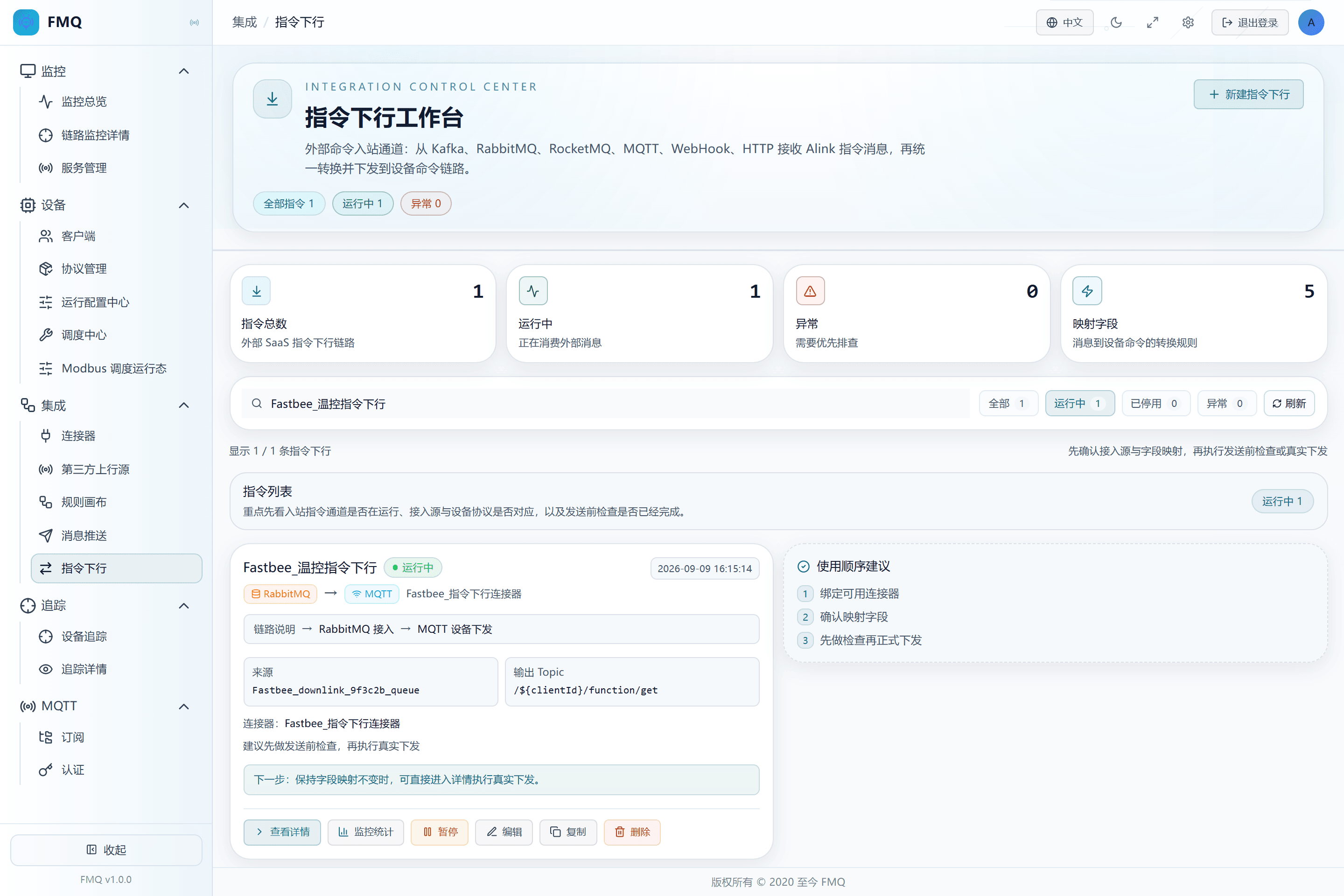
Figure: precisely locating this batch's command downlink task by name, the Running filter, and refresh.
Field Descriptions
| Field / Control | Description |
|---|---|
| Search | Locates tasks by task name or the summaries the page supports.; after saving it affects the current command downlink task; after changes, re-check and retest with a real device. Optional · Source: the task identities in the current list. Choice: when nothing is found, clear the status filter and search term, then refresh. Recommended: fill in per the integration documents · Example: FastBee_温控指令下行 |
| Status Filter | Shows only all, running, disabled, or abnormal tasks.; after saving it affects the current command downlink task; after changes, re-check and retest with a real device. Optional · Source: the task's current running state. Choice: when a task cannot be found during troubleshooting, switch back to All first. Recommended: fill in per the integration documents · Example: All |
25. Edit a Simple Task
Location: Integration → Command Downlink
Click Edit, and record the connector, Queue, target protocol, and Topic before modifying.
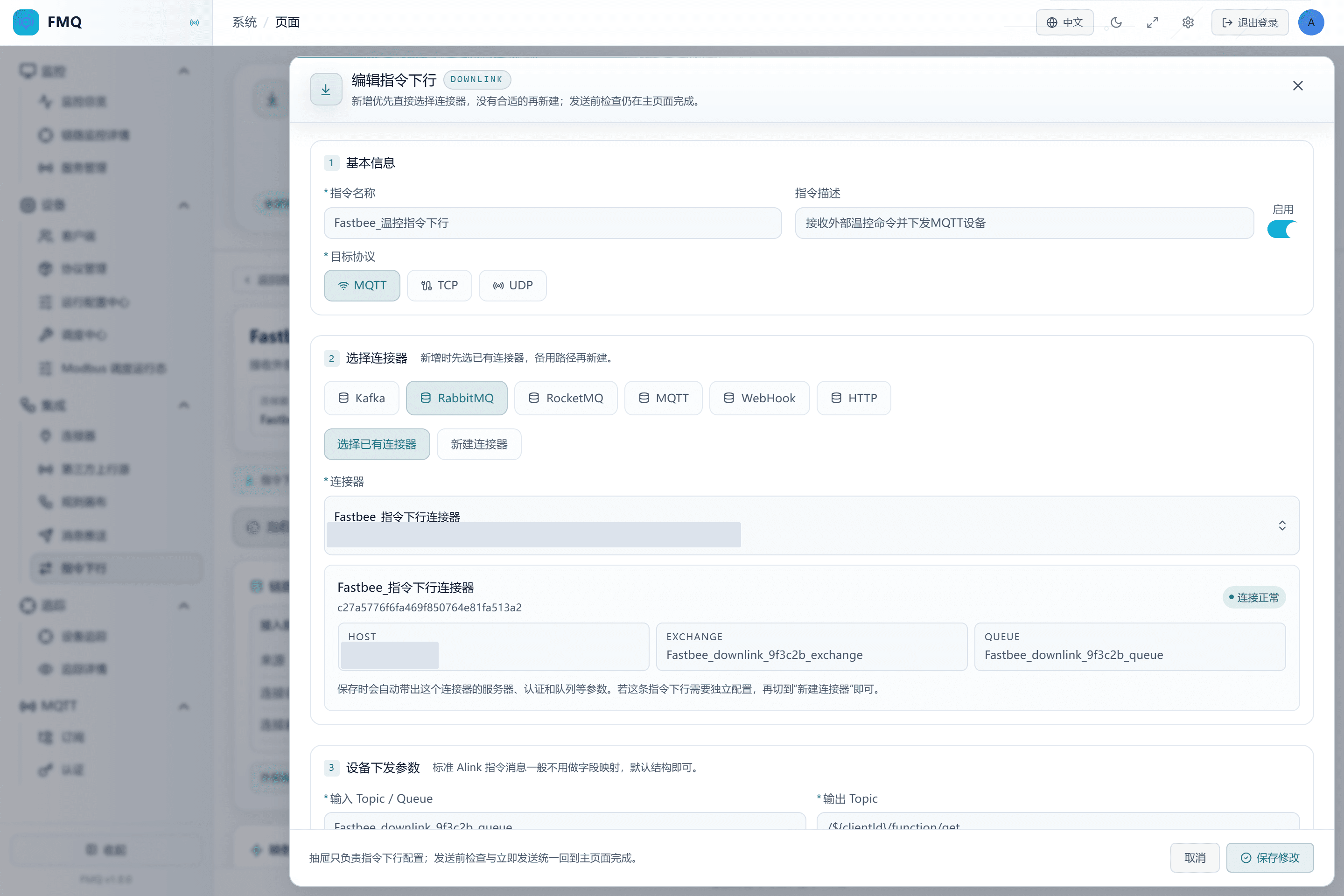
Figure: the edit drawer correctly brings out the current task, connector, Queue, target protocol, and Topic; this time nothing is modified and it is cancelled.
26. Copy as a New Disabled Task
Location: Integration → Command Downlink
Click Copy, change to an independent name and turn off Enable before saving; this time only view and cancel.
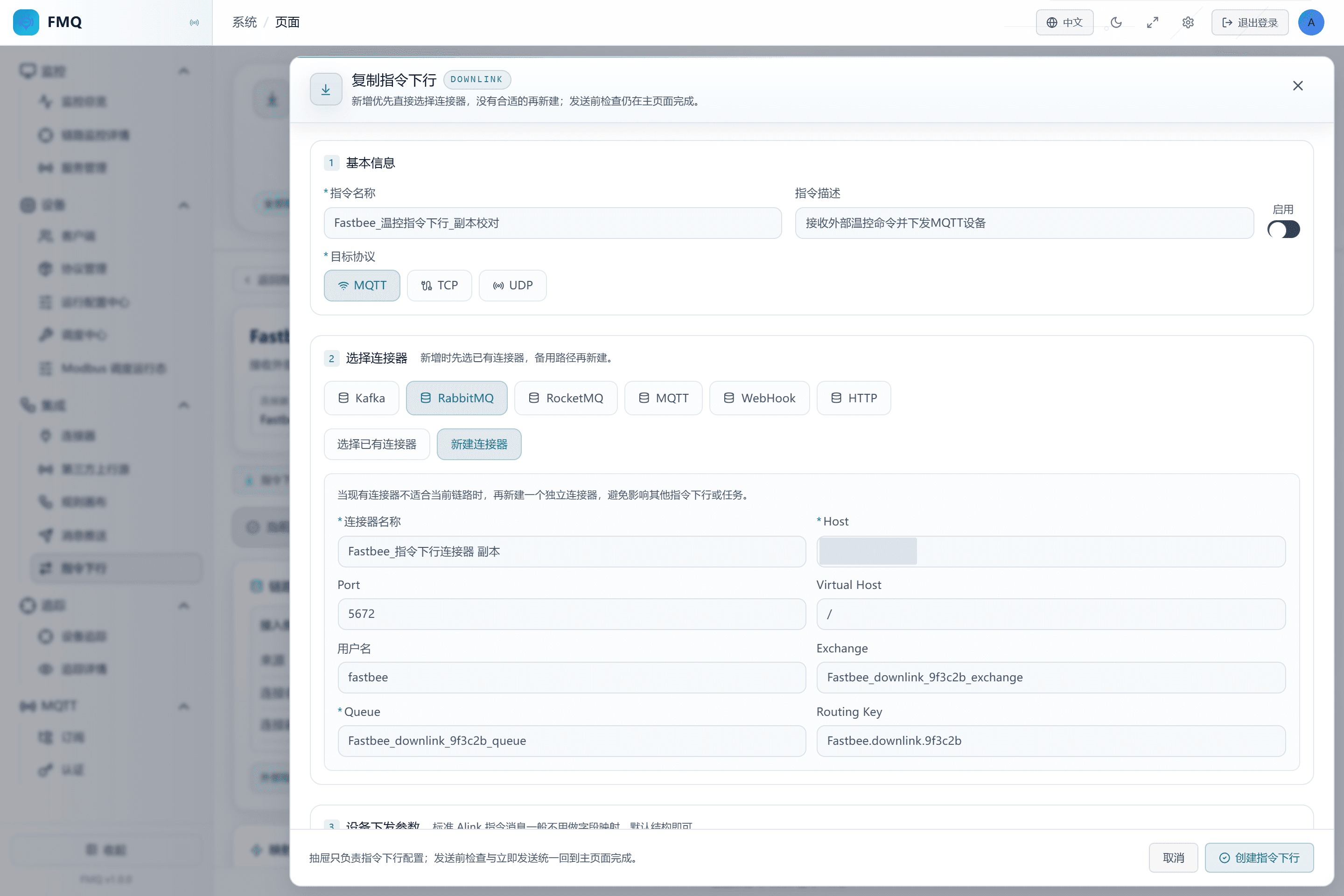
Figure: the copied draft has been renamed and kept disabled; this time it is only viewed for teaching, and no copy is saved.
Field Descriptions
| Field / Control | Description |
|---|---|
| Enabled State | When on, the external entry starts consuming; when off, it no longer consumes automatically, but Send Now may still execute.; after saving it affects the current command downlink task; after changes, re-check and retest with a real device. Optional · Source: choose according to the debugging, go-live, or maintenance phase. Choice: create new tasks disabled first; enable them only after manual checks and device-side actual receipt pass. Recommended: fill in per the integration documents · Example: Disabled |
27. Disable the External Entry
Location: Integration → Command Downlink
Click Disable and confirm the state changes to Disabled.
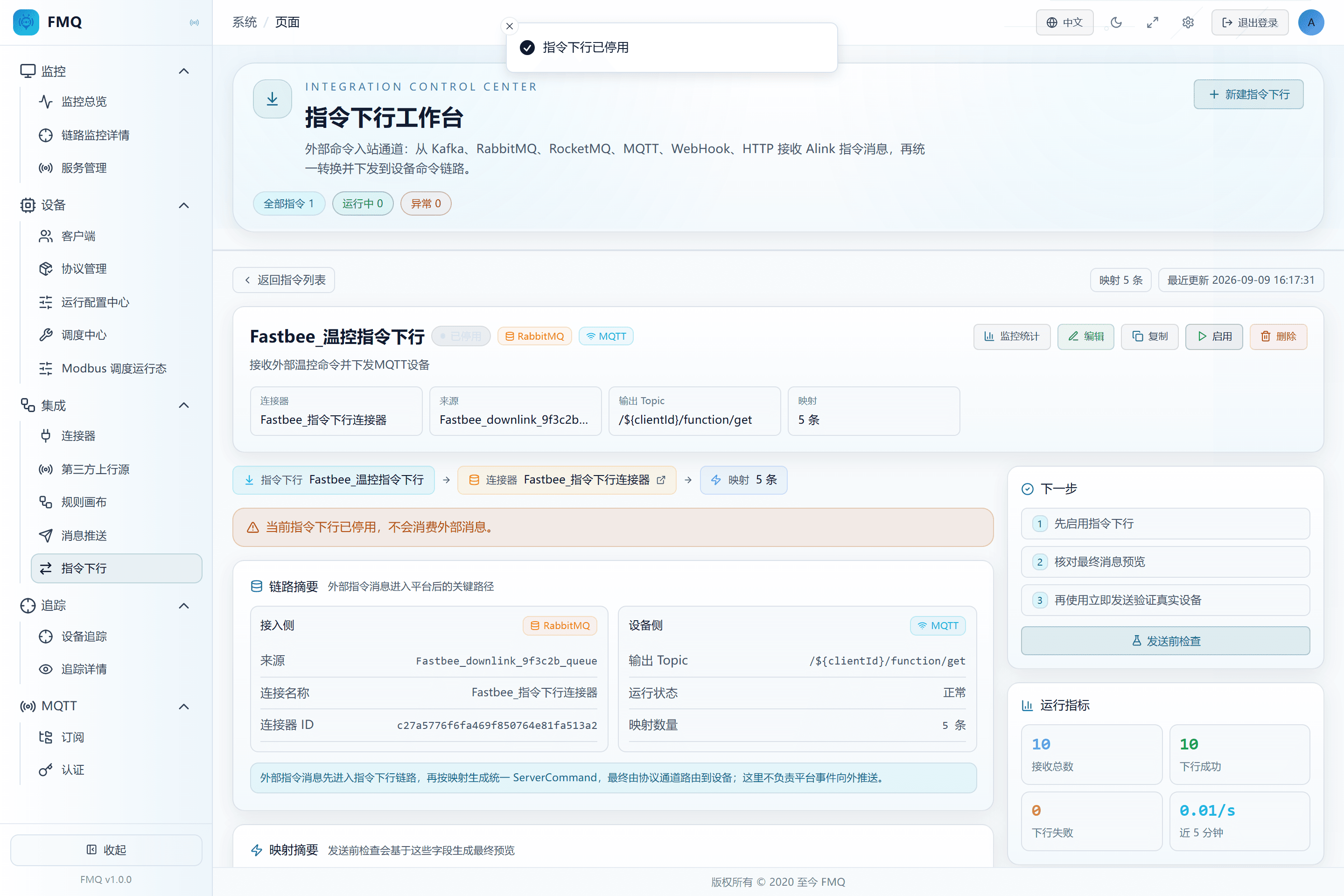
Figure: the task is disabled and the external entry no longer continues consuming; the manual Send Now entry must still be used with caution.
Field Descriptions
| Field / Control | Description |
|---|---|
| Enabled State | When on, the external entry starts consuming; when off, it no longer consumes automatically, but Send Now may still execute.; after saving it affects the current command downlink task; after changes, re-check and retest with a real device. Optional · Source: choose according to the debugging, go-live, or maintenance phase. Choice: create new tasks disabled first; enable them only after manual checks and device-side actual receipt pass. Recommended: fill in per the integration documents · Example: Disabled |
28. View the Deletion Impact; Cancelled This Time
Location: Integration → Command Downlink
Click Delete, verify the task name and the associated-resource note, and click Cancel before proofreading is complete.
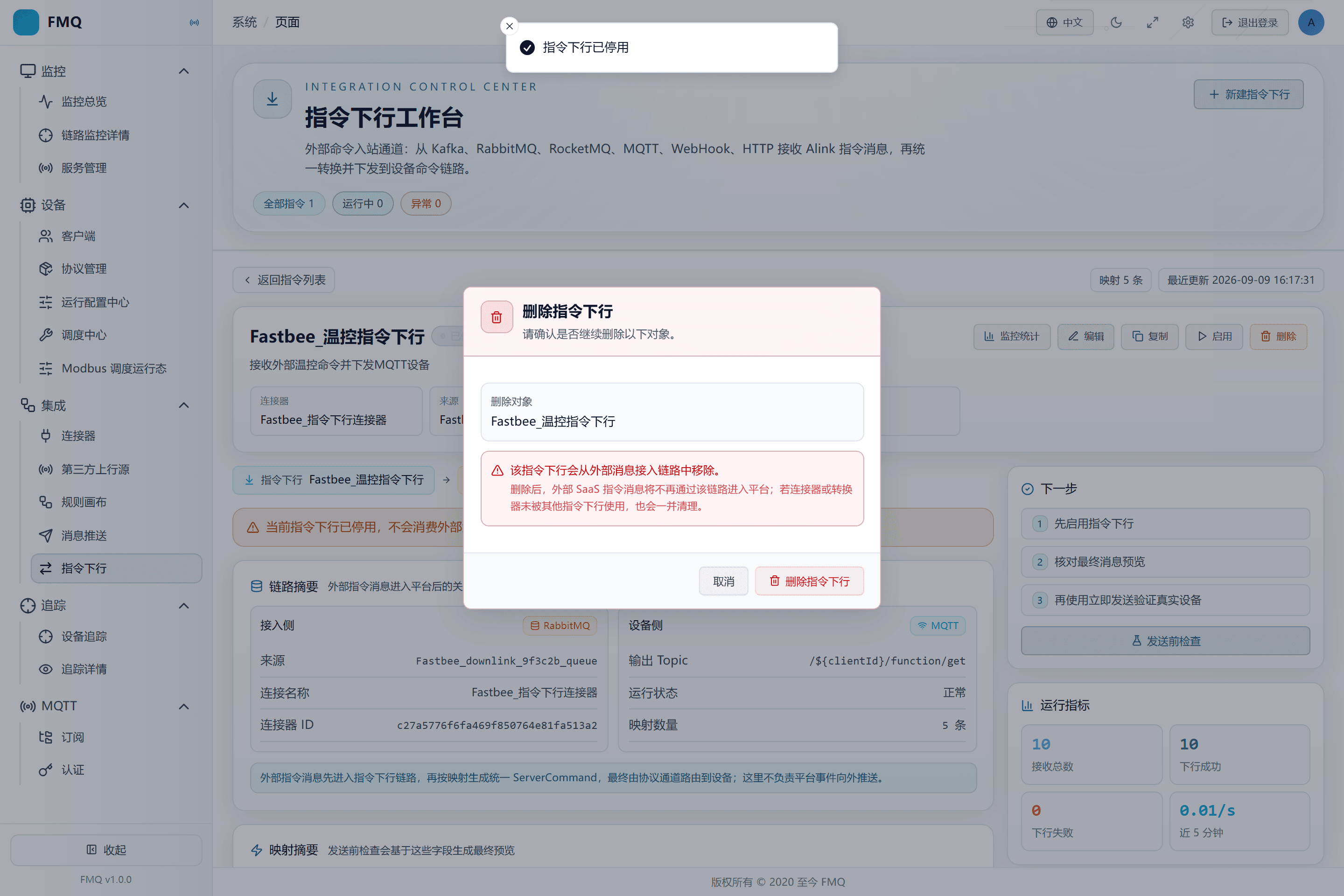
Figure: the deletion confirmation box shows the exact task name and explains that connectors or converters without other references may be cleaned up together; cancelled this time.
Reference Table
| Symptom | Possible Cause | What to Check First | How to Recover |
|---|---|---|---|
| Check passed, but the device has no message | Check by nature does not send | Confirm whether the result is marked dryRun | After the device is online and the target is correct, verify with Send Now or the external entry |
| The RabbitMQ queue has messages but Total Received does not increase | The task is disabled, the consumer is not started, or the connector is abnormal | Look at the task state, the connector check result, and the Queue consumers | Fix the entry and then enable it; watch whether the backlog is consumed |
| Total Received increases but Downlink Failure also increases | The TCP/UDP session is unavailable, the transport is wrong, or the clientId or target endpoint does not match | Query the FAILED reason by command ID, and verify the real device protocol | After restoring the correct session and routing, resend with a new command ID |
| After the device reconnects, repeating the old ID still receives nothing | The old ID already exists within the idempotency window | Query whether the original command record is still FAILED | Keep the business correlation, generate a new unique command ID, and resend |
| SENT but the business system still considers it failed | SENT only proves the protocol write-out, not the device business execution result | Look at FMQX/real-device actual receipt and the device reply | Supplement with a device receipt or business confirmation; do not overrule the command conclusion |
| After deletion, the connector is also gone | The connector had no other references and was cleaned up by the page together with the simple task | Check the connector references before deletion | Rebuild from the backed-up parameters and re-validate; for shared connectors, references must be confirmed first |
Production Operation Notice
The screenshots and examples illustrate operation locations and judgment methods and do not represent the current production state. Before publishing, starting/stopping, rebinding, retrying, or deleting, confirm the target environment, scope of impact, and recovery plan, and have authorized personnel perform the operation.
Fengxin IoT (FastBee) · FMQ Operation Manual