


Preview, Publish, and Embed
Use Preview to check a dashboard and Publish to deliver it. An unpublished project may still open in preview, so a successful preview does not prove it was published.
1. Before You Start
| Item | Details |
|---|---|
| Entry point | Dashboard Projects → Project Card. Save, Preview, and Publish are also in the editor toolbar. |
| Permissions | Preview access. An authorized maintainer must approve publishing, external access, or embedding. |
| What to check | Intended viewers, display, data visibility, and whether embedding is necessary |
2. Preview Before Delivery
- Open Preview from the list or editor. Confirm that headings, layers, charts, images, and data appear correctly. Check at the target resolution and verify refresh and error states for dynamic data.
- Once the delivery version is agreed, save it. An authorized maintainer can then open Publish in the editor or More → Publish on the project card. Afterward, check the status in the list.
- Test the access entry provided after publishing as the intended viewer. Confirm that it opens and retrieves data. Do not give viewers the administrator's preview URL.
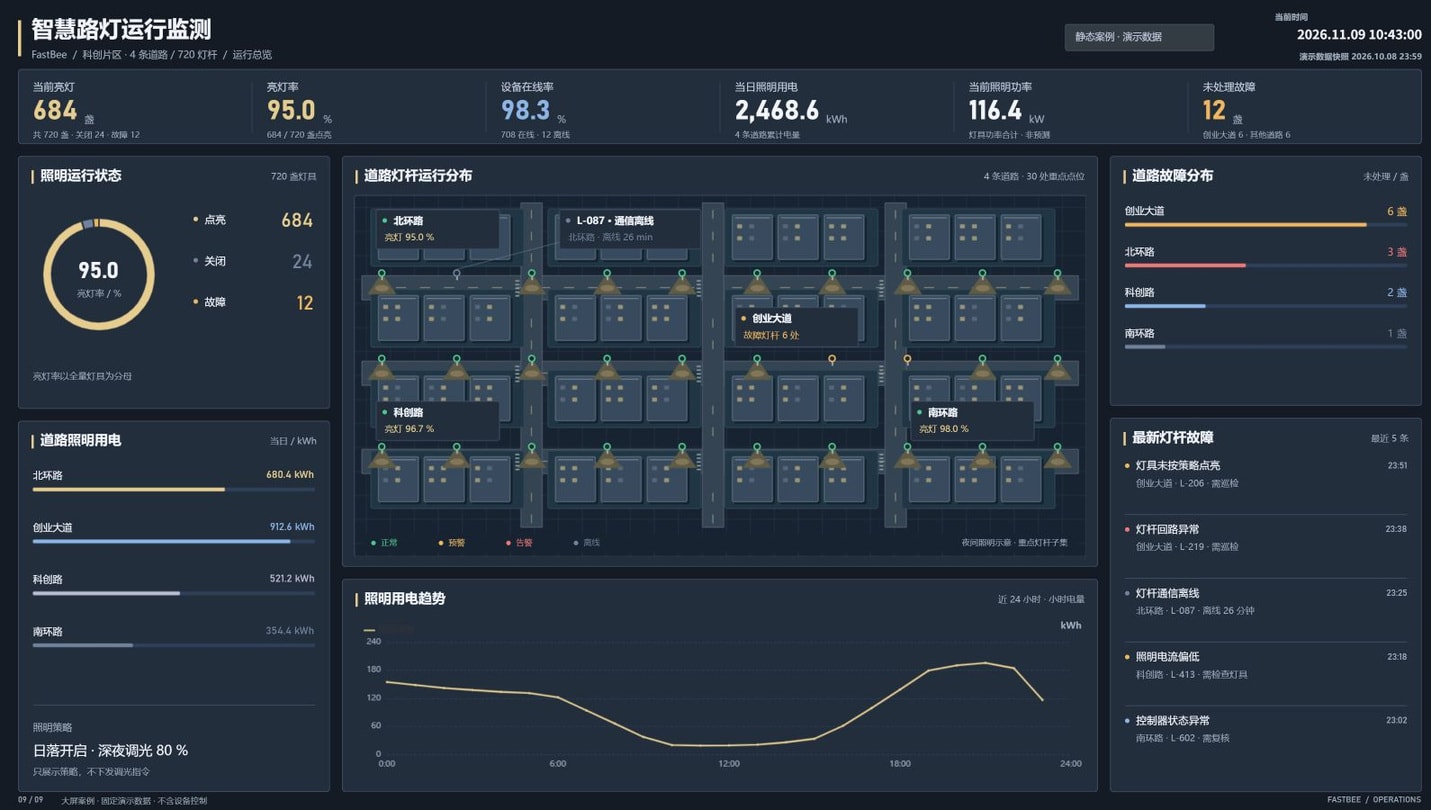
Verify against the screenshot: The title and Static Case / Demo Data badge should be fully visible at the top, and the Lighting Power Trend, fault list, and footer should be visible at the bottom. Current Time at the top right is the page clock, not the demo snapshot time. For an actual delivery, verify the metrics' own update times as well as the complete layout.
3. Publishing and Access Acceptance Checks
| Acceptance item | Expected behavior |
|---|---|
| Project save | Content remains after reopening the editor, and the published version matches the confirmed version. |
| Publication status | The list status matches the actual access entry. Being able to preview does not mean the project is published. |
| Data requests | The target environment returns the correct metrics, with an empty state or error message on failure. |
| Automatic refresh | The interval meets business needs, and duplicate requests from multiple charts do not overload the API. |
| Screen fit | Nothing overlaps or distorts at the target resolution, and legends and units are fully visible. |
| Access control | Viewers can see the data they should, and unauthorized users cannot enter management or editing pages. |
| Withdrawal and updates | Verify access behavior after unpublishing or updating in an authorized test project before delivery to production users. |
For complex projects, compress images and reduce charts with frequent refreshes and videos playing simultaneously before adjusting refresh intervals. A sluggish page is not necessarily caused by a slow API; large images, videos, or accumulated animations may also be responsible.
4. Menu Links and Page Embedding
Opening a published link through a system menu is not the same as placing the page in another system's embedded frame. Menu links should use the access entry provided by the current environment. Confirm that the intended viewer can sign in and retrieve data. Do not reuse example domains or fixed paths from earlier documentation.
Confirm that both the platform and the host application allow embedding. Check the actual URL's sign-in method, HTTPS requirements, and permitted embedding origins. After embedding, check layout, resizing, session expiry, data requests, and denied access. If the page works directly but fails in the host, check both embedding policies. Do not disable security controls to bypass a block.
Verification Boundary
This guide confirms preview and publishing entry points. Test external or anonymous access, embedding, and behavior after withdrawal with an authorized project in the actual delivery environment.
5. Common Issues
| Symptom | What to check first |
|---|---|
| Blank page after publishing | Whether static resources return 404, resource paths match the actual deployment, and the browser reports loading errors. |
| Dynamic request fails | Whether the URL, identity, cross-origin settings, and HTTP/HTTPS are consistent. |
| API returns data, but the chart is empty | Whether response fields, filter output, and the component's required data structure match. |
| Page works directly but cannot be embedded | The host's and page's embedding policies, session restrictions, and the intended viewer's access permissions. |