

Voice Intercom Debugging and Integration
1. How to Determine Whether a Monitoring Device Supports Voice Intercom
1.1 Dahua Cameras
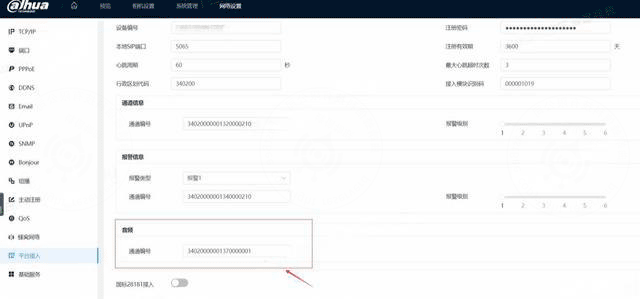
Note: Dahua cameras support cross-network voice intercom, meaning the device and the server do not need to be on the same network. Fill in the voice channel of Dahua devices as: 34020000001370000001
1. Configuration and Access Example:
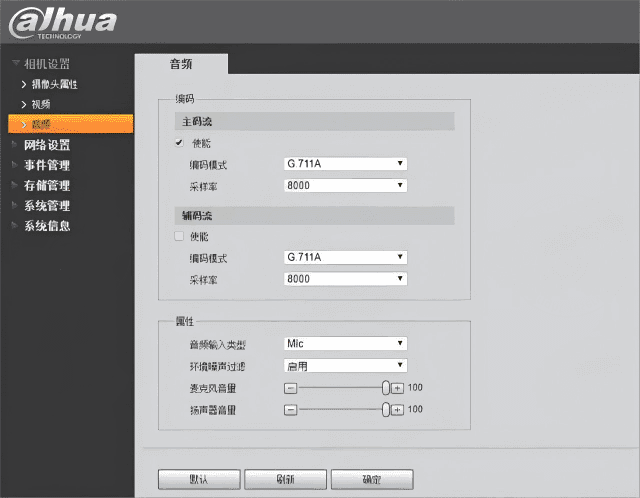
- Select mic as the audio input type; the audio encoding can be G.711A
- Configure the audio channel number
- The voice channel of some Dahua devices can be configured with a number; fill in the fixed value here: 34020000001370000001
1.2 Hikvision Cameras
Note: Hikvision devices with old firmware do not support cross-network voice intercom, meaning the device and the server must be on the same network.
1. Example of Not Supporting Cross-network Intercom
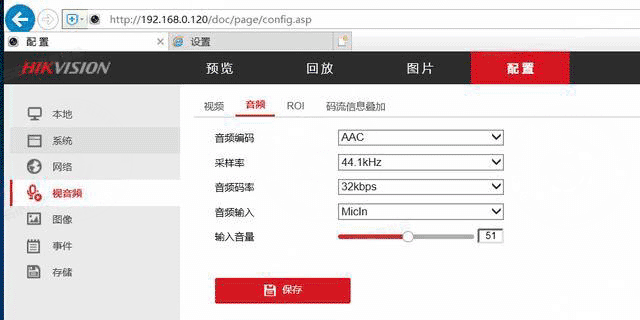
- Camera — Voice output channel encoding
- If you see a voice output channel encoding, the device supports the voice intercom feature
- The middle part of the voice output channel encoding ID is fixed as 137
2. Example of Not Supporting Cross-network Intercom
- Under Network - Device Access - GB28181, devices with "Enable TCP Broadcast" in the configuration support cross-network intercom.
1.3 Uniview Cameras
Note: Uniview cameras do not support cross-network voice intercom, meaning the device and the server must be on the same network.
1. Example of Not Supporting Cross-network Intercom
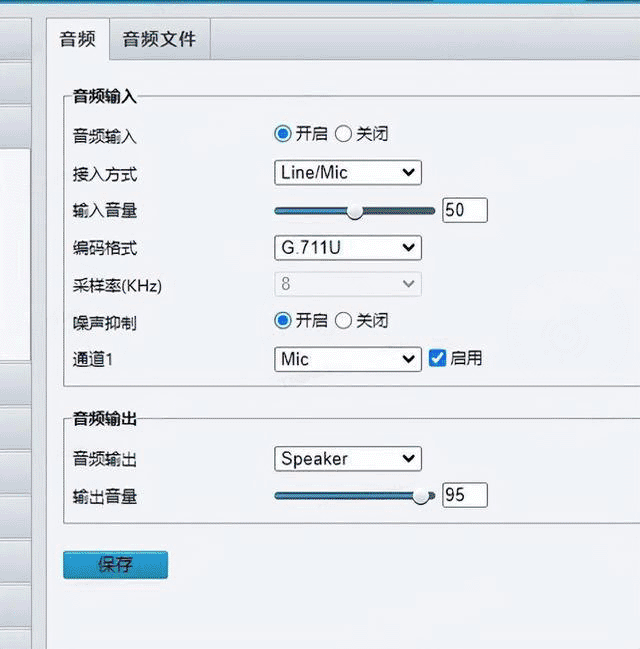
Camera — Voice output channel encoding
If you see a voice output channel encoding, the device supports the voice intercom feature
The middle part of the voice output channel encoding ID is fixed as 137
2. Standard GB Intercom Signaling
2.1 Flowchart
2.2 Interaction Signaling Description
2.2.1 Broadcast Notification BroadCast
xml
#Platform side -------> Device side

MESSAGE sip:34020000001110000001@3402000000 SIP/2.0
From: <sip:34020000002000000001@3402000000>;tag=bccedfd000006
To: <sip:34020000001110000001@3402000000>
Content-Length: 176
CSeq: 5 MESSAGE
Route: <sip:34020000001110000001>
Call-ID: 12345678900006
Via: SIP/2.0/UDP 192.168.1.101:5060;wlsscid=377aa9afcf1b36f;branch=123133532300006
Content-Type: Application/MANSCDP+xml
Max-Forwards: 70

<?xml version="1.0"?>
<Notify>
<CmdType>Broadcast</CmdType>
<SN>17298</SN>
<!--Device code of the voice input device-->
<SourceID>34020000002000000001</SourceID>
<!--Device code of the voice output device-->
<TargetID>34020000001370000001</TargetID>
</Notify>2.2.2 Device Reply After Receiving the Broadcast Notification
xml
#Device side ------> Platform side

SIP/2.0 200 OK
Via: SIP/2.0/UDP 192.168.1.101:5060;wlsscid=377aa9afcf1b36f;branch=123133532300006
From: <sip:34020000002000000001@3402000000>;tag=bccedfd000006
To: <sip:34020000001110000001@3402000000>;tag=880670885
Call-ID: 12345678900006
CSeq: 5 MESSAGE
User-Agent: IP Camera
Content-Length: 02.2.3 Device Actively Initiates invite
xml
#Device side ------> Platform side

INVITE sip:34020000002000000001@192.168.1.101:5060 SIP/2.0
Via: SIP/2.0/UDP 192.168.1.64:5060;rport;branch=z9hG4bK1490643408
From: <sip:34020000001110000001@192.168.1.64:5060>;tag=1499847265        //
To: <sip:34020000002000000001@192.168.1.101:5060>
Call-ID: 1420309512
CSeq: 20 INVITE
Contact: <sip:34020000001110000001@192.168.1.64:5060>
Content-Type: application/sdp
Max-Forwards: 70
User-Agent: IP Camera
# Media stream sender ID: sender media stream sequence number, media stream receiver ID: receiver media stream sequence number
Subject: 34020000002000000001:1,34020000001110000001:2
Content-Length:   214

v=0
o=34020000001110000001 2418 2418 IN IP4 192.168.1.64
s=Play
c=IN IP4 192.168.1.64
t=0 0
# Audio  port  RTP-over-UDP payload type ( 8-PCMA, 96-PS)
# Note: this step is the port opened by the device side to receive voice stream data
# RTP/AVP transport mode is udp, which only allows intercom on the LAN
# TCP/RTP/AVP is required for intercom over the public network
m=audio 15062 RTP/AVP 8 96
a=recvonly
# RTP + audio stream: payload type
a=rtpmap:8 PCMA/8000
a=rtpmap:96 PS/90000
# SSRC (synchronization source identifier): the SSRC value is generated by the SIP monitoring domain where the media stream sending device resides, and is used as the identifier of the media stream
y=0200000017
# v/encoding format/resolution/frame rate/bitrate type/bitrate  a/encoding format/bitrate/sampling rate
#                                     G.711 / 64kbps / 8kHz
f=v/a/1/8/12.2.4 Platform Replies invite ok
xml
#Platform side -------> Device side
》》》》》》 IPC
SIP/2.0 200 OK
From: <sip:34020000001110000001@192.168.1.64:5060>;tag=1499847265
To: <sip:34020000002000000001@192.168.1.101:5060>;tag=1420309512
Call-ID: 1420309512
CSeq: 20 INVITE
User-Agent: General SIP UAS V1.0
Via: SIP/2.0/UDP 192.168.1.64:5060;rport;branch=z9hG4bK1490643408
Contact: <sip:34020000002000000001@192.168.1.101:5060>
Content-Type: application/SDP
Content-Length: 182

v=0
o=34020000002000000001 0 0 IN IP4 192.168.1.101
s=Play
c=IN IP4 192.168.1.101
t=0 0
# This is the port opened on our platform side, used to send audio data to the device
m=audio 8000 RTP/AVP 8        //  port: 8000
a=rtpmap:8 PCMA/8000        //rtpmap:8 PCMA, i.e. g711a  sampling rate: 8000HZ
a=sendonly
y=02000000172.2.5 Device Replies ACK
xml
#Device side ------> Platform side
ACK sip:34020000002000000001@192.168.1.101:5060 SIP/2.0
Via: SIP/2.0/UDP 192.168.1.64:5060;rport;branch=z9hG4bK106578989
From: <sip:34020000001110000001@192.168.1.64:5060>;tag=1499847265
To: <sip:34020000002000000001@192.168.1.101:5060>;tag=1420309512
Call-ID: 1420309512
CSeq: 20 ACK
Contact: <sip:34020000001110000001@192.168.1.64:5060>
Max-Forwards: 70
User-Agent: IP Camera
Content-Length: 0

#After this step we can start sending audio data2.2.6 Closing the Intercom
xml
#Platform side ------> Device side
# Send the BYE signaling
BYE sip:34020000001370000001@3402000000 SIP/2.0
From: <sip:34020000002000000001@3402000000>;tag=1420309512
To: <sip:34020000001370000001@3402000000>;tag=1499847265
CSeq: 2 BYE
Call-ID: 1420309512
Via: SIP/2.0/UDP 192.168.1.64:5060;branch=z9hG4bKee5c5d98-00007
Max-Forwards: 70
Content-Length: 0

#Device side ------> Platform side
# BYE ok
SIP/2.0 200 OK
Via: SIP/2.0/UDP 192.168.1.64:5060;branch=z9hG4bKee5c5d98-00007;received=192.168.1.101
From: <sip:34020000002000000001@3402000000>;tag=1420309512
To: <sip:34020000001370000001@3402000000>;tag=1499847265
Call-ID: 1420309512
CSeq: 2 BYE
User-Agent: IP Camera
Content-Length: 0