

Run the visual editor
1. Technical features
fastbee-viewis an efficient low-code visual editor. Charts and page elements are packaged as base components, so users can quickly build dashboards for exhibitions, business monitoring, risk alerts, and other scenarios without writing code.- Technology stack: Vue 3, TypeScript 4, Vite 2, Naive UI, ECharts 5, Axios, Pinia 2, and PlopJS.
- Typical workflow: create a project -> edit the project name -> drag and arrange components -> save manually or wait for 60-second auto-save -> preview -> publish and generate an access URL.
2. Run the project
2.1 Modify configuration
Edit .env.development in the project root and configure the backend API address.
# Backend API address.
VITE_DEV_PATH = 'http://localhost:8080'2.2 Install dependencies
Install dependencies before starting the project. pnpm is recommended to avoid unnecessary dependency installation errors. Node.js 16.14.x is recommended.
# Install pnpm.
npm install -g pnpm# Install project dependencies.
# pnpm, recommended. Use a suitable registry mirror when needed.
pnpm install
# npm
npm install
# yarn
yarn install2.3 Start the project
# pnpm
pnpm dev

# npm
npm run dev

# yarn
yarn dev

# makefile
make devReference external URL:
https://iot.fastbee.cn/view/#/project/items3. API description
Project list                         GET     /goview/project/list
Create project                       POST    /goview/project
Save project content                 POST    /goview/project/save/data
Update project info or publish state PUT     /goview/project/
Delete project                       DELETE  /goview/project/{ids}
Upload file                                  /goview/project/upload
Get project data GET /goview/project/getDataThe getData API is used by preview pages, so it should be allowed by the frontend and backend whitelist configuration.
4. Add menu entries
提示
The FastBee commercial version includes a built-in large-screen dashboard. The visual editor can also be integrated into the IoT platform by adding menu entries.
Fixed dashboard menu:
System Management -> Menu Management -> Add

Parent menu: Data visualization
Menu type: Menu
Menu icon: monitor
Menu name: Large-screen display
External link: Yes
Sort order: 1
Route address: https://iot.fastbee.cn/bigScreen
Cache: Yes
Display status: Show
Menu status: NormalReplace iot.fastbee.cn with your own server address.
Visual editor menu:
System Management -> Menu Management -> Add

Parent menu: Data visualization
Menu type: Menu
Menu icon: monitor
Menu name: Visual editor
External link: Yes
Sort order: 2
Route address: https://iot.fastbee.cn/view
Cache: Yes
Display status: Show
Menu status: NormalReplace iot.fastbee.cn with your own server address.
5. Notes
- Use Node.js v16.14.x or later. v16.14.2 is recommended.
- If
npm installfails, usepnpm. pnpmsetup example:
# 1. Install pnpm.
npm install -g pnpm

# 2. Install nrm.
npm install -g nrm

# 3. Add a registry mirror.
nrm add taobao https://registry.npmmirror.com/

# 4. List registry mirrors.
nrm ls

# 5. Use the registry mirror.
nrm use taobao6. FAQ
6.1 const open = require('open') error when running nrm ls

Install the compatible open package, then run nrm ls again.
npm i nrm -g open@8.4.2 --save
nrm ls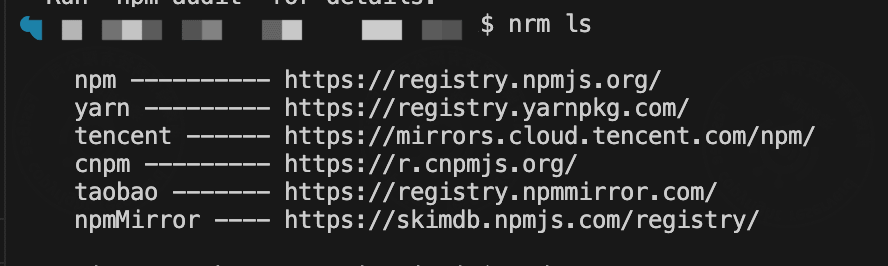
6.2 Node.js memory limit
Check the current heap limit:
node -e "console.log(v8.getHeapStatistics().heap_size_limit/(1024*1024))"Increase the memory limit when needed:
export NODE_OPTIONS="--max-old-space-size=8192"Common values are 2048, 4096, 8192, and 16384.