

iot deploy
提示
The project has a separated frontend and backend, which need to be deployed separately.
1. Backend Deployment
- Run package.bat in the
fastbee\springboot\bindirectory to package the project into a web application, generating the war/jar package file.
sh
# Generated package directory
fastbee\springboot\fastbee-admin\target- jar deployment:
sh
# Run from the command line
java –jar fastbee-admin.jar- war deployment:
sh
# Change packaging to war in the fastbee\springboot\fastbee-admin\pom.xml file, then after packaging place it in the tomcat server's webapps directory
<packaging>war</packaging>2. Frontend Packaging
- Modify the
.env.productionfile in the root directory. The MQTT message server address uses port 8083 for the ws protocol; for the wss protocol, it is recommended to configure a proxy to access port 8083.
ts
# EMQX API account (the backend address and EMQX API address are proxied through nginx)
VUE_APP_EMQX_API_USER_NAME = 'admin'
VUE_APP_EMQX_API_PASSWORD = 'public'

# EMQX message server connection address
VUE_APP_EMQX_SERVER_URL = 'ws://localhost:8083/mqtt'- Run the command to package the application
js
# Package for the production environment
npm run build:prodMake sure the dependency packages are installed before packaging. After a successful build, a dist folder is generated in the root directory, containing the built files — usually static files such as *.js, *.css, and index.html.
- Interface configuration
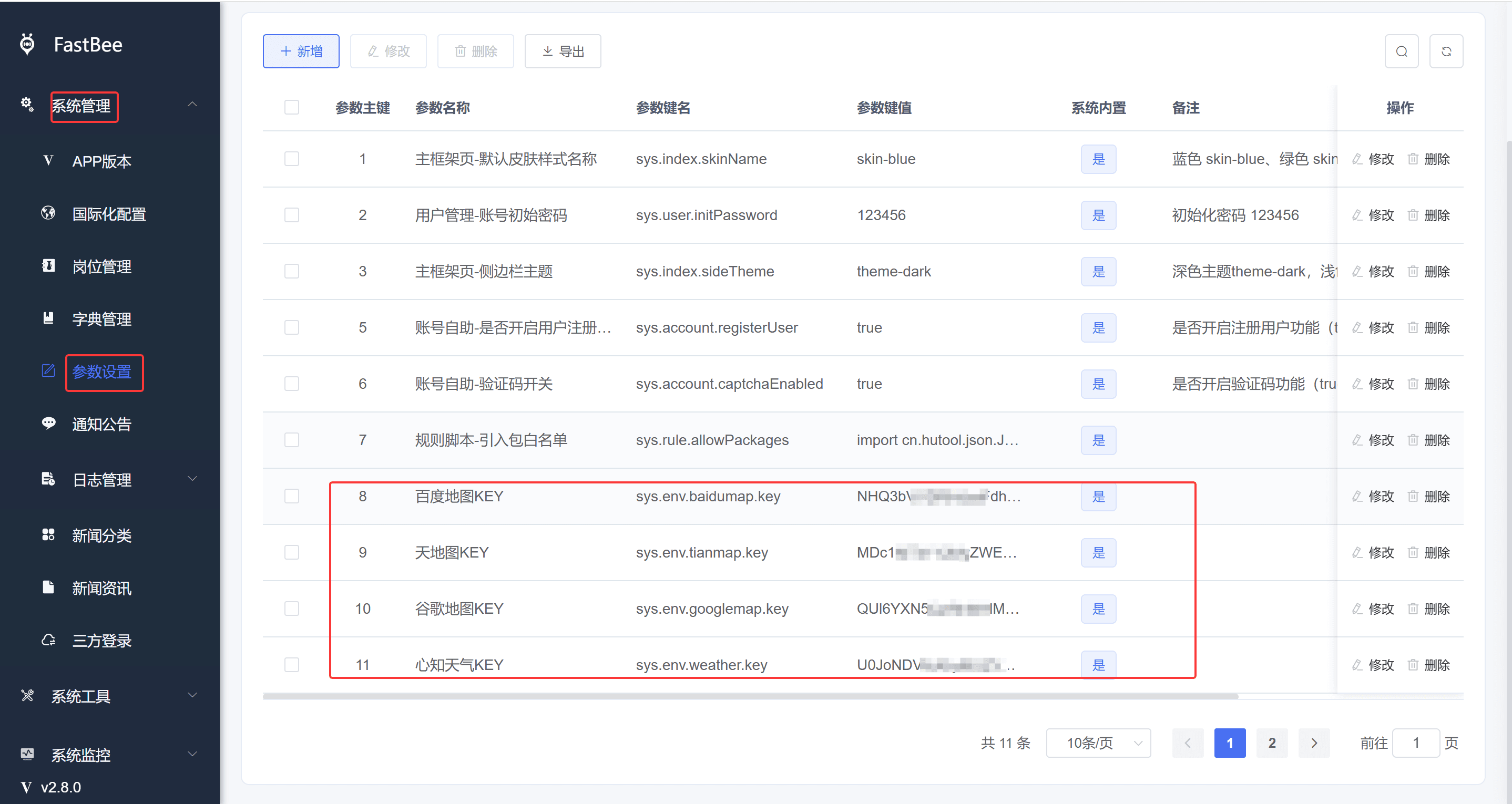
- Tianditu (China national map), Baidu Maps, Google Maps, and Seniverse Weather can be filled in under System Management - Parameter Configuration. Refer to the image below (keep the parameter keys consistent with the image).
3. Deploying the Frontend with Nginx
After the frontend is packaged, configure the upload path for the files in the dist directory: /var/data/vue. The backend deployment address is http://localhost:8080/ with default port 8080. The full configuration is as follows:
ts
worker_processes  1;

events {
    worker_connections  1024;
}

http {
    include       mime.types;
    default_type  application/octet-stream;
    sendfile        on;
    keepalive_timeout  65;
    client_max_body_size 10m;

    gzip on;
    gzip_min_length  1k;
    gzip_buffers     16 64K;
    gzip_http_version 1.1;
    gzip_comp_level 5;
    gzip_types     text/plain application/javascript application/x-javascript text/javascript text/css application/xml;
    gzip_vary on;
    gzip_proxied   expired no-cache no-store private auth;
    gzip_disable   "MSIE [1-6]\.";

    # Redirect Http to Https
    # server {
    #     listen 80;
    #     server_name localhost;
    #     location / {
    #         rewrite ^(.*) https://$server_name$1 permanent;
    #     }
    # }

    server {
        listen      80;

        # The default SSL access port is 443
        # listen 443 ssl;
        server_name  localhost;
        charset utf-8;

        # Path of the certificate file
        # ssl_certificate /usr/share/nginx/ssl/fastbee.crt;
        # Path of the private key file
        # ssl_certificate_key /usr/share/nginx/ssl/fastbee.key;
        # ssl_session_timeout 10m;
        # Configure according to the following protocols
        # ssl_protocols TLSv1.2 TLSv1.3;
        # Configure cipher suites as follows, following the openssl standard
        # ssl_ciphers ECDHE-RSA-AES128-GCM-SHA256:ECDHE:ECDH:AES:HIGH:!NULL:!aNULL:!MD5:!ADH:!RC4;
        # ssl_prefer_server_ciphers on;

        # Frontend
        location / {
            root   /usr/share/nginx/html;
            try_files $uri $uri/ /index.html;
            index  index.html index.htm;
        }
        # Backend API
        location /prod-api/ {
            proxy_set_header Host $http_host;
            proxy_set_header X-Real-IP $remote_addr;
            proxy_set_header REMOTE-HOST $remote_addr;
            proxy_set_header X-Forwarded-For $proxy_add_x_forwarded_for;
            proxy_pass http://localhost:8080/;
        }

        # Proxy wss connections to ws
        location /mqtt {
            proxy_pass http://localhost:8083/mqtt;
            proxy_read_timeout 60s;
            proxy_set_header Host $host;
            proxy_set_header X-Real_IP $remote_addr;
            proxy_set_header X-Forwarded-for $remote_addr;
            proxy_http_version 1.1;
            proxy_set_header Upgrade $http_upgrade;
            proxy_set_header Connection 'Upgrade';
        }

        error_page   500 502 503 504  /50x.html;
        location = /50x.html {
            root   html;
        }
    }
}提示
For more deployment materials, refer to the RuoYi system documentation (Chinese)