

Rule scripts
1. Script language
提示
Rule scripts are written in Groovy, an agile development language based on the JVM. Groovy integrates well with Java code and can also be used to extend existing Java logic.
Groovy syntax is very close to Java, but usually requires less code for the same task. You can treat it as a simpler and more expressive variant of Java. In most cases, Java-style code can be used directly in a Groovy script.
2. Create a rule script
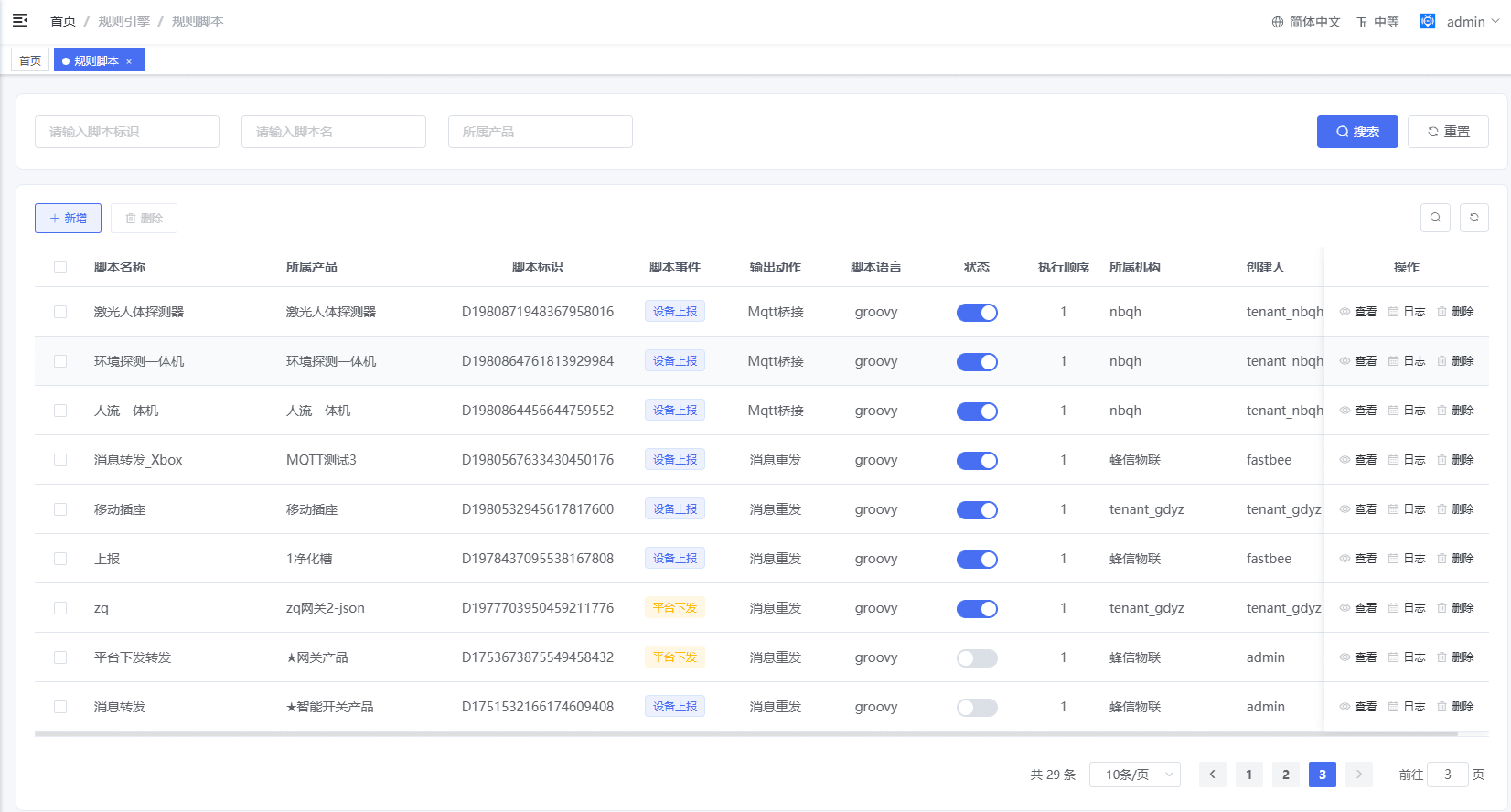
Rule script list:
Rule script editor:
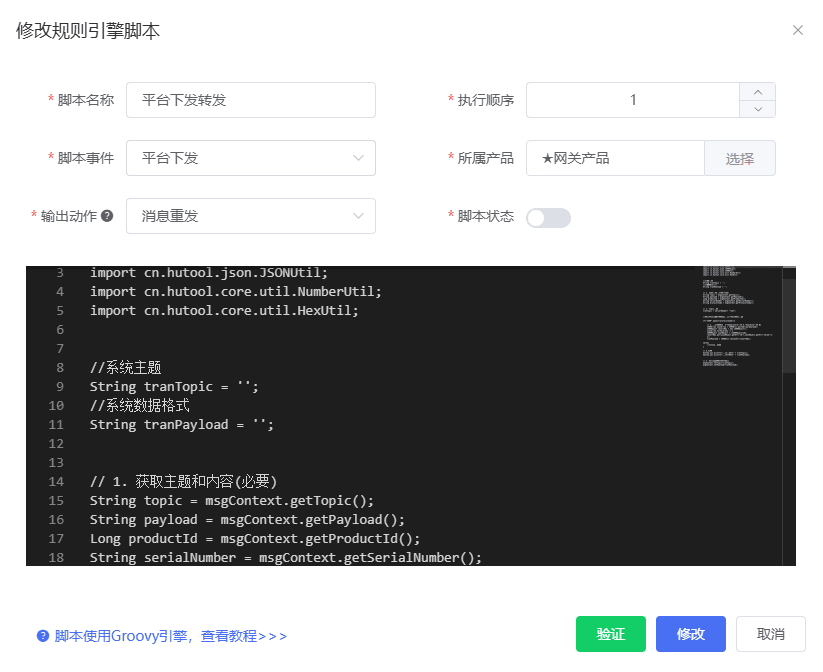
Configuration fields:
| Field | Description |
|---|---|
| Script event | Device reporting is supported. Service delivery is supported. Device online and device offline can be extended. |
| Script action | Message forwarding is supported. Message notification, HTTP push, MQTT bridge, and database storage can be extended. |
| Product | Rule scripts are bound to products and only affect devices under the selected product. |
| Script order | If a product has multiple scripts, they are executed in order. |
3. Basic rule script example
import cn.hutool.json.JSONArray;
import cn.hutool.json.JSONObject;
import cn.hutool.json.JSONUtil;
import cn.hutool.core.util.NumberUtil;

// 1. Get topic, payload, device serial number, and protocol code.
String topic = msgContext.getTopic();
String payload = msgContext.getPayload();
String serialNumber = msgContext.getSerialNumber();
String protocolCode = msgContext.getProtocolCode();

// 2. Transform data according to your protocol.
msgContext.logger.info("Transform message data");
String newTopic = topic;
String newPayload = payload;

// 3. Return the transformed data.
msgContext.setTopic(newTopic);
msgContext.setPayload(newPayload);提示
- By default, only Hutool JSON utilities and number utilities are enabled. Other Hutool modules or system libraries must be opened by the backend when needed.
for/whileloops and IO operations are disabled by default. They can be enabled by the backend according to the actual requirement.- Use
msgContextto get and set the topic and payload. - Topic and payload conversion must be implemented according to the device protocol.
Rule scripts read and write data through the MsgContext context object. The system-defined context is:
public class MsgContext {

    /** Message topic */
    private String topic;

    /** Message payload */
    private String payload;

    /** Device serial number */
    private String serialNumber;

    /** Product ID */
    private Long productId;

    /** Protocol code */
    private String protocolCode;
}4. Device reporting example
Create a product and select the JSON protocol.
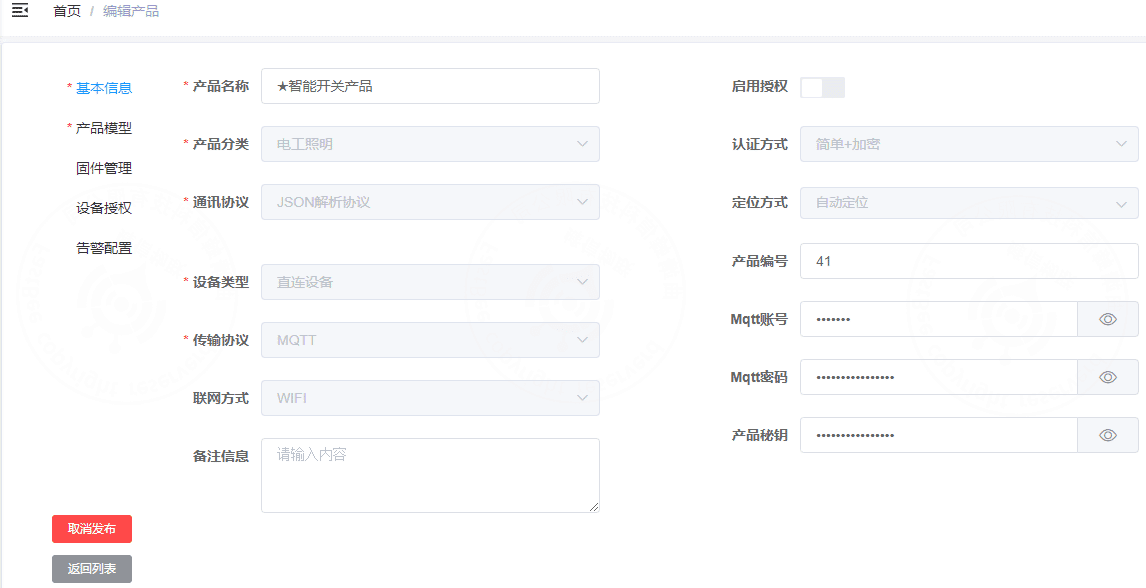
The platform expects the following system topic and payload format for reported property data:
Topic: /96/D1ELV3A5TOJS/property/post

[
  {
    "id": "temperature",
    "value": "26.45"
  },
  {
    "id": "humidity",
    "value": "65.8"
  }
]The actual device reports the following topic and payload:
Topic: D1ELV3A5TOJS/post
{
  "temperature": 26.5,
  "humidity": 65.8
}Use a rule script to convert the topic and payload format.
Script content:
import cn.hutool.json.JSONArray;
import cn.hutool.json.JSONObject;
import cn.hutool.json.JSONUtil;
import cn.hutool.core.util.NumberUtil;

String sysTopic = '';
String sysPayload = '';

// 1. Get topic and payload. Example input topic: S&D1PGLPG58K66/post.
String name = msgContext.getTopic();
Long productId = msgContext.getProductId();
String serialNumber = msgContext.getSerialNumber();
String protocolCode = msgContext.getProtocolCode();
String payload = msgContext.getPayload();
msgContext.logger.info("Product ID / protocol code: " + productId + " / " + protocolCode);

// 2. Convert to the system topic: /96/D1ELV3A5TOJS/property/post.
sysTopic = "/" + productId + "/" + serialNumber + "/property/post";

if ("JSON".equals(protocolCode)) {
    // 3. Convert payload format.
    JSONArray newArray = new JSONArray();
    JSONObject jsonObject = JSONUtil.parseObj(payload);
    jsonObject.keySet().forEach(key -> {
        JSONObject newObject = new JSONObject();
        newObject.put("id", key);
        newObject.put("value", jsonObject.getStr(key));
        newArray.add(newObject);
    });
    sysPayload = newArray.toString();
} else {
    // Handle other protocols here.
}

// 4. Print conversion result.
msgContext.logger.info("New topic: " + sysTopic);
msgContext.logger.info("New payload: " + sysPayload);

// 5. Return the transformed data. This step is required.
msgContext.setTopic(sysTopic);
msgContext.setPayload(sysPayload);After editing the script, verify it by connecting the device whose serial number is S&D1PGLPG58K66, then send data in the following format:
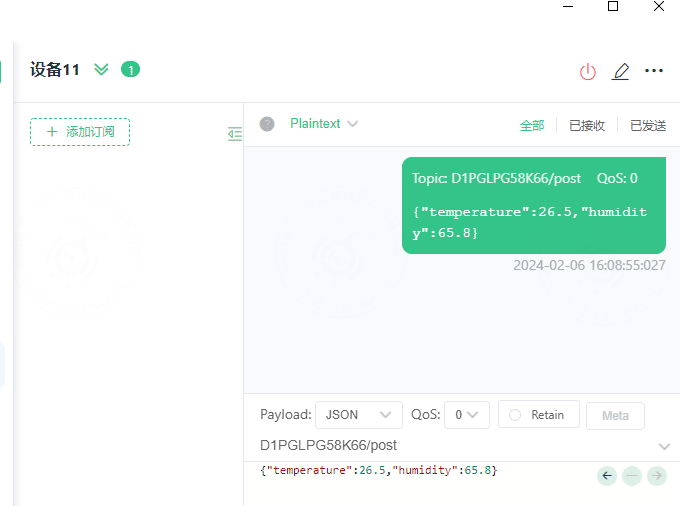
The backend console prints the converted result:
16:08:55.066 [MQTT-BROKER-6-5] INFO  c.y.l.c.FlowExecutor - [info,186] - [68bc37d0dffa41a8a25b1d8c1a63a8a5]:requestId has generated
16:08:55.066 [MQTT-BROKER-6-5] INFO  c.y.l.c.FlowExecutor - [info,193] - [68bc37d0dffa41a8a25b1d8c1a63a8a5]:slot[10] offered
16:08:55.066 [MQTT-BROKER-6-5] INFO  c.y.l.f.element.Node - [info,193] - [68bc37d0dffa41a8a25b1d8c1a63a8a5]:[O]start component[D1751532166174609408(Message forwarding)] execution
----------------------------------------------------------------------------------------
Product ID / protocol code: 41 / JSON
New topic: /41/D1ELV3A5TOJS/property/post
New payload: [{"id":"temperature","value":"26.5"},{"id":"humidity","value":"65.8"}]
-----------------------------------------------------------------------------------------
16:08:55.067 [MQTT-BROKER-6-5] INFO  c.y.l.c.ScriptCommonComponent - [info,200] - [68bc37d0dffa41a8a25b1d8c1a63a8a5]:component[D1751532166174609408(Message forwarding)] finished in 0 milliseconds
16:08:55.067 [MQTT-BROKER-6-5] INFO  c.y.l.slot.Slot - [info,200] - [68bc37d0dffa41a8a25b1d8c1a63a8a5]:CHAIN_NAME[dataChain]
D1751532166174609408[Message forwarding]<0>The topic and payload have now been converted to the platform system format.
5. Service delivery conversion example
Assume the real device expects the following service-delivery topic and payload:
Topic: D1PGLPG58KZ2/set
{
  "report_monitor": "4"
}The platform system topic and payload are:
Topic: /96/D1PGLPG58K66/property/post

[
  {
    "id": "temperature",
    "value": "26.45"
  },
  {
    "id": "humidity",
    "value": "65.8"
  }
]Add a script as shown below:
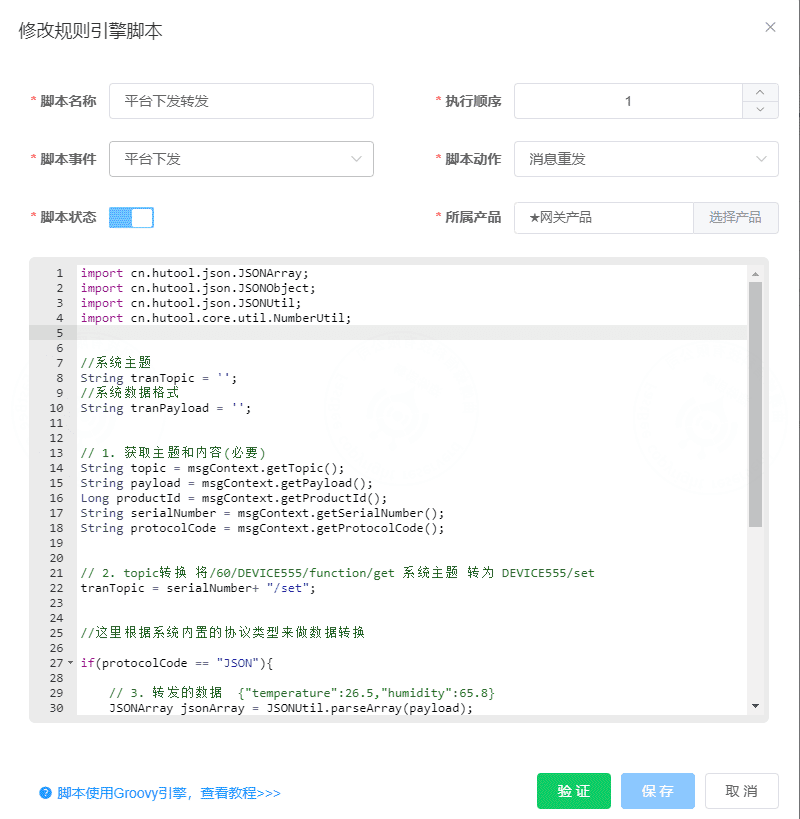
This script does two things:
- Converts the system topic to the topic required by the real device.
- Converts the system payload to the payload required by the real device.
重要
During topic conversion, the topic must contain the device serial number, and its length must be greater than 9 characters. If the serial number is not included in the topic, backend code must be adjusted.
import cn.hutool.json.JSONArray;
import cn.hutool.json.JSONObject;
import cn.hutool.json.JSONUtil;
import cn.hutool.core.util.NumberUtil;

String tranTopic = '';
String tranPayload = '';

// 1. Get topic and payload.
String topic = msgContext.getTopic();
String payload = msgContext.getPayload();
Long productId = msgContext.getProductId();
String serialNumber = msgContext.getSerialNumber();
String protocolCode = msgContext.getProtocolCode();

// 2. Convert system topic /60/DEVICE555/function/get to DEVICE555/set.
tranTopic = serialNumber + "/set";

if ("JSON".equals(protocolCode)) {
    // 3. Convert payload to {"temperature":26.5,"humidity":65.8}.
    JSONArray jsonArray = JSONUtil.parseArray(payload);
    JSONObject resultObj = new JSONObject();
    jsonArray.forEach(obj -> {
        JSONObject jsonObject = (JSONObject) obj;
        resultObj.put(jsonObject.getStr("id"), jsonObject.getStr("value"));
    });
    tranPayload = JSONUtil.toJsonStr(resultObj);
} else {
    // Handle other protocols here.
}

// 4. Print conversion result.
msgContext.logger.info("Forward topic: " + tranTopic);
msgContext.logger.info("Forward payload: " + tranPayload);

// 5. Return the transformed data. This step is required.
msgContext.setTopic(tranTopic);
msgContext.setPayload(tranPayload);Send a command to verify the conversion. The backend log is:
17:34:36.439 [functionInvokeTask2] INFO  c.y.l.c.FlowExecutor - [info,186] - [6481bf113e15499aabe550189d16f4a5]:requestId has generated
17:34:36.440 [functionInvokeTask2] INFO  c.y.l.c.FlowExecutor - [info,193] - [6481bf113e15499aabe550189d16f4a5]:slot[13] offered
17:34:36.440 [functionInvokeTask2] INFO  c.y.l.f.element.Node - [info,193] - [6481bf113e15499aabe550189d16f4a5]:[O]start component[D1753673875549458432(Platform delivery forwarding)] execution
-------------------------------------------------
Forward topic: D1PGLPG58KZ2/set
Forward payload: {"report_monitor":"6"}
-----------------------------------------------
17:34:36.440 [functionInvokeTask2] INFO  c.y.l.c.ScriptCommonComponent - [info,200] - [6481bf113e15499aabe550189d16f4a5]:component[D1753673875549458432(Platform delivery forwarding)] finished in 0 milliseconds
17:34:36.440 [functionInvokeTask2] INFO c.y.l.slot.Slot - [info,200] - [6481bf113e15499aabe550189d16f4a5]:CHAIN_NAME[dataChain]The client receives the converted message:
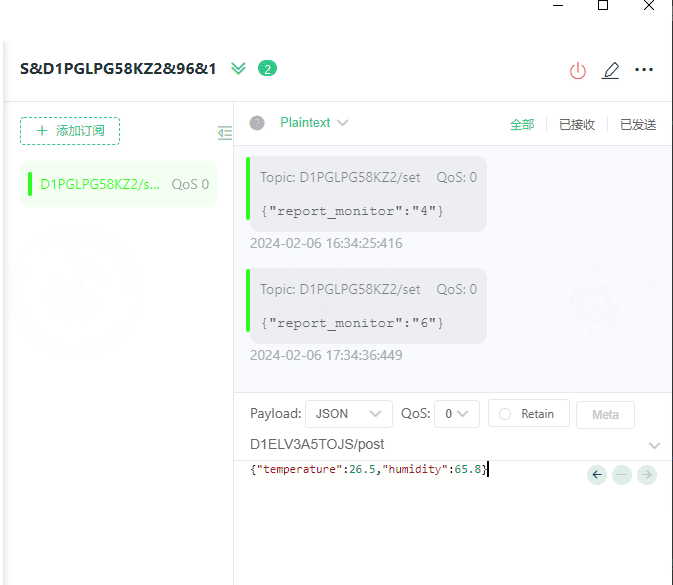
At this point, the system topic and payload have been converted to the format required by the real device.