

ZLMediaKit installation
1. Docker deployment
- Modify
application-prod.ymlin thefastbee-recordpackage according to the deployment environment. This service uses Redis cache, so update the Redishostandpasswordas needed. - Build
fastbee-record.jarand place it under/data/zlmedia/recordin the deployment directory. - The Dockerfile used to package the container is located at
/docker/data/zlmedia/recordin the project. It packagesfastbee-recordand ZLMediaKit together. - Uncomment the related section in
docker-compose.yml, then rundocker-compose up -d.
yaml
zlmedia-record:
  build:
    context: /var/data/zlmedia/record
  # image: zlmediakit/zlmediakit:master
  container_name: zlmedia-record
  privileged: true
  restart: always
  ports:
    - 18081:18081
    - 8082:80
    - 8443:443
    - 554:554
    - 1935:1935
    - 8000:8000
    - 30000-30100:30000-30100/udp
  expose:
    - "80"
    - "443"
    - "554"
    - "1935"
  volumes:
    - /var/data/zlmedia/record/fastbee-record.jar:/fastbee-record.jar
    - /var/data/zlmedia/record/logs:/opt/assist/logs
    - /var/data/zlmedia/logs:/opt/media/bin/log
    - /var/data/zlmedia/data/www:/opt/media/bin/www
    - /var/data/zlmedia/conf/config.ini:/opt/media/conf/config.ini
    - /var/data/zlmedia/conf/default.pem:/opt/media/bin/default.pem
  networks:
    network:
ipv4_address: 177.7.0.152. Windows and Linux deployment
- Install
ffmpegandffprobe. - Modify the tool paths and recording path in the
fastbee-recordconfiguration file. - Run
fastbee-record.jarand ZLMediaKit separately. - Start the record service:
shell
java -jar /fastbee-record.jar &fastbee-record configuration example:
yaml
userSettings:
  # Required. Recording path configured in ZLMediaKit.
  record: /opt/media/bin/www/record

  # Required. ffmpeg path.
  ffmpeg: /usr/bin/ffmpeg

  # Required. ffprobe path. It is usually installed with ffmpeg and located in the same directory.
  # ffprobe is used to query media file information.
ffprobe: /usr/bin/ffprobe警告
ffmpeg and ffprobe must work together with ZLMediaKit. They are used to manage recording files on the streaming server.
3. Switch recording APIs to HTTPS
提示
The latest master version supports switching recording APIs between HTTPS and HTTP. Update the code before using this capability.
3.1 Download a JKS certificate
Reference document:
text
https://help.aliyun.com/zh/ssl-certificate/user-guide/enable-https-on-spring-boot3.2 Modify configuration and redeploy the JAR
Configuration fields:
enabled: HTTPS enable switch.key-store: certificate path.key-store-password: certificate password.
yaml
# Optional. HTTP port used by web pages and API calls.
# Replace domain_name.jks with your actual certificate name.
# Reference:
# https://help.aliyun.com/zh/ssl-certificate/user-guide/enable-https-on-spring-boot
server:
  port: 18081
  ssl:
    # Enable HTTPS access. Disabled by default.
    enabled: true
    # Certificate file path. Replace fastbee.online.jks with your actual certificate name.
    key-store: classpath:fastbee.online.jks
    # Certificate password.
    key-store-password: fastbee
    # Certificate type. Default is JKS. Adjust according to the actual certificate.
key-store-type: JKS3.3 Change the streaming server playback protocol to HTTPS
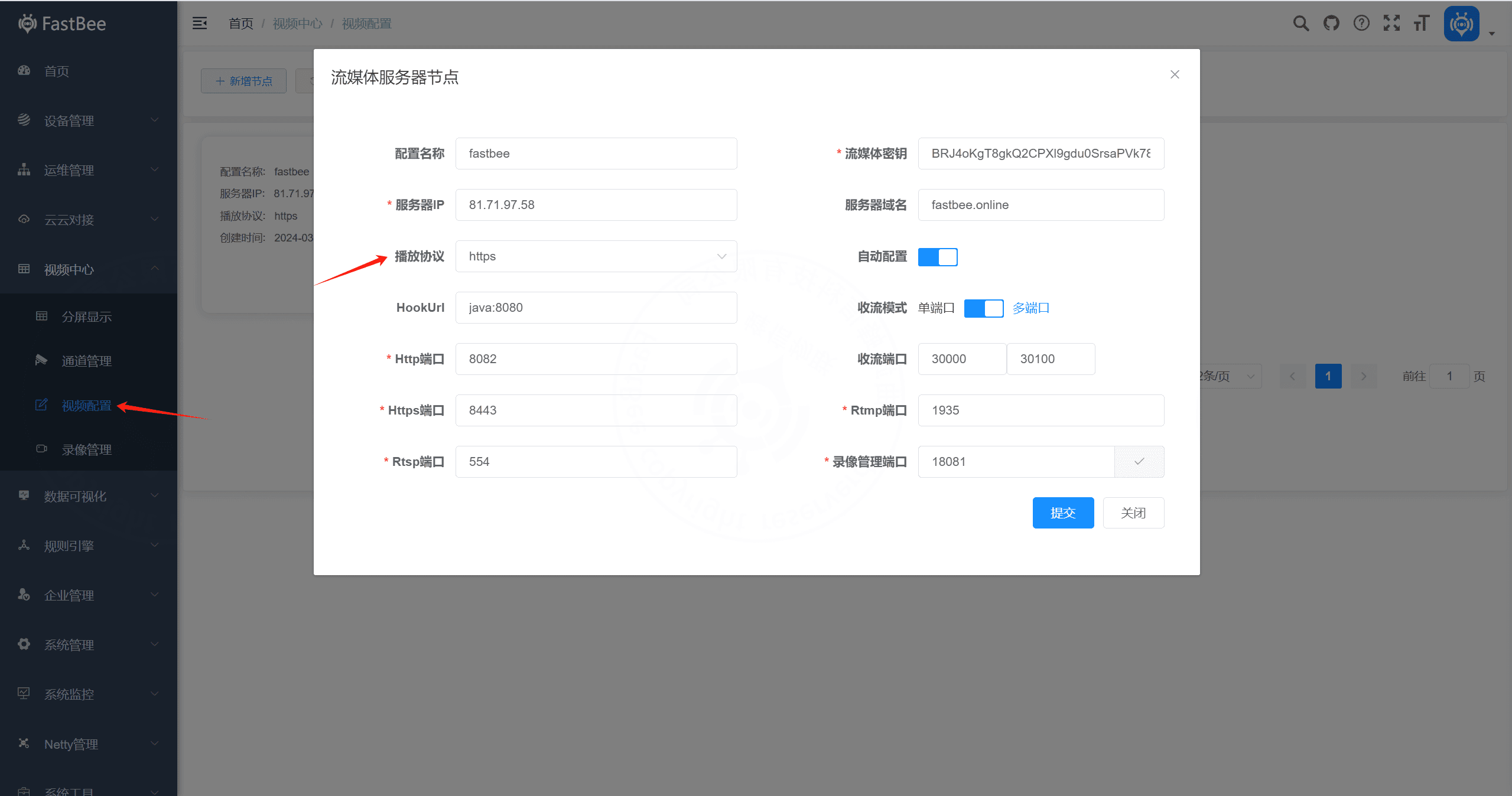
4. Common issues
4.1 Change recording file length
ini
# zlmedia/conf/config.ini
# Streaming service configuration file.
[record]
appName=record
fileBufSize=65536
filePath=./www
fileSecond=3600
sampleMS=500
fastStart=0
fileRepeat=0In the Java ZmlHookServiceImpl#onPublish method:
java
// playrecord
ret.put("mp4_max_second", 10);

// download
ret.put("mp4_max_second", 10);

// Default value is 10 seconds. Modify it according to your requirements.4.2 Recording storage path
Camera recording files are stored under:
text
zlmedia/data/www/record/