

Modbus RTU Device Access

Page Guide
1. Create products and polling tasks
Create a gateway product and a sub-device product first, then establish the topology relationship between the gateway and sub-device. For the topology process, see the Gateway and sub-device document.
After binding, the topology relationship is shown below:
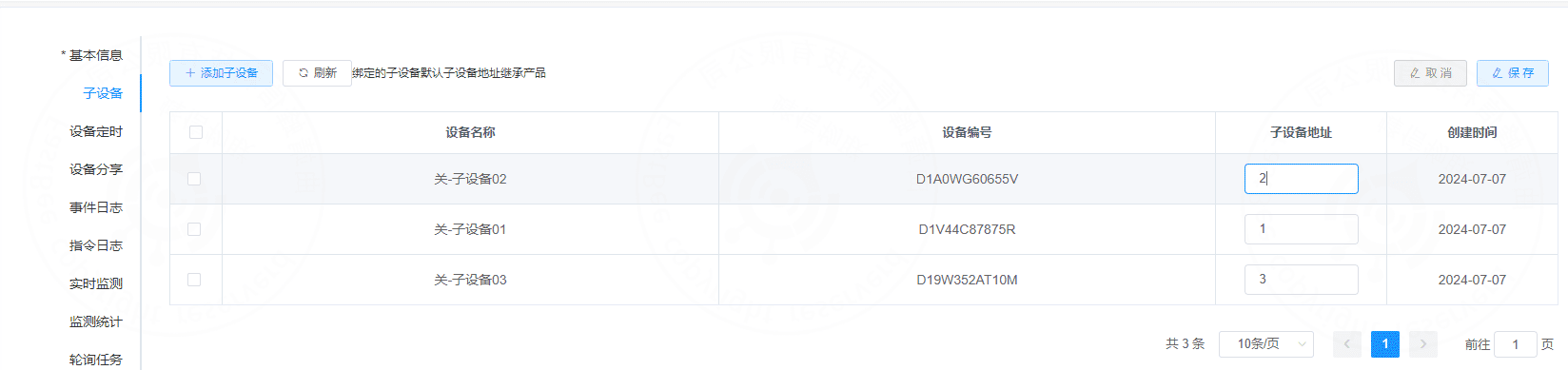
Next, create polling tasks for the sub-device. The following example uses sub-device 01.
1.1 Open the polling task page
Open Sub-device -> Device details -> Polling task.
提示
Note: polling tasks can be configured for gateway devices and direct devices; sub-devices do not support them.
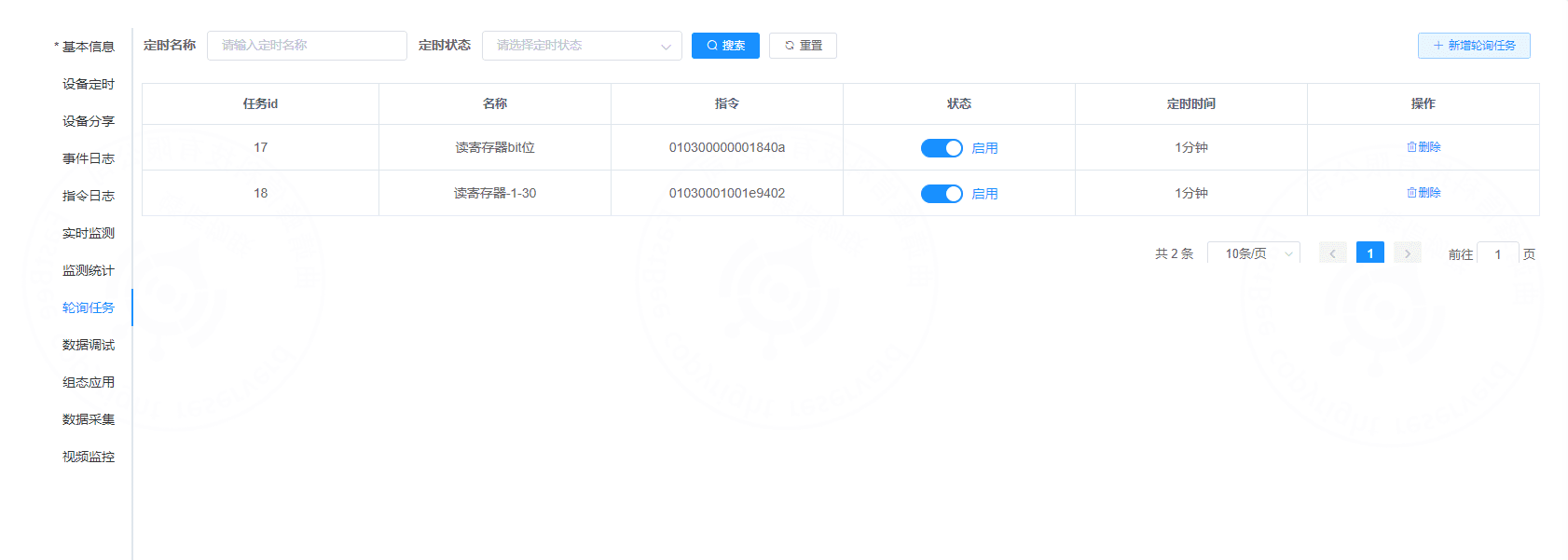
1.2 Add a polling task
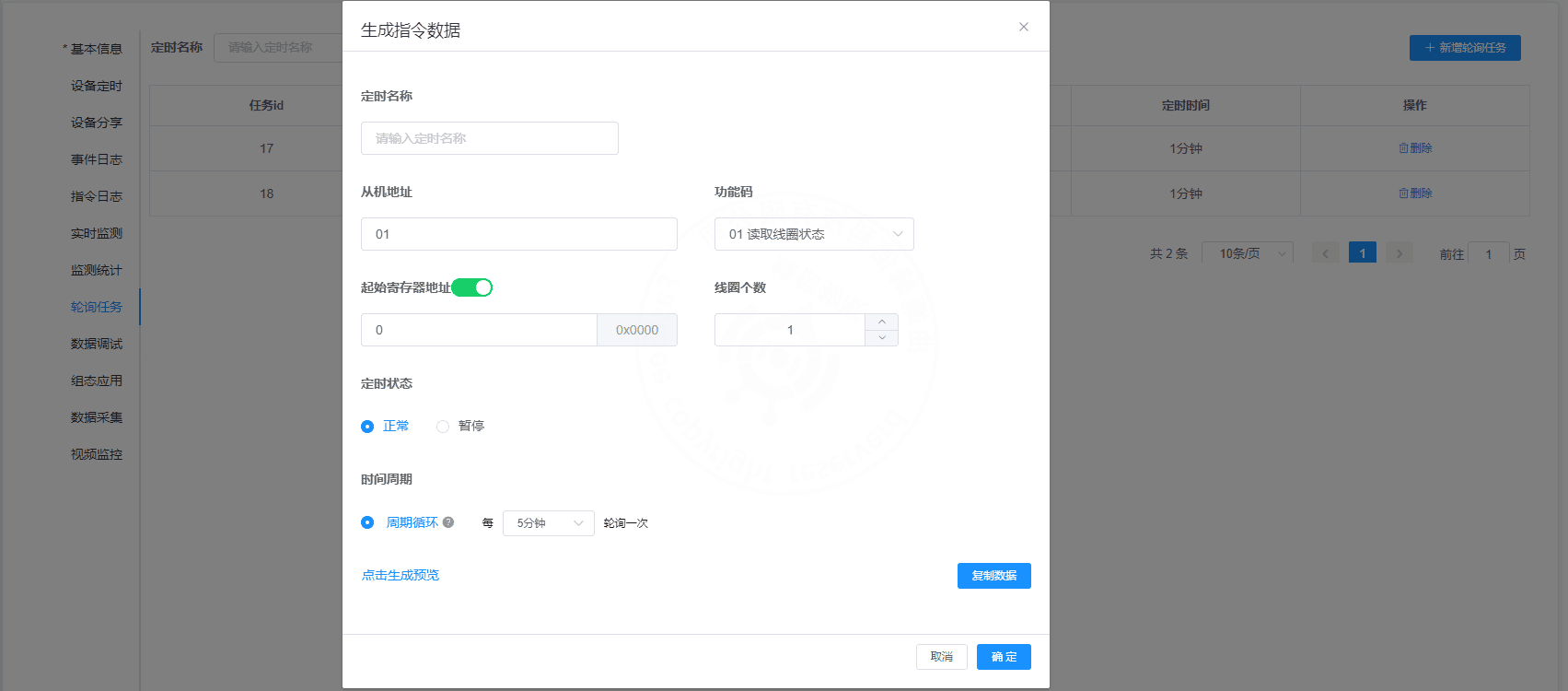
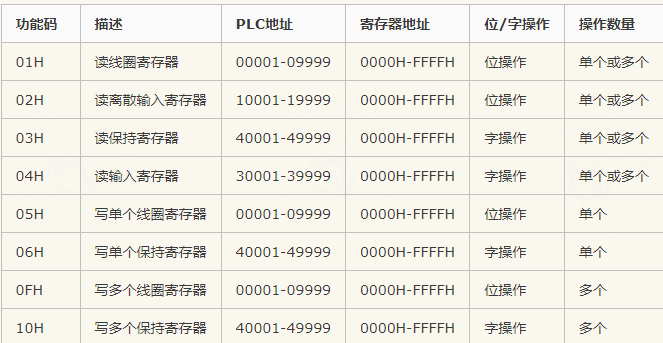
Supported function codes:
Polling interval examples:
| Interval |
|---|
| 1 minute |
| 3 minutes |
| 5 minutes |
| 10 minutes |
| 20 minutes |
| 30 minutes |
| ... |
The task list is shown below:
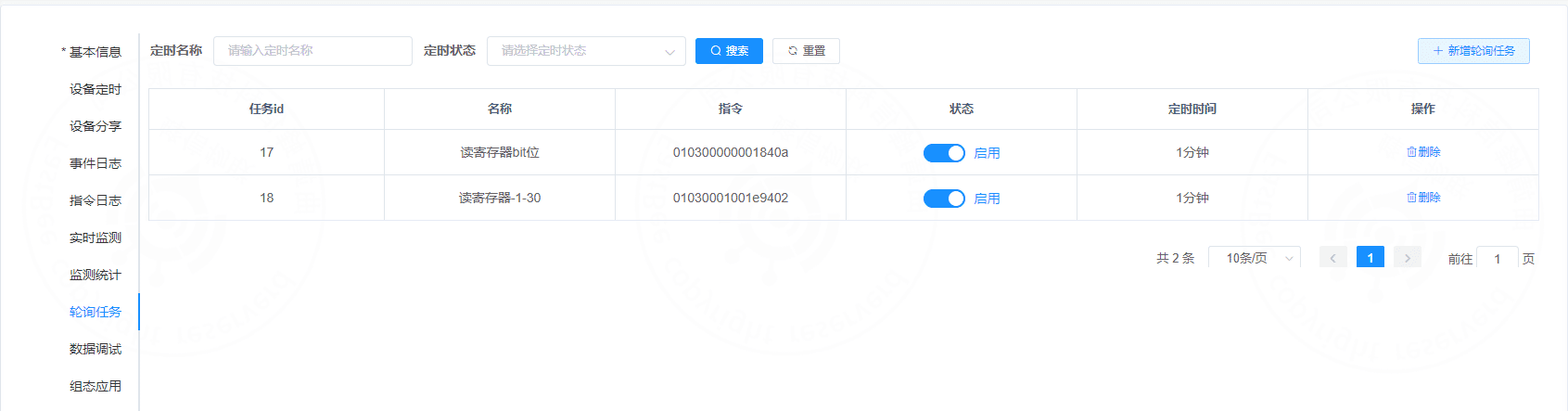
After the polling task is created, polling commands are automatically delivered when the gateway device comes online.
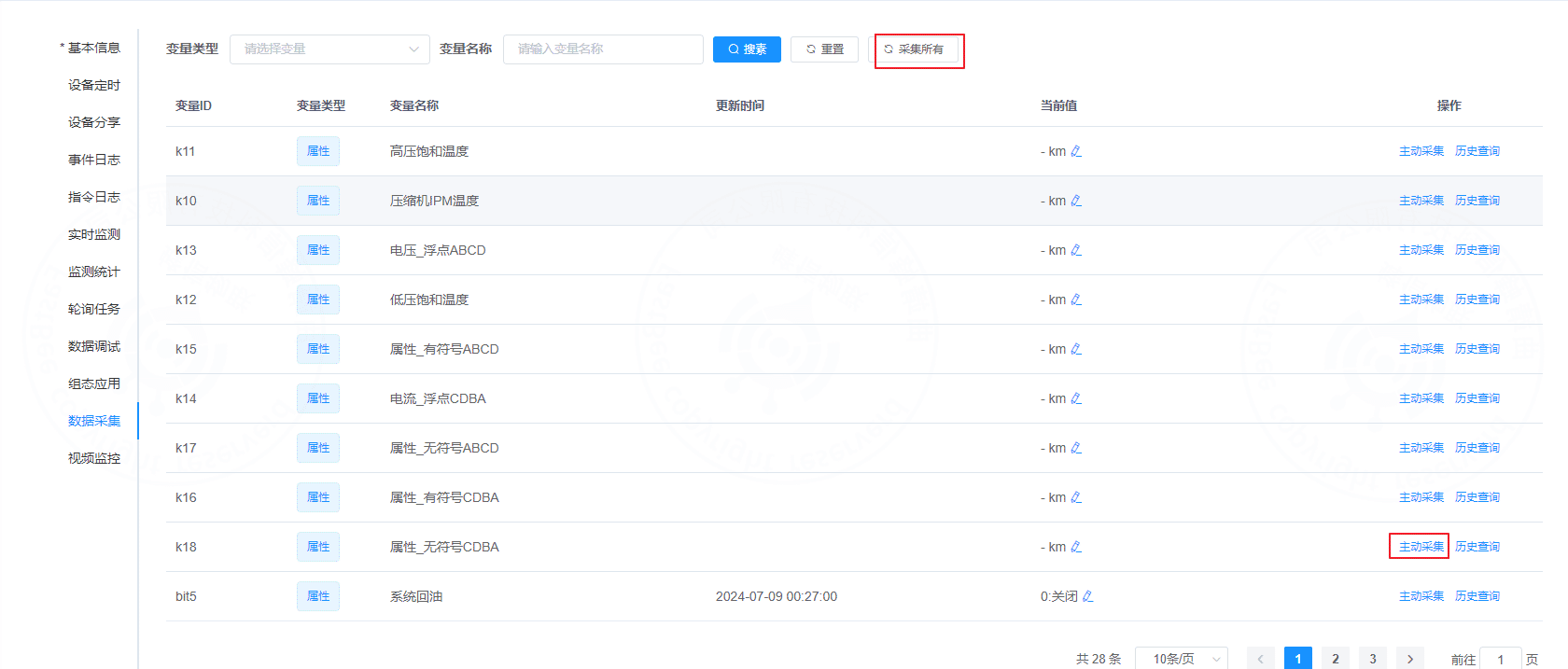
1.3 Active collection and collect all
Active collection immediately sends a read command and reads the register value corresponding to the selected thing model.
Collect all sends all polling commands and reads all configured register points.
2. Modbus protocol
2.1 Modbus RTU frame
A Modbus RTU message is one complete data frame. In essence, it is a complete sequence of instruction bytes.


Frame fields:
- Slave address: each slave has a unique one-byte address. The full range is
0-255; the common valid slave range is1-247. Address255can be used as a broadcast address. - Function code: one byte. It defines what the instruction does, such as reading data or writing data.
- Data: varies by function code. For a read instruction, it usually contains the start address and the number of registers to read.
- CRC: cyclic redundancy check used to detect transmission errors.
2.2 Modbus function codes
Modbus assigns a function code to each supported operation.
| Code | Meaning |
|---|---|
| 01H | Read coils |
| 02H | Read discrete inputs |
| 03H | Read holding registers |
| 04H | Read input registers |
| 05H | Write single coil |
| 06H | Write single register |
| 0FH | Write multiple coils |
| 10H | Write multiple registers |
2.3 Master reads data from slave

Example request:
01 03 00 01 00 01 D5 CAField explanation:
0x01: slave address.0x03: function code for reading holding registers.0x00 0x01: start register address. Reading starts from0x0001.0x00 0x01: number of registers to read.0xD5 0xCA: CRC.
Example response:
| Slave address | Function code | Byte count | Byte 1 | Byte 2 | CRC |
|---|---|---|---|---|---|
| 0x01 | 0x03 | 0x02 | 0x00 | 0x17 | 0xF8 0x4A |
Response explanation:
0x01: slave address.0x03: read function code.0x02: returned byte count is 2.0x00 0x17: register value.0xF8 0x4A: CRC.
2.4 Master writes data to slave

Example request:
01 06 00 01 00 17 98 04Field explanation:
0x01: slave address.0x06: function code for writing a single register.0x00 0x01: target register address.0x00 0x17: value to write.0x98 0x04: CRC.
The slave returns the same frame after a successful write.
0106000100179804| 0x01 | 06 | 00 01 | 00 17 | 98 04 |
|---|---|---|---|---|
| Slave address | Function code | Data address | Data | CRC |
2.5 Read command field example
0103020017F84A| 0x01 | 03 | 00 01 | 00 01 | D5 CA |
|---|---|---|---|---|
| Slave address | Function code | Data address | Number of values | CRC |
2.6 Message example
Read registers 40005 and 40006, assuming the slave address is 1.
Downstream message:
01 03 00 04 00 02 85 ca| Slave address | Function code | Start register address | Number of registers | CRC |
|---|---|---|---|---|
| 01 | 03 | 00 04 | 00 02 | 85 ca |
Upstream message:
01 03 04 00 00 00 00 fa 33| Slave address | Function code | Returned byte count | Register 40005 data | Register 40006 data | CRC |
|---|---|---|---|---|---|
| 01 | 03 | 04 | 00 00 | 00 00 | fa 33 |
2.7 Common Modbus RTU function codes
| Data type | Read function code | Write function code | Object type |
|---|---|---|---|
| Discrete input | 02 | - | Single bit |
| Coil status | 01 | 05, 15 | Single bit |
| Input register | 04 | - | 16-bit word |
| Holding register | 03 | 06, 16 | 16-bit word |
2.8 Register start addresses
| Data type | Parameter address / register number |
|---|---|
| Discrete input | 00001-0FFFF |
| Coil status | 10001-1FFFF |
| Input register | 30001-3FFFF |
| Holding register | 40001-4FFFF |
2.9 Platform configuration acceptance
Modbus RTU access acceptance should cover not only serial communication, but also correct product, register, and polling task configuration on the platform.
| Acceptance Item | Normal Behavior |
|---|---|
| Product type | The product uses a Modbus-related communication protocol |
| Device type | Direct or gateway type matches the field link |
| Slave address | Consistent with the field instrument or PLC address |
| Register address | Address, function code, data type, and scaling factor are correct |
| Collection mode | Cloud polling is enabled when active cloud collection is required |
| Polling task | The interval is reasonable and the task is enabled |
| Data display | Parsed values are visible in device data collection or running status |
| Command delivery | Write-coil or write-register commands are answered by the device |
3. FAQ
No data can be read
First check the serial port, baud rate, data bits, stop bits, parity, slave address, function code, and register start address.
Data values are incorrect
Check the byte order, data type, scaling factor, decimal places, signed/unsigned setting, and whether the register number and the protocol address are being confused.
The platform does not collect actively
Check whether a polling task is configured on the product or device side, whether cloud polling is selected as the collection mode, and whether the task is enabled.
Old data is still read after configuration changes
Check whether the Modbus-related cache in Redis needs to be cleared, whether the device or service needs a restart, and whether the product release status is updated.
Data from multiple slaves is mixed up
Check whether slave addresses are duplicated, whether sub-device addresses are unique, and whether the gateway-to-sub-product binding is correct.
4. Secondary Development Entry Points
| Type | Path or API | Description |
|---|---|---|
| Frontend pages | vue3/src/views/iot/product, vue3/src/views/iot/device | Modbus configuration, polling tasks, and device collection |
| Backend APIs | /api/modbus, /modbus/config, /modbus/job | Modbus configuration and tasks |
| Product Modbus | /productModbus/gateway, /productModbus/job | Product-level gateway and polling configuration |
| Protocol module | springboot/fastbee-protocol | Modbus message parsing |
| Service module | springboot/fastbee-server | TCP/serial related service capabilities |