

esp8266 burn code access
1. Arduino Development Environment
- Development tool: Arduino
- Boards: esp8266 core for arduino v3.0.2 or esp32 core for arduino 1.0.6
- Dependencies: PubSubClient2.8.0, ArduinoJson6.19.1, OneButton2.0.4
2. Arduino Example Features
- Wi-Fi connection, MQTT connection, device encryption authentication, device network provisioning, publishing device information, subscribing to device upgrades, getting the current device time via HTTP and MQTT
- Publishing and subscribing to the Thing Model (properties, functions, events)
- Real-time monitoring and simulated reporting of monitoring data
- User-defined functions: relay on/off
3. Arduino Project File Description
When using this SDK, you mainly modify the configuration information in Config.cpp, and implement custom functions in User.cpp according to the product Thing Model.
java
├───Apconfig.cpp     #Device network provisioning
├───Apconfig.h
├───Auth.cpp         #Device authentication
├───Auth.h
├───Base64.cpp       #Base64 encoding and decoding
├───Base64.h
├───Config.cpp       #Global configuration information
├───Config.h
├───Mqtt.cpp         #Device interaction
├───Mqtt.h
├───User.cpp         #User-defined functions
├───User.h
├───FastBeeArduino.h #Program entry4. Flashing Code with Arduino
Example of flashing code to a device; common serial modules include the CH340. On the ESP8266, connect the GPIO0 pin to the GDN pin and pull it low to enter flashing mode. 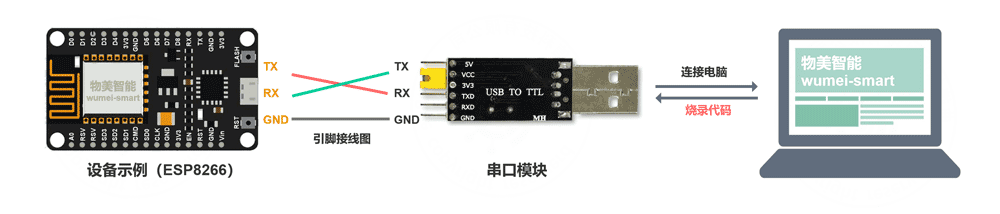
5. Other Hardware
Supported Development Environments
- Arduino IDE
- VS code
- luatIDE
Supported Hardware Development Frameworks
- Arduino
- ESP-IDF
- Hezhou (Air) SDK
Supported Chip Solutions
- ESP8266
- ESP32
- Hezhou air724