

HTTP Device Access
Page Guide
/info/post can be called, and the results of property, event, and monitoring data reporting can be viewed on the platform.Access Entry and Minimal Flow
- Create and publish an HTTP product in Product Management, and confirm the authentication method, product ID, device number, and account password.
- The client first completes authentication with Digest or Basic; after successful authentication, the server records the session and device ownership.
- The device calls
/info/postto report device information, then calls/property/post,/event/post, or/monitor/postto report business data. - On the platform side, confirm the access result through device details, running status, event logs, and rule scenes.
1. Access Steps
提示
- Refer to the access test code in TestBasicScheme.java and TestDigestScheme.java under the test folder of the http-server module.
Device Authentication
- Digest authentication
- Basic authentication
Device Interaction
- Publish Thing Model and device information related MQTT topics
2. Device Authentication
1. Digest Authentication
- After receiving an unauthenticated request from the client, the server replies with status 401 and the Header WWW-Authenticate with the value: Digest realm="http-auth@fastbee.com", nonce="xxxxx", opaque="", stale="FALSE", qop="auth", algorithm="MD5"
Digest: indicates digest authentication
qop: =auth means authentication is required; =auth-int means authentication with integrity protection is required; other values are ignored. (optional)
realm: the realm of the current response; the realm tells you which username and password to use, and generally contains the host name performing authentication.
nonce: a random string generated by the server, used for encryption, generally Base64 or hexadecimal data. For GET requests the nonce contains an expiration time; PUT or POST requires a one-time nonce.
stale: when true, the nonce has expired and needs to be re-obtained; when false, the nonce is still valid.
algorithm: indicates the algorithm; when absent, MD5 is used by default- The client parses WWW-Authenticate to obtain the nonce, encryption algorithm, and other information, and generates the response.
1. MD5-encrypt in the format user:realm:password to get value a1, e.g. fastbee:http-auth@fastbee.com:fastbee
2. MD5-encrypt in the format method:uri to get value a2, e.g. post:/
3. MD5-encrypt in the format a1:nonce:nc:cnonce:qop:a2 to get the response, e.g. a1:326435383a37323966343563663a3c2f55408da812d8509c09bb0574faff:00000001:0a4f113b:auth:a2- The client adds the Header Authorization to the HTTP request with the value:
Digest username="fastbee", realm="http-auth@fastbee.com",
nonce="353761313a62373364373163373a94eac188bbb9a6119d58f125dfad1c7a", uri="/",algorithm="MD5",
qop=auth,nc=1,cnonce="177783ecbdc88e14",response="c3a1lcf18elebc5f3b237dd4664169262"- The server receives the request and authenticates it. After successful authentication, the server stores the session information; subsequent requests only need to carry the authentication header to confirm device ownership and obtain the device information stored in the session.
2. Basic Authentication
- After receiving an unauthenticated request from the client, the server replies with status 401 and the Header WWW-Authenticate with the value: Basic realm="http-auth@fastbee.com"
- The client Base64-encodes user:password, resulting in: dXNlcipwYXNzd29yZA==
- The client adds the Header Authorization to the HTTP request with the value: Basic ywRtaW46YWRtal4=
- The server receives the request and authenticates it. After successful authentication, the server stores the session information; subsequent requests only need to carry the authentication header to confirm device ownership and obtain the device information stored in the session.
3. Device Interaction
productId represents the product ID, and SerialNumber represents the device number. Obtain the product ID and device number from the web side. If automatic device addition is used, the device number can be a unique code or the device MAC address. After HTTP authentication succeeds, the client must send an /info/post request carrying the product ID and device number information, which the server stores in the session.
2. Publishing Topics
| uri | Description |
|---|---|
| /info/post | Publish device information |
| /property/post | Publish data (real-time display; property/function and monitoring data; monitoring data can be reported on a schedule) |
| /event/post | Publish events |
| /monitor/post | Publish real-time monitoring data (only used for real-time monitoring charts; not stored) |
3. Data Format
Devices interact with the system in JSON format
- Publish device information, corresponding topic:
/info/postts# Description: 1. The device publishes device information after powering on; 2. The device publishes device information after receiving a device information command # productId Product ID # serialNumber Device number # rssi Device signal (excellent [-55— 0], good [-70— -55], fair [-85— -70], poor [-100— -85]) # status Device status, fixed at 3, meaning online # firmwareVersion Firmware version # userId The user ID; can be set to user ID 1 (administrator). During network provisioning, the device is assigned to a specific user. # longitude Optional, longitude; required when using device positioning # latitude Optional, latitude; required when using device positioning # summary Optional, summary; device configuration information, etc., in JSON format, the object can be customized { "productId": 145, "serialNumber": "D1M267SH21TM", "rssi": -43, "firmwareVersion": 1.2, "status": 3, "userId": 2, "longitude": 0, "latitude": 0, "summary": { "name": "FastBee", "chip": "ESP8266", "author": "fastbee", "deliveryTime": "2023-06-06", "activeTime": "2022-10-01" } }
- Publish data and events, corresponding topics:
/property/post,/event/postts# Description: properties, functions, and events all belong to the Thing Model and share the same JSON definition. If the `value` is a boolean, it is "0" or "1", meaning on/off; for an enum type it is the key of the enum item (e.g. "1" means the medium speed gear); an array type is a string separated by English commas. # id Identifier; view the Thing Model in the product details, corresponding to the Thing Model identifier # value Value, as defined in the Thing Model, passed as a string # remark The remark obtained from the subscription can be used directly; this remark can be viewed in the device log information [{ "id": "gear", "value": "1", "remark": "Gear set successfully" }, { "id": "switch", "value": "0", "remark": "Switch turned off" }]
- Publish real-time monitoring, corresponding topic:
/monitor/postts# Description: based on the subscribed real-time monitoring message, publish monitoring data with the specified count and interval # id Identifier; real-time monitoring is a property in the Thing Model — view the identifier in the product details, corresponding to the id value # value The value collected by the device; only integers or decimals, passed as a string # remark Can be empty or use the device's current time [{ "id": "temperature", "value": "27.43", "remark": "" }, { "id": "humidity", "value": "32.18", "remark": "" }]
4. HTTP Protocol Device Access Example
1. Create an HTTP protocol product and device
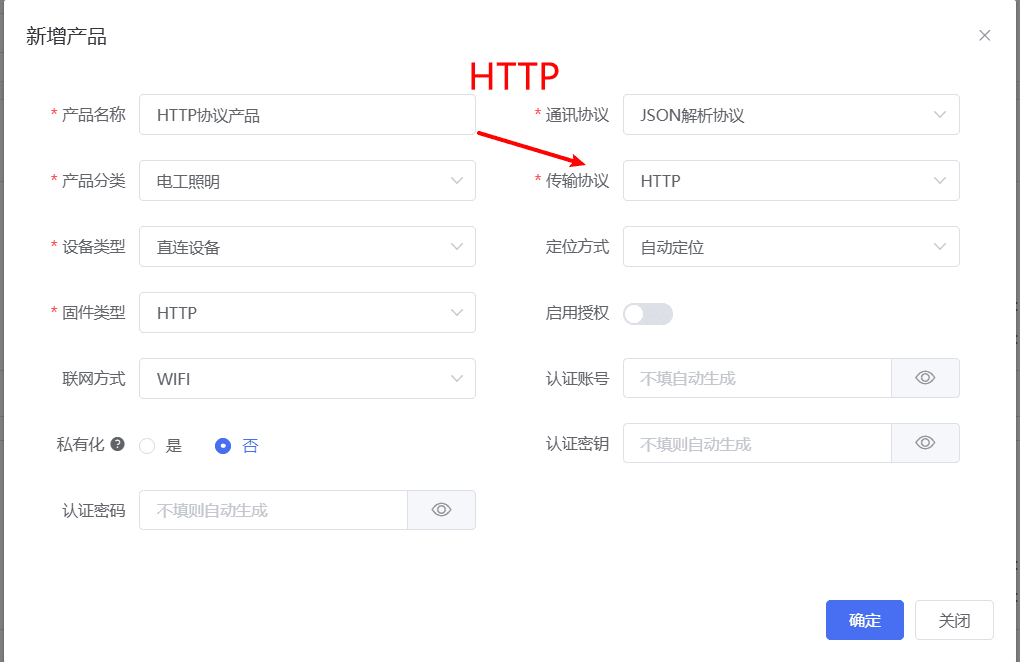
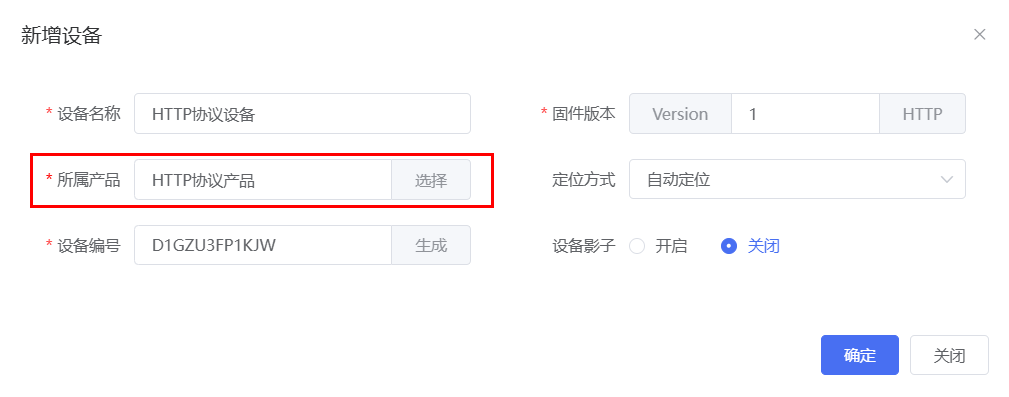
2. View the authentication information in the device details, and copy the corresponding information into the example code to replace it
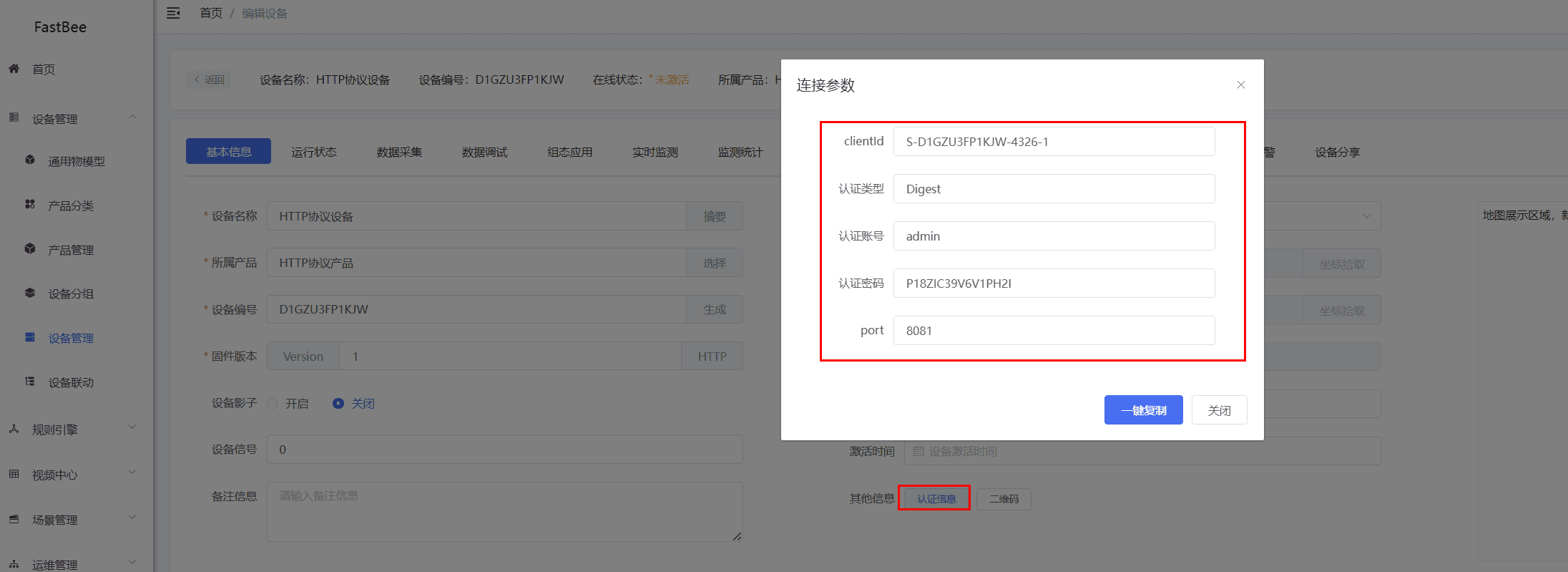
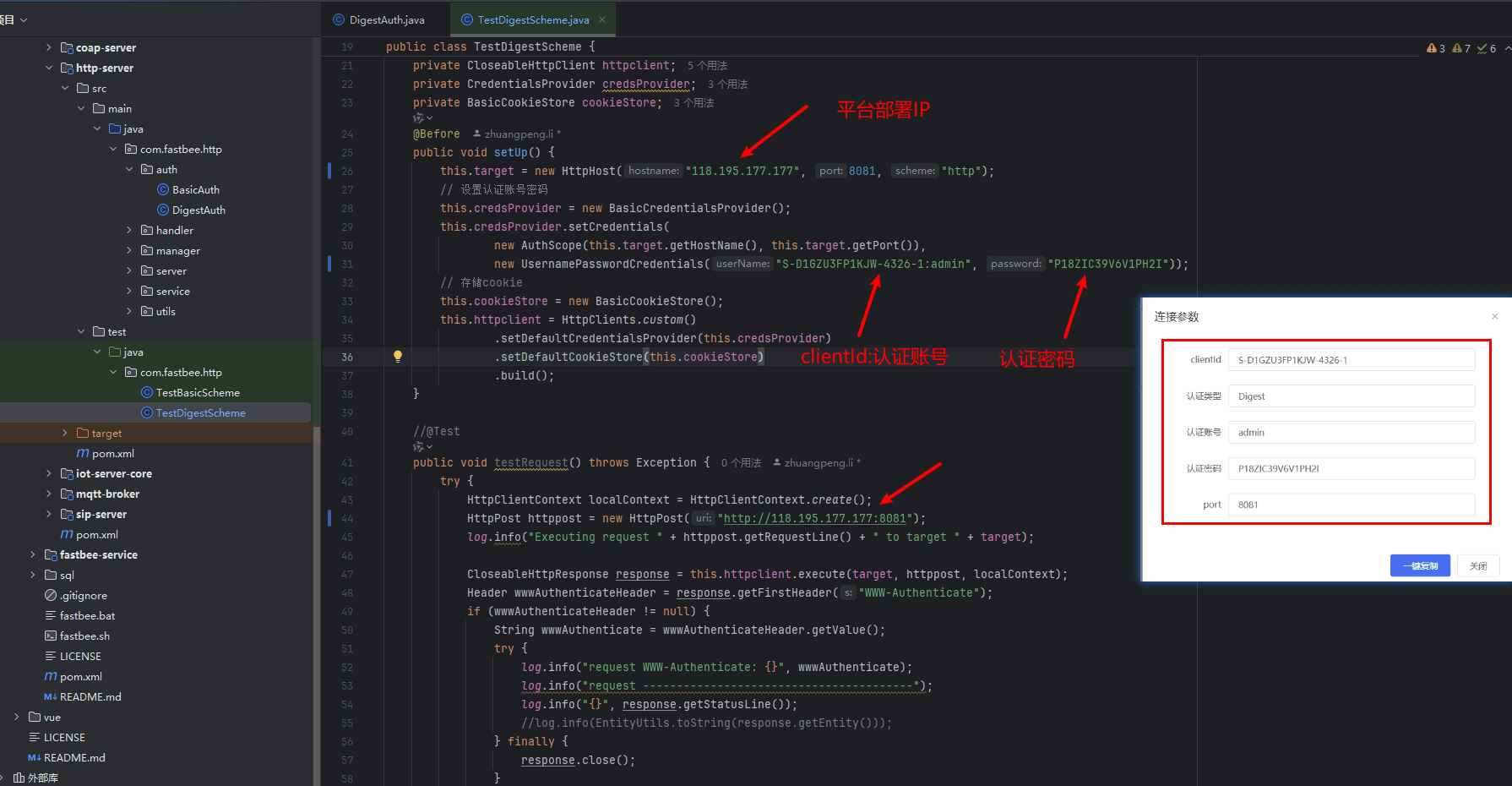
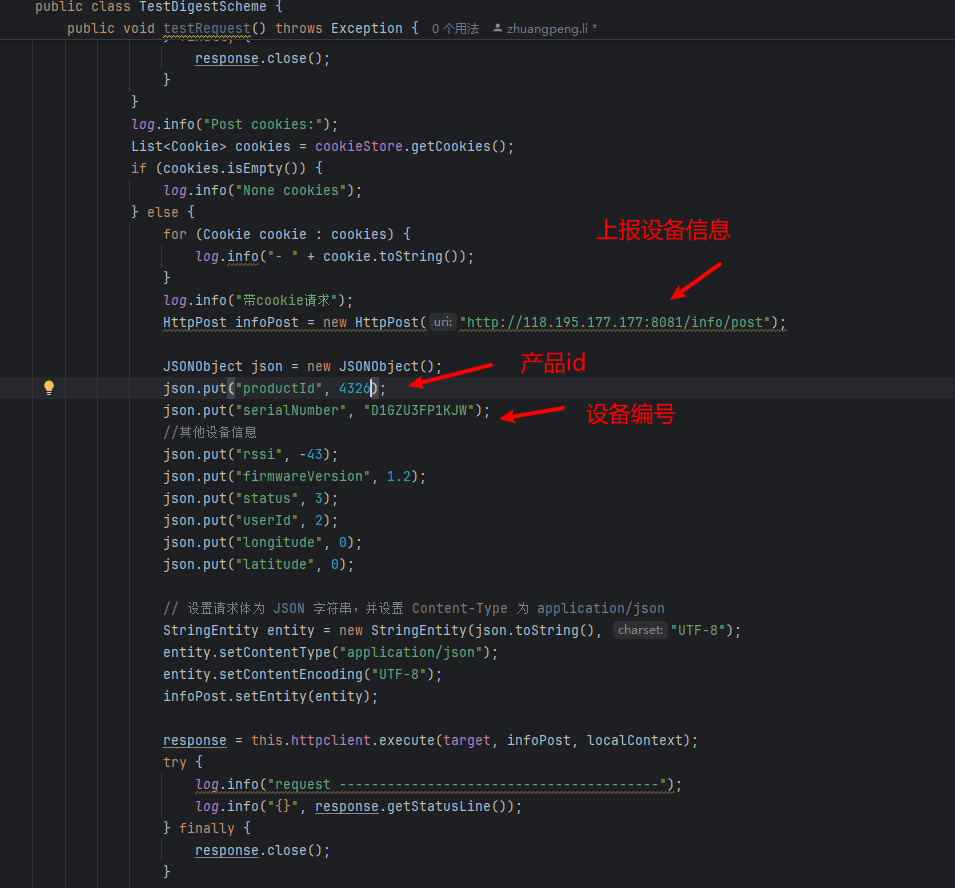
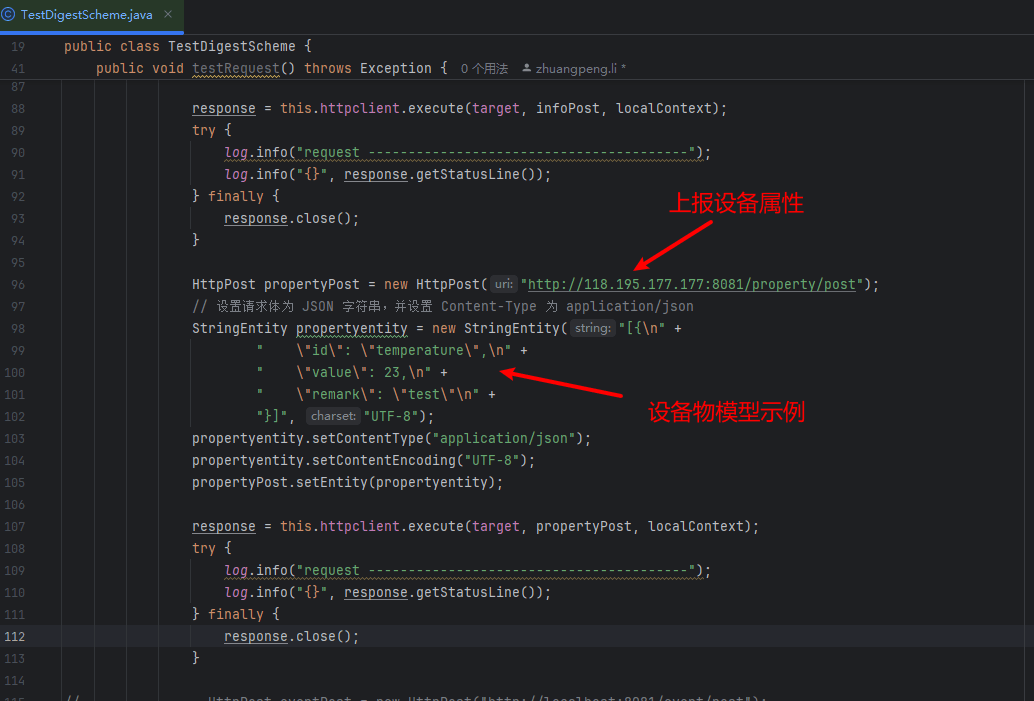
3. Run the test demo and you can see the device come online and report data
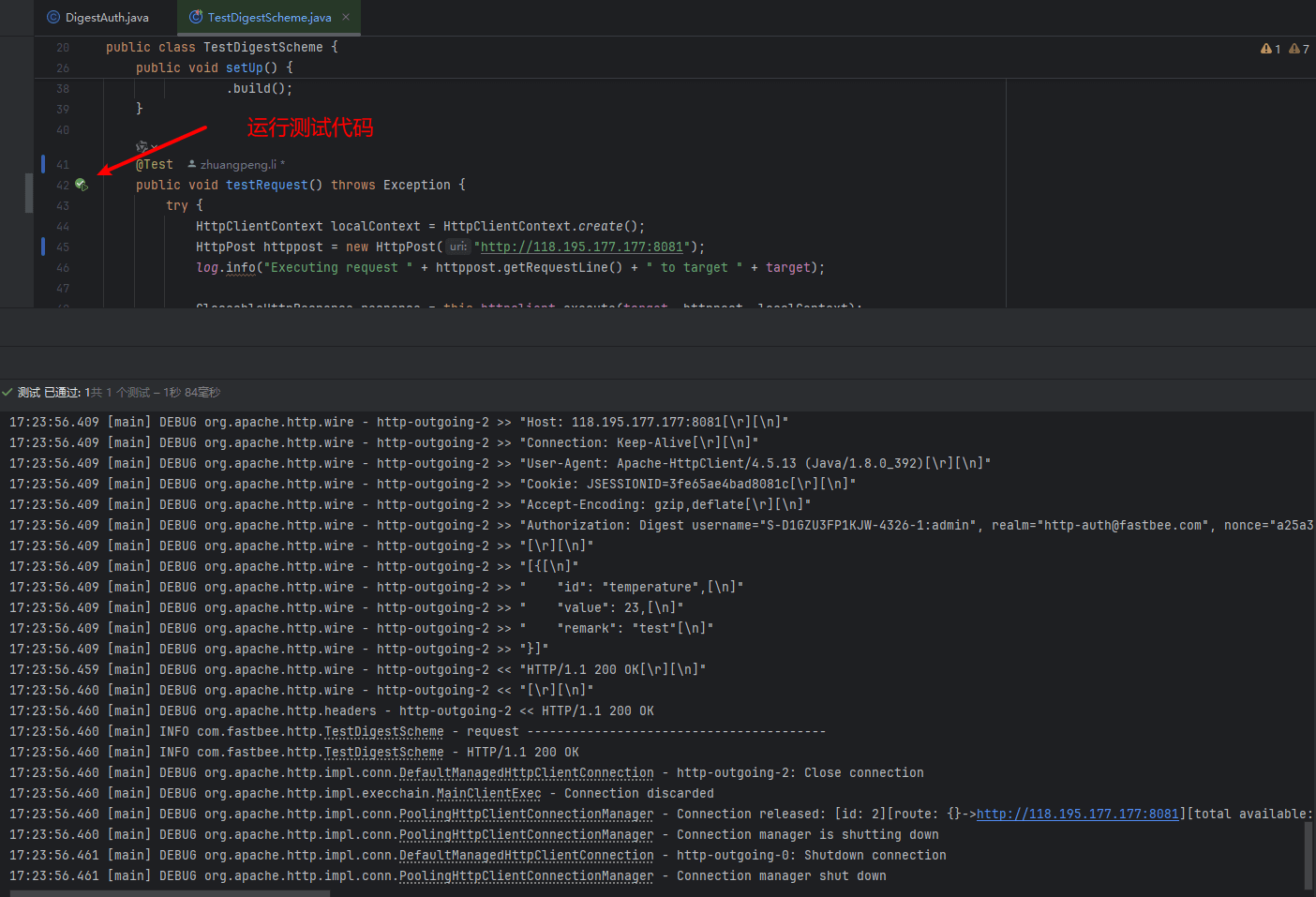
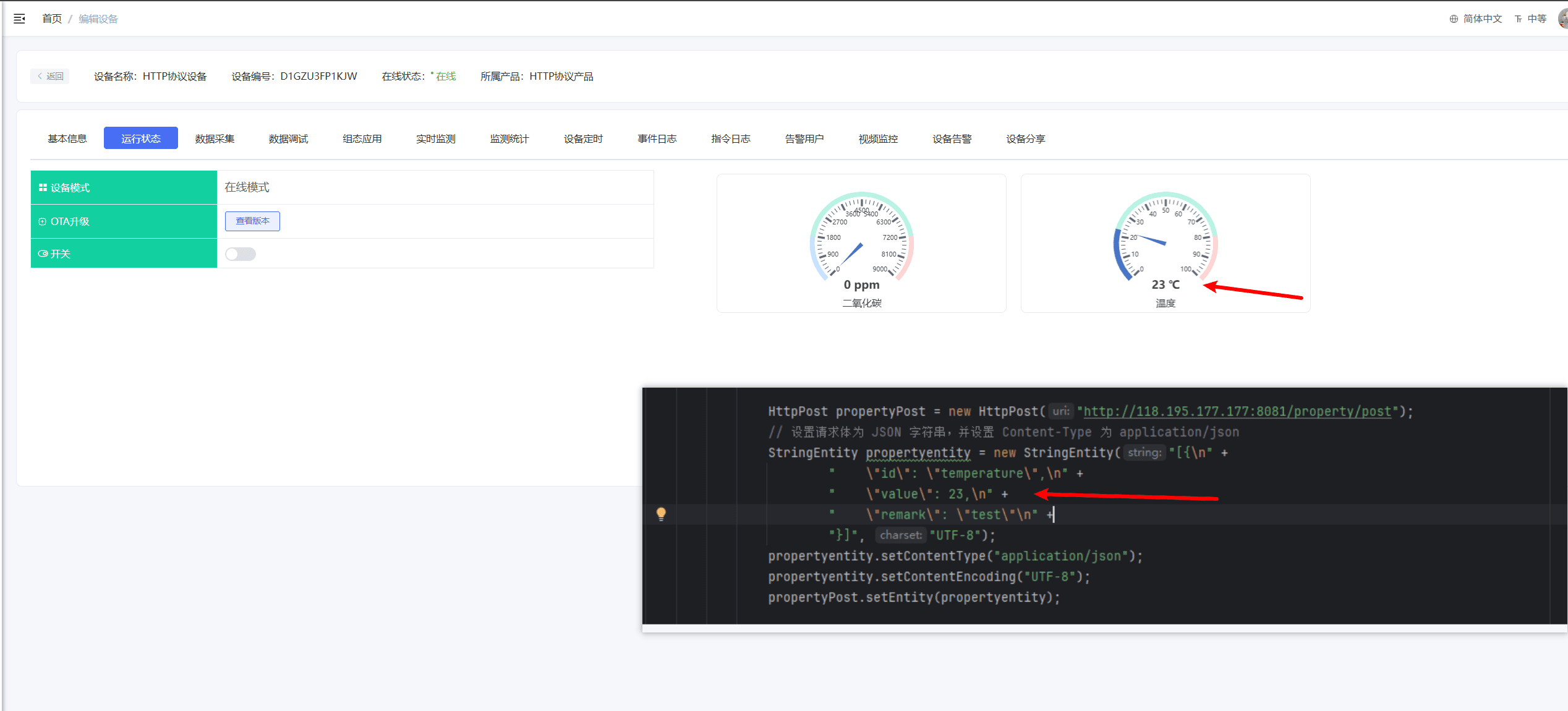
For the Basic authentication method, refer to Digest.
5. Authentication and Request Checks
For HTTP device access, it is recommended to verify authentication, device information, and business data separately.
| Check Item | Description |
|---|---|
| Product status | The product must be published |
| Device number | The platform device number matches the request parameters |
| Product ID | Use the product ID in requests; do not mistakenly use the product number |
| Authentication method | Consistent with the product configuration |
| Request method | Use GET/POST as required by the API |
| Content-Type | application/json is recommended for JSON requests |
| Time parameters | Pay attention to device time in encryption or signing scenarios |
| Auth code | Must be carried when device authorization is enabled |
6. Joint Debugging Acceptance Checklist
| Step | Acceptance Content | Success Criteria |
|---|---|---|
| 1 | Device authentication | The API returns success and the device status changes to online |
| 2 | Device information reporting | Version, signal, positioning and other information in the device details is refreshed |
| 3 | Property reporting | Running status displays Thing Model data |
| 4 | Event reporting | Records appear in the event log |
| 5 | Platform issuing | The device can obtain pending commands through polling or business APIs |
| 6 | Rule linkage | Reported data can trigger rules, scenes, or alarms |
7. FAQ
HTTP returns authentication failure
Check the authentication account, authentication password, product ID, device number, device auth code, and request signature. If using Digest authentication, also confirm the nonce, realm, algorithm, and device time.
The API returns success but the device is not online
Check whether the API called is related to device information or authentication, and whether the device status needs /info/post or an equivalent API to trigger a refresh.
Data is reported successfully but not displayed on the page
Check the Thing Model identifiers, data types, product publish status, and the product the device belongs to in the message.
The rule did not trigger
First confirm whether the data is displayed in the running status, then check the rule's bound variables and trigger conditions.
8. Secondary Development Entry Points
| Type | Path or API | Description |
|---|---|---|
| Device tool APIs | /iot/tool | HTTP registration, authentication, upload and other tool APIs |
| Device APIs | /iot/device | Device entities and status |
| Thing Model APIs | /iot/model | Thing Model mapping |
| Protocol module | springboot/fastbee-protocol | HTTP message parsing adaptation |
| Frontend page | vue3/src/views/iot/device | Data debugging and device details |
| Troubleshooting doc | Device Access Troubleshooting Checklist | Unified access problem locating |