

Modbus TCP Device Access

Page Guide
1. Modbus TCP Protocol
1. Implementation and Configuration
- The implementation is largely consistent with ModbusRtu; only the message format is different
- Configuration method: when creating a product, select the ModbusTcp or ModbusTcpOverRtu protocol as the communication protocol, then configure it by referring to the Gateway and Sub-device document
- Notes:
- If the device connects as a Client, select the ModbusTcpOverRtu protocol. For the connection method, refer to the TCP Protocol Device Access document. The device needs to actively send registration packets and heartbeat packets;
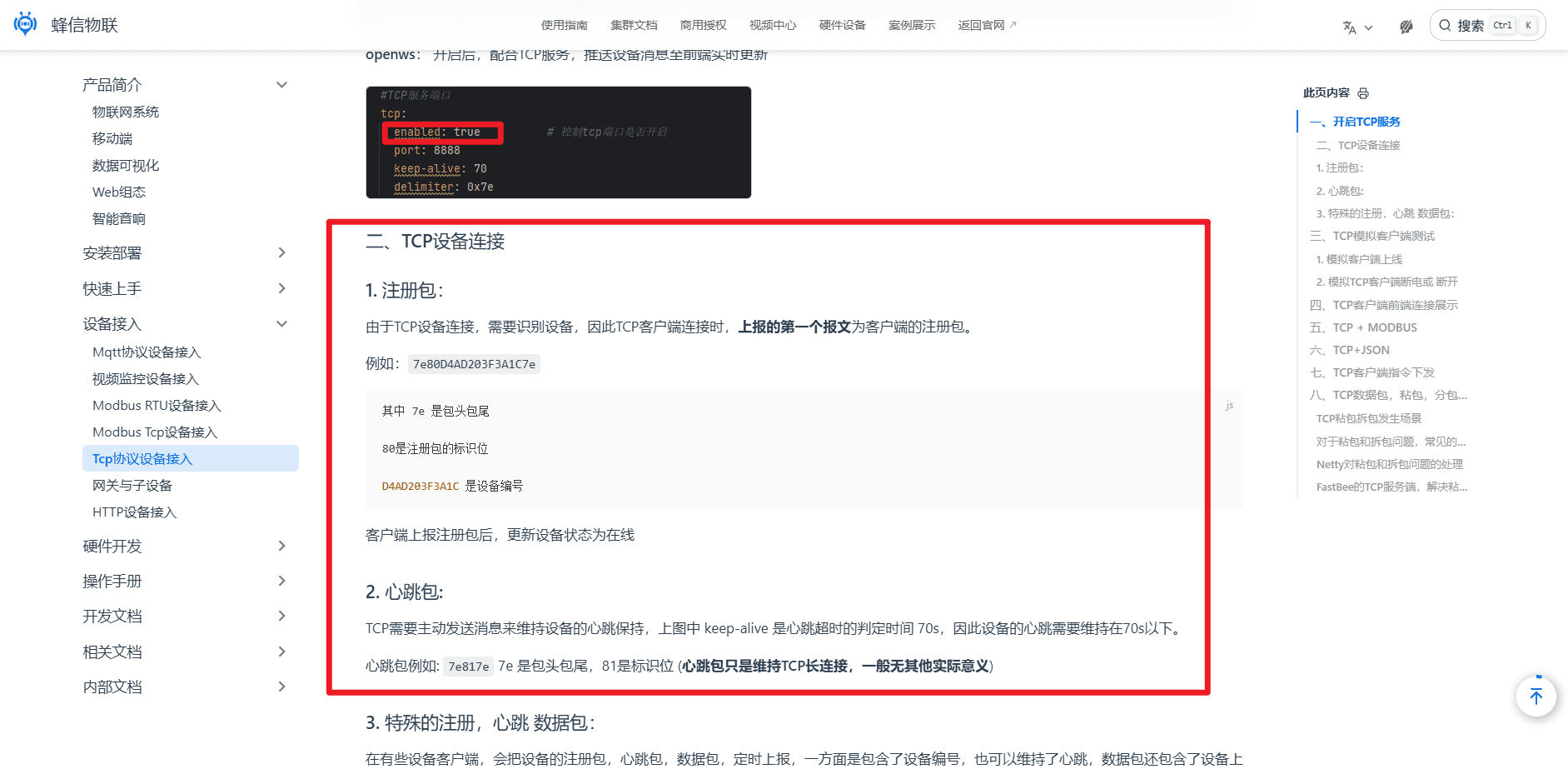
- If the device connects as a Server, select the ModbusTcp protocol, and configure the Modbus master IP and port in the device details. You also need to configure polling tasks; the system actively connects to the device every two minutes and delivers polling commands to read data. To deliver a write command, configure it under Command Delivery, then select the relevant command and deliver it manually;
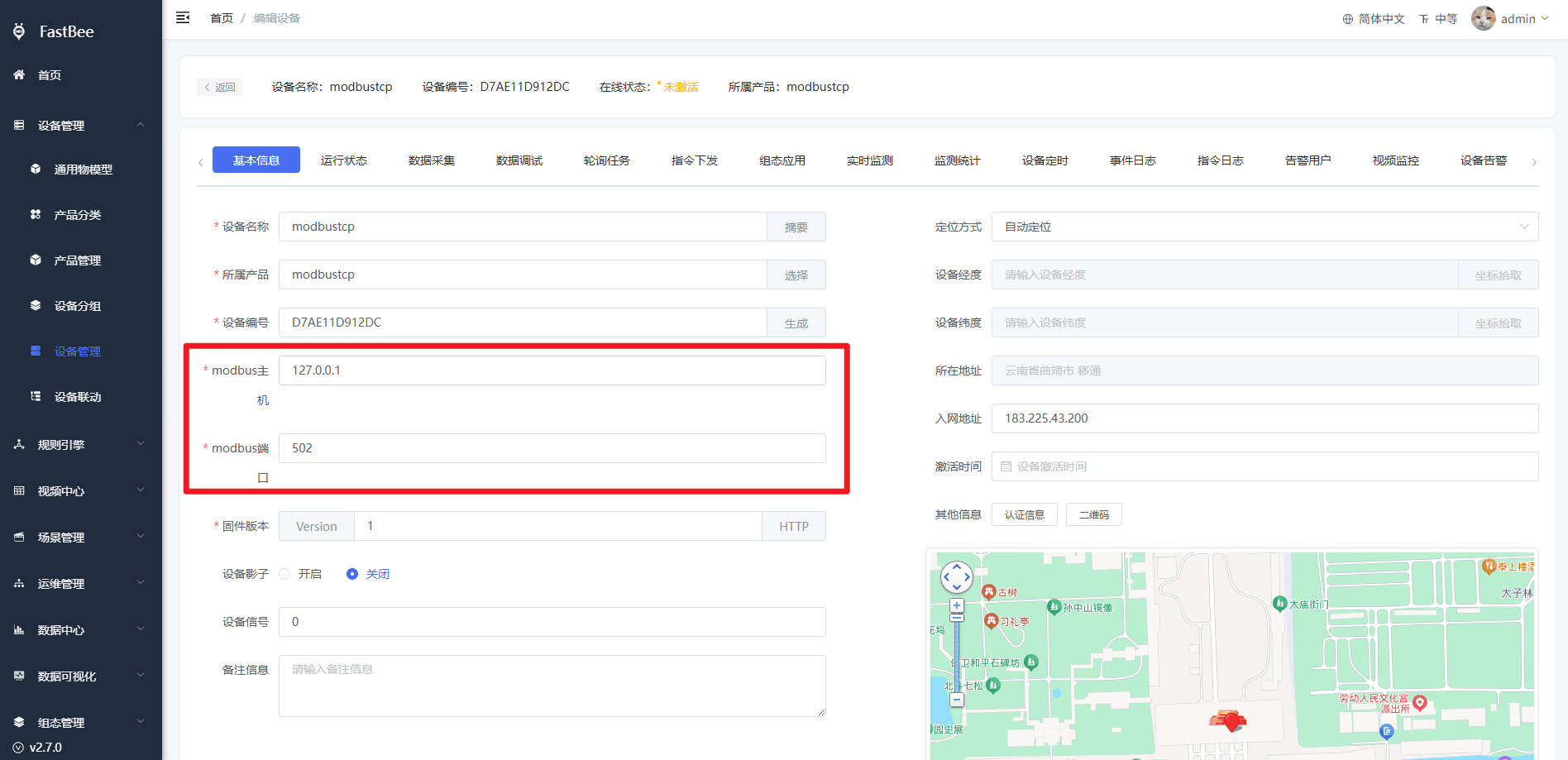
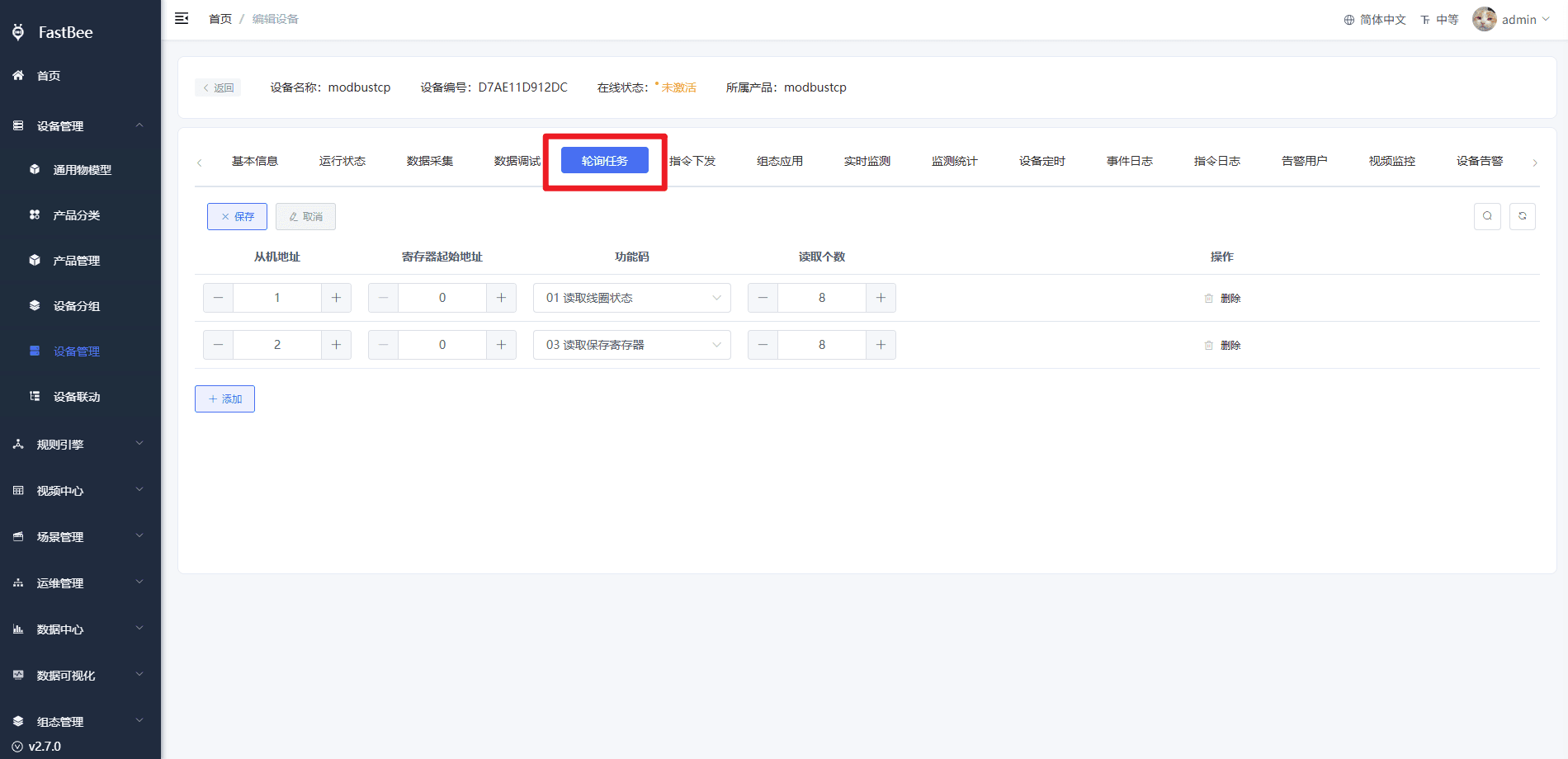
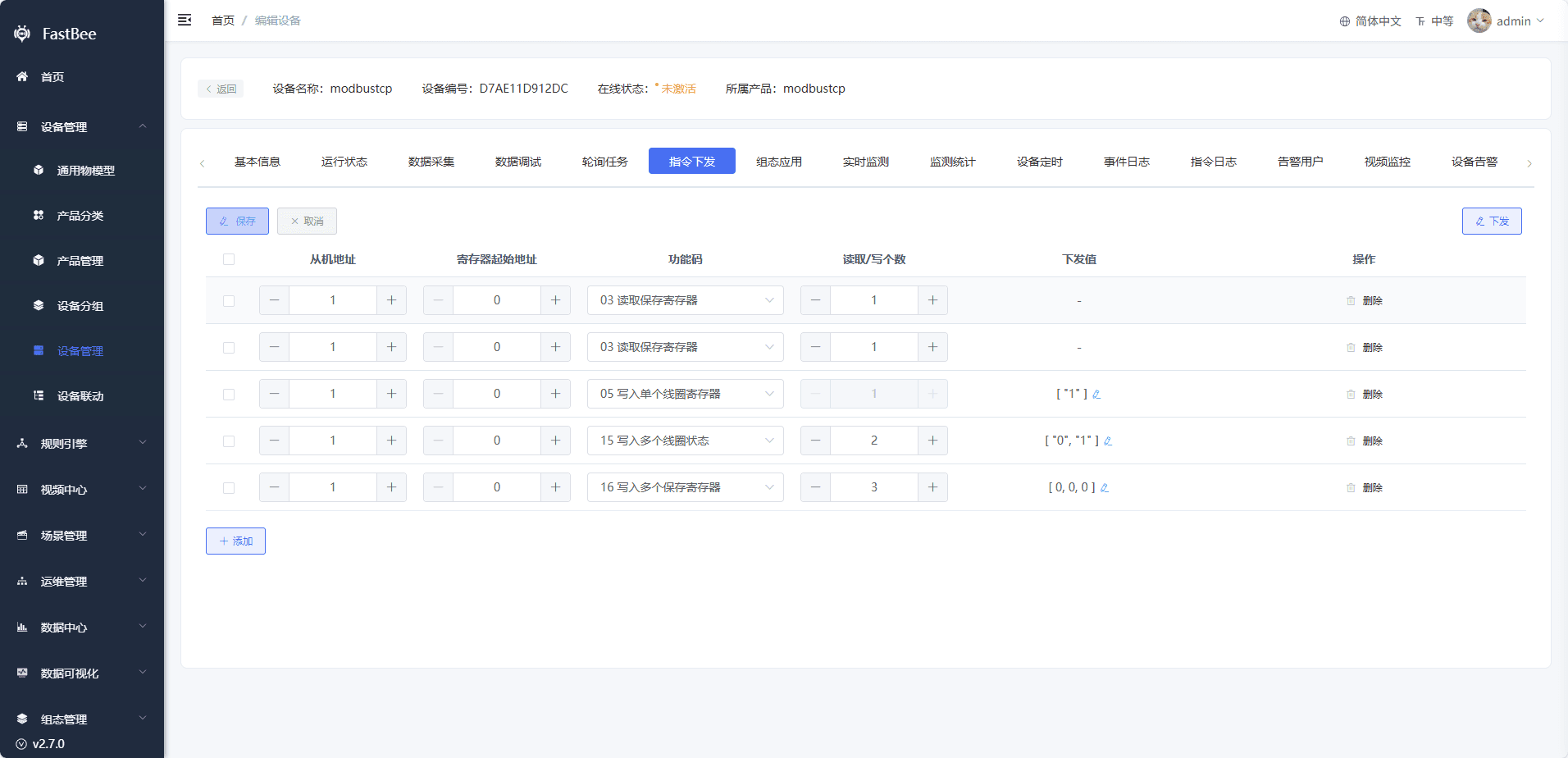
- If the device connects as a Client, select the ModbusTcpOverRtu protocol. For the connection method, refer to the TCP Protocol Device Access document. The device needs to actively send registration packets and heartbeat packets;
2. Modbus TCP Message
A Modbus TCP message consists of the following main parts:
- MBAP Header (Modbus Application Protocol Header):
- Transaction Identifier: used to match requests and responses, usually generated by the client.
- Protocol Identifier: fixed at 0, indicating the Modbus protocol.
- Length: the byte length of the subsequent data, including the Unit Identifier and the PDU (Protocol Data Unit).
- Unit Identifier: used to identify the slave device.
- PDU (Protocol Data Unit):
- Function Code: indicates the operation to perform, such as read, write, and so on.
- Data: contains the corresponding operation data depending on the function code.
A request message for reading holding registers may look like this:
Transaction Identifier: 0x0001
Protocol Identifier: 0x0000
Length: 0x0006
Unit Identifier: 0x01
Function Code: 0x03
Start Address: 0x0000
Number of Registers: 0x0002In the response message, if the data is read successfully:
Transaction Identifier: 0x0001
Protocol Identifier: 0x0000
Length: 0x0005
Unit Identifier: 0x01
Function Code: 0x03
Byte Count: 0x04
Data: 0x000A 0x000BTransaction Identifier:
Value range: 0x0000 ~ 0xFFFF, that is, 0-65535. If the range is exceeded, counting restarts from 0.
Most important role: serves as the sequence number of the message.
The client generates a unique transaction identifier when sending a request, and the server uses the same transaction identifier in its response. This allows the client to accurately associate each received response with the request it sent earlier, ensuring data correspondence and accuracy. For example, if the client sends multiple different requests at the same time, without a transaction identifier it would be difficult for the client to tell which request each response corresponds to.
Assign transaction identifiers to each device status read request in sequentially increasing order.
It is recommended that each device record its own transaction identifier so that it can be incremented.
For example, record the transaction identifier of device A's polling in Redis, starting from 0. Each time a message is delivered to the client (after the client replies), the transaction identifier automatically increments by 1.
After reaching 65535, counting restarts from 0. The client does not validate the transaction identifier, and it will still reply even if the identifier is repeated.
2. Function Code Examples
1. 0x01: Read Coils (Cloud Polling)
Request: 00 01 00 00 00 06 01 01 00 02 00 04 (cloud)
00 01: transaction identifier
00 00: Modbus TCP protocol
00 06: followed by 00 06 bytes of data
01: unit identifier
01: function code (read coils)
00 02: the address of the data to start reading from. Reading starts from 00 02.
00 04: note that this does not mean reading up to 00 04, but reading 00 04 data items from the start position.
This message requests reading 00 08 data items starting from 00 00.
Response: 00 01 00 00 00 04 01 01 01 0E (device)
00 01: transaction identifier
00 00: Modbus TCP protocol
00 04: followed by 00 04 bytes of data
01: unit identifier
01: function code
01: followed by 01 byte of data
0E: indicates that among the read coil addresses, the one at position 2 is 0 and the rest are 1
Note: coils only have two states, 00 and 01, so the 4 bits read starting from position 2 in the figure are: 1110 (binary), which is 0E in hexadecimal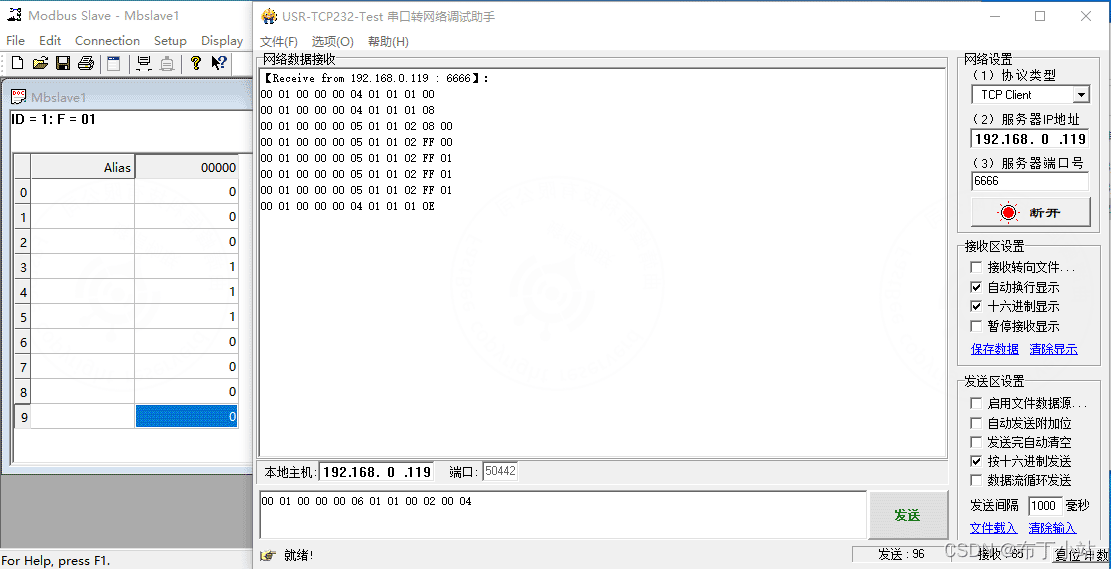
2. 0x03: Read Holding Registers
Request: 00 01 00 00 00 06 01 03 00 02 00 04 (cloud)
00 01: transaction identifier
00 00: Modbus TCP protocol
00 06: followed by 00 06 bytes of data
01: unit identifier
03: function code (read holding registers)
00 02: the address of the data to start reading from. Reading starts from 00 02.
00 04: note that this does not mean reading up to 00 04, but reading 00 04 registers from the start position.
Response: 00 01 00 00 00 0B 01 03 08 00 00 00 37 00 00 00 00 (device)
00 01: transaction identifier
00 00: Modbus TCP protocol
00 09: followed by 00 09 bytes of data
01: unit identifier
03: function code
08: followed by 08 bytes of data; every two bytes in the subsequent data represent one register value.
00 00: first register value
00 37: second register value; the value I wrote in the figure is 55 (decimal), shown here as hexadecimal data
00 00: third register value
00 00: fourth register value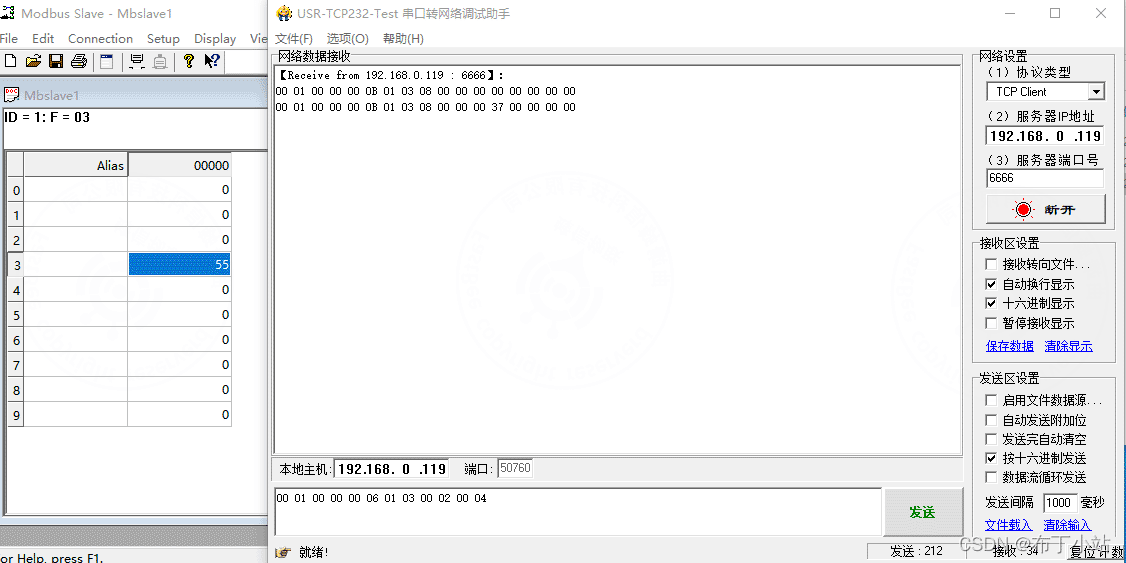
3. Write (Single) Multiple Coils
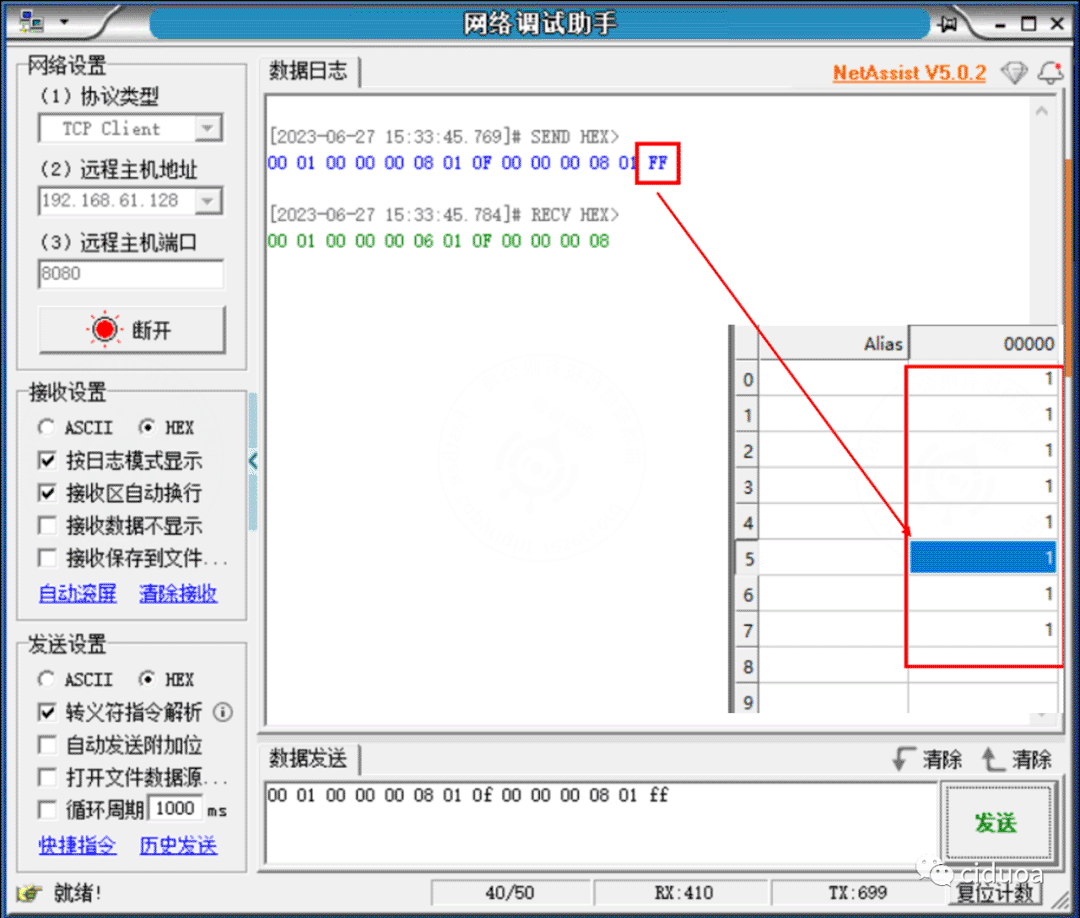
First, set the slave address in Modbus Slave to: 01, and set the register coil type to: 01 Coil Status (0x). After the setup is complete, click "OK" to connect to the master and modify the coil states.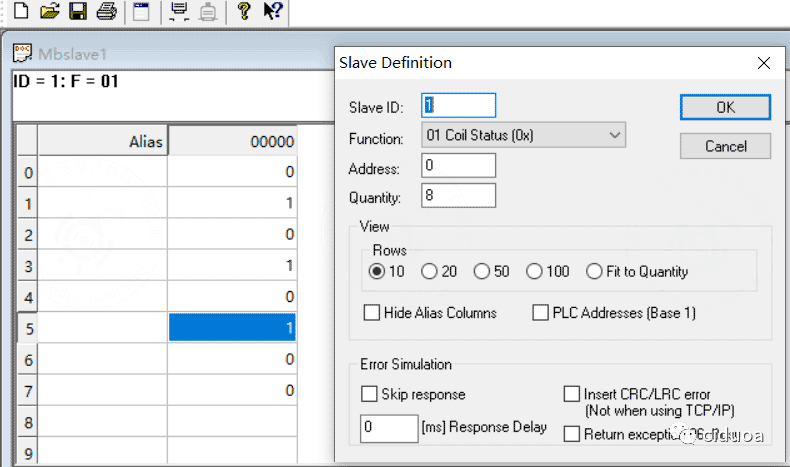
Finally, connect the network debugging assistant, copy the message from the example into the network debugging assistant, and click "Send". You can observe that the corresponding coil states in Modbus Slave change.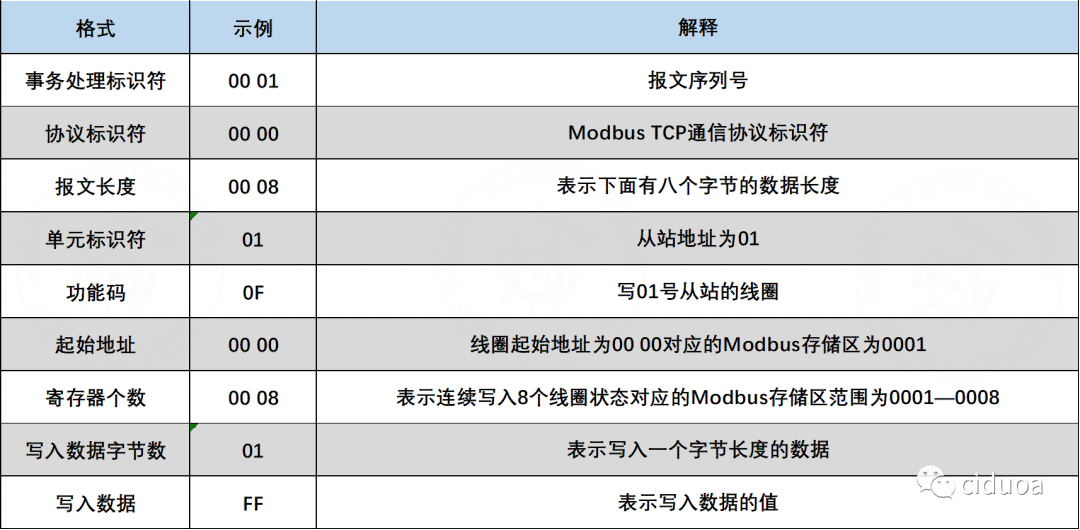
4. Write (Single) Multiple Holding Registers
First, set the slave address in Modbus Slave to: 01, and set the register coil type to: 03 Holding Register (4x). After the setup is complete, click "OK" to connect to the master and modify the register values (the values entered here are in decimal).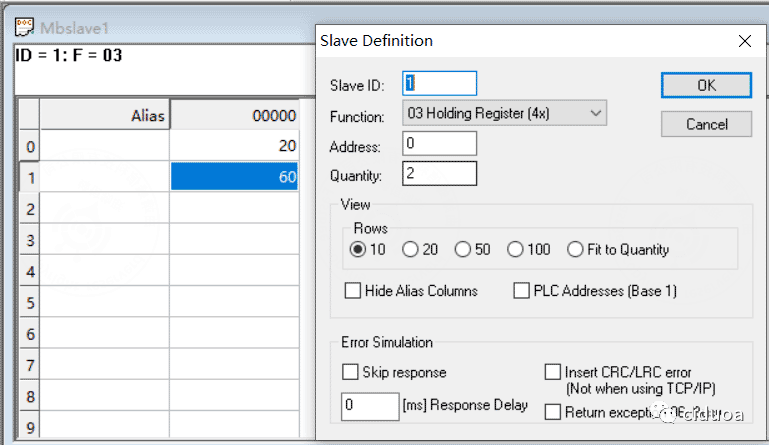
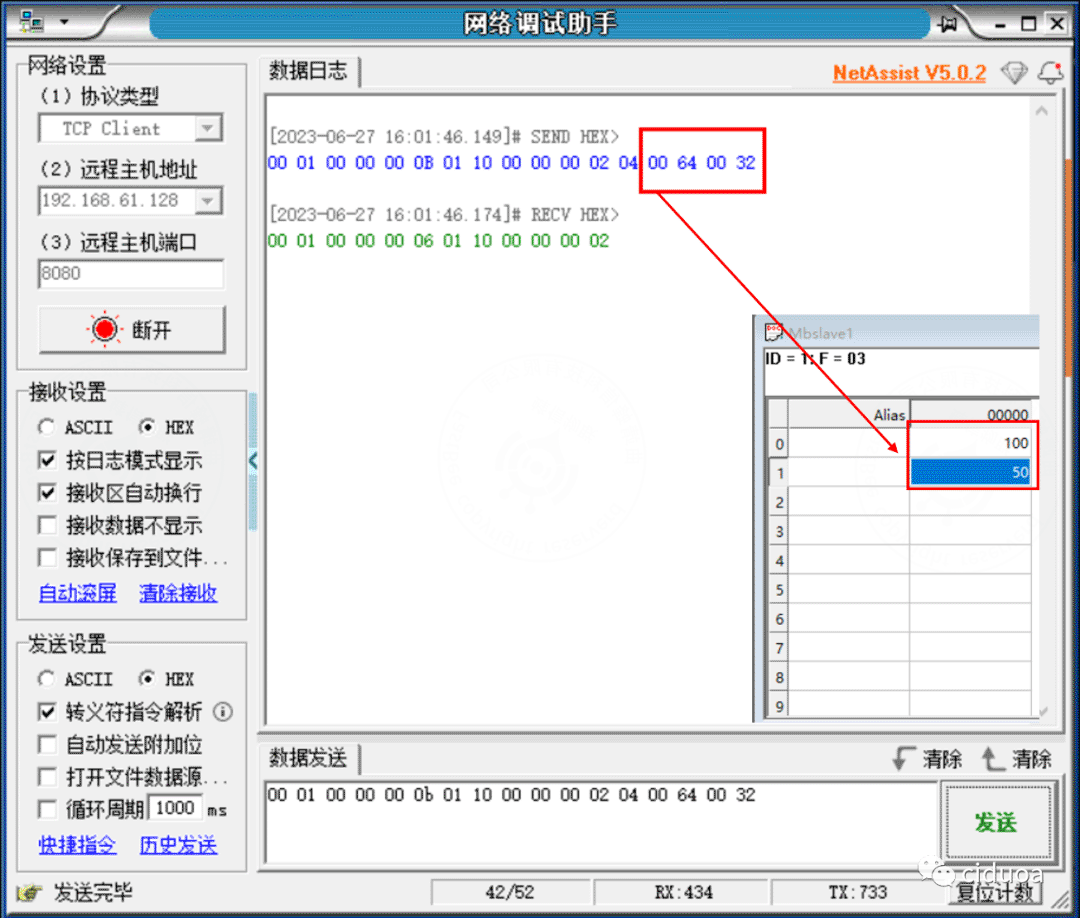
Finally, connect the network debugging assistant, copy the message from the example into the network debugging assistant, and click "Send". You can observe that the corresponding holding register values in Modbus Slave change (they are automatically converted to decimal for display here).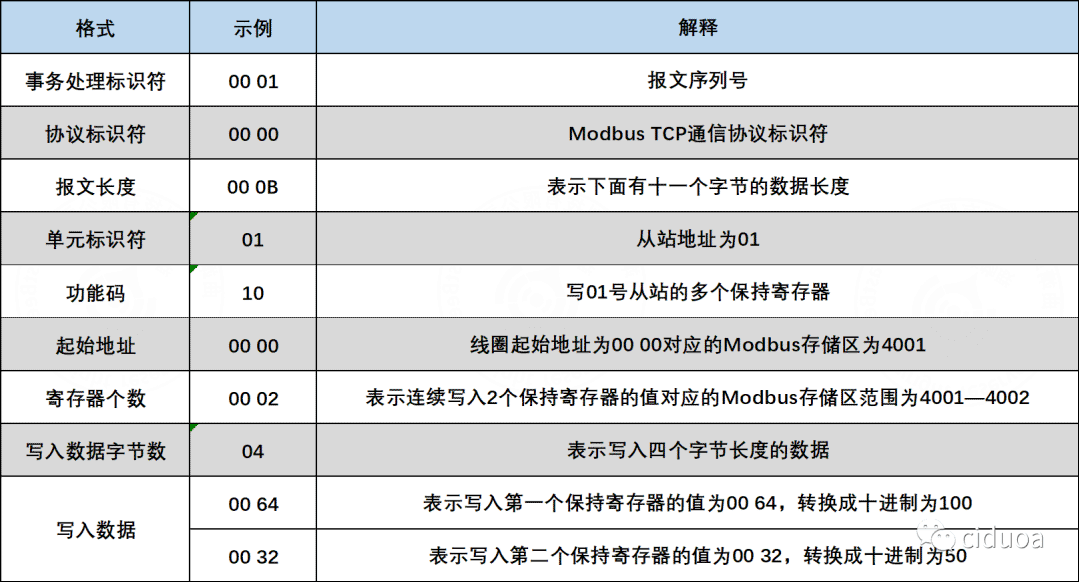
3. Platform Configuration Acceptance
| Acceptance Item | Expected Behavior |
|---|---|
| Connection direction | Confirm whether the device acts as a TCP client or server |
| IP and port | The platform can reach the device, or the device can reach the platform |
| Unit identifier | Consistent with the device or gateway configuration |
| Transaction identifier | Requests and responses can be matched correctly |
| Register configuration | Address, function code, data type, and scale factor are correct |
| Polling tasks | Active collection tasks are enabled with a reasonable interval |
| Command delivery | Device state changes after writing coils or registers |
| Data display | Parsed values are shown on the running status or data collection page |
4. FAQ
TCP Connection Fails
Check the device IP, port, firewall, NAT, whether the device is listening, and whether the platform and the device are within the same reachable network.
Response Received but Parsing Fails
Check the transaction identifier, protocol identifier, length field, unit identifier, and function code, and confirm whether the message is a standard Modbus TCP message.
Misaligned Read Values
Check whether the register start address begins at 0, and whether the 40001 in the device manual needs to be converted to the protocol address by subtracting 1.
Unstable Multi-device Polling
Check whether the polling interval is too short, whether the device has a concurrent connection limit, and whether the network latency and timeout settings are reasonable.
5. Secondary Development Entry Points
| Type | Path or API | Description |
|---|---|---|
| Frontend pages | vue3/src/views/iot/product, vue3/src/views/iot/device | Product and device Modbus TCP configuration |
| Backend APIs | /api/modbus, /modbus/config, /modbus/job | Modbus configuration, parameters, and tasks |
| Protocol module | springboot/fastbee-protocol | Modbus TCP encoding and decoding |
| Service module | springboot/fastbee-server | TCP service and connection management |
| Troubleshooting document | Device Access Troubleshooting | Unified diagnosis of access issues |